Whisper Transcriber Suite: sound in, text out. Interviews with speaker labels, timed lecture subtitles, subtitled video from a link and live captions, all on your own computer. # Whisper Transcriber Suite **Free, offline transcription and subtitles for long recordings in your language — on an ordinary laptop, with no account and no audio upload.** [![CI](https://github.com/Milomilo777/whisper-transcriber-suite/actions/workflows/ci.yml/badge.svg)](https://github.com/Milomilo777/whisper-transcriber-suite/actions/workflows/ci.yml) [![release](https://img.shields.io/github/v/release/Milomilo777/whisper-transcriber-suite?label=release&color=207a80)](https://github.com/Milomilo777/whisper-transcriber-suite/releases/latest) [![downloads](https://img.shields.io/github/downloads/Milomilo777/whisper-transcriber-suite/total?label=downloads&color=207a80)](https://github.com/Milomilo777/whisper-transcriber-suite/releases) [![License: BSD-3-Clause](https://img.shields.io/badge/license-BSD--3--Clause-green.svg)](LICENSE) ### [Download for Windows](https://github.com/Milomilo777/whisper-transcriber-suite/releases/latest) macOS and Linux: see [Download](#download). No install? **[Try it in your browser](https://whisper-transcriber-suite.com/try/)**: transcribe a short file (up to 10 minutes) right in the page and get TXT, SRT or VTT. The audio never leaves your device. Step-by-step guides: [YouTube video to text](https://whisper-transcriber-suite.com/youtube-to-text/) · [video to SRT subtitles](https://whisper-transcriber-suite.com/video-to-srt/) · [transcripts with speaker labels](https://whisper-transcriber-suite.com/speaker-labels/) **English** · [Deutsch](docs/i18n/README.de.md) · [Français](docs/i18n/README.fr.md) · [Español](docs/i18n/README.es.md) · [Italiano](docs/i18n/README.it.md) · [Português (Brasil)](docs/i18n/README.pt-BR.md) · [Português (Portugal)](docs/i18n/README.pt.md) · [Nederlands](docs/i18n/README.nl.md) · [Polski](docs/i18n/README.pl.md) · [Русский](docs/i18n/README.ru.md) · [Українська](docs/i18n/README.uk.md) · [Türkçe](docs/i18n/README.tr.md) · [Čeština](docs/i18n/README.cs.md) · [Slovenčina](docs/i18n/README.sk.md) · [Magyar](docs/i18n/README.hu.md) · [Română](docs/i18n/README.ro.md) · [Български](docs/i18n/README.bg.md) · [Ελληνικά](docs/i18n/README.el.md) · [Svenska](docs/i18n/README.sv.md) · [Dansk](docs/i18n/README.da.md) · [Norsk bokmål](docs/i18n/README.nb.md) · [Suomi](docs/i18n/README.fi.md) · [Hrvatski](docs/i18n/README.hr.md) · [Српски](docs/i18n/README.sr.md) · [Slovenščina](docs/i18n/README.sl.md) · [Lietuvių](docs/i18n/README.lt.md) · [简体中文](docs/i18n/README.zh-CN.md) · [繁體中文](docs/i18n/README.zh-TW.md) · [日本語](docs/i18n/README.ja.md) · [한국어](docs/i18n/README.ko.md) · [Tiếng Việt](docs/i18n/README.vi.md) · [ไทย](docs/i18n/README.th.md) · [Bahasa Indonesia](docs/i18n/README.id.md) · [Bahasa Melayu](docs/i18n/README.ms.md) · [हिन्दी](docs/i18n/README.hi.md) · [العربية](docs/i18n/README.ar.md) · [فارسی](docs/i18n/README.fa.md) · [עברית](docs/i18n/README.he.md) · [Latviešu](docs/i18n/README.lv.md) · [Català](docs/i18n/README.ca.md) · [বাংলা](docs/i18n/README.bn.md) · [Filipino](docs/i18n/README.fil.md)


## Contents - [Who it is for](#who-it-is-for) · [What's new in 2.2](#whats-new-in-22) · [Quick start](#quick-start) · [Features](#features) - [Try it in your browser (no install)](#try-it-in-your-browser-no-install) - [Speech engines and models](#speech-engines-and-models) · [Accuracy and speed](#accuracy-and-speed) · [Languages](#languages) - [Output formats](#output-formats) · [The app, tab by tab](#the-app-tab-by-tab) · [Transcript viewer and shareable page](#transcript-viewer-and-shareable-page) - [Speaker labels](#speaker-labels) · [Online videos and YouTube](#online-videos-and-youtube) · [Subtitled video from a link](#subtitled-video-from-a-link) - [Live transcription](#live-transcription) · [Text to Voice and voice cloning](#text-to-voice-and-voice-cloning-optional) · [AI tools](#ai-tools-for-a-finished-transcript-optional) - [From your phone, the local network and the API](#from-your-phone-the-local-network-and-the-api) - [What leaves your computer](#what-leaves-your-computer) · [Work offline](#work-offline) - [Download](#download) · [System requirements](#system-requirements) · [Install](#install) · [Update and uninstall](#update-and-uninstall) · [Where files are stored](#where-files-are-stored) - [Command line](#command-line) · [How it compares](#how-it-compares) · [Known limits](#known-limits) - [Frequently asked questions](#frequently-asked-questions) · [Troubleshooting](#troubleshooting) - [Documentation](#documentation) · [Build from source](#build-from-source) · [Contributing and contact](#contributing-and-contact) · [License](#license) ## Who it is for Subtitlers, translators, researchers and journalists who turn long recordings (interviews, lectures, talks, videos) into text or subtitles. Drop in an audio or video file and the transcript is written next to it. The speech engine runs on your own computer, so there is no per-minute cost and, once the model is downloaded, no internet connection is needed. Typical uses: - **Interviews and meetings:** a transcript with speaker labels, saved as Word (DOCX) or PDF, with timestamps you can click back to. - **Lectures, talks and courses:** timed SRT or VTT subtitles for a video player or a course platform, and a searchable text of the whole lecture. - **Video subtitling:** paste a link, get the video with the subtitles burned in, or an SRT to correct in Subtitle Edit. - **Research:** transcripts in ELAN, InqScribe, oTranscribe or TSV for annotation and qualitative analysis, with per-word timings and confidence in JSON. - **Journalism and sensitive material:** recordings that must not be uploaded to a cloud service. With the default settings the audio never leaves the computer, and **File → Work offline** blocks new network connections. - **Accessibility:** live captions of a microphone, or of whatever the computer is playing on Windows. - **Many files:** a queue, a watched folder that transcribes new files by itself, and a local API for scripts.
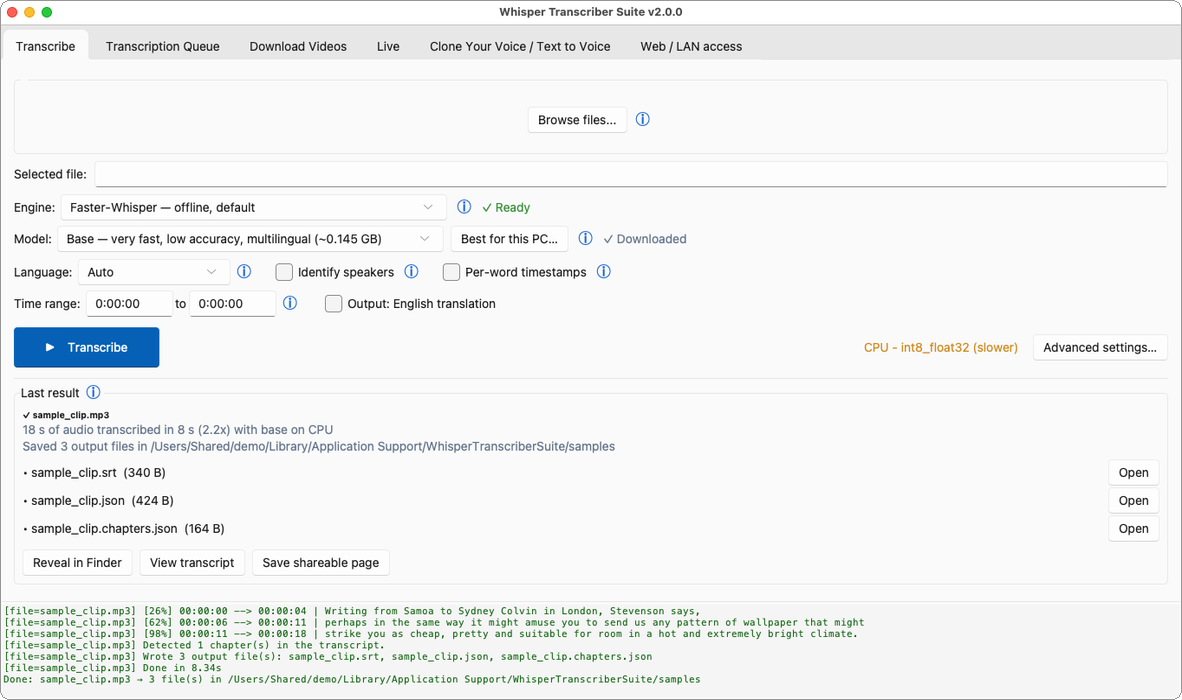
The Transcribe tab: a drop target, language and accuracy pickers, speaker-label and word-timestamp options
## What's new in 2.2 - **A simpler Transcribe tab:** pick **Accuracy** (Fast, Balanced or Best) and the app chooses a model that fits your language and your computer, with its download size shown. The rarer options wait under **More options**. - **Right to left:** with a Persian, Arabic or Hebrew interface the tabs, lists, dialogs and tick boxes mirror (Windows). - **From your phone:** turn on *Share on local network*, scan the QR code and send a recording from a phone on the same Wi-Fi. - **A compact Download form** and a calmer Queue, with plainer words throughout. - **Every message translated** in all 42 interface languages, and many fixes that keep your settings, history and finished work safe. Also in 2.2: models trained for one language (Persian, Chinese, Japanese, German, Thai, Swedish and Hebrew), an experimental option for audio in two languages, new installs that start on Large v3 Turbo, and a free in-browser transcription page on the website. Version 2.1 added the interface in 42 languages, reliable speaker labels and safer saving; version 2.0 added the queue's speed and time left, [subtitled video from a link](docs/SUBTITLED_VIDEO.md), transcripts as an offline web page, a checkable Work offline mode and translation to English. Full list: [CHANGELOG](docs/CHANGELOG.md). ## Quick start 1. **Download** the Windows installer (or the Mac `.dmg`) from the [latest release](https://github.com/Milomilo777/whisper-transcriber-suite/releases/latest) and install it. Windows SmartScreen and macOS Gatekeeper warn the first time because the Windows builds are unsigned and the Mac app is not notarized; [docs/INSTALL.md](docs/INSTALL.md) shows what to click. 2. **Quick start window:** on the first launch, pick your main language, Fast or Best quality and a download folder. Each choice shows the model, its download size and a rough time per minute of audio on your computer. **Skip** keeps the defaults. For Persian, Best quality picks a model trained for Persian (Nemotron ASR Persian). 3. **Drop a file** (or paste a video link) on the Transcribe tab and press **Transcribe**. The first time, the speech model downloads once (about 0.5 to 3 GB, depending on the model). 4. **Open the result:** the transcript files are written next to your file. The **Last result** card opens them, opens the transcript viewer, or saves a shareable web page. No file at hand? **Try it now (sample clip)** transcribes an 18-second public-domain clip that ships with the app. ## Features
Speaker labels, local engines faster-whisper, whisper.cpp and Parakeet, 14 transcript formats, no cloud and no cost.
- **Local engines:** [faster-whisper](https://github.com/SYSTRAN/faster-whisper) (default), whisper.cpp and NVIDIA Parakeet, for the many languages Whisper recognises. Uses an NVIDIA GPU through CUDA when it can, otherwise the CPU. - **The app in your language:** menus, buttons and messages in 42 languages (machine-translated; corrections welcome). It follows your system language, or you pick one in Advanced settings. Persian, Arabic and Hebrew are offered on Windows for now. - **14 output formats:** SRT, VTT, ASS, TSV, TXT, JSON, LRC, Markdown, DOCX and PDF, plus the oTranscribe, ELAN, InqScribe and Express Scribe formats. DOCX and PDF draw most scripts with the system's fonts, and Persian, Arabic and Urdu read right to left with joined letters. - **Shareable web page:** save a finished transcript as one `.html` file that works offline in any browser; click a word to hear it, search, jump to chapters. - **Speaker labels** without a Hugging Face account, plus word timestamps and time-range clipping. - **Interrupted jobs resume** from their last checkpoint instead of starting over (default engine). - **Online videos:** download from any site [yt-dlp](https://github.com/yt-dlp/yt-dlp) supports and transcribe when the download finishes. - **Link to subtitled video:** one tick turns a link into `-subbed.mp4` with the subtitles burned in: download, transcribe and burn in one queued job ([docs/SUBTITLED_VIDEO.md](docs/SUBTITLED_VIDEO.md)). - **Live:** transcribe a microphone, or the system audio on Windows, as it happens ([docs/LIVE.md](docs/LIVE.md)). - **Batch queue and watched folder** for many files. - **Hand-offs when a job finishes** (optional, in Advanced): a Markdown note copied into an Obsidian vault folder, and a webhook to tools such as n8n, with an optional secret ([docs/CONFIG.md](docs/CONFIG.md)). - **Local-network mode:** a transcription page and an OpenAI-compatible API for the other devices on your network ([docs/SERVER.md](docs/SERVER.md)). - **Optional, off by default:** AI tools for a finished transcript (summary, questions, bilingual SRT), and offline text to voice with voice cloning. More, in one list: - **Accuracy levels** (Fast, Balanced, Best) pick a model measured for your language (eight were measured; others get defaults) and sized to your memory. - **Models trained for one language** are suggested for Persian, Chinese, Japanese, German, Thai, Swedish and Hebrew, with a **Use it** button and a **Switch back** later. - **Translate speech to English** in the same pass (Whisper's own translate task). - **Mixed-language audio** (experimental): each stretch is written in whichever of two languages it sounds like. - **Use a video's existing subtitles** instead of transcribing, when the site already has them in your language. - **Speed and time left** for faster-whisper jobs in the queue, and a plain speed line for every finished one. - **Transcript viewer** with click-to-play, word highlight, word-confidence colours, find and replace, filler-word removal, speaker renaming and timestamp editing. - **Convert transcripts** between formats (File → Convert transcript…), including SRT, VTT, ASS/SSA, TSV, JSON, oTranscribe, ELAN and InqScribe as input. - **Search transcripts** across your whole history, and a statistics summary of what you transcribed. - **Quality aids:** voice-activity detection, a repetition-loop guard, hallucination flagging, automatic chapters, a prompt and hotwords for names and spelling, an optional adaptive denoise and optional word-timing refinement. - **Work offline:** one switch stops all new network use, and a status line shows whether a connection is open. - **Light, Dark or System theme**, sharp text at 125% and 150% display scaling, Windows taskbar progress, and native menus, Dark mode and notifications on the Mac. How it compares with Subtitle Edit, Vibe, Buzz, noScribe and aTrain, including when another app is the better pick: **[docs/COMPARISON.md](docs/COMPARISON.md)**. ## Try it in your browser (no install) **[whisper-transcriber-suite.com/try/](https://whisper-transcriber-suite.com/try/)** transcribes a short recording inside the browser tab. Nothing is installed, there is no sign-up, and the audio is never uploaded: the page decodes and transcribes the file on your device. | | | |---|---| | **What it does** | Pick or drop a file, press Transcribe, then save TXT, SRT or VTT, or copy the text. | | **Models** | Whisper **Small** (the default, 250 MB download, works in every current browser) or **Large v3 Turbo** (best quality, 730 MB, needs WebGPU: current Chrome or Edge on a computer). The model stays in the browser for the next file; **Remove downloaded models** deletes it. | | **How it runs** | [Transformers.js](https://github.com/huggingface/transformers.js) in a Web Worker: Small on ONNX Runtime WebAssembly with 8-bit weights, Large on WebGPU with 4-bit weights. | | **Length** | Up to 10 minutes per file (5 minutes on a phone). One file at a time. | | **Files** | Most audio files (MP3, WAV, M4A, OGG) and MP4 or WebM videos with sound; what a browser can open varies. | | **Languages** | You pick one of 16 (English, Arabic, Chinese, French, German, Hindi, Indonesian, Italian, Japanese, Korean, Persian, Portuguese, Russian, Spanish, Turkish, Vietnamese); the page starts from your browser's language. | | **Speed** | About as long as the audio, or longer on a phone. The page asks the browser to keep the screen awake while it works. | | **Browsers** | Current Chrome, Edge, Firefox and Safari. | | **Network** | Only the model downloads, once, from Hugging Face (then the browser caches it), plus the Transformers.js library and the ONNX Runtime files from jsDelivr. The page's own script sends nothing. | The browser version is a sample of what the desktop app does. It has no speaker labels, no queue, no Word or PDF output and no video links, and its small models make many more mistakes, above all in Persian, Arabic, Hindi, Korean, Turkish and Vietnamese. For long files, better accuracy and every feature on this page, use the desktop app. ## Speech engines and models ### Engines Pick an engine in **Advanced settings → Model & engine**. Three run on your computer; two optional cloud engines exist for people who want them and stay off unless you choose them. | Engine | Where it runs | Notes | |---|---|---| | **faster-whisper** (default) | your computer | Whisper models in [CTranslate2](https://github.com/OpenNMT/CTranslate2) form. CPU (int8) by default, NVIDIA CUDA when usable. The only engine with live speed and time left, and full resume from a checkpoint. | | **whisper.cpp** | your computer | For low-end CPUs. One model, `ggml-large-v3-q5_0.bin` (about 1.1 GB), fetched with a button in Advanced settings. | | **NVIDIA Parakeet TDT v3** | your computer | `nvidia/parakeet-tdt-0.6b-v3` by default; any Hugging Face transformers speech model id or local folder also works. Its packages (a few GB) install on first use. | | **Gemini API** (opt-in) | Google's servers | Uploads the audio with your own free Gemini API key. No word timestamps. [docs/CLOUD_STT.md](docs/CLOUD_STT.md) | | **Google Cloud Speech-to-Text** (opt-in) | Google's servers | Uploads the audio with your own service account. Word timestamps, speaker labels and a cheaper batch mode. [docs/CLOUD_STT_GOOGLE.md](docs/CLOUD_STT_GOOGLE.md) | Nothing ships with a cloud key. The cloud engines are the only paths that upload audio. ### Accuracy levels The Transcribe tab asks for an **Accuracy** level instead of an engine and a model: | Level | Model | Download | When to pick it | |---|---|---|---| | **Fast** | Small | about 0.5 GB | Older or slower computers, quick drafts. | | **Balanced** | Large v3 Turbo | about 1.6 GB | Nearly as accurate as Best in a fraction of the time. New installs start here. | | **Best** | The most accurate model measured for your language (Large v3, or Turbo where Turbo measured better) | up to about 3 GB | When every word matters and time does not. | - Where Best already is Turbo (Arabic, Chinese, Russian and Spanish), Balanced and Best are the same model. - The pick shrinks to fit your memory: Large v3 needs at least 6.5 GB of RAM, Turbo and Medium at least 5 GB; below that the app picks Small. - The line under the picker names the model and its download size. **Check this computer** opens an advisor with the best fit for this PC. A model you chose yourself in Advanced settings shows as **Custom** and is left alone. ### Whisper models All of these download once from the Hugging Face Hub, resume if a download is cut, and can live on another drive (**Advanced → Model folder → Change…**). | Model | Download | Notes | |---|---|---| | Tiny, Tiny.en | about 75 MB | Fastest, least accurate. Fine for live captions in English. | | Base, Base.en | about 145 MB | | | Small, Small.en | about 500 MB | The **Fast** level. A good balance of speed and accuracy. | | Medium, Medium.en | about 1.5 GB | | | Large v1, Large v2 | about 3 GB | Older large models. | | **Large v3** | about 3 GB | The most accurate general model. | | **Large v3 Turbo** | about 1.6 GB | The **Balanced** level: close to Large v3 and much faster. Cannot translate to English. | | Large v3 Turbo (deepdml) | about 1.6 GB | A community conversion of Turbo. | | Distil Small.en, Distil Medium.en | about 0.4 / 0.8 GB | English only. | | Distil Large v2, v3, v3.5 | about 1.5 GB | English only. | Models whose name ends in `.en`, and the Distil models, understand English only. If one is picked and the audio is not English, the app warns and offers a multilingual model instead of writing made-up English. ### Models trained for one language Pick one of these languages and the Transcribe tab suggests a model trained for it, with a **Use it** button. The figures are each publisher's own, not measured by this project, and the app says so. | Language | Model | Download | Licence | Publisher's figure | |---|---|---|---|---| | Persian | Nemotron ASR Persian | 2.5 GB | OpenMDW-1.1 | 8.8% word error rate on FLEURS, against 24.2% for NVIDIA's earlier Persian model | | Chinese | Belle Whisper Large v3 Turbo zh | 1.62 GB | Apache-2.0 | 3.1% character error rate on AISHELL-1, against 8.1% for Whisper Large v3 | | Japanese | Kotoba-Whisper v2.0 | 1.52 GB | MIT | 11.6% character error rate on ReazonSpeech, against 14.9%, about 6 times faster | | German | primeline Large v3 Turbo German | 1.62 GB | Apache-2.0 | 2.6% word error rate, against 3.3% | | Thai | Thonburian Whisper Large v3 | 3.09 GB | MIT | 13.9% word error rate on FLEURS, against 24.1% | | Swedish | KB-Whisper Large (National Library of Sweden) | 3.09 GB | Apache-2.0 | 4.1% word error rate on Common Voice, against 9.5% | | Hebrew | ivrit.ai Large v3 Turbo | 1.62 GB | Apache-2.0 | 18.1% word error rate on FLEURS, against 26.2% | Jobs sent from the web page or a phone in these languages use the language model automatically once it is on the computer and the app runs its default Whisper engine. ### Quality aids - **Voice-activity detection** (Silero, on by default) skips silence, and speech after long loud music is no longer missed. - **Repetition-loop guard** and **hallucination flagging** (both on by default) catch the repeated or invented lines Whisper sometimes writes on weak audio. - **Initial prompt and hotwords** (Advanced → Prompt & hotwords) bias the spelling of names and terms. - **Automatic chapters** (on by default) write a `<name>.chapters.json` file used by the viewer and the web page. - **Adaptive denoise** (optional, off by default; Advanced → Silence & noise) measures each recording first and in Auto strength only cleans it when the measurement says that helps. It re-measures its own output and goes back to the original if it removed speech. It uses the bundled ffmpeg only ([docs/DENOISE.md](docs/DENOISE.md)). - **Word-timing refinement** (optional, stable-ts, about 700 MB on first use) tightens word timestamps to about ±50 ms at 10–30% more time. - A recording with no speech writes no empty files; the history, the queue and the result card say why. ## Accuracy and speed The project measured six local Whisper models in eight languages on public read speech (Google FLEURS, five utterances per language, CPU only). Lower is better; WER counts words, CER counts characters (for Chinese and Japanese). Full method and tables: [docs/evaluations/benchmark-v1/README.md](docs/evaluations/benchmark-v1/README.md). | Language | Tiny | Base | Small | Medium | Large v3 Turbo | Large v3 | |---|---|---|---|---|---|---| | Persian (WER) | 0.903 | 0.911 | 0.589 | 0.371 | 0.234 | 0.218 | | Arabic (WER) | 0.475 | 0.394 | 0.232 | 0.111 | 0.101 | 0.101 | | Chinese (CER) | 0.364 | 0.231 | 0.118 | 0.149 | 0.046 | 0.046 | | Japanese (CER) | 0.400 | 0.280 | 0.152 | 0.116 | 0.084 | 0.064 | | Russian (WER) | 0.205 | 0.159 | 0.045 | 0.034 | 0.000 | 0.011 | | Hindi (WER) | 1.065 | 1.081 | 0.512 | 0.325 | 0.309 | 0.276 | | Spanish (WER) | 0.160 | 0.115 | 0.046 | 0.031 | 0.015 | 0.015 | | Turkish (WER) | 0.358 | 0.295 | 0.200 | 0.105 | 0.084 | 0.063 | What the numbers say: - **Tiny and Base are not usable for Persian and Hindi.** Small is good enough in six of the eight languages. - **Large v3 Turbo and Large v3 are within five errors of each other in every language**, and Turbo decodes 1.4 to 2.3 times faster. That is why Balanced uses Turbo. - Medium makes more errors than Turbo in all eight languages at a similar speed, so the levels skip it. - This is a small sample of clean read speech: it does not cover noise, conversation, accents or long recordings. Use it as a sensible default, not a ranking to quote. **Speed on a CPU** (one 4-core / 8-thread desktop CPU, 16 GB RAM, no GPU; seconds of work per second of audio, median over the eight languages): | Model | Tiny | Base | Small | Medium | Large v3 Turbo | Large v3 | |---|---|---|---|---|---|---| | Time per second of audio | 0.10 | 0.18 | 0.46 | 1.27 | 1.41 | 2.24 | | One hour of audio takes about | 6 min | 11 min | 28 min | 1 h 16 min | 1 h 25 min | 2 h 15 min | Your own computer will differ. The queue shows the real speed of every faster-whisper job as it runs, for example `about 4.8x, 6 min left`, and the result card says how long it took (for example *42 min of audio transcribed in 3 min 40 s (11.5x) with small on CPU*). An **NVIDIA GPU** makes transcription about 10 to 20 times faster than the CPU ([docs/INSTALL.md](docs/INSTALL.md); how the speed is measured: [docs/SPEED_METER.md](docs/SPEED_METER.md)). ## Languages ### Languages it transcribes - The engine accepts **Whisper's 100 languages** (99 plus Cantonese), with **Auto** detection. Naming the language is faster and can be more accurate for short or noisy clips. The picker starts on Auto at every launch. - Quality differs a lot between languages and models; see [Accuracy and speed](#accuracy-and-speed) and the [models trained for one language](#models-trained-for-one-language). - **Translate to English:** under **More options**, **Output: English translation** writes an English transcript in the same pass (`name.en-translated.srt`), with Whisper's own translate task. It works with faster-whisper and the multilingual models other than Large v3 Turbo. - **Mixed-language audio (experimental):** for a recording in two languages, tick it under More options and pick the second language. Each stretch is written in whichever of the two it sounds like (faster-whisper only). - Translation into languages other than English is offered only by the optional [AI tools](#ai-tools-for-a-finished-transcript-optional), as a bilingual SRT. ### Languages of the app itself The menus, buttons and messages come in **42 languages**: English, Deutsch, Français, Español, Italiano, Português (Brasil), Português (Portugal), Nederlands, Polski, Русский, Українська, Türkçe, Čeština, Slovenčina, Magyar, Română, Български, Ελληνικά, Svenska, Dansk, Norsk bokmål, Suomi, Hrvatski, Српски, Slovenščina, Lietuvių, 简体中文, 繁體中文, 日本語, 한국어, Tiếng Việt, ไทย, Bahasa Indonesia, Bahasa Melayu, हिन्दी, العربية, فارسی, עברית, Latviešu, Català, বাংলা and Filipino. - Hindi was reviewed by a native speaker; the other 40 translations are machine-made. Corrections are welcome: [docs/TRANSLATING.md](docs/TRANSLATING.md). - The app follows your system's display language, or you pick one in **Advanced settings → App behaviour**. - Persian, Arabic and Hebrew are offered on Windows, where the whole window mirrors right to left: tabs, lists, scroll bars, dialogs, tick boxes and the viewer's panes. Paths, links, times and numbers stay left to right. - The website is published in the same 42 languages, and this README in 41 translations (links at the top). ## Output formats Pick any of the 14 formats in **Advanced settings → Output formats** (new installs write SRT, JSON and TXT). By default every file is written next to the input file, with the same name and a new extension (translations add `.en-translated`), and fully saved to disk before it replaces an older one. | Format | Extension | What it contains | |---|---|---| | SubRip | `.srt` | Numbered subtitle cues with start and end times; the speaker as a `Speaker N:` prefix. | | WebVTT | `.vtt` | Web video subtitles, with per-word karaoke timing when word timestamps are on. | | Advanced SubStation Alpha | `.ass` | Styled subtitles with word-level karaoke tags; the speaker in the Name field. | | TSV | `.tsv` | `start`, `end` and `text` columns in milliseconds, the layout of OpenAI's Whisper. | | Plain text | `.txt` | One segment per line, no timestamps; speaker labels kept. | | JSON | `.json` | Every segment with start, end and text, plus speaker labels and per-word timings with probabilities when those are on. The transcript viewer opens this file. | | LRC | `.lrc` | Lyrics-style `[mm:ss.xx]` lines. | | Markdown | `.md` | A heading, then `**HH:MM:SS** Speaker: text` lines. | | Word | `.docx` | A title, a details line, and a paragraph per segment with its time and a bold speaker name. Arabic-script and Hebrew paragraphs are marked right to left. | | PDF | `.pdf` | Letter pages in any script, using the system's fonts; Persian, Arabic and Urdu joined and right to left. | | oTranscribe | `.otr` | Opens in [oTranscribe](https://otranscribe.com) for correcting by ear. | | ELAN | `.eaf` | A schema-valid ELAN 3.0 file with one tier of time-aligned annotations, for linguistic annotation. | | InqScribe | `.inqscr` | Text with inline `[hh:mm:ss.ff]` timestamps. | | Express Scribe | `.express_scribe.txt` | `[hh:mm:ss] text` lines for Express Scribe. | Besides these, the app can write a **chapters file** (`<name>.chapters.json`), a **shareable web page** (`.html`), a **subtitled video** (`<title>-subbed.mp4`) and, from the AI tools, a **bilingual SRT**. **File → Convert transcript…** turns an existing transcript into any of the text formats above (every format but DOCX and PDF). It reads JSON, SRT, VTT, ASS/SSA, TSV, oTranscribe, ELAN and InqScribe files, so subtitles made elsewhere can be converted too. ## The app, tab by tab ### Transcribe - A drop target with **Browse files…** and **Try it now (sample clip)**, and a **File or video link** box: a link downloads first, then transcribes. - The **Transcribe** button turns blue once a real file or link is in the box, with a line such as *Ready: class.flac (1:46:12, 52.3 MB)*. A file that is not audio or video gets a message instead. - **Language** and **Accuracy** pickers, the model line, **Check this computer**, and the language-model suggestion. - **More options** (remembered open or closed): **Identify speakers** with a **Speakers** count (Auto or 2 to 10), **Per-word timestamps**, **Output: English translation**, **Time range** (transcribe only part of a recording) and **Mixed-language audio**. - While a job runs, a line shows its progress and time left, with **Show in Queue**. - The **Last result** card opens the files or their folder, opens the transcript viewer, saves a shareable page, opens the subtitles in Subtitle Edit (Windows) and shows the speed of the run. ### Transcription Queue - Every job with its status, progress, language, **speed and time left** (faster-whisper) and elapsed time. - **Pause**, **Resume**, **Cancel**, **Re-run** and **Remove**, plus **Remove waiting** and **Re-run selected** for many rows at once. **Remove ended jobs** never deletes files. - Double-click a finished job to open its transcript. Right-click it to export to oTranscribe, burn the subtitles into the video, open the output folder or re-run it. - A failed job shows its reason when selected. A job with no speech says *no speech found*. - One transcription runs at a time on a CPU, two once a GPU is in use. Interrupted faster-whisper jobs resume from their last checkpoint. - Windows shows progress on the taskbar button; the Mac sends a notification when a job ends while the app is in the background. ### Download Videos - A video link, a folder, and a mode: **Audio and video**, or **Audio** (MP3, m4a or opus). - Quality pickers for audio, video and the output container. - Ticks for **Transcribe after download**, **Make subtitled video** and **Subtitles** (download the site's own subtitles). - **More options:** **Log-in cookies** (read from a browser you pick, for private, age-restricted or members-only videos) and a **Time range** to download only part of a video. - Pasting a link looks up its title and length right away (*Found: Me at the zoo (0:19)*) and shows which subtitles the video already has in your language. Details: [Online videos and YouTube](#online-videos-and-youtube). ### Live Transcribe a microphone, or the system audio on Windows, as it happens. Details: [Live transcription](#live-transcription). ### Clone Your Voice / Text to Voice An optional tab that reads text aloud or clones a voice, fully offline. Details: [Text to Voice and voice cloning](#text-to-voice-and-voice-cloning-optional). ### Web / LAN access One button turns this computer into a transcription page for the phones and computers on your network, with a QR code for phones. Details: [From your phone, the local network and the API](#from-your-phone-the-local-network-and-the-api). ### Menus - **File:** Browse…, Recent files (the last 10), Convert transcript…, Statistics…, Work offline, Exit. - **View:** Light, Dark or System theme (System follows the operating system live on Windows and macOS), and a chime when a job ends. - **Help:** Open transcript viewer…, Search transcripts…, Import oTranscribe (.otr) → SRT…, Open oTranscribe website…, Open log folder, Check for updates…, Usage statistics, Report a problem…, About. ### Advanced settings Sections: Model & engine · Gemini setup · Parakeet setup · Google Cloud setup · Output formats · Silence & noise · Prompt & hotwords · AI Layer · Watched folder · Downloads (yt-dlp) · App behaviour. The sections of an engine appear only when that engine is picked. Every setting is described in [docs/CONFIG.md](docs/CONFIG.md). - **Watched folder:** new audio and video files that land in a folder are transcribed by themselves. - **Downloads (yt-dlp):** how yt-dlp updates itself, SponsorBlock categories to cut out, and whether to ask about a video's existing subtitles. - **App behaviour:** the interface language, minimise to the system tray (Windows and Linux), the update check, usage statistics, Work offline and the Subtitle Edit program. - **Re-detect hardware…** finds an NVIDIA GPU and, when only NVIDIA's cuBLAS library is missing, installs it with one click (**Install GPU support**, about 550 MB, once). **Copy diagnostics** makes a report for a bug report. ### Keyboard `Ctrl+O` browse · `Ctrl+Enter` transcribe · `Esc` cancel · `Ctrl+Q` exit. In the viewer: `Ctrl+F` find and replace, `Ctrl+S` save. On a Mac, use `Cmd` instead of `Ctrl`. ## Transcript viewer and shareable page Open a finished transcript with **View transcript** (or **Help → Open transcript viewer…**): - A list of segments with time, speaker and text, and a search box that filters it. - **Click a segment to play the media from there**, with the spoken word highlighted as it plays (playback uses VLC; without it an **Open in system player** button appears). - **Word-confidence colours** show the words the model was unsure of. - **Edit** the text, **find and replace** (`Ctrl+F`; Persian spelling variants such as the half-space, kaf/yeh and digit styles are matched), **remove fillers** (uh, um…), **edit a timestamp** (overlaps and very short segments are tinted) and **rename a speaker everywhere** (right-click the speaker). - **Save** writes the transcript back and rebuilds the other exports next to it (every format but PDF), but only those you have not edited by hand. **Save shareable page** writes the transcript as **one `.html` file** that opens in any browser, offline: timestamps, speakers, chapters and a search box; click a word or a line to play the recording from there, with the spoken word highlighted. The media is linked, not copied, so keep the page next to the media file. The page loads nothing from the internet. ## Speaker labels Tick **Identify speakers** under More options, and pick the number of speakers if you know it (2 to 10), or leave **Auto**. - It runs **offline** with [sherpa-onnx](https://github.com/k2-fsa/sherpa-onnx) (pyannote segmentation 3.0 and a 3D-Speaker embedding model, two small ONNX files). There is **no Hugging Face account, no token and no PyTorch** to install. - Labels look like `Speaker 01` in every format: a prefix in SRT and TXT, the Name field in ASS, a bold name in DOCX and PDF. - Rename a speaker to a real name in the transcript viewer (right-click the speaker), and every line changes. - The transcript is saved before the speaker step, and that step runs in its own process, so a problem there can never lose a finished transcript. Speaker labels reach the end of long recordings. - It adds processing time, and it is not available in Live. Guide with screenshots: [transcripts with speaker labels](https://whisper-transcriber-suite.com/speaker-labels/). ## Online videos and YouTube - Paste a link on the Transcribe tab, or use the **Download Videos** tab, for any site [yt-dlp](https://github.com/yt-dlp/yt-dlp) supports: YouTube, X (Twitter), Facebook, Instagram, TikTok, Vimeo and many more. - **One video at a time.** A YouTube link that also names a playlist downloads only that video. - YouTube needs a small JavaScript helper (Deno). It is bundled with the Windows and Mac builds; in a source install, a YouTube link shows an **Install YouTube helper** button (about 42 MB, checksum-verified, no admin rights). - yt-dlp is bundled and updates itself without admin rights, through an **Update it** bar or automatically (ask, automatic or never). - **Use the existing subtitles:** when a video already has subtitles in your language, the app offers to use them instead of transcribing (**Download and transcribe**, **Subtitles only (no video)** or **Use the subtitles**). Regional variants such as `pt-BR` or `en-GB` match too. - **Log-in cookies** from a browser you pick open private, age-restricted or members-only videos. On Windows, close that browser if reading its cookies fails. - **SponsorBlock** can cut sponsor segments and other categories you pick. - Downloads resume instead of starting over, and a full disk is reported as such. Guide: [YouTube video to text](https://whisper-transcriber-suite.com/youtube-to-text/). ## Subtitled video from a link Tick **Make subtitled video** on the Download Videos tab: the app downloads the video, transcribes it and burns the subtitles in with ffmpeg, in one queued job. The result is `<title>-subbed.mp4` ([docs/SUBTITLED_VIDEO.md](docs/SUBTITLED_VIDEO.md)). - The download list shows one percentage for the three stages (download, transcription, burn-in). - It uses the Transcribe tab's settings (language, accuracy, English translation), and always writes an SRT as well. - The video is H.264 with the index at the front, so it starts playing at once on the web; the audio is copied when it can be, otherwise re-encoded to AAC. - The download and every transcript file are kept. An existing `-subbed.mp4` is never replaced; a new one gets `(2)`. - Persian and Arabic lines use Tahoma and Chinese uses Microsoft YaHei on Windows, with punctuation on the right side of right-to-left lines. - Re-encoding takes about twice the video's length on an 8-thread CPU. - Any finished job can be burned in later: right-click it in the Queue → **Burn subtitles into video…**. Guide: [video to SRT subtitles](https://whisper-transcriber-suite.com/video-to-srt/). ## Live transcription The **Live** tab transcribes a **microphone** (Windows, macOS and Linux) or the **system audio**, meaning whatever the computer is playing (Windows) ([docs/LIVE.md](docs/LIVE.md)). - The sound is cut into chunks at natural pauses (at most 12 seconds by default), so words are rarely split in half. Silent chunks are never sent to the model. - Text follows speech by the pause (about half a second), the chunk length (2 to 12 seconds) and the model's time. If the model is slower than real time, the oldest chunks are dropped and the status line says so. - Use a small model for real time (Tiny is the default, Small or Base are better; Large v3 Turbo needs a fast computer). Name the language: Auto is unreliable on short chunks. - **Stop**, then **Save transcript…** or **Copy all**. Closing the app with unsaved text asks first, and never loses both the words and the audio. - **Keep the audio** keeps the session as a WAV file (100 to 350 MB per hour). - Live has no speaker labels and no translation, and it is not a dictation tool: text appears per utterance. ## Text to Voice and voice cloning (optional) The **Clone Your Voice / Text to Voice** tab reads text aloud, entirely on your computer. On Windows it is an optional task in the installer (unticked means no tab). - **Kokoro** (Apache-2.0): 54 ready-made voices in US and UK English, Spanish, French, Hindi, Italian, Japanese, Brazilian Portuguese and Chinese. The model (about 350 MB) downloads on first use, and it is several times faster than real time on an ordinary CPU. - **OmniVoice** (k2-fsa, Apache-2.0): clones a voice from 1 to 3 short recordings, designs a voice from a description, or uses its own. It downloads once on first use (about 2 GB) and is slow on a CPU. - Cloning asks you to confirm that you have the speaker's permission (or that it is your own voice), every session. A local consent log stores hashes, the time and the output path, and never leaves the computer. - Long texts (up to 100,000 characters; 5,000 for OmniVoice voice design and own voice) are spoken piece by piece and can resume; an estimate of time, size and free space comes first. - Every WAV file carries an *AI-generated synthetic speech* tag. ## AI tools for a finished transcript (optional) Off by default. Turn them on in **Advanced settings → AI Layer**, then use the **AI Tools** in the transcript viewer: - **Summarise**, **Action items**, **Ask** (a question about the transcript) and **Translate**, which writes a **bilingual SRT** (the original line and the translation in every cue). The AI Layer can also give chapters sentence-like titles. - **Remote provider:** any OpenAI-compatible endpoint you choose (OpenAI, Ollama, LM Studio, vLLM, OpenRouter…), with your own address, model and key. The transcript text is sent to that endpoint, and only then. - **Local provider:** Qwen2.5-1.5B-Instruct (about 1 GB), running on your computer. It needs the `llama-cpp-python` package, which the installers do not include (`pip install llama-cpp-python` in a source install). ## From your phone, the local network and the API ### A transcription page for your network On the **Web / LAN access** tab, **Start web access** serves a transcription page at `http://127.0.0.1:8765`. Tick **Share on local network** and every phone and computer on the same network can open it, send a file or a video link, follow the job and download the result. The computer running the app does the work, with the model and engine chosen in its settings ([docs/SERVER.md](docs/SERVER.md)). - **From a phone:** with Share on local network on, a **QR code** shows the address. Scan it with a phone on the same Wi-Fi, pick a recording or a video from the phone, and read or download the transcript there. **Copy phone link** copies the address. Recording straight in the phone's browser is not offered (phones require trusted HTTPS for that), so record with the phone's own recorder first. - An optional **access password** protects the page; it travels inside the QR code. - It has no user accounts and no encryption by default: use it on **trusted networks only**, never on the open internet. Optional HTTPS uses a self-signed certificate that browsers warn about once. - Jobs run one at a time. Uploads are capped at 512 MB by default; a link job may download up to 4 GB. ### The API The same server offers a JSON job API, an **OpenAI-compatible** speech-to-text route and an **MCP** endpoint for AI assistants. Start it from the tab, or from the command line: ```cmd python gui.py serve REM this computer only (no firewall prompt) python gui.py serve --lan --token SECRET REM the whole local network, with a token ``` | Route | Purpose | |---|---| | `GET /` | The browser page (submit, jobs, result) | | `GET /api/health` | Status, version, formats and the queue | | `GET /api/formats`, `GET /api/options` | Formats, languages, speaker-label and language-model availability | | `GET /api/jobs`, `POST /api/jobs` | List jobs; create one from an upload or from JSON `{"url": ...}` | | `GET /api/jobs/<id>` | Status, progress, error and outputs of one job | | `GET /api/jobs/<id>/result?fmt=srt` | Download a result | | `POST /api/jobs/<id>/cancel`, `/pause`, `/resume` | Job control | | `GET /v1/models`, `POST /v1/audio/transcriptions` | OpenAI-compatible | | `POST /mcp` | Model Context Protocol (tools: `transcribe_url`, `job_status`, `get_result`, `list_jobs`, `cancel_job`) | Examples: ```bash curl -H "X-Auth-Token: mysecret" http://127.0.0.1:8765/api/health curl -H "X-Auth-Token: mysecret" http://127.0.0.1:8765/api/jobs -F file=@meeting.wav -F formats=srt,txt -F language=en curl http://127.0.0.1:8765/v1/audio/transcriptions -H "Authorization: Bearer mysecret" -F file=@meeting.wav -F model=whisper-1 ``` ```python from openai import OpenAI client = OpenAI(base_url="http://127.0.0.1:8765/v1", api_key="mysecret") with open("meeting.wav", "rb") as f: print(client.audio.transcriptions.create(model="whisper-1", file=f).text) ``` - `response_format` can be `json` (default), `text`, `srt`, `verbose_json` or `vtt`. The `model` field is required by the OpenAI clients but ignored: the app uses the model chosen in its settings. - **Open WebUI** and other OpenAI-compatible apps work with the base URL `http://<host>:8765/v1` and the model `whisper-1`. - An optional **webhook** receives a JSON `POST` when a job finishes or fails. - A web caller can set formats, languages, speaker labels, voice-activity settings and a time range per job, but can never switch the server to a cloud engine. ## What leaves your computer With the default settings your audio and transcripts stay on your computer. The app does use the network for: - downloading a model or an optional component the first time it is needed; - its online settings at startup and a daily update check on GitHub, which only tells you about a new version; - usage statistics, on by default, after each transcription that ends (finished, failed or cancelled): model, language, durations, word count, app version, operating system, CPU and memory size, region and a random install id (made by the app, not derived from your name, computer or files, deleted when you turn the statistics off), never the file's name. Turn them off under **Help → Usage statistics**. Audio or transcript text is sent only if you choose a cloud engine (Gemini API or Google Cloud Speech-to-Text) or connect a remote AI provider yourself. **File → Work offline** stops all of it. Every connection is listed in [docs/CONFIG.md](docs/CONFIG.md#network-use). | What | When | Turn it off | |---|---|---| | Online settings of the app | at startup | Work offline | | Update check (GitHub) | at most once a day, and on Help → Check for updates… | Advanced → App behaviour, or Work offline | | Usage statistics | after each transcription that ends in the app (finished, failed or cancelled) | Help → Usage statistics | | Model and component downloads | the first time each one is needed | Work offline refuses them | | Video downloads, subtitles, yt-dlp updates | when you start them | Work offline | | Cloud engines (audio to Google) | only if you pick one | do not pick them | | Remote AI provider (transcript text) | only if you set one up | keep the AI Layer off or local | | Report a problem (the text you write, app version and system) | when you send it | Work offline | The usage statistics never include the file's name, its folder, the audio, the transcript text, or the computer's or user's name; a local model folder is sent as `local-model`, never as a path. The region comes from the operating system's region setting, read on the computer. <div align="center"> <img src="docs/img/promo-loom.svg" alt="Per-word timed subtitles, English subtitles offline with faster-whisper; local engines faster-whisper, whisper.cpp and Parakeet, 14 transcript formats, no account, BSD-3-Clause." width="80%"> </div> ## Work offline **File → Work offline** keeps the app off the network: no update check, no usage statistics, no model downloads and no remote AI provider. Actions that need the network say *Offline mode is on* and offer to turn it off, and the window title ends in *— Work offline* ([docs/WORK_OFFLINE.md](docs/WORK_OFFLINE.md)). - A line at the bottom of the window says, about every 10 seconds, whether a connection to another computer is open, and which process and address if one is. - **Network log** lists every refused action and unsent request. **Verify offline now** tries three connections that must be refused and shows OK or FAILED. - The guard covers outgoing connections, name lookups and UDP in the app and in its transcription and voice workers. The docs explain how to check it yourself with Resource Monitor, PowerShell or Wireshark. ## Download Latest release: **[releases page](https://github.com/Milomilo777/whisper-transcriber-suite/releases/latest)**. | File | For | |---|---| | `WhisperTranscriberSuite-Installer-Windows-vX.Y.Z.exe` | Windows 10 or 11, 64-bit. Most people want this one. | | `WhisperTranscriberSuite-Portable-Windows-vX.Y.Z.zip` | Windows without installing: unzip and run. | | `WhisperTranscriberSuite-vX.Y.Z-macOS-arm64.dmg` | Macs with Apple silicon, macOS 14 or newer. | | `WhisperTranscriberSuite-vX.Y.Z-macOS-x64.dmg` | Intel Macs, macOS 10.15 or newer. | Linux runs from source: [platform/linux/README.md](platform/linux/README.md). <div align="center"> <img src="docs/img/promo-release.svg" alt="The words Sound in become a timed transcript of two speakers, saved as SRT, DOCX and PDF, with no account and no upload." width="80%"> </div> The bundled FFmpeg is a GPL build. Its corresponding source is attached to each release as `WhisperTranscriberSuite-vX.Y.Z-source-ffmpeg-*` files; the exact links are in [THIRD_PARTY_NOTICES.md](THIRD_PARTY_NOTICES.md). ffmpeg and yt-dlp are bundled. On first launch a quick start window picks the speech model for your language: Fast (Small, about 500 MB) or Best quality (up to about 3 GB); it downloads once, on first use. Plan for 8 GB of RAM; on a CPU the Large models take about 1.5–2.5 times the length of the audio and Small about half, an NVIDIA GPU is much faster. The Windows builds are not code-signed and the Mac builds are not notarized, so SmartScreen and Gatekeeper warn on first launch; [docs/INSTALL.md](docs/INSTALL.md) shows what to click. To update, run the newer installer over the old one; settings are kept. For version 2.2.0 the Windows installer is about 250 MB, the Portable ZIP about 380 MB and the Mac files about 290 MB (Apple silicon) and 350 MB (Intel). The Apple-silicon `.dmg` is built and tested on GitHub's Apple-silicon machines, not yet by hand on a real Apple-silicon Mac; if it does not start, the Intel `.dmg` runs through Rosetta. **Downloads by version** (each badge counts only that version's own release — older versions stay published and their counts are never reset): [![all versions](https://img.shields.io/github/downloads/Milomilo777/whisper-transcriber-suite/total?label=all%20versions&color=207a80)](https://github.com/Milomilo777/whisper-transcriber-suite/releases) [![v2.2.0](https://img.shields.io/github/downloads/Milomilo777/whisper-transcriber-suite/v2.2.0/total?label=v2.2.0&color=207a80)](https://github.com/Milomilo777/whisper-transcriber-suite/releases/tag/v2.2.0) [![v2.1.0](https://img.shields.io/github/downloads/Milomilo777/whisper-transcriber-suite/v2.1.0/total?label=v2.1.0&color=207a80)](https://github.com/Milomilo777/whisper-transcriber-suite/releases/tag/v2.1.0) [![v2.0.0](https://img.shields.io/github/downloads/Milomilo777/whisper-transcriber-suite/v2.0.0/total?label=v2.0.0&color=8a8a8a)](https://github.com/Milomilo777/whisper-transcriber-suite/releases/tag/v2.0.0) [![v1.9.3](https://img.shields.io/github/downloads/Milomilo777/whisper-transcriber-suite/v1.9.3/total?label=v1.9.3&color=8a8a8a)](https://github.com/Milomilo777/whisper-transcriber-suite/releases/tag/v1.9.3) [![v1.9.1](https://img.shields.io/github/downloads/Milomilo777/whisper-transcriber-suite/v1.9.1/total?label=v1.9.1&color=8a8a8a)](https://github.com/Milomilo777/whisper-transcriber-suite/releases/tag/v1.9.1) [![v1.9.0](https://img.shields.io/github/downloads/Milomilo777/whisper-transcriber-suite/v1.9.0/total?label=v1.9.0&color=8a8a8a)](https://github.com/Milomilo777/whisper-transcriber-suite/releases/tag/v1.9.0) [![v1.8.0](https://img.shields.io/github/downloads/Milomilo777/whisper-transcriber-suite/v1.8.0/total?label=v1.8.0&color=8a8a8a)](https://github.com/Milomilo777/whisper-transcriber-suite/releases/tag/v1.8.0) [![v1.7.0](https://img.shields.io/github/downloads/Milomilo777/whisper-transcriber-suite/v1.7.0/total?label=v1.7.0&color=8a8a8a)](https://github.com/Milomilo777/whisper-transcriber-suite/releases/tag/v1.7.0) [![v1.6.0](https://img.shields.io/github/downloads/Milomilo777/whisper-transcriber-suite/v1.6.0/total?label=v1.6.0&color=8a8a8a)](https://github.com/Milomilo777/whisper-transcriber-suite/releases/tag/v1.6.0) [![v1.5.0](https://img.shields.io/github/downloads/Milomilo777/whisper-transcriber-suite/v1.5.0/total?label=v1.5.0&color=8a8a8a)](https://github.com/Milomilo777/whisper-transcriber-suite/releases/tag/v1.5.0) ## System requirements | | Minimum | Better | |---|---|---| | **Windows** | Windows 10 or 11, 64-bit | | | **macOS** | 10.15 (Intel) or 14 (Apple silicon) | | | **Linux** | Python 3.11 or newer with Tk (`python3-tk`) | | | **Memory** | below 5 GB the app picks Small | 8 GB or more; Large v3 needs at least 6.5 GB | | **Disk** | about 2 GB (app and a Small model) | about 5 GB (app, Large v3 and working space) | | **Processor** | any 64-bit CPU | 4 cores or more | | **GPU** | none needed | an NVIDIA GPU with CUDA: about 10 to 20 times faster | | **Internet** | once, to download the model | | The installers carry their own Python and runtime files, so nothing else needs installing. GPU acceleration is NVIDIA CUDA only; AMD, Intel and Apple GPUs run on the CPU. An NVIDIA GPU needs the driver plus NVIDIA's cuBLAS library, which **Advanced → Re-detect hardware… → Install GPU support** adds with one click. RTX 50-series cards are supported. ## Install ### Windows - **Installer:** run it, accept the admin prompt and pick the optional tasks: a desktop icon, a **Transcribe with Whisper Transcriber Suite** entry in the Explorer right-click menu, and the **Clone Your Voice / Text to Voice** tab (unticked by default). It installs to `C:\Program Files\WhisperTranscriberSuite\` with a Start menu shortcut. - **Portable ZIP:** unzip anywhere, even a USB stick (no admin rights), and double-click **Run Whisper Transcriber Suite.bat**. - **SmartScreen** shows *Windows protected your PC* because the build is not code-signed: click **More info → Run anyway**. ### macOS - Open the `.dmg` and drag the app to **Applications**. - The first launch is blocked because the app is not notarized. On macOS 14 and older, right-click the app → **Open** → **Open**. On macOS 15 and newer, open **System Settings → Privacy & Security** and click **Open Anyway**. - The website has a one-line Terminal installer that picks the right `.dmg` for your Mac. - The Mac app runs on the CPU (CUDA does not exist on macOS). It is built without whisper.cpp and the optional word-timing refinement, and cannot install extra Python packages, so features that install one on first use (Parakeet, voice cloning) need Windows or a source install. ### Linux ```bash git clone https://github.com/Milomilo777/whisper-transcriber-suite.git cd whisper-transcriber-suite bash platform/linux/install.sh ``` The script creates a virtual environment, installs the requirements and adds two commands, the app `whisper-transcriber-suite` and the headless `whisper-transcribe`, plus a desktop entry ([platform/linux/README.md](platform/linux/README.md)). Every step, with screenshots of the warnings and fixes for common problems: [docs/INSTALL.md](docs/INSTALL.md). ## Update and uninstall - **Update:** the app checks GitHub at most once a day and shows a quiet bar (What's new, Download, Later, Skip this version) when a new version exists. It never downloads or installs anything by itself. Run the newer installer over the old one; settings, history and models are kept. For the Portable ZIP, replace the folder. **Help → Check for updates…** checks on demand. - **Uninstall:** Windows **Settings → Apps → Whisper Transcriber Suite → Uninstall**. It asks whether to delete the downloaded models too. For the Portable ZIP, delete the folder. Settings and history stay in `%LOCALAPPDATA%\WhisperTranscriberSuite\` until you delete that folder. - **Start over:** run the app with `--safe-mode`; it backs up `config.json` and shows the first-run windows again. ## Where files are stored | What | Where (Windows) | |---|---| | Transcripts | Next to the audio or video file, with the same name and a new extension | | Downloaded videos | The Download folder you chose (your Downloads folder by default) | | Settings | `%LOCALAPPDATA%\WhisperTranscriberSuite\config.json` | | History of transcriptions | `%LOCALAPPDATA%\WhisperTranscriberSuite\history.db` | | Speech models | `%LOCALAPPDATA%\WhisperTranscriberSuite\Cache\models` (or the folder you picked) | | Logs | `%LOCALAPPDATA%\WhisperTranscriberSuite\Logs\` (Help → Open log folder) | On Linux the settings are in `~/.config/WhisperTranscriberSuite/` and the models in `~/.cache/WhisperTranscriberSuite/`. API keys and the web-access password are stored in `config.json` in plain text, so keep that folder private. ## Command line ```cmd python gui.py transcribe interview.mp3 --language en --formats srt txt --diarization python gui.py transcribe lecture.mp4 --model large-v3-turbo python gui.py serve --lan --port 9000 --token SECRET ``` - `transcribe` exits with 0 on success, 2 for a missing file or an unknown model, 3 when the model cannot load and 4 when the transcription fails, so scripts can check the result. - On Linux, `whisper-transcribe /path/to/media.mp4 --formats srt json --language en` does the same without the window. - All `serve` options (`--host`, `--port`, `--token`, `--max-upload-mb`, `--https`, `--webhook`, `--webhook-secret`, `--webhook-header`): [docs/SERVER.md](docs/SERVER.md). ## How it compares Facts from each project's own README, documentation and releases (checked 2026-10-05; the full table, sources and what was not checked are in [docs/COMPARISON.md](docs/COMPARISON.md)): | | Whisper Transcriber Suite | Subtitle Edit | Vibe | Buzz | noScribe | aTrain | |---|---|---|---|---|---|---| | Licence | BSD-3-Clause | MIT | MIT | MIT | GPL-3.0 | AGPL-3.0 | | Windows | installer and portable ZIP | installer and ZIP | installer | yes | installers | Microsoft Store | | macOS | Apple silicon and Intel, not notarized | notarized | Apple silicon and Intel | Apple silicon | Apple silicon | | | Linux | from source with a script | Flatpak, tar.gz | .deb, .rpm | Flatpak, Snap, AppImage | tar.gz or source | Flathub | | GPU | NVIDIA CUDA | CUDA, Vulkan | NVIDIA, AMD, Intel, CoreML | CUDA, Apple silicon, Vulkan | CUDA | CUDA | **Pick this app** for one tool that combines file transcription, a live microphone (and system audio on Windows), video downloads, a watched folder, 14 output formats and a local-network mode with an OpenAI-compatible API; or for a Windows portable ZIP, or an Intel Mac on macOS 10.15. **Pick another app** if you need a code-signed Windows installer (Vibe), a notarized Mac app (Subtitle Edit), AMD or Intel GPU acceleration (Vibe, Subtitle Edit, Buzz), a Linux package (Buzz, Vibe, Subtitle Edit, aTrain), output for MAXQDA, ATLAS.ti or NVivo (aTrain), or a full subtitle editor with many engines (Subtitle Edit). ## Known limits - Windows builds are not code-signed and Mac builds are not notarized, so the first launch shows a warning. - GPU acceleration is NVIDIA CUDA only. - Linux has no package (no .deb, Flatpak or Snap); it installs from source with a script. - Capturing the system audio in Live works on Windows only. Live has no speaker labels and no translation. - Translation is to English only (and not with Large v3 Turbo or English-only models); other languages only through the optional AI tools. - One video per link: playlists download only the linked video. - The web page and API run one job at a time and are meant for trusted networks. - Whisper can still invent or repeat text on very weak, noisy or overlapping speech; the quality aids reduce this but cannot remove it. - The interface translations other than Hindi are machine-made. - What is being considered next: [docs/ROADMAP.md](docs/ROADMAP.md). ## Frequently asked questions ### Is Whisper Transcriber Suite free? Yes. It is BSD-3-Clause open source, with no account, no subscription and no per-minute cost. The speech model downloads once (about 0.5 to 3 GB, depending on the model) on first use. ### Does it work offline? Yes. Once the model is downloaded, transcription needs no internet connection. **File → Work offline** keeps the app off the network and shows whether any connection is open. ### Does it upload my audio or video anywhere? No, not by default. faster-whisper, whisper.cpp and NVIDIA Parakeet all run on your computer. Audio leaves only if you pick one of the two optional cloud engines (Gemini API or Google Cloud Speech-to-Text), and transcript text only if you connect a remote AI provider yourself. ### What does the app send over the network, then? Its online settings at startup, a daily update check on GitHub, model downloads the first time, the downloads you start, and usage statistics after each transcription that ends (finished, failed or cancelled). Those statistics have no audio, no file names and no transcript text, and **Help → Usage statistics** turns them off. See [What leaves your computer](#what-leaves-your-computer). ### How is this different from calling the Whisper API directly? The model runs on your own computer, so there is no per-minute API cost, no key, no upload size limit and no audio sent anywhere. It also adds speaker labels, 14 output formats, video downloads, a queue and an editor around the model. ### Which model should I pick? Use the **Accuracy** level: **Fast** (Small, about 0.5 GB) for older computers or quick drafts, **Balanced** (Large v3 Turbo, about 1.6 GB) for most people, **Best** (the most accurate model for your language, up to about 3 GB) when every word matters. For Persian, Chinese, Japanese, German, Thai, Swedish and Hebrew, try the suggested model trained for that language. ### What computer do I need? Windows 10 or 11 (64-bit), macOS 10.15 (Intel) or 14 (Apple silicon) or newer, or Linux with Python 3.11. Plan for 8 GB of RAM and about 5 GB of free disk. On a computer with less than 5 GB of RAM the app picks the Small model. See [System requirements](#system-requirements). ### Do I need a GPU? No. Every model runs on the CPU. An NVIDIA GPU with CUDA makes it about 10 to 20 times faster; **Advanced → Re-detect hardware…** sets it up and installs NVIDIA's cuBLAS library with one click if it is missing. ### How fast is it? On one 4-core desktop CPU without a GPU, one hour of audio took about 28 minutes with Small, 1 h 25 min with Large v3 Turbo and 2 h 15 min with Large v3. Your computer will differ, and the queue shows the real speed and time left of every faster-whisper job. ### How accurate is it? It depends on the language, the recording and the model. On clean read speech in eight languages, Large v3 and Large v3 Turbo made between 0 and 31 errors per 100 words (or characters) (Spanish and Russian almost none, Persian and Hindi the most). Noisy, overlapping or accented speech is harder. See [Accuracy and speed](#accuracy-and-speed). ### Which languages does it transcribe? Whisper's 100 languages, with automatic detection. Quality is best in widely spoken languages; for seven languages a model trained for that language is suggested. ### Which languages is the app itself in? 42 interface languages. Hindi was reviewed by a native speaker; the other translations are machine-made. Persian, Arabic and Hebrew are offered on Windows, where the window mirrors right to left. ### Can it transcribe YouTube videos? Yes. Paste the link on the Transcribe tab (or use the Download Videos tab) for YouTube or any other site yt-dlp supports. The installers include the small helper YouTube needs. If the video already has subtitles in your language, the app offers to use them instead. ### Can it label who is speaking? Yes. Tick **Identify speakers**, and pick the number of speakers if you know it. It runs offline with no Hugging Face account. Rename speakers to real names in the transcript viewer. ### Can it make SRT subtitles? Yes. SRT is written by default, and VTT and ASS (with word-level karaoke timing) are one tick away. Subtitles can be corrected in the built-in viewer or opened in Subtitle Edit with one click. ### Can it burn subtitles into a video? Yes. Tick **Make subtitled video** on the Download Videos tab to go from a link to `<title>-subbed.mp4` in one job, or right-click any finished job in the Queue → **Burn subtitles into video…**. ### Can it translate? Into English, yes, in the same pass (**Output: English translation**, not with Large v3 Turbo). Into other languages only through the optional AI tools, which write a bilingual SRT. ### Can it transcribe a live microphone or system audio? Yes, on the **Live** tab: a microphone on every platform, or the system audio on Windows. Use a small model for real time. ### Can it handle long recordings? Yes, recordings of several hours. Interrupted faster-whisper jobs resume from their last checkpoint instead of starting over. The 10-minute limit is only for the browser version. ### Is there a version that runs in the browser? Yes: [whisper-transcriber-suite.com/try/](https://whisper-transcriber-suite.com/try/). It transcribes files of up to 10 minutes (5 on a phone) inside the browser tab with Whisper Small or Large v3 Turbo, and saves TXT, SRT or VTT. The audio never leaves your device. The desktop app is far more accurate and has every other feature. ### Can I use it from my phone? Yes. On the **Web / LAN access** tab, turn on **Share on local network** and scan the QR code with a phone on the same Wi-Fi. Send a recording or a video from the phone; the computer transcribes it and the phone shows the result. ### Does it have an API? Yes: a JSON job API, an OpenAI-compatible `/v1/audio/transcriptions` route (works with the `openai` Python library and Open WebUI) and an MCP endpoint for AI assistants, all served from your own computer. See [The API](#the-api). ### Does it work on a Mac? Yes. There are `.dmg` files for Apple silicon (macOS 14 or newer) and for Intel Macs (macOS 10.15 or newer). The app is not notarized, so you approve it once on first launch. It runs on the CPU. ### Does it work on Linux? Yes, from source with an install script that adds the app and a headless command. There is no .deb, Flatpak or Snap package. ### Is there a portable version? Yes, the Windows Portable ZIP: unzip it anywhere, even on a USB stick, and run it without admin rights. ### Why does Windows warn me when I install it? The installer is not code-signed, so SmartScreen does not know it yet. Click **More info → Run anyway**. The source code of every build is in this repository. ### Where are my transcripts saved? Next to the audio or video file, with the same name and a new extension (for example `interview.srt` next to `interview.mp3`). Settings, history and models are in `%LOCALAPPDATA%\WhisperTranscriberSuite\` on Windows. ### How do I update it? Run the newer installer over the old one; settings are kept. The app tells you once a day at most when a new version exists, and never downloads it by itself. ### How do I uninstall it? **Settings → Apps → Whisper Transcriber Suite → Uninstall** on Windows; it asks whether to delete the models too. For the Portable ZIP, delete its folder. ### Can it reduce background noise? Yes, optionally: **Advanced → Silence & noise → adaptive denoise** measures the noise first, cleans, in Auto strength, only when that helps, and goes back to the original if cleaning removed speech. ### Can it summarise a transcript or answer questions about it? Yes, with the optional AI tools in the transcript viewer: summary, action items, questions and a bilingual SRT, through an OpenAI-compatible provider you choose or a local model. They are off by default. ### Can it read text aloud or clone a voice? Yes, with the optional **Clone Your Voice / Text to Voice** tab: 54 ready-made Kokoro voices, or OmniVoice cloning from a short recording, all on your computer. Cloning needs your confirmation that you have the speaker's permission. ### Can it transcribe a whole folder automatically? Yes. Drop a folder on the window to queue the audio and video files in it, or set a **watched folder** in Advanced settings and new files are transcribed by themselves. ### Which audio and video files does it open? MP3, WAV, M4A, FLAC, OGG, MP4, MKV, MOV, WebM and most other formats ffmpeg reads. ffmpeg is bundled. ### Can I use it for commercial work? The app's own code is under the BSD 3-Clause License, which allows commercial use. Bundled tools and the models keep their own licences (FFmpeg is GPL, Whisper is MIT, and so on); see [THIRD_PARTY_NOTICES.md](THIRD_PARTY_NOTICES.md). ### How do I report a bug or ask a question? Bugs and feature requests: [GitHub Issues](https://github.com/Milomilo777/whisper-transcriber-suite/issues), or **Help → Report a problem…** in the app (no GitHub account needed). Questions and ideas: [GitHub Discussions](https://github.com/Milomilo777/whisper-transcriber-suite/discussions). ## Troubleshooting | Problem | What to do | |---|---| | Windows says *Windows protected your PC* | **More info → Run anyway** (the build is not code-signed). | | macOS says the app cannot be opened | Right-click → **Open** (macOS 14 and older), or **System Settings → Privacy & Security → Open Anyway** (macOS 15 and newer). | | Transcription is very slow | Pick **Fast** or **Balanced**; with an NVIDIA GPU, run **Advanced → Re-detect hardware…**. | | The model download stops | Start it again: downloads resume. Check free disk space and the model folder. | | A YouTube download fails | Click **Update it** on the yt-dlp bar; in a source install, also install the YouTube helper when asked. | | A private or age-restricted video fails | Use **More options → Log-in cookies** with a browser where you are signed in (close it first on Windows). | | English text appears for non-English audio | An English-only model is picked: choose a multilingual model or an Accuracy level. | | Repeated or invented lines | Keep voice-activity detection on, name the language, try **Best**, or turn on adaptive denoise. | | The GPU is not used | **Advanced → Re-detect hardware…** says why; **Install GPU support** adds the missing cuBLAS library. | More: [docs/INSTALL.md](docs/INSTALL.md). Still stuck? **Advanced → Re-detect hardware… → Copy diagnostics** and open an [issue](https://github.com/Milomilo777/whisper-transcriber-suite/issues). ## Documentation [Install](docs/INSTALL.md) · [Configuration](docs/CONFIG.md) · [Live transcription](docs/LIVE.md) · [Local-network mode and API](docs/SERVER.md) · [Cloud engines](docs/CLOUD_STT.md) · [Architecture](docs/ARCHITECTURE.md) · [Changelog](docs/CHANGELOG.md) · [All docs](docs/README.md) | Doc | What it covers | |---|---| | [INSTALL.md](docs/INSTALL.md) | Install on every system, first launch, troubleshooting | | [CONFIG.md](docs/CONFIG.md) | Every setting with its default, and every network connection | | [LIVE.md](docs/LIVE.md) | Live microphone and system-audio transcription | | [SERVER.md](docs/SERVER.md) | The web page, phone mode, the API, MCP and webhooks | | [SUBTITLED_VIDEO.md](docs/SUBTITLED_VIDEO.md) | Link to subtitled video | | [WORK_OFFLINE.md](docs/WORK_OFFLINE.md) | Work offline and how to check it | | [DENOISE.md](docs/DENOISE.md) | The adaptive denoise | | [SPEED_METER.md](docs/SPEED_METER.md) | How speed and time left are measured | | [CLOUD_STT.md](docs/CLOUD_STT.md), [CLOUD_STT_GOOGLE.md](docs/CLOUD_STT_GOOGLE.md) | The optional cloud engines | | [COMPARISON.md](docs/COMPARISON.md) | Side-by-side facts for five similar apps | | [Benchmark](docs/evaluations/benchmark-v1/README.md) | Error rate and CPU speed of six models in eight languages | | [TRANSLATING.md](docs/TRANSLATING.md) | Translating the interface | | [ARCHITECTURE.md](docs/ARCHITECTURE.md) | Process model, worker protocol, threading | | [BUILD.md](docs/BUILD.md) | Building the Windows, Mac and Linux deliverables | | [CHANGELOG.md](docs/CHANGELOG.md) | What changed in every version | | [ROADMAP.md](docs/ROADMAP.md) | What is being considered next | **How it works, in short:** the Tk window runs in the main process, and each transcription runs in a long-lived worker process that keeps the model in memory and streams progress back as JSON lines, so the window never freezes. A heartbeat lets the window notice a stuck worker instead of hanging with it. Finished work is saved before it is reported, so a crash after that point never loses it. Details: [docs/ARCHITECTURE.md](docs/ARCHITECTURE.md). ## Build from source ```cmd git clone https://github.com/Milomilo777/whisper-transcriber-suite.git cd whisper-transcriber-suite pip install -r requirements.txt python gui.py ``` Needs Python 3.11 or newer. Build pipelines: [docs/BUILD.md](docs/BUILD.md). Tests and pull requests: [CONTRIBUTING.md](CONTRIBUTING.md). Before a commit, `pyright app core` must report 0 errors and 0 warnings and `python -m pytest tests/ --ignore=tests/smoke -q` must pass (`run_tests.bat` runs both on Windows). The Mac app is built on a Mac with `bash platform/macos/build_mac.sh` ([docs/MACOS_BUILD_NOTES.md](docs/MACOS_BUILD_NOTES.md)). ## Contributing and contact - **Bugs and feature requests:** [GitHub Issues](https://github.com/Milomilo777/whisper-transcriber-suite/issues) - **Questions and ideas:** [GitHub Discussions](https://github.com/Milomilo777/whisper-transcriber-suite/discussions) - **Everything else:** by email to [admin@whisper-transcriber-suite.com](mailto:admin@whisper-transcriber-suite.com), or through the [Contact section of the website](https://whisper-transcriber-suite.com/#contact) - **Security reports:** [SECURITY.md](SECURITY.md) You do not need to write code to help: a two-line bug report with a screenshot, a sentence that confused you, or a corrected translation ([docs/TRANSLATING.md](docs/TRANSLATING.md)) all make the app better for the next person. This project follows the [Contributor Covenant](.github/CODE_OF_CONDUCT.md). If the app saves you time, a Star at the top of this page helps other people find it. ## How this project is built The maintainer develops it with heavy help from AI coding assistants (mainly Claude). Type checks and the unit tests must pass before each commit, and CI runs them again on Windows and Linux after every push. The [release checklist](docs/RELEASE_PROCESS.md) includes a manual install test on a real machine. Commits made with AI help now name the model in an `Assisted-by:` line; many older ones carry a `Co-Authored-By: Claude` line instead. ## License Copyright (c) 2026 translation-robot (co-author). The project lives in this repository, [Milomilo777/whisper-transcriber-suite](https://github.com/Milomilo777/whisper-transcriber-suite). The project's own source is under the [BSD 3-Clause License](LICENSE). Bundled tools, the Python runtime and the models keep their own licences; see [THIRD_PARTY_NOTICES.md](THIRD_PARTY_NOTICES.md). | Component | Licence | |---|---| | Whisper models, faster-whisper | MIT | | FFmpeg (bundled build) | GPL-3.0-or-later; its source is attached to every release | | yt-dlp | Unlicense | | Deno (YouTube helper) | MIT | | sherpa-onnx (speaker labels, Kokoro) | Apache-2.0 | | Kokoro voices, OmniVoice | Apache-2.0 | | NVIDIA Parakeet TDT 0.6B v3, the language models above | their own licences, listed in THIRD_PARTY_NOTICES.md |