
AnythingLLM logo

Mintplex-Labs%2Fanything-llm | Trendshift

AnythingLLM: 您一直在寻找的全方位AI应用程序。
与您的文档聊天,使用AI代理,高度可配置,多用户,无需繁琐的设置。

Discord | 许可证 | 文档 | 托管实例

English · 简体中文 · 日本語

👉 适用于桌面(Mac、Windows和Linux)的AnythingLLM!立即下载

这是一个全栈应用程序,可以将任何文档、资源(如网址链接、音频、视频)或内容片段转换为上下文,以便任何大语言模型(LLM)在聊天期间作为参考使用。此应用程序允许您选择使用哪个LLM或向量数据库,同时支持多用户管理并设置不同权限。 ![聊天](https://github.com/Mintplex-Labs/anything-llm/assets/16845892/cfc5f47c-bd91-4067-986c-f3f49621a859)
观看演示视频! [![观看视频](/images/youtube.png)](https://youtu.be/f95rGD9trL0)
### 产品概览 AnythingLLM是一个全栈应用程序,您可以使用现成的商业大语言模型或流行的开源大语言模型,再结合向量数据库解决方案构建一个私有ChatGPT,不再受制于人:您可以本地运行,也可以远程托管,并能够与您提供的任何文档智能聊天。 AnythingLLM将您的文档划分为称为`workspaces` (工作区)的对象。工作区的功能类似于线程,同时增加了文档的容器化。工作区可以共享文档,但工作区之间的内容不会互相干扰或污染,因此您可以保持每个工作区的上下文清晰。 ## AnythingLLM的一些酷炫特性 - 🆕 [**完全兼容 MCP**](https://docs.anythingllm.com/mcp-compatibility/overview) - 🆕 [**无代码AI代理构建器**](https://docs.anythingllm.com/agent-flows/overview) - 🖼️ **多用户实例支持和权限管理(支持封闭源和开源LLM!)** - [**自定义人工智能代理**](https://docs.anythingllm.com/agent/custom/introduction) - 👤 多用户实例支持和权限管理 _仅限Docker版本_ - 🦾 工作区内的智能体(浏览网页、运行代码等) - 💬 [为您的网站定制的可嵌入聊天窗口](https://github.com/Mintplex-Labs/anythingllm-embed/blob/main/README.md) - 📖 支持多种文档类型(PDF、TXT、DOCX等) - 带有拖放功能和清晰引用的简洁聊天界面。 - 100%云部署就绪。 - 兼容所有主流的[闭源和开源大语言模型提供商](#支持的llm嵌入模型转录模型和向量数据库)。 - 内置节省成本和时间的机制,用于处理超大文档,优于任何其他聊天界面。 - 全套的开发人员API,用于自定义集成! - 而且还有更多精彩功能……安装后亲自体验吧! ### 支持的LLM、嵌入模型、转录模型和向量数据库 **支持的LLM:** - [任何与llama.cpp兼容的开源模型](/server/storage/models/README.md#text-generation-llm-selection) - [OpenAI](https://openai.com) - [OpenAI (通用)](https://openai.com) - [Azure OpenAI](https://azure.microsoft.com/en-us/products/ai-services/openai-service) - [AWS Bedrock](https://aws.amazon.com/bedrock/) - [Anthropic](https://www.anthropic.com/) - [NVIDIA NIM (聊天模型)](https://build.nvidia.com/explore/discover) - [Google Gemini Pro](https://ai.google.dev/) - [Hugging Face (聊天模型)](https://huggingface.co/) - [Ollama (聊天模型)](https://ollama.ai/) - [LM Studio (所有模型)](https://lmstudio.ai) - [LocalAI (所有模型)](https://localai.io/) - [Together AI (聊天模型)](https://www.together.ai/) - [Fireworks AI (聊天模型)](https://fireworks.ai/) - [Perplexity (聊天模型)](https://www.perplexity.ai/) - [OpenRouter (聊天模型)](https://openrouter.ai/) - [DeepSeek (聊天模型)](https://deepseek.com/) - [Mistral](https://mistral.ai/) - [Groq](https://groq.com/) - [Cohere](https://cohere.com/) - [KoboldCPP](https://github.com/LostRuins/koboldcpp) - [LiteLLM](https://github.com/BerriAI/litellm) - [Text Generation Web UI](https://github.com/oobabooga/text-generation-webui) - [Apipie](https://apipie.ai/) - [xAI](https://x.ai/) - [Z.AI (聊天模型)](https://z.ai/model-api) - [Novita AI (聊天模型)](https://novita.ai/model-api/product/llm-api?utm_source=github_anything-llm&utm_medium=github_readme&utm_campaign=link) - [PPIO (聊天模型)](https://ppinfra.com?utm_source=github_anything-llm) - [CometAPI (聊天模型)](https://api.cometapi.com/) **支持的嵌入模型:** - [AnythingLLM原生嵌入器](/server/storage/models/README.md)(默认) - [OpenAI](https://openai.com) - [Azure OpenAI](https://azure.microsoft.com/en-us/products/ai-services/openai-service) - [LocalAI (全部)](https://localai.io/) - [Ollama (全部)](https://ollama.ai/) - [LM Studio (全部)](https://lmstudio.ai) - [Cohere](https://cohere.com/) **支持的转录模型:** - [AnythingLLM内置](https://github.com/Mintplex-Labs/anything-llm/tree/master/server/storage/models#audiovideo-transcription) (默认) - [OpenAI](https://openai.com/) **TTS (文本转语音) 支持:** - 浏览器内置(默认) - [PiperTTSLocal - 在浏览器中运行](https://github.com/rhasspy/piper) - [OpenAI TTS](https://platform.openai.com/docs/guides/text-to-speech/voice-options) - [ElevenLabs](https://elevenlabs.io/) - 任何与 OpenAI 兼容的 TTS 服务 **STT (语音转文本) 支持:** - 浏览器内置(默认) **支持的向量数据库:** - [LanceDB](https://github.com/lancedb/lancedb) (默认) - [PGVector](https://github.com/pgvector/pgvector) - [Astra DB](https://www.datastax.com/products/datastax-astra) - [Pinecone](https://pinecone.io) - [Chroma](https://trychroma.com) - [Weaviate](https://weaviate.io) - [QDrant](https://qdrant.tech) - [Milvus](https://milvus.io) - [Zilliz](https://zilliz.com) ### 技术概览 这个单库由六个主要部分组成: - `frontend`: 一个 viteJS + React 前端,您可以运行它来轻松创建和管理LLM可以使用的所有内容。 - `server`: 一个 NodeJS express 服务器,用于处理所有交互并进行所有向量数据库管理和 LLM 交互。 - `collector`: NodeJS express 服务器,用于从UI处理和解析文档。 - `docker`: Docker 指令和构建过程 + 从源代码构建的信息。 - `embed`: 用于生成和创建[网页嵌入组件](https://github.com/Mintplex-Labs/anythingllm-embed)的子模块. - `browser-extension`: 用于[Chrome 浏览器扩展](https://github.com/Mintplex-Labs/anythingllm-extension)的子模块. ## 🛳 自托管 Mintplex Labs和社区维护了许多部署方法、脚本和模板,您可以使用它们在本地运行AnythingLLM。请参阅下面的表格,了解如何在您喜欢的环境上部署,或自动部署。 | Docker | AWS | GCP | Digital Ocean | Render.com | |----------------------------------------|----|-----|---------------|------------| | [![在 Docker 上部署][docker-btn]][docker-deploy] | [![在 AWS 上部署][aws-btn]][aws-deploy] | [![在 GCP 上部署][gcp-btn]][gcp-deploy] | [![在DigitalOcean上部署][do-btn]][do-deploy] | [![在 Render.com 上部署][render-btn]][render-deploy] | | Railway | RepoCloud | Elestio | | --- | --- | --- | | [![在 Railway 上部署][railway-btn]][railway-deploy] | [![在 RepoCloud 上部署][repocloud-btn]][repocloud-deploy] | [![在 Elestio 上部署][elestio-btn]][elestio-deploy] | [其他方案:不使用Docker配置AnythingLLM实例 →](../BARE_METAL.md) ## 如何设置开发环境 - `yarn setup` 填充每个应用程序部分所需的 `.env` 文件(从仓库的根目录)。 - 在开始下一步之前,先填写这些信息`server/.env.development`,不然代码无法正常执行。 - `yarn dev:server` 在本地启动服务器(从仓库的根目录)。 - `yarn dev:frontend` 在本地启动前端(从仓库的根目录)。 - `yarn dev:collector` 然后运行文档收集器(从仓库的根目录)。 [了解文档](../server/storage/documents/DOCUMENTS.md) [了解向量缓存](../server/storage/vector-cache/VECTOR_CACHE.md) ## 外部应用与集成 _以下是一些与 AnythingLLM 兼容的应用程序,但并非由 Mintplex Labs 维护。列在此处并不代表官方背书。_ - [Midori AI 子系统管理器 - 使用 Docker 容器技术高效部署 AI 系统的简化方式](https://io.midori-ai.xyz/subsystem/anythingllm/) - 使用 Docker 容器技术高效部署 AI 系统的简化方式。 - [Coolify](https://coolify.io/docs/services/anythingllm/) - 一键部署 AnythingLLM。 - [适用于 Microsoft Word 的 GPTLocalhost](https://gptlocalhost.com/demo/) - 一个本地 Word 插件,让你可以在 Microsoft Word 中使用 AnythingLLM。 ## 远程信息收集与隐私保护 由 Mintplex Labs Inc 开发的 AnythingLLM 包含一个收集匿名使用信息的 Telemetry 功能。
有关 AnythingLLM 的远程信息收集与隐私保护更多信息 ### 为什么收集信息? 我们使用这些信息来帮助我们理解 AnythingLLM 的使用情况,帮助我们确定新功能和错误修复的优先级,并帮助我们提高 AnythingLLM 的性能和稳定性。 ### 怎样关闭 在服务器或 Docker 的 .env 设置中将 `DISABLE_TELEMETRY` 设置为 "true",即可选择不参与遥测数据收集。你也可以在应用内通过以下路径操作:侧边栏 > `Privacy` (隐私) > 关闭遥测功能。 ### 你们跟踪收集哪些信息? 我们只会跟踪有助于我们做出产品和路线图决策的使用细节,具体包括: - 您的安装方式(Docker或桌面版) - 文档被添加或移除的时间。但不包括文档内的具体内容。我们只关注添加或移除文档这个行为。这些信息能让我们了解到文档功能的使用情况。 - 使用中的向量数据库类型。让我们知道哪个向量数据库最受欢迎,并在后续更新中优先考虑相应的数据库。 - 使用中的LLM类型。让我们知道谁才是最受欢迎的LLM模型,并在后续更新中优先考虑相应模型。 - 信息被`发送`出去。这是最常规的“事件/行为/event”,并让我们了解到所有安装了这个项目的每日活动情况。同样,只收集`发送`这个行为的信息,我们不会收集关于聊天本身的性质或内容的任何信息。 您可以通过查找所有调用`Telemetry.sendTelemetry`的位置来验证这些声明。此外,如果启用,这些事件也会被写入输出日志,因此您也可以看到发送了哪些具体数据。**IP或其他识别信息不会被收集**。Telemetry远程信息收集的方案来自[PostHog](https://posthog.com/) - 一个开源的远程信息收集服务。 我们非常重视隐私,且不用烦人的弹窗问卷来获取反馈,希望你能理解为什么我们想要知道该工具的使用情况,这样我们才能打造真正值得使用的产品。所有匿名数据 _绝不会_ 与任何第三方共享。 [在源代码中查看所有信息收集活动](https://github.com/search?q=repo%3AMintplex-Labs%2Fanything-llm%20.sendTelemetry\(&type=code)
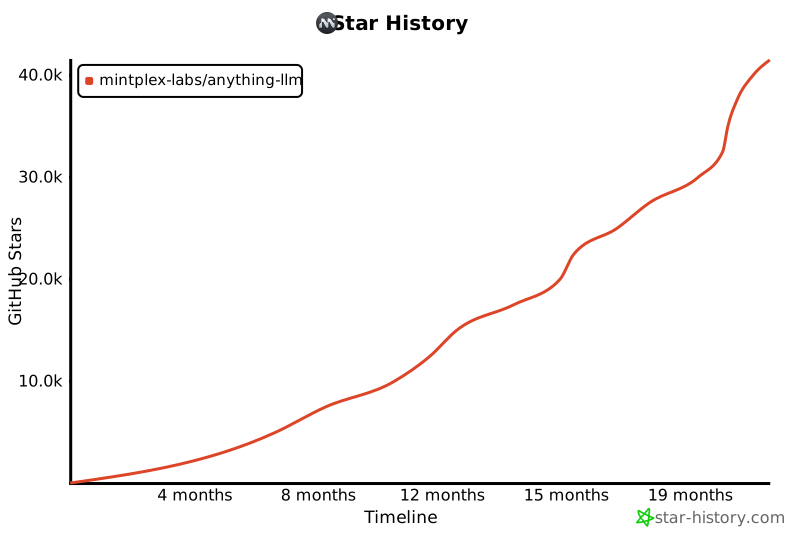
## 👋 如何贡献 - 创建 issue - 创建 PR,分支名称格式为 `-` - 合并 ## 💖 赞助商 ### 高级赞助商 User avatar: DCS DIGITAL ### 所有赞助商 User avatar: JaschaUser avatar: KickAssUser avatar: ShadowArcanistUser avatar: AtlasUser avatar: Predrag StojadinovićUser avatar: Diego SpinolaUser avatar: KyleUser avatar: Giulio De PasqualeUser avatar: User avatar: MacStadiumUser avatar: User avatar: User avatar: User avatar: User avatar: DennisUser avatar: Michael Hamilton, Ph.D.User avatar: User avatar: TernaryLabsUser avatar: Daniel CelaUser avatar: AlessoUser avatar: Rune MathisenUser avatar: User avatar: User avatar: AlanUser avatar: Damien PetersUser avatar: DCS DigitalUser avatar: Paul McilreavyUser avatar: Til WolfUser avatar: Leopoldo Crhistian Riverin GomezUser avatar: AJEsauUser avatar: Steven VanOmmerenUser avatar: Casey BoettcherUser avatar: User avatar: Avineet ## 🌟 贡献者们 [![anythingllm 的贡献者们](https://contrib.rocks/image?repo=mintplex-labs/anything-llm)](https://github.com/mintplex-labs/anything-llm/graphs/contributors) [![Star 历史图](https://api.star-history.com/svg?repos=mintplex-labs/anything-llm&type=Timeline)](https://star-history.com/#mintplex-labs/anything-llm&Date) ## 🔗 更多产品 - **[VectorAdmin][vector-admin]**:一个用于管理向量数据库的全方位图形用户界面和工具套件。 - **[OpenAI Assistant Swarm][assistant-swarm]**:一个智能体就可以管理您所有的OpenAI助手。

[![][back-to-top]](#readme-top)
--- 版权所有 © 2025 [Mintplex Labs][profile-link]。
本项目采用[MIT](https://github.com/Mintplex-Labs/anything-llm/blob/master/LICENSE)许可证。 [back-to-top]: https://img.shields.io/badge/-BACK_TO_TOP-222628?style=flat-square [profile-link]: https://github.com/mintplex-labs [vector-admin]: https://github.com/mintplex-labs/vector-admin [assistant-swarm]: https://github.com/Mintplex-Labs/openai-assistant-swarm [docker-btn]: ../images/deployBtns/docker.png [docker-deploy]: ../docker/HOW_TO_USE_DOCKER.md [aws-btn]: ../images/deployBtns/aws.png [aws-deploy]: ../cloud-deployments/aws/cloudformation/DEPLOY.md [gcp-btn]: https://deploy.cloud.run/button.svg [gcp-deploy]: ../cloud-deployments/gcp/deployment/DEPLOY.md [do-btn]: https://www.deploytodo.com/do-btn-blue.svg [do-deploy]: ../cloud-deployments/digitalocean/terraform/DEPLOY.md [render-btn]: https://render.com/images/deploy-to-render-button.svg [render-deploy]: https://render.com/deploy?repo=https://github.com/Mintplex-Labs/anything-llm&branch=render [render-btn]: https://render.com/images/deploy-to-render-button.svg [render-deploy]: https://render.com/deploy?repo=https://github.com/Mintplex-Labs/anything-llm&branch=render [railway-btn]: https://railway.app/button.svg [railway-deploy]: https://railway.app/template/HNSCS1?referralCode=WFgJkn [repocloud-btn]: https://d16t0pc4846x52.cloudfront.net/deploylobe.svg [repocloud-deploy]: https://repocloud.io/details/?app_id=276 [elestio-btn]: https://elest.io/images/logos/deploy-to-elestio-btn.png [elestio-deploy]: https://elest.io/open-source/anythingllm