# Customization
Take a look in the `headline.zsh-theme` file to see all the customization variables (they start [around line 60](../headline.zsh-theme#L60)).
See [Example Configurations](#example-configurations).
## Intro
### Setting variables
You can edit the customization variables in the theme file directly, or set them in your `~/.zshrc` after the theme is sourced.
***Note:** You must source the theme before setting customization variables!*
### Associative arrays
Some variables contain a map of key value pairs. These may be set using syntax `VARIABLE=(key1 value1 key2 value2)`. To update an individual entry instead of the whole array, use syntax `VARIABLE[key]=value`.
### Template
A template string includes the template token (`...` by default) which will be replaced by something else. Templates may contain styles.
### Styles
Here the term "styles" refers to [ANSI SGR codes](https://en.wikipedia.org/wiki/ANSI_escape_code#SGR_(Select_Graphic_Rendition)_parameters). These are non-printed sequences that specify colors and formatting, assuming your terminal supports them. The beginning of the file has aliases for common SGR codes, so you can use `$red` instead of `$'\e[31m'`.
These styles must be enclosed by the prompt escape characters `%{` and `%}`. Strings with styles should use double quotes.
So to show "apple" in red for example, we write `"%{$red%}apple"`
## Options
### Separator
**`HL_SEP_STYLE`**
Style applied to entire separator line, after other styles.
**`HL_SEP`**
An associative array with the segments of the separator line.
* `_PRE` - Optional string at start of separator line
* `_LINE` - A character that will be repeated to build the separator line
* `_POST` - Optional string at end of separator line
### Layout
**`HL_BASE_STYLE`**
Style applied to all the segments, before other styles.
**`HL_LAYOUT_STYLE`**
Style of the segment layout template... everything besides segment content.
**`HL_LAYOUT_ORDER`**
An array specifying the order of the segments in the prompt. These segments are `_PRE`, `USER`, `HOST`, `VENV`, `PATH`, `_SPACER`, `BRANCH`, `STATUS`, and `_POST`. For guidance on extending the layout, see [Add Segment](#add-segment) below.
**`HL_LAYOUT_TEMPLATE`**
An associative array with a template for each segment. Segments whose names start with an underscore are special and don't have content.
**`HL_LAYOUT_FIRST`**
An associative array with an optional template to use when a segment is first in the layout, which occurs when preceeding segments are removed during truncation.
**`HL_SPACE_CHAR`**
The character used by the `_SPACER` segment to fill space.
### Content
**`HL_CONTENT_TEMPLATE`**
An associative array with a template for each content segment. These templates each contain a unique style (and perhaps a symbol).
**`HL_CONTENT_SOURCE`**
An associative array with a command to produce content for each segment. Enclose commands in single quotes so they may be eval'd later. If a command produces nothing, the associated segment is removed.
### Git Status
**`HL_GIT_COUNT_MODE`**
Choose how to indicate the count of each status.
* `on` - Always show the count (`[3+|1!|2?]`)
* `auto` - Only show the count when it's greater than one (`[3+|!|2?]`)
* `off` - Never show the count (`[+|!|?]`)
**`HL_GIT_SEP_SYMBOL`**
The symbol used to separate each status.
**`HL_GIT_STATUS_ORDER`**
An array specifying the order of the statuses. These statuses are `STAGED`, `CHANGED`, `UNTRACKED`, `BEHIND`, `AHEAD`, `DIVERGED`, `STASHED`, `CONFLICTS`, and `CLEAN`.
**`HL_GIT_STATUS_SYMBOLS`**
An associative array with a symbol to represent each status.
### Truncation
See [Truncation Procedure](#truncation-procedure).
**`HL_COLS_REMOVAL`**
An associative array with an optional minimum width to show segment. The segment is always removed at smaller console widths, regardless of the truncation order.
**`HL_TRUNC_ORDER`**
An array specifying the order to begin truncating and removing segments. Segments not in this list won't be truncated.
**`HL_TRUNC_SYMBOL`**
The symbol to insert when truncating a segment.
**`HL_TRUNC_INITIAL`**
The minimum segment length for the initial round of truncation. Once all segments are at least this short, the removal round may begin.
**`HL_TRUNC_REMOVAL`**
The minimum segment length for the removal round of truncation. If a segment would be shorter than this it is removed.
### Prompt
**`HL_PROMPT`**
The standard prompt where commands are entered.
**`HL_RPROMPT`**
Optional prompt at the right of the console.
### Clock
**`HL_CLOCK_MODE`**
Show the time in `RPROMPT`.
* `on` - Enable the clock
* `off` - Don't show
**`HL_CLOCK_TEMPLATE`**
The template for the clock.
**`HL_CLOCK_SOURCE`**
The command which produces clock content. Enclose command in single quotes so it may be eval'd later.
***Hint:** The clock shows the time that the prompt was printed. If you want the clock to stay current by re-printing every second, add `TMOUT=1; TRAPALRM () { zle reset-prompt }` to your `~/.zshrc`. Note that this only works properly when `HL_PRINT_MODE` is set to the default value `precmd`.*
### Error
**`HL_ERR_MODE`**
Choose how to show non-zero exit codes.
* `on` - Show non-zero exit code
* `detail` - Show non-zero exit code and a guessed meaning
* `off` - Don't show exit code
**`HL_ERR_TEMPLATE`**
The template for the exit code.
**`HL_ERR_DETAIL_TEMPLATE`**
The template for the optional detail. It will be appended to the error template.
***Hint:** To add or change the messages associated with exit codes, edit the `headline-exit-meaning()` function (it's just a switch statement).*
### Printing
**`HL_PRINT_MODE`**
Choose how to print the output.
* `precmd` - Output is printed in a `precmd` hook
* ***Note:** Some terminals may confuse this for the previous command's output*
* `prompt` - Output is assigned to the `PROMPT` variable
* ***Note:** Zsh doesn't always handle multi-line prompts correctly... expect issues when re-printing*
**`HL_SEP_MODE`**
Choose when to print the separator line.
* `on` - Always print the separator line
* `auto` - Print the separator line unless the screen has just been cleared
* `off` - Never print the separator line
**`HL_INFO_MODE`**
Choose when to print the information line.
* `on` - Always print the information line
* `auto` - Print the information line only if it has changed
* `off` - Never print the information line
**`HL_OVERWRITE`**
Press `` with no commands to overwrite previous prompt.
* `on` - Enable prompt overwrite
* `off` - Re-print as normal
### Other
**`HL_TEMPLATE_TOKEN`**
The string to replace in templates (`...` by default).
## Remove Segment
To remove a segment, delete its name from `HL_LAYOUT_ORDER`. Alternatively, set the segment content command to an empty string `HL_CONTENT_SOURCE[key]=''`.
## Add Segment
Because the segment truncation and removal logic is abstracted, it's *relatively* easy to add a new segment. We just need to update a few arrays.
For example, let's add an `OS` segment that displays the name of the operating system.
```sh
# 1. Specify the content source
HL_CONTENT_SOURCE[OS]='uname'
# 2. Specify the content template
HL_CONTENT_TEMPLATE[OS]="%{$bold$yellow%}..."
# 3. Specify the layout template
HL_LAYOUT_TEMPLATE[OS]='[...]'
# 4. Redefine the layout order to position the new segment
HL_LAYOUT_ORDER=(_PRE USER HOST OS VENV PATH _SPACER BRANCH STATUS _POST)
```
Optionally, we may also configure truncation rules.
```sh
# 5. (Optional) Set a minimum console width before segment is removed
HL_COLS_REMOVAL[OS]=60
# 6. (Optional) Redefine the truncation order to enable truncation for this segment
HL_TRUNC_ORDER=(OS HOST USER VENV PATH BRANCH)
```
Explained in words, the `OS` segment obtains content by running the `uname` command. Then that content is styled bold yellow, wrapped in brackets, and inserted just after the `HOST` segment. If the console width is less than 60, the segment is removed. Additionally, it will be the first segment truncated when there's not enough space.
## Truncation Procedure
Intelligent truncation is a primary feature of Headline. The goal is to show as much content as possible while keeping the information on a single line.
The procedure consists of two rounds, which halt as soon as the information line fits within `COLUMNS`:
1. For each segment in `HL_TRUNC_ORDER`, truncate the segment to the initial length specified by `HL_TRUNC_INITIAL`. This shortens excessively long segments.
1. For each segment in `HL_TRUNC_ORDER`, truncate the segment further. Remove the segment if it's shorter than `HL_TRUNC_REMOVAL`.
To disable truncation, set `HL_TRUNC_ORDER` to an empty array `()`.
> 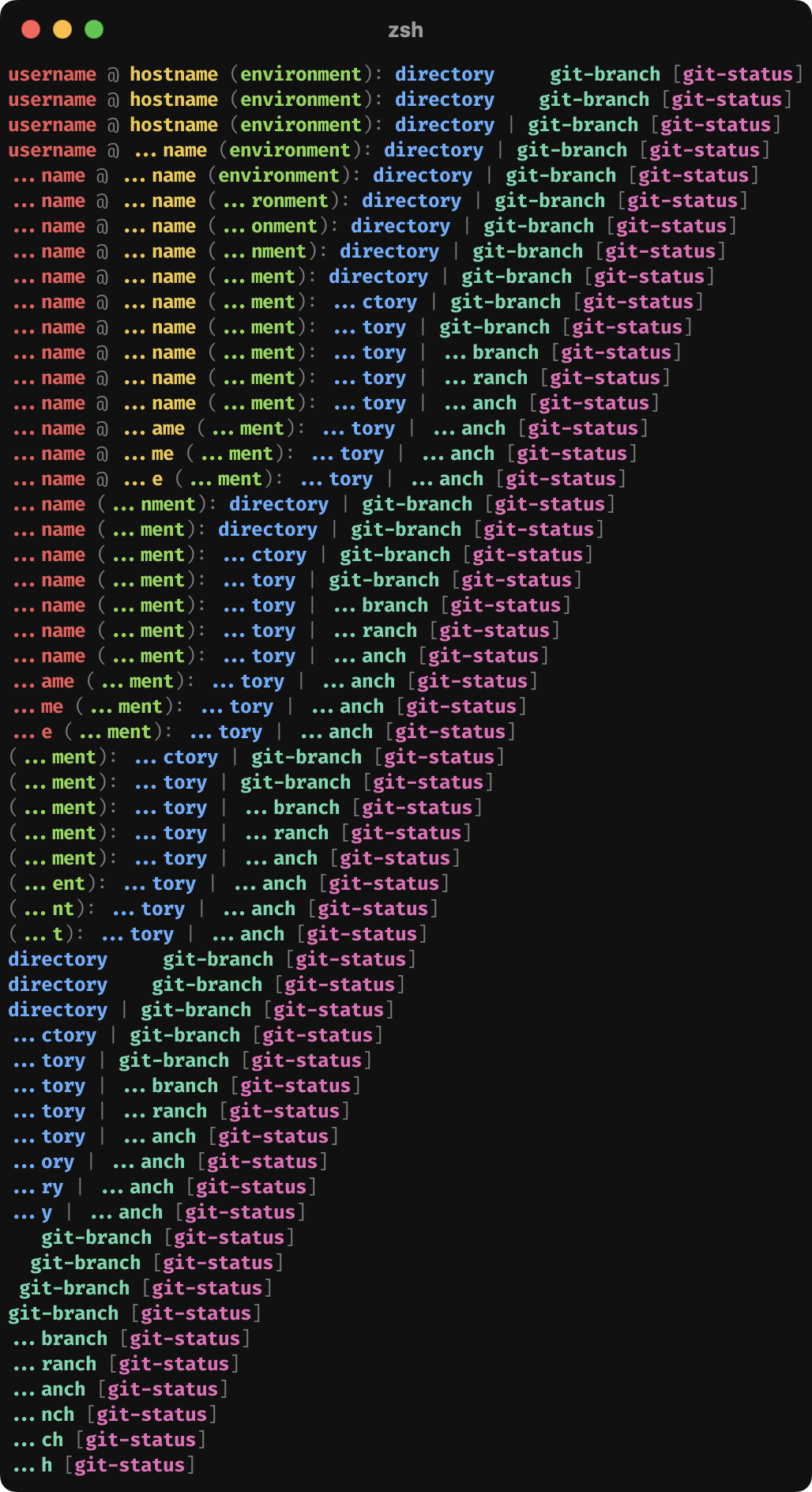 >
> A demonstration of the truncation procedure with `HL_TRUNC_INITIAL=4` and `HL_TRUNC_REMOVAL=1`
>
> A demonstration of the truncation procedure with `HL_TRUNC_INITIAL=4` and `HL_TRUNC_REMOVAL=1`
## Example Configurations
### Compact
Hides separator line and removes space between info segments.

Show configuration
```sh
HL_SEP_MODE='off'
HL_LAYOUT_TEMPLATE[HOST]='@...'
HL_LAYOUT_TEMPLATE[VENV]='(...)'
HL_LAYOUT_TEMPLATE[PATH]=':...'
HL_LAYOUT_TEMPLATE[_SPACER]='|'
HL_LAYOUT_TEMPLATE[STATUS]='|...'
HL_TRUNC_SYMBOL='…'
```
### Standard
Shows non-zero exit codes, clock, and git status counts. Personal favorite.

Show configuration
```sh
HL_INFO_MODE='auto'
HL_OVERWRITE='on'
HL_GIT_COUNT_MODE='auto'
HL_GIT_SEP_SYMBOL='|'
HL_CLOCK_MODE='on'
HL_ERR_MODE='detail'
```
### Verbose
Shows non-zero exit codes, full time and date, git status counts, content symbols, and words between segments. Clean branch shows green `✔`, conflicting branch shows red `✘`.

Show configuration
```sh
HL_LAYOUT_TEMPLATE=(
_PRE "${IS_SSH+ssh }" # shows "ssh " if this is an ssh session
USER '...'
HOST ' at ...'
VENV ' with ...'
PATH ' in ...'
_SPACER '' # special, only shows when compact, otherwise fill with space
BRANCH ' on ...'
STATUS ' (...)'
_POST ''
)
HL_CONTENT_TEMPLATE=(
USER "%{$bold$red%} ..."
HOST "%{$bold$yellow%} ..."
VENV "%{$bold$green%} ..."
PATH "%{$bold$blue%} ..."
BRANCH "%{$bold$cyan%} ..."
STATUS "%{$bold$magenta%}..."
)
HL_GIT_COUNT_MODE='on'
HL_GIT_SEP_SYMBOL='|'
HL_GIT_STATUS_SYMBOLS[CONFLICTS]="%{$red%}✘"
HL_GIT_STATUS_SYMBOLS[CLEAN]="%{$green%}✔"
HL_CLOCK_MODE='on'
HL_CLOCK_SOURCE="date +%+"
HL_ERR_MODE='detail'
```
### Fancy
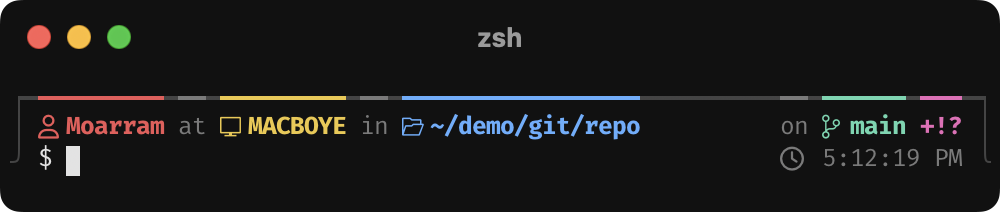
Has almost everything in the verbose config and utilizes `_PRE` and `_POST` segments to further decorate the prompt.
Show configuration
```sh
HL_SEP_MODE='on'
HL_INFO_MODE='auto'
HL_OVERWRITE='on'
HL_SEP=(
_PRE '┍' # consider '┌' or '╭'
_LINE '━' # consider '─'
_POST '┑' # consider '┐' or '╮'
)
HL_LAYOUT_STYLE="%{$light_black%}"
HL_LAYOUT_TEMPLATE=(
_PRE "│${IS_SSH+ %{$reset$faint%\}ssh}" # shows " ssh" if this is an SSH session
USER ' ...'
HOST " %{$reset$faint%}at%{$reset$HL_LAYOUT_STYLE%} ..."
VENV " %{$reset$faint%}with%{$reset$HL_LAYOUT_STYLE%} ..."
PATH " %{$reset$faint%}in%{$reset$HL_LAYOUT_STYLE%} ..."
_SPACER ''
BRANCH " %{$reset$faint%}on%{$reset$HL_LAYOUT_STYLE%} ..."
STATUS ' ...'
_POST ' │'
)
HL_LAYOUT_FIRST=(
HOST ' ...'
VENV ' ...'
PATH ' ...'
_SPACER ' '
BRANCH ' ...'
)
HL_CONTENT_TEMPLATE=(
USER "%{$bold$red%} ..."
HOST "%{$bold$yellow%} ..."
VENV "%{$bold$green%} ..."
PATH "%{$bold$blue%} ..."
BRANCH "%{$bold$cyan%} ..."
STATUS "%{$bold$magenta%}..."
)
HL_GIT_SEP_SYMBOL=''
HL_GIT_STATUS_SYMBOLS[CONFLICTS]="%{$red%}✘"
HL_GIT_STATUS_SYMBOLS[CLEAN]="%{$green%}✔"
HL_PROMPT="%{$HL_LAYOUT_STYLE%}╯ %{$reset%}$ "
HL_CLOCK_MODE='on'
HL_CLOCK_TEMPLATE="%{$faint%} ... %{$reset$HL_LAYOUT_STYLE%}╰"
HL_ERR_MODE='on'
```