# DSH Studio
**A native desktop shell for [DeepSeek Harness](https://github.com/deepseek-ai/deepseek-harness).**
Rust + Tauri 2. It supervises the local `dsh` service, reclaims every process it
spawns, and never forks the upstream project to do it.
[](https://github.com/Moresyl/dsh-studio/releases/latest)
[](https://github.com/Moresyl/dsh-studio/releases)
[](https://github.com/Moresyl/dsh-studio/actions/workflows/ci.yml)
[](https://github.com/Moresyl/dsh-studio/stargazers)
[](LICENSE)
[](https://github.com/Moresyl/dsh-studio/releases/latest)
[](https://github.com/Moresyl/dsh-studio/releases/latest)
[](https://github.com/Moresyl/dsh-studio/releases/latest)
Lite and Full/Offline installers · [all artifacts and checksums](#install) · [简体中文](README.zh-CN.md)
For a precise platform and runtime boundary, see the [support matrix](docs/support-matrix.md).
If startup or plugin installation fails, begin with the [troubleshooting guide](docs/troubleshooting.md).
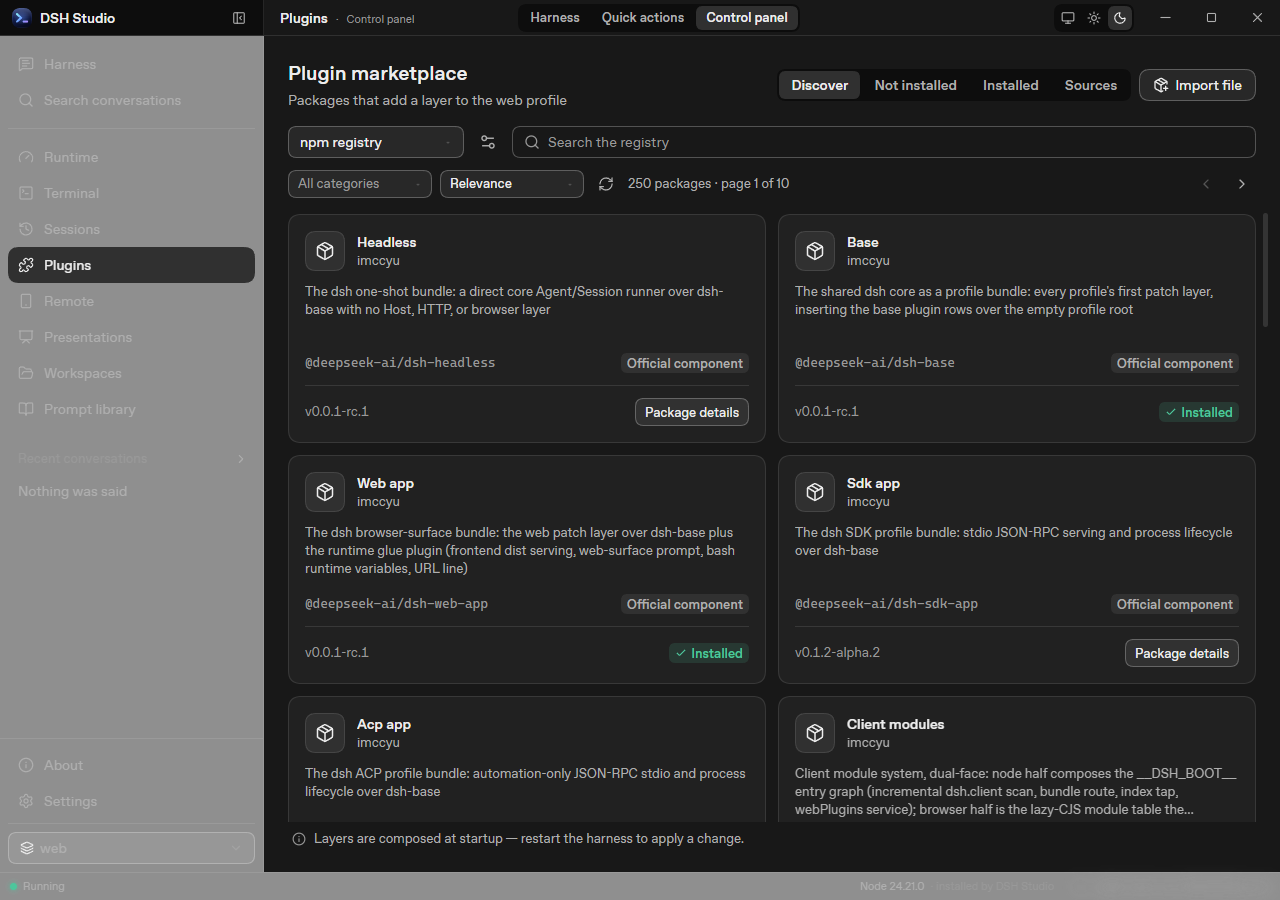
**Browse cards, review compatibility, then install** — inspect the exact package
before installing through Harness's own plugin command. Installed layers can be
disabled without uninstalling them.
Screenshots show v0.9.19 in an isolated Windows QA environment. Local paths and
LAN addresses are blurred; screenshots illustrate the interface, not test coverage.
---
| | |
| -------------------------------------------------------------------------------------------------------------------------------------------------------------------------------------------------------------------------------------- | ---------------------------------------------------------------------------------------------------------------------------------------------------------------------------------------------------------------------------------------- |
| **⟳ Supervised, not just launched**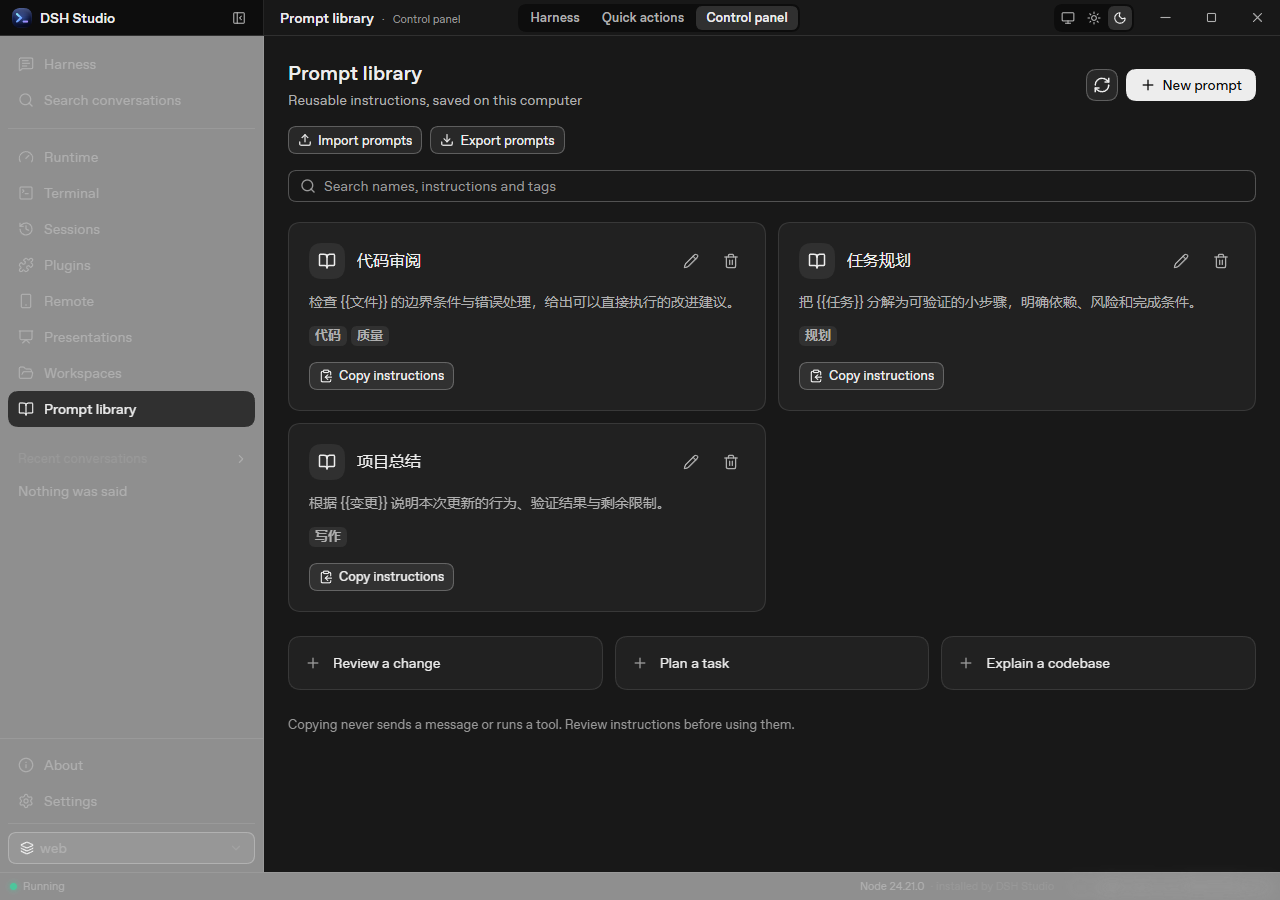 The prompt-library image uses v0.9.24 in isolated Windows QA, with
demonstration content and processed local paths.
The prompt-library image uses v0.9.24 in isolated Windows QA, with
demonstration content and processed local paths.
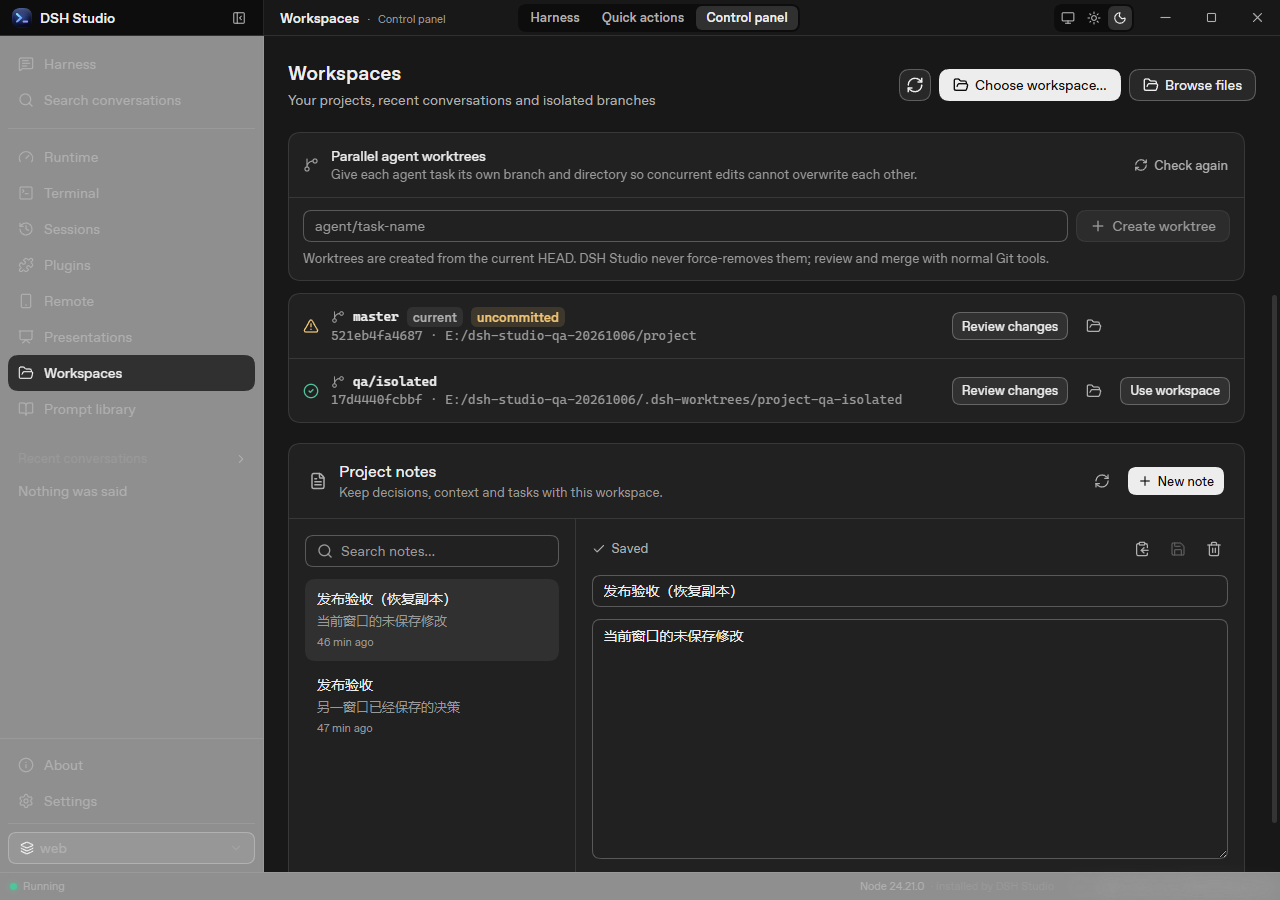
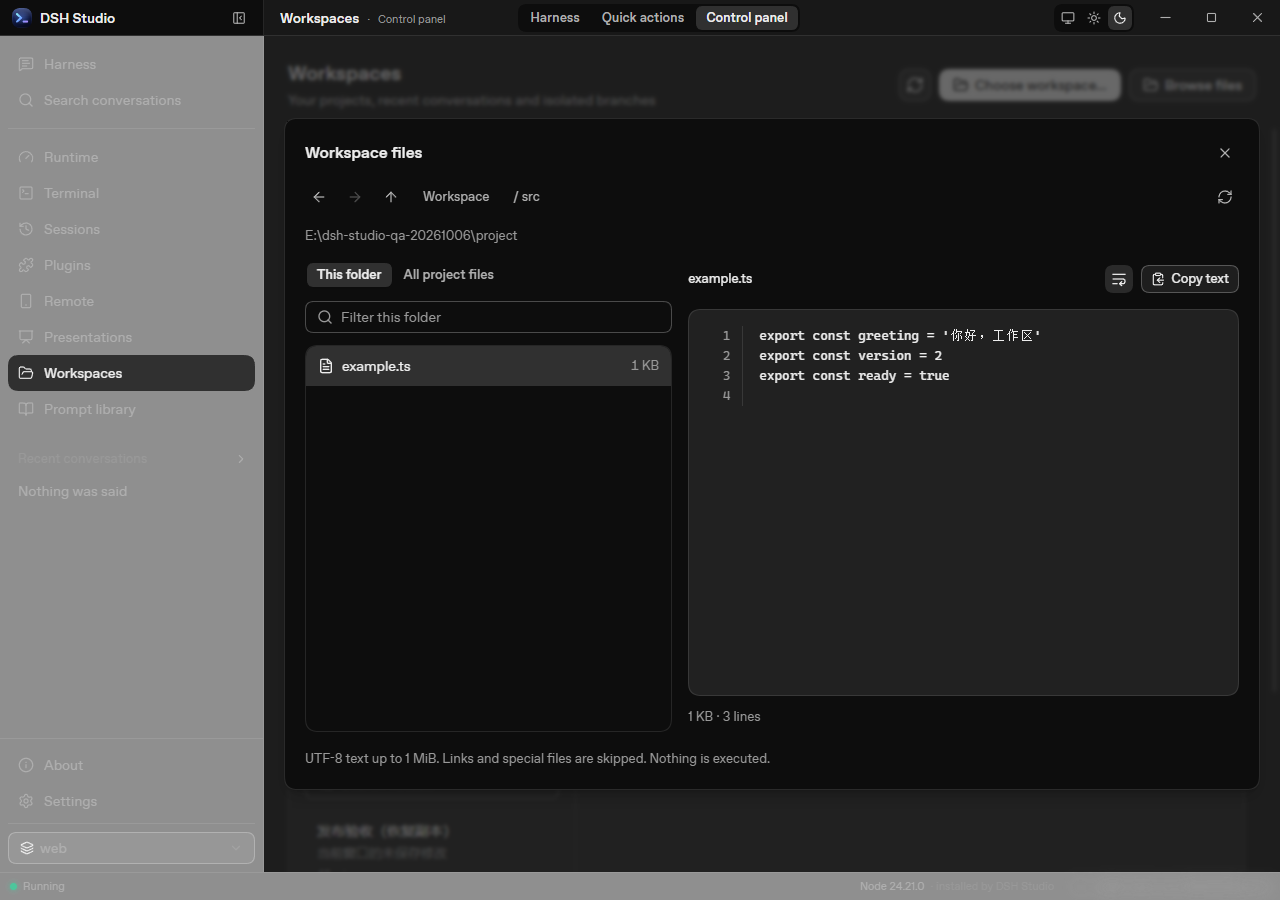 Project notes stay separate for each workspace, with local autosave and recoverable
drafts. Revision conflicts keep your text available for a separate copy.
Project notes stay separate for each workspace, with local autosave and recoverable
drafts. Revision conflicts keep your text available for a separate copy.
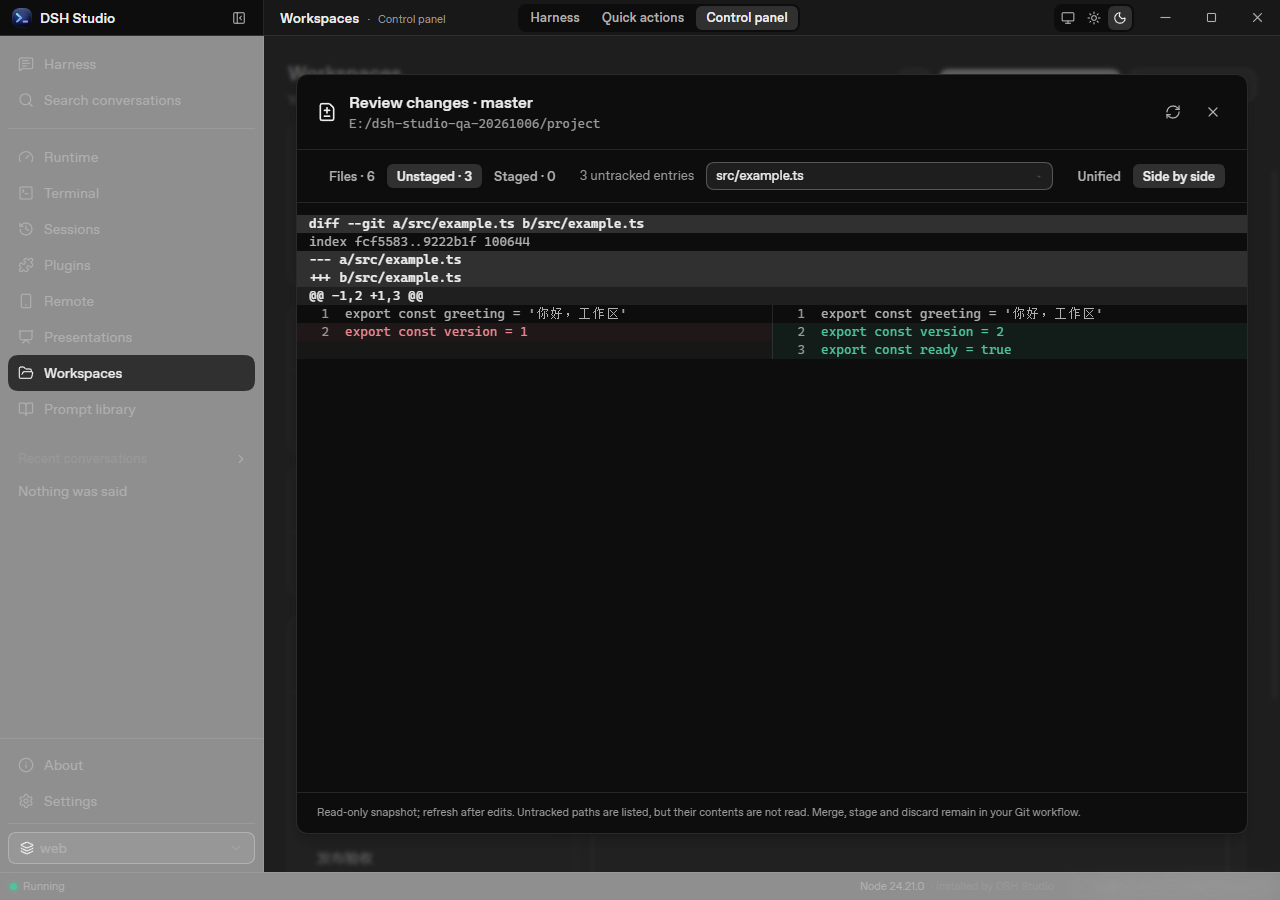
 Select a changed file and compare its old/new lines side by side without modifying Git.
 The file-browser image uses isolated demonstration data. Links, special files
and oversized previews are rejected.
**Supervises, rather than just launches.**
The service runs under a supervisor that restarts it with backoff when it exits.
A restart lands on a new port and the window follows it — no stale bookmarks, no
manual re-launch.
**Notices a service that is alive but wedged.**
Watching the process is only half the job: a server that has stopped answering
still has a live PID, and a TCP connect still succeeds because the kernel
completes the handshake from the listen backlog. So the supervisor sends a real
HTTP request every 10 seconds. Three consecutive misses and the harness is
recycled.
**Reclaims the whole process tree.**
The harness spawns tools, which spawn their own children. On Windows the service
is launched into a [Job Object] with `JOB_OBJECT_LIMIT_KILL_ON_JOB_CLOSE`, so the
kernel tears the tree down even if the shell is killed outright. On Unix it gets
its own process group and is signalled as a group. Quitting the application leaves
nothing behind. Hiding the main window in the tray keeps the application and its managed processes running.
**Picks its own port.**
`--port 0` asks the OS for an unused one and the supervisor reads back the port
the service actually bound. There is no configured port to collide with, and no
scan-for-a-free-port race between the check and the bind.
**Brings its own Node, if the machine has none.**
Being sent to nodejs.org and told to come back is where most people stop. So the
row that says Node is missing is also a button: it reads the current LTS from the
official release index, downloads that build, checks it against the published
SHA-256 before unpacking it, and only calls it installed once the unpacked binary
answers `--version`. It lands inside the app's own data directory — nothing is
added to `PATH`, nothing is written to the registry, and deleting the directory
undoes it. There is a second mirror for places where nodejs.org is slow, serving
the same bytes.
**Installs the harness for you.**
If `@deepseek-ai/dsh` is not on the machine, the row that says so is a button.
It runs `npm install` against a private prefix inside the app's data directory —
invoking `npm-cli.js` through the detected Node binary directly, never through a
shell — and streams the output into the window while it works.
**Hosts the harness instead of replacing it.**
The harness UI is loaded in a frame under the shell's own title bar, so the
window stays movable and closable, and switching to the control panel does not
throw away a running session. Studio does not maintain an upstream fork or
vendor Harness source. Its managed, exact-version client receives one
deterministic native-workspace integration at install time; the runtime contract
verifies that known seam and enters Repair if a future upstream version moves it.
**Extends it through its own plugin system.**
There is a marketplace in the window: search the npm registry, read what a
package declares before you commit to it, and install into the harness's hosted
profile. Installation goes through the harness's own plugin command rather than
around it — no private side channel into somebody else's config. A package whose
manifest declares a profile patch becomes a layer the harness loads; one that
does not is labelled the plain library it is, instead of appearing as a plugin
that mysteriously did nothing. An installed plugin can also be switched off
without being uninstalled, so "is this the one breaking it?" costs a click
rather than a download.
**Reaches your phone without putting the agent on the network.**
Remote access is off until you open it, and opening it does not move the
service — `dsh` stays bound to loopback, which is not configurable. What opens is
a separate gateway, bound to one LAN address. Pairing is a QR code, and the code
inside it is good for one device and two minutes: scan it and that phone walks
away with a credential of its own, which is what every request after it carries.
Everything from there is spliced straight through to the harness. Paired devices
are listed on the pane, and forgetting one revokes its credential and drops the
connection it already had. Close the door and all of them die with it.
[Job Object]: https://learn.microsoft.com/en-us/windows/win32/procthread/job-objects
The file-browser image uses isolated demonstration data. Links, special files
and oversized previews are rejected.
**Supervises, rather than just launches.**
The service runs under a supervisor that restarts it with backoff when it exits.
A restart lands on a new port and the window follows it — no stale bookmarks, no
manual re-launch.
**Notices a service that is alive but wedged.**
Watching the process is only half the job: a server that has stopped answering
still has a live PID, and a TCP connect still succeeds because the kernel
completes the handshake from the listen backlog. So the supervisor sends a real
HTTP request every 10 seconds. Three consecutive misses and the harness is
recycled.
**Reclaims the whole process tree.**
The harness spawns tools, which spawn their own children. On Windows the service
is launched into a [Job Object] with `JOB_OBJECT_LIMIT_KILL_ON_JOB_CLOSE`, so the
kernel tears the tree down even if the shell is killed outright. On Unix it gets
its own process group and is signalled as a group. Quitting the application leaves
nothing behind. Hiding the main window in the tray keeps the application and its managed processes running.
**Picks its own port.**
`--port 0` asks the OS for an unused one and the supervisor reads back the port
the service actually bound. There is no configured port to collide with, and no
scan-for-a-free-port race between the check and the bind.
**Brings its own Node, if the machine has none.**
Being sent to nodejs.org and told to come back is where most people stop. So the
row that says Node is missing is also a button: it reads the current LTS from the
official release index, downloads that build, checks it against the published
SHA-256 before unpacking it, and only calls it installed once the unpacked binary
answers `--version`. It lands inside the app's own data directory — nothing is
added to `PATH`, nothing is written to the registry, and deleting the directory
undoes it. There is a second mirror for places where nodejs.org is slow, serving
the same bytes.
**Installs the harness for you.**
If `@deepseek-ai/dsh` is not on the machine, the row that says so is a button.
It runs `npm install` against a private prefix inside the app's data directory —
invoking `npm-cli.js` through the detected Node binary directly, never through a
shell — and streams the output into the window while it works.
**Hosts the harness instead of replacing it.**
The harness UI is loaded in a frame under the shell's own title bar, so the
window stays movable and closable, and switching to the control panel does not
throw away a running session. Studio does not maintain an upstream fork or
vendor Harness source. Its managed, exact-version client receives one
deterministic native-workspace integration at install time; the runtime contract
verifies that known seam and enters Repair if a future upstream version moves it.
**Extends it through its own plugin system.**
There is a marketplace in the window: search the npm registry, read what a
package declares before you commit to it, and install into the harness's hosted
profile. Installation goes through the harness's own plugin command rather than
around it — no private side channel into somebody else's config. A package whose
manifest declares a profile patch becomes a layer the harness loads; one that
does not is labelled the plain library it is, instead of appearing as a plugin
that mysteriously did nothing. An installed plugin can also be switched off
without being uninstalled, so "is this the one breaking it?" costs a click
rather than a download.
**Reaches your phone without putting the agent on the network.**
Remote access is off until you open it, and opening it does not move the
service — `dsh` stays bound to loopback, which is not configurable. What opens is
a separate gateway, bound to one LAN address. Pairing is a QR code, and the code
inside it is good for one device and two minutes: scan it and that phone walks
away with a credential of its own, which is what every request after it carries.
Everything from there is spliced straight through to the harness. Paired devices
are listed on the pane, and forgetting one revokes its credential and drops the
connection it already had. Close the door and all of them die with it.
[Job Object]: https://learn.microsoft.com/en-us/windows/win32/procthread/job-objects
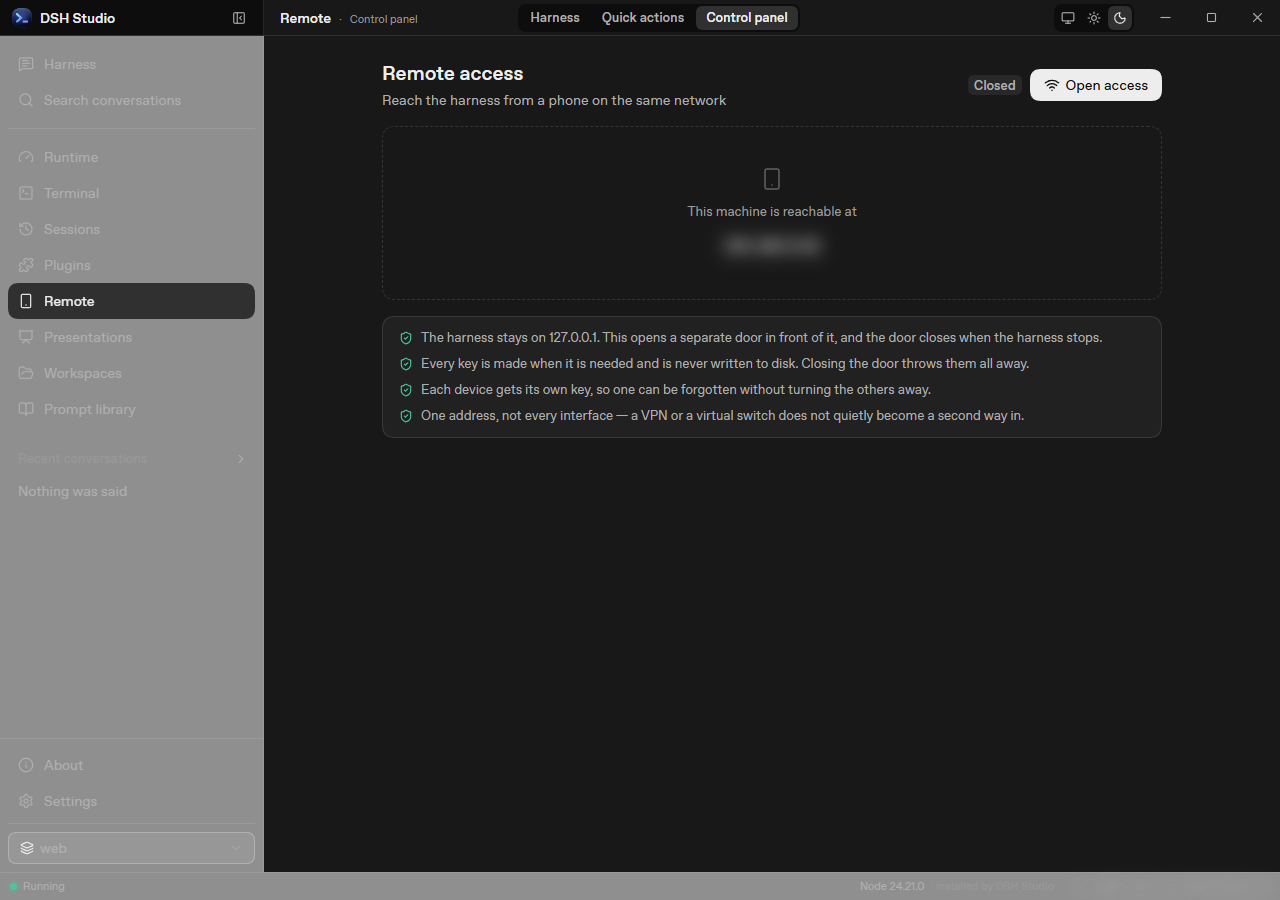 **Remote access stays closed until you enable it.** Once enabled, each redeemed
pairing code creates a separate device credential that can be revoked individually.
**Remote access stays closed until you enable it.** Once enabled, each redeemed
pairing code creates a separate device credential that can be revoked individually.
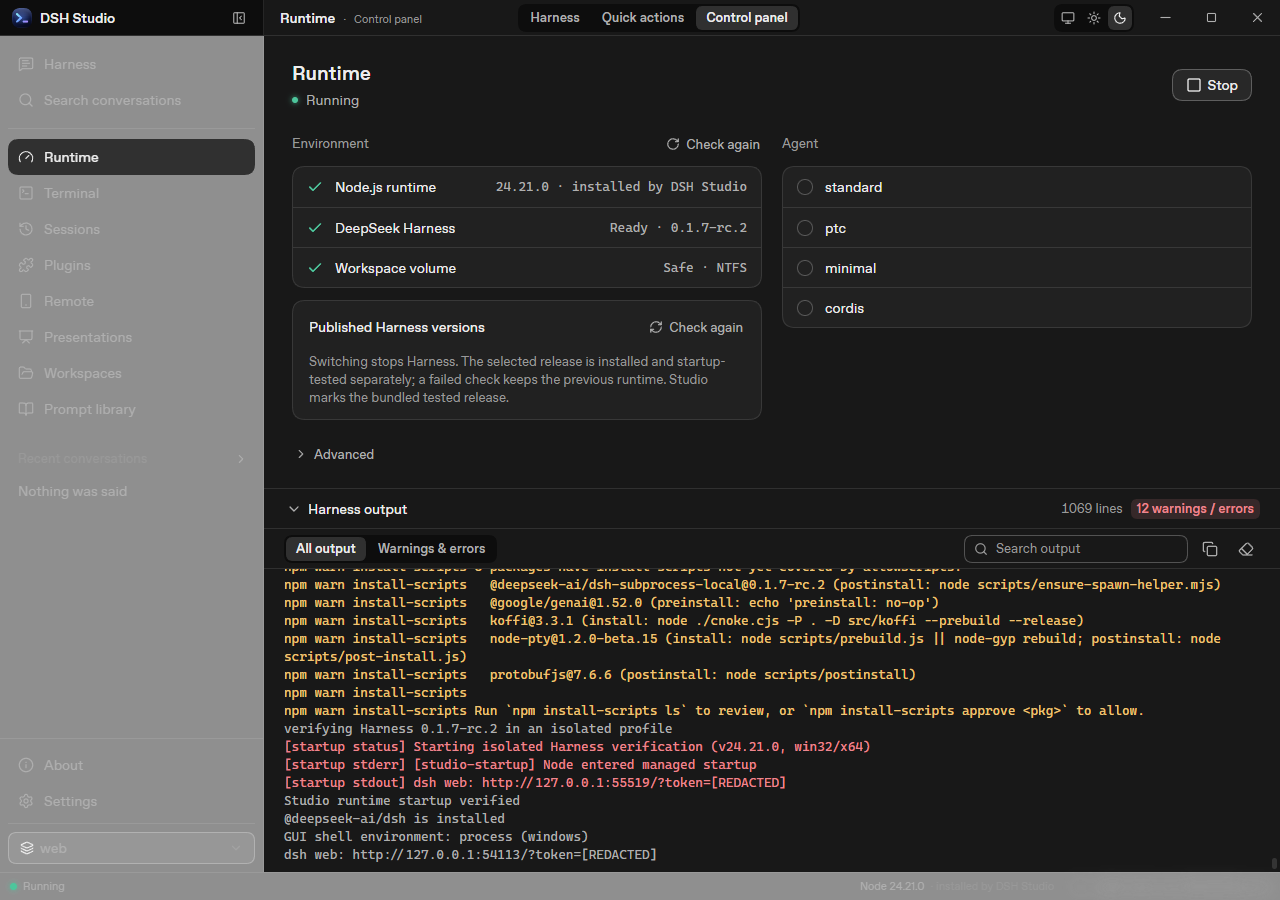 The Runtime page after startup: environment checks and agent choices stay
visible, with detailed output available on demand. Every image on this page is captured
from the shipped UI by the deterministic script in
The Runtime page after startup: environment checks and agent choices stay
visible, with detailed output available on demand. Every image on this page is captured
from the shipped UI by the deterministic script in