# Anything Analyzer
[English](README.en.md) | [简体中文](README.md)
> **Web pages, desktop apps, terminal commands, Python scripts, mobile apps -- no matter where traffic comes from, capture it and let AI reverse engineer it automatically.**
[](https://www.electronjs.org/)
[](https://react.dev/)
[](https://www.typescriptlang.org/)
[](LICENSE)
 ---
## Why Anything Analyzer?
Traditional tools each cover only one area: DevTools is for browsers, Fiddler/Charles are for proxies, and Wireshark does not decrypt HTTPS. After capture, you still have to sift through hundreds of requests and analyze them manually.
**Anything Analyzer is different -- full scenario capture + AI automatic analysis:**
```
Web Desktop apps Terminal Scripts Mobile / IoT
Chrome Postman curl/wget Python App / Mini Program
| Electron | Node.js |
| | | | |
v v v v v
┌──────────┐ ┌──────────────────────────────────────────────────────────┐
│ Embedded │ │ MITM Proxy (port 8888) │
│ Browser │ │ System proxy / manual / Wi-Fi proxy │
│ (CDP) │ └──────────────────────────┬───────────────────────────────┘
└────┬─────┘ |
| |
└──────────┬───────────────────────┘
v
┌─────────────────┐
│ Unified Session │ <- All sources flow into one session
└────────┬────────┘
v
┌─────────────────┐
│ AI Analysis │ <- One-click protocol reverse / security / crypto report
└─────────────────┘
```
---
## Three Core Capabilities
### 1. Capture across all scenarios -- anything, not just browsers
| Target | How to capture | Typical use cases |
|--------|----------------|------------------|
| **Web** | Use the embedded browser directly | Web API reverse engineering, OAuth login, frontend crypto |
| **Desktop apps** | MITM proxy + system proxy | Postman, Electron apps, game clients |
| **Terminal commands** | MITM proxy + environment variables | curl, wget, httpie |
| **Scripts** | MITM proxy + code config | Python requests, Node.js fetch, Go http |
| **Mobile / tablets** | MITM proxy + Wi-Fi proxy | iOS/Android apps, mini programs, H5 |
| **IoT / other devices** | MITM proxy + gateway proxy | Smart home, embedded HTTP traffic |
All sources are **merged into a single Session**, and AI analyzes them together.
### 2. AI analysis -- more than capture, automatic protocol understanding
- **Two-phase analysis** -- Phase 1 filters noise requests, Phase 2 focuses on deep analysis
- **5 analysis modes** -- Auto detect / API reverse / security audit / performance / JS crypto reverse
- **JS Hook injection** -- Intercepts fetch, XHR, crypto.subtle, CryptoJS, SM2/3/4 crypto calls
- **Crypto code extraction** -- Extracts crypto-related code snippets from JS files
- **Streaming output + follow-ups** -- Reports stream in real time and support multi-round Q&A
### 3. MCP ecosystem integration -- capture tool for AI agents
- **MCP Client** -- Connect to external MCP servers (stdio + StreamableHTTP) to extend AI analysis
- **Built-in MCP Server** -- Expose capture and analysis as MCP tools for Claude Desktop, Cursor, and more
---
## Use Cases
| Scenario | Traffic source | What you get |
|----------|----------------|--------------|
| **Reverse a website API** | Embedded browser | API endpoints + auth flow + Python reproduction code |
| **Reverse an app protocol** | Mobile Wi-Fi proxy | Hidden APIs + request signing logic |
| **JS crypto reverse** | Embedded browser + JS Hook | Crypto algorithm ID + flow reconstruction + Python implementation |
| **Security audit** | Browser + proxy mix | Token leaks, CSRF/XSS, sensitive data exposure |
| **Debug CLI tools** | Terminal curl/httpie | Full request/response logs + AI step-by-step explanations |
| **Debug microservices** | Scripts + env proxy | Service call chains + auth propagation analysis |
---
## Quick Start
### Download and install
Get the installer for your platform from [Releases](https://github.com/Mouseww/anything-analyzer/releases):
| Platform | File |
|----------|------|
| Windows | `Anything-Analyzer-Setup-x.x.x.exe` |
| macOS (Apple Silicon) | `Anything-Analyzer-x.x.x-arm64.dmg` |
| macOS (Intel) | `Anything-Analyzer-x.x.x-x64.dmg` |
| Linux | `Anything-Analyzer-x.x.x.AppImage` |
### Capture web traffic -- embedded browser
1. **Configure LLM** -- Settings -> LLM, fill in API Key (OpenAI / Anthropic / any compatible API)
2. **Create a new Session** -- enter a name and target URL
3. **Interact and capture** -- use the embedded browser, click Start Capture
4. **AI analysis** -- stop capture, click Analyze, choose analysis mode
### Capture apps/terminal/mobile -- MITM proxy
1. Settings -> MITM Proxy -> **install CA certificate**
2. **Enable proxy** (default port `8888`)
3. Configure proxy by scenario:
```bash
# ---- Terminal commands ----
curl -x http://127.0.0.1:8888 https://api.example.com/data
# ---- Python script ----
proxies = {"http": "http://127.0.0.1:8888", "https": "http://127.0.0.1:8888"}
requests.get("https://api.example.com/data", proxies=proxies)
# ---- Node.js ----
HTTP_PROXY=http://127.0.0.1:8888 HTTPS_PROXY=http://127.0.0.1:8888 node app.js
# ---- System-wide (desktop apps follow proxy) ----
# Use the one-click "Set as system proxy" in Settings
# ---- Mobile / tablets ----
# Wi-Fi Settings -> HTTP Proxy -> Manual -> enter computer IP + port 8888
# Then open the proxy address in a phone browser to download and install the CA certificate
```
4. Create a Session (URL can be empty) -> Start Capture -> external app traffic flows in
---
## Why Anything Analyzer?
Traditional tools each cover only one area: DevTools is for browsers, Fiddler/Charles are for proxies, and Wireshark does not decrypt HTTPS. After capture, you still have to sift through hundreds of requests and analyze them manually.
**Anything Analyzer is different -- full scenario capture + AI automatic analysis:**
```
Web Desktop apps Terminal Scripts Mobile / IoT
Chrome Postman curl/wget Python App / Mini Program
| Electron | Node.js |
| | | | |
v v v v v
┌──────────┐ ┌──────────────────────────────────────────────────────────┐
│ Embedded │ │ MITM Proxy (port 8888) │
│ Browser │ │ System proxy / manual / Wi-Fi proxy │
│ (CDP) │ └──────────────────────────┬───────────────────────────────┘
└────┬─────┘ |
| |
└──────────┬───────────────────────┘
v
┌─────────────────┐
│ Unified Session │ <- All sources flow into one session
└────────┬────────┘
v
┌─────────────────┐
│ AI Analysis │ <- One-click protocol reverse / security / crypto report
└─────────────────┘
```
---
## Three Core Capabilities
### 1. Capture across all scenarios -- anything, not just browsers
| Target | How to capture | Typical use cases |
|--------|----------------|------------------|
| **Web** | Use the embedded browser directly | Web API reverse engineering, OAuth login, frontend crypto |
| **Desktop apps** | MITM proxy + system proxy | Postman, Electron apps, game clients |
| **Terminal commands** | MITM proxy + environment variables | curl, wget, httpie |
| **Scripts** | MITM proxy + code config | Python requests, Node.js fetch, Go http |
| **Mobile / tablets** | MITM proxy + Wi-Fi proxy | iOS/Android apps, mini programs, H5 |
| **IoT / other devices** | MITM proxy + gateway proxy | Smart home, embedded HTTP traffic |
All sources are **merged into a single Session**, and AI analyzes them together.
### 2. AI analysis -- more than capture, automatic protocol understanding
- **Two-phase analysis** -- Phase 1 filters noise requests, Phase 2 focuses on deep analysis
- **5 analysis modes** -- Auto detect / API reverse / security audit / performance / JS crypto reverse
- **JS Hook injection** -- Intercepts fetch, XHR, crypto.subtle, CryptoJS, SM2/3/4 crypto calls
- **Crypto code extraction** -- Extracts crypto-related code snippets from JS files
- **Streaming output + follow-ups** -- Reports stream in real time and support multi-round Q&A
### 3. MCP ecosystem integration -- capture tool for AI agents
- **MCP Client** -- Connect to external MCP servers (stdio + StreamableHTTP) to extend AI analysis
- **Built-in MCP Server** -- Expose capture and analysis as MCP tools for Claude Desktop, Cursor, and more
---
## Use Cases
| Scenario | Traffic source | What you get |
|----------|----------------|--------------|
| **Reverse a website API** | Embedded browser | API endpoints + auth flow + Python reproduction code |
| **Reverse an app protocol** | Mobile Wi-Fi proxy | Hidden APIs + request signing logic |
| **JS crypto reverse** | Embedded browser + JS Hook | Crypto algorithm ID + flow reconstruction + Python implementation |
| **Security audit** | Browser + proxy mix | Token leaks, CSRF/XSS, sensitive data exposure |
| **Debug CLI tools** | Terminal curl/httpie | Full request/response logs + AI step-by-step explanations |
| **Debug microservices** | Scripts + env proxy | Service call chains + auth propagation analysis |
---
## Quick Start
### Download and install
Get the installer for your platform from [Releases](https://github.com/Mouseww/anything-analyzer/releases):
| Platform | File |
|----------|------|
| Windows | `Anything-Analyzer-Setup-x.x.x.exe` |
| macOS (Apple Silicon) | `Anything-Analyzer-x.x.x-arm64.dmg` |
| macOS (Intel) | `Anything-Analyzer-x.x.x-x64.dmg` |
| Linux | `Anything-Analyzer-x.x.x.AppImage` |
### Capture web traffic -- embedded browser
1. **Configure LLM** -- Settings -> LLM, fill in API Key (OpenAI / Anthropic / any compatible API)
2. **Create a new Session** -- enter a name and target URL
3. **Interact and capture** -- use the embedded browser, click Start Capture
4. **AI analysis** -- stop capture, click Analyze, choose analysis mode
### Capture apps/terminal/mobile -- MITM proxy
1. Settings -> MITM Proxy -> **install CA certificate**
2. **Enable proxy** (default port `8888`)
3. Configure proxy by scenario:
```bash
# ---- Terminal commands ----
curl -x http://127.0.0.1:8888 https://api.example.com/data
# ---- Python script ----
proxies = {"http": "http://127.0.0.1:8888", "https": "http://127.0.0.1:8888"}
requests.get("https://api.example.com/data", proxies=proxies)
# ---- Node.js ----
HTTP_PROXY=http://127.0.0.1:8888 HTTPS_PROXY=http://127.0.0.1:8888 node app.js
# ---- System-wide (desktop apps follow proxy) ----
# Use the one-click "Set as system proxy" in Settings
# ---- Mobile / tablets ----
# Wi-Fi Settings -> HTTP Proxy -> Manual -> enter computer IP + port 8888
# Then open the proxy address in a phone browser to download and install the CA certificate
```
4. Create a Session (URL can be empty) -> Start Capture -> external app traffic flows in
CA certificate details
- Cert storage: `%APPDATA%/anything-analyzer/certs/` (Windows) / `~/Library/Application Support/anything-analyzer/certs/` (macOS)
- Admin permissions required on first install (Windows UAC / macOS password)
- Settings allows uninstall, regenerate, or export at any time
- Root CA is valid for 10 years, leaf certs 825 days (Apple requirement)
- MITM proxy is **read-only capture**, it does not modify requests/responses
- WebSocket traffic is tunneled, not decrypted
- Per-body size limit 1MB, binary content is skipped
---
## All Features
Expand to see full feature list
**Capture engine**
- Full network capture -- CDP Fetch interception for all HTTP requests/responses (headers, body)
- MITM proxy -- built-in HTTPS MITM proxy, auto-issues TLS certs with per-domain LRU cache
- Dual-channel capture -- browser CDP + MITM proxy into one session
- SSE / WebSocket detection -- auto detect streaming and upgrade requests
- Storage snapshots -- periodic Cookie, localStorage, sessionStorage collection
- Domain filters -- group/filter by domain with partial match search
- Source tags -- distinguish "CDP" and "Proxy" sources
- Export requests -- export raw request data to JSON files
**Browser**
- Multi-tab -- auto-capture popups into internal tabs (OAuth friendly)
- Tab protection -- prevent window.close from killing tabs, auto-restore last tab
- One-click clean environment -- clear cookies, localStorage, sessionStorage, cache
**AI analysis**
- Two-phase analysis -- Phase 1 filtering -> Phase 2 deep analysis, AI reads details on demand
- Manual multi-select analysis -- analyze selected requests without pre-filtering
- Custom prompt templates -- built-in templates plus custom ones
- Streaming output + follow-ups -- live report display with multi-round chat
**System**
- System proxy integration -- one-click system proxy (Windows registry / macOS networksetup / Linux gsettings)
- CA certificate management -- install / uninstall / regenerate / export across platforms
- Global proxy -- SOCKS5/HTTP/HTTPS proxy support
- Auto update -- built-in electron-updater
- Dark theme -- modern UI based on Ant Design
---
## Build from Source
```bash
git clone https://github.com/MouseWW/anything-analyzer.git
cd anything-analyzer
pnpm install
pnpm dev # dev mode
pnpm test # run tests
pnpm build && npx electron-builder --win # build Windows installer
```
> macOS release note: auto-update requires **signed and notarized** installers. Before publishing mac builds from GitHub Actions, configure `CSC_LINK`, `CSC_KEY_PASSWORD`, `APPLE_ID`, `APPLE_APP_SPECIFIC_PASSWORD`, and `APPLE_TEAM_ID` in repository secrets, otherwise `ShipIt` cannot install updates.
**Requirements:** Node.js >= 18, pnpm, Visual Studio Build Tools (Windows)
## Tech Stack
| Layer | Technology |
|-------|------------|
| Framework | Electron 35 + electron-vite |
| Frontend | React 19 + Ant Design 5 + TypeScript |
| Database | better-sqlite3 (local SQLite) |
| Protocol | Chrome DevTools Protocol (CDP) |
| Proxy | Built-in MITM HTTPS proxy (node-forge TLS) |
| AI | OpenAI / Anthropic / Custom LLM (Chat Completions + Responses API) |
| AI extensions | MCP Client (stdio + StreamableHTTP) + built-in MCP Server |
Project structure
```
src/
├── main/ # Electron main process
│ ├── ai/ # AI pipeline (two-phase orchestration, prompts, LLM routing)
│ ├── capture/ # Capture engine (CDP Fetch + JS Hook + storage snapshots)
│ ├── cdp/ # Chrome DevTools Protocol management
│ ├── proxy/ # MITM proxy (CA management, cert issuance, system proxy)
│ ├── mcp/ # MCP Client + built-in MCP Server
│ ├── db/ # SQLite data layer
│ └── session/ # Session lifecycle management
├── preload/ # Context bridge + hook injection scripts
├── renderer/ # React UI (components + hooks)
└── shared/ # Shared type definitions
```
---
This project **does not** include the following capabilities:
- Illegal access to computer data
- Illegal modification of computer data
- Illegal control of computer systems
- Destruction of computer systems
- Built-in AI models (you must configure your own model and use it in compliance with regulations)
**Do not use this tool for any activity that violates the laws of the PRC.**
---
Thanks to everyone on [LinuxDo](https://linux.do/) for their support!
## Star History
[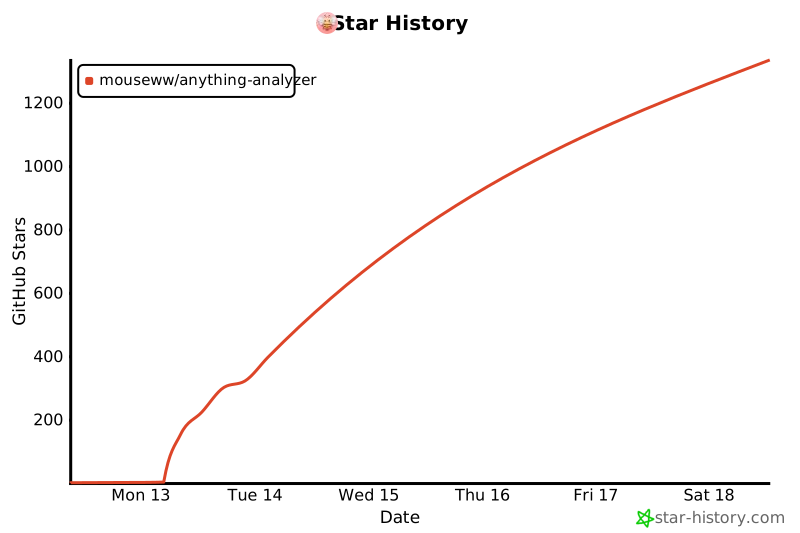](https://star-history.com/#Mouseww/anything-analyzer&Date)
## License
MIT