# DSH CUA — Windows Computer Use for DeepSeek Harness
[简体中文](README.md) | **English**
A Windows desktop and browser automation plugin for **DeepSeek Harness (DSH)**.
Combines **Windows UI Automation (UIA), local OCR, icon detection, window binding,
and visual grounding** so an AI agent can inspect controls, interact with apps,
and read back results. The installable package is named `dsh-doraemon`.
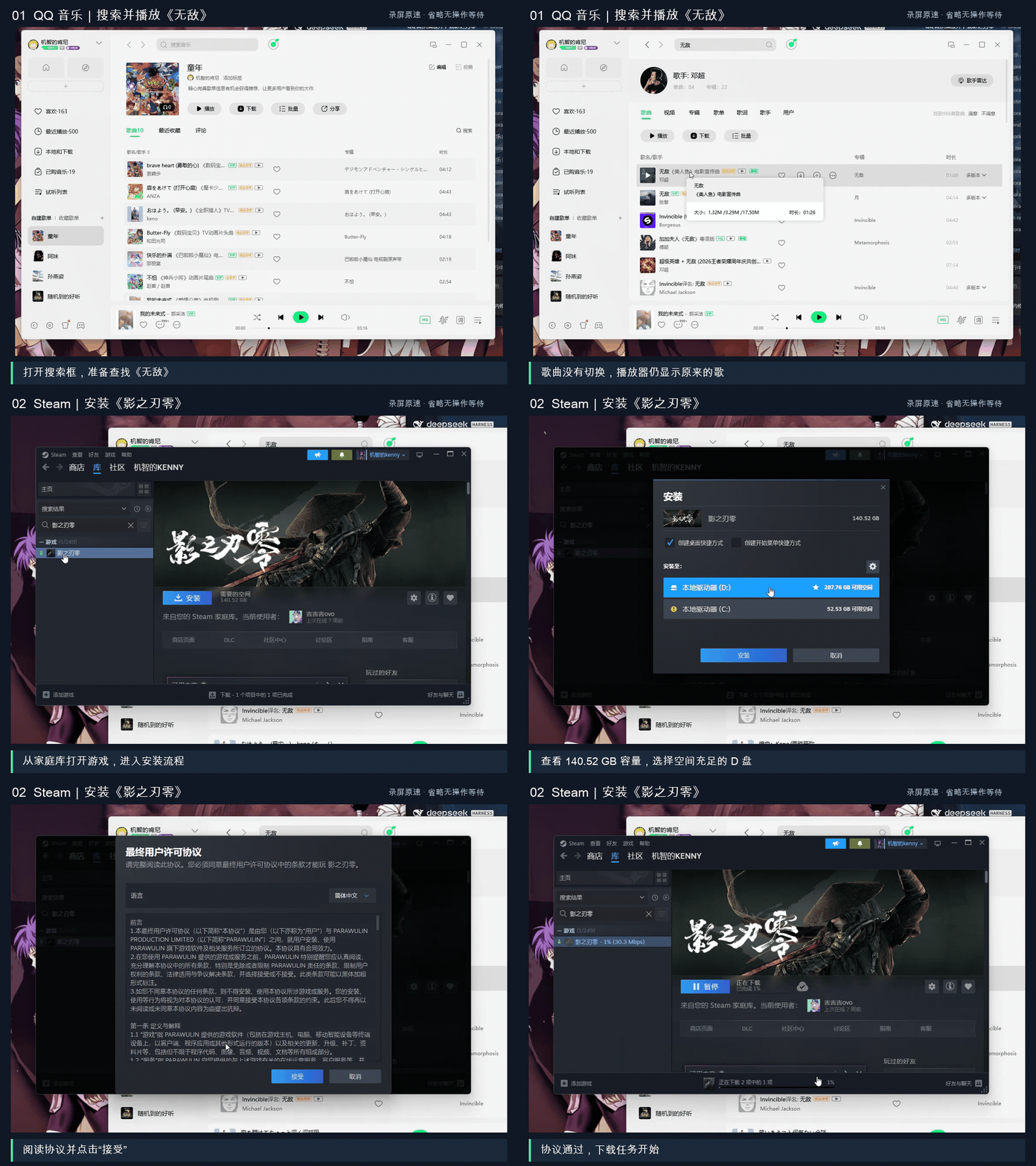
*72 seconds of selected actions at their original recorded speed, with idle waits removed and action captions below the screen. Click to watch the full demo.*
**[Watch the cross-app demo on Bilibili](https://www.bilibili.com/video/BV1L9xe6sEDi/)**
— QQ Music → Steam → Bilibili → QQ. The author reports approximately 6.5 minutes
and CNY 0.36 for this particular run; these are not general performance guarantees.
The demo starts music, initiates a game download, searches for a tutorial, and sends
the link to the author's own QQ account. It shows recovery from UI mistakes and
disk selection, not just successful clicks.
**[快速上手 / Quick start](QUICKSTART.md)** · [Data boundary](docs/data-boundary.md)
· [Report a problem](https://github.com/Mrkennyhungry/dsh-cua/issues)
Thanks to [LINUX DO](https://linux.do/) for the community space to share and discuss open-source projects.
## How it works
- Bind a target window using its native Windows handle.
- Read native controls through UIA; use local RapidOCR and YOLO icon detection when needed.
- Request visual icon semantics when structural or text information is insufficient.
Caption requests send an annotated screenshot plus icon crops to the configured
DeepSeek caption endpoint; this is not a crop-only or entirely local mode.
- Click, type, scroll, or use browser DOM tools as appropriate, then inspect the result.
Tools are selected for the task; every step does not have to traverse every layer.
Desktop coordinate actions use the physical mouse. A docked, click-through
whale-maid commander provides task feedback; see [commander mode](docs/commander-mode.md).
## Requirements and limitations
- Windows 10/11, Node.js >= 22, and DeepSeek Harness. The current main branch does not declare a DSH client-version range; compatibility still depends on the APIs provided by the installed client.
- `uv` and network access for initial Python dependency installation. OCR and icon
detection weights are bundled; there is no separate model-weight download.
- This is a DSH plugin, not a standalone desktop agent or an isolated sandbox.
- Custom-drawn controls, foreground focus and elevated windows may need fallback
handling; do not assume every Windows application is supported.
- Screenshot and tool output can contain private content. Read the data-boundary
document before use. `effect: "confirmed"` means UI change, not task completion.
**Install in one line** — paste this into **Plugins → Add plugin** in DSH, restart, then run `scripts\bootstrap.ps1` once:
```
dsh-doraemon@git+https://github.com/Mrkennyhungry/dsh-cua.git#main
```
Or add the market index `https://raw.githubusercontent.com/Mrkennyhungry/dsh-cua/main/market/index.json` on **Plugins → Discover** and install from there. Both paths are described below.
Short on time? **[QUICKSTART.md](QUICKSTART.md)** is one screen: three prerequisites, four steps, one error message to avoid.
## Install the plugin
Two ways, same spec.
**From the Web UI:** open **Plugins** in the DSH sidebar, paste this into the install dialog, confirm, then restart DSH:
```
dsh-doraemon@git+https://github.com/Mrkennyhungry/dsh-cua.git#main
```
**From the profile's `package.json`**, add the same value as a dependency:
```json
{
"dependencies": {
"dsh-doraemon": "git+https://github.com/Mrkennyhungry/dsh-cua.git#v0.4.7"
}
}
```
The `main` spec follows the current branch. For a reproducible install, replace `main` with the exact commit you reviewed.
## Install from Discover (optional)
DSH ships custom plugin markets switched off. To have this plugin listed in **Plugins → Discover**:
1. Open **Plugins** in the Web sidebar, choose **More** next to **Experimental plugins**, and switch on **Custom plugin markets**. The page then shows the **Installed** and **Discover** tabs.
2. On **Discover**, add this index source:
```
https://raw.githubusercontent.com/Mrkennyhungry/dsh-cua/main/market/index.json
```
Mirror, if `raw.githubusercontent.com` is unreachable: `https://cdn.jsdelivr.net/gh/Mrkennyhungry/dsh-cua@main/market/index.json`.
3. Pick **dsh-doraemon** and install the published market entry, then restart DSH. The market entry remains tied to its published release; use the direct `#main` Git spec above to try the current unpinned branch.
There is no official DSH market: Discover lists only the index sources a user adds, so the URL above is how this plugin reaches that list. The document is DSH's own `format: 1` market index, validated with `@deepseek-ai/dsh-plugin-market-index` before it was committed, and it pins an immutable commit rather than a branch.
The 92 MB of ONNX weights are committed to this repository, so no separate model-weight download is needed; first-run Python dependency installation still requires network access. GitHub warns above 50 MB per file; the largest file is 76.7 MB, under the 100 MB hard limit. Git LFS is deliberately not used so that installing never requires a second tool.
## First run on a new machine
Installing the plugin does **not** install the Python runtime. Until bootstrap has run once the kernel refuses to start, and says so: `Run the bundled scripts/bootstrap.ps1 or set repoRoot/pythonPath`.
**1. Install `uv`.** Bootstrap requires it and exits if it is missing; `uv` also fetches the Python 3.11 interpreter for the virtual environment.
**2. Run bootstrap once, from PowerShell:**
```powershell
cd
.\scripts\bootstrap.ps1
```
It creates a virtual environment at `%LOCALAPPDATA%\dsh-desktop\venv`, installs `requirements.txt` (onnxruntime, pywinauto, pywebview, playwright, opencv and friends — several hundred MB, this step needs network), and copies the bundled weights to `%LOCALAPPDATA%\dsh-desktop\weights`.
**3. Restart DSH.** The kernel starts on first tool use and stays available between sessions.
**4. Optional — elevated hosts.** Run `scripts/install-elevated-task.ps1` once from an elevated PowerShell if you need to automate applications that are themselves running elevated. The task starts the bundled kernel with High integrity, and applications it starts can inherit that privilege.
### API key
The plugin reuses the DeepSeek key **already configured in DSH** (Settings → Models). It resolves `DEEPSEEK_API_KEY` through `ctx.credentials` and hands it to the kernel, so there is no second copy to set in the environment.
If the kernel was started without a key, task submission is refused with a hint. Configure the key in DSH and call the tool again — the plugin replaces a keyless kernel that it started itself.
The key is used only for icon captions. Without it, OCR and icon detection still run locally; unnamed icons simply carry no description. See [Data boundary](#data-boundary-and-what-success-means).
### Browser
Web automation drives the **installed Microsoft Edge** by default, so there is nothing extra to download. Setting `DSH_DESKTOP_BROWSER=chromium` switches to Playwright's Chromium, which requires `playwright install chromium` first.
The browser profile lives under the state directory, so **web logins do not transfer between machines** — sign in again on a fresh host.
## Self-check after installing
1. `doraemon_health` returns `status: ok` — bridge and kernel are up.
2. `doraemon_analyze` on any bound window returns a non-empty `ui_elements` list — the YOLO and OCR weights loaded.
3. `doraemon_web` opens a page — the Edge channel works.
## Data boundary and what "success" means
Read [`docs/data-boundary.md`](docs/data-boundary.md) before enabling this on a machine with private content on screen. In short:
- OCR (RapidOCR) and icon detection (YOLO) run **locally**.
- Icon **captions** can send screen pixels off the machine: when a key is available, `desktop_analyze(caption=true)` posts an annotated frame plus icon crops to `api.deepseek.com`. Without a key it makes no network call.
- Explicit `desktop_read_image` use also returns image data to the calling model; its destination depends on the DSH model configuration.
- Tool results mix three strengths of evidence — **action sent**, **UI changed**, **business result verified**. `effect: "confirmed"` only means the screen moved, not that the task worked.
## Task window lifecycle
The first desktop/browser request records a lightweight window and browser-page baseline. End-of-task cleanup closes only task-owned launches and pages, preserves requested keep items, and reports remaining window differences. Existing desktop windows are never closed just because they were absent from the task's actions.
## Package variants
This generic build contains no company-specific page or component catalog.
Application launch confirms a new window and its process evidence. A forwarded launch or shared process that cannot be attributed returns `LAUNCH_UNCONFIRMED`; inspect the windows before retrying.
Elevated scheduled-task output is appended to `kernel.out.log` and `kernel.err.log` in the configured `stateDir` (or the task home `state` folder for older configurations). Cleanup sends a normal close request, reports an open save prompt as a failure, and does not force-terminate process-only records.
New tool-entry logs redact common text, path and credential fields, including values inside action batches. Existing log files are retained.