# Vue Log Arsenal
> Vue Log Arsenal is a lightweight plugin that equips your Vue 3 app with an arsenal of logging directives for faster, easier debugging.
In many Vue projects, you can end up spending more time than you’d like digging through Devtools to track down a specific piece of data. Or when you’re fixing a bug, you might repeatedly check the value of a property when you’d rather just see it instantly where and when it matters.
Vue Log Arsenal solves that by letting you drop a directive in your template and get the data you need right in the console — no more messy `console.log` calls scattered through your code.
## Directives
| Directive | Description |
|-----------|-------------|
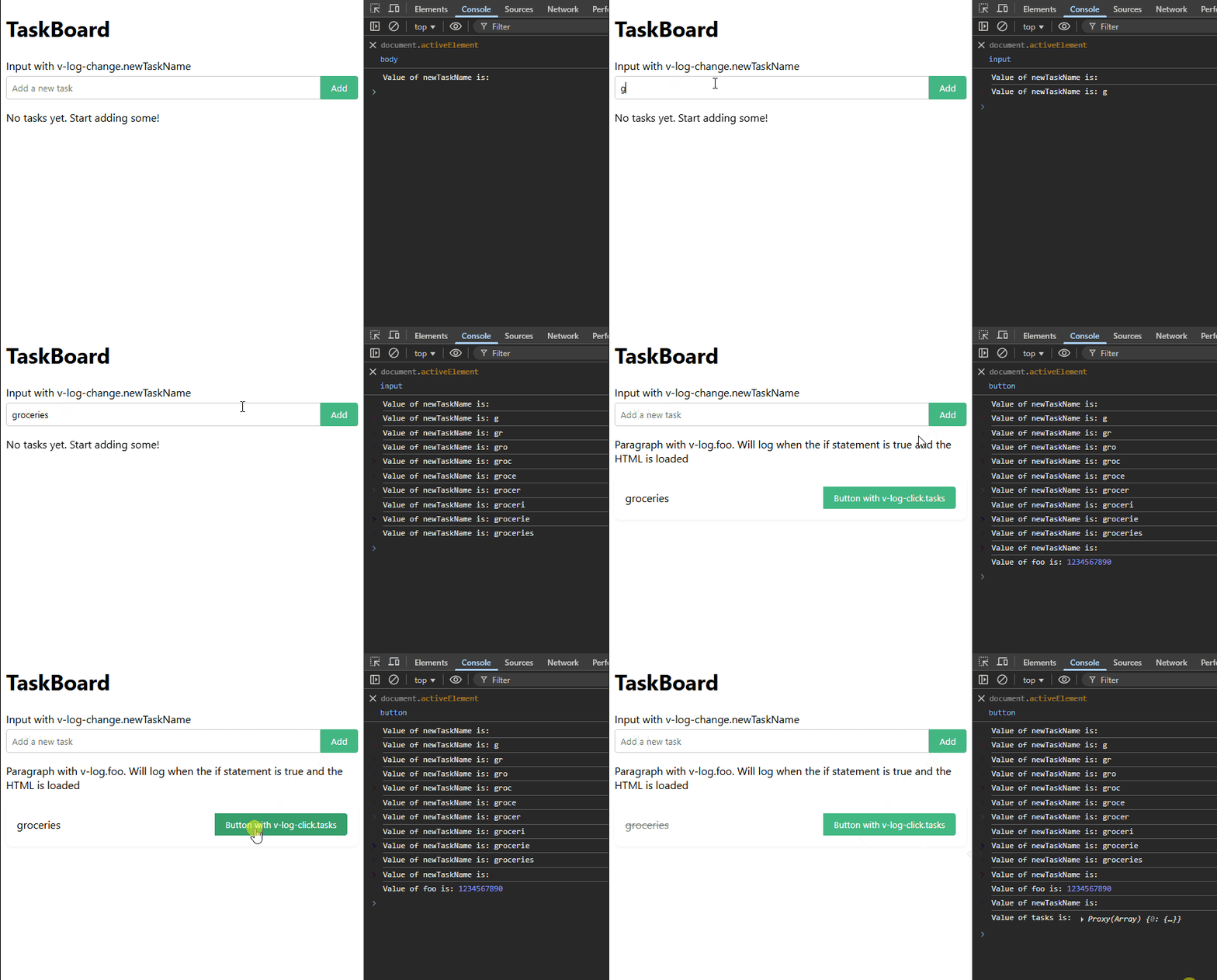
| `v-log` | Logs all reactive and computed properties in the component when the element is loaded in the DOM. |
| `v-log.propertyName` | Logs the specified reactive property or computed value when the element is loaded in the DOM. |
| `v-log-change` | Logs all reactive and computed properties whenever a value within the component changes. |
| `v-log-change.propertyName` | Logs the specified property or computed value when its value changes. |
| `v-log-click` | Logs all reactive and computed properties in the component when the element is clicked. |
| `v-log-click.propertyName` | Logs the specified property or computed value when the element is clicked. |
## Installation
```bash
npm install vue-log-arsenal
```
Register it in your Vue 3 project:
```javascript
import { createApp } from 'vue';
import App from './App.vue';
import VueLogArsenal from 'vue-log-arsenal';
createApp(App)
.use(VueLogArsenal)
.mount('#app');
```
## Examples
### 1. `v-log-change`
You have a `totalPrice` property that updates whenever items are added or removed from an input in a form:
```vue
{{ totalPrice }}
```
Now, every time totalPrice updates — whether from adding an item, removing one, or applying a discount — the new value is logged so you can spot the exact moment when something goes wrong.
### 2. `v-log` with `v-if`
Only log the value of `selectedUser` when a certain condition becomes true.
For example, you might only care about the data when a user has admin privileges:
```vue
{{ selectedUser.name }}
```
The log will only appear when isAdmin is true and this block is rendered, helping you avoid noisy logs and focus on the states that matter.
### 3. `v-log-click`
Log the entire state of a component right before performing an action, such as an AJAX call:
```vue
```
When clicked, this logs all reactive and computed properties in the component so you can confirm everything is correct before proceeding.
## Demo
## Contributing
This project is currently not open to external contributions.
Bug reports and feature requests are welcome via the [GitHub issues page](https://github.com/MvdZon/Vue3-log-arsenal/issues).
## License
Released under **CC0-1.0** (public domain). No attribution required.
You may use this in open source or proprietary software, including commercial projects.
## Links
- [GitHub](https://github.com/MvdZon/Vue3-log-arsenal)
- [npm](https://www.npmjs.com/package/vue-log-arsenal)