#  GIFs for GitHub
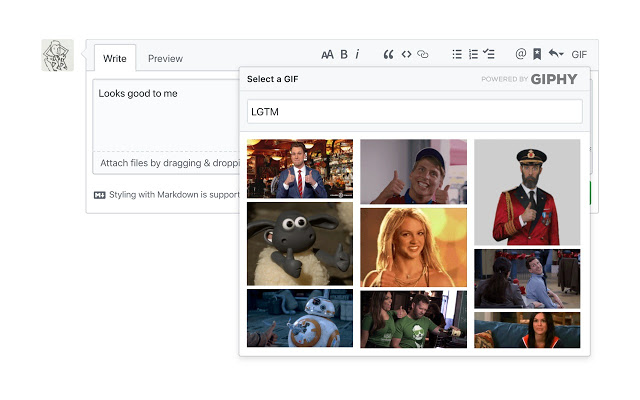
A Browser extension that makes it easy to search GIPHY and add a GIF into any GitHub comment box.
GIFs for GitHub
A Browser extension that makes it easy to search GIPHY and add a GIF into any GitHub comment box.
 ---
## Install
[link-chrome]: https://chrome.google.com/webstore/detail/gifs-for-github/dkgjnpbipbdaoaadbdhpiokaemhlphep 'Version published on Chrome Web Store'
[link-firefox]: https://addons.mozilla.org/en-US/firefox/addon/gifs-for-github/ 'Version published on Mozilla Add-ons'
[
---
## Install
[link-chrome]: https://chrome.google.com/webstore/detail/gifs-for-github/dkgjnpbipbdaoaadbdhpiokaemhlphep 'Version published on Chrome Web Store'
[link-firefox]: https://addons.mozilla.org/en-US/firefox/addon/gifs-for-github/ 'Version published on Mozilla Add-ons'
[ ][link-chrome] [
 ][link-chrome]
[
][link-chrome]
[ ][link-firefox] [
 ][link-firefox]
---
## Contributing
```sh
git clone https://github.com/N1ck/gifs-for-github
cd gifs-for-github
pnpm install
```
```sh
pnpm run watch # Listen to file changes and automatically rebuild
```
### Debug Mode
When developing, you can enable debug mode by setting the DEBUG environment variable:
```bash
DEBUG=true npm run build
```
This will output helpful logs prefixed with 🎨 when using the extension.
Once built, load it in the browser of your choice with [web-ext](https://github.com/mozilla/web-ext):
```sh
npx web-ext run --target=chromium # Open extension in Chrome
```
```sh
npx web-ext run # Open extension in Firefox
```
Or you can [load it manually in Chrome](https://www.smashingmagazine.com/2017/04/browser-extension-edge-chrome-firefox-opera-brave-vivaldi/#google-chrome-opera-vivaldi) or [Firefox](https://www.smashingmagazine.com/2017/04/browser-extension-edge-chrome-firefox-opera-brave-vivaldi/#mozilla-firefox).
---
If you want to read about why I built this extension, and some of the challenges I faced, check out my [blog post][link-blogpost].
[link-cws]: https://chrome.google.com/webstore/detail/gifs-for-github/dkgjnpbipbdaoaadbdhpiokaemhlphep?hl=en 'Version published on Chrome Web Store'
[link-amo]: https://addons.mozilla.org/en-US/firefox/addon/gifs-for-github/ 'Version published on Mozilla Add-ons'
[link-blogpost]: https://medium.com/we-build-vend/helping-engineers-gif-their-best-life-challenges-faced-when-building-the-gifs-for-github-f0cac9dd8fa5 "Helping Engineers GIF Their Best Life: Challenges Faced When Building the 'GIFs for GitHub' Extension"
][link-firefox]
---
## Contributing
```sh
git clone https://github.com/N1ck/gifs-for-github
cd gifs-for-github
pnpm install
```
```sh
pnpm run watch # Listen to file changes and automatically rebuild
```
### Debug Mode
When developing, you can enable debug mode by setting the DEBUG environment variable:
```bash
DEBUG=true npm run build
```
This will output helpful logs prefixed with 🎨 when using the extension.
Once built, load it in the browser of your choice with [web-ext](https://github.com/mozilla/web-ext):
```sh
npx web-ext run --target=chromium # Open extension in Chrome
```
```sh
npx web-ext run # Open extension in Firefox
```
Or you can [load it manually in Chrome](https://www.smashingmagazine.com/2017/04/browser-extension-edge-chrome-firefox-opera-brave-vivaldi/#google-chrome-opera-vivaldi) or [Firefox](https://www.smashingmagazine.com/2017/04/browser-extension-edge-chrome-firefox-opera-brave-vivaldi/#mozilla-firefox).
---
If you want to read about why I built this extension, and some of the challenges I faced, check out my [blog post][link-blogpost].
[link-cws]: https://chrome.google.com/webstore/detail/gifs-for-github/dkgjnpbipbdaoaadbdhpiokaemhlphep?hl=en 'Version published on Chrome Web Store'
[link-amo]: https://addons.mozilla.org/en-US/firefox/addon/gifs-for-github/ 'Version published on Mozilla Add-ons'
[link-blogpost]: https://medium.com/we-build-vend/helping-engineers-gif-their-best-life-challenges-faced-when-building-the-gifs-for-github-f0cac9dd8fa5 "Helping Engineers GIF Their Best Life: Challenges Faced When Building the 'GIFs for GitHub' Extension"