# Audio2Face-3D Training Framework
**Resources:**
- Audio2Face-3D Example Dataset: https://huggingface.co/datasets/nvidia/Audio2Face-3D-Dataset-v1.0.0-claire
- Maya-ACE plugin: https://github.com/NVIDIA/Maya-ACE
- Research Paper: https://arxiv.org/abs/2508.16401
## Audio2Face-3D
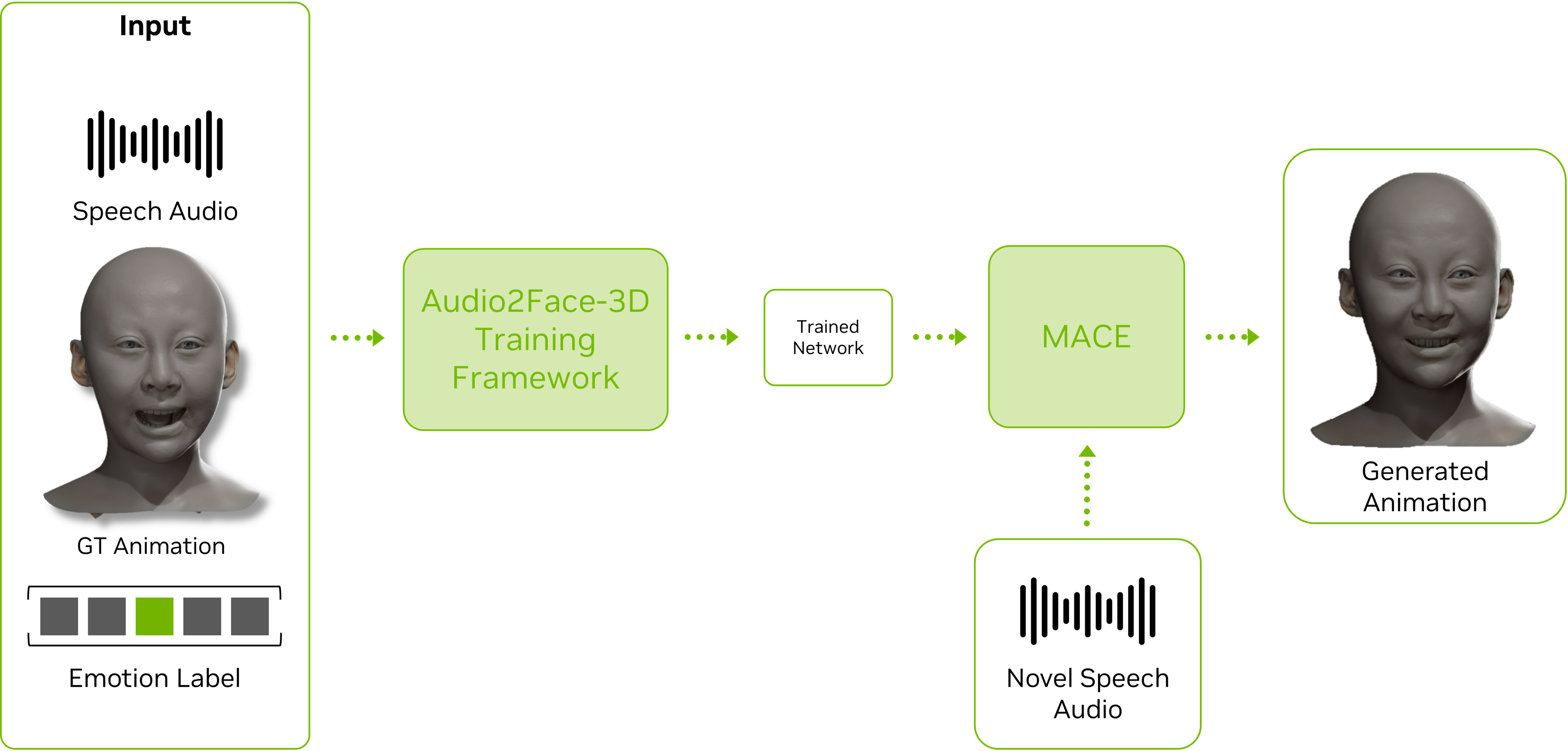
**Audio2Face-3D** generates high-fidelity facial animations from an audio source. The technology is capable of producing detailed and realistic articulation, including precise motion for the skin, jaw, tongue, and eyes, to achieve accurate lip-sync and lifelike character expression, including emotions.
**Audio2Face-3D Training Framework** is the core tool for training high-fidelity facial animation models within the Audio2Face-3D ecosystem. It supports both NVIDIA's prebuilt models and custom models tailored to specific characters, languages, or artistic styles. Training these models requires extensive datasets of synchronized facial animation and corresponding audio, which the framework is designed to leverage efficiently.
 ## Documentation Navigation
### This README
- **[Prerequisites](#prerequisites)**
- **[Quick Start](#quick-start)**
- **[Citation](#citation)**
### Detailed Guides
- **[Introduction](docs/a2f_introduction.md)**
- [Audio2Face-3D (A2F) Models and Integrations](docs/a2f_introduction.md/#audio2face-3d-models-and-integrations)
- [Training Framework High Level Overview](docs/a2f_introduction.md/#training-framework--high-level-overview)
- **[Preparing Animation Data for Training](docs/preparing_animation_data.md)**
- [What is a Training Dataset?](docs/preparing_animation_data.md/#what-is-a-training-dataset)
- [Claire Sample Dataset | Step by Step Data Preparation](docs/preparing_animation_data.md/#claire-sample-dataset--step-by-step-data-preparation)
- **[Training Framework](docs/training_framework.md)**
- [Framework Architecture](docs/training_framework.md/#framework-architecture)
- [Using the Framework](docs/training_framework.md/#using-the-framework)
- [Running the Framework](docs/training_framework.md/#running-the-framework)
- [Multi-Actor Support](docs/training_framework.md/#multi-actor-support)
- [VSCode Development and Debugging](docs/training_framework.md/#vscode-development-and-debugging--advanced)
- [Beginner's Guide: Detailed Setup for WSL2/Ubuntu](docs/training_framework.md/#detailed-setup-under-windows-wsl2--ubuntu--beginners-guide)
- **[Configurations Guide](docs/config_details.md)**
- [Dataset](docs/config_details.md/#config_datasetpy)
- [Preprocessing](docs/config_details.md/#config_preprocpy)
- [Training](docs/config_details.md/#config_trainpy)
- [Inference](docs/config_details.md/#config_inferencepy)
- **[Using Trained Models in Maya-ACE 2.0](docs/using_maya_ace.md)**
- [Install the plugin](docs/using_maya_ace.md/#install-the-plugin)
- [Load a Model made in the Training Framework](docs/using_maya_ace.md/#load-a-model-made-in-the-training-framework)
- [Configure the Audio2Emotion Model](docs/using_maya_ace.md/#configure-the-audio2emotion-model)
## Prerequisites
### System Requirements
1. **Operating System**: Linux or WSL2 (Ubuntu 22.04 recommended)
- [How to install WSL2 on Windows](https://learn.microsoft.com/en-us/windows/wsl/install)
2. **Storage**: ~1 GB of free space for framework artifacts and the example dataset
3. **Hardware**: CUDA-compatible GPU with at least 6 GB VRAM
4. **NVIDIA Driver**: Use the following supported range:
- Linux: 575.57 - 579.x
- Windows/WSL2: 576.57 - 579.x
- Check your current version: `nvidia-smi`
5. **Docker**: Required for running the framework
- [How to install Docker](https://docs.docker.com/engine/install/ubuntu/#install-using-the-convenience-script)
6. **NVIDIA Docker**: Required for GPU acceleration
- [Installing with Apt](https://docs.nvidia.com/datacenter/cloud-native/container-toolkit/latest/install-guide.html#installing-with-apt)
- [Configuring Docker](https://docs.nvidia.com/datacenter/cloud-native/container-toolkit/latest/install-guide.html#configuring-docker)
## Quick Start
This quick start guide provides a comprehensive walkthrough of the Audio2Face-3D Training Framework.
Using a sample dataset available from Hugging Face, you will learn the complete end-to-end workflow, from initial setup to testing a newly trained model.
In this guide, you will learn to:
- Set up the Training Framework environment.
- Train a new model using the sample data.
- Deploy the trained model into a usable format.
- Test the new model by running an inference.
**Note**: If you are not familiar with Linux and are working on a Windows system, please refer to the [Detailed Setup Under Windows (WSL2 / Ubuntu)](docs/training_framework.md/#detailed-setup-under-windows-wsl2--ubuntu--beginners-guide) section in the [Training Framework](docs/training_framework.md) page.
### 1. Clone Repository
Clone the Audio2Face-3D Training Framework repository:
```bash
# Create audio2face directory and navigate to it
mkdir -p ~/audio2face && cd ~/audio2face
# Clone the repository
git clone https://github.com/NVIDIA/Audio2Face-3D-Training-Framework.git
```
### 2. Setup Workspace
Create new directories to hold datasets and training files:
```bash
# Create datasets and workspace directories
mkdir -p ~/audio2face/datasets
mkdir -p ~/audio2face/workspace
```
### 3. Configure Environment
```bash
# Navigate to the repository directory
cd ~/audio2face/Audio2Face-3D-Training-Framework
# Copy environment file template
cp .env.example .env
```
Edit the `.env` file with your actual paths (use absolute paths):
```bash
A2F_DATASETS_ROOT="/home//audio2face/datasets"
A2F_WORKSPACE_ROOT="/home//audio2face/workspace"
```
### 4. Download Example Dataset
We provide the Audio2Face-3D Example Dataset as part of this framework.
1. **Download the dataset**:
- You can download the Claire dataset from: [Claire Dataset on Hugging Face](https://huggingface.co/datasets/nvidia/Audio2Face-3D-Dataset-v1.0.0-claire/tree/main)
- It needs to be placed under the `A2F_DATASETS_ROOT` directory as defined in the environment
- **Authentication**: You may need to authenticate with Hugging Face to access the dataset:
- Using Tokens: [Hugging Face Tokens](https://huggingface.co/docs/hub/security-tokens)
- Using SSH Key: [Hugging Face SSH Keys](https://huggingface.co/settings/keys)
- **Clone the dataset using the following commands**:
```bash
# Navigate to the datasets directory
cd ~/audio2face/datasets
# Make sure git LFS is installed
sudo apt-get install -y git-lfs
git lfs install
# Clone Claire dataset in the datasets directory using https
git clone https://huggingface.co/datasets/nvidia/Audio2Face-3D-Dataset-v1.0.0-claire
# Or alternatively clone Claire dataset in the datasets directory using SSH
git clone git@hf.co:datasets/nvidia/Audio2Face-3D-Dataset-v1.0.0-claire
```
2. **Verify the dataset structure**:
- After download, your dataset directory should look like this:
```
/home//audio2face/datasets/
└── Audio2Face-3D-Dataset-v1.0.0-claire/
├── data/
│ └── claire/
│ ├── audio/
│ ├── cache/
│ └── ...
├── docs/
└── ...
```
### 5. Setup Permissions and Build Docker
```bash
# Navigate to the repository directory
cd ~/audio2face/Audio2Face-3D-Training-Framework
# Add executable permissions
chmod +x docker/*.sh
# Build Docker container
./docker/build_docker.sh
```
**Note**: In the next steps, all `python run_*.py` commands automatically execute inside Docker containers with pre-configured dependencies.
### 6. Run Example Training
**Python Note**: In Ubuntu, the `python` command can be `python3`. You'll get a warning with the correct spelling for your installation.
#### Step 1: Preprocess the Dataset
```bash
# Run preprocessing with example config
python run_preproc.py example-diffusion claire
```
Once this process is completed, the log will print the Preproc Run Name Full, like this:
## Documentation Navigation
### This README
- **[Prerequisites](#prerequisites)**
- **[Quick Start](#quick-start)**
- **[Citation](#citation)**
### Detailed Guides
- **[Introduction](docs/a2f_introduction.md)**
- [Audio2Face-3D (A2F) Models and Integrations](docs/a2f_introduction.md/#audio2face-3d-models-and-integrations)
- [Training Framework High Level Overview](docs/a2f_introduction.md/#training-framework--high-level-overview)
- **[Preparing Animation Data for Training](docs/preparing_animation_data.md)**
- [What is a Training Dataset?](docs/preparing_animation_data.md/#what-is-a-training-dataset)
- [Claire Sample Dataset | Step by Step Data Preparation](docs/preparing_animation_data.md/#claire-sample-dataset--step-by-step-data-preparation)
- **[Training Framework](docs/training_framework.md)**
- [Framework Architecture](docs/training_framework.md/#framework-architecture)
- [Using the Framework](docs/training_framework.md/#using-the-framework)
- [Running the Framework](docs/training_framework.md/#running-the-framework)
- [Multi-Actor Support](docs/training_framework.md/#multi-actor-support)
- [VSCode Development and Debugging](docs/training_framework.md/#vscode-development-and-debugging--advanced)
- [Beginner's Guide: Detailed Setup for WSL2/Ubuntu](docs/training_framework.md/#detailed-setup-under-windows-wsl2--ubuntu--beginners-guide)
- **[Configurations Guide](docs/config_details.md)**
- [Dataset](docs/config_details.md/#config_datasetpy)
- [Preprocessing](docs/config_details.md/#config_preprocpy)
- [Training](docs/config_details.md/#config_trainpy)
- [Inference](docs/config_details.md/#config_inferencepy)
- **[Using Trained Models in Maya-ACE 2.0](docs/using_maya_ace.md)**
- [Install the plugin](docs/using_maya_ace.md/#install-the-plugin)
- [Load a Model made in the Training Framework](docs/using_maya_ace.md/#load-a-model-made-in-the-training-framework)
- [Configure the Audio2Emotion Model](docs/using_maya_ace.md/#configure-the-audio2emotion-model)
## Prerequisites
### System Requirements
1. **Operating System**: Linux or WSL2 (Ubuntu 22.04 recommended)
- [How to install WSL2 on Windows](https://learn.microsoft.com/en-us/windows/wsl/install)
2. **Storage**: ~1 GB of free space for framework artifacts and the example dataset
3. **Hardware**: CUDA-compatible GPU with at least 6 GB VRAM
4. **NVIDIA Driver**: Use the following supported range:
- Linux: 575.57 - 579.x
- Windows/WSL2: 576.57 - 579.x
- Check your current version: `nvidia-smi`
5. **Docker**: Required for running the framework
- [How to install Docker](https://docs.docker.com/engine/install/ubuntu/#install-using-the-convenience-script)
6. **NVIDIA Docker**: Required for GPU acceleration
- [Installing with Apt](https://docs.nvidia.com/datacenter/cloud-native/container-toolkit/latest/install-guide.html#installing-with-apt)
- [Configuring Docker](https://docs.nvidia.com/datacenter/cloud-native/container-toolkit/latest/install-guide.html#configuring-docker)
## Quick Start
This quick start guide provides a comprehensive walkthrough of the Audio2Face-3D Training Framework.
Using a sample dataset available from Hugging Face, you will learn the complete end-to-end workflow, from initial setup to testing a newly trained model.
In this guide, you will learn to:
- Set up the Training Framework environment.
- Train a new model using the sample data.
- Deploy the trained model into a usable format.
- Test the new model by running an inference.
**Note**: If you are not familiar with Linux and are working on a Windows system, please refer to the [Detailed Setup Under Windows (WSL2 / Ubuntu)](docs/training_framework.md/#detailed-setup-under-windows-wsl2--ubuntu--beginners-guide) section in the [Training Framework](docs/training_framework.md) page.
### 1. Clone Repository
Clone the Audio2Face-3D Training Framework repository:
```bash
# Create audio2face directory and navigate to it
mkdir -p ~/audio2face && cd ~/audio2face
# Clone the repository
git clone https://github.com/NVIDIA/Audio2Face-3D-Training-Framework.git
```
### 2. Setup Workspace
Create new directories to hold datasets and training files:
```bash
# Create datasets and workspace directories
mkdir -p ~/audio2face/datasets
mkdir -p ~/audio2face/workspace
```
### 3. Configure Environment
```bash
# Navigate to the repository directory
cd ~/audio2face/Audio2Face-3D-Training-Framework
# Copy environment file template
cp .env.example .env
```
Edit the `.env` file with your actual paths (use absolute paths):
```bash
A2F_DATASETS_ROOT="/home//audio2face/datasets"
A2F_WORKSPACE_ROOT="/home//audio2face/workspace"
```
### 4. Download Example Dataset
We provide the Audio2Face-3D Example Dataset as part of this framework.
1. **Download the dataset**:
- You can download the Claire dataset from: [Claire Dataset on Hugging Face](https://huggingface.co/datasets/nvidia/Audio2Face-3D-Dataset-v1.0.0-claire/tree/main)
- It needs to be placed under the `A2F_DATASETS_ROOT` directory as defined in the environment
- **Authentication**: You may need to authenticate with Hugging Face to access the dataset:
- Using Tokens: [Hugging Face Tokens](https://huggingface.co/docs/hub/security-tokens)
- Using SSH Key: [Hugging Face SSH Keys](https://huggingface.co/settings/keys)
- **Clone the dataset using the following commands**:
```bash
# Navigate to the datasets directory
cd ~/audio2face/datasets
# Make sure git LFS is installed
sudo apt-get install -y git-lfs
git lfs install
# Clone Claire dataset in the datasets directory using https
git clone https://huggingface.co/datasets/nvidia/Audio2Face-3D-Dataset-v1.0.0-claire
# Or alternatively clone Claire dataset in the datasets directory using SSH
git clone git@hf.co:datasets/nvidia/Audio2Face-3D-Dataset-v1.0.0-claire
```
2. **Verify the dataset structure**:
- After download, your dataset directory should look like this:
```
/home//audio2face/datasets/
└── Audio2Face-3D-Dataset-v1.0.0-claire/
├── data/
│ └── claire/
│ ├── audio/
│ ├── cache/
│ └── ...
├── docs/
└── ...
```
### 5. Setup Permissions and Build Docker
```bash
# Navigate to the repository directory
cd ~/audio2face/Audio2Face-3D-Training-Framework
# Add executable permissions
chmod +x docker/*.sh
# Build Docker container
./docker/build_docker.sh
```
**Note**: In the next steps, all `python run_*.py` commands automatically execute inside Docker containers with pre-configured dependencies.
### 6. Run Example Training
**Python Note**: In Ubuntu, the `python` command can be `python3`. You'll get a warning with the correct spelling for your installation.
#### Step 1: Preprocess the Dataset
```bash
# Run preprocessing with example config
python run_preproc.py example-diffusion claire
```
Once this process is completed, the log will print the Preproc Run Name Full, like this:
 This name is important for future steps. It needs to be added to the `config_train.py` file located in the `configs/example-diffusion` directory. In this file, you need to locate the following section:
```python
PREPROC_RUN_NAME_FULL = {
"claire": "XXXXXX_XXXXXX_example",
}
```
The value needs to be updated with the name that was provided in the shell log from the preproc script. In the example above, it would be updated as follows:
```python
PREPROC_RUN_NAME_FULL = {
"claire": "250909_135508_example",
}
```
**Note**: A new sub-directory is also created in the `workspace/output_preproc` directory containing the artifacts of the preproc process.
#### Step 2: Train
```bash
# Run training example
python run_train.py example-diffusion
```
**Note**: The training process can take some time (between 30 and 40 minutes depending on your hardware). The training log provides guidance on how much time is needed to complete the training.
Again, once this process is completed, a new sub-directory will be created in the `workspace/output_train` directory. The name of that directory will be reflected in the shell log. It will look like this:
This name is important for future steps. It needs to be added to the `config_train.py` file located in the `configs/example-diffusion` directory. In this file, you need to locate the following section:
```python
PREPROC_RUN_NAME_FULL = {
"claire": "XXXXXX_XXXXXX_example",
}
```
The value needs to be updated with the name that was provided in the shell log from the preproc script. In the example above, it would be updated as follows:
```python
PREPROC_RUN_NAME_FULL = {
"claire": "250909_135508_example",
}
```
**Note**: A new sub-directory is also created in the `workspace/output_preproc` directory containing the artifacts of the preproc process.
#### Step 2: Train
```bash
# Run training example
python run_train.py example-diffusion
```
**Note**: The training process can take some time (between 30 and 40 minutes depending on your hardware). The training log provides guidance on how much time is needed to complete the training.
Again, once this process is completed, a new sub-directory will be created in the `workspace/output_train` directory. The name of that directory will be reflected in the shell log. It will look like this:
 You can use this name as `` in next step.
#### Step 3: Deploy
```bash
# run the deploy example
python run_deploy.py example-diffusion
```
This process creates a new sub-directory in the `workspace/output_deploy` directory. The name of that directory will be reflected in the shell log.
This new directory contains all the files required to use the trained model for inference.
### 7. Model Validation and Testing
Once training is complete, validate your custom model using one of the following methods:
**Option 1: Python Inference:**
Generate animations in .npy format or Maya cache (.mc) format using the built-in inference engine:
```bash
python run_inference.py example-diffusion
```
**Option 2: Maya-ACE Integration:**
Deploy and test your model in a visual production environment using Maya and the Maya-ACE plugin.
The Maya-ACE plugin enables real-time visualization of animation inference. It allows you to see the output from a model directly on a character within the Autodesk Maya 3D environment, providing immediate visual feedback for testing and validation
- **Documentation**: [Using Trained Models in Maya-ACE 2.0](docs/using_maya_ace.md)
- **Reference Scene**: `Audio2Face-3D-Dataset-v1.0.0-claire/data/claire/geom/fullface/a2f_maya_scene.mb`
## Citation
If you use Audio2Face-3D Training Framework in your research, please cite:
```bibtex
@misc{nvidia2025audio2face3d,
title={Audio2Face-3D: Audio-driven Realistic Facial Animation For Digital Avatars},
author={Chaeyeon Chung and Ilya Fedorov and Michael Huang and Aleksey Karmanov and Dmitry Korobchenko and Roger Ribera and Yeongho Seol},
year={2025},
eprint={2508.16401},
archivePrefix={arXiv},
primaryClass={cs.GR},
url={https://arxiv.org/abs/2508.16401},
note={Authors listed in alphabetical order}
}
```
***
You can use this name as `` in next step.
#### Step 3: Deploy
```bash
# run the deploy example
python run_deploy.py example-diffusion
```
This process creates a new sub-directory in the `workspace/output_deploy` directory. The name of that directory will be reflected in the shell log.
This new directory contains all the files required to use the trained model for inference.
### 7. Model Validation and Testing
Once training is complete, validate your custom model using one of the following methods:
**Option 1: Python Inference:**
Generate animations in .npy format or Maya cache (.mc) format using the built-in inference engine:
```bash
python run_inference.py example-diffusion
```
**Option 2: Maya-ACE Integration:**
Deploy and test your model in a visual production environment using Maya and the Maya-ACE plugin.
The Maya-ACE plugin enables real-time visualization of animation inference. It allows you to see the output from a model directly on a character within the Autodesk Maya 3D environment, providing immediate visual feedback for testing and validation
- **Documentation**: [Using Trained Models in Maya-ACE 2.0](docs/using_maya_ace.md)
- **Reference Scene**: `Audio2Face-3D-Dataset-v1.0.0-claire/data/claire/geom/fullface/a2f_maya_scene.mb`
## Citation
If you use Audio2Face-3D Training Framework in your research, please cite:
```bibtex
@misc{nvidia2025audio2face3d,
title={Audio2Face-3D: Audio-driven Realistic Facial Animation For Digital Avatars},
author={Chaeyeon Chung and Ilya Fedorov and Michael Huang and Aleksey Karmanov and Dmitry Korobchenko and Roger Ribera and Yeongho Seol},
year={2025},
eprint={2508.16401},
archivePrefix={arXiv},
primaryClass={cs.GR},
url={https://arxiv.org/abs/2508.16401},
note={Authors listed in alphabetical order}
}
```
***