# Topograph in Kubernetes
Topograph is a tool designed to enhance scheduling decisions in Kubernetes clusters by leveraging network topology information.
## Overview
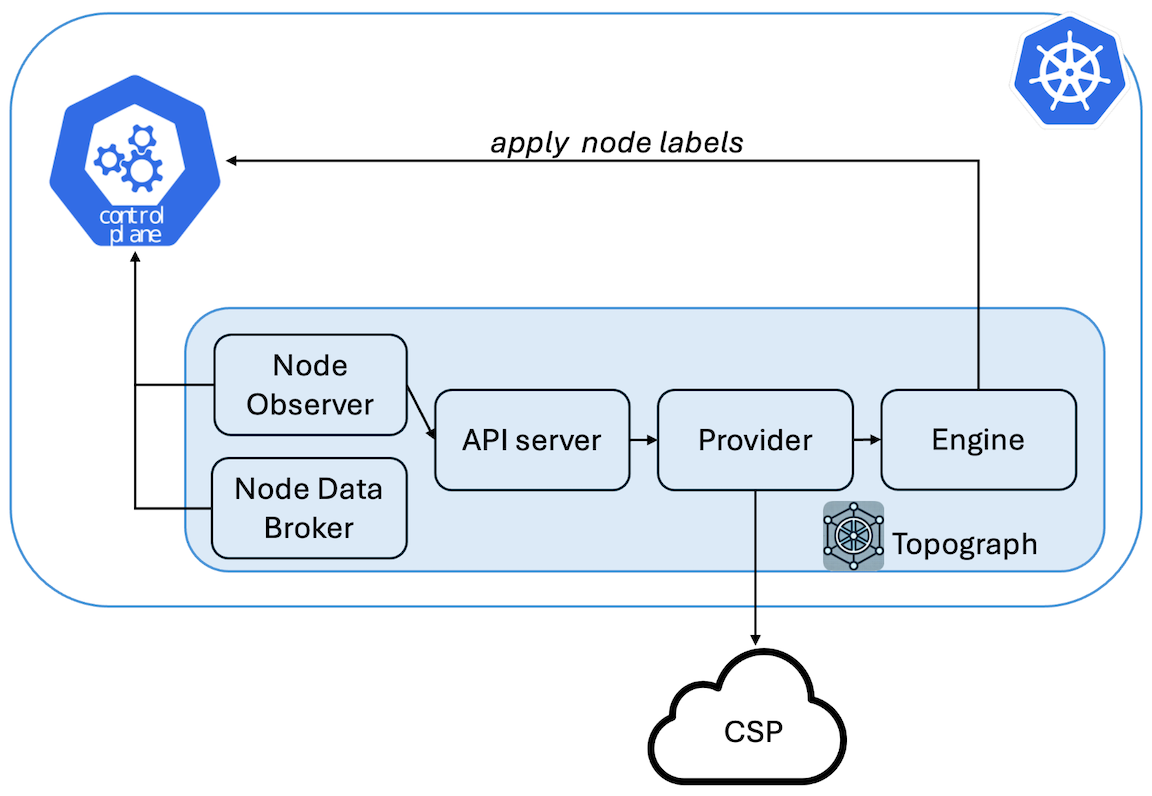
Topograph maps both the multi-tier network hierarchy and accelerated network domains (such as NVLink) using node labels.
Most cloud providers expose three levels of network topology through their APIs. To provide a unified view, Topograph assigns four labels to each node:
* `network.topology.nvidia.com/accelerator`: Identifies high-speed interconnect domains, such as NVLink. If the node already has `nvidia.com/gpu.clique`, Topograph leaves the accelerator label unset and uses the GPU Operator label as the accelerator-domain signal.
* `network.topology.nvidia.com/leaf`: Indicates the switches directly connected to compute nodes.
* `network.topology.nvidia.com/spine`: Represents the next tier of switches above the leaf level.
* `network.topology.nvidia.com/core`: Denotes the top-level switches.
The names of these node labels are configurable via the [Helm chart](https://github.com/NVIDIA/topograph/tree/main/charts/topograph).
For example, if a node belongs to NVLink domain `nvl1` and connects to switch `s1`, which connects to switch `s2`, and then to switch `s3`, Topograph will apply the following labels to the node:
```
network.topology.nvidia.com/accelerator: nvl1
network.topology.nvidia.com/leaf: s1
network.topology.nvidia.com/spine: s2
network.topology.nvidia.com/core: s3
```
### Relationship to the kubelet Topology Manager
Kubernetes includes a [Topology Manager](https://kubernetes.io/docs/tasks/administer-cluster/topology-manager/) (GA since Kubernetes 1.27) that aligns CPU, GPU, and NIC allocations to the same NUMA domain *within a single node*, reducing memory access latency for a Pod's containers. These two features are complementary and address different scopes:
| | Topograph (`k8s` engine) | kubelet Topology Manager |
|---|---|---|
| **Scope** | Inter-node (cluster-wide) | Intra-node (single node) |
| **What it does** | Discovers the physical network fabric and publishes it as node labels | Aligns CPU/device allocations to the same NUMA domain within a node |
| **Consumed by** | Topology-aware schedulers (KAI Scheduler, Kueue TAS) for multi-node placement | The kubelet itself, when binding containers to hardware resources |
Both can be active simultaneously. Topology Manager optimizes resource allocation within a node; Topograph labels tell the scheduler which nodes belong together on the network.
```mermaid
graph TB
subgraph topo_scope["Topograph — inter-node scope"]
fabric["Physical Network Fabric\n(NVLink domains · IB/Ethernet switches)"]
topograph["Topograph\n(queries CSP/fabric APIs)"]
labels["Kubernetes Node Labels\n(network.topology.nvidia.com/*)"]
scheduler["Topology-Aware Scheduler\n(KAI Scheduler · Kueue TAS)"]
fabric --> topograph --> labels --> scheduler
end
subgraph kubelet_scope["kubelet — intra-node scope"]
tm["Topology Manager\n(NUMA alignment within a node)"]
end
scheduler -. "schedules Pods onto nodes;\nTopology Manager handles\nresource alignment inside each node" .-> tm
```
### Relationship to `nvidia.com/gpu.clique`
The GPU Operator device plugin sets `nvidia.com/gpu.clique` on nodes with Multi-Node NVLink (MNNVL) GPUs (e.g., GB200 NVL72). This label identifies the NVLink clique a node belongs to and can be used as a topology key for Pod placement.
Topograph treats `nvidia.com/gpu.clique` as the authoritative accelerator-domain node label when it is already present:
- On **MNNVL systems**: if `nvidia.com/gpu.clique` exists on a node, the k8s engine does not write Topograph's configured accelerator label for that node. It still writes `leaf`, `spine`, and `core` labels from the provider topology.
- On **non-MNNVL systems** (e.g., DGX B200, B300): `nvidia.com/gpu.clique` is not set (see the [node labels reference](../reference/node-labels.md) for the Fabric Manager init and `GPU_FABRIC_STATE_COMPLETED` details). Topograph writes the configured accelerator label when the selected provider supplies an accelerator domain.
In addition to NVLink domain membership, Topograph provides the IB switch hierarchy (`leaf`, `spine`, `core`) — giving schedulers both dimensions of topology simultaneously.
For `infiniband-k8s`, operators can set `global.provider.params.useGpuCliqueLabel: true` so the provider reads the GPU Operator's existing clique label instead of collecting the same value through a `nvidia-smi` exec in the GPU Operator device-plugin DaemonSet.
## Use of Topograph
While there is currently no fully network-aware scheduler capable of optimally placing groups of pods based on network considerations, Topograph serves as a stepping stone toward developing such a scheduler.
Topograph can be used in conjunction with Kubernetes' existing PodAffinity feature.
This combination enhances pod distribution based on network topology information.
The following excerpt describes a Kubernetes object specification for a cluster with a three-tier network switch hierarchy. The goal is to improve inter-pod communication by assigning pods to nodes within
closer network proximity.
```yaml
affinity:
podAffinity:
preferredDuringSchedulingIgnoredDuringExecution:
- weight: 70
podAffinityTerm:
labelSelector:
matchExpressions:
- key: app
operator: In
values:
- myapp
topologyKey: network.topology.nvidia.com/spine
- weight: 90
podAffinityTerm:
labelSelector:
matchExpressions:
- key: app
operator: In
values:
- myapp
topologyKey: network.topology.nvidia.com/leaf
```
Pods are prioritized to be placed on nodes sharing the label `network.topology.nvidia.com/leaf`.
These nodes are connected to the same network switch, ensuring the lowest latency for communication.
Nodes with the label `network.topology.nvidia.com/spine` are next in priority.
Pods on these nodes will still be relatively close, but with slightly higher latency.
In the three-tier network, all nodes will share the same `network.topology.nvidia.com/core` label,
so it doesn’t need to be included in pod affinity settings.
Since the default Kubernetes scheduler places one pod at a time, the placement may vary depending on where
the first pod is placed. As a result, each scheduling decision might not be globally optimal.
However, by aligning pod placement with network-aware labels, we can significantly improve inter-pod
communication efficiency within the limitations of the scheduler.
### Mixed Workload Considerations
Topology labels are most valuable when nodes in a topology domain are available for topology-sensitive workloads together. Mixed clusters running both distributed training and topology-insensitive workloads (single-GPU inference, CPU services) present a scheduling challenge: topology-insensitive Pods will consume nodes that could otherwise form complete leaf-switch groups or NVLink domains, forcing training jobs to communicate across additional hops. Schedulers that honor topology labels — such as [KAI Scheduler](https://github.com/NVIDIA/KAI-Scheduler) and Kueue with Topology-Aware Scheduling — can minimize this fragmentation, but only when topology information is available. Topograph's labels are a prerequisite for making these decisions.
## Configuration
Topograph is deployed as a standard Kubernetes application using a [Helm chart](https://github.com/NVIDIA/topograph/tree/main/charts/topograph).
Topograph is configured using a configuration file stored in a ConfigMap and mounted to the Topograph container at `/etc/topograph/topograph-config.yaml`.
In addition, when sending a topology request, the request payload includes additional parameters.
The parameters for the configuration file and topology request are defined in the `global` section of the Helm values file, as shown below:
```yaml
global:
# provider – name of the cloud provider or on-prem environment.
# Supported values: "aws", "gcp", "oci", "nebius", "nscale", "netq", "infiniband-k8s".
provider: "aws"
engine: "k8s"
```
## Exposing the Topograph API
The Topograph API server listens on port `49021` by default. The Helm chart always creates a Kubernetes `Service`; how that Service is exposed depends on your deployment topology and access requirements.
**The API server does not implement built-in authentication.** Access controls are always applied at a network layer (`NetworkPolicy`, service mesh, ingress auth, etc.). Deployments that expose the API outside the cluster must add an authentication layer in front of it.
### Access pattern matrix
| Pattern | When to use | Auth story |
|---|---|---|
| `ClusterIP` + `kubectl port-forward` (default) | Local debugging, one-off calls | kubeconfig-based — the user needs K8s API access |
| `ClusterIP` + in-cluster callers | Node Observer calling the API server; downstream schedulers consume node labels directly (no API call needed) | Cluster-internal; lock down with `NetworkPolicy` |
| `NodePort` / `LoadBalancer` | External access without Ingress — simple, but lacks hostname routing and TLS without extra setup | Expect to add an L7 auth layer in front |
| Traditional `Ingress` (`networking.k8s.io/v1`) | Most common production pattern — works with nginx-ingress, Traefik, cloud-managed ingress | Add via ingress auth annotations, oauth2-proxy, or mesh |
| Gateway API (`gateway.networking.k8s.io/v1` `HTTPRoute`) | Newer clusters running a Gateway API implementation (kgateway, Cilium, Istio, Envoy Gateway, Nginx Gateway Fabric, etc.); role-oriented separation between platform-owned `Gateway` and workload-owned `HTTPRoute`; cross-namespace routing via `ReferenceGrant` | Attach implementation-specific policy (kgateway `TrafficPolicy`, Istio `RequestAuthentication`, Envoy Gateway `SecurityPolicy`, Nginx Gateway Fabric `ClientSettingsPolicy`, Cilium L7) to the rendered `HTTPRoute` via `targetRefs` |
### Default: ClusterIP
By default, `global.service.type: ClusterIP` and `ingress.enabled: false`. This means:
- The API is not exposed outside the cluster
- In-cluster components (Node Observer, Node Data Broker) reach the API via the Service DNS name `..svc.cluster.local:49021`
- Cluster operators can reach the API via port-forward for debugging:
```bash
kubectl -n port-forward svc/-topograph 49021:49021
curl http://localhost:49021/healthz
```
The Service name is `-topograph` by default (rendered from the chart's `fullname` template); substitute your Helm release name and the namespace you deployed it into.
This is the recommended pattern for production deployments where Topograph is consumed only by in-cluster callers.
### Exposing via Ingress
Enable the bundled Ingress template:
```yaml
# values.yaml
ingress:
enabled: true
className: nginx
hosts:
- host: topograph.example.com
paths:
- path: /
pathType: Prefix
tls:
- hosts:
- topograph.example.com
secretName: topograph-tls
```
Authentication must be added at the Ingress or mesh layer. Common patterns:
- nginx-ingress `nginx.ingress.kubernetes.io/auth-url` + oauth2-proxy
- Istio `RequestAuthentication` + `AuthorizationPolicy`
- mTLS termination at the ingress with client certificate validation
### Exposing via Gateway API (`HTTPRoute`)
The chart ships an optional `HTTPRoute` template (`charts/topograph/templates/httproute.yaml`) that attaches to an existing platform-owned `Gateway`. Enable with:
```yaml
# values.yaml
gatewayAPI:
enabled: true
parentRefs:
- name: topograph-gateway
namespace: gateway-system
hostnames:
- topograph.example.com
```
**Mutually exclusive with `ingress.enabled`.** The chart refuses to render if both are enabled — deploying both routing resources against the same Service is almost always a misconfiguration.
A complete example values file is provided at `charts/topograph/values.k8s.gateway-api-example.yaml`.
**Prerequisites** (operator responsibility, outside this chart):
1. **Gateway API CRDs installed** in the cluster — standard channel `gateway.networking.k8s.io/v1`. The chart fails cleanly with a clear error if they are absent.
2. **A Gateway API implementation running** — kgateway, Cilium, Istio, Envoy Gateway, Nginx Gateway Fabric, or any other conformant implementation. The chart's `HTTPRoute` uses only standard `gateway.networking.k8s.io/v1` fields with no implementation-specific annotations, so it is portable across any of them.
3. **A `Gateway` resource provisioned** with a listener this `HTTPRoute` can attach to. The chart does **not** author `Gateway` or `GatewayClass` resources — both are platform-owned.
4. **A `ReferenceGrant`** in the Gateway's namespace if it lives in a different namespace from the release, per Gateway API cross-namespace attachment rules.
**Default routing.** If `gatewayAPI.rules` is empty, the chart emits a single catch-all rule routing all requests to the Topograph Service (which serves `/v1/generate`, `/v1/topology`, `/healthz`, and `/metrics` on a single port). Override `gatewayAPI.rules` to provide path-specific matching — for example, to expose only `/v1/`:
```yaml
gatewayAPI:
enabled: true
parentRefs:
- name: topograph-gateway
namespace: gateway-system
rules:
- matches:
- path:
type: PathPrefix
value: /v1/
backendRefs:
- name: topograph
port: 49021
```
**Authentication.** Topograph's binary has no built-in authentication on `/v1/generate`. When exposing the API externally, enforce authentication at the Gateway layer via the implementation's policy mechanism (kgateway `TrafficPolicy` + ExtAuth, Istio `RequestAuthentication`, Envoy Gateway `SecurityPolicy`, Nginx Gateway Fabric `ClientSettingsPolicy`, Cilium L7). These attach to the rendered `HTTPRoute` via `targetRefs` (or equivalent) as separate resources — no chart changes required. See `values.k8s.gateway-api-example.yaml` for a concrete kgateway example.
**GRPCRoute, TLSRoute, BackendTLSPolicy** are not supported in this chart. Topograph's API is HTTP-only; TLS termination (when needed) happens at the Gateway listener.
### Metrics endpoint
The `/metrics` endpoint exposes Prometheus metrics on the same port. Enable the bundled `ServiceMonitor` for Prometheus Operator scraping:
```yaml
serviceMonitor:
enabled: true
```
This creates a `monitoring.coreos.com/v1` `ServiceMonitor` selecting the Topograph Service.
### NetworkPolicy
The chart does not ship a `NetworkPolicy` template at this time. For clusters that enforce NetworkPolicy, a recommended starting point allows ingress to port `49021` only from the Topograph namespace and from the Prometheus scraper namespace (when `serviceMonitor.enabled: true`), and denies all other ingress. Replace `` with the namespace you deployed the chart into and `` with the namespace running your Prometheus instance:
```yaml
apiVersion: networking.k8s.io/v1
kind: NetworkPolicy
metadata:
name: topograph
namespace:
spec:
podSelector:
matchLabels:
app.kubernetes.io/name: topograph
policyTypes: [Ingress]
ingress:
- from:
- namespaceSelector:
matchLabels:
kubernetes.io/metadata.name:
ports:
- protocol: TCP
port: 49021
- from:
- namespaceSelector:
matchLabels:
kubernetes.io/metadata.name:
ports:
- protocol: TCP
port: 49021
```
Apply alongside the chart. A bundled template is under consideration.
## Validation and Testing
The Helm chart ships two layers of validation for operators.
### Schema-backed values validation at install time
`charts/topograph/values.schema.json` is a JSON Schema that Helm enforces during `helm template` and `helm install`. Misspelled provider names, wrong engine enums, out-of-range replica counts, bad pull policies, invalid service port numbers, and malformed `serviceMonitor` / `tests` / `ingress` shapes are rejected with a clear `at '/field/path': ` error before any template rendering happens. For example, `--set global.provider.name=bogus` produces:
```
Error: values don't meet the specifications of the schema(s) in the following chart(s):
topograph:
- at '/global/provider/name': value must be one of 'aws', 'oci', 'gcp', 'cw', 'infiniband-k8s', 'lambdai', 'nebius', 'nscale', 'netq', 'test'
```
The schema is deliberately narrow: per-provider credential requirements are documented in prose in `docs/providers/.md` rather than enforced in the schema, because credential field sets evolve with upstream provider changes.
### `helm test` hooks
The chart ships two `helm test` hook pods (`charts/topograph/templates/tests/`) that probe the running Topograph API via its in-cluster Service after install:
- **`test-healthz`** — `GET /healthz`; expects HTTP 200 (liveness check).
- **`test-metrics`** — `GET /metrics`; expects HTTP 200 and the `topograph_version` Prometheus metric present in the response body (topograph-specific identity check; distinguishes topograph from any other service that might return 200).
Run the suite after installation:
```bash
helm repo add topograph https://NVIDIA.github.io/topograph
helm repo update
helm install topograph topograph/topograph \
--namespace topograph --create-namespace
helm test topograph --namespace topograph
```
Expected output:
```
TEST SUITE: topograph-test-healthz
Phase: Succeeded
TEST SUITE: topograph-test-metrics
Phase: Succeeded
```
Both pods clean themselves up on success (`helm.sh/hook-delete-policy: before-hook-creation,hook-succeeded`). On failure the pods persist so operators can inspect logs via `kubectl logs -n `; the next `helm test` invocation replaces the prior pods.
**Air-gapped environments.** The test pods reuse the main topograph image by default — they invoke `busybox wget` from the Alpine-based `ghcr.io/nvidia/topograph` image already pulled by the Deployment. No additional image pull is required by `helm test`, so the suite works in environments where only mirrored images are reachable. Operators running a topograph image variant without `busybox wget` (notably the ubuntu-based IB variant built from `Dockerfile.ib`) can either override the test image:
```yaml
tests:
image:
repository: my-registry.internal/wget
tag: v1.0.0
```
or disable the test hooks entirely:
```yaml
tests:
enabled: false
```
### Chart README
For installation, prerequisites, values reference, and configuration examples, see [`charts/topograph/README.md`](../../charts/topograph/README.md) — also surfaced via `helm show readme topograph/topograph`.