NadirClaw
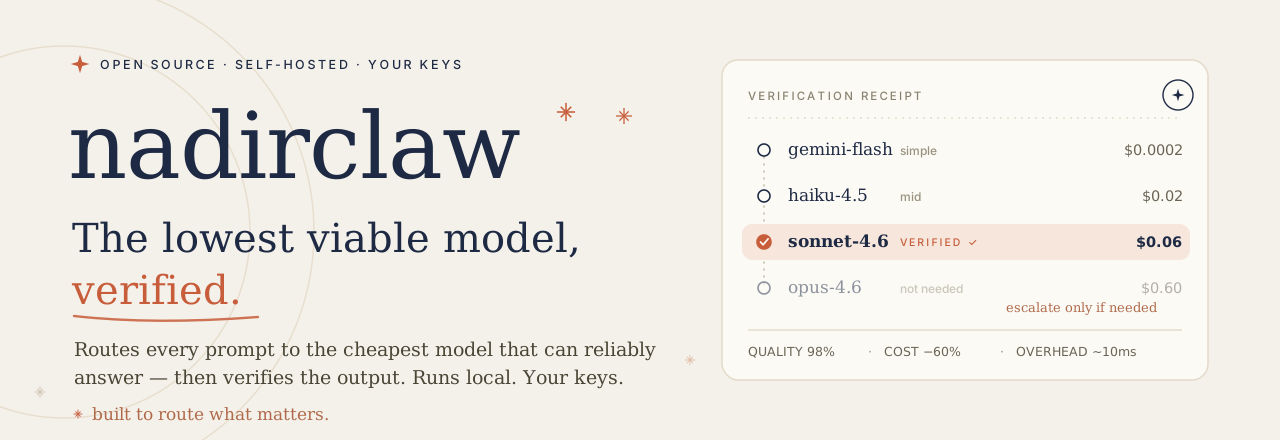
The lowest viable model, verified.
NadirClaw routes every prompt to the cheapest model that can reliably answer, verifies the
output, and escalates only when it has to. Better answers, lower cost — 40–70% lower.





Works with Claude Code · Cursor · Continue · Aider · Windsurf · Codex · OpenClaw · Open WebUI · Any OpenAI-compatible client
Nadir Pro (hosted) · Quick Start · OSS vs Pro · Comparisons · GitHub Action
Running real traffic or a team? Nadir Pro adds a trained classifier (10-20% more savings), a live dashboard, team billing, and SSO. 30-day free trial.
---
## Why NadirClaw?
Most LLM requests don't need a premium model. In typical coding sessions, **60-70% of prompts are simple** — reading files, short questions, formatting. They can be handled by models that cost 10-20x less.
```
$ nadirclaw serve
✓ Classifier ready — Listening on localhost:8856
SIMPLE "What is 2+2?" → gemini-flash $0.0002
SIMPLE "Format this JSON" → haiku-4.5 $0.0004
COMPLEX "Refactor auth module..." → claude-sonnet $0.098
COMPLEX "Debug race condition..." → gpt-5.2 $0.450
SIMPLE "Write a docstring" → gemini-flash $0.0002
3 of 5 routed cheaper · $0.549 vs $1.37 all-premium · 60% saved
```
- **Cut AI API costs 40-70%** — real savings from day one
- **~10ms classification overhead** — you won't notice it
- **Drop-in proxy** — works with any OpenAI-compatible tool
- **Runs locally** — your API keys never leave your machine
- **Fallback chains** — automatic failover when models are down
- **Built-in cost tracking** — dashboard, reports, budget alerts
> **Your keys. Your models. No middleman.** NadirClaw runs locally and routes directly to providers. No third-party proxy, no subsidized tokens, no platform that can pull the plug on you. [Why this matters.](docs/vs-clawrouter.md)
## How NadirClaw works
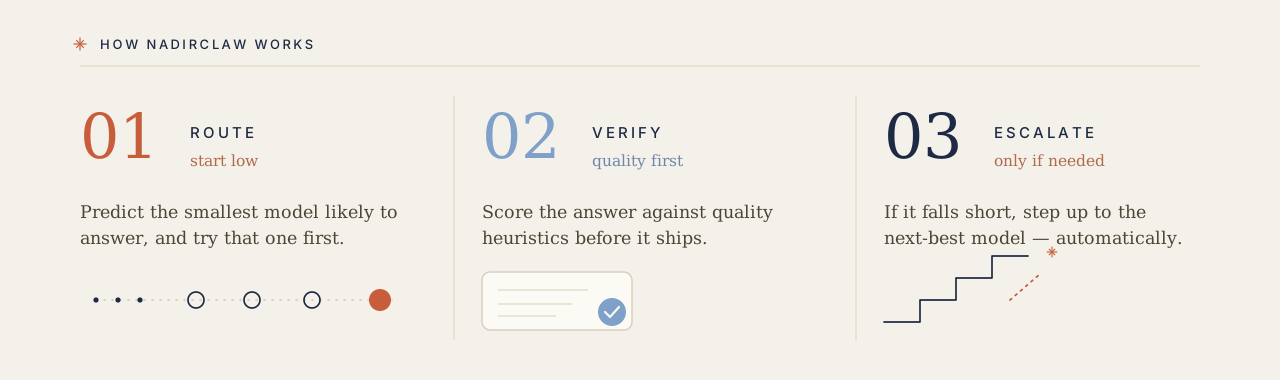
Three moves, on every request:
1. **Route** — a ~10ms embedding classifier predicts the *smallest* model likely to answer and sends the prompt there first. Routing modifiers (agentic tool loops, reasoning markers, vision content, long context) can override the score and force a stronger tier.
2. **Verify** — the cheap answer is scored against quality heuristics (refusals, truncation, JSON-format failures) before it ships. Pro swaps the heuristic for a trained DeBERTa cross-encoder.
3. **Escalate** — if the answer falls below the acceptance threshold (τ = 0.80), NadirClaw steps up to the next-best model automatically. You only pay for the big model when the small one wasn't enough.
## Benchmarks — proof, not promises
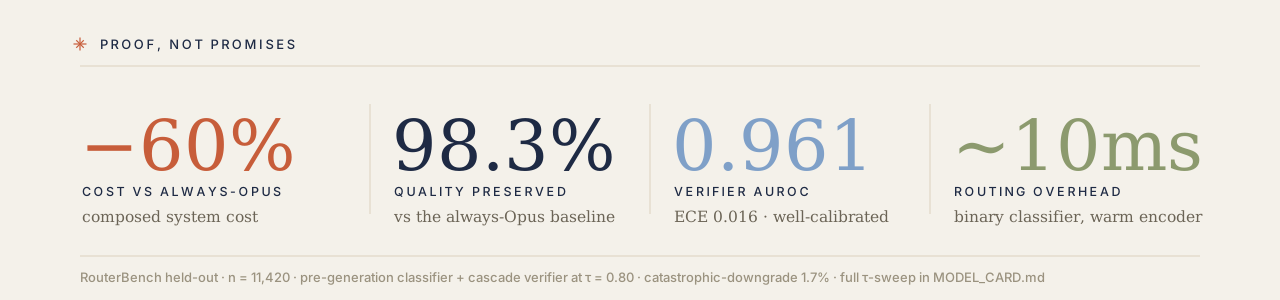
NadirClaw and Nadir Pro share the same routing architecture. The numbers
below are from the trained classifier + DeBERTa verifier in Nadir Pro;
the NadirClaw OSS classifier uses a simpler binary centroid that trades
some accuracy for zero training cost. Both run the same cascade rule
engine (`nadirclaw/cascade_rules/`).
### RouterBench (held-out, n=11,420)
The composed system (pre-generation classifier + post-generation
cascade verifier, τ=0.80):
| Metric | Value |
| --- | ---: |
| AUROC | **0.961** |
| Expected Calibration Error (ECE) | **0.016** |
| Quality preserved vs always-Opus | **98.3%** |
| Catastrophic-downgrade rate | 1.7% |
| Composed cost vs always-Opus | -60% |
Full τ-sweep and per-domain breakdown is in [`MODEL_CARD.md`](MODEL_CARD.md).
### RouterArena (sub_10, n=809, public leaderboard)
| Metric | Value |
| --- | ---: |
| Composite score | **0.7118** |
| Projected leaderboard rank | **#5** |
| Routers below (selected) | NotDiamond-0001, Auto Router, Martian |
RouterArena submission PR (live):
[RouteWorks/RouterArena#112](https://github.com/RouteWorks/RouterArena/pull/112).
### Contamination audit
Zero overlap between Nadir's training corpus and either held-out set:
| Held-out set | Audit run | Overlap |
| --- | --- | --- |
| RouterBench `0shot` | 2026-05-24 | 0 of 36,481 |
| RouterArena `sub_10` | 2026-05-27 | 0 of 809 |
| RouterArena `full` | 2026-05-27 | 0 of 8,399 |
The audit is reproducible from this repo:
[`verifier/contamination_audit.py`](verifier/contamination_audit.py).
Hash recipe: `sha256(NFC(prompt).strip().casefold().utf8)`.
## Quick Start
```bash
pip install nadirclaw
```
Or install from source:
```bash
curl -fsSL https://raw.githubusercontent.com/doramirdor/NadirClaw/main/install.sh | sh
```
Then run the interactive setup wizard:
```bash
nadirclaw setup
```
This guides you through selecting providers, entering API keys, and choosing models for each routing tier. Then start the router:
```bash
nadirclaw serve --verbose
```
That's it. NadirClaw starts on `http://localhost:8856` with sensible defaults (Gemini 3 Flash for simple, OpenAI Codex for complex). If you skip `nadirclaw setup`, the `serve` command will offer to run it on first launch.
## NadirClaw vs Nadir Pro
NadirClaw is the free, open-source core. If you are routing production traffic or running a team, [**Nadir Pro**](https://getnadir.com) is the hosted version with more accurate routing, team features, and analytics. Same routing philosophy, zero vendor lock-in (Pro lets you BYOK and you can always fall back to NadirClaw self-hosted).
| | NadirClaw (Free, OSS) | [Nadir Pro](https://getnadir.com) (Hosted) |
|---|---|---|
| **License** | PolyForm Noncommercial 1.0.0 (free for noncommercial use; commercial license via [getnadir.com](https://getnadir.com)) | Proprietary |
| **Deploy** | Self-hosted, localhost | `api.getnadir.com` or self-host via Docker |
| **Pre-generation classifier** | Binary centroid (~10ms), opt-in DistilBERT, or **bundled** `wide_deep_asym_v3` trained checkpoint (~40ms CPU; see [`MODEL_CARD.md`](MODEL_CARD.md)) | Same trained classifier + closed-loop retraining, provider-health-aware ranking |
| **Post-generation verifier** | Rule-based heuristic (refusal / length / JSON checks, ~1ms) | Trained DeBERTa-v3-small cross-encoder, AUROC 0.96 on RouterBench held-out |
| **Verifier-gated cascade** | Yes (heuristic verifier) | Yes (trained verifier) |
| **Storage** | Local JSONL + SQLite | Postgres (Supabase), multi-tenant |
| **Dashboard** | Terminal + local web | Hosted web dashboard, per-team analytics |
| **Cost tracking** | `nadirclaw savings` CLI | Live dashboard, monthly invoices, projected savings |
| **Extras** | Context optimize, fallback chains | Everything in Free, plus semantic cache, response healing, prompt caching passthrough |
| **Team** | None | SSO, audit logs, API key management, priority support |
| **Billing** | N/A | Pay only on savings: 25% of first $2K, 10% above, plus $9/mo base |
| **Best for** | Solo devs, self-hosters, anyone who wants the router running locally | Teams routing real traffic who want a hosted dashboard and want someone else to maintain the classifier |
**Start free at [getnadir.com](https://getnadir.com/auth?mode=signup)** (15 requests/day on our keys, unlimited with BYOK). If Nadir is not saving you money, you do not pay us.
## Features
- **Context Optimize** — compacts bloated context (JSON, tool schemas, chat history, whitespace) before dispatch, saving 30-70% input tokens with zero semantic loss. Modes: `off` (default), `safe` (lossless), `aggressive` (+ columnar JSON-array packing & semantic dedup), `progressive` (staged ladder that only escalates until a token budget is met). Pluggable backend (`native` default, or opt-in `headroom`). See [savings analysis](docs/context-optimize-savings.md)
- **Smart routing** — classifies prompts in ~10ms using sentence embeddings
- **Pluggable classifier** — `binary` (default, ~10ms centroid classifier) or `distilbert` (3-class fine-tuned DistilBERT that natively predicts simple/mid/complex). Select with `NADIRCLAW_COMPLEXITY_ANALYZER`
- **Three-tier routing** — simple / mid / complex tiers with configurable score thresholds (`NADIRCLAW_TIER_THRESHOLDS`); set `NADIRCLAW_MID_MODEL` for a cost-effective middle tier
- **N-tier YAML config** — one classifier head, any number of tiers. The default profile (`n2_default.yaml`) ships a cheap-and-strong two-tier cascade tuned on RouterArena (arena_F 0.7358, beats the legacy three-tier baseline). Switch profiles with `NADIRCLAW_TIERS_PROFILE=`. Custom YAML profiles hot-reload from disk in <30s. See `nadirclaw/tier_config/` and the [N-tier docs](#n-tier-routing) below.
- **Verifier-gated cascade** — cheap model first, score the response with a rule-based heuristic verifier (refusals, truncations, JSON-format failures, ~1ms), escalate to the next tier when the score falls below τ=0.80. Same architecture as Nadir Pro, swap the verifier for the trained DeBERTa cross-encoder. See `nadirclaw/cascade.py` (`Cascade` for 2-tier, `NTierCascade` for N≥2).
- **Cascade rule engine** — declarative YAML rules drive per-prompt overrides: `force_escalate` on patterns where the verifier is unreliable (code, summarisation), `set_threshold` to raise the verifier bar on borderline domains, `force_cheap` for trivially-easy patterns, `set_max_tokens` for length budgeting. Hot-reload from disk; profiles live in `nadirclaw/cascade_rules/profiles/`.
- **Agentic task detection** — auto-detects tool use, multi-step loops, and agent system prompts; forces complex model for agentic requests
- **Reasoning detection** — identifies prompts needing chain-of-thought and routes to reasoning-optimized models
- **Vision routing** — auto-detects image content in messages and routes to vision-capable models (GPT-4o, Claude, Gemini)
- **Routing profiles** — `auto`, `eco`, `premium`, `free`, `reasoning` — choose your cost/quality strategy per request
- **Model aliases** — use short names like `sonnet`, `flash`, `gpt4` instead of full model IDs
- **Session persistence** — pins the model for multi-turn conversations so you don't bounce between models mid-thread
- **Context-window filtering** — auto-swaps to a model with a larger context window when your conversation is too long
- **Fallback chains** — if a model fails (429, 5xx, timeout), NadirClaw cascades through a configurable chain of fallback models until one succeeds
- **Streaming support** — full SSE streaming compatible with OpenClaw, Codex, and other streaming clients
- **Native Gemini support** — calls Gemini models directly via the Google GenAI SDK (not through LiteLLM)
- **OAuth login** — use your subscription with `nadirclaw auth login` (OpenAI, Anthropic, Google), no API key needed
- **Multi-provider** — supports Gemini, OpenAI, Anthropic, Ollama, and any LiteLLM-supported provider
- **OpenAI-compatible API** — drop-in replacement for any tool that speaks the OpenAI chat completions API (`/v1/chat/completions`)
- **Anthropic-compatible API** — `/v1/messages` endpoint so Anthropic-native clients like Claude Code route through NadirClaw; streaming piped through byte-for-byte
- **Request reporting** — `nadirclaw report` with per-model and per-day cost breakdown (`--by-model --by-day`), anomaly flagging, filters, latency stats, tier breakdown, and token usage
- **Log export** — `nadirclaw export --format csv|jsonl --since 7d` for offline analysis in spreadsheets or data tools
- **Raw logging** — optional `--log-raw` flag to capture full request/response content for debugging and replay
- **Prometheus metrics** — built-in `/metrics` endpoint with request counts, latency histograms, token/cost totals, cache hits, and fallback tracking (zero extra dependencies)
- **OpenTelemetry tracing** — optional distributed tracing with GenAI semantic conventions (`pip install nadirclaw[telemetry]`)
- **Cost savings calculator** — `nadirclaw savings` shows exactly how much money you've saved, with monthly projections
- **Spend tracking and budgets** — real-time per-request cost tracking with daily/monthly budget limits, alerts via `nadirclaw budget`, optional webhook and stdout notifications
- **Prompt caching** — in-memory LRU cache for identical chat completions, skipping redundant LLM calls entirely. Configurable TTL and max size via `NADIRCLAW_CACHE_TTL` and `NADIRCLAW_CACHE_MAX_SIZE`. Monitor with `nadirclaw cache` or the `/v1/cache` endpoint
- **Live dashboard** — `nadirclaw dashboard` for terminal, or visit `http://localhost:8856/dashboard` for a web UI with real-time stats, cost tracking, and model usage
- **GitHub Action** — [`doramirdor/nadirclaw-action`](https://github.com/doramirdor/nadirclaw-action) for CI/CD pipelines
## Dashboard
Monitor your routing in real-time with `nadirclaw dashboard`:
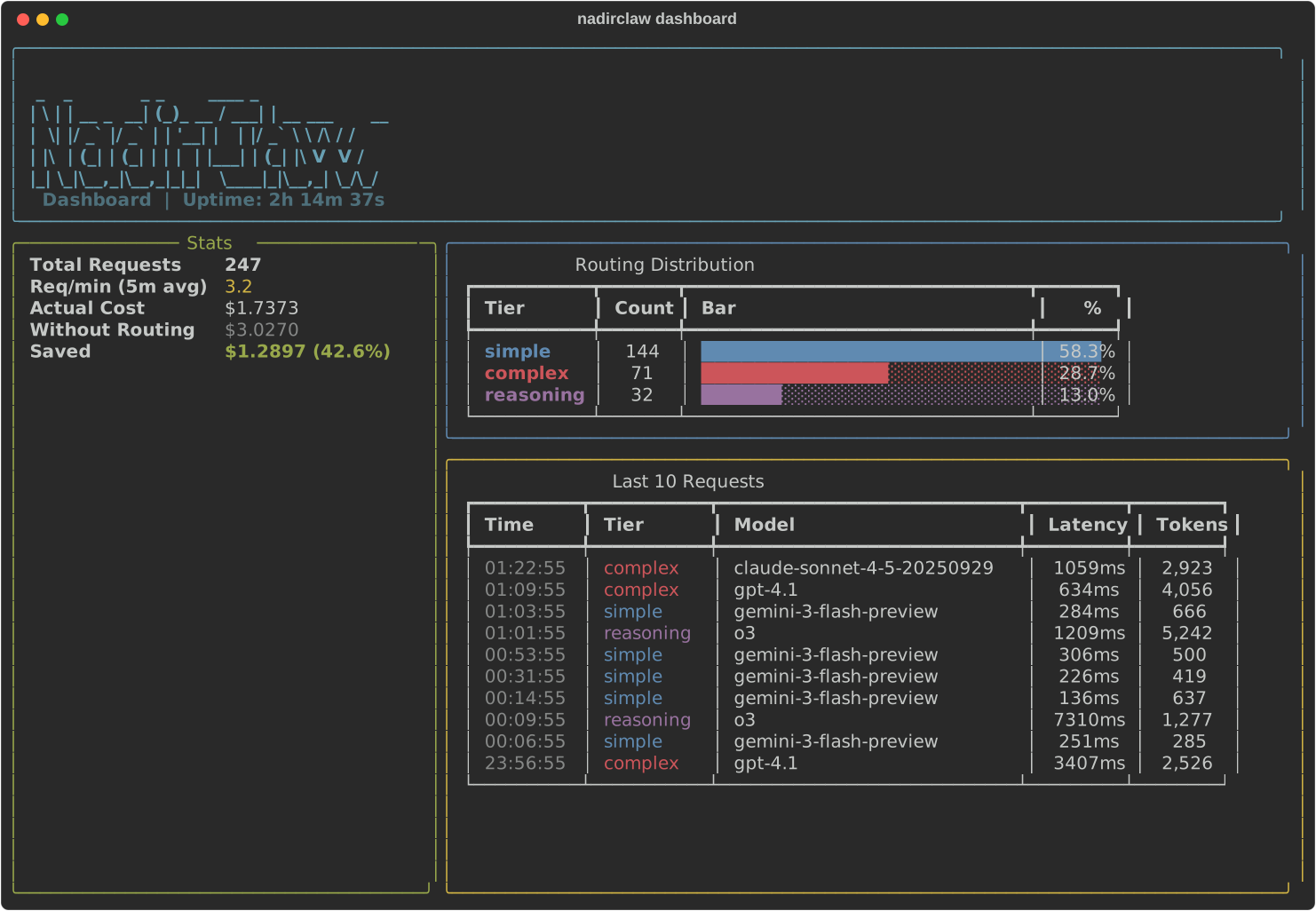
Install the dashboard extras: `pip install nadirclaw[dashboard]`
## Prerequisites
- **Python 3.10+**
- **git**
- **At least one LLM provider:**
- [Google Gemini API key](https://aistudio.google.com/apikey) (free tier: 20 req/day)
- [Ollama](https://ollama.com) running locally (free, no API key needed)
- [Anthropic API key](https://console.anthropic.com/) for Claude models
- [OpenAI API key](https://platform.openai.com/) for GPT models
- Provider subscriptions via OAuth (`nadirclaw auth openai login`, `nadirclaw auth anthropic login`, `nadirclaw auth antigravity login`, `nadirclaw auth gemini login`)
- Or any provider supported by [LiteLLM](https://docs.litellm.ai/docs/providers)
## Install
### One-line install (recommended)
```bash
curl -fsSL https://raw.githubusercontent.com/doramirdor/NadirClaw/main/install.sh | sh
```
This clones the repo to `~/.nadirclaw`, creates a virtual environment, installs dependencies, and adds `nadirclaw` to your PATH. Run it again to update.
### Manual install
```bash
git clone https://github.com/doramirdor/NadirClaw.git
cd NadirClaw
python3 -m venv venv
source venv/bin/activate
pip install -e .
```
### Uninstall
```bash
rm -rf ~/.nadirclaw
sudo rm -f /usr/local/bin/nadirclaw
```
### Docker
Run NadirClaw + Ollama with zero cost, fully local:
```bash
git clone https://github.com/doramirdor/NadirClaw.git && cd NadirClaw
docker compose up
```
This starts Ollama and NadirClaw on port `8856`. Pull a model once it's running:
```bash
docker compose exec ollama ollama pull llama3.1:8b
```
To use premium models alongside Ollama, create a `.env` file with your API keys and model config (see `.env.example`), then restart.
To run NadirClaw standalone (without Ollama):
```bash
docker build -t nadirclaw .
docker run -p 8856:8856 --env-file .env nadirclaw
```
## Configure
### Environment File
NadirClaw loads configuration from `~/.nadirclaw/.env`. Create or edit this file to set API keys and model preferences:
```bash
# ~/.nadirclaw/.env
# API keys (set the ones you use)
GEMINI_API_KEY=AIza...
OPENAI_API_KEY=sk-...
ANTHROPIC_API_KEY=sk-ant-...
# Model routing
NADIRCLAW_SIMPLE_MODEL=gemini-3-flash-preview
NADIRCLAW_COMPLEX_MODEL=gemini-2.5-pro
# Server
NADIRCLAW_PORT=8856
```
If `~/.nadirclaw/.env` does not exist, NadirClaw falls back to `.env` in the current directory.
### Authentication
NadirClaw supports multiple ways to provide LLM credentials, checked in this order:
1. **OpenClaw stored token** (`~/.openclaw/agents/main/agent/auth-profiles.json`)
2. **NadirClaw stored credential** (`~/.nadirclaw/credentials.json`)
3. **Environment variable** (`GEMINI_API_KEY`, `ANTHROPIC_API_KEY`, `OPENAI_API_KEY`, etc.)
#### Using `nadirclaw auth` (recommended)
```bash
# Add a Gemini API key
nadirclaw auth add --provider google --key AIza...
# Add any provider API key
nadirclaw auth add --provider anthropic --key sk-ant-...
nadirclaw auth add --provider openai --key sk-...
# Login with your OpenAI/ChatGPT subscription (OAuth, no API key needed)
nadirclaw auth openai login
# Login with your Anthropic/Claude subscription (OAuth, no API key needed)
nadirclaw auth anthropic login
# Login with Google Gemini (OAuth, opens browser)
nadirclaw auth gemini login
# Login with Google Antigravity (OAuth, opens browser)
nadirclaw auth antigravity login
# Store a Claude subscription token (from 'claude setup-token') - alternative to OAuth
nadirclaw auth setup-token
# Check what's configured
nadirclaw auth status
# Remove a credential
nadirclaw auth remove google
```
#### Using environment variables
Set API keys in `~/.nadirclaw/.env`:
```bash
GEMINI_API_KEY=AIza... # or GOOGLE_API_KEY
ANTHROPIC_API_KEY=sk-ant-...
OPENAI_API_KEY=sk-...
```
### Model Configuration
Configure which model handles each tier:
```bash
NADIRCLAW_SIMPLE_MODEL=gemini-3-flash-preview # cheap/free model
NADIRCLAW_COMPLEX_MODEL=gemini-2.5-pro # premium model
NADIRCLAW_REASONING_MODEL=o3 # reasoning tasks (optional, defaults to complex)
NADIRCLAW_FREE_MODEL=ollama/llama3.1:8b # free fallback (optional, defaults to simple)
NADIRCLAW_FALLBACK_CHAIN=gpt-4.1,claude-sonnet-4-5-20250929,gemini-2.5-flash # cascade order on failure (optional)
```
### Example Setups
| Setup | Simple Model | Complex Model | API Keys Needed |
|---|---|---|---|
| **Gemini + Gemini** | `gemini-2.5-flash` | `gemini-2.5-pro` | `GEMINI_API_KEY` |
| **Gemini + Claude** | `gemini-2.5-flash` | `claude-sonnet-4-5-20250929` | `GEMINI_API_KEY` + `ANTHROPIC_API_KEY` |
| **Claude + Ollama** | `ollama/llama3.1:8b` | `claude-sonnet-4-5-20250929` | `ANTHROPIC_API_KEY` |
| **Claude + Claude** | `claude-haiku-4-5-20251001` | `claude-sonnet-4-5-20250929` | `ANTHROPIC_API_KEY` |
| **OpenAI + Ollama** | `ollama/llama3.1:8b` | `gpt-4.1` | `OPENAI_API_KEY` |
| **OpenAI + OpenAI** | `gpt-4.1-mini` | `gpt-4.1` | `OPENAI_API_KEY` |
| **DeepSeek + DeepSeek** | `deepseek/deepseek-v4-flash` | `deepseek/deepseek-v4-pro` | `DEEPSEEK_API_KEY` |
| **OpenAI Codex** | `gemini-2.5-flash` | `openai-codex/gpt-5.3-codex` | `GEMINI_API_KEY` + OAuth login |
| **Fully local** | `ollama/llama3.1:8b` | `ollama/qwen3:32b` | None |
Gemini models are called natively via the Google GenAI SDK. All other models go through [LiteLLM](https://docs.litellm.ai/docs/providers), which supports 100+ providers.
### Complexity analyzer
NadirClaw ships two local prompt classifiers, plus an optional remote one. Pick one with `NADIRCLAW_COMPLEXITY_ANALYZER`:
| Value | Model | Latency | Size | Output |
|---|---|---|---|---|
| `binary` *(default)* | Sentence-embedding centroid classifier | ~10ms | ~22MB | 2-class (simple / complex) — `mid` and `reasoning` come from rule overlays |
| `distilbert` | Fine-tuned DistilBERT sequence classifier | ~30ms | ~256MB | 3-class (simple / mid / complex) predicted natively |
| `morph` | [Morph hosted Model Router](https://docs.morphllm.com/sdk/components/router) (remote) | ~50ms + network | — | difficulty → simple / mid / complex via the same tier thresholds |
```bash
# opt into the 3-class DistilBERT classifier
NADIRCLAW_COMPLEXITY_ANALYZER=distilbert
```
The DistilBERT artifact is **not** bundled in the package — on first use it downloads (~256MB, then cached under `~/.cache/huggingface/hub/`) from the Hugging Face Hub. Override the source repo with `NADIRCLAW_DISTILBERT_REPO`. If the download fails, NadirClaw logs a warning and falls back to the binary classifier — it never crashes the router.
#### Morph router (remote, opt-in)
`morph` delegates the routing decision to Morph's hosted Model Router instead of a local model. It is **strictly opt-in** and requires `MORPH_API_KEY`:
```bash
NADIRCLAW_COMPLEXITY_ANALYZER=morph MORPH_API_KEY=sk-... nadirclaw serve
```
Morph returns a `difficulty` (`easy` / `medium` / `hard` / `needs_info`), which NadirClaw maps to a complexity score and then to a tier using the same `NADIRCLAW_TIER_THRESHOLDS` as the local classifiers (so `mid` only appears when `NADIRCLAW_MID_MODEL` is set). Tuning knobs:
| Env var | Default | Purpose |
|---|---|---|
| `MORPH_API_KEY` | — | Required. Without it, routing falls back to `binary`. |
| `MORPH_API_BASE` | `https://api.morphllm.com/v1` | Override for self-hosted/proxy gateways. |
| `MORPH_TIMEOUT_MS` | `200` | Per-request budget; past it, fail closed to the local classifier. |
**Fail-closed:** on a missing key, HTTP error, timeout, or unparseable response, NadirClaw logs once and serves that request from the local binary classifier — a Morph outage degrades routing quality, never availability. Repeated prompts within a session are served from a small in-memory cache. Note: the Morph call adds a small per-classification cost that NadirClaw's savings report does not yet subtract from net-saved (tracked as a follow-up).
Test how any prompt buckets with either analyzer:
```bash
nadirclaw classify "design a distributed rate limiter"
NADIRCLAW_COMPLEXITY_ANALYZER=distilbert nadirclaw classify "fix this typo"
```
### N-tier routing
The shape of the cascade — how many tiers, which models per tier, how the
verifier escalates — is configured via a YAML profile. One classifier
head serves N=2, N=3, N=5, ..., because the classifier emits a continuous
score in `[0, 1]` and the YAML cutoffs slice it into tiers.
Switch profiles with `NADIRCLAW_TIERS_PROFILE`:
```bash
# default: cheap + strong, tuned on RouterArena
unset NADIRCLAW_TIERS_PROFILE # uses n2_default.yaml
# legacy three-tier behaviour (simple / medium / complex)
export NADIRCLAW_TIERS_PROFILE=n3_legacy
# your own profile
export NADIRCLAW_TIERS_PROFILE=/path/to/my_5tier.yaml
```
The bundled `n2_default.yaml` is the new default. It encodes the two-tier
cascade that won our internal RouterArena bake-off (arena_F 0.7358 vs N=3
at 0.7136):
```yaml
version: 1
mode: tiered
selector:
classifier: wide_deep_asym_v3
cascade:
escalation: adjacent
acceptance_threshold: 0.80
rules_profile: default
tiers:
- name: cheap
score_min: 0.00
model_pool: [gpt-4o-mini, qwen3-235b-a22b-2507, deepseek-v3.2, claude-3-haiku-20240307]
max_output_tokens: 2048
- name: strong
score_min: 0.65
model_pool: [gpt-5-mini, deepseek-reasoner, deepseek-v4-flash, grok-4-1-fast-reasoning, claude-sonnet-4]
max_output_tokens: 4096
```
Edit a profile YAML on disk and the change is picked up within 30s — no
restart, same TTL hot-reload pattern as the cascade rule engine.
**Migration for existing users:** if you have `NADIRCLAW_SIMPLE_MODEL` /
`NADIRCLAW_MID_MODEL` / `NADIRCLAW_COMPLEX_MODEL` set and `NADIRCLAW_TIERS_PROFILE`
unset, your routing keeps working — the legacy 3-tier env-var path is
untouched. Set `NADIRCLAW_TIERS_PROFILE=n3_legacy` to opt into the
N-tier dispatch with the bundled 3-tier profile, or write your own.
Schema reference: `nadirclaw/tier_config/schema.py`. Sample profiles:
`nadirclaw/tier_config/profiles/`.
### Trained verifier (nadirclaw/cascade-verifier-v1)
The default `n2_default` profile escalates via the rule-based
`HeuristicVerifier` shipped in this repo — no extra dependencies, runs
in under 1 ms per call, catches the obvious failure modes (refusals,
truncation, JSON parse failure). For the subtler "looks right but is
factually wrong" tail, NadirClaw v0.19 ships an opt-in trained
cross-encoder verifier.
This is the frozen DeBERTa-v3-small snapshot used in the
[RouterArena PR #112](https://github.com/RouteWorks/RouterArena/pull/112)
submission (arena_F 0.7358). It is released under the PolyForm
Noncommercial License 1.0.0 as
[`nadirclaw/cascade-verifier-v1`](https://huggingface.co/nadirclaw/cascade-verifier-v1)
on HuggingFace so the RouterArena number is reproducible end-to-end
with the noncommercial router.
**Install with the optional extras:**
```bash
pip install nadirclaw[trained]
```
This pulls in `transformers>=4.40` and `torch>=2.0`. Users who do not
want the transformer stack pay nothing — the heuristic remains the
default.
**Activate the trained verifier:**
```bash
export NADIRCLAW_TIERS_PROFILE=n2_trained
```
The `n2_trained` profile uses the same N=2 cascade ladder as
`n2_default` but routes verifier decisions through the trained
DeBERTa-v3-small cross-encoder. Weights load lazily on first cascade
call (~500 MB checkpoint, ~10 s download into the HF cache; subsequent
runs hit the cache).
**Direct API:**
```python
from nadirclaw.trained_verifier import TrainedVerifier
verifier = TrainedVerifier(threshold=0.80)
result = verifier.score(prompt, cheap_answer)
print(result.score, result.accepted)
```
**What is and is not released**
| | OSS (NadirClaw v0.19) | Pro (Nadir hosted) |
| --- | --- | --- |
| Frozen verifier weights | YES (`cascade-verifier-v1`, PolyForm Noncommercial 1.0.0) | YES |
| Training pipeline | NO | YES (corpus + judge + curriculum) |
| Adaptive retraining loop | NO | YES |
| Custom-routed quality scoring | NO | YES |
The frozen snapshot is enough to reproduce the RouterArena result; the
adaptive retraining keeps the production verifier current as new model
families ship.
## Usage with Gemini
Gemini is the default simple model. NadirClaw calls Gemini natively via the Google GenAI SDK for best performance.
```bash
# Set your Gemini API key
nadirclaw auth add --provider google --key AIza...
# Or set in ~/.nadirclaw/.env
echo "GEMINI_API_KEY=AIza..." >> ~/.nadirclaw/.env
# Start the router
nadirclaw serve --verbose
```
### Rate Limit Fallback
If the primary model hits a 429 rate limit, NadirClaw automatically retries once, then falls back to the other tier's model. For example, if `gemini-3-flash-preview` is exhausted, NadirClaw will try `gemini-2.5-pro` (or whatever your complex model is). If both models are rate-limited, it returns a friendly error message instead of crashing.
## Usage with Ollama
If you're running [Ollama](https://ollama.com) locally, NadirClaw works out of the box with no API keys:
```bash
# Fully local setup -- no API keys, no cost
NADIRCLAW_SIMPLE_MODEL=ollama/llama3.1:8b \
NADIRCLAW_COMPLEX_MODEL=ollama/qwen3:32b \
nadirclaw serve --verbose
```
Or mix local + cloud:
```bash
nadirclaw serve \
--simple-model ollama/llama3.1:8b \
--complex-model claude-sonnet-4-20250514 \
--verbose
```
### Recommended Ollama Models
| Model | Size | Good For |
|---|---|---|
| `llama3.1:8b` | 4.7 GB | Simple tier (fast, good enough) |
| `qwen3:32b` | 19 GB | Complex tier (local, no API cost) |
| `qwen3-coder` | 19 GB | Code-heavy complex tier |
| `deepseek-r1:14b` | 9 GB | Reasoning-heavy complex tier |
### Auto-Discovery
NadirClaw can automatically discover Ollama instances on your local network:
```bash
# Quick scan (localhost only)
nadirclaw ollama discover
# Network scan (finds instances on your local subnet)
nadirclaw ollama discover --scan-network
```
The `nadirclaw setup` wizard offers auto-discovery when you select Ollama as a provider, so you don't need to know the URL beforehand. If Ollama is running on a different machine (like a home server or VM), auto-discovery will find it and configure the `OLLAMA_API_BASE` automatically.
Manual configuration is still supported via the `OLLAMA_API_BASE` environment variable:
```bash
# Connect to Ollama on a different host
OLLAMA_API_BASE=http://192.168.1.100:11434 nadirclaw serve
```
## Usage with Custom OpenAI-Compatible Endpoints
NadirClaw works with any OpenAI-compatible API server — vLLM, LocalAI, LM Studio, text-generation-inference, or any custom endpoint:
```bash
# Point NadirClaw at your custom endpoint
NADIRCLAW_API_BASE=http://your-server:8000/v1 \
NADIRCLAW_SIMPLE_MODEL=openai/your-small-model \
NADIRCLAW_COMPLEX_MODEL=openai/your-large-model \
nadirclaw serve --verbose
```
Use the `openai/` prefix on model names so LiteLLM routes them as OpenAI-compatible. `NADIRCLAW_API_BASE` is passed to all non-Ollama, non-Gemini LiteLLM calls.
You can also mix custom endpoints with cloud providers:
```bash
# Local model for simple, cloud for complex
NADIRCLAW_API_BASE=http://localhost:8000/v1 \
NADIRCLAW_SIMPLE_MODEL=openai/local-llama \
NADIRCLAW_COMPLEX_MODEL=claude-sonnet-4-5-20250929 \
nadirclaw serve
```
For a fully worked example — env vars plus a `models.local.json` pricing
override for a hosted third-party gateway — see
[Routing NadirClaw at a custom OpenAI-compatible gateway](docs/providers/starveri.md).
## Usage with OpenClaw
[OpenClaw](https://openclaw.dev) is a personal AI assistant that bridges messaging services to AI coding agents. NadirClaw integrates as a model provider so OpenClaw's requests are automatically routed to the right model.
### Quick Setup
```bash
# Auto-configure OpenClaw to use NadirClaw
nadirclaw openclaw onboard
# Start the router
nadirclaw serve
```
This writes NadirClaw as a provider in `~/.openclaw/openclaw.json` with model `nadirclaw/auto`. If OpenClaw is already running, it will auto-reload the config -- no restart needed.
### Configure Only (Without Launching)
```bash
nadirclaw openclaw onboard
# Then start NadirClaw separately when ready:
nadirclaw serve
```
### What It Does
`nadirclaw openclaw onboard` adds this to your OpenClaw config:
```json
{
"models": {
"providers": {
"nadirclaw": {
"baseUrl": "http://localhost:8856/v1",
"apiKey": "local",
"api": "openai-completions",
"models": [{ "id": "auto", "name": "auto" }]
}
}
},
"agents": {
"defaults": {
"model": { "primary": "nadirclaw/auto" }
}
}
}
```
NadirClaw supports the SSE streaming format that OpenClaw expects (`stream: true`), handling multi-modal content and tool definitions in system prompts.
## Usage with Codex
[Codex](https://github.com/openai/codex) is OpenAI's CLI coding agent. NadirClaw integrates as a custom model provider.
```bash
# Auto-configure Codex
nadirclaw codex onboard
# Start the router
nadirclaw serve
```
This writes `~/.codex/config.toml`:
```toml
model_provider = "nadirclaw"
[model_providers.nadirclaw]
base_url = "http://localhost:8856/v1"
api_key = "local"
```
### OpenAI Subscription (OAuth)
To use your ChatGPT subscription instead of an API key:
```bash
# Login with your OpenAI account (opens browser)
nadirclaw auth openai login
# NadirClaw will auto-refresh the token when it expires
```
This delegates to the Codex CLI for the OAuth flow and stores the credentials in `~/.nadirclaw/credentials.json`. Tokens are automatically refreshed when they expire.
## Usage with Claude Code
[Claude Code](https://docs.anthropic.com/en/docs/claude-code) is Anthropic's CLI coding agent. NadirClaw works as a drop-in proxy that intercepts Claude Code's API calls and routes simple prompts to cheaper models.
### Seamless onboard (recommended)
One command wires everything up — detects your Claude Code models, maps them into NadirClaw tiers, persists `ANTHROPIC_BASE_URL` + `ANTHROPIC_MODEL` into `~/.claude/settings.json`, and installs a launchd / systemd auto-start unit so the proxy is always up when you run `claude`:
```bash
nadirclaw claude onboard --interactive
```
`--interactive` shows a menu of every model your account can reach (pulled live from Anthropic's `/v1/models` using your stored token, with a hardcoded fallback) and lets you pick a model for each tier plus a default routing profile. Without the flag, onboarding auto-detects.
After that, just run `claude` from any new shell — no env exports, no manual server start. Re-run with `--detect-only` first if you want to see the tier mapping without writing anything, or pass `--no-daemon` / `--no-settings` to skip individual pieces. Undo everything with `nadirclaw claude uninstall`.
> **Subscription users:** if you don't have an Anthropic API key, run `claude setup-token` and feed the result to `nadirclaw auth setup-token` first. NadirClaw then talks to Anthropic on your behalf using the subscription token.
### Lightweight shim (no daemon, no settings.json edits)
Prefer not to install a background service? Use the shim instead:
```bash
nadirclaw claude shim install
export PATH="$HOME/.nadirclaw/bin:$PATH" # add to your shell rc
```
Now `claude` resolves to a small wrapper that probes `http://localhost:8856/health`, lazy-starts `nadirclaw serve` if it's down, exports the right env vars, and exec's the real Claude binary. Remove it with `nadirclaw claude shim uninstall`.
### Manual setup
If you don't want either option, the original env-var dance still works:
```bash
export ANTHROPIC_BASE_URL=http://localhost:8856 # bare host — Claude Code appends /v1/messages itself
export ANTHROPIC_API_KEY=local
export ANTHROPIC_MODEL=nadir-auto # so Claude Code routes through NadirClaw
nadirclaw serve --verbose
claude
```
> **Important:** `ANTHROPIC_BASE_URL` must **not** include a `/v1` suffix — Claude Code appends `/v1/messages` itself, so a suffix produces a broken `/v1/v1/messages` path.
### Authentication
Use your existing Claude subscription instead of a separate API key:
```bash
# Login with your Anthropic account (OAuth, opens browser)
nadirclaw auth anthropic login
# Or store a Claude subscription token directly
nadirclaw auth setup-token
```
#### Subscription tokens and premium-model access
If you authenticate with a Claude **subscription** token (`sk-ant-oat*`, from `nadirclaw auth anthropic login` or `claude setup-token`) and find that **Haiku works but Sonnet/Opus return an immediate `rate_limit_error`**, Anthropic is likely gating premium models behind the official Claude Code identity. The real client always leads its requests with a fixed identity system block; raw API/SDK callers omit it. Opt in to have NadirClaw prepend it:
```bash
export NADIRCLAW_CLAUDE_CODE_IDENTITY=1
nadirclaw serve
```
When enabled, NadirClaw prepends `"You are Claude Code, Anthropic's official CLI for Claude."` as the first `system` block on OAuth (`sk-ant-oat*`) requests — only when not already present, preserving any system prompt you sent after it. It has **no effect on API-key (`sk-ant-api*`) credentials** and is **off by default**, since it changes the system prompt the model sees.
### What happens
Claude Code sends every request to Anthropic's API. With NadirClaw in front, each prompt is classified in ~10ms:
- **Simple** — short reads, quick questions, formatting, single-file glances (e.g. "what does this function do?"). Routed to a cheap model like Gemini Flash or Haiku.
- **Mid** — focused edits, single-function debugging, small refactors. Routed to a mid-tier model when `NADIRCLAW_MID_MODEL` is set.
- **Complex** — architecture, multi-file refactors, multi-step planning, agentic tool loops, reasoning-heavy prompts. Stays on Claude / GPT-5 / Opus.
Classification uses sentence-transformer embeddings against learned centroids plus rule overrides (tool definitions, reasoning markers, large context, vision content). See `nadirclaw classify ""` to test how any prompt would be bucketed.
### Choosing routing profiles in Claude Code
Claude Code's `/model` **picker UI is hardcoded** to Anthropic's own model families — it does not show custom entries, even though NadirClaw advertises them on `/v1/models`. To route through a NadirClaw profile, set the model explicitly:
```bash
claude --model nadir-auto # smart routing (per-prompt classification)
claude --model nadir-eco # force cheap tier for every prompt
claude --model nadir-premium # force complex tier for every prompt
claude --model nadir-reasoning # force the reasoning-optimized model
claude --model nadir-free # force the configured free / local model
```
Or persist a default by setting `ANTHROPIC_MODEL` in `~/.claude/settings.json` (the `onboard` command does this for you). Inside a session you can also type `/model nadir-eco` as a slash command.
Streaming works as expected. In typical Claude Code usage, 40-70% of prompts are simple enough to route to a cheaper model, which translates directly to cost savings.
### How the proxy speaks to Claude Code
NadirClaw exposes **both** API surfaces:
- `/v1/chat/completions` — OpenAI-compatible (Open WebUI, Cursor, Continue, …)
- `/v1/messages` — Anthropic-compatible (Claude Code). Routing runs first, then the request is forwarded to `api.anthropic.com` with the model rewritten. Streaming is piped through SSE byte-for-byte.
## Usage with Open WebUI
[Open WebUI](https://openwebui.com) is a popular self-hosted AI interface. NadirClaw works as a drop-in OpenAI-compatible provider:
```bash
# View setup instructions
nadirclaw openwebui onboard
```
### Quick Setup
1. Start NadirClaw: `nadirclaw serve`
2. In Open WebUI, go to **Admin Settings** → **Connections** → **OpenAI** → **Add Connection**
3. Enter:
- **URL:** `http://localhost:8856/v1`
- **API Key:** `local`
4. Select the `auto` model in your chat
Open WebUI will auto-discover NadirClaw's available models (`auto`, `eco`, `premium`, plus your configured tier models). The `auto` model routes each prompt to the right model automatically — simple prompts go to cheap models, complex ones to premium.
## Usage with Continue
[Continue](https://continue.dev) is an open-source AI coding assistant for VS Code and JetBrains. NadirClaw can be added as a model provider:
```bash
# Auto-configure Continue
nadirclaw continue onboard
```
This writes a `~/.continue/config.json` entry with NadirClaw's `auto` model. Just start the server, open Continue in your editor, and select "NadirClaw Auto" from the model dropdown.
## Usage with Cursor
[Cursor](https://cursor.sh) supports OpenAI-compatible providers natively:
```bash
# View setup instructions
nadirclaw cursor onboard
```
In Cursor: **Settings** → **Models** → **OpenAI API Key** → enter `local` as the API key and `http://localhost:8856/v1` as the base URL, with model name `auto`.
## Usage with Any OpenAI-Compatible Tool
NadirClaw exposes a standard OpenAI-compatible API. Point any tool at it:
```bash
# Base URL
http://localhost:8856/v1
# Model
model: "auto" # or omit -- NadirClaw picks the best model
```
### Example: curl
```bash
curl http://localhost:8856/v1/chat/completions \
-H "Content-Type: application/json" \
-d '{
"messages": [{"role": "user", "content": "What is 2+2?"}]
}'
```
### Example: curl (streaming)
```bash
curl http://localhost:8856/v1/chat/completions \
-H "Content-Type: application/json" \
-d '{
"messages": [{"role": "user", "content": "What is 2+2?"}],
"stream": true
}'
```
### Example: Python (openai SDK)
```python
from openai import OpenAI
client = OpenAI(
base_url="http://localhost:8856/v1",
api_key="local", # NadirClaw doesn't require auth by default
)
response = client.chat.completions.create(
model="auto",
messages=[{"role": "user", "content": "What is 2+2?"}],
)
print(response.choices[0].message.content)
```
## Routing Profiles
Choose your routing strategy by setting the model field:
| Profile | Model Field | Strategy | Use Case |
|---|---|---|---|
| **auto** | `auto` or omit | Smart routing (default) | Best overall balance |
| **eco** | `eco` | Always use simple model | Maximum savings |
| **premium** | `premium` | Always use complex model | Best quality |
| **free** | `free` | Use free fallback model | Zero cost |
| **reasoning** | `reasoning` | Use reasoning model | Chain-of-thought tasks |
```bash
# Use profiles via the model field
curl http://localhost:8856/v1/chat/completions \
-H "Content-Type: application/json" \
-d '{"model": "eco", "messages": [{"role": "user", "content": "Hello"}]}'
# Also works with nadirclaw/ prefix
# model: "nadirclaw/eco", "nadirclaw/premium", etc.
```
## Model Aliases
Use short names instead of full model IDs:
| Alias | Resolves To |
|---|---|
| `sonnet` | `claude-sonnet-4-5-20250929` |
| `opus` | `claude-opus-4-6-20250918` |
| `haiku` | `claude-haiku-4-5-20251001` |
| `gpt4` | `gpt-4.1` |
| `gpt5` | `gpt-5.2` |
| `flash` | `gemini-2.5-flash` |
| `gemini-pro` | `gemini-2.5-pro` |
| `deepseek` | `deepseek/deepseek-chat` |
| `deepseek-v4` | `deepseek/deepseek-v4-flash` |
| `deepseek-v4-flash` | `deepseek/deepseek-v4-flash` |
| `deepseek-v4-pro` | `deepseek/deepseek-v4-pro` |
| `deepseek-r1` | `deepseek/deepseek-reasoner` |
| `llama` | `ollama/llama3.1:8b` |
```bash
# Use an alias as the model
curl http://localhost:8856/v1/chat/completions \
-H "Content-Type: application/json" \
-d '{"model": "sonnet", "messages": [{"role": "user", "content": "Hello"}]}'
```
## Routing Intelligence — How NadirClaw Classifies Prompts
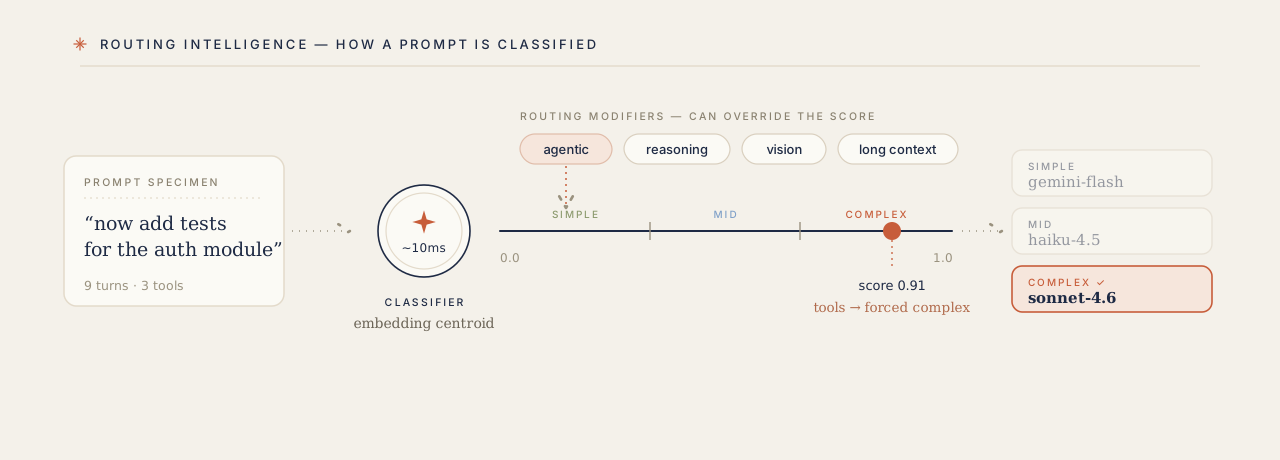
Beyond basic simple/complex classification, NadirClaw applies routing modifiers that can override the base decision:
### Agentic Task Detection
NadirClaw detects agentic requests (coding agents, multi-step tool use) and forces them to the complex model, even if the individual message looks simple. Signals:
- Tool definitions in the request (`tools` array)
- Tool-role messages (active tool execution loop)
- Assistant→tool→assistant cycles (multi-step execution)
- Agent-like system prompts ("you are a coding agent", "you can execute commands")
- Long system prompts (>500 chars, typical of agent instructions)
- Deep conversations (>10 messages)
This prevents a message like "now add tests" from being routed to the cheap model when it's part of an ongoing agentic refactoring session.
### Reasoning Detection
Prompts with 2+ reasoning markers are routed to the reasoning model (or complex model if no reasoning model is configured):
- "step by step", "think through", "chain of thought"
- "prove that", "derive the", "mathematically show"
- "analyze the tradeoffs", "compare and contrast"
- "critically analyze", "evaluate whether"
### Vision Routing
NadirClaw detects when messages contain images (`image_url` content parts, including base64-encoded images) and automatically routes to a vision-capable model. If the classifier picks a text-only model (e.g., DeepSeek, Ollama), NadirClaw swaps to a vision-capable alternative from your configured tiers.
### Session Persistence
Once a conversation is routed to a model, subsequent messages in the same session reuse that model. This prevents jarring mid-conversation model switches. Sessions are keyed by system prompt + first user message, with a 30-minute TTL.
### Context Window Filtering
If the estimated token count of a request exceeds a model's context window, NadirClaw automatically swaps to a model with a larger context. For example, a 150k-token conversation targeting `gpt-4o` (128k context) will be redirected to `gemini-2.5-pro` (1M context).
## CLI Reference
```bash
nadirclaw setup # Interactive setup wizard (providers, keys, models)
nadirclaw serve # Start the router server
nadirclaw serve --log-raw # Start with full request/response logging
nadirclaw update-models # Refresh local model metadata
nadirclaw test # Probe each configured model and verify it responds
nadirclaw optimize # Test context compaction on a file (dry-run)
nadirclaw classify # Classify a prompt (no server needed)
nadirclaw classify --format json # Machine-readable JSON output
nadirclaw report # Show a summary report of request logs
nadirclaw report --since 24h # Report for the last 24 hours
nadirclaw report --by-model # Per-model cost breakdown with anomaly detection
nadirclaw report --by-day # Per-day cost breakdown
nadirclaw report --by-model --by-day # Combined model × day breakdown
nadirclaw export --format csv --since 7d # Export logs to CSV for offline analysis
nadirclaw export --format jsonl -o data.jsonl # Export to JSONL file
nadirclaw savings # Show how much money NadirClaw saved you
nadirclaw savings --since 7d # Savings for the last 7 days
nadirclaw dashboard # Live terminal dashboard with real-time stats
nadirclaw status # Show config, credentials, and server status
nadirclaw auth add # Add an API key for any provider
nadirclaw auth status # Show configured credentials (masked)
nadirclaw auth remove # Remove a stored credential
nadirclaw auth setup-token # Store a Claude subscription token (alternative to OAuth)
nadirclaw auth openai login # Login with OpenAI subscription (OAuth)
nadirclaw auth openai logout # Remove stored OpenAI OAuth credential
nadirclaw auth anthropic login # Login with Anthropic/Claude subscription (OAuth)
nadirclaw auth anthropic logout # Remove stored Anthropic OAuth credential
nadirclaw auth antigravity login # Login with Google Antigravity (OAuth, opens browser)
nadirclaw auth antigravity logout # Remove stored Antigravity OAuth credential
nadirclaw auth gemini login # Login with Google Gemini (OAuth, opens browser)
nadirclaw auth gemini logout # Remove stored Gemini OAuth credential
nadirclaw codex onboard # Configure Codex integration
nadirclaw openclaw onboard # Configure OpenClaw integration
nadirclaw openwebui onboard # Show Open WebUI setup instructions
nadirclaw continue onboard # Configure Continue (continue.dev) integration
nadirclaw cursor onboard # Show Cursor editor setup instructions
nadirclaw build-centroids # Regenerate centroid vectors from prototypes
```
### Model Metadata Updates
`nadirclaw update-models` writes model metadata to `~/.nadirclaw/models.json`.
Without options it exports the built-in registry. Pass `--source-url` or set
`NADIRCLAW_MODEL_REGISTRY_URL` to merge a published registry JSON before saving. The
router merges the saved file at startup, then applies any user-managed overrides from
`~/.nadirclaw/models.local.json`.
`update-models` only rewrites the generated metadata file. It does not re-export
entries from `models.local.json`, so local overrides stay separate across refreshes.
Use `models.local.json` for private models or custom pricing:
```json
{
"models": {
"openai/my-local-model": {
"context_window": 32768,
"cost_per_m_input": 0,
"cost_per_m_output": 0,
"has_vision": false
}
}
}
```
### `nadirclaw serve`
```bash
nadirclaw serve [OPTIONS]
Options:
--port INTEGER Port to listen on (default: 8856)
--simple-model TEXT Model for simple prompts
--complex-model TEXT Model for complex prompts
--models TEXT Comma-separated model list (legacy)
--token TEXT Auth token
--optimize [off|safe|aggressive|progressive] Context compression: off | safe | aggressive | progressive (default: off)
--verbose Enable debug logging
--log-raw Log full raw requests and responses to JSONL
```
### `nadirclaw optimize`
Test context compaction on a file or stdin without running the server:
```bash
nadirclaw optimize payload.json # dry-run with safe mode
nadirclaw optimize payload.json --format json # machine-readable output
nadirclaw optimize payload.json --mode aggressive # + columnar JSON packing & semantic dedup
cat messages.json | nadirclaw optimize # pipe from stdin
```
Input can be a JSON file with a `messages` array (OpenAI format), a raw JSON array of messages, or plain text (wrapped as a single user message).
Example output:
```
Mode: safe
Original: ~3,657 tokens
Optimized: ~1,573 tokens
Saved: ~2,084 tokens (57.0%)
Transforms: tool_schema_dedup, json_minify, whitespace_normalize
```
### `nadirclaw report`
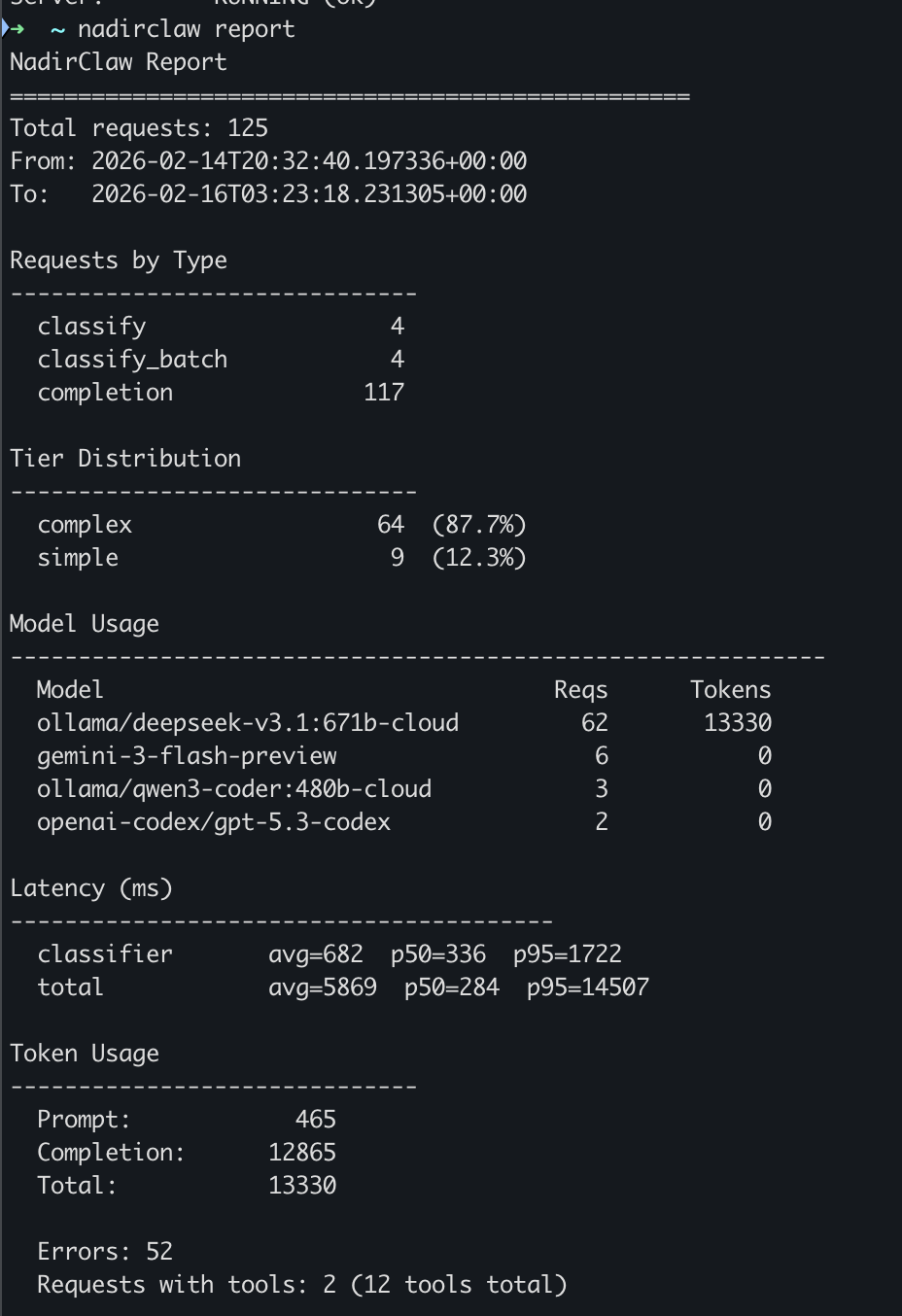
Analyze request logs and print a summary report:
```bash
nadirclaw report # full report
nadirclaw report --since 24h # last 24 hours
nadirclaw report --since 7d # last 7 days
nadirclaw report --since 2025-02-01 # since a specific date
nadirclaw report --model gemini # filter by model name
nadirclaw report --by-model # per-model cost breakdown
nadirclaw report --by-day # per-day cost breakdown
nadirclaw report --by-model --by-day # combined breakdown with anomaly detection
nadirclaw report --format json # machine-readable JSON output
nadirclaw report --export report.txt # save to file
```
Example output:
```
NadirClaw Report
==================================================
Total requests: 147
From: 2026-02-14T08:12:03+00:00
To: 2026-02-14T22:47:19+00:00
Requests by Type
------------------------------
classify 12
completion 135
Tier Distribution
------------------------------
complex 41 (31.1%)
direct 8 (6.1%)
simple 83 (62.9%)
Model Usage
------------------------------------------------------------
Model Reqs Tokens
gemini-3-flash-preview 83 48210
openai-codex/gpt-5.3-codex 41 127840
claude-sonnet-4-20250514 8 31500
Latency (ms)
----------------------------------------
classifier avg=12 p50=11 p95=24
total avg=847 p50=620 p95=2340
Token Usage
------------------------------
Prompt: 138420
Completion: 69130
Total: 207550
Fallbacks: 3
Errors: 2
Streaming requests: 47
Requests with tools: 18 (54 tools total)
```
### `nadirclaw classify`
Classify a prompt locally without running the server. Useful for testing your setup. Quotes are optional — multi-word prompts work directly:
```bash
$ nadirclaw classify What is 2+2?
Tier: simple
Confidence: 0.2848
Score: 0.0000
Model: gemini-3-flash-preview
$ nadirclaw classify Design a distributed system for real-time trading
Tier: complex
Confidence: 0.1843
Score: 1.0000
Model: gemini-2.5-pro
# Machine-readable output for scripting
$ nadirclaw classify --format json Refactor this module to use dependency injection
{"tier": "complex", "is_complex": true, "confidence": 0.1612, "score": 0.9056, "model": "gemini-2.5-pro", "prompt": "Refactor this module to use dependency injection"}
```
### `nadirclaw status`
```bash
$ nadirclaw status
NadirClaw Status
----------------------------------------
Simple model: gemini-3-flash-preview
Complex model: gemini-2.5-pro
Tier config: explicit (env vars)
Port: 8856
Threshold: 0.06
Log dir: /Users/you/.nadirclaw/logs
Token: nadir-***
Server: RUNNING (ok)
```
### `nadirclaw test`
Verify your credentials and model names before starting the server. Sends a short probe request to each configured tier and reports latency and the model's reply:
```bash
$ nadirclaw test
NadirClaw Model Test
==================================================
[simple] gemini-2.5-flash
──────────────────────────────────────────────
Status: OK
Latency: 312ms
Reply: 'ok'
[complex] claude-sonnet-4-5-20250929
──────────────────────────────────────────────
Status: OK
Latency: 891ms
Reply: 'ok'
All models OK. Start the router with: nadirclaw serve
```
Exits with code 1 if any model fails, so it works in CI. Override models inline:
```bash
nadirclaw test --simple-model gemini-2.5-flash --complex-model gpt-4.1
nadirclaw test --timeout 10
```
## How It Works
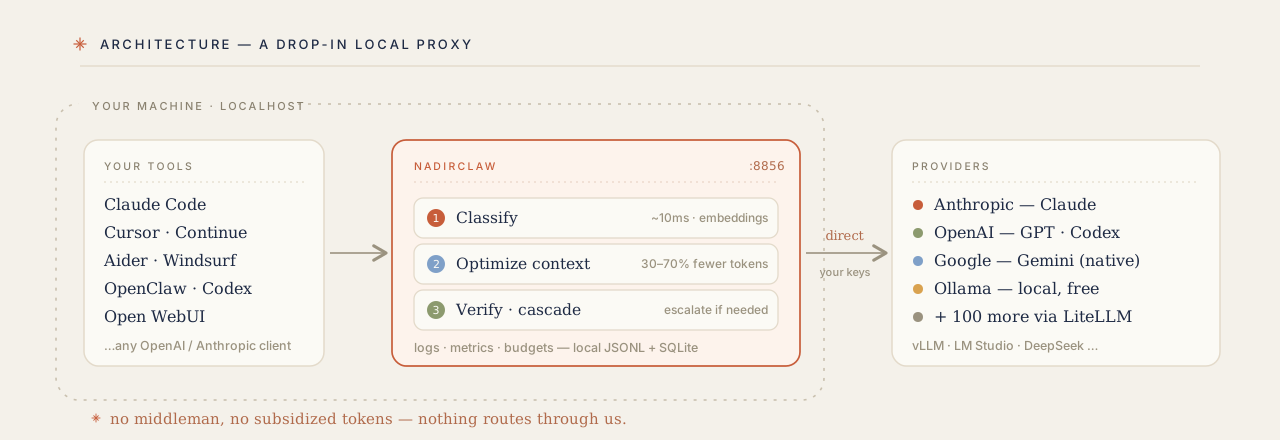
NadirClaw sits between your application and the LLM provider as a transparent local proxy. Your tools talk to it on `localhost`; it classifies, optimizes, verifies, and routes each request directly to the provider with your own keys — nothing passes through a third party.
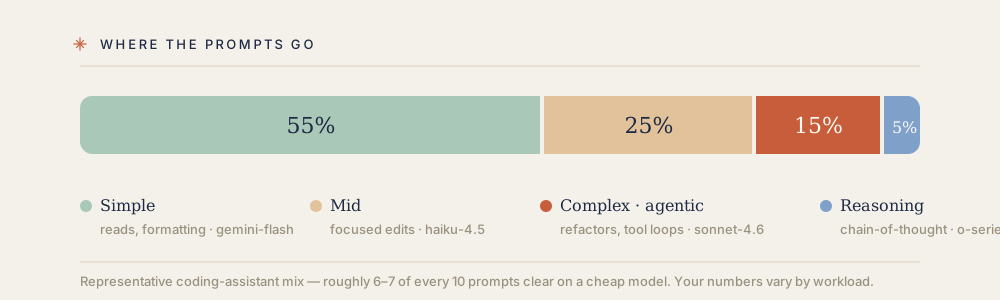
Most LLM usage doesn't need a premium model. NadirClaw routes each prompt to the right tier automatically:
### Step-by-Step
1. **Your tool sends a request** to `localhost:8856/v1/chat/completions` (OpenAI format)
2. **NadirClaw intercepts it** and runs the prompt through a lightweight classifier based on sentence embeddings
3. **Routes to the cheapest viable model** based on the classification result and routing modifiers
4. **Forwards the request** to the chosen provider and returns the response
5. **Logs everything** for cost analysis and reporting
Total overhead: ~10ms (classifier inference on a warm encoder)
### The Classifier
NadirClaw uses a binary complexity classifier based on sentence embeddings:
1. **Pre-computed centroids**: Ships two tiny centroid vectors (~1.5 KB each) derived from ~170 seed prompts. These are pre-computed and included in the package — no training step required.
2. **Classification**: For each incoming prompt, computes its embedding using [all-MiniLM-L6-v2](https://huggingface.co/sentence-transformers/all-MiniLM-L6-v2) (~80 MB, downloaded once on first use) and measures cosine similarity to both centroids. If the prompt is closer to the complex centroid, it routes to your complex model; otherwise to your simple model.
3. **Borderline handling**: When confidence is below the threshold (default 0.06), the classifier defaults to complex -- it's cheaper to over-serve a simple prompt than to under-serve a complex one.
4. **Routing modifiers**: After classification, NadirClaw applies intelligent overrides:
- **Agentic detection** — if tool definitions, tool-role messages, or agent system prompts are detected, forces the complex model
- **Reasoning detection** — if 2+ reasoning markers are found, routes to the reasoning model
- **Vision routing** — if image content is detected, swaps to a vision-capable model
- **Context window check** — if the conversation exceeds the model's context window, swaps to a model that fits
- **Session persistence** — reuses the same model for follow-up messages in the same conversation
5. **Dispatch**: Calls the selected model via the appropriate backend:
- **Gemini models** — called natively via the [Google GenAI SDK](https://github.com/googleapis/python-genai) for best performance
- **All other models** — called via [LiteLLM](https://docs.litellm.ai), which provides a unified interface to 100+ providers
6. **Fallback chains**: If the selected model fails (429 rate limit, 5xx error, or timeout), NadirClaw cascades through a configurable fallback chain. Set `NADIRCLAW_FALLBACK_CHAIN=gpt-4.1,claude-sonnet-4-5-20250929,gemini-2.5-flash` to define the order. Default chain uses all your configured tier models.
7. **Per-model rate limiting**: Protect against runaway costs and provider quota exhaustion with configurable RPM limits per model. When a model hits its limit, NadirClaw automatically triggers the fallback chain — no failed requests. Configure via `NADIRCLAW_MODEL_RATE_LIMITS=gemini-3-flash-preview=30,gpt-4.1=60` or set a blanket default with `NADIRCLAW_DEFAULT_MODEL_RPM=120`. Monitor usage in real-time at `/v1/rate-limits`.
### Why This Works
The key insight: **most prompts don't need the most expensive model.**
In real-world coding assistant usage:
- **60-70%** of prompts work fine on cheap models (Haiku, GPT-4o-mini, Gemini Flash)
- **20-30%** need mid-tier (Sonnet, GPT-4o, Gemini Pro)
- **5-10%** need flagship (Opus, o1, o3)
But without a classifier, everything hits the expensive default. NadirClaw's job is to route smartly without breaking your workflow.
Classification takes ~10ms on a warm encoder. The first request takes ~2-3 seconds to load the embedding model.
## Cost Savings & Benchmarks — How Much Does NadirClaw Save?
Real-world usage shows NadirClaw typically reduces LLM costs by 40-70% depending on your workload and model choices.
### Example: Claude Code Usage
A typical 8-hour coding day with Claude Code (tracked via JSONL session logs):
**Without NadirClaw:**
- Total requests: 147
- All routed to `claude-sonnet-4-5` (premium model)
- Prompt tokens: 138,420
- Completion tokens: 69,130
- Total cost: **$24.18**
**With NadirClaw:**
- Simple tier (62% of requests): 83 requests to `gemini-2.5-flash`
- Cost: $1.85
- Complex tier (31% of requests): 41 requests to `claude-sonnet-4-5`
- Cost: $7.32
- Direct (7% of requests): 8 requests (model override, reasoning tasks)
- Cost: $1.12
- Total cost: **$10.29**
**Savings: $13.89 (57% reduction)**
### Example: OpenClaw Agent
Running an autonomous agent for 24 hours with mixed tasks (file operations, web searches, code generation):
**Without routing:**
- 412 LLM calls to `gpt-4.1`
- Average 850 tokens per call
- Total cost: **$31.45**
**With NadirClaw:**
- Simple tier (68%): 280 calls to `ollama/llama3.1:8b` (local, free)
- Complex tier (32%): 132 calls to `gpt-4.1`
- Total cost: **$11.92**
**Savings: $19.53 (62% reduction)**
### What Gets Routed Where?
Based on 10,000+ production prompts:
**Simple tier (typically 60-70% of requests):**
- "What does this function do?"
- "Read the file at src/main.py"
- "Add a docstring to this class"
- "Show me the last 5 commits"
- "What's the error on line 42?"
- "Continue with that approach"
**Complex tier (30-40% of requests):**
- "Refactor this module to use dependency injection"
- "Design a caching layer for this API"
- "Explain the tradeoffs between these architectures"
- "Debug why this async operation deadlocks"
- Multi-file changes requiring context understanding
**Auto-upgraded to complex:**
- Agentic requests with tool definitions
- Prompts with 2+ reasoning markers
- Requests containing images (vision routing)
- Long conversations (>10 turns)
- Requests exceeding the simple model's context window
### Monthly Projections
If you currently spend $100/month on Claude API:
| Routing Setup | Simple Model | Complex Model | Monthly Cost | Savings |
|---|---|---|---|---|
| No routing | Claude Sonnet | Claude Sonnet | $100.00 | - |
| Conservative | Claude Haiku | Claude Sonnet | $62.00 | 38% |
| Balanced | Gemini Flash | Claude Sonnet | $48.00 | 52% |
| Aggressive | Ollama (free) | Claude Sonnet | $35.00 | 65% |
**Use `nadirclaw report` and `nadirclaw savings` to see your actual numbers.**
### Context Optimize Savings
On top of routing savings, Context Optimize compacts bloated payloads before they hit the provider. Benchmarked on Claude Opus 4.6 ($15/1M input tokens):
| Payload Type | Tokens Saved | Savings % | Saved / 1K req |
|---|---:|---:|---:|
| Agentic assistant (8 turns, 5 tool schemas repeated) | 2,084 | 57% | $31.26 |
| RAG pipeline (6 chunks, pretty-printed JSON) | 158 | 29% | $2.37 |
| API response analysis (nested JSON) | 1,018 | 62% | $15.27 |
| Long debug session (50 turns + JSON logs) | 2,442 | 63% | $36.63 |
| OpenAPI spec context (5 endpoints) | 1,887 | 71% | $28.30 |
Average: **61.5% input token reduction** across structured payloads. Enable with `--optimize safe`. See [full analysis](docs/context-optimize-savings.md).
#### Modes
```bash
# Pick a mode when starting the server (or set NADIRCLAW_OPTIMIZE)
nadirclaw serve --optimize safe # lossless: dedup, json minify, whitespace
nadirclaw serve --optimize aggressive # + columnar JSON packing & semantic dedup
nadirclaw serve --optimize progressive # staged ladder, escalates only until budget met
```
Per request, override the mode in the body: `{"optimize": "aggressive", "messages": [...]}` (or `"off"` to disable).
#### Backends — `native` (default) vs `headroom`
The mode decides *how hard* to compress; the backend decides *who* runs it. `native` is the
built-in, dependency-free pipeline. `headroom` delegates to the optional Apache-2.0
[`headroom-ai`](https://pypi.org/project/headroom-ai/) package for statistical JSON crushing and
content-type routing — and **transparently falls back to `native`** if it isn't installed or errors,
so it never breaks a request.
```bash
pip install "nadirclaw[headroom]"
NADIRCLAW_OPTIMIZE=safe NADIRCLAW_OPTIMIZE_BACKEND=headroom nadirclaw serve
# per-request: {"optimize": "safe", "optimize_backend": "headroom", "messages": [...]}
```
#### Progressive (staged) compression
`progressive` escalates through stages — `native_safe → native_aggressive → headroom_structural →
headroom_ml` — and **stops as soon as a token budget is met**, so you only pay the cost (and
fidelity risk) of heavier compression when lighter stages aren't enough. With no
`NADIRCLAW_OPTIMIZE_TARGET_TOKENS` set, it stops after `native_aggressive` (dependency-free,
lossless); Headroom stages are skipped silently if `headroom-ai` is absent, and the lossy ML stage
only runs when explicitly allowed.
```bash
NADIRCLAW_OPTIMIZE=progressive \
NADIRCLAW_OPTIMIZE_TARGET_TOKENS=180000 \
NADIRCLAW_OPTIMIZE_MAX_STAGE=headroom_structural \
nadirclaw serve
```
See the [backends & progressive reference](docs/context-optimize-savings.md#backends-native-default-vs-headroom)
for the full ladder, the env-var table under [Configuration Reference](#configuration-reference), and safety/fallback details.
## API Endpoints
Auth is disabled by default (local-only). Set `NADIRCLAW_AUTH_TOKEN` to require a bearer token.
| Endpoint | Method | Description |
|---|---|---|
| `/v1/chat/completions` | POST | OpenAI-compatible completions with auto routing (supports `stream: true`) |
| `/v1/classify` | POST | Classify a prompt without calling an LLM |
| `/v1/classify/batch` | POST | Classify multiple prompts at once |
| `/v1/models` | GET | List available models |
| `/v1/rate-limits` | GET | Per-model rate limit status (current RPM, remaining, limits) |
| `/v1/logs` | GET | View recent request logs |
| `/metrics` | GET | Prometheus metrics (request counts, latency histograms, token/cost totals, cache hits, fallbacks) |
| `/health` | GET | Health check (no auth required) |
## Configuration Reference
| Variable | Default | Description |
|---|---|---|
| `NADIRCLAW_SIMPLE_MODEL` | `gemini-3-flash-preview` | Model for simple prompts |
| `NADIRCLAW_COMPLEX_MODEL` | `openai-codex/gpt-5.3-codex` | Model for complex prompts |
| `NADIRCLAW_MID_MODEL` | *(falls back to simple)* | Model for mid-complexity prompts (enables 3-tier routing) |
| `NADIRCLAW_TIER_THRESHOLDS` | `0.35,0.65` | Score thresholds for 3-tier routing: `simple_max,complex_min` |
| `NADIRCLAW_REASONING_MODEL` | *(falls back to complex)* | Model for reasoning tasks |
| `NADIRCLAW_FREE_MODEL` | *(falls back to simple)* | Free fallback model |
| `NADIRCLAW_FALLBACK_CHAIN` | *(all tier models)* | Comma-separated cascade order on model failure |
| `NADIRCLAW_DAILY_BUDGET` | *(none)* | Daily spend limit in USD (e.g. `5.00`) |
| `NADIRCLAW_MONTHLY_BUDGET` | *(none)* | Monthly spend limit in USD (e.g. `50.00`) |
| `NADIRCLAW_BUDGET_WARN_THRESHOLD` | `0.8` | Alert when spend reaches this fraction of budget |
| `NADIRCLAW_BUDGET_WEBHOOK_URL` | *(none)* | Webhook URL — receives POST with JSON alert payload |
| `NADIRCLAW_BUDGET_STDOUT_ALERTS` | `false` | Print alerts to stdout (`true`/`1`/`yes` to enable) |
| `NADIRCLAW_MODEL_RATE_LIMITS` | *(none)* | Per-model RPM limits, e.g. `gemini-3-flash-preview=30,gpt-4.1=60` |
| `NADIRCLAW_DEFAULT_MODEL_RPM` | `0` (unlimited) | Default max requests/minute for any model not in `MODEL_RATE_LIMITS` |
| `NADIRCLAW_MODEL_REGISTRY_URL` | *(empty — disabled)* | Optional registry JSON URL for `nadirclaw update-models` |
| `NADIRCLAW_MODEL_METADATA_FILE` | `~/.nadirclaw/models.json` | Generated model metadata file loaded at startup |
| `NADIRCLAW_LOCAL_MODEL_METADATA_FILE` | `~/.nadirclaw/models.local.json` | User-managed model metadata overrides loaded after generated metadata |
| `NADIRCLAW_AUTH_TOKEN` | *(empty — auth disabled)* | Set to require a bearer token |
| `GEMINI_API_KEY` | -- | Google Gemini API key (also accepts `GOOGLE_API_KEY`) |
| `ANTHROPIC_API_KEY` | -- | Anthropic API key |
| `OPENAI_API_KEY` | -- | OpenAI API key |
| `NADIRCLAW_API_BASE` | *(empty — disabled)* | Custom base URL for OpenAI-compatible endpoints (vLLM, LocalAI, LM Studio, etc.) |
| `OLLAMA_API_BASE` | `http://localhost:11434` | Ollama base URL |
| `NADIRCLAW_CONFIDENCE_THRESHOLD` | `0.06` | Classification threshold (lower = more complex) |
| `NADIRCLAW_PORT` | `8856` | Server port |
| `NADIRCLAW_LOG_DIR` | `~/.nadirclaw/logs` | Log directory |
| `NADIRCLAW_OPTIMIZE` | `off` | Context compression: `off` (disabled), `safe` (lossless), `aggressive`, or `progressive` (staged ladder that escalates to Headroom). `off` is the master on/off switch |
| `NADIRCLAW_OPTIMIZE_MAX_TURNS` | `40` | Max conversation turns to keep when trimming history |
| `NADIRCLAW_OPTIMIZE_BACKEND` | `native` | Optimizer backend: `native` (built-in) or `headroom` (needs `pip install nadirclaw[headroom]`; falls back to native if absent). See [savings analysis](docs/context-optimize-savings.md#backends-native-default-vs-headroom) |
| `NADIRCLAW_HEADROOM_KOMPRESS` | `off` | When backend is `headroom`, enable Kompress ML text compression (downloads a HuggingFace model on first use) |
| `NADIRCLAW_OPTIMIZE_PROGRESSIVE` | `off` | Legacy alias for `NADIRCLAW_OPTIMIZE=progressive` — forces the [progressive ladder](docs/context-optimize-savings.md#progressive-staged-compression) regardless of mode. Prefer setting `NADIRCLAW_OPTIMIZE=progressive` |
| `NADIRCLAW_OPTIMIZE_TARGET_TOKENS` | _(unset)_ | Token budget for progressive compression (e.g. the model's context window). Unset → native stages only |
| `NADIRCLAW_OPTIMIZE_MAX_STAGE` | `headroom_structural` | Cap on the progressive ladder: `native_safe`, `native_aggressive`, `headroom_structural`, or `headroom_ml` |
| `NADIRCLAW_OPTIMIZE_ALLOW_LOSSY` | `off` | Permit the lossy ML prose stage (`headroom_ml`) in progressive compression |
| `NADIRCLAW_LOG_RAW` | `false` | Log full raw requests and responses (`true`/`false`) |
| `NADIRCLAW_MODELS` | `openai-codex/gpt-5.3-codex,gemini-3-flash-preview` | Legacy model list (fallback if tier vars not set) |
| `OTEL_EXPORTER_OTLP_ENDPOINT` | *(empty — disabled)* | OpenTelemetry collector endpoint (enables tracing) |
## OpenTelemetry (Optional)
NadirClaw supports optional distributed tracing via OpenTelemetry. Install the extras and set an OTLP endpoint:
```bash
pip install nadirclaw[telemetry]
# Export to a local collector (e.g. Jaeger, Grafana Tempo)
OTEL_EXPORTER_OTLP_ENDPOINT=http://localhost:4317 nadirclaw serve
```
When enabled, NadirClaw emits spans for:
- **`smart_route_analysis`** — classifier decision with tier and selected model
- **`dispatch_model`** — individual LLM provider call
- **`chat_completion`** — full request lifecycle
Spans include [GenAI semantic conventions](https://opentelemetry.io/docs/specs/semconv/gen-ai/) (`gen_ai.request.model`, `gen_ai.usage.input_tokens`, `gen_ai.usage.output_tokens`) plus custom `nadirclaw.*` attributes for routing metadata.
If the telemetry packages are not installed or `OTEL_EXPORTER_OTLP_ENDPOINT` is not set, all tracing is a no-op with zero overhead.
## Prometheus Metrics
NadirClaw exposes a built-in `/metrics` endpoint in Prometheus text exposition format. No extra dependencies required.
```bash
curl http://localhost:8856/metrics
```
Available metrics:
| Metric | Type | Labels | Description |
|---|---|---|---|
| `nadirclaw_requests_total` | counter | model, tier, status | Total completed LLM requests |
| `nadirclaw_tokens_prompt_total` | counter | model | Total prompt tokens consumed |
| `nadirclaw_tokens_completion_total` | counter | model | Total completion tokens generated |
| `nadirclaw_cost_dollars_total` | counter | model | Estimated cost in USD |
| `nadirclaw_request_latency_ms` | histogram | model, tier | Request latency in milliseconds |
| `nadirclaw_cache_hits_total` | counter | — | Prompt cache hits |
| `nadirclaw_fallbacks_total` | counter | from_model, to_model | Fallback events |
| `nadirclaw_errors_total` | counter | model, error_type | Request errors |
| `nadirclaw_uptime_seconds` | gauge | — | Seconds since server start |
Add to your `prometheus.yml`:
```yaml
scrape_configs:
- job_name: nadirclaw
static_configs:
- targets: ["localhost:8856"]
```
## Project Structure
```
nadirclaw/
__init__.py # Package version
cli.py # CLI commands (setup, serve, classify, report, status, auth, codex, openclaw)
setup.py # Interactive setup wizard (provider selection, credentials, model config)
server.py # FastAPI server with OpenAI-compatible API + streaming
classifier.py # Binary complexity classifier (sentence embeddings)
credentials.py # Credential storage, resolution chain, and OAuth token refresh
encoder.py # Shared SentenceTransformer singleton
oauth.py # OAuth login flows (OpenAI, Anthropic, Gemini, Antigravity)
routing.py # Routing intelligence (agentic, reasoning, vision, profiles, aliases, sessions)
report.py # Log parsing and report generation
metrics.py # Built-in Prometheus metrics (zero dependencies)
rate_limit.py # Per-model rate limiting (sliding window, env-configurable)
telemetry.py # Optional OpenTelemetry integration (no-op without packages)
auth.py # Bearer token / API key authentication
settings.py # Environment-based configuration (reads ~/.nadirclaw/.env)
prototypes.py # Seed prompts for centroid generation
simple_centroid.npy # Pre-computed simple centroid vector
complex_centroid.npy # Pre-computed complex centroid vector
```
## License
[PolyForm Noncommercial License 1.0.0](LICENSE) — free to use, modify, and
distribute for any **noncommercial** purpose (personal projects, research,
education, evaluation, and noncommercial organizations).
**Commercial use requires a separate license.** If you want to use NadirClaw
in or for a for-profit business, or to build or operate a paid product or
service, get a commercial license via [getnadir.com](https://getnadir.com)
or contact nadir@nadirclaw.com.