# Channel 系统架构解析
> 从源码视角深度剖析 Claude Code 如何通过 IM 平台远程控制 Agent
概念 ·
架构 ·
协议 ·
访问控制 ·
权限中继 ·
UI ·
插件 ·
安全 ·
CLI ·
特性开关
---
## 一、什么是 Channel
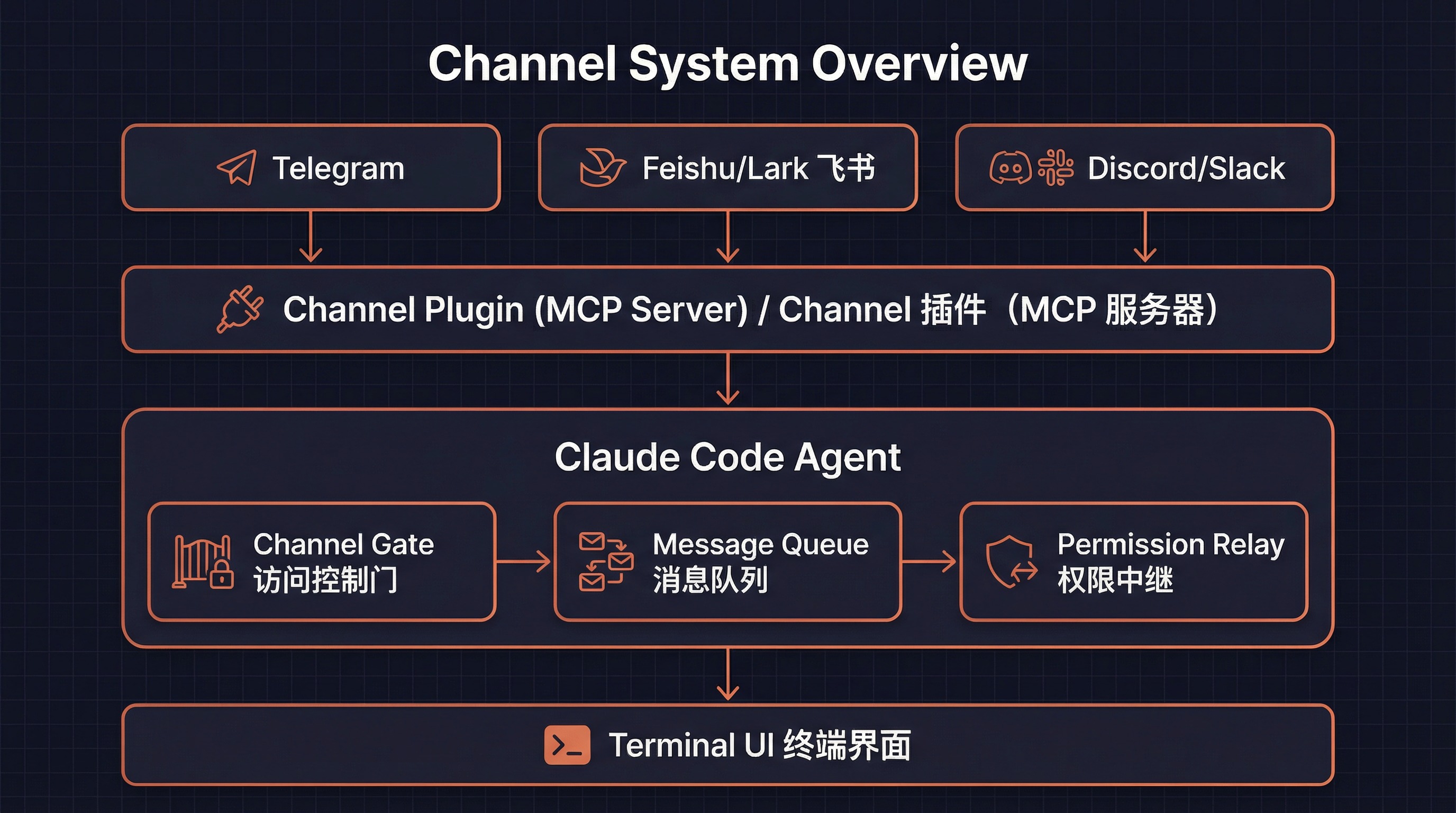
Channel 是 Claude Code 的 **IM 集成系统**,它允许用户通过 Telegram、Feishu(飞书)、Discord、Slack 等即时通讯平台远程控制正在运行的 Claude Code Agent。
### 核心理念
传统的 AI 编程助手只能在终端中交互。Channel 系统打破了这一限制——你可以在手机上通过 Telegram 给 Claude Code 发消息,它会像在终端中一样理解并执行你的请求,并将结果回复到你的聊天窗口。
### Channel 的本质
从技术角度看,一个 Channel 就是一个特殊的 **MCP(Model Context Protocol)Server**,它需要:
1. **声明能力**:在 MCP 握手时声明 `experimental['claude/channel']` 能力
2. **推送消息**:通过 `notifications/claude/channel` 通知将 IM 消息推入 Agent 对话
3. **暴露工具**:提供 `reply`、`react`、`edit_message` 等 MCP 工具,让 Agent 回复到 IM 平台
```typescript
// Channel 的两种形态
type ChannelEntry =
| { kind: 'plugin'; name: string; marketplace: string; dev?: boolean }
| { kind: 'server'; name: string; dev?: boolean }
```
**plugin 类型**:来自 marketplace 的验证插件(如 `plugin:telegram@anthropic`)
**server 类型**:直接指定的 MCP 服务器名称(始终需要 dev 旁路)
---
## 二、整体架构
### 消息流转全链路
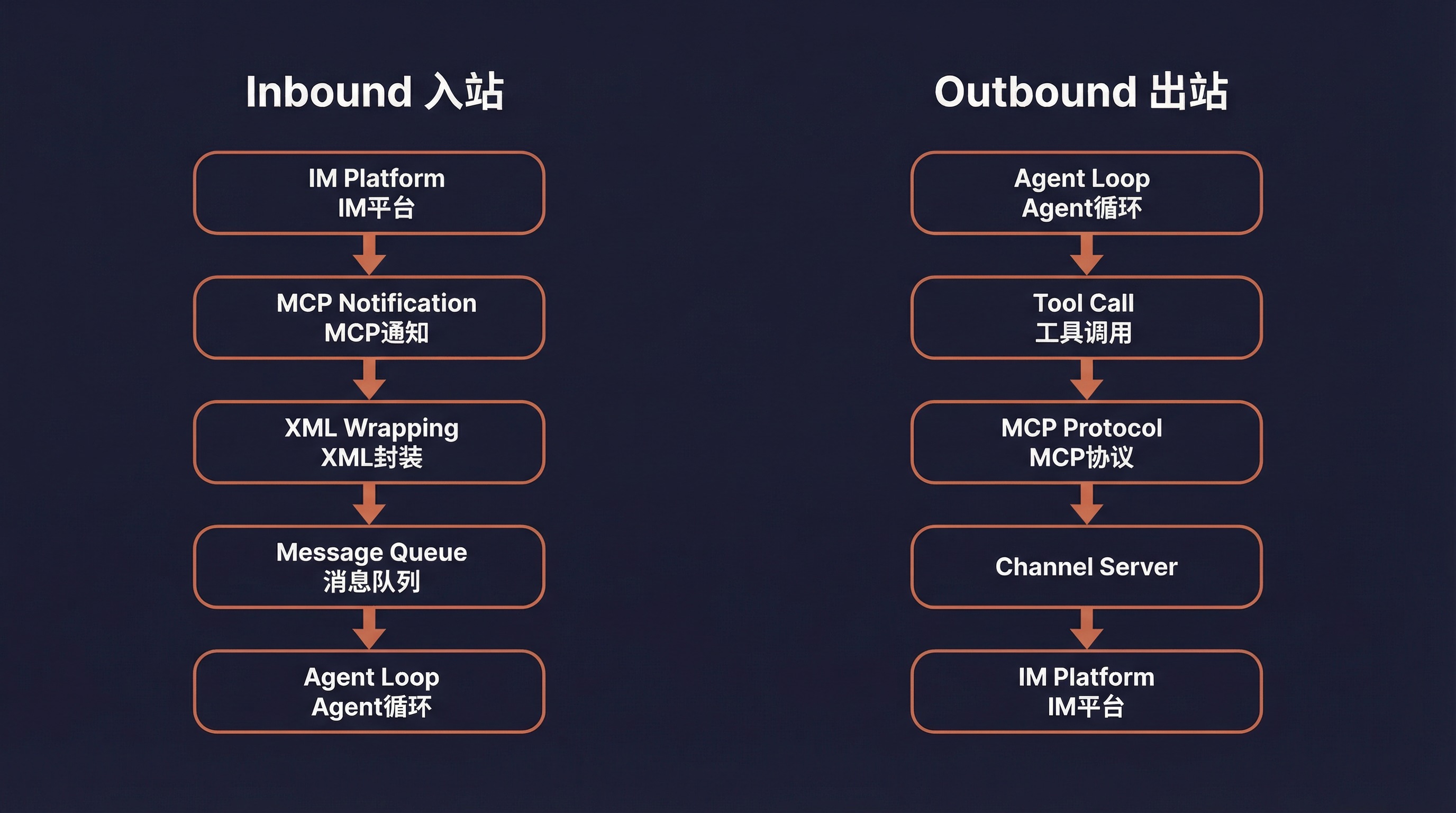
Channel 系统的消息流转遵循一个清晰的双向路径:
```
┌─────────────────────────────────────────────────────────────┐
│ 入站(IM → Agent) │
│ │
│ Telegram/Feishu/Discord │
│ ↓ │
│ Channel Plugin(MCP Server) │
│ ↓ │
│ notifications/claude/channel { content, meta } │
│ ↓ │
│ useManageMCPConnections → registerNotificationHandler │
│ ↓ │
│ wrapChannelMessage() → │
│ ↓ │
│ enqueue({ priority: 'next', isMeta: true }) │
│ ↓ │
│ SleepTool 每 ~1s 轮询 hasCommandsInQueue() │
│ ↓ │
│ Model 看到 标签,理解消息来源 │
└─────────────────────────────────────────────────────────────┘
┌─────────────────────────────────────────────────────────────┐
│ 出站(Agent → IM) │
│ │
│ Model 决定使用哪个工具回复 │
│ ↓ │
│ callTool() → Channel 的 MCP 工具 │
│ (reply / react / edit_message / download_attachment) │
│ ↓ │
│ MCP 协议调用 Channel Server │
│ ↓ │
│ Channel Server 发送消息到 IM 平台 │
│ ↓ │
│ Telegram/Feishu/Discord 用户收到回复 │
└─────────────────────────────────────────────────────────────┘
```
### 核心组件关系
| 组件 | 文件 | 职责 |
|------|------|------|
| **Channel Gate** | `channelNotification.ts` | 六层访问控制门 |
| **Message Wrapper** | `channelNotification.ts` | XML 消息封装 |
| **Permission Relay** | `channelPermissions.ts` | 远程权限审批 |
| **Allowlist** | `channelAllowlist.ts` | GrowthBook 白名单管理 |
| **MCP Connection** | `useManageMCPConnections.ts` | 连接管理与通知注册 |
| **Channel Message UI** | `UserChannelMessage.tsx` | 终端渲染 Channel 消息 |
| **Dev Dialog** | `DevChannelsDialog.tsx` | 开发模式确认对话框 |
| **Channels Notice** | `ChannelsNotice.tsx` | 启动时 Channel 状态通知 |
| **Plugin Integration** | `mcpPluginIntegration.ts` | 插件作用域命名 |
| **State** | `bootstrap/state.ts` | 全局 Channel 白名单状态 |
---
## 三、消息协议
### 3.1 入站通知 Schema
Channel Server 推送到 Claude Code 的通知格式:
```typescript
// channelNotification.ts
const ChannelMessageNotificationSchema = z.object({
method: z.literal('notifications/claude/channel'),
params: z.object({
content: z.string(),
// 透传元数据 — thread_id、user 等
// 渲染为 标签的属性
meta: z.record(z.string(), z.string()).optional(),
}),
})
```
### 3.2 XML 封装
收到通知后,系统将其封装为 `` XML 标签:
```typescript
// channelNotification.ts:106-116
function wrapChannelMessage(
serverName: string,
content: string,
meta?: Record,
): string {
const attrs = Object.entries(meta ?? {})
.filter(([k]) => SAFE_META_KEY.test(k)) // 防 XML 注入
.map(([k, v]) => ` ${k}="${escapeXmlAttr(v)}"`)
.join('')
return `
${content}
`
}
```
**封装结果示例**:
```xml
帮我看看 main.ts 有什么问题
```
Model 看到这个标签后,就知道消息来自 Telegram 的用户 alice,并会使用 Telegram 的 `reply` 工具回复。
### 3.3 安全的元数据过滤
Meta 键名会成为 XML 属性名,恶意构造的键(如 `x="" injected="y`)可能导致 XML 注入。系统使用严格的正则过滤:
```typescript
// 只允许纯标识符格式的键名
const SAFE_META_KEY = /^[a-zA-Z_][a-zA-Z0-9_]*$/
```
实际场景中,Channel 服务器只发送 `chat_id`、`user`、`thread_ts`、`message_id` 这类安全键名。
### 3.4 消息入队
封装后的消息通过 enqueue 推入消息队列:
```typescript
enqueue({
mode: 'prompt',
value: wrapChannelMessage(serverName, content, meta),
priority: 'next', // 高优先级
isMeta: true, // 元数据消息
origin: { kind: 'channel', server: serverName },
skipSlashCommands: true // 不解释为斜杠命令
})
```
SleepTool 每约 1 秒轮询一次 `hasCommandsInQueue()`,发现新消息后唤醒 Agent。
---
## 四、六层访问控制
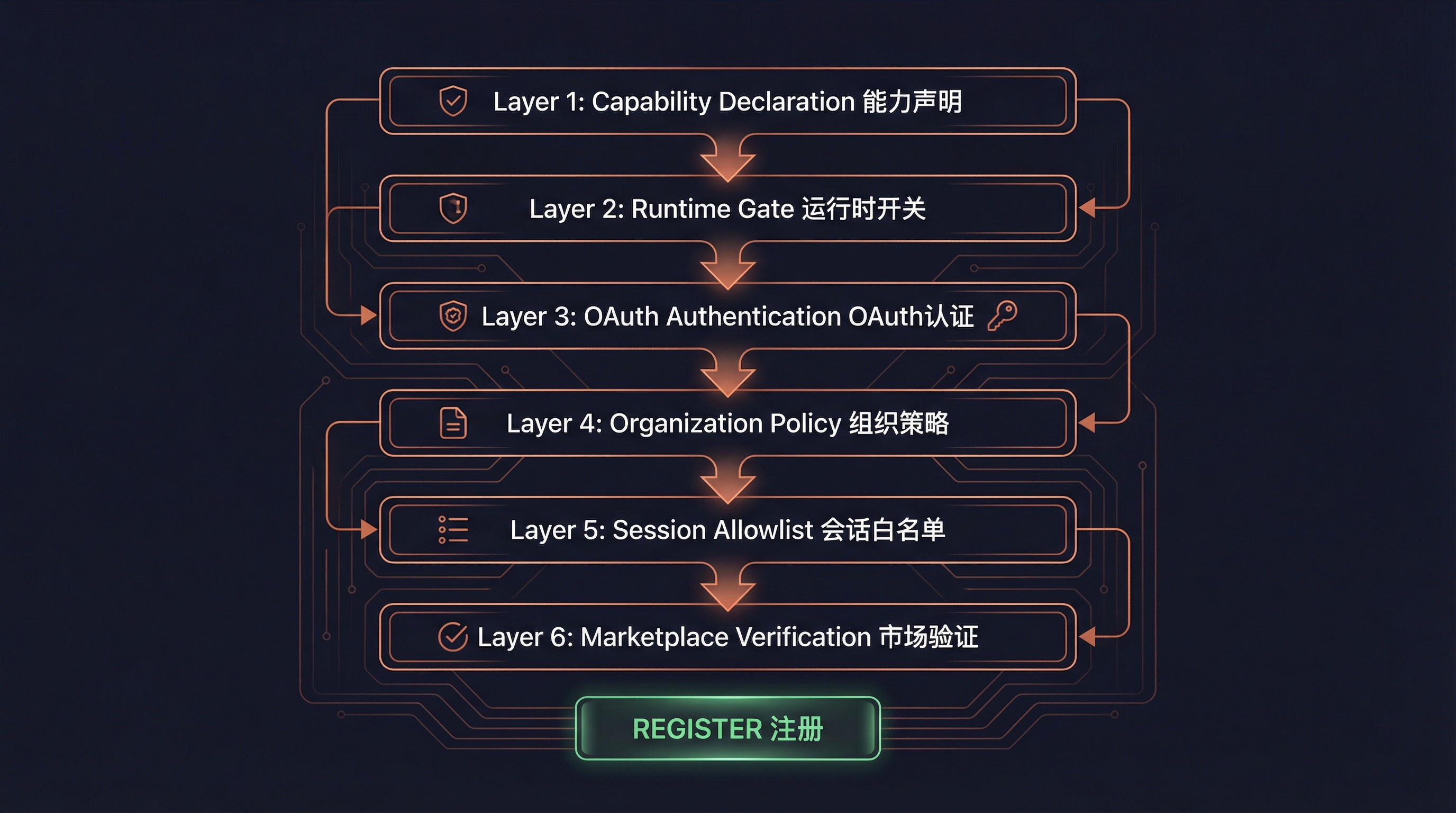
Channel 系统采用**六层递进式访问控制**,每一层都可以独立阻断 Channel 注册。这是整个系统安全性的基石。
### Gate 函数签名
```typescript
// channelNotification.ts:191-316
function gateChannelServer(
serverName: string,
capabilities: ServerCapabilities | undefined,
pluginSource: string | undefined,
): ChannelGateResult // { action: 'register' } | { action: 'skip', kind, reason }
```
### 4.1 第一层:能力声明(Capability)
```typescript
if (!capabilities?.experimental?.['claude/channel']) {
return { action: 'skip', kind: 'capability',
reason: 'server did not declare claude/channel capability' }
}
```
MCP Server 必须在握手时声明 `experimental['claude/channel']: {}` 能力。这是 MCP 的"存在信号"惯例(类似 `tools: {}`),将普通 MCP Server 与 Channel Server 区分开来。
### 4.2 第二层:运行时开关(Runtime Gate)
```typescript
if (!isChannelsEnabled()) {
return { action: 'skip', kind: 'disabled',
reason: 'channels feature is not currently available' }
}
```
`isChannelsEnabled()` 检查 GrowthBook 特性开关 `tengu_harbor`(默认 false,5 分钟刷新)。这是全局的"紧急制动"——关闭此开关立即禁用所有 Channel,不需要发版。
### 4.3 第三层:OAuth 认证(Auth)
```typescript
if (!getClaudeAIOAuthTokens()?.accessToken) {
return { action: 'skip', kind: 'auth',
reason: 'channels requires claude.ai authentication (run /login)' }
}
```
Channel 仅限 OAuth 认证用户。API Key 用户被阻止,因为 Console 端目前还没有 `channelsEnabled` 的管理界面。
### 4.4 第四层:组织策略(Policy)
```typescript
const sub = getSubscriptionType()
const managed = sub === 'team' || sub === 'enterprise'
const policy = managed ? getSettingsForSource('policySettings') : undefined
if (managed && policy?.channelsEnabled !== true) {
return { action: 'skip', kind: 'policy',
reason: 'channels not enabled by org policy' }
}
```
Teams/Enterprise 组织必须在托管设置中显式启用 `channelsEnabled: true`。默认关闭——即使没有配置任何策略的团队组织也不会回退到非托管路径。
### 4.5 第五层:会话白名单(Session)
```typescript
const entry = findChannelEntry(serverName, getAllowedChannels())
if (!entry) {
return { action: 'skip', kind: 'session',
reason: `server ${serverName} not in --channels list for this session` }
}
```
MCP Server 必须在本次会话的 `--channels` 参数列表中。即使一个受信任的 Server 动态添加了 `claude/channel` 能力,也无法绕过——必须用户在启动时显式列出。
### 4.6 第六层:Marketplace 验证 + 白名单(Allowlist)
对于 plugin 类型的 Channel:
```typescript
// Marketplace 验证:确保安装的插件来自声称的市场
const actual = pluginSource
? parsePluginIdentifier(pluginSource).marketplace
: undefined
if (actual !== entry.marketplace) {
return { action: 'skip', kind: 'marketplace',
reason: `tag mismatch: asked for @${entry.marketplace}, installed from ${actual}` }
}
// 白名单检查:插件必须在 GrowthBook 审批列表中
if (!entry.dev) {
const { entries } = getEffectiveChannelAllowlist(sub, policy?.allowedChannelPlugins)
if (!entries.some(e => e.plugin === entry.name && e.marketplace === entry.marketplace)) {
return { action: 'skip', kind: 'allowlist', reason: 'not on approved list' }
}
}
```
**双重验证**:先验证 `--channels plugin:slack@anthropic` 中的 `@anthropic` 标签与实际安装的插件来源是否匹配(防止 `slack@evil` 冒充 `slack@anthropic`),再检查是否在审批白名单中。
**白名单来源优先级**:Team/Enterprise 组织可以设置 `allowedChannelPlugins`,此时它替代 GrowthBook ledger 白名单(管理员拥有信任决策权)。
对于 server 类型,白名单始终失败(schema 是 `{marketplace, plugin}` 格式,server 类型无法匹配),除非使用 `--dangerously-load-development-channels`(设置 `entry.dev = true` 旁路白名单)。
### Gate 结果类型
```typescript
type ChannelGateResult =
| { action: 'register' } // 通过所有检查,注册通知处理器
| { action: 'skip'; kind: string; reason: string } // 某层拦截
// kind 枚举:capability | disabled | auth | policy | session | marketplace | allowlist
```
---
## 五、权限中继系统
### 5.1 为什么需要权限中继
当 Claude Code 需要执行敏感操作(如运行 Bash 命令),会弹出权限确认对话框。但如果用户通过 Telegram 远程控制 Agent,他看不到本地终端的对话框。
权限中继系统解决了这个问题:**将权限提示转发到 IM 平台,让用户在手机上也能审批或拒绝操作**。
### 5.2 出站:CC → Channel(权限请求)
当 Agent 触发权限对话框且 Channel 声明了 `experimental['claude/channel/permission']` 能力时:
```typescript
// 通知 Schema
const CHANNEL_PERMISSION_REQUEST_METHOD =
'notifications/claude/channel/permission_request'
type ChannelPermissionRequestParams = {
request_id: string // 5 字母标识符(如 "tbxkq")
tool_name: string // 工具名(如 "Bash")
description: string // 人类可读描述
input_preview: string // JSON 输入预览,截断到 200 字符
}
```
Channel Server 收到后,按各平台格式化(Telegram markdown、Discord embed 等)发送给用户。
### 5.3 Short Request ID 生成
5 字母标识符的设计充满巧思:
```typescript
// channelPermissions.ts:140-152
function shortRequestId(toolUseID: string): string {
let candidate = hashToId(toolUseID)
for (let salt = 0; salt < 10; salt++) {
if (!ID_AVOID_SUBSTRINGS.some(bad => candidate.includes(bad))) {
return candidate
}
candidate = hashToId(`${toolUseID}:${salt}`)
}
return candidate
}
```
**设计决策**:
- **25 字母表**:a-z 去掉 `l`(与 1/I 混淆),25^5 约 980 万种组合
- **FNV-1a 哈希**:不是加密级别,但足够稳定且快速
- **脏话过滤**:5 个随机字母可能拼出不雅词汇(如发短信给老板的场景),内置屏蔽词表
- **纯字母**:手机用户不需要切换键盘模式(十六进制需要在字母和数字间切换)
- **大小写不敏感**:适配手机自动更正
### 5.4 入站:Channel → CC(权限响应)
用户在 IM 中回复格式:`yes tbxkq` 或 `no tbxkq`
```typescript
// 服务端解析正则
const PERMISSION_REPLY_RE = /^\s*(y|yes|n|no)\s+([a-km-z]{5})\s*$/i
// 结构化通知(服务端解析后发出,而非 CC 端正则匹配文本)
const ChannelPermissionNotificationSchema = z.object({
method: z.literal('notifications/claude/channel/permission'),
params: z.object({
request_id: z.string(),
behavior: z.enum(['allow', 'deny']),
}),
})
```
**关键设计**:Channel Server 负责解析用户回复并发出结构化事件,CC 端不做文本正则匹配。这意味着普通聊天中的文字永远不会意外触发权限审批。
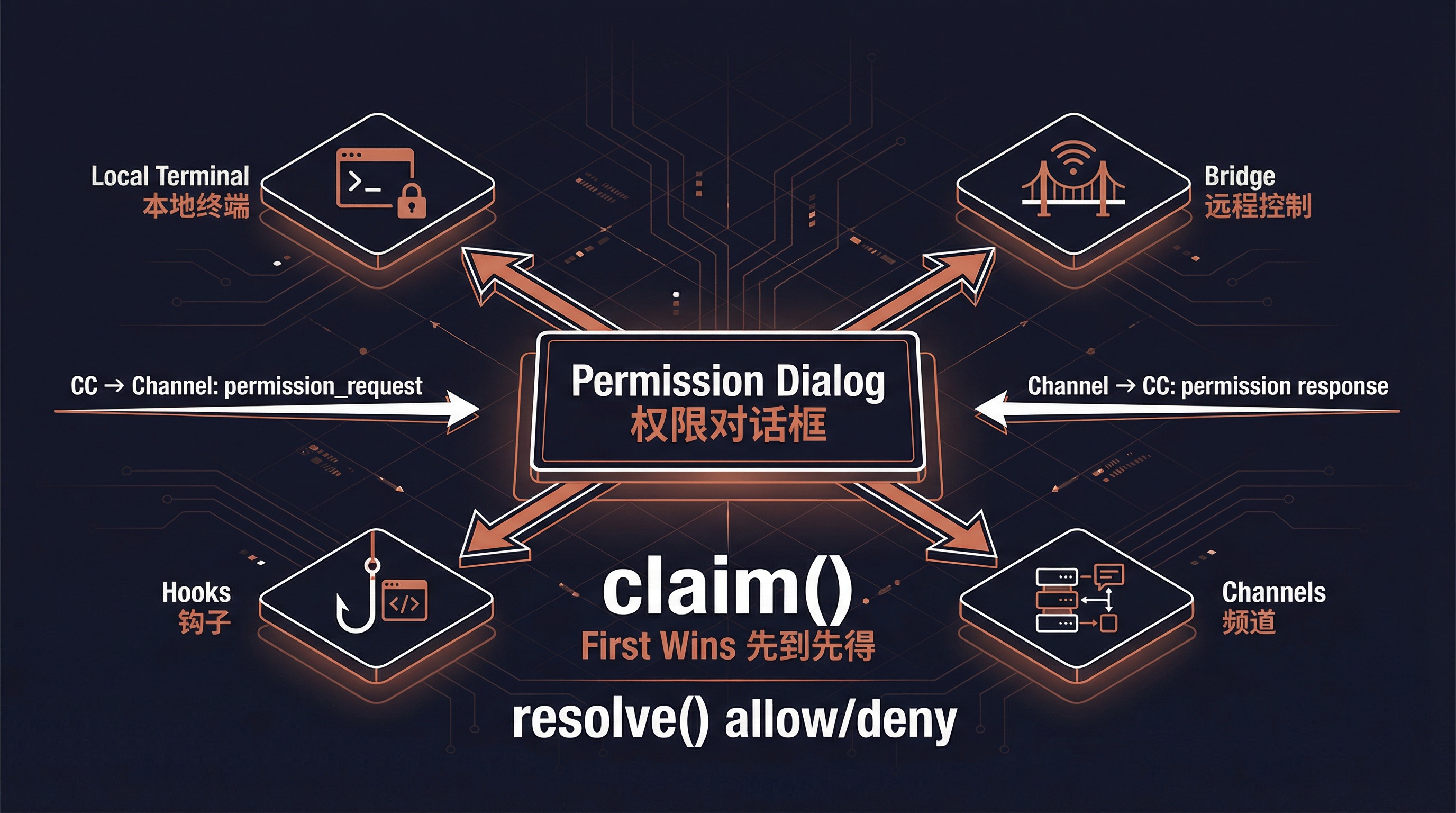
### 5.5 多源竞争
权限响应来自四个来源,先到先得:
```
┌──────────────┐ ┌──────────────┐ ┌──────────────┐ ┌──────────────┐
│ 本地终端 │ │ Bridge │ │ Channels │ │ Hooks │
│ Local UI │ │ 远程控制 │ │ Telegram etc │ │ Permission │
└──────┬───────┘ └──────┬───────┘ └──────┬───────┘ └──────┬───────┘
│ │ │ │
└───────────────────┴───────────────────┴──────────────────┘
│
claim() — 先到先得
│
┌─────┴─────┐
│ resolve │
│ allow/deny│
└───────────┘
```
`createChannelPermissionCallbacks()` 使用闭包维护 pending Map(不在模块级别,也不在 AppState 中——函数引用在状态中会导致序列化问题),构造一次后存入 AppState。
### 5.6 过滤权限中继客户端
```typescript
// channelPermissions.ts:177-194
function filterPermissionRelayClients(clients, isInAllowlist) {
return clients.filter(c =>
c.type === 'connected' &&
isInAllowlist(c.name) &&
c.capabilities?.experimental?.['claude/channel'] !== undefined &&
c.capabilities?.experimental?.['claude/channel/permission'] !== undefined
)
}
```
**三个条件全部必须**:已连接 + 在白名单中 + 同时声明了两个能力(`claude/channel` 和 `claude/channel/permission`)。第二个能力是显式 opt-in——只推消息的 Channel 永远不会意外成为权限审批入口。
---
## 六、UI 组件
### 6.1 终端消息渲染(UserChannelMessage)
```typescript
// UserChannelMessage.tsx
// 解析 XML 标签并在终端中渲染
const CHANNEL_RE = new RegExp(
`<${CHANNEL_TAG}\\s+source="([^"]+)"([^>]*)>\\n?([\\s\\S]*?)\\n?`
)
// 插件服务器名称显示:plugin:slack-channel:slack → slack
function displayServerName(name: string): string {
const i = name.lastIndexOf(':')
return i === -1 ? name : name.slice(i + 1)
}
const TRUNCATE_AT = 60 // 消息体截断长度
```
**渲染效果**:
```
◁ tg · alice: 帮我看看 main.ts 有什么问题
```
其中 `◁` 是 Channel 箭头符号(`CHANNEL_ARROW`),显示服务器叶子名称和可选的用户名。
### 6.2 状态通知(ChannelsNotice)
启动时显示 `--channels` 条目的状态,报告阻断原因:
| 阻断类型 | 含义 |
|----------|------|
| `disabled` | Channel 功能未启用(tengu_harbor 关闭) |
| `noAuth` | 未通过 OAuth 认证 |
| `policyBlocked` | 组织策略未启用 channels |
| `unmatched` | 未在 `--channels` 列表中匹配到 |
### 6.3 开发者确认对话框(DevChannelsDialog)
使用 `--dangerously-load-development-channels` 时显示的警告对话框:
```
┌─ WARNING: Loading development channels ──────────────────┐
│ │
│ --dangerously-load-development-channels is for local │
│ channel development only. Do not use this option to │
│ run channels you have downloaded off the internet. │
│ │
│ Please use --channels to run a list of approved channels│
│ │
│ Channels: plugin:my-channel@local │
│ │
│ > I am using this for local development │
│ Exit │
└──────────────────────────────────────────────────────────┘
```
选择 "Exit" 会调用 `gracefulShutdownSync(1)` 立即退出。
---
## 七、插件 Channel 架构
### 7.1 Plugin Manifest 中的 Channel 声明
插件通过 `plugin.json` 中的 `channels` 数组声明 Channel:
```typescript
// schemas.ts:670-703
const PluginManifestChannelsSchema = z.object({
channels: z.array(z.object({
server: z.string().min(1), // MCP 服务器名,必须匹配 mcpServers 中的 key
displayName: z.string().optional(), // 配置对话框标题(如 "Telegram")
userConfig: z.record( // 安装时提示用户配置的字段
z.string(),
PluginUserConfigOptionSchema()
).optional(),
}).strict()),
})
```
**示例 plugin.json**:
```json
{
"name": "telegram",
"version": "1.0.0",
"mcpServers": {
"tg": {
"command": "node",
"args": ["./server.js"],
"env": {
"BOT_TOKEN": "${user_config.bot_token}",
"OWNER_ID": "${user_config.owner_id}"
}
}
},
"channels": [
{
"server": "tg",
"displayName": "Telegram",
"userConfig": {
"bot_token": {
"type": "string",
"description": "Telegram Bot API Token",
"required": true,
"secret": true
},
"owner_id": {
"type": "string",
"description": "Your Telegram User ID",
"required": true
}
}
}
]
}
```
### 7.2 配置流(PluginOptionsFlow)
启用插件后,如果 Channel 有未配置的 `userConfig` 字段:
1. `getUnconfiguredChannels()` 检测未满足验证的字段
2. `PluginOptionsFlow` 组件逐个提示用户输入
3. 敏感值(如 bot_token)存入 Keychain
4. 普通值存入 `~/.claude/plugins/options/{pluginId}.json`
```typescript
// mcpPluginIntegration.ts:290-318
function getUnconfiguredChannels(plugin: LoadedPlugin): UnconfiguredChannel[] {
const channels = plugin.manifest.channels
if (!channels || channels.length === 0) return []
const unconfigured: UnconfiguredChannel[] = []
for (const channel of channels) {
if (!channel.userConfig) continue
const saved = loadMcpServerUserConfig(pluginId, channel.server) ?? {}
const validation = validateUserConfig(saved, channel.userConfig)
if (!validation.valid) {
unconfigured.push({
server: channel.server,
displayName: channel.displayName ?? channel.server,
configSchema: channel.userConfig,
})
}
}
return unconfigured
}
```
### 7.3 作用域命名(Scoped Naming)
插件提供的 MCP Server 会被添加作用域前缀以避免冲突:
```typescript
// mcpPluginIntegration.ts:341-360
function addPluginScopeToServers(
servers: Record,
pluginName: string,
pluginSource: string, // e.g., "telegram@anthropic"
): Record {
const scopedServers = {}
for (const [name, config] of Object.entries(servers)) {
const scopedName = `plugin:${pluginName}:${name}`
scopedServers[scopedName] = {
...config,
scope: 'dynamic',
pluginSource,
}
}
return scopedServers
}
```
**命名转换**:
- 输入:`{ "tg": { ... } }` from `telegram@anthropic`
- 输出:`{ "plugin:telegram:tg": { scope: 'dynamic', pluginSource: 'telegram@anthropic', ... } }`
`pluginSource` 被保存在配置上,后续 Channel Gate 的 marketplace 验证步骤会用到它。
### 7.4 白名单有效来源
```typescript
// channelNotification.ts:127-138
function getEffectiveChannelAllowlist(sub, orgList) {
// Team/Enterprise 组织自定义白名单 → 替代 GrowthBook ledger
if ((sub === 'team' || sub === 'enterprise') && orgList) {
return { entries: orgList, source: 'org' }
}
// 默认使用 GrowthBook ledger
return { entries: getChannelAllowlist(), source: 'ledger' }
}
```
组织管理员可以通过 `allowedChannelPlugins` 完全控制哪些 Channel 插件被信任,而不依赖全局 ledger。
---
## 八、安全设计
### 8.1 XML 注入防护
Channel 消息中的元数据会成为 XML 属性。两道防线:
1. **键名过滤**:`SAFE_META_KEY = /^[a-zA-Z_][a-zA-Z0-9_]*$/` 只允许纯标识符
2. **值转义**:`escapeXmlAttr()` 对属性值进行 XML 转义
### 8.2 Marketplace 验证
`--channels plugin:slack@anthropic` 只是用户的"意图声明"。运行时名称 `plugin:slack:X` 可能来自 `slack@anthropic` 或 `slack@evil`。Gate 验证两者必须匹配:
```typescript
const actual = pluginSource
? parsePluginIdentifier(pluginSource).marketplace
: undefined
if (actual !== entry.marketplace) {
return { action: 'skip', kind: 'marketplace', reason: '...' }
}
```
### 8.3 权限中继的信任边界
来自代码注释中 Kenneth 的分析(PR 讨论 #2956440848):
> "Claude 会自我审批吗?" 答:审批方是通过 Channel 的人类,不是 Claude。但信任边界不是终端——而是白名单(tengu_harbor_ledger)。一个被妥协的 Channel Server 可以在人类没看到提示的情况下伪造 "yes \"。这是被接受的风险:一个已妥协的 Channel 本来就有无限的对话注入轮次(可以社会工程攻击、等待 acceptEdits 模式等);注入后自动审批更快,但能力上并不更强。权限对话框减缓了已妥协 Channel 的攻击速度,但不能完全阻止。
### 8.4 skipSlashCommands
Channel 消息入队时设置 `skipSlashCommands: true`,确保 IM 用户发送的 `/help` 等文本不会被解释为 Claude Code 的斜杠命令。
### 8.5 dev 旁路的粒度
`--dangerously-load-development-channels` 的 `dev` 标记是**每个条目**级别的,不是全局的。接受开发对话框后,只有显式标记为 dev 的条目才旁路白名单,`--channels` 中的正常条目仍然需要通过完整的白名单检查。
---
## 九、命令行接口
### 9.1 启动参数
```bash
# 使用已审批的 Channel 插件
claude --channels plugin:telegram@anthropic plugin:feishu@anthropic
# 本地开发模式(旁路白名单)
claude --dangerously-load-development-channels plugin:my-channel@local
# 两者可以同时使用
claude --channels plugin:telegram@anthropic \
--dangerously-load-development-channels plugin:dev-channel@local
```
### 9.2 参数解析
```typescript
// main.tsx
const parseChannelEntries = (raw: string[], flag: string): ChannelEntry[] => {
// 解析 "plugin:slack@anthropic"、"server:slack" 等格式
// 验证格式正确性
// 返回 ChannelEntry 数组
}
// 存入全局状态
setAllowedChannels(channelEntries)
```
### 9.3 特性门控
这两个 CLI 选项只在特性开关启用时可用:
```typescript
// main.tsx:3850-3852
if (feature('KAIROS') || feature('KAIROS_CHANNELS')) {
program.addOption(new Option('--channels ', '...').hideHelp())
program.addOption(new Option('--dangerously-load-development-channels ', '...').hideHelp())
}
```
`hideHelp()` 表示这些选项不会出现在 `--help` 输出中——Channel 功能目前处于隐藏特性阶段。
---
## 十、特性开关与分析
### 10.1 特性开关
| 开关 | 来源 | 用途 |
|------|------|------|
| `KAIROS` / `KAIROS_CHANNELS` | 编译时 | 控制 CLI 参数注册和代码路径 |
| `tengu_harbor` | GrowthBook 运行时 | Channel 功能总开关(默认 false) |
| `tengu_harbor_ledger` | GrowthBook 运行时 | 审批插件白名单 |
| `tengu_harbor_permissions` | GrowthBook 运行时 | 权限中继功能开关 |
### 10.2 分析事件
```typescript
// Channel Gate 结果
tengu_mcp_channel_gate: {
gate_kind: 'disabled' | 'auth' | 'policy' | 'session' | 'marketplace' | 'allowlist'
plugin: string
is_dev: boolean
}
// Channel 消息
tengu_mcp_channel_message: {
content_length: number
meta_key_count: number
entry_kind: 'plugin' | 'server'
is_dev: boolean
plugin: string
}
// 启动标志
tengu_mcp_channel_flags: {
channels_count: number
dev_count: number
plugins: string[]
dev_plugins: string[]
}
```
---
## 十一、总结
Channel 系统是 Claude Code 的 **IM 集成框架**,它的设计体现了几个核心原则:
### 1. 安全优先
六层访问控制门确保只有经过审批、用户明确选择的 Channel 才能推送消息。从编译时特性开关到运行时白名单,每一层都可以独立中断。
### 2. 协议驱动
Channel 不是特殊代码——它们就是普通的 MCP Server,只是多了一个通知协议。这意味着任何能实现 MCP 的语言都可以编写 Channel 插件。
### 3. 松耦合
Channel 失败不会阻断本地工作流。权限中继是多源竞争机制,任一来源的响应都有效。
### 4. 渐进式信任
从全局开关 → 认证 → 组织策略 → 会话白名单 → Marketplace 验证 → 白名单,信任级别逐级递增,每一步都有明确的安全目的。
### 5. 插件友好
通过 `plugin.json` 的声明式 Channel 配置、自动的用户配置提示流和作用域命名,第三方开发者可以轻松构建自己的 Channel 插件。
### 源码文件索引
| 文件 | 行数 | 职责 |
|------|------|------|
| `src/services/mcp/channelNotification.ts` | ~320 | 门控、消息封装、白名单集成 |
| `src/services/mcp/channelPermissions.ts` | ~240 | 权限中继、请求 ID 生成 |
| `src/services/mcp/channelAllowlist.ts` | ~80 | GrowthBook 白名单查询 |
| `src/services/mcp/useManageMCPConnections.ts` | - | 连接管理、通知处理器注册 |
| `src/components/messages/UserChannelMessage.tsx` | ~140 | 终端渲染 Channel 消息 |
| `src/components/DevChannelsDialog.tsx` | ~105 | 开发模式确认对话框 |
| `src/components/LogoV2/ChannelsNotice.tsx` | - | 启动时状态通知 |
| `src/utils/plugins/mcpPluginIntegration.ts` | - | 插件 MCP 集成、作用域命名 |
| `src/utils/plugins/schemas.ts` | ~700 | 插件清单 Schema(含 Channel 声明) |
| `src/bootstrap/state.ts` | - | 全局 Channel 白名单状态 |
| `src/main.tsx` | ~3850 | CLI 参数注册和解析 |