

 ## Installation
NKVPhonePicker is available through [CocoaPods](http://cocoapods.org). To install
it, simply add the following line to your Podfile:
```ruby
pod 'NKVPhonePicker'
```
Also you can try an example project with
```ruby
pod try NKVPhonePicker
```
*(don't forget to update your cocoapods master repo)*
For swift 4.2 version use `011f7090e69a8446aadd21531e4b83da745cd2d4` in `master` branch.
If you're still using Swift 2.x - you can set (The development for swift_2.x is deprecated. Stale version still exists.)
```ruby
pod 'NKVPhonePicker', :git => "https://github.com/NikKovIos/NKVPhonePicker.git", :branch => "Swift_2.x"
```
## Usage
1) Make your UITextField a class of NKVPhonePickerTextField
2) Set its phonePickerDelegate to UIViewController in order to be able of presenting the CountriesViewController
3) If any troubles - watch an example project.
Please, make an issue, if you need any features, or have bugs.
## Example
```swift
topTextField.phonePickerDelegate = self
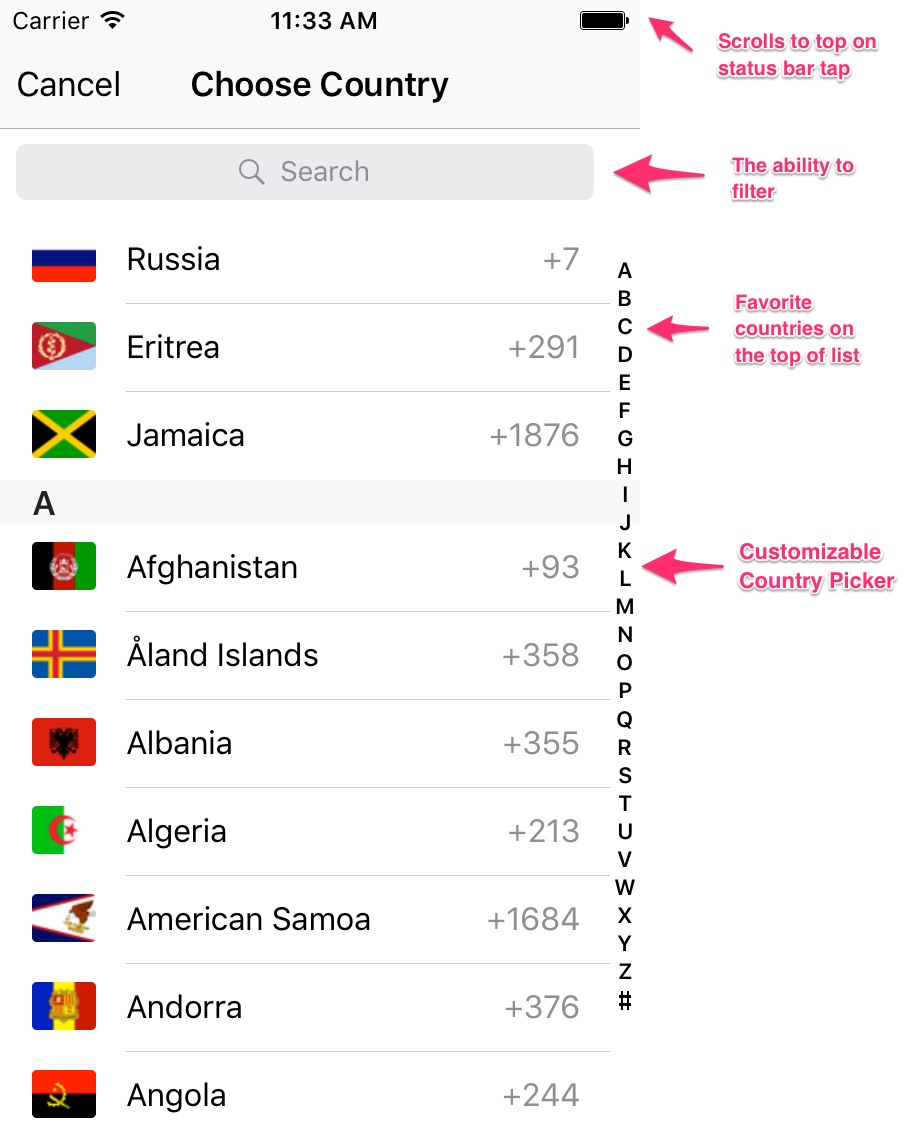
topTextField.favoriteCountriesLocaleIdentifiers = ["RU", "ER", "JM"]
topTextField.rightToLeftOrientation = true
topTextField.shouldScrollToSelectedCountry = false
topTextField.flagSize = CGSize(width: 30, height: 50)
topTextField.enablePlusPrefix = false
// Setting initial custom country
let country = Country.countryBy(countryCode: "EG")
topTextField.currentSelectedCountry = country
// Setting custom format pattern for some countries
topTextField.customPhoneFormats = ["RU" : "# ### ### ## ##",
"GB": "## #### #########"]
// Adding programmatically
bottomTextField = NKVPhonePickerTextField(frame: CGRect(x: 0, y: 0, width: 0, height: 30))
bottomTextField.placeholder = "ex: 03123456"
bottomTextField.autocorrectionType = .no
bottomTextField.phonePickerDelegate = self
bottomTextField.keyboardType = .numberPad
bottomTextField.favoriteCountriesLocaleIdentifiers = ["LB"]
bottomTextField.layer.borderWidth = 1
bottomTextField.layer.borderColor = UIColor.white.cgColor
bottomTextField.layer.cornerRadius = 5
bottomTextField.font = UIFont.boldSystemFont(ofSize: 25)
bottomTextField.textColor = UIColor.white
bottomTextField.textFieldTextInsets = UIEdgeInsets(top: 0, left: 20, bottom: 0, right: 0)
bottomTextField.translatesAutoresizingMaskIntoConstraints = false
// prefilling
let source = NKVSource(countryCode: "ru")
bottomTextField.setCurrentCountryInitially = false
bottomTextField.preFillText(source: source, number: 7999432423)
```
**Note:** 'In this library used the `TextFieldPatternFormat` lib by Vojta Stavik'
#### TODO:
- [x] Add example
- [x] Max numbers count var (can do with custom pattern)
- [x] Patterns for each country
## Checkout my other works
- [x] https://github.com/Yummypets/YPImagePicker - Instagram like image picker. The project in cooperative with [s4cha](https://github.com/s4cha)
- [x] https://github.com/NikKovIos/SDWebImage-CircularProgressView - extension to change progress bar on images for SDWebImage
- [x] https://github.com/NikKovIos/ObjectMapper_RealmSwift - extension to add Realm object support for ObjectMapper
## Installation
NKVPhonePicker is available through [CocoaPods](http://cocoapods.org). To install
it, simply add the following line to your Podfile:
```ruby
pod 'NKVPhonePicker'
```
Also you can try an example project with
```ruby
pod try NKVPhonePicker
```
*(don't forget to update your cocoapods master repo)*
For swift 4.2 version use `011f7090e69a8446aadd21531e4b83da745cd2d4` in `master` branch.
If you're still using Swift 2.x - you can set (The development for swift_2.x is deprecated. Stale version still exists.)
```ruby
pod 'NKVPhonePicker', :git => "https://github.com/NikKovIos/NKVPhonePicker.git", :branch => "Swift_2.x"
```
## Usage
1) Make your UITextField a class of NKVPhonePickerTextField
2) Set its phonePickerDelegate to UIViewController in order to be able of presenting the CountriesViewController
3) If any troubles - watch an example project.
Please, make an issue, if you need any features, or have bugs.
## Example
```swift
topTextField.phonePickerDelegate = self
topTextField.favoriteCountriesLocaleIdentifiers = ["RU", "ER", "JM"]
topTextField.rightToLeftOrientation = true
topTextField.shouldScrollToSelectedCountry = false
topTextField.flagSize = CGSize(width: 30, height: 50)
topTextField.enablePlusPrefix = false
// Setting initial custom country
let country = Country.countryBy(countryCode: "EG")
topTextField.currentSelectedCountry = country
// Setting custom format pattern for some countries
topTextField.customPhoneFormats = ["RU" : "# ### ### ## ##",
"GB": "## #### #########"]
// Adding programmatically
bottomTextField = NKVPhonePickerTextField(frame: CGRect(x: 0, y: 0, width: 0, height: 30))
bottomTextField.placeholder = "ex: 03123456"
bottomTextField.autocorrectionType = .no
bottomTextField.phonePickerDelegate = self
bottomTextField.keyboardType = .numberPad
bottomTextField.favoriteCountriesLocaleIdentifiers = ["LB"]
bottomTextField.layer.borderWidth = 1
bottomTextField.layer.borderColor = UIColor.white.cgColor
bottomTextField.layer.cornerRadius = 5
bottomTextField.font = UIFont.boldSystemFont(ofSize: 25)
bottomTextField.textColor = UIColor.white
bottomTextField.textFieldTextInsets = UIEdgeInsets(top: 0, left: 20, bottom: 0, right: 0)
bottomTextField.translatesAutoresizingMaskIntoConstraints = false
// prefilling
let source = NKVSource(countryCode: "ru")
bottomTextField.setCurrentCountryInitially = false
bottomTextField.preFillText(source: source, number: 7999432423)
```
**Note:** 'In this library used the `TextFieldPatternFormat` lib by Vojta Stavik'
#### TODO:
- [x] Add example
- [x] Max numbers count var (can do with custom pattern)
- [x] Patterns for each country
## Checkout my other works
- [x] https://github.com/Yummypets/YPImagePicker - Instagram like image picker. The project in cooperative with [s4cha](https://github.com/s4cha)
- [x] https://github.com/NikKovIos/SDWebImage-CircularProgressView - extension to change progress bar on images for SDWebImage
- [x] https://github.com/NikKovIos/ObjectMapper_RealmSwift - extension to add Realm object support for ObjectMapper