

Give your AI a rulebook. Build a research library that grows with your reading.
From papers in your inbox to connected research notes with traceable sources and methods.


Get the rulebook · Start your first quest
Explore the workflow ·
Read the guild code ·
FAQ ·
简体中文

A useful paper deserves more than a forgotten summary. When you return to write a literature review, compare methods, or question a finding, you need its original source, the conditions behind its results, and its connections to other research.
**This repository puts those requirements into one file for your AI agent: [llm-wiki-starter.md](llm-wiki-starter.md).** A file-capable agent follows the guide to maintain your knowledge base. You read, search, and explore it in Obsidian.

Find the paper. Follow the evidence.
Chinese and English titles, authors, journal, and version appear in consistent locations. Main articles and supplements have explicit links. Key numbers remain connected to their original evidence.
|
Bring related papers into the same conversation.
Gather research around shared questions. Compare methods and interpretive limits. Add concept links and testable hypotheses when the evidence supports them.
|
1 core file · 5 identity checks · 8 archival rules
The operating rules, paper template, and initialization instructions live in one Markdown file.

Start with an Obsidian vault and an agent such as Codex or Claude Code that can read papers and edit local files.
### Ⅰ · Pick up the rulebook
Open [llm-wiki-starter.md](llm-wiki-starter.md), save it in the root of your vault, and keep its filename.
### Ⅱ · Set up your research guild
Launch your agent in that directory and send the following prompt. Replace the research area with your own:
~~~text
Read llm-wiki-starter.md in full before acting.
My research area is: [your research area].
Inspect the current directory, propose a knowledge-base initialization plan,
and draft purpose.md.
List the files and discipline folders you would create.
Wait for my confirmation before making changes.
~~~
### Ⅲ · Begin your first archive
After initialization, place papers and supplementary materials in `raw/inbox/`, then send:
~~~text
Archive the inbox and update the academic methodology toolbox.
Follow llm-wiki-starter.md: read the full sources, check for duplicates,
and compare versions.
List the destination of each file and the pages you would create or update.
Wait for my confirmation before executing the plan.
~~~
When the batch is complete, start exploring from `wiki/index.md` in Obsidian.
▸ What about new sessions and existing vaults?
At the start of each new session, explicitly ask the agent to read `llm-wiki-starter.md`. The filename alone does not guarantee that your tool will load it automatically.
If you already use `AGENTS.md` or `CLAUDE.md`, point your existing entry instructions to this file. For an existing vault, inspect its structure first and adopt the conventions in agreed batches. Updating the rules does not authorize a rewrite of the entire library.

**You choose the papers, ask the questions, and confirm the scope. The agent organizes and checks the work in six stages.**
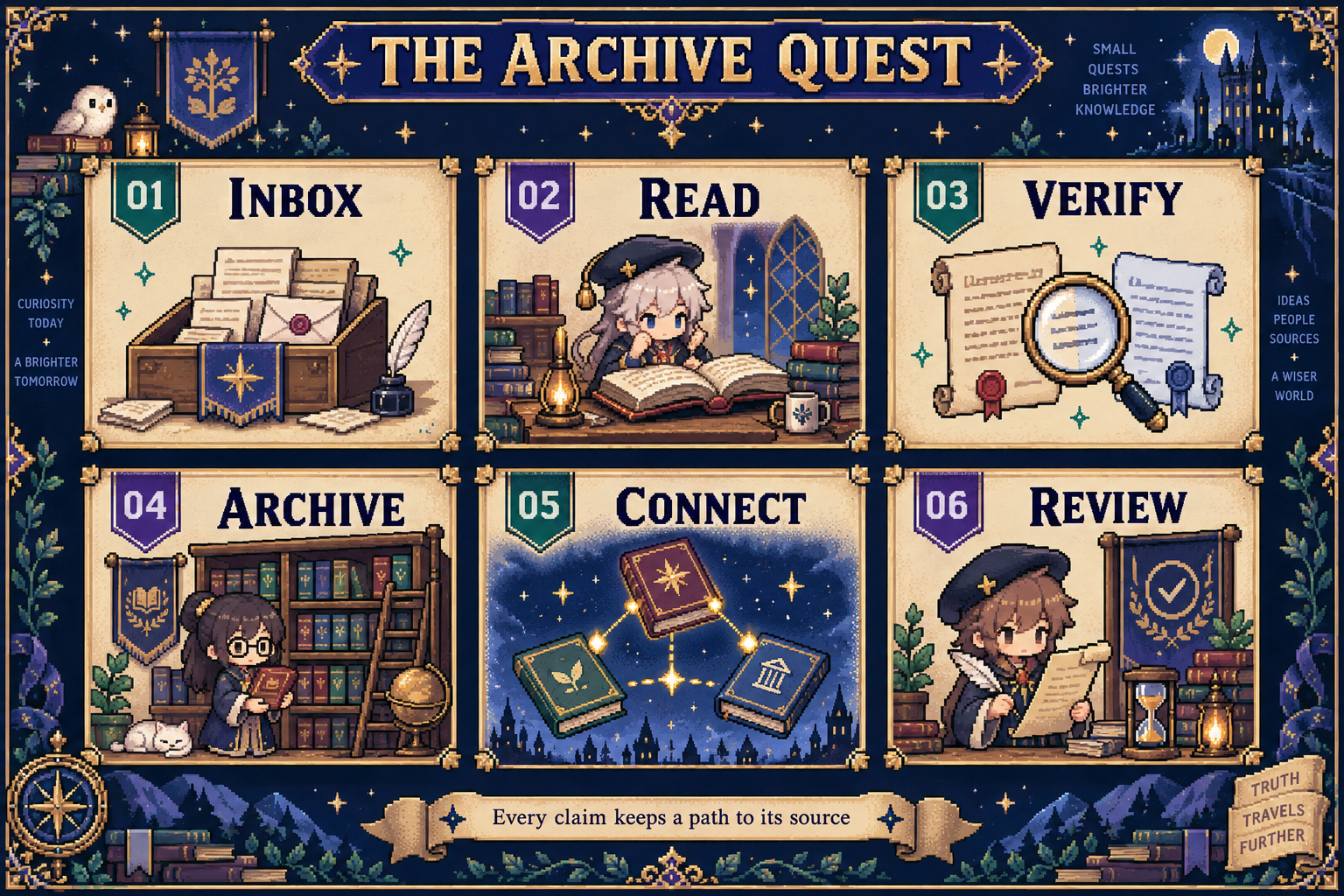
▸ Explore the six stages
| Stage | What it covers |
|---|---|
| 01 · INBOX | Identify main articles, supplementary information, duplicate files, and different versions. |
| 02 · READ | Read the full paper, figures, tables, and supplementary material needed to assess its conclusions. |
| 03 · VERIFY | Run five duplicate checks, verify bibliographic details, compare versions, and propose a concrete plan. |
| 04 · ARCHIVE | Move sources to the confirmed destinations and write standardized paper pages. |
| 05 · CONNECT | Update evidence-backed topic connections and the academic methodology toolbox. |
| 06 · REVIEW | Check source paths, metadata, equations, and links; update the index, overview, and activity log. |
The report must also explain what happened to duplicates, unreadable files, and anything you asked to keep in the inbox.
### Keep asking questions after archiving
~~~text
How do these papers differ in what they measure and what they conclude
about the same research question?
Separate the authors' findings, the authors' interpretations, and
cross-paper inferences. List the original sources supporting each judgment.
~~~
The academic methodology toolbox gradually maps **research question → method → measured object → interpretive limits → source**. When you need to compare methods, you can start with a question and follow the relevant evidence.

**An adventurous presentation. Evidence you can trace.**
| Principle | What it means in practice |
|---|---|
| **Establish the paper's identity** | Cross-check title and author keywords, the source path, the author-year slug prefix, the file hash, and persistent identifiers. |
| **Preserve version differences** | Compare methods, data, conclusions, and discussion across preprints and published versions. Record meaningful additions and removals. |
| **Keep sources accessible** | Link the main article through `source_pdf`; register each supplement in the `source_supplement` list. |
| **Respect interpretive limits** | Separate findings, interpretations, and inferences. Preserve key numbers and conditions. |
| **Accept missing information** | Omit an unverified DOI. Use one bounded check for missing metadata in older literature. |
| **Check the finished archive** | Verify required fields, sections, YAML, equations, links, and the catalog. Recompute page counts from actual files. |
▸ See what a paper page looks like
Every paper page prioritizes its Chinese title, original English title, authors, and journal or version. If a DOI can be verified, its line goes immediately after the English title. Otherwise, omit that line.
The starter uses Chinese paper-page bodies and English frontmatter keys by default. The example below preserves the canonical labels so it matches the operating guide:
~~~markdown
# 中文论文译名
**论文**:Exact English Original Title
**作者**:Full author list, in the original source order
**期刊 / 版本**:Verified journal, or preprint platform and version
## 核心问题
## 实验与判别方法
## 核心结果
## 关键解释边界
## 后续研究
## 关联
## Sources
~~~
In order, the sections cover the **core question**, **experimental and discriminating methods**, **core results**, **interpretive limits**, **further research**, **connections**, and **sources**.
Reviews use `证据范围与综合方法` (evidence scope and synthesis methods) for the methods section. Mathematical and theoretical papers use `模型、定义与证明结构` (models, definitions, and proof structure). Evidence-backed, testable predictions belong in `可检验的新假说` (testable new hypotheses), replacing the further-research heading when warranted.
[Read the complete template and field requirements](llm-wiki-starter.md#canonical-paper-page).
▸ Read the eight archival rules
1. Propose a concrete plan before bulk moves or directory changes.
2. Preserve original sources and existing knowledge; archive within the authorized scope.
3. Maintain references whenever files are moved or renamed.
4. Obtain confirmation before a batch changes three or more files.
5. Keep exact source paths on paper pages and register supplements individually.
6. Complete all five duplicate checks and compare versions before deciding how to update the archive.
7. Ground academic judgments in original research and use accurate language.
8. Preserve the paper template, evidence detail, and version labels.
[Read the full rules and exception handling](llm-wiki-starter.md#fatal-rules).

▸ Do I need a dedicated Obsidian plugin?
The guide organizes your knowledge base through Markdown files and wikilinks. No dedicated plugin is required. Your agent environment supplies the ability to read papers, inspect figures, and edit files.
▸ Will AI automatically handle every paper correctly?
Results depend on the agent's reading capabilities, file tools, and your review. The rules require full-source reading and evidence checks. Important judgments should still be checked against the original paper. The guide does not start background tasks on its own.
▸ Can I update only titles, authors, and journals?
Yes. The rules distinguish full archiving from bibliographic repair. When you request only retrieval metadata, the agent should preserve existing analysis and keep the lookup bounded.
▸ Will my papers and personal notes be uploaded?
This repository contains the rules and presentation assets. The archival workflow keeps papers and personal notes in your own vault. Publishing that material to GitHub or another external service requires a separate arrangement. Any data sent to an AI provider also depends on the agent and settings you use.

Get the rulebook
· Questions and feedback
· Back to the start
If these rules are useful to you, consider leaving a Star or sharing your archiving experience.
简体中文 · English
Obsidian-Codex-CC-for-academy · Paper Quest / The Scholar Guild
Credits · Knowledge-base foundations
The knowledge-base organization draws on [Andrej Karpathy's LLM Wiki](https://gist.github.com/karpathy/442a6bf555914893e9891c11519de94f). This project adds conventions for academic paper archiving.