
DSH Agent Pet
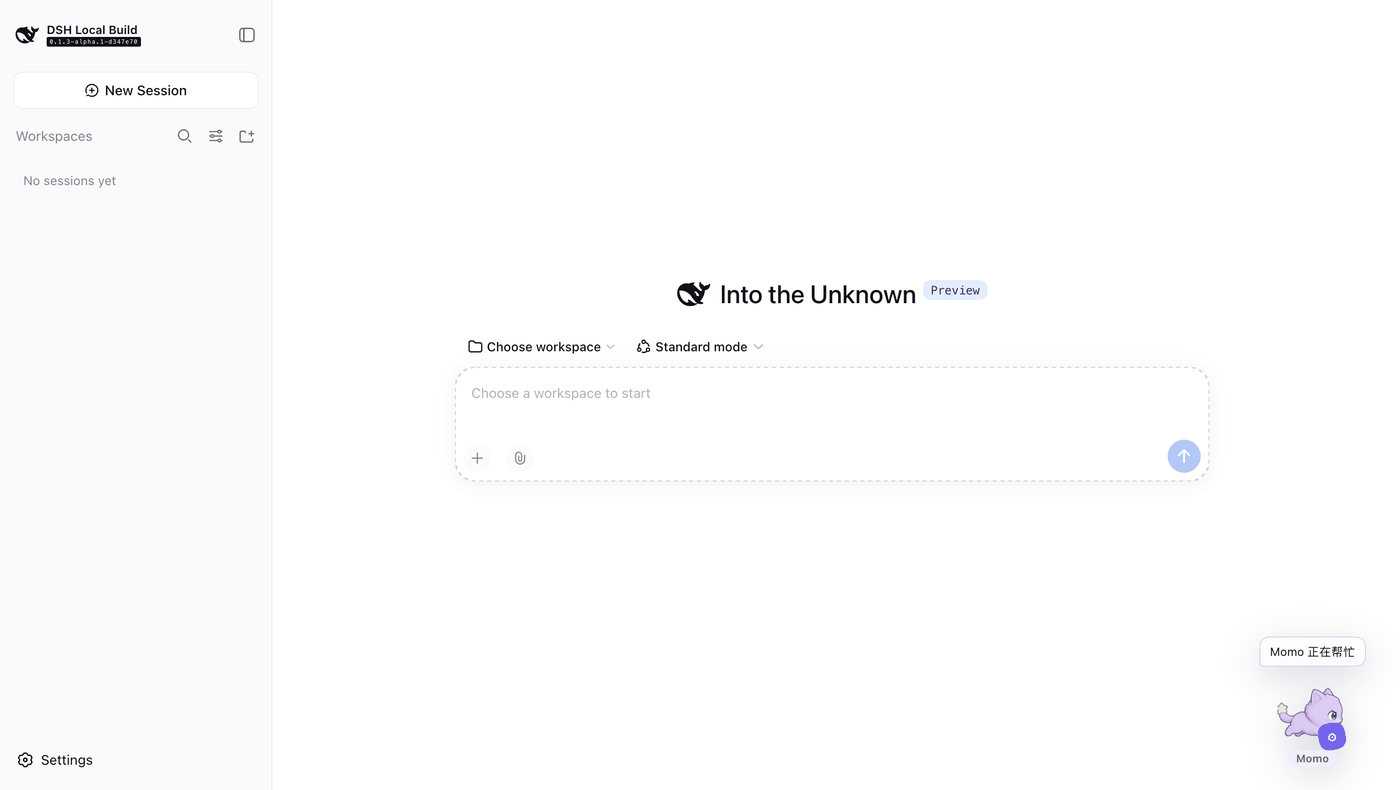
A pet that lives in the corner of the DeepSeek Harness Web UI and changes pose with your agent.
It raises a paw while the agent thinks, runs while a tool executes, and sits up looking at you when it needs approval.
Generate its look from one sentence — with your own API key, or by taking the prompt to any other image AI.




中文 · English
---
## One looping animation per state
Most desktop pets are a single image faking motion with transforms. This one is not: **a single generation draws a 6×8 frame-by-frame sprite sheet — eight states, six frames each**. The UI jumps to the row for the current agent state and plays it with CSS `steps(6)`.
| State | Loop | When |
| --- | --- | --- |
| `idle` | breathing, ears and tail drifting | nothing running |
| `thinking` | paw tapping the chin, head tilting back | the agent is thinking |
| `running_tool` | side-view run cycle | a tool is executing |
| `waiting_approval` | head tilting toward you, one blink | waiting for your confirmation |
| `done` | crouch, leap with paws raised, land | finished |
| `error` | shoulders sagging and lifting | something failed |
| `resting` | curled up asleep, breathing | reserved |
| `greeting` | raised paw swinging side to side | reserved |
All forty-eight cells come from **one generation**, so it is one character. Generating separately yields similar-but-different animals — text-to-image has no memory, and character consistency is the whole difficulty here.
The last two rows have no trigger yet; reserving them now means adding states later will not require regenerating artwork.
---
## Three ways to get a pet
### 1. Do nothing
The packaged cloud cat Momo ships with the plugin and animates across all six states. It is a hand-written SVG: no API key, no network.
### 2. Draw one with your own API key
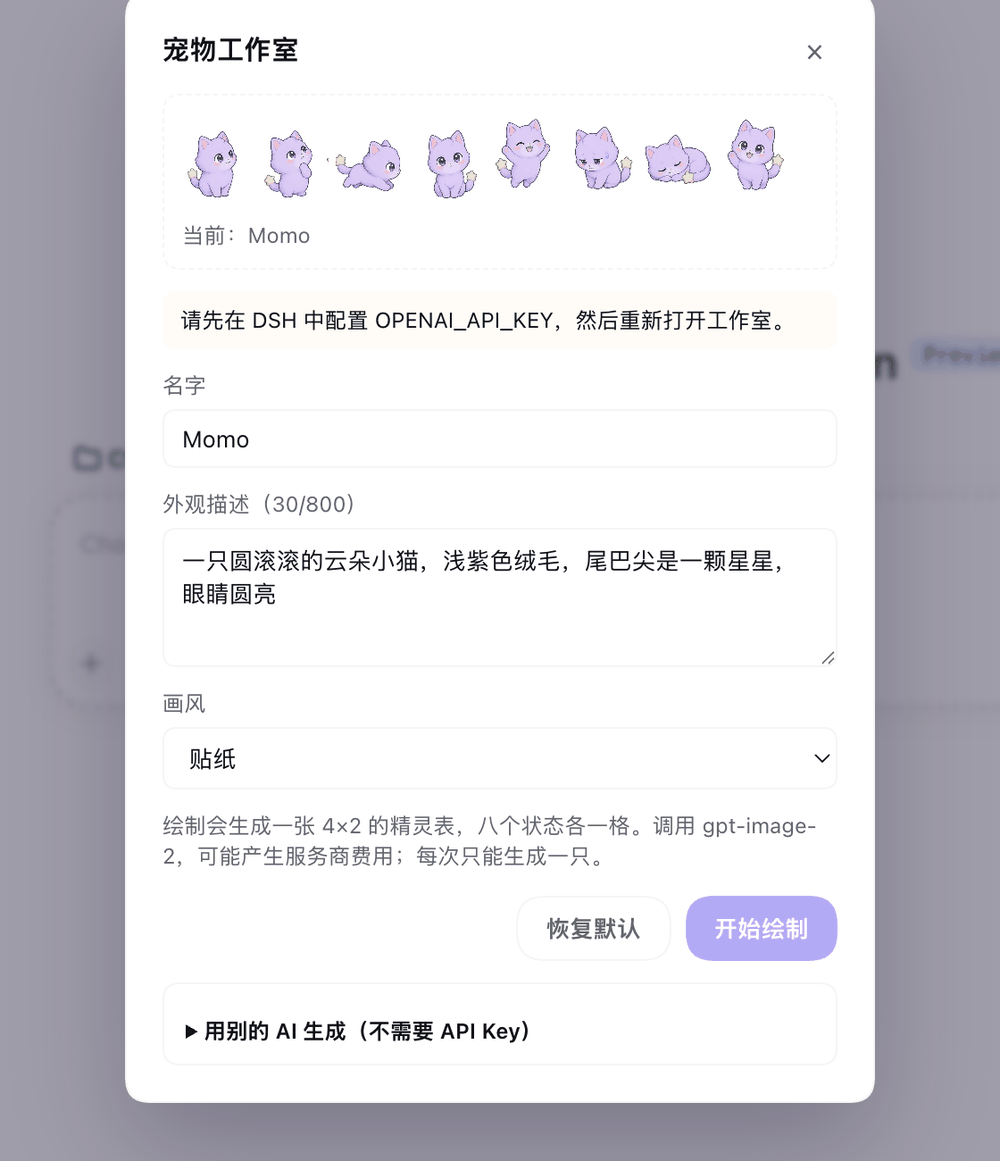 Open **Settings → 宠物**, or hover the pet and click 🎨. Enter a name, a description (8–800 characters), pick a style, and press "开始绘制".
The plugin generates a transparent 6×8 frame-by-frame sheet and swaps it in immediately. "恢复默认" restores Momo.
Style presets: `auto`, `pixel`, `sticker`, `plush`, `flat-vector`, `3d-toy`.
Drawing needs an image API key, resolved from the DSH credential service as `OPENAI_API_KEY` by default. Without one the studio says so and sends nothing.
Open **Settings → 宠物**, or hover the pet and click 🎨. Enter a name, a description (8–800 characters), pick a style, and press "开始绘制".
The plugin generates a transparent 6×8 frame-by-frame sheet and swaps it in immediately. "恢复默认" restores Momo.
Style presets: `auto`, `pixel`, `sticker`, `plush`, `flat-vector`, `3d-toy`.
Drawing needs an image API key, resolved from the DSH credential service as `OPENAI_API_KEY` by default. Without one the studio says so and sends nothing.
### 3. Draw it in another AI and import it (no API key)
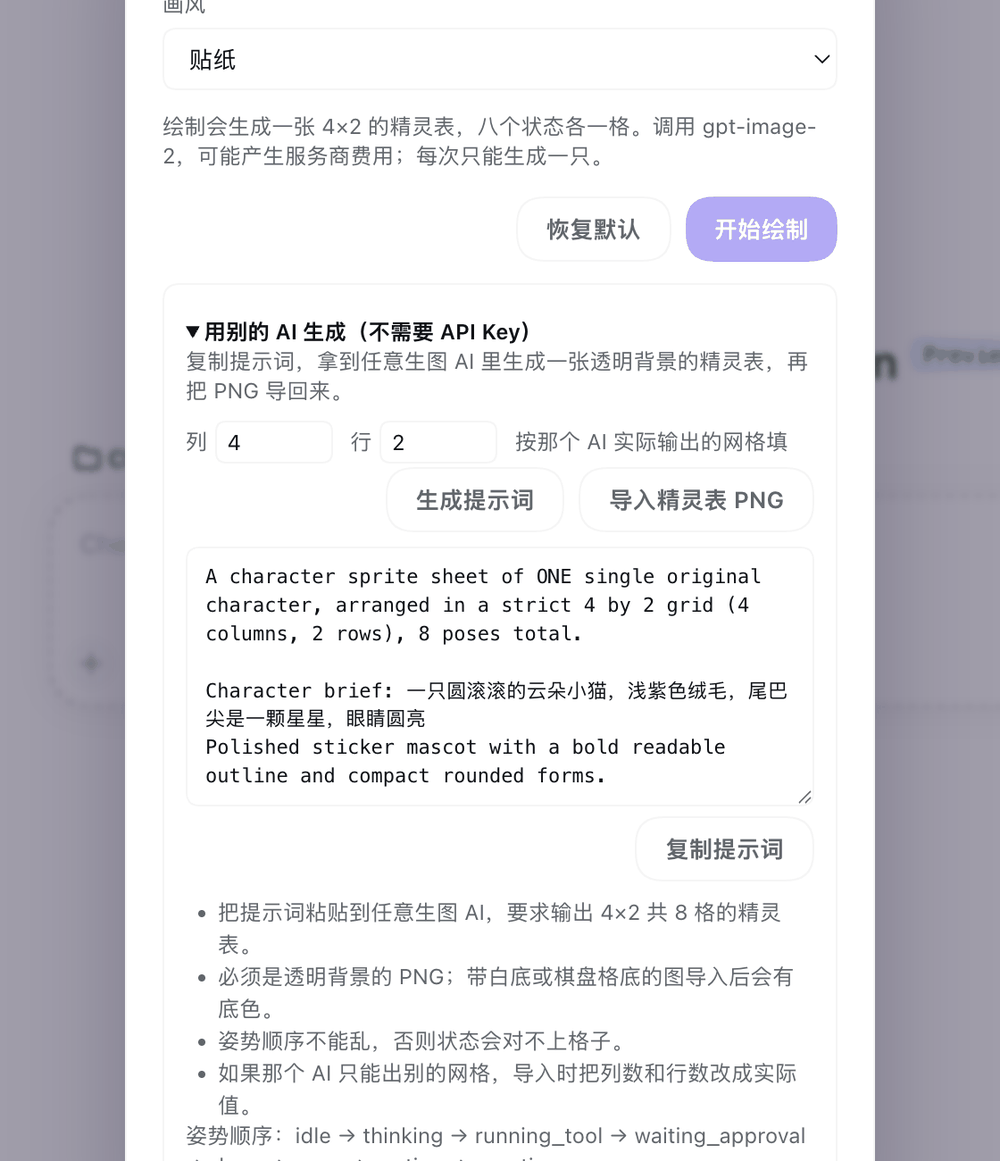 Expand "用别的 AI 生成" and press "生成提示词" for a **self-contained** prompt.
Paste it into any image AI, ask for a transparent 6×8 sprite sheet (eight state rows, six frames each), then press "⬆ 上传精灵表 PNG" and pick the file.
If that AI lays things out differently, change the column/row inputs; `1×1` imports a single frame. The image dimensions need not divide evenly by the grid — the UI scales the sheet to its own cell size.
This path needs no credential and costs nothing.
Expand "用别的 AI 生成" and press "生成提示词" for a **self-contained** prompt.
Paste it into any image AI, ask for a transparent 6×8 sprite sheet (eight state rows, six frames each), then press "⬆ 上传精灵表 PNG" and pick the file.
If that AI lays things out differently, change the column/row inputs; `1×1` imports a single frame. The image dimensions need not divide evenly by the grid — the UI scales the sheet to its own cell size.
This path needs no credential and costs nothing.
---
## Settings
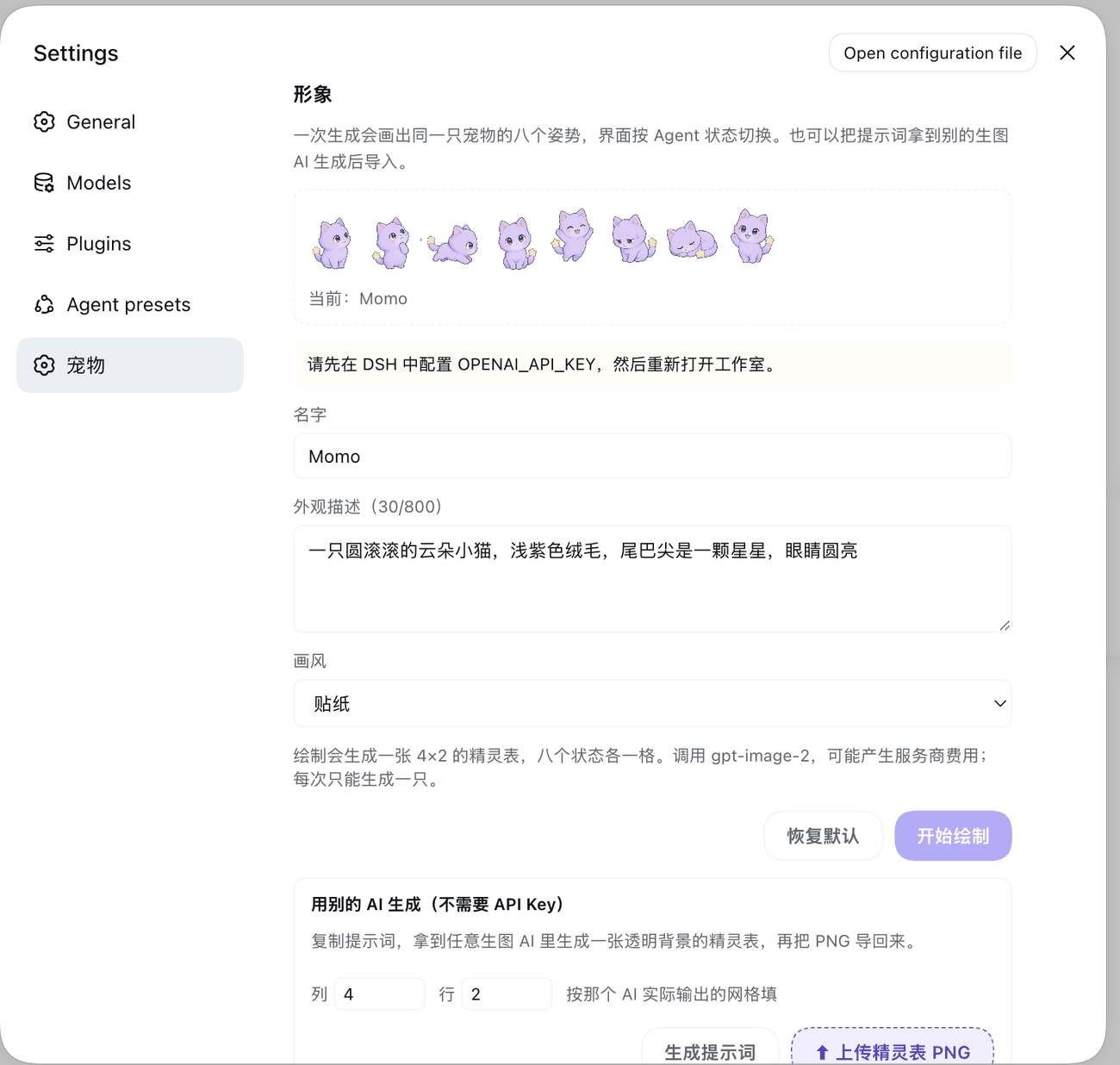
Installing adds a **宠物** section to Settings: the full studio on top, appearance switches below — bubble, animation, hide, and reset position.
Position, hidden state, and those switches are stored on the host, so they **survive reloads and restarts**.
---
## Install
Requires the DSH `web` profile.
```bash
dsh plugin --profile web add dsh-agent-pet
```
From Git:
```bash
dsh plugin --profile web add github:Noah-wang/dsh-agent-pet
```
From a local checkout:
```bash
dsh plugin --profile web add /absolute/path/to/dsh-agent-pet
```
Restart the DSH Web UI afterwards. To uninstall:
```bash
dsh plugin --profile web remove dsh-agent-pet
```
---
## Configuration
Override in your profile's patch layer. Everything is optional.
| Key | Default | Meaning |
| --- | --- | --- |
| `apiKeyEnv` | `OPENAI_API_KEY` | credential reference name |
| `model` | `gpt-image-2` | image model |
| `baseURL` | `https://api.openai.com/v1` | image endpoint; any OpenAI-compatible one works |
| `quality` | `medium` | `low` / `medium` / `high` |
| `dataDir` | `/agent-pet` | where generated pets are stored |
| `petFile` | packaged `pets/default/pet.md` | custom pet definition |
| `idleAfterMs` | `2400` | milliseconds before returning to idle |
---
## Privacy
**The plugin does not read conversation text, tool arguments, tool results, API keys, or any credential.** It observes agent lifecycle events and tool names only.
The browser half makes same-origin requests to the local DSH host and nothing else. During generation the key is resolved inside the host process by the DSH credential service; it never reaches browser state, API responses, logs, or exported pet metadata.
Only bytes carrying a valid PNG signature are stored; generated SVG or HTML is rejected rather than executed. Full boundaries in [`SECURITY.md`](SECURITY.md).
---
## Interaction and customization
- Drag to move; × hides it into a 🐾 button that brings it back. Both are remembered across reloads
- Honors `prefers-reduced-motion` by disabling every animation
- Edit `pets/default/pet.md` to change the name, artwork, and the short line shown per state. `avatar` accepts only a relative path beside `pet.md`; the Markdown never executes scripts, commands, or HTML
Drive states locally while developing:
```bash
curl -X POST http://127.0.0.1:3080/api/agent-pet \
-H 'content-type: application/json' \
-d '{"state":"running_tool"}'
```
---
## Implementation notes
- **Zero runtime dependencies**; React is a peer dependency
- Sprite cells are selected with pixel `background-position` and advanced with CSS `steps()`, so **neither side decodes an image**
- Single-frame pets (packaged Momo, older data, a user-uploaded single image) use `background-size: contain` and stay undistorted
- Generated artwork is written atomically and survives restarts
---
## Scope
`0.5.0`. Frame-by-frame sheet generation, prompt export, external sheet import, a Settings section with durable preferences, and npm, Git, or local installation are supported.
Community account submission, cloud sync, ESP32 communication, and executable third-party pet plugins are not.
---
## License
[MIT](LICENSE)