# MiddleDrag
**Three-finger trackpad gestures for middle-click and middle-drag on macOS.**
The middle mouse button your Mac trackpad is missing.
[](https://www.apple.com/macos/)
[](https://swift.org)
[](LICENSE)
[](https://formulae.brew.sh/cask/middledrag)
[](https://ports.macports.org/port/middledrag/)
[](https://github.com/NullPointerDepressiveDisorder/MiddleDrag/releases)
[](https://github.com/NullPointerDepressiveDisorder/MiddleDrag/releases)
[](https://app.fossa.com/projects/custom%2B59309%2Fgithub.com%2FNullPointerDepressiveDisorder%2FMiddleDrag?ref=badge_shield&issueType=license)
[](https://codecov.io/github/NullPointerDepressiveDisorder/MiddleDrag)
## The Problem
Mac trackpads don't have a middle mouse button. Many apps expect one.
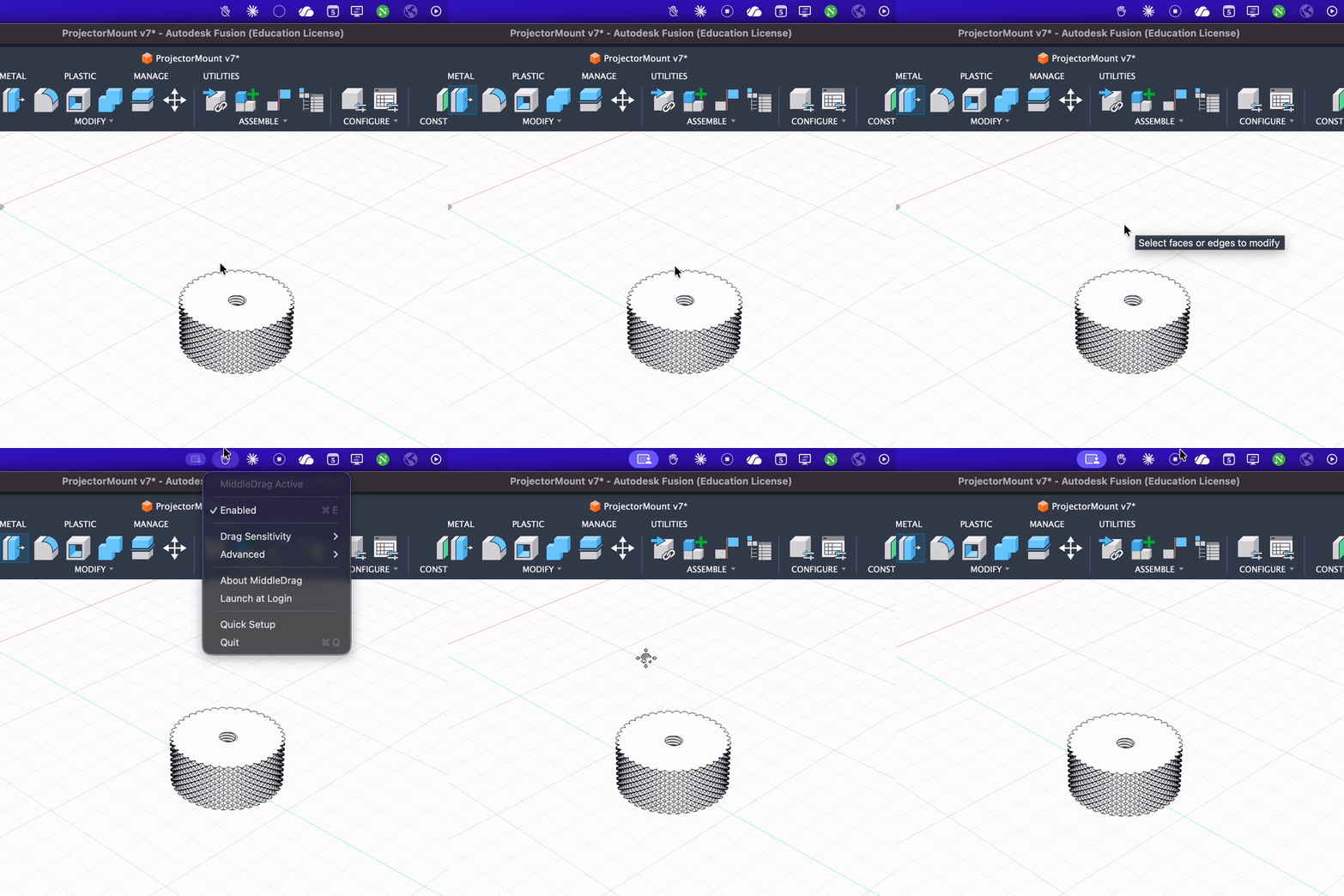
**MiddleDrag fixes this.** Three-finger tap for middle-click. Three-finger drag for middle-drag. Works alongside Mission Control and other system gestures.
## Use Cases
### Browsers
- Open links in new background tabs
- Close tabs with a click
- Open bookmarks/history in new tabs
### Design & Creative Tools
- Pan canvas in Figma, Photoshop, Illustrator, GIMP
- Navigate large documents in PDF viewers
- Scroll in any direction without modifier keys
### Development
- Close editor tabs in VS Code, Sublime Text, IDEs
- Middle-click paste in terminals (where supported)
- Pan around large codebases in code visualization tools
### 3D & CAD Software
- Orbit and pan viewports in Blender, FreeCAD, Fusion 360, SketchUp, Maya, ZBrush, OnShape
- Navigate Google Earth and mapping applications
- Essential for apps with broken or missing trackpad support
### Productivity
- Autoscroll in supported applications
- Any workflow that expects middle-mouse input
## Features
- **Three-finger tap** → Middle mouse click
- **Three-finger drag** → Middle mouse drag (pan/orbit in 3D apps)
- **Works with system gestures** — Mission Control, Exposé, and other macOS gestures remain functional
- **Native macOS app** — Menu bar interface, no terminal configuration required
- **Configurable** — Adjust sensitivity and smoothing to your preference
- **Launch at login** — Set it and forget it
## Installation
### Homebrew (Recommended)
```bash
brew install --cask middledrag
```
### MacPorts
```bash
sudo port install MiddleDrag
```
### Manual Download
1. Download the latest `.pkg` installer from [Releases](https://github.com/NullPointerDepressiveDisorder/MiddleDrag/releases)
2. Open the installer and follow the prompts
3. Launch MiddleDrag from your Applications folder
4. Grant Accessibility permissions when prompted
### Verify Download Integrity
Downloads are cryptographically attested via [GitHub Artifact Attestations](https://docs.github.com/en/actions/security-for-github-actions/using-artifact-attestations/using-artifact-attestations-to-establish-provenance-for-builds).
```bash
# Requires GitHub CLI: brew install gh
gh attestation verify ~/Downloads/MiddleDrag-{VERSION}.pkg --repo NullPointerDepressiveDisorder/MiddleDrag
```
## Usage
MiddleDrag runs in your menu bar as a hand icon.
| Gesture | Action |
|---------|--------|
| Three-finger tap | Middle click |
| Three-finger drag | Middle drag (pan/orbit) |
### Settings
- **Enabled** — Toggle gesture recognition
- **Drag Sensitivity** — Cursor speed during drag (0.5x – 2x)
- **Require Exactly 3 Fingers** — Ignore 4+ finger touches
- **Launch at Login** — Auto-start with macOS
## Why MiddleDrag?
### vs. BetterTouchTool ($10-24)
BetterTouchTool is powerful but overwhelming. Hundreds of options, complex interface, middle-click buried among features you'll never use. MiddleDrag does one thing well.
### vs. Middle ($8)
Middle costs $8 for functionality that should be free. It's also closed-source. MiddleDrag is MIT-licensed and community-maintained.
### vs. MiddleClick (open source)
MiddleClick requires terminal commands for all configuration — no GUI. MiddleDrag provides a native macOS settings interface. Both are open source, but MiddleDrag is actively maintained for modern macOS versions.
## Requirements
- macOS 15.0 (Sequoia) or later
- Built-in trackpad or Magic Trackpad
- Accessibility permissions
## How It Works
MiddleDrag uses Apple's private MultitouchSupport framework to intercept raw touch data *before* the system gesture recognizer processes it. This allows three-finger gestures to generate middle-mouse events while leaving Mission Control and other system gestures intact.
Technical flow:
1. MultitouchSupport framework provides raw touch coordinates
2. GestureRecognizer detects three-finger tap/drag patterns
3. Accessibility API generates synthetic middle-mouse events
4. CGEventTap suppresses conflicting system click events
## Building from Source
```bash
git clone https://github.com/NullPointerDepressiveDisorder/MiddleDrag.git
cd MiddleDrag
./build.sh
```
Or open `MiddleDrag.xcodeproj` in Xcode 16+.
Project Structure
```
MiddleDrag/
├── Core/
│ ├── GestureRecognizer.swift # Gesture detection logic
│ ├── MouseEventGenerator.swift # Mouse event synthesis
│ └── MultitouchFramework.swift # Private API bindings
├── Managers/
│ ├── DeviceMonitor.swift # Trackpad monitoring
│ └── MultitouchManager.swift # Main coordinator
├── Models/
│ ├── GestureModels.swift # Configuration types
│ └── TouchModels.swift # Touch data structures
├── UI/
│ ├── AlertHelper.swift # Dialog utilities
│ └── MenuBarController.swift # Menu bar interface
└── Utilities/
├── LaunchAtLoginManager.swift # Login item management
└── PreferencesManager.swift # Settings persistence
```
## Compatibility
| macOS Version | Status |
|---------------|--------|
| macOS 15 (Sequoia) | ✅ Supported |
| macOS 26 beta (Tahoe) | ✅ Compatible |
Works with built-in MacBook trackpads and external Magic Trackpads.
## Troubleshooting
Gestures not working
1. Check Accessibility permissions: **System Settings → Privacy & Security → Accessibility**
2. Toggle "Enabled" in the menu bar
3. Restart the app
After updating, gestures stopped
macOS treats each app version as a new application. Re-grant permissions:
1. **System Settings → Privacy & Security → Accessibility**
2. Toggle MiddleDrag **off** then **on**
3. Restart MiddleDrag
Conflicts with system gestures
Use soft taps instead of physical clicks. The app is designed to coexist with system gestures, but pressing down hard may still trigger Mission Control.
## Contributing
Contributions welcome. See [CONTRIBUTING.md](CONTRIBUTING.md).
## Acknowledgements
MiddleDrag uses [Sentry](https://sentry.io) for crash reporting and [Sparkle](https://sparkle-project.org) for auto-updates. See [THIRD_PARTY_LICENSES](THIRD_PARTY_LICENSES) for full license texts.
## Trademark
MiddleDrag™ is used as a trademark by Karan Kunal Mohindroo. The MIT License grants rights to the code, not the name. You may use the name "MiddleDrag" for:
- Forks intended for contribution back to this project
- Describing compatibility (e.g., "works with MiddleDrag")
- Factual references and reviews
If you distribute a modified version as a separate project, we ask that you choose a different name to avoid user confusion.
## License
[MIT License](LICENSE)
---
[](https://app.fossa.com/projects/custom%2B59309%2Fgithub.com%2FNullPointerDepressiveDisorder%2FMiddleDrag?ref=badge_large&issueType=license)
[](https://codecov.io/github/NullPointerDepressiveDisorder/MiddleDrag)
[](https://www.star-history.com/#NullPointerDepressiveDisorder/MiddleDrag&type=date&legend=top-left)
---
The middle mouse button your Mac trackpad is missing.