---
## Setup
> The minimum supported version of Node.js is v22. Check your Node.js version with `node --version`.
1. Install _aicommits_:
```sh
npm install -g aicommits
```
2. Run the setup command to choose your AI provider:
```sh
aicommits setup
```
This will guide you through:
- Selecting your AI provider (sets the `provider` config)
- Configuring your API key
- **Automatically fetching and selecting from available models** (when supported)
- **Choosing your preferred commit message format** (plain, conventional, conventional+body, gitmoji, or subject+body)
Supported providers include:
- **TogetherAI** (recommended) - Get your API key from [TogetherAI](https://api.together.ai/)
- **OpenAI** - Get your API key from [OpenAI API Keys page](https://platform.openai.com/account/api-keys)
- **Groq** - Get your API key from [Groq Console](https://console.groq.com/keys)
- **xAI** - Get your API key from [xAI Console](https://console.x.ai/)
- **OpenRouter** - Get your API key from [OpenRouter](https://openrouter.ai/keys)
- **Ollama** (local) - Run AI models locally with [Ollama](https://ollama.ai)
- **LM Studio** (local) - No API key required. Runs on your computer via [LM Studio](https://lmstudio.ai/)
- **Custom OpenAI-compatible endpoint** - Use any service that implements the OpenAI API
**For CI/CD environments**, you can also set up configuration via the config file:
```bash
aicommits config set OPENAI_API_KEY="your_api_key_here"
aicommits config set OPENAI_BASE_URL="your_api_endpoint" # Optional, for custom endpoints
aicommits config set OPENAI_MODEL="your_model_choice" # Optional, defaults to provider default
```
> **Note:** When using environment variables, ensure all related variables (e.g., `OPENAI_API_KEY` and `OPENAI_BASE_URL`) are set consistently to avoid configuration mismatches with the config file.
This will create a `.aicommits` file in your home directory.
### Upgrading
Check the installed version with:
```sh
aicommits --version
```
To update to the latest version, run:
```sh
aicommits update
```
This will automatically detect your package manager (npm, pnpm, yarn, or bun) and update using the correct command.
Alternatively, you can manually update:
```sh
npm install -g aicommits
```
## Usage
### CLI mode
You can call `aicommits` directly to generate a commit message for your staged changes:
```sh
git add 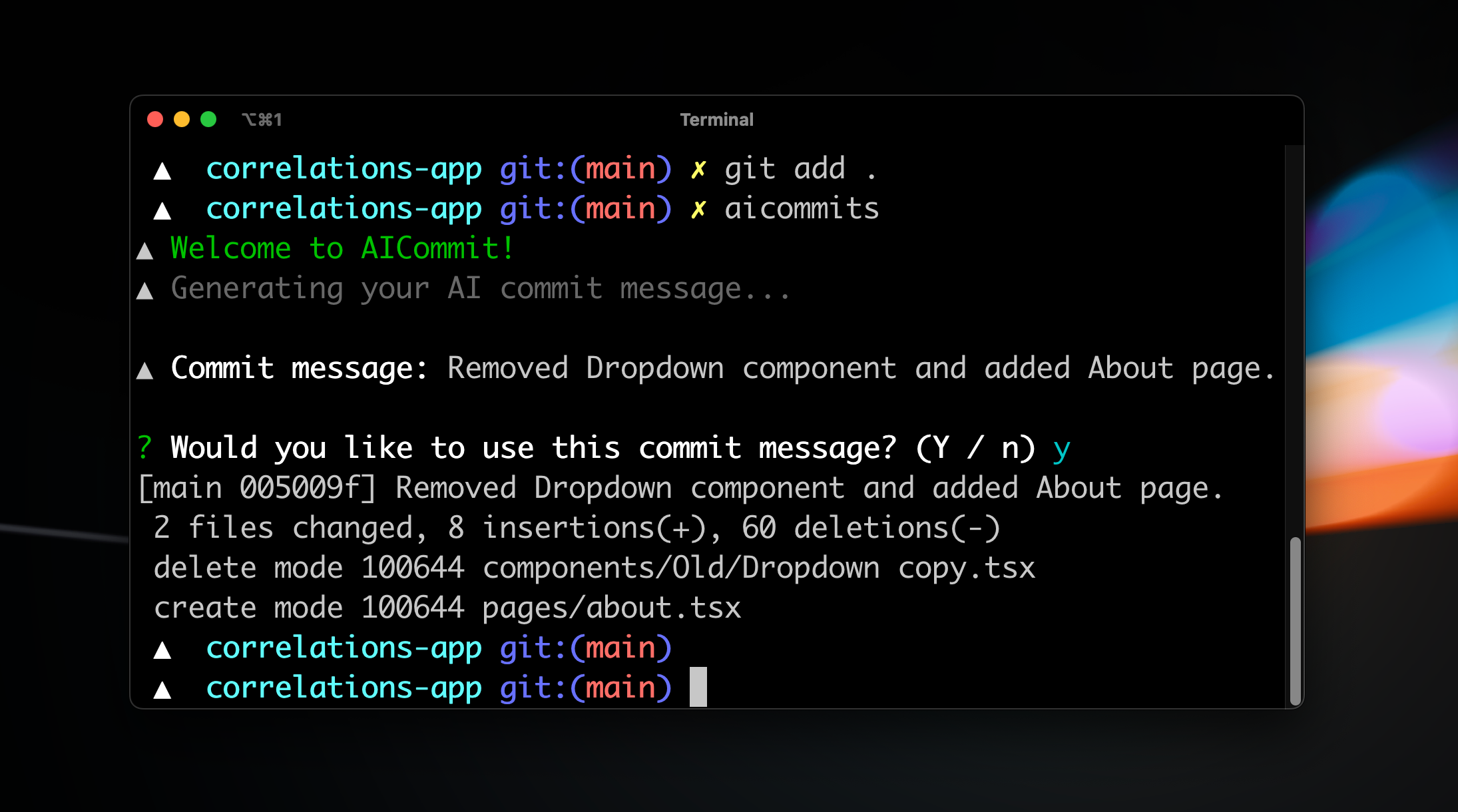


 ](https://x.com/nutlope)
- **Riccardo Giorato**: [@riccardogiorato](https://github.com/riccardogiorato) [
](https://x.com/nutlope)
- **Riccardo Giorato**: [@riccardogiorato](https://github.com/riccardogiorato) [ ](https://x.com/riccardogiorato)
- **Hiroki Osame**: [@privatenumber](https://github.com/privatenumber) [
](https://x.com/riccardogiorato)
- **Hiroki Osame**: [@privatenumber](https://github.com/privatenumber) [ ](https://twitter.com/privatenumbr)
## Contributing
If you want to help fix a bug or implement a feature in [Issues](https://github.com/Nutlope/aicommits/issues), checkout the [Contribution Guide](CONTRIBUTING.md) to learn how to setup and test the project
](https://twitter.com/privatenumbr)
## Contributing
If you want to help fix a bug or implement a feature in [Issues](https://github.com/Nutlope/aicommits/issues), checkout the [Contribution Guide](CONTRIBUTING.md) to learn how to setup and test the project