ISNONTEXT Function
The ISNONTEXT function is one of the information functions. It is used to check for a value that is not a text. If the cell does not contain a text value, the function returns TRUE, otherwise the function returns FALSE.
Syntax
ISNONTEXT(value)
The ISNONTEXT function has the following argument:
| Argument | Description |
|---|---|
| value | The value that you want to test. The value can be an empty cell, error, logical value, text, number, reference value, or a name referring to any of these. |
Notes
How to apply the ISNONTEXT function.
Examples
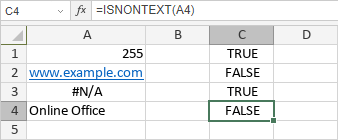
The figure below displays the result returned by the ISNONTEXT function.