MAXIFS Function
The MAXIFS function is one of the statistical functions. It is used to return the maximum value among cells specified by a given set of conditions or criteria.
Syntax
MAXIFS(max_range, criteria_range1, criteria1, [criteria_range2, criteria2], ...)
The MAXIFS function has the following arguments:
| Argument | Description |
|---|---|
| max_range | The range of cells in which the maximum will be determined. |
| criteria_range1 | The first selected range of cells to apply the criteria1 to. |
| criteria1 | The first condition that must be met. It is applied to the criteria_range1 and used to determine which cells in the max_range will be evaluated as maximum. |
| criteria_range2, criteria2 | Additional ranges of cells and their corresponding criteria. These arguments are optional. |
Notes
You can use wildcard characters when specifying criteria. The question mark "?" can replace any single character and the asterisk "*" can be used instead of any number of characters.
How to apply the MAXIFS function.
Examples
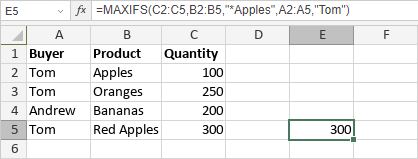
The figure below displays the result returned by the MAXIFS function.