🔬 O-Researcher
An Open-Source Tool-Augmented Research Agent for Complex Question Answering
This is the official repository for our paper "O-Researcher: An Open Ended Deep Research Model via Multi-Agent Distillation and Agentic RL".By integrating web search, page crawling, and intelligent summarization, it delivers accurate and traceable research results.
---
# 📋 Overview
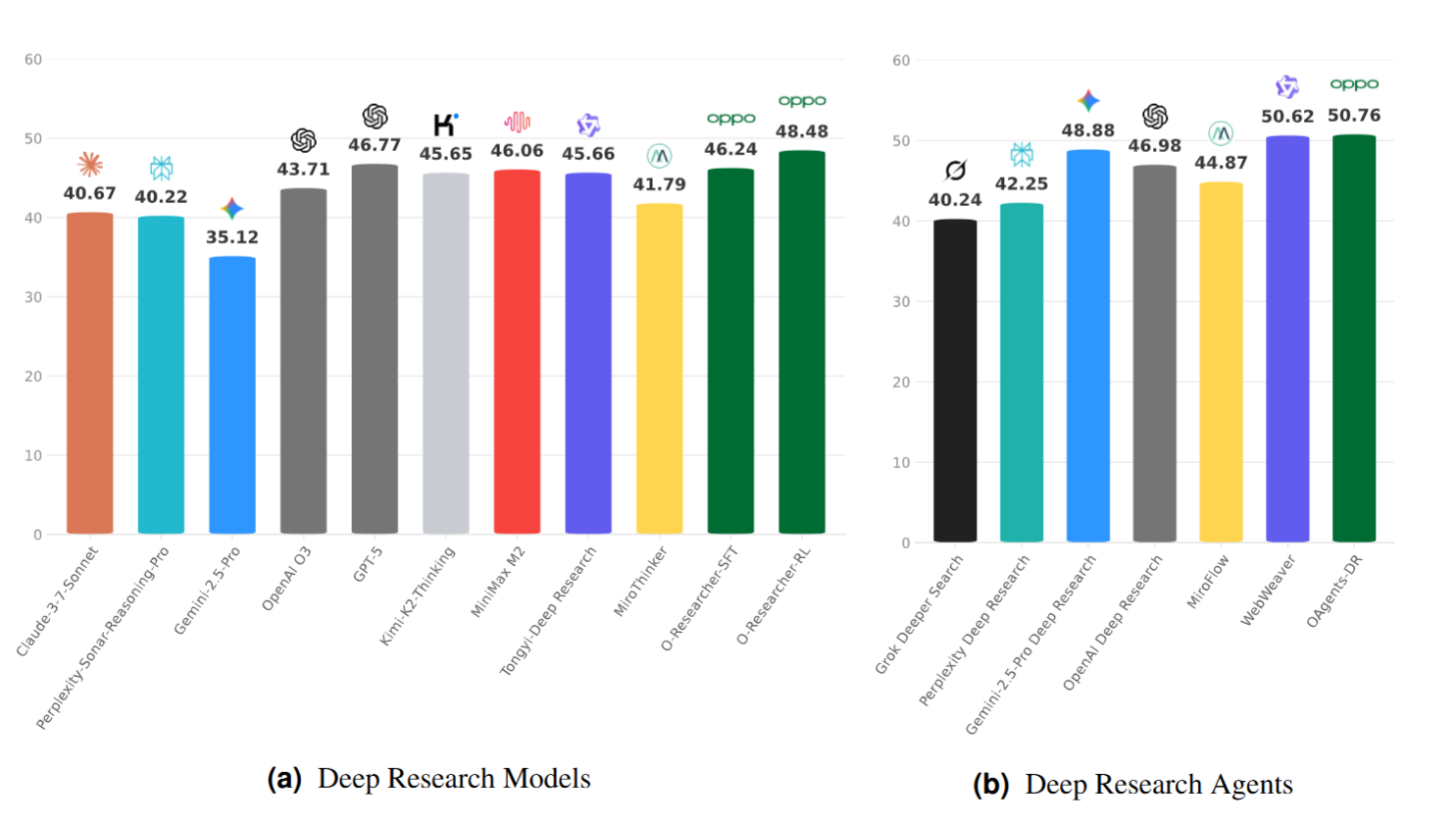
O-Researcher presents a unified framework that bridges the gap between closed-source and open-source LLMs through automated multi-agent data synthesis and a two-stage training strategy, achieving state-of-the-art performance on deep research benchmarks while eliminating dependency on proprietary data.
## Key Features
🔍 **Web Search Integration**: Multi-API Google search with intelligent caching and load balancing
📄 **Page Crawling**: Concurrent page crawling with AI-powered content summarization
⚡ **High Performance**: Multi-worker architecture with async processing for concurrent operations
🔄 **Smart Caching**: Persistent cache mechanism reduces redundant API calls and improves response times
🛡️ **Robust Error Handling**: Automatic retry logic with multi-API fallback for enhanced reliability
🎯 **Structured Output**: Generates well-formatted research reports with traceable citations
---
# 🚀 Quick Start
## 1. Install Dependencies
First, install the required dependencies by executing the command below to install packages listed in requirements.txt
```bash
# Install Python dependencies
pip install -r requirements.txt
```
## 2. Model Download
You can directly download the model by following the links below.
| Model | Download Links | Model Size | Context Length |
| :-----------------: | :-----------------------------------------: | :----------: | :--------------: |
| O-Researcher-72B-rl | [🤗 HuggingFace](https://huggingface.co/PersonalAILab/O-Researcher-72B-rl)| 72B | 128K |
| O-Researcher-72B-sft | [🤗 HuggingFace](https://huggingface.co/PersonalAILab/O-Researcher-72B-sft)| 72B | 128K |
**Alternative Download Methods:**
1. **Direct from HuggingFace**: Click the 🤗 HuggingFace link above
2. **Script Download**:
```bash
cd ./model
python download.py
## 3. Data Download
The sft and rl datasets for O-Researcher, the download links are as below:
You can directly download the model by following the links below.
| Datasets | Download Links | Dataset Size | Max Context Length |
| :-----------------: | :-----------------------------------------: | :----------: | :--------------: |
| O-Researcher-SFT-Dataset | [🤗 HuggingFace](https://huggingface.co/datasets/PersonalAILab/O-Researcher-SFT-Dataset)| 2.92k | 128K
| O-Researcher-RL-Dataset | [🤗 HuggingFace](https://huggingface.co/datasets/PersonalAILab/O-Researcher-RL-Dataset)| 10k | 128K
## 4. Configure Environment
```bash
# Copy the template and fill in your values
cp env_template .env
# Edit .env with your actual configuration
vim .env
```
**Server Configuration (server/start_servers.sh):**
| Variable | Description | Default |
|----------|-------------|---------|
| `SERVER_HOST` | Server listening address | `127.0.0.1` |
| `CRAWL_PAGE_PORT` | CrawlPage service port | `20001` |
| `WEBSEARCH_PORT` | WebSearch service port | `20002` |
| `CRAWL_PAGE_WORKERS` | CrawlPage worker processes | `10` |
| `WEBSEARCH_WORKERS` | WebSearch worker processes | `10` |
**API Configuration:**
| Variable | Description | Example |
|----------|-------------|---------|
| `SERPER_API_KEY` | Serper API Key (multiple keys separated by `\|`) | `key1\|key2` |
| `SERPAPI_BASE_URL` | Serper API URL | `https://google.serper.dev/search` |
| `SUMMARY_API_URLS` | Summarization API URL (multiple separated by `\|`) | `https://api.openai.com/v1` |
| `SUMMARY_OPENAI_API_KEY` | OpenAI API Key for summarization | `sk-xxx` |
| `SUMMARY_MODEL` | Summarization model name | `gpt-5-mini` |
| `JINA_API_KEY` | Jina API Key (optional) | `jina_xxx` |
## 5. Start Tool Servers
```bash
# Start all tool servers
bash server/start_servers.sh start
# Check server status
bash server/start_servers.sh status
# Stop all servers
bash server/start_servers.sh stop
```
**Available Tool Servers:**
| Server | Port | Description |
|--------|------|-------------|
| **WebSearch** | `WEBSEARCH_PORT` | Multi-API Google search with intelligent caching |
| **CrawlPage** | `CRAWL_PAGE_PORT` | Concurrent page crawling with AI summarization |
## 6. Deploy Model Server
Deploy the model using vLLM for high-performance inference:
```bash
# Start model deployment
bash deploy/deploy.sh start
# Check deployment status
bash deploy/deploy.sh status
# Stop model deployment
bash deploy/deploy.sh stop
```
**Deployment Configuration:**
| Variable | Description | Default |
|----------|-------------|---------|
| `MODEL_PATH` | Path to your model (required) | - |
| `MODEL_NAME` | Model name (required) | - |
| `MODEL_BASE_PORT` | Base port for model service | `9095` |
| `DEPLOY_HOST` | Deployment host address | `0.0.0.0` |
| `DEPLOY_INSTANCES` | Number of instances | `1` |
| `DEPLOY_GPUS_PER_INSTANCE` | GPUs per instance | `4` |
| `DEPLOY_MAX_MODEL_LEN` | Maximum model length | `131072` |
| `DEPLOY_LOG_DIR` | Deployment log directory | `deploy/logs` |
| `DEPLOY_WAIT_TIMEOUT` | Startup timeout (seconds) | `120` |
**Inference Configuration:**
| Variable | Description | Example |
|----------|-------------|---------|
| `MODEL_URL` | Model API URL (multiple separated by `\|` for load balancing) | `http://localhost:9095/v1` |
| `WEBSEARCH_URL` | WebSearch service URL | `http://localhost:20002/search` |
| `CRAWL_PAGE_URL` | CrawlPage service URL | `http://localhost:20001/crawl_page` |
**Multi-Instance Deployment:**
When deploying multiple instances (`DEPLOY_INSTANCES > 1`), ports are assigned incrementally:
- Instance 1: `MODEL_BASE_PORT` (e.g., 9095)
- Instance 2: `MODEL_BASE_PORT + 1` (e.g., 9096)
- ...
Remember to update `MODEL_URL` accordingly:
```bash
# For 2 instances
export MODEL_URL="http://localhost:9095/v1|http://localhost:9096/v1"
```
## 7. Run Inference
Make sure `.env` is properly configured and sourced:
```bash
source .env
cd infer
python infer.py --input_file ../data/example.jsonl --output_file ../results/output.jsonl
```
**Quick Start with Example Script:**
```bash
cd infer
bash example_infer.sh # Automatically sources .env
```
---
# ⚙️ Configuration Reference
## Key Parameters
| Parameter | Description | Default |
|-----------|-------------|---------|
| `--input_file` | Input JSON/JSONL file path | Required |
| `--output_file` | Output JSONL file path | Required |
| `--q_key` | Key name for question field | `question` |
| `--a_key` | Key name for answer field | `answer` |
| `--temperature` | Generation temperature | `1.0` |
| `--top_p` | Top-p sampling | `0.9` |
| `--max_tokens` | Max tokens per generation | `4096` |
| `--total_tokens` | Max total tokens | `131072` |
| `--max_steps` | Max inference steps per question | `100` |
| `--parallel` | Number of parallel workers | `1` |
| `--round` | Number of inference rounds | `1` |
## Example Usage
```bash
# Custom input/output keys
python infer.py \
--input_file ../data/queries.jsonl \
--output_file ../results/output.jsonl \
--q_key "prompt" \
--a_key "answer"
# High-performance parallel processing
python infer.py \
--input_file ../data/example.json \
--output_file ../results/parallel_output.jsonl \
--parallel 30
# Multiple rounds inference
python infer.py \
--input_file ../data/example.json \
--output_file ../results/multi_round.jsonl \
--round 3
```
---
# 🔧 Tool Server Details
## WebSearch Server
The WebSearch server provides intelligent web search with caching:
- **Multi-API Support**: Load balancing across multiple Serper API keys
- **Intelligent Caching**: JSONL-based persistent cache reduces API costs
- **Query Splitting**: Supports multiple queries separated by `|`
- **Result Formatting**: Structured output with titles, snippets, and URLs
**API Endpoint:**
```bash
POST /search
Content-Type: application/json
{
"q": "query1 | query2",
"num": 10
}
```
## CrawlPage Server
The CrawlPage server handles webpage content extraction:
- **Concurrent Crawling**: Async processing for multiple URLs
- **AI Summarization**: Intelligent content summarization using LLM
- **Error Handling**: Robust retry mechanisms for failed requests
**API Endpoint:**
```bash
POST /crawl_page
Content-Type: application/json
{
"urls": ["https://example.com/page1", "https://example.com/page2"],
"task": "Summarize the main points",
"chunk_size": 8192
}
```
---
# 📊 Output Format
O-Researcher generates structured research reports with:
1. **Introduction**: Context and problem statement
2. **Body**: Organized findings with in-text citations
3. **Conclusion**: Summary of key findings
4. **References**: Numbered list of sources with URLs
**Example Output:**
```markdown
## Research Report
### Introduction
This report examines the latest developments in AI...
### Findings
According to recent studies [1], the adoption of AI has increased by 40% in 2024...
### Conclusion
The research indicates that...
### References
[1]. https://example.com/ai-study - AI Adoption Report 2024
[2]. https://example.org/research - Latest AI Developments
```
---
# 🐛 Troubleshooting
## Common Issues
**1. Port already in use**
```bash
# Check what's using the port
lsof -i :20001
# Force stop all servers
bash server/start_servers.sh stop
```
**2. API Key errors**
```bash
# Verify environment variables
echo $SERPER_API_KEY
echo $SERPAPI_BASE_URL
# Make sure .env is sourced
source .env
```
**3. Model deployment timeout**
```bash
# Increase timeout in .env
export DEPLOY_WAIT_TIMEOUT=600
# Check deployment logs
tail -f deploy/logs/*.log
```
---
# Related Work
Listed below are friendly links to relevant agents works from OPPO PersonalAI Lab:
- [Flash-Searcher](https://github.com/OPPO-PersonalAI/Flash-Searcher): Fast and Effective Web Agents via DAG-Based Parallel Execution
- [Agent Foundation Models](https://github.com/OPPO-PersonalAI/Agent_Foundation_Models): Chain-of-Agents: End-to-End Agent Foundation Models via Multi-Agent Distillation and Agentic RL
- [TaskCraft](https://github.com/OPPO-PersonalAI/TaskCraft): Automated Generation of Agentic Tasks
- [OAgents](https://github.com/OPPO-PersonalAI/OAgents): An Empirical Study of Building Effective Agents
- [Agent-KB](https://github.com/OPPO-PersonalAI/Agent-KB): Leveraging Cross-Domain Experience for Agentic Problem Solving
- [MiCoTA](https://github.com/OPPO-PersonalAI/MiCoTA): Bridging the Learnability Gap with Intermediate CoT and Teacher Assistants
# Star
[](https://github.com/OPPO-PersonalAI/O-Researcher)