OWASP legacy2mcp: analyze a codebase, label every business flow by risk, and turn the approved flows into safe MCP tools

# OWASP legacy2mcp **Understand any codebase, then turn the flows you approve into a safe MCP server.**
Python and JavaScript/TypeScript. Offline, no API key, nothing executed or uploaded.

Level: Incubator Type: Code Slack: #project-legacy2mcp Build status

License Last commit Contributors

Forks Stars Downloads

Issues Pull requests

PyPI version Python versions MCP Registry

Created: Sep 2026

## What is legacy2mcp? **Make your existing app AI-ready in seconds. No rewrite, no risk.** legacy2mcp is an OWASP Incubator Project that gives AI agents safe access to the applications you already have. Point it at a Python or JavaScript/TypeScript codebase and it generates an MCP server, with guardrails built in, for just the parts you approve. ### How it works ```mermaid flowchart LR A["Your codebase

Python · JS/TS"] --> B["analyze
entry points, flows,
side effects"] B --> C{"Risk per flow"} C -->|read-only| D["report.html
you tick the tools"] C -->|low-risk write| D C -->|high-risk| D D -->|selections.json| E["generate
config.yaml"] E --> F["MCP server
schema-validated,
audit-logged"] F --> G["AI agent /
MCP client"] ``` 1. **Map**: finds every entry point (HTTP routes, CLI commands, scheduled jobs, queue consumers) and the business flow behind it. 2. **Rate**: labels each flow read-only, low-risk write, or high-risk, with the file and line behind every reason. 3. **Report**: proposes MCP tools, an agent setup with approval points, and a phased roadmap. 4. **Generate**: builds a server for only the flows you approve. Read-only by default, every call schema-validated and audit-logged. ### Why teams use it - No hand-written MCP adapters for every endpoint - No dangerous operations slipping through unnoticed - Works with the code you already have > **Private by design.** Everything runs locally. Your code is parsed, never imported or executed, and nothing is uploaded. Optional AI enrichment is off unless you provide a key, and it only runs after you confirm. See [Data flow and privacy](https://github.com/OWASP/legacy2mcp/blob/main/docs/security.md#data-flow-and-privacy) and the [analyze guide](https://github.com/OWASP/legacy2mcp/blob/main/docs/analyze.md). ## Quick start You need Python 3.10+ and a local Python or JavaScript/TypeScript project. No API key. Nothing in your project is run or uploaded. **1. Install** ```bash pip install "legacy2mcp[analyze]" ``` **2. Analyze your project** ```bash legacy2mcp analyze ./my-app --no-ai ``` This creates a `legacy2mcp-analysis/` folder with `report.html` in it. **3. Review the report** Open `legacy2mcp-analysis/report.html` in your browser. Every business flow is labelled **read-only**, **low-risk write** or **high-risk**, with the file and line behind each label. Under **Proposed MCP tools**, tick the tools you want (read-only tools are ticked for you) and click **Export selections.json**. **4. Generate the server config** ```bash legacy2mcp generate ./legacy2mcp-analysis \ --selections ~/Downloads/selections.json \ --base-url https://staging.my-app.example ``` - `--selections`: the file you exported in step 3. Leave it out to use the read-only tools only. - `--base-url`: where your app is running, so the tools can call it. This writes `config.yaml`. Write tools stay hidden unless you add `--allow-writes`. **5. Connect it to your AI client** Check the tools, then add this to your MCP client's config (Claude Desktop, Cursor, VS Code, Claude Code): ```bash legacy2mcp inspect --config config.yaml ``` ```json { "mcpServers": { "legacy2mcp": { "command": "legacy2mcp", "args": ["run", "--config", "/absolute/path/to/config.yaml"] } } } ``` Per-client setup: [docs/clients.md](docs/clients.md). ## What the report shows

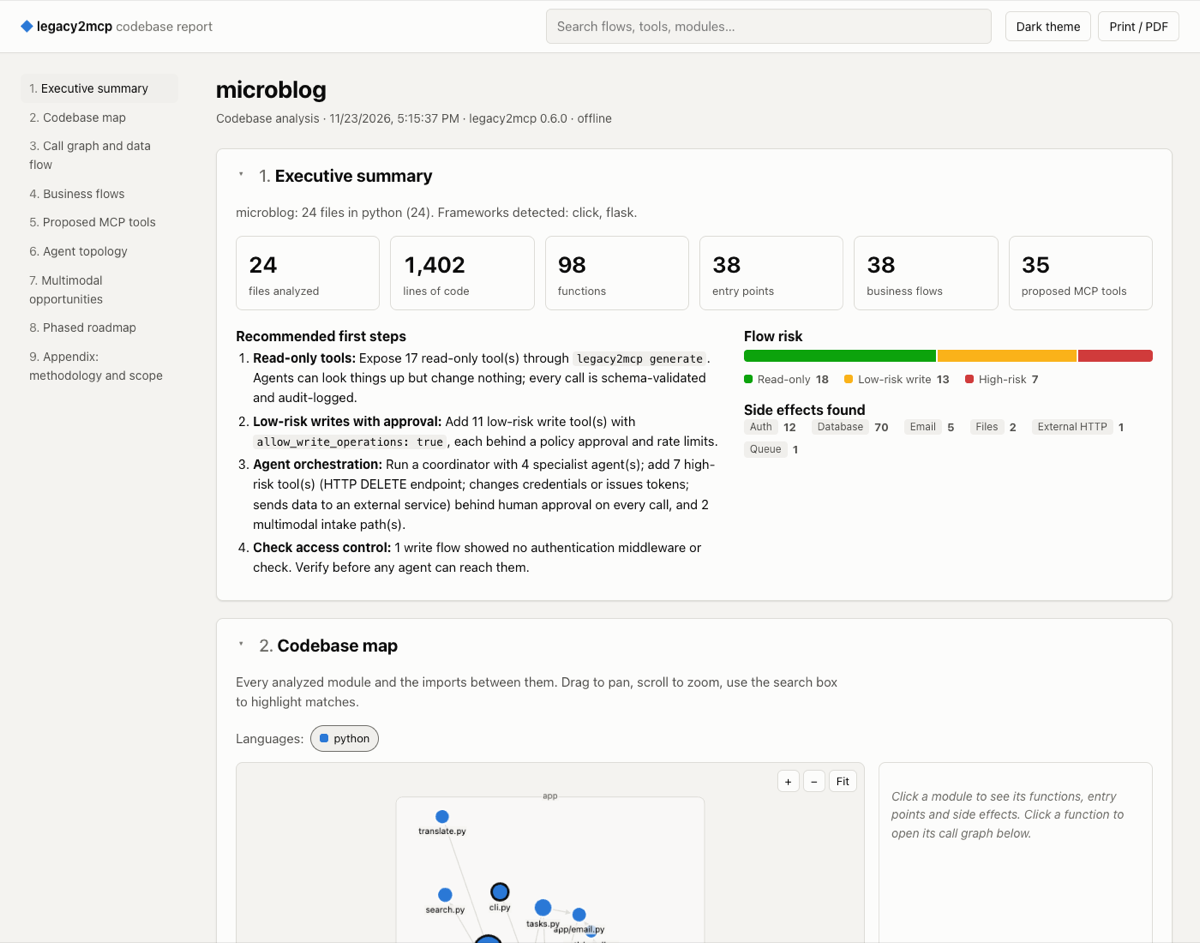
legacy2mcp report: executive summary with KPIs, recommended first steps and flow-risk breakdown

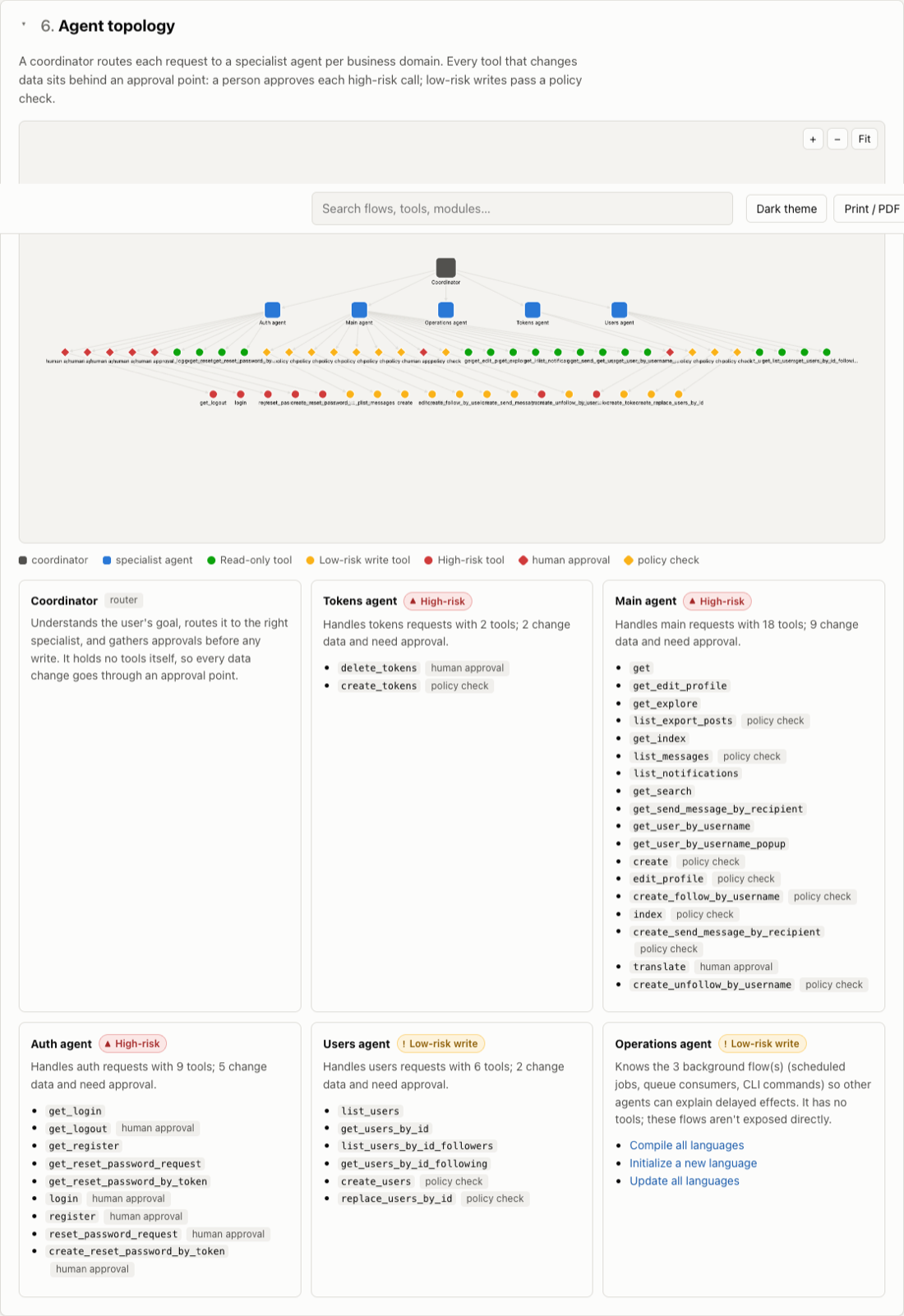
- Every entry point (HTTP routes, CLI commands, scheduled jobs, queue consumers), what it calls, and its side effects: database writes, outbound HTTP, email, payments, queues, auth changes. - A risk label and reasons for every flow, linked to the source line. - The proposed MCP tools, an agent setup with approval points on every write, and a phased roadmap.

Proposed agent topology: a coordinator, specialist agents per domain, and approval gates in front of write tools

See a [sample report from a real open-source app](docs/sample-report/). ## Supported frameworks - **Python:** Flask, FastAPI, Django, click/typer, Celery, APScheduler - **JavaScript / TypeScript:** Express, Next.js API routes, commander, node-cron, BullMQ, amqplib, kafkajs Full list, AI enrichment (optional, bring your own key) and every flag: [analyze guide](docs/analyze.md). ## Safe by default - Nothing in the scanned repo is imported, executed or sent anywhere. - Generated servers are read-only unless you opt in to writes. - Every tool call is schema-validated before it reaches your backend and written to an audit log. - AI enrichment is off unless you provide a key; it never changes a risk level or which tools are selected. See the [security model](docs/security.md). > [!TIP] > Already have a SOAP service, database, REST API or website instead of a > codebase? `legacy2mcp init` connects to it directly. See the > [CLI guide](docs/cli.md). ## Documentation - [Analyze guide](docs/analyze.md) · [CLI guide](docs/cli.md) · [Configuration](docs/configuration.md) · [How it works](docs/how-it-works.md) - [Clients](docs/clients.md) · [Security model](docs/security.md) · [Roadmap](docs/roadmap.md) · [Changelog](CHANGELOG.md) ## Community and contributing - **OWASP Slack:** [`#project-legacy2mcp`](https://owasp.org/slack/invite) - **Issues:** https://github.com/OWASP/legacy2mcp/issues · good starting points are labeled [`good first issue`](https://github.com/OWASP/legacy2mcp/labels/good%20first%20issue) - **Contributing:** see [CONTRIBUTING.md](CONTRIBUTING.md) and the [Code of Conduct](CODE_OF_CONDUCT.md) - **Security issues:** report privately per the [security policy](SECURITY.md) ## Authors & maintainers - **[Balaji Venkatasubramaniyar](https://github.com/bvenkata)**: Project Creator and Lead Maintainer See [AUTHORS](AUTHORS) and [MAINTAINERS.md](MAINTAINERS.md). ## How to cite Use GitHub's "Cite this repository" button ([CITATION.cff](CITATION.cff)), or: ```bibtex @software{legacy2mcp, author = {Venkatasubramaniyar, Balaji}, title = {OWASP legacy2mcp: Safe, Typed, Audit-Logged MCP Servers for Legacy Systems}, url = {https://github.com/OWASP/legacy2mcp}, license = {Apache-2.0} } ``` ## License Apache 2.0. See [LICENSE](LICENSE).
OWASP legacy2mcp · an OWASP Foundation project