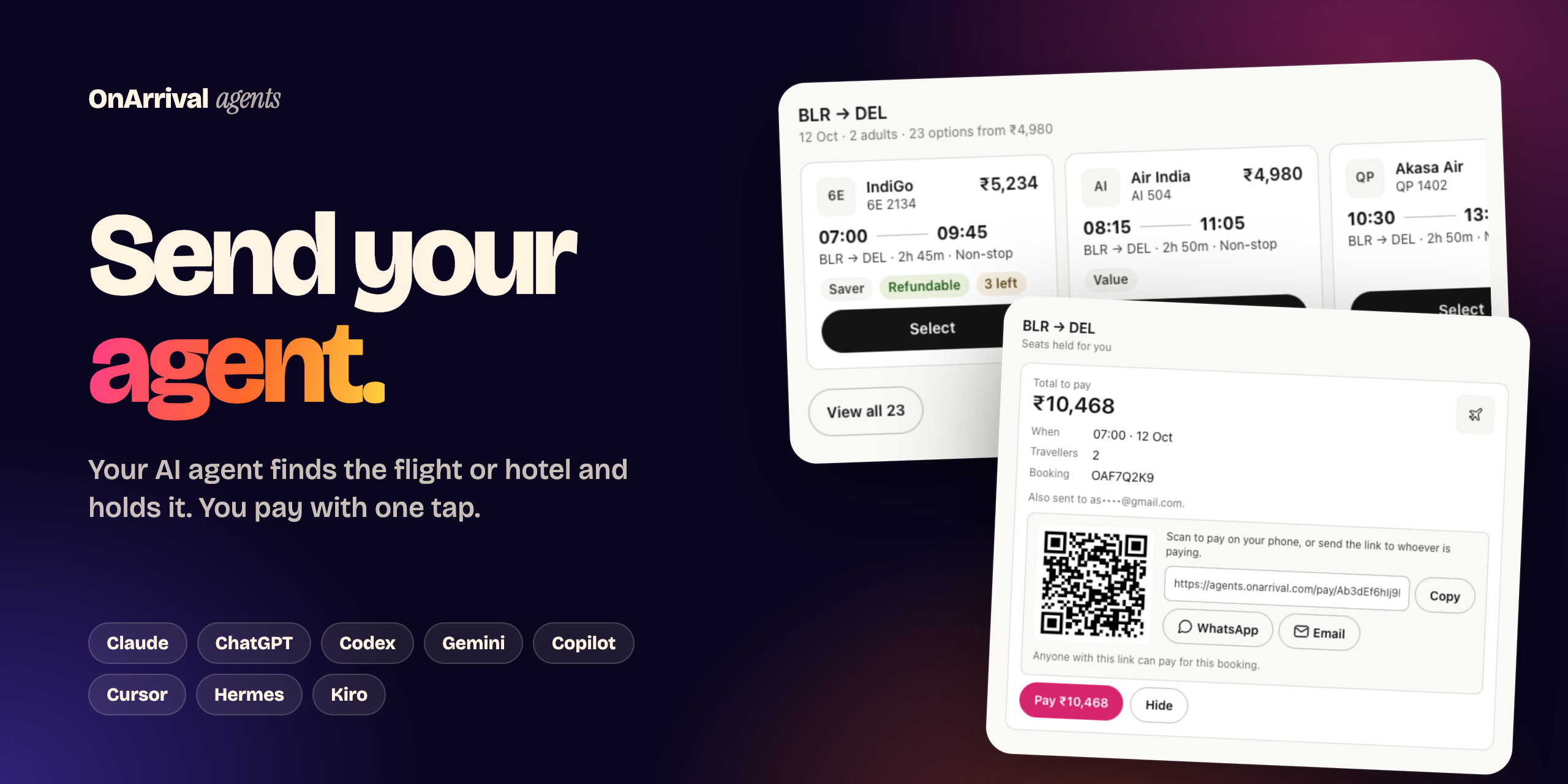
OnArrival for your AI agent
Book flights and hotels with your AI agent: Claude, ChatGPT, Cursor or any MCP client.
Your agent searches live fares, compares options and holds the booking on your OnArrival account. You pay with one link.




Sign up ·
Install ·
How it works ·
Interactive cards ·
Security ·
FAQ
> [!NOTE]
> **Sign up free at [agents.onarrival.com](https://agents.onarrival.com)**, then connect your agents. In ChatGPT and Claude you can also just add the OnArrival app and sign in when asked.
## Just ask
> *"Find me a morning flight from Bengaluru to Delhi on 12 October for two adults, non-stop, under ₹6,000."*
> *"What's the cheapest day to fly Bengaluru to Goa next week?"*
> *"Bengaluru to Delhi on the 5th, Delhi to Jaipur on the 8th, back to Bengaluru on the 12th."*
> *"Book a 4-star hotel near Connaught Place for 12–14 October with free cancellation."*
> *"Goa for three nights: these flights and that hotel. What's the total?"*
> *"I've paid. Is my booking confirmed? Send me the PNR."*
> *"Tell me on WhatsApp if Bengaluru to Delhi on 12 October gets cheaper."*
> *"Cancel my Delhi flight. How much do I get back?"*
> *"It's a work trip: show me corporate fares."*
Your agent does the searching and the forms. You stay in control of the money: **nothing is booked until you pay**.
| | Flights | Hotels |
| --- | --- | --- |
| **Search** | One way, round trip and multi-city, and the cheapest day across several | Cities, areas, landmarks, a brand or one hotel by name, with live prices for your dates |
| **Compare** | Price, times, stops, duration, and each fare's bags and cancellation and date-change charges | Star rating, guest rating, reviews, rooms, inclusions, cancellation terms |
| **Book** | Travellers from your saved profiles, plus seats, meals and bags where the flight has them | Guests from your saved profiles. A stay abroad that needs a PAN takes it from the guest's saved profile |
| **Pay** | One payment link, paid on OnArrival's secure payment page | Same |
| **After** | PNR and e-ticket | The hotel's confirmation |
| **Trip plans** | Flights and a hotel together, with the total and the dates checked to fit | |
| **Cancel** | Ask your agent to cancel: it shows the refund first, and cancels only after you say yes | |
| **Price alerts** | Watch a route and date, and hear on WhatsApp when the fare drops | |
| **Corporate fares** | For work trips within India | |
## How it works
```mermaid
sequenceDiagram
autonumber
actor You
participant Agent as Your agent
participant OA as OnArrival
You->>Agent: "Morning flight BLR → DEL, 12 Oct, 2 adults"
Agent->>OA: Search live fares
OA-->>Agent: Options
Agent-->>You: The best matches
You->>Agent: "The 7:00 IndiGo"
Agent->>OA: Hold the fare, add travellers
OA-->>Agent: Payment link
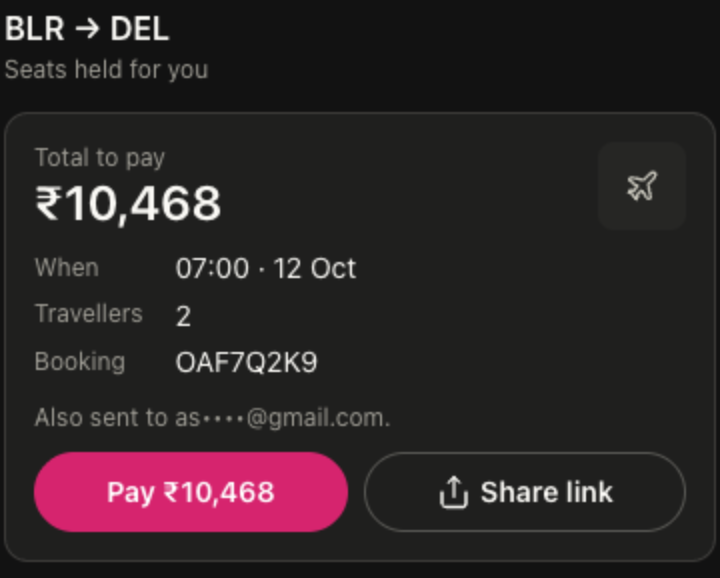
Agent-->>You: Pay ₹10,468 (link and QR code)
You->>OA: Pay on OnArrival's secure payment page
OA-->>You: Confirmed, with PNR and e-ticket
```
1. **Your agent searches** OnArrival's live inventory and shows you the best options.
2. **You choose.** Your agent holds the fare and adds travellers from your saved profiles, asking before it creates anyone new.
3. **You get one payment link.** It also goes to your email. You pay on OnArrival's secure payment page; your agent never pays or sees card details.
4. **It's confirmed.** Your agent follows the booking to confirmation and hands you the PNR and e-ticket, or the hotel's confirmation.
## Interactive cards
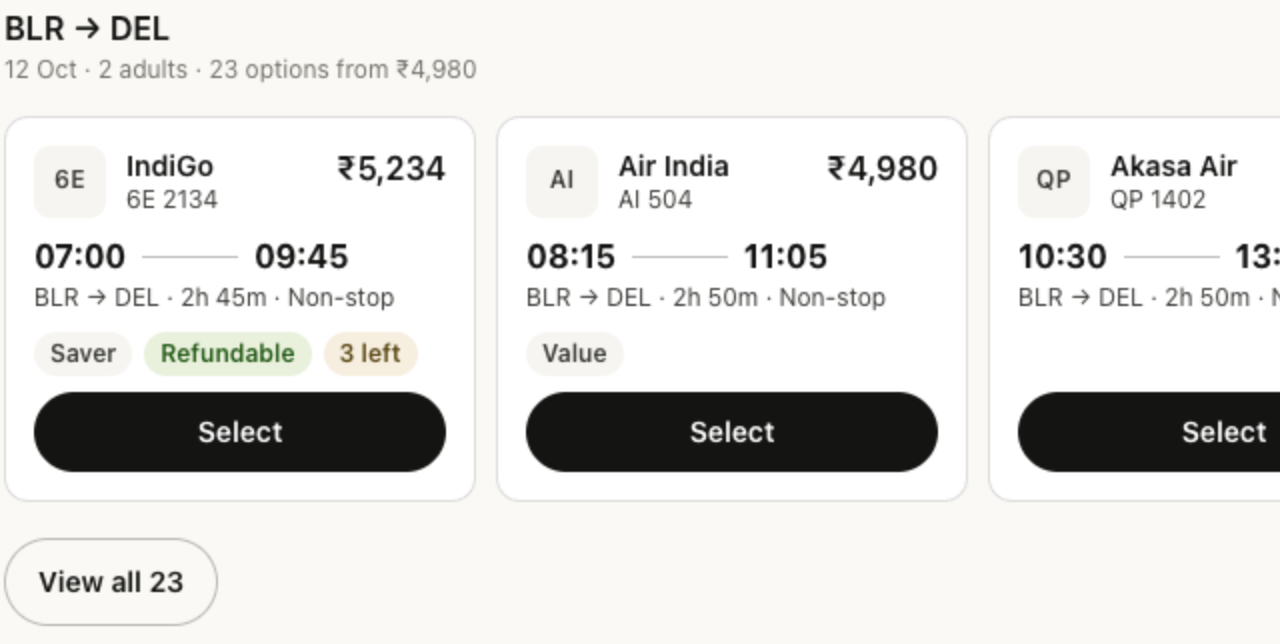
In apps that render [MCP Apps](https://github.com/modelcontextprotocol/ext-apps) (**Claude and ChatGPT**), results appear as native-looking cards right in the conversation. They follow each app's own light and dark theme. Everywhere else, your agent gets the same information as text.
 |
 |
| Compare and choose. Swipe through options, or open full screen to sort by price, speed or time and filter by stops. Choosing an option books it right there: the card holds the fare, adds your saved travellers and gives you the payment link. |
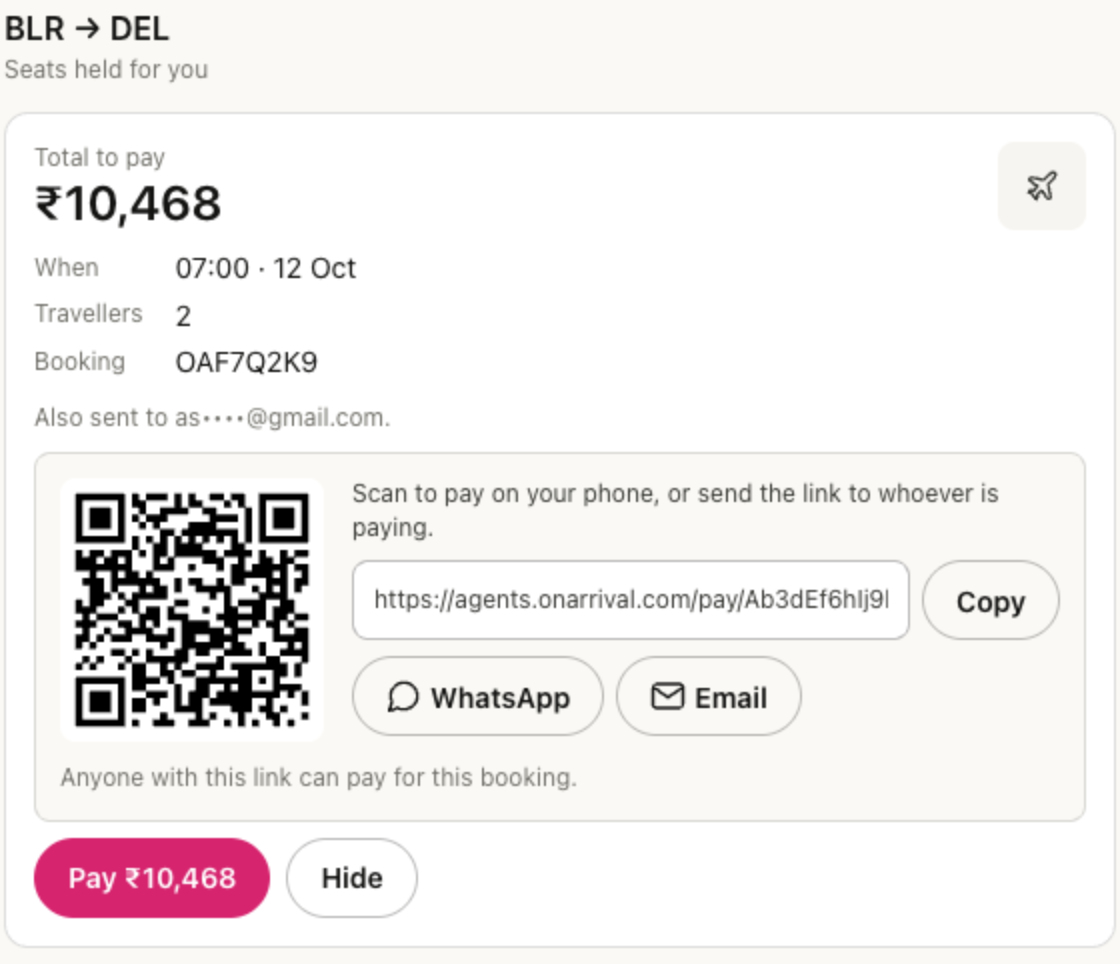
Pay. Pay in one tap, or scan the QR code to pay on your phone. The card follows the payment live. |
 |
 |
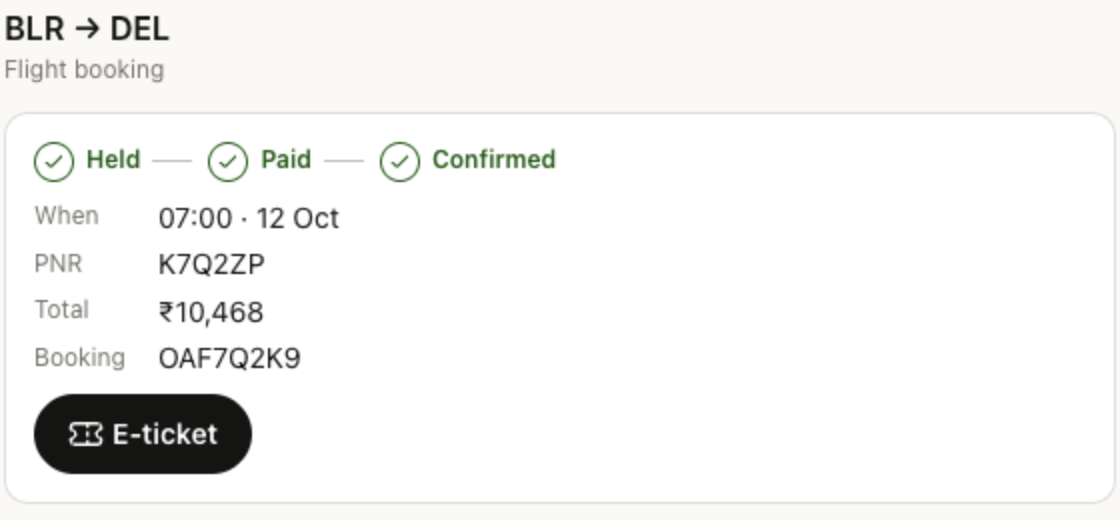
| Booked. Held → paid → confirmed, with the PNR and your e-ticket a tap away. |
At home on phones. Full-width, thumb-friendly and in the app's dark mode. |
## Install
**1. Get your connection key (only for agents that don't sign in).** Claude Code, Claude and ChatGPT ask you to sign in to OnArrival the first time you use them, so they need no key. For the others, sign in at [agents.onarrival.com](https://agents.onarrival.com) and create a connection for your agent. Its MCP URL looks like `https://mcp.onarrival.com/u/oa_agt_…/mcp`, and the `oa_agt_…` part is your **connection key**. For command-line agents, put the key in your shell profile:
```bash
export ONARRIVAL_CONNECTION=oa_agt_…
```
**2. Add OnArrival to your agent.**
| Agent | Install |
| --- | --- |
| **Claude Code** | `/plugin marketplace add OnArrival/agent-plugins` then `/plugin install onarrival@onarrival` |
| **Codex** | `codex plugin marketplace add OnArrival/agent-plugins` then `codex plugin add onarrival@onarrival` |
| **Gemini CLI** | `gemini extensions install https://github.com/OnArrival/agent-plugins` |
| **GitHub Copilot CLI** | `copilot plugin marketplace add OnArrival/agent-plugins` then `copilot plugin install onarrival@onarrival` |
| **Hermes** | `hermes mcp add onarrival --url https://mcp.onarrival.com/mcp --auth header` |
| **Claude** (web, desktop) | Custom connector with your personal MCP URL. [Steps](#claude-web-and-desktop) |
| **ChatGPT** | Developer-mode plugin with your personal MCP URL. [Steps](#chatgpt) |
| **Grok · Cursor · VS Code · Windsurf · Kiro · Goose · OpenClaw** | [See below](#more-agents) |
| **Any MCP client** | `https://mcp.onarrival.com/mcp` with `Authorization: Bearer oa_agt_…` |
**3. Ask for a trip.** That's it.
Claude Code
```
/plugin marketplace add OnArrival/agent-plugins
/plugin install onarrival@onarrival
```
Or from a terminal: `claude plugin marketplace add OnArrival/agent-plugins`, then `claude plugin install onarrival@onarrival`. The first time you use it, Claude Code asks you to sign in to OnArrival; you can also run `/mcp` and choose **onarrival**. No key is needed. Check the connection with `claude mcp list`. The plugin brings the MCP server and both skills.
Codex (CLI, IDE and app)
```bash
codex plugin marketplace add OnArrival/agent-plugins
codex plugin add onarrival@onarrival
```
Codex sends `ONARRIVAL_CONNECTION` as a bearer token. `codex mcp list` shows the server.
Gemini CLI
```bash
gemini extensions install https://github.com/OnArrival/agent-plugins
```
Gemini CLI reads `ONARRIVAL_CONNECTION` from your environment. Check the connection with `gemini mcp list`.
GitHub Copilot CLI
```bash
copilot plugin marketplace add OnArrival/agent-plugins
copilot plugin install onarrival@onarrival
```
Copilot CLI uses the same plugin as Claude Code and signs you in to OnArrival when you first use it. If your version can't sign in, add the server with the header shown under **Any MCP client** instead. `copilot mcp get onarrival` shows the server.
Hermes
```bash
hermes mcp add onarrival --url https://mcp.onarrival.com/mcp --auth header
hermes skills install OnArrival/agent-plugins/skills/onarrival-flights
hermes skills install OnArrival/agent-plugins/skills/onarrival-hotels
```
When `hermes mcp add` asks for an API key, paste your connection key. Hermes keeps it in `~/.hermes/.env` and connects to list the tools. Start a new session to use them.
### Claude (web and desktop)
In Claude, open **Customize → Connectors → Add custom connector**. Name it **OnArrival**, paste your personal MCP URL (`https://mcp.onarrival.com/u/oa_agt_…/mcp`) and choose no sign-in. Then turn the connector on in a chat. Results show as interactive cards.
### ChatGPT
Turn on developer mode (**Settings → Security and login → Developer mode**), then add a plugin with your personal MCP URL and no authentication. Developer mode depends on your ChatGPT plan. Results show as interactive cards.
### More agents
Grok
Grok takes OnArrival as a custom connector, on Grok's paid plans:
1. Open [grok.com/connectors](https://grok.com/connectors) and choose **New Connector → Custom**.
2. Paste `https://mcp.onarrival.com/mcp`.
3. Sign in with OnArrival when Grok asks. Allow its sign-in pop-up if your browser blocks it.
No key is needed. Then ask Grok for a trip.
Cursor
**As a plugin:** in the Cursor dashboard, go to **Plugins & MCPs → Team Marketplaces → Import from Repo** and paste `https://github.com/OnArrival/agent-plugins`. The plugin brings the server and both skills.
**Just the server:** with `ONARRIVAL_CONNECTION` set, [add OnArrival to Cursor](cursor://anysphere.cursor-deeplink/mcp/install?name=onarrival&config=eyJ1cmwiOiJodHRwczovL21jcC5vbmFycml2YWwuY29tL21jcCIsImhlYWRlcnMiOnsiQXV0aG9yaXphdGlvbiI6IkJlYXJlciAke2VudjpPTkFSUklWQUxfQ09OTkVDVElPTn0ifX0%3D), or add it to `~/.cursor/mcp.json`:
```json
{
"mcpServers": {
"onarrival": {
"url": "https://mcp.onarrival.com/mcp",
"headers": { "Authorization": "Bearer ${env:ONARRIVAL_CONNECTION}" }
}
}
}
```
VS Code (GitHub Copilot)
Add this to `.vscode/mcp.json` in a workspace, or to your user MCP configuration. VS Code asks for the key once and stores it securely.
```json
{
"inputs": [
{ "type": "promptString", "id": "onarrival-connection", "description": "OnArrival connection key (oa_agt_…)", "password": true }
],
"servers": {
"onarrival": {
"type": "http",
"url": "https://mcp.onarrival.com/mcp",
"headers": { "Authorization": "Bearer ${input:onarrival-connection}" }
}
}
}
```
Windsurf
Add this to your MCP config (`mcp_config.json`):
```json
{
"mcpServers": {
"onarrival": {
"serverUrl": "https://mcp.onarrival.com/mcp",
"headers": { "Authorization": "Bearer ${env:ONARRIVAL_CONNECTION}" }
}
}
}
```
Kiro
In Kiro's Powers panel, choose **Add Custom Power → Import power from GitHub** and enter `https://github.com/OnArrival/agent-plugins`. The OnArrival power is in `powers/onarrival`. Kiro reads `ONARRIVAL_CONNECTION` for the key.
Goose
Run `goose configure`, choose **Add Extension → Remote Extension (Streamable HTTP)**, name it `onarrival` and enter your personal MCP URL (`https://mcp.onarrival.com/u/oa_agt_…/mcp`). In Goose Desktop, add a custom extension of type Streamable HTTP with the same URL.
OpenClaw
Add a remote MCP server named `onarrival` that uses streamable HTTP, with your personal MCP URL (`https://mcp.onarrival.com/u/oa_agt_…/mcp`), which carries the key itself. Copy the `skills/` folders into your OpenClaw skills folder.
Skills for Amp, Antigravity, OpenCode and more
The two skills work in any agent that reads [Agent Skills](https://agentskills.io):
```bash
npx skills add OnArrival/agent-plugins -g
```
Then connect the MCP server in that agent.
Any other MCP client
Use streamable HTTP with either:
- `https://mcp.onarrival.com/mcp` and the header `Authorization: Bearer oa_agt_…`, or
- your personal URL, `https://mcp.onarrival.com/u/oa_agt_…/mcp`, for clients that can't send headers.
## Paying for a booking
- **One link per booking.** It opens OnArrival's secure payment page, and it's also emailed to you.
- **Pay on your phone.** Scan the QR code on the payment card.
- **You pay, not your agent.** Your agent hands you the link; the payment itself happens on OnArrival's secure payment page.
- **Fares are checked again** when your agent holds the booking.
## Security and privacy
- **One key per agent.** Each agent gets its own connection, so you can revoke one without touching the others. Revoking takes effect within a minute.
- **Keys are stored hashed.** OnArrival shows a connection link once and stores only a hash of it. Treat it like a password, and revoke it at [agents.onarrival.com](https://agents.onarrival.com) if it leaks.
- **Agents never see card details.** Payment happens on OnArrival's secure payment page. Agents only ever get the payment link.
- **Nothing is booked until it's paid,** so an agent can't spend money on its own.
## FAQ
Which agents work best?
Agents that speak MCP (Claude, ChatGPT, Codex, Gemini, Copilot, Cursor, Grok, Hermes) use OnArrival's tools directly. Claude and ChatGPT also show interactive cards. Browser agents such as Muse and Instinct use OnArrival's agent-friendly website instead: create a connection for them at [agents.onarrival.com](https://agents.onarrival.com) and give them its website link.
Do I need a new account?
Sign up at [agents.onarrival.com](https://agents.onarrival.com) with Google or your email, and your OnArrival account is set up. Bookings made by your agents appear under **Bookings** at [agents.onarrival.com](https://agents.onarrival.com).
What if my agent picks the wrong option?
Nothing is booked until the payment link is paid, and the payment page shows the trip and the total first. Ask your agent to search again, or just don't pay the link.
How do I stop an agent?
Revoke its connection at [agents.onarrival.com](https://agents.onarrival.com). It stops working within a minute, and your other agents keep working.
## What's inside
| Path | For |
| --- | --- |
| `skills/` | The flight and hotel skills ([Agent Skills](https://agentskills.io) format), shared by every platform |
| `.claude-plugin/`, `.mcp.json` | Claude Code plugin and marketplace, also used by GitHub Copilot CLI and VS Code |
| `.codex-plugin/`, `.agents/plugins/marketplace.json` | Codex plugin and marketplace |
| `gemini-extension.json`, `GEMINI.md` | Gemini CLI extension |
| `.cursor-plugin/`, `mcp.json` | Cursor plugin |
| `powers/onarrival/` | Kiro power (its `skills/` is a copy of the root `skills/`) |
| `scripts/check.sh` | Fails if the Kiro power's skills differ from `skills/` or a manifest isn't valid JSON; runs on every pull request |
| `server.json` | Entry for the official MCP Registry |
Built on open standards: the [Model Context Protocol](https://modelcontextprotocol.io), [MCP Apps](https://github.com/modelcontextprotocol/ext-apps) and [Agent Skills](https://agentskills.io).
## Help
See your bookings, manage your connections or contact support at [agents.onarrival.com](https://agents.onarrival.com). New here? [Sign up](https://agents.onarrival.com).