openapi: 3.0.2
info:
title: openEO API
version: 1.3.0
description: |-
The openEO API specification for interoperable cloud-based processing of large Earth observation datasets.
**Conformance class:** `https://api.openeo.org/1.3.0`
# API Principles
## Language
In the specification the key words “MUST”, “MUST NOT”, “REQUIRED”, “SHALL”, “SHALL NOT”, “SHOULD”, “SHOULD NOT”, “RECOMMENDED”, “MAY”, and “OPTIONAL” in this document are to be interpreted as described in [RFC 2119](https://www.rfc-editor.org/rfc/rfc2119.html) and [RFC 8174](https://www.rfc-editor.org/rfc/rfc8174.html).
## Literal Case
Unless otherwise stated the API works **case sensitive**.
All names SHOULD be written in snake case, i.e. words are separated with one underscore character (`_`) and no spaces, with all letters lower-cased. Example: `hello_world`. This applies particularly to endpoints and JSON property names. HTTP header fields are generally case-insensitive according to [RFC 7230](https://www.rfc-editor.org/rfc/rfc7230.html#section-3.2) and their respective casing conventions are followed, e.g. `Content-Type` or `OpenEO-Costs`, for better readability and consistency.
## HTTP / REST
This specification uses [HTTP REST](https://en.wikipedia.org/wiki/Representational_state_transfer) [Level 2](https://martinfowler.com/articles/richardsonMaturityModel.html#level2) for communication between client and back-end server.
Public API implementations MUST be available via HTTPS only.
Endpoints are made use meaningful HTTP verbs (e.g. GET, POST, PUT, PATCH, DELETE) whenever technically possible. If there is a need to transfer big chunks of data for a GET requests to the back-end, POST requests MAY be used as a replacement as they support to send data via request body. Unless otherwise stated, PATCH requests are only defined to work on direct (first level) children of the full JSON object. Therefore, changing a property on a deeper level of the full JSON object always requires sending the whole JSON object defined by the first-level property.
Naming rules of the API endpoints follow the REST principles. Therefore, endpoints are centered around resources. Resource identifiers MUST be named with a noun in plural form except for single actions that can not be modelled with the regular HTTP verbs. Single actions MUST be single endpoints with a single HTTP verb (POST is RECOMMENDED) and no other endpoints beneath it.
The openEO API makes use of [HTTP Content Negotiation](https://www.rfc-editor.org/rfc/rfc9110.html#name-content-negotiation),
including, but not limited to, the request headers `Accept`, `Accept-Charset` and `Accept-Language`.
### JSON
The API uses JSON for request and response bodies whenever feasible. Services use JSON as the default encoding. Other encodings can be requested using HTTP Content Negotiation ([`Accept` header](https://www.rfc-editor.org/rfc/rfc9110.html#name-accept)). Clients and servers MUST NOT rely on the order in which properties appear in JSON. To keep the response size small, lists of resources (e.g. the list of batch jobs) usually should not include nested JSON objects, if this information can be requested from the individual resource endpoints (e.g. the metadata for a single batch job).
### Charset
If not negotiated otherwise with HTTP Content Negotiation ([`Accept-Charset` header](https://www.rfc-editor.org/rfc/rfc9110.html#name-accept-charset)), services use [UTF-8](https://en.wikipedia.org/wiki/UTF-8) as the default charset.
## Web Linking
The API is designed in a way that for most resources, such as collections and processes, a set of links can be added. These can be alternate representations such as data discovery via OGC WCS or OGC CSW, references to a license, references to actual raw data for downloading, detailed information about pre-processing and more. Clients should allow users to follow the links.
Whenever links are utilized in the API, the description explains which relation (`rel` property) types are commonly used.
A [list of standardized link relations types is provided by IANA](https://www.iana.org/assignments/link-relations/link-relations.xhtml) and the API tries to align whenever feasible.
Some very common relation types - usually not mentioned explicitly in the description of `links` fields - are:
1. `self`: Refers to the location that the resource can be (permanently) found online. This is particularly useful when the data is made available offline, so that the downstream user knows the source of the data.
2. `alternate`: An alternative representation of the resource, may it be another metadata standard the data is available in or simply a human-readable version in HTML or PDF.
3. `about`: A resource that is related to or further explains the resource, e.g. a user guide.
4. `canonical`: This relation type usually points to a publicly accessible and more long-lived URL for a resource that otherwise often requires (Bearer) authentication with a short-lived token.
This way the exposed resources can be used by non-openEO clients without additional authentication steps.
For example, a shared user-defined process or batch job results could be exposed via a canonical link.
If a URL should be publicly available to everyone, it can simply a user-specific URL, e.g. `https://openeo.example/processes/john_doe/ndvi`.
For resources that should only be accessible to a certain group of user, a signed URL could be given, e.g. `https://openeo.example/processes/81zjh1tc2pt52gbx/ndvi`.
Generally, it is RECOMMENDED adding descriptive titles (property `title`) and media type information (property `type`) for a better user experience.
## Error Handling
The success of requests MUST be indicated using [HTTP status codes](https://www.rfc-editor.org/rfc/rfc7231.html#section-6) according to [RFC 7231](https://www.rfc-editor.org/rfc/rfc7231.html).
If the API responds with a status code between 100 and 399 the back-end indicates that the request has been handled successfully.
In general an error is communicated with a status code between 400 and 599. Client errors are defined as a client passing invalid data to the service and the service *correctly* rejecting that data. Examples include invalid credentials, incorrect parameters, unknown versions, or similar. These are generally "4xx" HTTP error codes and are the result of a client passing incorrect or invalid data. Client errors do *not* contribute to overall API availability.
Server errors are defined as the server failing to correctly return in response to a valid client request. These are generally "5xx" HTTP error codes. Server errors *do* contribute to the overall API availability. Calls that fail due to rate limiting or quota failures MUST NOT count as server errors.
### JSON error object
A JSON error object SHOULD be sent with all responses that have a status code between 400 and 599.
``` json
{
"id": "936DA01F-9ABD-4D9D-80C7-02AF85C822A8",
"code": "SampleError",
"message": "A sample error message.",
"url": "https://openeo.example/docs/errors/SampleError"
}
```
Sending `code` and `message` is REQUIRED.
* A back-end MAY add a free-form `id` (unique identifier) to the error response to be able to log and track errors with further non-disclosable details.
* The `code` is either one of the [standardized textual openEO error codes](errors.json) or a proprietary error code.
* The `message` explains the reason the server is rejecting the request. For "4xx" error codes the message explains how the client needs to modify the request.
By default, the message MUST be in English. Content Negotiation is used to localize the error messages: If an `Accept-Language` header is sent by the client and a translation is available, the message should be translated accordingly, and the `Content-Language` header must be present in the response. See "[How to localize your API](http://apiux.com/2013/04/25/how-to-localize-your-api/)" for more information.
* `url` is an OPTIONAL attribute and contains a link to a resource that is explaining the error and potential solutions in-depth.
### Standardized status codes
The openEO API usually uses the following HTTP status codes for successful requests:
- **200 OK**:
Indicates a successful request **with** a response body being sent.
- **201 Created**
Indicates a successful request that successfully created a new resource. Sends a `Location` header to the newly created resource **without** a response body.
- **202 Accepted**
Indicates a successful request that successfully queued the creation of a new resource, but it has not been created yet. The response is sent **without** a response body.
- **204 No Content**:
Indicates a successful request **without** a response body being sent.
The openEO API reuses commonly used HTTP status codes for failed requests:
- **400 Bad Request**:
The back-end responds with this error code whenever the error has its origin on client side and no other HTTP status code in the 400 range is suitable.
- **401 Unauthorized**:
The client did not provide any authentication details for a resource requiring authentication or the provided authentication details are not correct.
- **403 Forbidden**:
The client did provide correct authentication details, but the privileges/permissions of the provided credentials do not allow requesting the resource.
- **404 Not Found**:
The resource specified by the path does not exist. One of the resources belonging to the specified identifiers are not available at the back-end.
*Note:* Unsupported endpoints MAY also return an HTTP status code 501.
- **500 Internal Server Error**:
The error has its origin on server side and no other status code in the 500 range is suitable.
- **501 Not Implemented**:
The requested endpoint is specified by the openEO API, but is not implemented (yet) by the back-end.
*Note:* Unsupported endpoints MAY also return HTTP status code 404.
If a HTTP status code in the 400 range is returned, the client SHOULD modify the request and repeat the request. For HTTP status code in the 500 range, the client MAY repeat the same request later.
All HTTP status codes defined in RFC 7231 in the 400 and 500 ranges can be used as openEO error code in addition to the most used status codes mentioned here. Responding with openEO error codes 400 and 500 SHOULD be avoided in favor of any more specific standardized or proprietary openEO error code.
## Temporal data
Date, time, time intervals, and durations are formatted based on [ISO 8601](https://www.iso.org/iso-8601-date-and-time-format.html) or its profile [RFC 3339](https://www.rfc-editor.org/rfc/rfc3339.html) whenever there is an appropriate encoding available in the standard. All temporal data are specified based on the Gregorian calendar.
# Authentication
The openEO API offers two forms of authentication by default:
* OpenID Connect (recommended) at `GET /credentials/oidc`
* Basic at `GET /credentials/basic`
After authentication with any of the methods listed above, the tokens obtained during the authentication workflows can be sent to protected endpoints in subsequent requests.
Further authentication methods MAY be added by back-ends.
**Note:** Although it is possible to request several public endpoints for capabilities and discovery that do not require authorization, it is RECOMMENDED that clients (re-)request the public endpoints that support Bearer authentication with the Bearer token once available to also retrieve any private data that is made available specifically for the authenticated user.
This may require that clients clear any cached data they retrieved from public endpoints before.
# Cross-Origin Resource Sharing (CORS)
> Cross-origin resource sharing (CORS) is a mechanism that allows restricted resources [...] on a web page to be requested from another domain outside the domain from which the first resource was served. [...]
> CORS defines a way in which a browser and server can interact to determine whether it is safe to allow the cross-origin request. This allows for more freedom and functionality than purely same-origin requests, but is more secure than simply allowing all cross-origin requests.
Source: [https://en.wikipedia.org/wiki/Cross-origin_resource_sharing](https://en.wikipedia.org/wiki/Cross-origin_resource_sharing)
openEO-based back-ends are usually hosted on a different domain / host than the client that is requesting data from the back-end. Therefore, most requests to the back-end are blocked by all modern browsers. This leads to the problem that the JavaScript library and any browser-based application can not access back-ends. Therefore, all back-end providers SHOULD support CORS to enable browser-based applications to access back-ends. [CORS is a recommendation of the W3C organization](https://www.w3.org/TR/2020/SPSD-cors-20200602/). The following chapters explain how back-end providers can implement CORS support.
**Tip**: Most servers can send the required headers and the responses to the OPTIONS requests automatically for all endpoints. Otherwise, a proxy server may be used to add the headers and OPTIONS responses.
## CORS headers
The following headers MUST be included with every response:
| Name | Description | Example |
| -------------------------------- | ------------------------------------------------------------ | ------- |
| Access-Control-Allow-Origin | Allowed origin for the request, including protocol, host and port or `*` for all origins. Returning the value `*` to allow requests from browser-based implementations is RECOMMENDED. | `*` |
| Access-Control-Expose-Headers | Some endpoints require sending additional HTTP response headers such as `OpenEO-Identifier` and `Location`. To make these headers available to browser-based clients, they MUST be white-listed with this CORS header. The following HTTP headers are white-listed by browsers and MUST NOT be included: `Cache-Control`, `Content-Language`, `Content-Length`, `Content-Type`, `Expires`, `Last-Modified` and `Pragma`. At least the following headers MUST be listed in this version of the openEO API: `Link`, `Location`, `OpenEO-Costs` and `OpenEO-Identifier`. | `Link, Location, OpenEO-Costs, OpenEO-Identifier` |
### Example request and response
Request:
```http
POST /api/v1/jobs HTTP/1.1
Host: openeo.example
Origin: https://company.example:8080
Authorization: Bearer basic//ZXhhbXBsZTpleGFtcGxl
```
Response:
```http
HTTP/1.1 201 Created
Access-Control-Allow-Origin: *
Access-Control-Expose-Headers: Location, OpenEO-Identifier, OpenEO-Costs, Link
Content-Type: application/json
Location: https://openeo.example/api/v1/jobs/abc123
OpenEO-Identifier: abc123
```
## OPTIONS method
All endpoints defined in the API specification must additionally respond to the `OPTIONS` HTTP method. This is a response for the preflight requests made by web browsers before sending the actual request (e.g. `POST /jobs`). It needs to respond with a status code of `204` and no response body.
**In addition** to the HTTP headers shown in the table above, the following HTTP headers MUST be included with every response to an `OPTIONS` request:
| Name | Description | Example |
| -------------------------------- | ------------------------------------------------------------ | ------- |
| Access-Control-Allow-Headers | Comma-separated list of HTTP headers allowed to be sent with the actual (non-preflight) request. MUST contain at least `Authorization` if any kind of authorization is implemented by the back-end. | `Authorization, Content-Type` |
| Access-Control-Allow-Methods | Comma-separated list of HTTP methods allowed to be requested. Back-ends MUST list all implemented HTTP methods for the endpoint. | `OPTIONS, GET, POST, PATCH, PUT, DELETE` |
| Content-Type | SHOULD return the content type delivered by the request that the permission is requested for. | `application/json` |
### Example request and response
Request:
```http
OPTIONS /api/v1/jobs HTTP/1.1
Host: openeo.example
Origin: https://company.example:8080
Access-Control-Request-Method: POST
Access-Control-Request-Headers: Authorization, Content-Type
```
Note that the `Access-Control-Request-*` headers are automatically attached to the requests by the browsers.
Response:
```http
HTTP/1.1 204 No Content
Access-Control-Allow-Origin: *
Access-Control-Allow-Methods: OPTIONS, GET, POST, PATCH, PUT, DELETE
Access-Control-Allow-Headers: Authorization, Content-Type
Access-Control-Expose-Headers: Location, OpenEO-Identifier, OpenEO-Costs, Link
Content-Type: application/json
```
# Processes
A **process** is an operation that performs a specific task on a set of parameters and returns a result. An example is computing a statistical operation, such as mean or median, on selected EO data. A process is similar to a function or method in programming languages. In openEO, processes are used to build a chain of processes ([process graph](#section/Processes/Process-Graphs)), which can be applied to EO data to derive your own findings from the data.
A **predefined process** is a process provided by the *back-end*. There is a set of predefined processes by openEO to improve interoperability between back-ends.
Back-ends SHOULD follow these specifications whenever possible. Not all processes need to be implemented by all back-ends. See the **[process reference](https://processes.openeo.org)** for predefined processes.
A **user-defined process** is a process defined by the *user*. It can directly be part of another process graph or be stored as custom process on a back-end. Internally, it is a *process graph* with a variety of additional metadata.
A **process graph** chains specific process calls from the set of predefined and user-defined processes together. A process graph itself can be stored as a (user-defined) process again. Similarly to scripts in the context of programming, process graphs organize and automate the execution of one or more processes that could alternatively be executed individually. In a process graph, processes need to be specific, i.e. concrete values or "placeholders" for input parameters need to be specified. These values can be scalars, arrays, objects, references to parameters or previous computations or other process graphs.
## Defining Processes
Back-ends and users MAY define new proprietary processes for their domain.
**Back-end providers** MUST follow the schema for predefined processes as in [`GET /processes`](#operation/list-processes) to define new processes. This includes:
* Choosing a intuitive process id, consisting of only letters (a-z), numbers and underscores. It MUST be unique across the predefined processes.
* Defining the parameters and their exact (JSON) schemes.
* Specifying the return value of a process also with a (JSON) schema.
* Providing examples or compliance tests.
* Trying to make the process universally usable so that other back-end providers or openEO can adopt it.
**Users** MUST follow the schema for user-defined processes as in [`GET /process_graphs/{process_graph_id}`](#operation/describe-custom-process) to define new processes. This includes:
* Choosing a intuitive name as process id, consisting of only letters (a-z), numbers and underscores. It MUST be unique per user across the user-defined processes.
* Defining the algorithm as a process graph.
* Optionally, specifying the additional metadata for processes.
If new process are potentially useful for other back-ends the openEO consortium is happily accepting [pull requests](https://github.com/Open-EO/openeo-processes/pulls) to include them in the list of predefined processes.
### Schemas
Each process parameter and the return values of a process define a schema that the value MUST comply to. The schemas are based on [JSON Schema draft-07](http://json-schema.org/).
Multiple custom keywords have been defined:
* `subtype` for more fine-grained data-types than JSON Schema supports.
* `dimensions` to further define the dimension types required if the `subtype` is `datacube`.
* `parameters` to specify the parameters of a process graph if the `subtype` is `process-graph`.
* `returns` to describe the return value of a process graph if the `subtype` is `process-graph`.
### Subtypes
JSON Schema allows to specify only a small set of native data types (string, boolean, number, integer, array, object, null).
To support more fine grained data types, a custom [JSON Schema keyword](https://json-schema.org/draft-07/json-schema-core.html#rfc.section.6.4) has been defined: `subtype`.
It works similarly as the JSON Schema keyword [`format`](https://json-schema.org/draft-07/json-schema-validation.html#rfc.section.7)
and standardizes a number of openEO related data types that extend the native data types, for example:
`bounding-box` (object with at least `west`, `south`, `east` and `north` properties),
`date-time` (string representation of date and time following RFC 3339),
`datacube` (a datacube with dimensions), etc.
The subtypes should be re-used in process schema definitions whenever suitable.
If a general data type such as `string` or `number` is used in a schema, all subtypes with the same parent data type can be passed, too.
Clients should offer make passing subtypes as easy as passing a general data type.
For example, a parameter accepting strings must also allow passing a string with subtype `date` and thus clients should encourage this by also providing a date-picker.
A list of predefined subtypes is available as JSON Schema in [openeo-processes](https://github.com/Open-EO/openeo-processes).
## Process Graphs
As defined above, a **process graph** is a chain of processes with explicit values for their parameters.
Technically, a process graph is defined to be a graph of connected processes with exactly one node returning the final result:
```
:= {
"": ,
...
}
```
`` is a unique key within the process graph that is used to reference (the return value of) this process in arguments of other processes. The identifier is unique only strictly within itself, excluding any parent and child process graphs. Process node identifiers are also strictly scoped and can not be referenced from child or parent process graphs. Circular references are not allowed.
Note: We provide a non-binding [JSON Schema for basic process graph validation](assets/pg-schema.json).
### Processes (Process Nodes)
A single node in a process graph (i.e. a specific instance of a process) is defined as follows:
```
:= {
"process_id": ,
"namespace": / null,
"description": ,
"arguments": ,
"result": true / false
}
```
A process node MUST always contain key-value-pairs named `process_id` and `arguments`. It MAY contain a `description`.
`process_id` MUST be a valid process ID in the `namespace` given. Clients SHOULD warn the user if a user-defined process is added with the same identifier as one of the predefined process.
In the following, "end node" (also known as "leaf node") defines a node that is not referenced by any other node in the same process graph. The "root process graph" is the outermost process graph, which is not part of any other process graph.
A "result node" is a node (often an end node, but that's not required) that defines the return value of the process graph and has the `result` flag set to `true`. Exactly one of the nodes in a map of processes MUST have the `result` flag set to `true`, all the other nodes can omit it as the default value is `false`. Each child process graph MUST specify its own result node. The root process graph MUST also specify a result node although not strictly needed in all use cases.
Having a result node is important as multiple end nodes are possible and in many use cases it is important to identify a specific return value for the process graph that is passed to other processes. The result node is not necessarily an end node.
### Arguments
A process can have an arbitrary number of arguments. Their name and value are specified
in the process specification as an object of key-value pairs:
```
:= {
"":
}
```
**Notes:**
- The specified data types are the native data types supported by JSON, except for `ResultReference`, `UserDefinedProcess` and `ParameterReference`.
- Objects are not allowed to have keys with the following reserved names:
* `from_node`, except for objects of type `ResultReference`
* `process_graph`, except for objects of type `UserDefinedProcess`
* `from_parameter`, except for objects of type `ParameterReference`
- Arrays and objects can also contain a `ResultReference`, a `UserDefinedProcess` or a `ParameterReference`. So back-ends must *fully* traverse the process graphs, including all children.
### Accessing results of other process nodes
A value of type `` is an object with a key `from_node` and a `` as corresponding value:
```
:= {
"from_node": ""
}
```
This tells the back-end that the process expects the result (i.e. the return value) from another process node to be passed as argument.
The `` is strictly scoped and can only reference nodes from within the same process graph, not child or parent process graphs.
### Child processes
Some processes can run child processes, which is similar to the concept that other programming languages call
[callbacks](https://en.wikipedia.org/wiki/Callback_(computer_programming)) or lambda functions.
Each child process is simply a user-defined process again and can in theory be arbritarily complex.
A very simple example would be to calculate the absolute value of each pixel in a data cube.
This can be achieved in openEO by using the `apply` process which gets the `absolute` process passed as child process.
In this example, the "child" processes consists of a single process `absolute`, but it can also be a more complex computation such as an NDVI or a prediciton based on a machine learning model.
**Example**:
A `` argument MUST at least consist of an object with a key `process_graph`.
Optionally, it can also be described with the same additional properties available for predefined processes such as an id, parameters, return values etc.
When embedded in a process graph, these additional properties of a user-defined process are usually not used, except for validation purposes.
```
:= {
"process_graph": ,
...
}
```
### Accessing process parameters
A "parent" process that works with a child process can make so called *process graph parameters*
available to the "child" logic.
Processes in the "child" process graph can access these parameters by passing a `ParameterReference` object as argument.
It is an object with key `from_parameter` specifying the name of the process graph parameter:
```
:= {
"from_parameter": ""
}
```
The parameter names made available for `` are defined and passed to the process graph by one of the parent entities.
The parent could be a process (such as `apply` or `reduce_dimension`) or something else that executes a process graph (a secondary web service for example).
If the parent is a process, the parameter are defined in the [`parameters` property](#section/Processes/Defining-Processes) of the corresponding JSON Schema.
In case of the example given above, the parameter `process` in the process [`apply`](https://processes.openeo.org/#apply) defines two process graph parameters: `x` (the value of each pixel that will be processed) and `context` (additional data passed through from the user).
The process `absolute` expects an argument with the same name `x`.
The process graph for the example would look as follows:
```
{
"process_id": "apply",
"arguments": {
"data": {"from_node": "loadcollection1"}
"process": {
"process_graph": {
"abs1": {
"process_id": "absolute",
"arguments": {
"x": {"from_parameter": "x"}
},
"result": true
}
}
}
}
}
```
`loadcollection1` would be a result from another process, which is not part of this example.
**Important:** `` is less strictly scoped than ``.
`` can be any parameter from the process graph or any of its parents.
The value for the parameter MUST be resolved as follows:
1. In general the most specific parameter value is used. This means the parameter value is resolved starting from the current scope and then checking each parent for a suitable parameter value until a parameter values is found or the "root" process graph has been reached.
2. In case a parameter value is not available, the most unspecific default value from the process graph parameter definitions are used. For example, if default values are available for the root process graph and all children, the default value from the root process graph is used.
3. If no default values are available either, the error `ProcessParameterMissing` must be thrown.
### Full example for an EVI computation
Deriving minimum EVI (Enhanced Vegetation Index) measurements over pixel time series of Sentinel-2 imagery. The root process graph in blue, child process graphs in yellow:
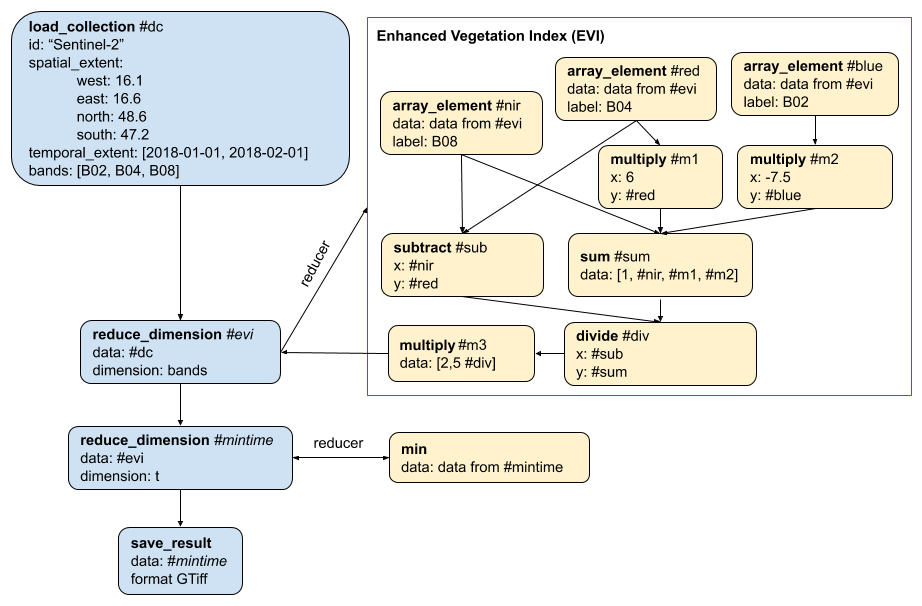
The process graph for the algorithm: [pg-evi-example.json](assets/pg-evi-example.json)
## Data Processing
Processes can run in three different ways:
1. Results can be pre-computed by creating a ***batch job***. They are submitted to the back-end's processing system, but will remain inactive until explicitly put into the processing queue. They will run only once and store results after execution. Results can be downloaded. Batch jobs are typically time consuming and user interaction is not possible although log files are generated for them. This is the only mode that allows to get an estimate about time, volume and costs beforehand.
2. A more dynamic way of processing and accessing data is to create a **secondary web service**. They allow web-based access using different protocols such as [OGC WMS](http://www.opengeospatial.org/standards/wms), [OGC WCS](http://www.opengeospatial.org/standards/wcs), [OGC API - Features](https://www.ogc.org/standards/ogcapi-features) or [XYZ tiles](https://wiki.openstreetmap.org/wiki/Slippy_map_tilenames). Some protocols such as the OGC WMS or XYZ tiles allow users to change the viewing extent or level of detail (zoom level). Therefore, computations often run *on demand* so that the requested data is calculated during the request. Back-ends should make sure to cache processed data to avoid additional/high costs and reduce waiting times for the user.
3. Processes can also be executed **on-demand** (i.e. synchronously). Results are delivered with the request itself and no job is created. Only lightweight computations, for example previews, should be executed using this approach as timeouts are to be expected for [long-polling HTTP requests](https://www.pubnub.com/guides/long-polling/).
### Validation
Process graph validation is a quite complex task. There's a [JSON schema](assets/pg-schema.json) for basic process graph validation. It checks the general structure of a process graph, but only checking against the schema is not fully validating a process graph. Note that this JSON Schema is probably good enough for a first version, but should be revised and improved for production. There are further steps to do:
1. Validate whether there's exactly one `result: true` per process graph.
2. Check whether the process names that are referenced in the field `process_id` are actually available in the corresponding `namespace`.
3. Validate all arguments for each process against the JSON schemas that are specified in the corresponding process specifications.
4. Check whether the values specified for `from_node` have a corresponding node in the same process graph.
5. Validate whether the return value and the arguments requesting a return value with `from_node` are compatible.
7. Check the content of arrays and objects. These could include parameter and result references (`from_node`, `from_parameter` etc.).
### Execution
To process the process graph on the back-end you need to go through all nodes/processes in the list and set for each node to which node it passes data and from which it expects data. In another iteration the back-end can find all start nodes for processing by checking for zero dependencies.
You can now start and execute the start nodes (in parallel, if possible). Results can be passed to the nodes that were identified beforehand. For each node that depends on multiple inputs you need to check whether all dependencies have already finished and only execute once the last dependency is ready.
Please be aware that the result node (`result` set to `true`) is not necessarily the last node that is executed. The author of the process graph may choose to set a non-end node to the result node!
contact:
name: openEO Project Steering Committee
url: 'https://openeo.org'
email: openeo.psc@uni-muenster.de
license:
name: Apache 2.0
url: 'http://www.apache.org/licenses/LICENSE-2.0.html'
externalDocs:
description: openEO Documentation
url: 'https://openeo.org/documentation/1.0/'
tags:
- name: Capabilities
description: General information about the API implementation and other supported capabilities provided by the back-end.
- name: Account Management
description: |-
The following endpoints handle user profiles, accounting and authentication. See also [Authentication](#section/Authentication). In general, the openEO API only defines a minimum subset of user management and accounting functionality. It allows to
* [authenticate and authorize](http://www.differencebetween.net/technology/difference-between-authentication-and-authorization/) a user, which may include [user registration with OpenID Connect](http://openid.net/specs/openid-connect-registration-1_0.html),
* handle storage space limits (disk quota),
* manage billing, which includes to
* query the credit a user has available,
* estimate costs for certain operations (data processing and downloading),
* get information about produced costs,
* limit costs of certain operations.
Therefore, the API leaves some aspects open that have to be handled by the back-ends separately, including
* credentials recovery, e.g. retrieving a forgotten password
* user data management, e.g. changing the users payment details or email address
* payments, i.e. topping up credits for pre-paid services or paying for post-paid services
* other accounting related tasks, e.g. creating invoices,
* user registration (except for [user registration with OpenID Connect](http://openid.net/specs/openid-connect-registration-1_0.html)).
- name: EO Data Discovery
description: |-
These endpoints allow to list the collections that are available at the back-end and can be used as data cubes for data processing.
## STAC
For data discovery of Earth Observation Collections at the back-ends, openEO strives for compatibility with the specifications [SpatioTemporal Asset Catalog (STAC)](https://stacspec.org/) and [OGC API - Features - Part 1: Core](http://docs.opengeospatial.org/is/17-069r3/17-069r3.html) as far as possible. Implementing the data discovery endpoints of openEO also produces valid STAC API 1.x and OGC API - Features 1.x responses, including ([partial](#provide-data-for-download)) compatibility with their APIs.
The data discovery endpoints `GET /collections` and `GET /collections/{collection_id}` are compatible with OGC API - Features and STAC. Both specifications define additional endpoints that need to be implemented to be fully compatible. The additional endpoints can easily be integrated into an openEO API implementation. A rough list of actions for compatibility is available below, but please refer to their specifications to find out the full details.
**Important:** [STAC specification](https://github.com/radiantearth/stac-spec) and [STAC API](https://github.com/radiantearth/stac-api-spec) are different specifications and have different version numbers.
The openEO API allows for the
- STAC versions 1.x.x (RECOMMENDED) and 0.9.x (DEPRECATED), and
- STAC API versions 1.x.x (RECOMMENDED) and 0.9.x (DEPRECATED).
### Content Extensions
STAC has several [extensions](https://stac-extensions.github.io) that can be used to better describe your data. Clients and server are not required to implement all of them, so be aware that some clients may not be able to read all your metadata.
Some commonly used extensions that are relevant for datasets exposed through the openEO API are:
- [Classification extension](https://github.com/stac-extensions/classification)
- [Data Cube extension](https://github.com/stac-extensions/datacube) (part of the openEO API)
- [EO (Electro-Optical) extension](https://github.com/stac-extensions/eo)
- [Processing extension](https://github.com/stac-extensions/processing)
- [Projection extension](https://github.com/stac-extensions/projection)
- [Raster extension](https://github.com/stac-extensions/raster)
- [SAR extension](https://github.com/stac-extensions/sar)
- [Satellite extension](https://github.com/stac-extensions/sat)
- [Scientific Citation extension](https://github.com/stac-extensions/scientific)
### Provide data for download
If you'd like to provide your data for download in addition to offering the cloud processing service, you can implement the full STAC API. Therefore, you can implement the endpoints `GET /collections/{collection_id}/items` and `GET /collections/{collection_id}/items/{feature_id}` to support retrieval of individual items. To benefit from the STAC ecosystem and allow searching for items you can also implement `POST /search` and `GET /search`. Further information can be found in the [STAC API repository](https://github.com/radiantearth/stac-api-spec).
### API Extensions
STAC API has several [extensions](https://stac-api-extensions.github.io) that can be implemented on top of the openEO API to enrich the API functionality, e.g. for searching.
- name: Process Discovery
description: |-
The process discovery endpoints provide details about the predefined processes that are available at the back-end. To list user-defined processes see '[User-Defined Processes](#tag/User-Defined-Processes)'.
- name: User-Defined Processes
description: These endpoints allow to store and manage user-defined processes with their process graphs at the back-end.
- name: Data Processing
description: Organizes and manages data processing on the back-end, either as synchronous on-demand computation or batch jobs.
- name: Batch Jobs
description: Management of batch processing tasks (jobs) and their results.
- name: Secondary Services
description: On-demand access to data using other web service protocols.
- name: File Storage
description: Management of user-uploaded assets and processed data.
servers:
- url: 'https://openeo.example/api/{version}'
description: >-
The URL of the API MAY freely be chosen by the back-end providers. The
path, including API versioning, is a *recommendation* only. Nevertheless,
all servers MUST support HTTPS as the authentication methods are not
secure with HTTP only!
variables:
version:
default: v1
description: |-
API versioning is RECOMMENDED. As the openEO API is following
[SemVer](https://semver.org/) only the **major** part of the version
numbers SHOULD be used for API versioning in the URL. To make clear
that it is a version number, it is RECOMMENDED to add the prefix `v`.
Example: API version `1.2.3` is recommended to use `v1`.
The reason to only consider the major part is that backward-incompatible
changes are introduced by major changes only. All changes from minor
and patch releases can usually be integrated without breakages and thus
a change in the URL is not really needed.
The version number in the URL MUST not be used by the clients to detect
the version number of the API. Use the version number returned in the
property `api_version` from `GET /` instead.
paths:
/:
get:
summary: Information about the back-end
operationId: capabilities
description: >-
Lists general information about the back-end, including which version
and endpoints of the openEO API are supported. May also include billing
information.
tags:
- Capabilities
security:
- {}
responses:
'200':
description: |-
Information about the API version and supported endpoints /
features.
This endpoint MUST always be available for the API to be valid.
content:
application/json:
schema:
title: Capabilities
type: object
required:
- id
- title
- description
- api_version
- backend_version
- stac_version
- conformsTo
- type
- endpoints
- links
properties:
api_version:
type: string
description: >-
Version number of the openEO API specification the back-end
implements.
enum:
- 1.3.0
backend_version:
type: string
description: >-
Version number of the back-end implementation.
Every change on back-end side MUST cause a change of the
version number.
example: 1.1.2
stac_version:
$ref: '#/components/schemas/stac_version'
type:
type: string
enum:
- Catalog
example: Catalog
id:
type: string
description: >-
Identifier for the service.
This field originates from STAC and is used as unique identifier for the STAC catalog available at `/collections`.
example: cool-eo-cloud
title:
type: string
description: The name of the service.
example: Example Cloud Corp.
description:
type: string
format: commonmark
description: >-
A description of the service, which allows the service
provider to introduce the user to its service.
[CommonMark 0.29](http://commonmark.org/) syntax MAY be
used for rich text representation.
example: |-
This service is provided to you by [Example Cloud Corp.](https://cloud.example). It implements the full openEO API and allows to process a range of 999 EO data sets, including
* Sentinel 1/2/3 and 5
* Landsat 7/8
A free plan is available to test the service. For further information please contact our customer service at [support@cloud.example](mailto:support@cloud.example).
conformsTo:
$ref: '#/components/schemas/conformsTo'
production:
$ref: '#/components/schemas/production'
endpoints:
type: array
description: >-
Lists all supported endpoints. Supported are all
endpoints, which are implemented, return usually
a 2XX or 3XX HTTP status code and are fully compatible
to the API specification.
An entry for this endpoint (path `/` with method `GET`)
SHOULD NOT be listed.
Each path MUST only be listed once in the array.
items:
title: Endpoint
type: object
required:
- path
- methods
properties:
path:
description: >-
Path to the endpoint, relative to the URL of this
endpoint. In general the paths MUST follow the paths
specified in the openAPI specification as closely as
possible. Therefore, paths MUST be prepended with a
leading slash, but MUST NOT contain a trailing
slash. Variables in the paths MUST be placed in
curly braces and follow the parameter names in the
openAPI specification, e.g. `{job_id}`.
type: string
methods:
description: >-
Supported HTTP verbs in uppercase. It is OPTIONAL to
list `OPTIONS` as method (see the [CORS section](#section/Cross-Origin-Resource-Sharing-(CORS))).
type: array
items:
type: string
enum:
- GET
- POST
- PATCH
- PUT
- DELETE
- OPTIONS
example:
- path: /collections
methods:
- GET
- path: '/collections/{collection_id}'
methods:
- GET
- path: /processes
methods:
- GET
- path: /jobs
methods:
- GET
- POST
- path: '/jobs/{job_id}'
methods:
- GET
- DELETE
- PATCH
billing:
title: Billing
description: >-
Billing related data, e.g. the currency used or available
plans to process jobs.
This property MUST be specified if the back-end uses any
billing related API functionalities, e.g. budgeting or
estimates.
The absence of this property does not mean the back-end is
necessarily free to use for all. Providers may choose to
bill users outside of the API, e.g. with a monthly fee
that is not depending on individual API interactions.
type: object
required:
- currency
properties:
currency:
description: >-
The currency the back-end is billing in. The currency
MUST be either a valid currency code as defined in
ISO-4217 or a back-end specific unit that is used for
billing such as credits, tiles or CPU hours.
If set to `null`, budget and costs are not supported
by the back-end and users can not be charged.
type: string
nullable: true
example: USD
default_plan:
type: string
description: |-
Name of the plan the back-end uses for billing in case
1. the user has not subscribed to a specific plan
(see `default_plan` in `GET /me`) and
2. also did not provide a specific plan with the
processing request.
If a free plan is available at the back-end, it is
probably most useful to provide this as the back-end
wide default plan and override it with paid plans through
the user-specific default plan in `GET /me`.
Otherwise, users that have not set up payment yet MAY
receive an error for each processing requests where
they did not provide a free plan specifically.
example: free
plans:
description: Array of plans
type: array
items:
title: Billing Plan
type: object
required:
- name
- description
- paid
properties:
name:
type: string
description: >-
Name of the plan. It MUST be accepted in a *case
insensitive* manner throughout the API.
example: free
description:
type: string
format: commonmark
description: >-
A description that gives a rough overview over
the plan.
[CommonMark 0.29](http://commonmark.org/) syntax
MAY be used for rich text representation.
example: Free plan for testing.
paid:
type: boolean
description: >-
Indicates whether the plan is a paid plan
(`true`) or a free plan (`false`).
url:
type: string
description: >-
URL to a web page with more details about the
plan.
format: uri
example: 'https://cloud.example/plans/free-plan'
example:
- name: free
description: >-
Free plan. Calculates one tile per second and a
maximum amount of 100 tiles per hour.
url: 'https://cloud.example/plans/free-plan'
paid: false
- name: premium
description: >-
Premium plan. Calculates unlimited tiles and each
calculated tile costs 0.003 USD.
url: 'https://cloud.example/plans/premium-plan'
paid: true
links:
description: |-
Links related to this service, e.g. the homepage of
the service provider or the terms of service.
It is highly RECOMMENDED to provide links with the
following `rel` (relation) types:
1. `version-history`: A link back to the Well-Known URL
(including `/.well-known/openeo`, see the corresponding endpoint for details)
to allow clients to work on the most recent version.
2. `terms-of-service`: A link to the terms of service. If
a back-end provides a link to the terms of service, the
clients MUST provide a way to read the terms of service
and only connect to the back-end after the user agreed to
them. The user interface MUST be designed in a way that
the terms of service are not agreed to by default, i.e.
the user MUST explicitly agree to them.
3. `privacy-policy`: A link to the privacy policy (GDPR).
If a back-end provides a link to a privacy policy, the
clients MUST provide a way to read the privacy policy and
only connect to the back-end after the user agreed to
them. The user interface MUST be designed in a way that
the privacy policy is not agreed to by default, i.e. the
user MUST explicitly agree to them.
4. `service-desc` or `service-doc`: A link to the API definition.
Use `service-desc` for machine-readable API definition and
`service-doc` for human-readable API definition.
Required if full OGC API compatibility is desired.
5. `conformance`: A link to the Conformance declaration
(see `/conformance`).
Required if full OGC API compatibility is desired.
6. `data`: A link to the collections (see `/collections`).
Required if full OGC API compatibility is desired.
7. `create-form`: A link to a user registration page.
8. `recovery-form`: A link to a page where a user can
recover a user account (e.g. to reset the password or send
a reminder about the username to the user's email account).
9. `web-editor`: A link to an openEO Web Editor instance.
This allows clients to open a Web Editor for other tasks.
It may be accompanied with a `version` flag in the link
to allow feature-detection for certain Web Editor functionalities.
For additional relation types see also the lists of
[common relation types in openEO](#section/API-Principles/Web-Linking).
type: array
items:
$ref: '#/components/schemas/link'
example:
- href: 'https://cloud.example'
rel: about
type: text/html
title: Homepage of the service provider
- href: 'https://cloud.example/tos'
rel: terms-of-service
type: text/html
title: Terms of Service
- href: 'https://cloud.example/privacy'
rel: privacy-policy
type: text/html
title: Privacy Policy
- href: 'https://cloud.example/register'
rel: create-form
type: text/html
title: User Registration
- href: 'https://cloud.example/lost-password'
rel: recovery-form
type: text/html
title: Reset Password
- href: 'https://cloud.example/.well-known/openeo'
rel: version-history
type: application/json
title: List of supported openEO versions
- href: 'https://cloud.example/api/v1/conformance'
rel: conformance
type: application/json
title: OGC Conformance Classes
- href: 'https://cloud.example/api/v1/collections'
rel: data
type: application/json
title: List of Datasets
- href: 'https://editor.openeo.org'
rel: web-editor
type: text/html
title: openEO Web Editor
version: '0.14.0'
4XX:
$ref: '#/components/responses/client_error'
5XX:
$ref: '#/components/responses/server_error'
/.well-known/openeo:
get:
summary: Supported openEO versions
operationId: connect
description: |-
Lists all implemented openEO versions supported by the
service provider. This endpoint is the Well-Known URI
(see [RFC 5785](https://www.rfc-editor.org/rfc/rfc5785.html)) for openEO.
This allows a client to easily identify the most recent openEO
implementation it supports. By default, a client SHOULD connect to the
most recent production-ready version it supports. If not available, the
most recent supported version of *all* versions SHOULD be connected to.
Clients MAY let users choose to connect to versions that are not
production-ready or outdated.
The most recent version is determined by comparing the version numbers
according to rules from [Semantic Versioning](https://semver.org/),
especially [§11](https://semver.org/#spec-item-11). Any pair of API
versions in this list MUST NOT be equal according to Semantic Versioning.
The Well-Known URI is the entry point for clients and users, so make
sure it is permanent and easy to use and remember. Clients MUST NOT
require the well-known path (`/.well-known/openeo`) in the URL that is
specified by a user to connect to the back-end.
For clients, the usual behavior SHOULD follow these steps:
1. The user provides a URI, which may consist of a scheme (protocol),
an authority (host, port) and a path.
2. The client parses the URI and appends `/.well-knwon/openeo` to the
path. Make sure to correctly handle leading/trailing slashes.
3. Send a request to the new URI.
A. On success: Detect the most suitable API instance/version (see above)
and read the [capabilities](#tag/Capabilities/operation/capabilities)
from there.
B. On failure: Directly try to read the capabilities from the original URI
given by the user.
**This URI MUST NOT be versioned as the other endpoints.**
If your API is available at `https://openeo.example/api/v1`, and
you instruct your API users to use `https://openeo.example` as connection URI,
the Well-Known URI SHOULD be located at `https://openeo.example/.well-known/openeo`.
The Well-Known URI is usually directly located at the top-level, but it is not a
requirement. For example, `https://openeo.example/eo/.well-known/openeo` is also allowed.
Clients MAY get additional information (e.g. title or description) about
a back-end from the most recent version that has the `production` flag
set to `true`.
tags:
- Capabilities
security:
- {}
servers:
- url: 'https://openeo.example'
description: >-
The Well-Known URI SHOULD be available directly at
`https://{{domain}}/.well-known/openeo` in contrast to the other
endpoints, which may be versioned and can run on other hosts, ports,
... etc.
responses:
'200':
description: >-
List of all available API instances, each with URL and the
implemented openEO API version.
content:
application/json:
schema:
title: Well Known Discovery
type: object
required:
- versions
properties:
versions:
type: array
items:
title: API Instance
type: object
required:
- url
- api_version
properties:
url:
type: string
format: uri
description: '*Absolute* URLs to the service.'
example: 'https://openeo.example/api/v1'
production:
$ref: '#/components/schemas/production'
api_version:
type: string
description: >-
Version number of the openEO specification this
back-end implements.
example:
versions:
- url: 'https://openeo.example/api/v0'
api_version: 0.4.2
- url: 'https://openeo.example/api/v1'
api_version: 1.3.0
- url: 'https://dev.openeo.example/api/v2'
production: false
api_version: 2.0.0-beta
4XX:
$ref: '#/components/responses/client_error'
5XX:
$ref: '#/components/responses/server_error'
/file_formats:
get:
summary: Supported file formats
operationId: list-file-types
description: |-
Lists supported input and output file formats.
*Input* file formats specify which file a back-end can *read* from.
*Output* file formats specify which file a back-end can *write* to.
The response to this request is an object listing all available input
and output file formats separately with their parameters and additional
data. This endpoint does not include the supported secondary web
services.
**Note**: Format names and parameters MUST be fully aligned with the
GDAL codes if available, see [GDAL Raster
Formats](https://gdal.org/drivers/raster/index.html) and [OGR Vector
Formats](https://gdal.org/drivers/vector/index.html). It is OPTIONAL to
support all output format parameters supported by GDAL. Some file
formats not available through GDAL may be defined centrally for openEO.
Custom file formats or parameters MAY be defined.
The format descriptions MUST describe how the file formats relate to
data cubes. Input file formats MUST describe how the files have to be
structured to be transformed into data cubes. Output file formats MUST
describe how the data cubes are stored at the back-end and how the
resulting file structure looks like.
Back-ends MUST NOT support aliases, for example it is not allowed to
support `geotiff` instead of `gtiff`. Nevertheless, openEO Clients MAY
translate user input for convenience (e.g. translate `geotiff` to
`gtiff`). Also, for a better user experience the back-end can specify a
`title`.
Format names MUST be accepted in a *case insensitive* manner throughout the API.
tags:
- Capabilities
- Data Processing
security:
- {}
- Bearer: []
responses:
'200':
description: >-
An object with containing all input and output format separately.
For each property `input` and `output` an object is defined where
the file format names are the property keys and the property values
are objects that define a title, supported parameters and related
links.
content:
application/json:
schema:
title: File Formats
type: object
required:
- input
- output
properties:
input:
title: Input File Formats
type: object
description: >-
Map of supported input file formats, i.e. file formats a
back-end can **read** from. The property keys are the file
format names that are used by clients and users, for
example in process graphs.
additionalProperties:
$ref: '#/components/schemas/file_format'
output:
title: Output File Formats
type: object
description: >-
Map of supported output file formats, i.e. file formats a
back-end can **write** to. The property keys are the file
format names that are used by clients and users, for
example in process graphs.
additionalProperties:
$ref: '#/components/schemas/file_format'
example:
output:
GTiff:
title: GeoTiff
description: Export to GeoTiff. Does not support cloud-optimized GeoTiffs (COGs) yet.
gis_data_types:
- raster
parameters:
tiled:
type: boolean
description: >-
This option can be used to force creation of tiled
TIFF files [true]. By default [false] stripped TIFF
files are created.
default: false
compress:
type: string
description: Set the compression to use.
default: NONE
enum:
- JPEG
- LZW
- DEFLATE
- NONE
jpeg_quality:
type: integer
description: Set the JPEG quality when using JPEG.
minimum: 1
maximum: 100
default: 75
links:
- href: 'https://gdal.org/drivers/raster/gtiff.html'
rel: about
title: GDAL on the GeoTiff file format and storage options
GPKG:
title: OGC GeoPackage
gis_data_types:
- raster
- vector
parameters:
version:
type: string
description: >-
Set GeoPackage version. In AUTO mode, this will be
equivalent to 1.2 starting with GDAL 2.3.
enum:
- auto
- '1'
- '1.1'
- '1.2'
default: auto
links:
- href: 'https://gdal.org/drivers/raster/gpkg.html'
rel: about
title: GDAL on GeoPackage for raster data
- href: 'https://gdal.org/drivers/vector/gpkg.html'
rel: about
title: GDAL on GeoPackage for vector data
input:
GPKG:
title: OGC GeoPackage
gis_data_types:
- raster
- vector
parameters:
table:
type: string
description: >-
**RASTER ONLY.** Name of the table containing the
tiles. If the GeoPackage dataset only contains one
table, this option is not necessary. Otherwise, it
is required.
links:
- href: 'https://gdal.org/drivers/raster/gpkg.html'
rel: about
title: GDAL on GeoPackage for raster data
- href: 'https://gdal.org/drivers/vector/gpkg.html'
rel: about
title: GDAL on GeoPackage for vector data
4XX:
$ref: '#/components/responses/client_error'
5XX:
$ref: '#/components/responses/server_error'
/conformance:
get:
summary: Conformance classes this API implements
operationId: conformance
description: |-
Lists all conformance classes specified in various standards that the
implementation conforms to. Conformance classes are commonly used in
all OGC API standards and the STAC API specification. openEO adds relatively
broadly defined conformance classes, especially for the extensions.
Otherwise, the implemented functionality can usually be retrieved from
the [capabilities](#tag/Capabilities/operation/capabilities) in openEO.
The general openEO conformance class is `https://api.openeo.org/1.3.0`.
See the individual openEO API extensions for their conformance classes.
The conformance classes listed at this endpoint and listed in the
corresponding `conformsTo` property in `GET /` MUST be equal.
More details:
- [STAC API](https://github.com/radiantearth/stac-api-spec), especially the conformance class "STAC API - Collections"
- [OGC API standards](https://ogcapi.ogc.org/)
tags:
- Capabilities
security:
- {}
- Bearer: []
responses:
'200':
description: The URIs of all conformance classes supported by the server.
content:
application/json:
schema:
title: OGC Conformance Classes
type: object
required:
- conformsTo
properties:
conformsTo:
$ref: '#/components/schemas/conformsTo'
4XX:
$ref: '#/components/responses/client_error'
5XX:
$ref: '#/components/responses/server_error'
/collections:
get:
summary: Basic metadata for all datasets
operationId: list-collections
description: |-
Lists available collections with at least the required information.
It is **strongly RECOMMENDED** to keep the response size small by
omitting larger optional values from the objects in `collections` (e.g. the
`summaries` and `cube:dimensions` properties).
To get the full metadata for a collection clients MUST
request `GET /collections/{collection_id}`.
This endpoint is compatible with [STAC API 1.0.0 and later](https://stacspec.org) and
[OGC API - Features 1.0](http://docs.opengeospatial.org/is/17-069r3/17-069r3.html).
[STAC API extensions](https://stac-api-extensions.github.io) and
[STAC extensions](https://stac-extensions.github.io)
can be implemented in addition to what is documented here.
Note: Although it is possible to request public collections without
authorization, it is RECOMMENDED that clients (re-)request the collections
with the Bearer token once available to also retrieve any private collections.
tags:
- EO Data Discovery
security:
- {}
- Bearer: []
parameters:
- $ref: '#/components/parameters/pagination_limit'
responses:
'200':
description: Lists of collections and related links.
content:
application/json:
schema:
title: Collections
type: object
required:
- collections
- links
properties:
collections:
type: array
items:
$ref: '#/components/schemas/collection'
links:
$ref: '#/components/schemas/links_pagination'
example:
collections:
- stac_version: 1.0.0
type: Collection
id: Sentinel-2A
title: Sentinel-2A MSI L1C
description: >-
Sentinel-2A is a wide-swath, high-resolution,
multi-spectral imaging mission supporting Copernicus
Land Monitoring studies, including the monitoring of
vegetation, soil and water cover, as well as observation
of inland waterways and coastal areas.
license: proprietary
extent:
spatial:
bbox:
- - -180
- -56
- 180
- 83
temporal:
interval:
- - '2015-06-23T00:00:00Z'
- '2019-01-01T00:00:00Z'
keywords:
- copernicus
- esa
- msi
- sentinel
providers:
- name: European Space Agency (ESA)
roles:
- producer
- licensor
url: >-
https://sentinel.esa.int/web/sentinel/user-guides/sentinel-2-msi
- name: openEO
roles:
- host
url: >-
https://developers.google.com/earth-engine/datasets/catalog/COPERNICUS_S2
links:
- rel: license
href: >-
https://scihub.copernicus.eu/twiki/pub/SciHubWebPortal/TermsConditions/Sentinel_Data_Terms_and_Conditions.pdf
- stac_version: 1.0.0
type: Collection
id: MOD09Q1
title: >-
MODIS/Terra Surface Reflectance 8-Day L3 Global 250m SIN
Grid V006
description: >-
The MOD09Q1 Version 6 product provides an estimate of
the surface spectral reflectance of Terra MODIS Bands
1-2 corrected for atmospheric conditions such as gasses,
aerosols, and Rayleigh scattering. Provided along with
the two 250 m MODIS bands is one additional layer, the
Surface Reflectance QC 250 m band. For each pixel, a
value is selected from all the acquisitions within the
8-day composite period. The criteria for the pixel
choice include cloud and solar zenith. When several
acquisitions meet the criteria the pixel with the
minimum channel 3 (blue) value is used. Validation at
stage 3 has been achieved for all MODIS Surface
Reflectance products.
license: proprietary
extent:
spatial:
bbox:
- - -180
- -90
- 180
- 90
temporal:
interval:
- - '2000-02-01T00:00:00Z'
- null
links:
- rel: license
href: 'https://openeo.example/api/v1/collections/MOD09Q1/license'
links:
- rel: alternate
href: 'https://openeo.example/csw'
title: openEO catalog (OGC Catalogue Services 3.0)
4XX:
$ref: '#/components/responses/client_error_auth'
5XX:
$ref: '#/components/responses/server_error'
'/collections/{collection_id}':
get:
summary: Full metadata for a specific dataset
operationId: describe-collection
description: |-
Lists **all** information about a specific collection specified by the
identifier `collection_id`.
This endpoint is compatible with [STAC API 1.0.0 and later](https://stacspec.org) and
[OGC API - Features 1.0](http://docs.opengeospatial.org/is/17-069r3/17-069r3.html).
[STAC API extensions](https://stac-api-extensions.github.io) and
[STAC extensions](https://stac-extensions.github.io)
can be implemented in addition to what is documented here.
Note: Providing the Bearer token is REQUIRED for private collections.
tags:
- EO Data Discovery
security:
- {}
- Bearer: []
parameters:
- $ref: '#/components/parameters/collection_id'
responses:
'200':
description: JSON object with the full collection metadata.
content:
application/json:
schema:
type: object
required:
- 'cube:dimensions'
- summaries
allOf:
- $ref: '#/components/schemas/collection'
example:
stac_version: 1.0.0
stac_extensions:
- https://stac-extensions.github.io/datacube/v2.2.0/schema.json
type: Collection
id: Sentinel-2
title: Sentinel-2 MSI L2A
description: >-
Sentinel-2A is a wide-swath, high-resolution, multi-spectral
imaging mission supporting Copernicus Land Monitoring
studies.
license: proprietary
keywords:
- copernicus
- esa
- msi
- sentinel
providers:
- name: European Space Agency (ESA)
roles:
- producer
- licensor
url: >-
https://sentinel.esa.int/web/sentinel/user-guides/sentinel-2-msi
- name: Google
roles:
- host
url: >-
https://developers.google.com/earth-engine/datasets/catalog/COPERNICUS_S2
extent:
spatial:
bbox:
- - -180
- -56
- 180
- 83
temporal:
interval:
- - '2015-06-23T00:00:00Z'
- null
links:
- rel: license
href: https://scihub.copernicus.eu/twiki/pub/SciHubWebPortal/TermsConditions/Sentinel_Data_Terms_and_Conditions.pdf
type: application/pdf
- rel: http://www.opengis.net/def/rel/ogc/1.0/queryables
href: https://openeo.example/api/v1/collections/Sentinel-2A/queryables
type: application/schema+json
- rel: about
href: https://earth.esa.int/web/sentinel/user-guides/sentinel-2-msi/product-types/level-1c
type: text/html
title: ESA Sentinel-2 MSI Level-1C User Guide
- rel: example
href: 'https://openeo.example/api/v1/collections/Sentinel-2/examples/true-color.json'
type: application/json
title: Example Process for True-Color Visualization
- rel: example
href: 'https://openeo.example/api/v1/collections/Sentinel-2/examples/ndvi.json'
type: application/json
title: Example Process for NDVI Calculation and Visualization
'cube:dimensions':
x:
type: spatial
axis: x
extent:
- -180
- 180
reference_system: 4326
y:
type: spatial
axis: 'y'
extent:
- -56
- 83
reference_system: 4326
t:
type: temporal
extent:
- '2015-06-23T00:00:00Z'
- null
step: null
bands:
type: bands
values:
- B1
- B2
- B3
- B4
- B5
- B6
- B7
- B8
- B8A
- B9
- B10
- B11
- B12
summaries:
'constellation':
- Sentinel-2
'platform':
- Sentinel-2A
- Sentinel-2B
'instruments':
- MSI
'eo:cloud_cover':
minimum: 0
maximum: 75
'sat:orbit_state':
- ascending
- descending
'gsd':
- 10
- 20
- 60
'eo:bands':
- name: B1
common_name: coastal
center_wavelength: 0.4439
gsd: 60
- name: B2
common_name: blue
center_wavelength: 0.4966
gsd: 10
- name: B3
common_name: green
center_wavelength: 0.56
gsd: 10
- name: B4
common_name: red
center_wavelength: 0.6645
gsd: 10
- name: B5
center_wavelength: 0.7039
gsd: 20
- name: B6
center_wavelength: 0.7402
gsd: 20
- name: B7
center_wavelength: 0.7825
gsd: 20
- name: B8
common_name: nir
center_wavelength: 0.8351
gsd: 10
- name: B8A
common_name: nir08
center_wavelength: 0.8648
gsd: 20
- name: B9
common_name: nir09
center_wavelength: 0.945
gsd: 60
- name: B10
common_name: cirrus
center_wavelength: 1.3735
gsd: 60
- name: B11
common_name: swir16
center_wavelength: 1.6137
gsd: 20
- name: B12
common_name: swir22
center_wavelength: 2.2024
gsd: 20
'proj:epsg':
minimum: 32601
maximum: 32660
assets:
thumbnail:
href: 'https://openeo.example/api/v1/collections/Sentinel-2/thumbnail.png'
type: image/png
title: Preview
roles:
- thumbnail
inspire:
href: 'https://openeo.example/api/v1/collections/Sentinel-2/inspire.xml'
type: application/xml
title: INSPIRE metadata
description: INSPIRE compliant XML metadata
roles:
- metadata
4XX:
$ref: '#/components/responses/client_error_auth'
5XX:
$ref: '#/components/responses/server_error'
'/collections/{collection_id}/queryables':
get:
summary: Metadata filters for a specific dataset
operationId: list-collection-queryables
description: |-
Lists **all** supported metadata filters (also called "queryables") for
a specific collection.
This endpoint is compatible with the endpoint defined in the STAC API extension
[`filter`](https://github.com/stac-api-extensions/filter#queryables) and
[OGC API - Features - Part 3: Filtering](https://github.com/opengeospatial/ogcapi-features/tree/master/extensions/filtering).
For a precise definition please follow those specifications.
This endpoints provides a JSON Schema for each queryable that openEO
users can use in multiple scenarios:
1. For loading data from the collection, e.g. in the process `load_collection`.
2. For filtering items using CQL2 on the `/collections/{collection_id}/items` endpoint
(if [STAC API - Features is implemented in addition to the openEO API](#tag/EO-Data-Discovery/STAC)).
Note: Providing the Bearer token is REQUIRED for private collections.
tags:
- EO Data Discovery
security:
- {}
- Bearer: []
parameters:
- $ref: '#/components/parameters/collection_id'
responses:
'200':
description: |-
A JSON Schema defining the queryables.
It is RECOMMENDED to dereference all "$refs".
content:
application/schema+json:
schema:
$ref: '#/components/schemas/json_schema'
example:
$schema: https://json-schema.org/draft/2019-09/schema
$id: https://openeo.example/api/v1/collections/Sentinel-2A/queryables
type: object
title: Sentinel-2A
properties:
'eo:cloud_cover':
title: Cloud Cover
type: number
minimum: 0
maximum: 100
platform:
title: Platform
description: The satellite platform.
type: string
enum:
- sentinel-2a
- sentinel-2b
additionalProperties: false
4XX:
$ref: '#/components/responses/client_error_auth'
5XX:
$ref: '#/components/responses/server_error'
/processes:
get:
summary: Supported predefined processes
operationId: list-processes
description: >-
Lists all predefined processes and returns
detailed process descriptions, including parameters and return values.
tags:
- Process Discovery
security:
- {}
- Bearer: []
parameters:
- $ref: '#/components/parameters/pagination_limit'
responses:
'200':
description: Formal specification describing the supported predefined processes.
content:
application/json:
schema:
title: Processes
type: object
required:
- processes
- links
properties:
version:
type: string
nullable: true
description: >-
Version number of the openEO process specification this back-end
targets.
If not provided or `null`, the version is either unknown or multiple versions are implemented.
Clients must be able to handle multiple process specification versions at the same time.
This is **not** the openEO API specification version.
example: 2.0.0
processes:
type: array
items:
title: Predefined Process
description: A predefined process made available by the back-end.
type: object
required:
- id
- description
- parameters
- returns
allOf:
- $ref: '#/components/schemas/process'
links:
$ref: '#/components/schemas/links_pagination'
example:
processes:
- id: apply
summary: Apply a process to each pixel
description: >-
Applies a *unary* process to each pixel value in the data cube (i.e. a local operation). A unary process takes a single value and returns a single value, for example ``abs()`` or ``linear_scale_range()``.
categories:
- cubes
parameters:
- name: data
description: A data cube.
schema:
type: object
subtype: datacube
- name: process
description: 'A unary process to be applied on each value, may consist of multiple sub-processes.'
schema:
type: object
subtype: process-graph
parameters:
- name: x
description: The value to process.
schema:
description: Any data type.
returns:
description: 'A data cube with the newly computed values. The resolution, cardinality and the number of dimensions are the same as for the original data cube.'
schema:
type: object
subtype: datacube
- id: multiply
summary: Multiplication of two numbers
description: |-
Multiplies the two numbers `x` and `y` (*x * y*) and returns the computed product.
No-data values are taken into account so that `null` is returned if any element is such a value.
The computations follow [IEEE Standard 754](https://ieeexplore.ieee.org/document/8766229) whenever the processing environment supports it.
categories:
- math
parameters:
- name: x
description: The multiplier.
schema:
type:
- number
- 'null'
- name: 'y'
description: The multiplicand.
schema:
type:
- number
- 'null'
returns:
description: The computed product of the two numbers.
schema:
type:
- number
- 'null'
exceptions:
MultiplicandMissing:
message: Multiplication requires at least two numbers.
examples:
- arguments:
x: 5
y: 2.5
returns: 12.5
- arguments:
x: -2
y: -4
returns: 8
- arguments:
x: 1
y: null
returns: null
links:
- rel: about
href: 'http://mathworld.wolfram.com/Product.html'
title: Product explained by Wolfram MathWorld
- rel: about
href: 'https://ieeexplore.ieee.org/document/8766229'
title: IEEE Standard 754-2019 for Floating-Point Arithmetic
links:
- rel: alternate
href: 'https://openeo.example/processes'
type: text/html
title: HTML version of the processes
4XX:
$ref: '#/components/responses/client_error_auth'
5XX:
$ref: '#/components/responses/server_error'
/udf_runtimes:
get:
summary: Supported UDF runtimes
operationId: list-udf-runtimes
description: >-
Lists the supported runtimes for user-defined functions (UDFs),
which includes either the programming languages including version
numbers and available libraries including version numbers or docker
containers.
tags:
- Capabilities
security:
- {}
- Bearer: []
responses:
'200':
description: Description of UDF runtime support
content:
application/json:
schema:
title: UDF Runtimes
type: object
description: |-
Map of available runtime environments. Runtime environments
can be either a programming language environment or Docker-based.
Each runtime environment has a unique name, which is used as
the property key. The name is used in processes to select the
runtime environment for UDFs, so the names should be stable and
meaningful.
It is RECOMMENDED to use the following naming and casing:
* For programming langauge environments use the names as provided
in in the [Scriptol List of Programming Languages](https://www.scriptol.com/programming/list-programming-languages.php).
* For docker images use the docker image identifier excluding the registry path.
minProperties: 1
additionalProperties:
x-additionalPropertiesName: UDF Runtime name
allOf:
- $ref: '#/components/schemas/udf_runtime'
example:
PHP:
title: PHP v7.x
description: Just an example how to reference a docker image.
experimental: true
type: docker
docker: openeo/udf-php7
default: latest
tags:
- latest
- 7.3.1
- '7.3'
- '7.2'
links:
- href: 'https://hub.docker.com/openeo/udf-php7/'
rel: about
R:
title: R v3.x for Statistical Computing
description: R programming language with `Rcpp` and `rmarkdown` extensions installed.
type: language
default: 3.5.2
versions:
3.1.0:
deprecated: true
libraries:
Rcpp:
version: 1.0.10
links:
- href: >-
https://cran.r-project.org/web/packages/Rcpp/index.html
rel: about
rmarkdown:
version: 1.7.0
links:
- href: >-
https://cran.r-project.org/web/packages/rmarkdown/index.html
rel: about
3.5.2:
libraries:
Rcpp:
version: 1.2.0
links:
- href: >-
https://cran.r-project.org/web/packages/Rcpp/index.html
rel: about
rmarkdown:
version: 1.7.0
links:
- href: >-
https://cran.r-project.org/web/packages/rmarkdown/index.html
rel: about
4XX:
$ref: '#/components/responses/client_error_auth'
5XX:
$ref: '#/components/responses/server_error'
/credentials/oidc:
get:
summary: OpenID Connect authentication
operationId: authenticate-oidc
description: |-
Lists the supported [OpenID Connect](http://openid.net/connect/)
providers (OP). OpenID Connect Providers MUST support [OpenID Connect
Discovery](http://openid.net/specs/openid-connect-discovery-1_0.html).
It is highly RECOMMENDED to implement OpenID Connect for public services
in favor of Basic authentication.
openEO clients MUST use the **access token** as part of the Bearer token
for authorization in subsequent API calls (see also the information
about Bearer tokens in this document). Clients MUST NOT use the id token
or the authorization code.
Back-ends MAY request user information ([including Claims](https://openid.net/specs/openid-connect-core-1_0.html#Claims))
from the [OpenID Connect Userinfo endpoint](https://openid.net/specs/openid-connect-core-1_0.html#UserInfo)
using the access token (without the prefix described above). Therefore,
both openEO client and openEO back-end are relying parties (clients) to
the OpenID Connect Provider.
tags:
- Account Management
security:
- {}
responses:
'200':
description: Lists the OpenID Connect Providers.
content:
application/json:
schema:
title: OpenID Connect Providers
type: object
required:
- providers
properties:
providers:
type: array
description: >-
The first provider in this list is the default provider for authentication.
Clients can either pre-select or directly use the default provider for authentication
if the user does not specify a specific value.
minItems: 1
items:
title: OpenID Connect Provider
type: object
required:
- id
- issuer
- title
properties:
id:
type: string
description: |-
A per-back-end **unique** identifier for the OpenID Connect provider.
Is used as prefix for the openEO token.
pattern: '[\d\w]{1,20}'
issuer:
type: string
format: uri
description: |-
The [issuer location](https://openid.net/specs/openid-connect-discovery-1_0.html#ProviderConfig)
(also referred to as 'authority' in some client libraries) is the URL of the
OpenID Connect provider, which conforms to a set of rules:
1. After appending `/.well-known/openid-configuration` to the URL, a
[HTTP/1.1 GET
request](https://openid.net/specs/openid-connect-discovery-1_0.html#ProviderConfigurationRequest)
to the concatenated URL MUST return a [OpenID Connect Discovery Configuration
Response](https://openid.net/specs/openid-connect-discovery-1_0.html#ProviderConfigurationResponse).
The response provides all information required to authenticate using
OpenID Connect.
2. The URL MUST NOT contain a terminating forward slash `/`.
example: 'https://accounts.google.com'
scopes:
type: array
description: >-
A list of OpenID Connect scopes that the client MUST at least include when requesting authorization.
Clients MAY add additional scopes such as the `offline_access` scope to retrieve a refresh token.
If scopes are specified, the list MUST at least contain the `openid` scope.
items:
type: string
title:
type: string
description: >-
The name that is publicly shown in clients for this
OpenID Connect provider.
description:
type: string
format: commonmark
description: |-
A description that explains how the authentication procedure works.
It should make clear how to register and get credentials. This should
include instruction on setting up `client_id`, `client_secret` and `redirect_uri`.
[CommonMark 0.29](http://commonmark.org/) syntax MAY be used for rich
text representation.
default_clients:
title: Default OpenID Connect Clients
type: array
description: |-
List of default OpenID Connect clients that can be used by an openEO client
for OpenID Connect based authentication.
A default OpenID Connect client is managed by the back-end implementer.
It MUST be configured to be usable without a client secret,
which limits its applicability to OpenID Connect grant types like
"Authorization Code Grant with PKCE" and "Device Authorization Grant with PKCE"
A default OpenID Connect client is provided without availability guarantees.
The back-end implementer CAN revoke, reset or update it any time.
As such, openEO clients SHOULD NOT store or cache default OpenID Connect client information
for long term usage.
A default OpenID Connect client is intended to simplify authentication for novice users.
Setting up a dedicated OpenID Connect client is RECOMMENDED for production-ready back-ends.
uniqueItems: true
items:
title: Default OpenID Connect Client
type: object
required:
- id
- grant_types
properties:
id:
type: string
description: >-
The OpenID Connect Client ID to be used in the authentication procedure.
grant_types:
type: array
description: |-
List of authorization grant types (flows) supported by the OpenID Connect client.
A grant type descriptor consist of a OAuth 2.0 grant type,
with an additional `+pkce` suffix when the grant type should be used with
the PKCE extension as defined in [RFC 7636](https://www.rfc-editor.org/rfc/rfc7636.html).
Allowed values:
- `implicit`: Implicit Grant as specified in [RFC 6749, sec. 1.3.2](https://www.rfc-editor.org/rfc/rfc6749.html#section-1.3.2)
- `authorization_code` / `authorization_code+pkce`: Authorization Code Grant as specified in [RFC 6749, sec. 1.3.1](https://www.rfc-editor.org/rfc/rfc6749.html#section-1.3.1), with or without PKCE extension.
- `urn:ietf:params:oauth:grant-type:device_code` / `urn:ietf:params:oauth:grant-type:device_code+pkce`: Device Authorization Grant (aka Device Code Flow) as specified in [RFC 8628](https://www.rfc-editor.org/rfc/rfc8628.html), with or without PKCE extension. Note that the combination of this grant with the PKCE extension is *not standardized* yet.
- `refresh_token`: Refresh Token as specified in [RFC 6749, sec. 1.5](https://www.rfc-editor.org/rfc/rfc6749.html#section-1.5)
minItems: 1
uniqueItems: true
items:
type: string
enum:
- 'implicit'
- 'authorization_code'
- 'authorization_code+pkce'
- 'urn:ietf:params:oauth:grant-type:device_code'
- 'urn:ietf:params:oauth:grant-type:device_code+pkce'
- 'refresh_token'
redirect_urls:
type: array
description: |-
List of redirect URLs that are whitelisted by the OpenID Connect client.
Redirect URLs MUST be provided when the OpenID Connect client supports
the Implicit Grant or the Authorization Code Grant (with or without PKCE extension).
uniqueItems: true
items:
type: string
format: uri
authorization_parameters:
type: object
description: |-
Additional parameters that an openEO client MUST include when requesting the authorization endpoint.
This can be used to enforce specific
[request parameters such as `prompt`](https://openid.net/specs/openid-connect-core-1_0.html#AuthRequest).
example:
prompt: consent
access_type: offline
links:
type: array
description: |-
Links related to this provider, for example a
help page or a page to register a new user account.
For relation types see the lists of
[common relation types in openEO](#section/API-Principles/Web-Linking).
items:
$ref: '#/components/schemas/link'
example:
providers:
- id: egi
issuer: 'https://aai.egi.eu/oidc'
title: EGI (default)
description: Login with your academic account.
scopes:
- openid
- profile
- email
default_clients:
- id: KStcUzD5AIUA
grant_types:
- implicit
- authorization_code+pkce
- urn:ietf:params:oauth:grant-type:device_code+pkce
- refresh_token
redirect_urls:
- https://editor.openeo.org/
- id: google
issuer: 'https://accounts.google.com'
title: Google
description: Login with your Google Account.
scopes:
- openid
- profile
- email
- earthengine
authorization_parameters:
access_type: offline
- id: ms
issuer: 'https://login.microsoftonline.com/example-tenant/v2.0'
title: Microsoft
description: Login with your Microsoft or Skype Account.
scopes: []
4XX:
$ref: '#/components/responses/client_error_auth'
5XX:
$ref: '#/components/responses/server_error'
/credentials/basic:
get:
summary: HTTP Basic authentication
operationId: authenticate-basic
description: |-
Checks the credentials provided through [HTTP Basic Authentication
according to RFC 7617](https://www.rfc-editor.org/rfc/rfc7617.html) and
returns an access token in exchange for providing valid credentials.
The credentials (username and password) MUST be sent in the HTTP header
`Authorization` with type `Basic` and the Base64 encoded string
consisting of username and password separated by a double colon `:`. The
header would look as follows for username `user` and password `pw`:
`Authorization: Basic dXNlcjpwdw==`.
The access token has to be used in the Bearer token for authorization in
subsequent API calls (see also the information about Bearer tokens in
this document).
It is RECOMMENDED to implement this authentication method for non-public
services only.
tags:
- Account Management
security:
- Basic: []
responses:
'200':
description: Credentials are correct and authentication succeeded.
content:
application/json:
schema:
title: HTTP Basic Access Token
type: object
required:
- access_token
properties:
access_token:
description: >-
The access token to be used in the Bearer token for authorization
in subsequent API calls (without the custom `basic//` prefix).
type: string
example: b34ba2bdf9ac9ee1
4XX:
$ref: '#/components/responses/client_error_auth'
5XX:
$ref: '#/components/responses/server_error'
/validation:
post:
summary: Validate a user-defined process (graph)
operationId: validate-custom-process
description: |-
Validates a user-defined process without executing it. A user-defined process is
considered valid unless the `errors` array in the response contains at
least one error.
Checks whether the process graph is schematically correct and the
processes are supported by the back-end. It MUST also check the
arguments against the schema, but checking whether the arguments are
adequate in the context of data is OPTIONAL. For example, a non-existing
band name may get rejected only by a few back-ends.
The validation MUST NOT throw an error for unresolvable process parameters.
Back-ends MUST validate the process graph. Validating the corresponding
metadata is OPTIONAL.
Errors that usually occur during processing MAY NOT get reported, e.g.
if a referenced file is accessible at the time of execution.
Back-ends can either report all errors at once or stop the validation
once they found the first error.
Please note that a validation always returns with HTTP status code 200.
Error codes in the 4xx and 5xx ranges MUST be returned only when the
general validation request is invalid (e.g. server is busy or properties
in the request body are missing), but never if an error was found during
validation of the user-defined process (e.g. an unsupported process).
tags:
- Data Processing
- User-Defined Processes
security:
- {}
- Bearer: []
responses:
'200':
description: >-
Returns the validation result as a list of errors. An empty list
indicates a successful validation.
content:
application/json:
schema:
title: Validation Result
type: object
required:
- errors
properties:
errors:
description: A list of validation errors.
type: array
items:
$ref: '#/components/schemas/error'
4XX:
$ref: '#/components/responses/client_error_auth'
5XX:
$ref: '#/components/responses/server_error'
requestBody:
required: true
content:
application/json:
schema:
$ref: '#/components/schemas/process_graph_with_metadata'
examples:
evi_user_defined_process:
$ref: '#/components/examples/evi_user_defined_process'
description: Specifies the user-defined process to be validated.
/result:
post:
summary: Process and download data synchronously
operationId: compute-result
description: >-
Executes a user-defined process directly (synchronously) and the result will be
downloaded in the format specified in the process graph. This endpoint
can be used to generate small previews or test user-defined processes before
starting a batch job.
Timeouts on either client-side or server-side are to be expected for complex
computations. Back-ends MAY send the openEO error `ProcessGraphComplexity`
immediately if the computation is expected to time out. Otherwise requests
MAY time-out after a certain amount of time by sending openEO error `RequestTimeout`.
A header named `OpenEO-Costs` MAY be sent with all responses, which MUST
include the costs for processing and downloading the data. Additionally,
a link to a log file MAY be sent in the header.
tags:
- Data Processing
security:
- Bearer: []
responses:
'200':
description: Result data in the requested output format
headers:
Content-Type:
description: |-
The appropriate media (MIME) type for the requested output
format MUST be sent, if the response contains a single file.
To send multiple files at once it is RECOMMENDED to use the
[`tar` file format](https://www.gnu.org/software/tar/manual/html_node/Standard.html)
(media type: `application/x-tar`).
To mimic the results of batch jobs, it is RECOMMENDED that
1. clients extract the tar file directly after receiving it so that users
can directly work on the contained files *and*
2. back-ends add STAC Items and/or Collections to the tar file
so that users can make sense of the files.
schema:
type: string
OpenEO-Costs:
description: MAY include the costs for processing and downloading the data.
schema:
$ref: '#/components/schemas/money'
OpenEO-Identifier:
description: Optionally, an identifier associated with the synchronous processing request.
schema:
type: string
pattern: '^[\w\-\.~]+$'
example: a3cca2b2aa1e3b5b
Link:
description: >-
The header MAY indicate a link to a log file generated by the request. If provided, the link MUST be serialized according to [RFC 8288](https://www.rfc-editor.org/rfc/rfc8288.html#section-3) and MUST use the relation type `monitor`. The link MUST follow the specifications for the links `GET /jobs/{job_id}/logs` and `GET /services/{service_id}/logs`, except that is MUST NOT accept any parameters (limit/offset). Therefore, the link MUST be accessible with HTTP GET, MUST be secured using a Bearer token and MUST follow the corresponding request body schema.
schema:
type: string
pattern: ^<[^>]+>;\s?rel="monitor"
example: ; rel="monitor"
4XX:
$ref: '#/components/responses/client_error_auth'
5XX:
$ref: '#/components/responses/server_error'
requestBody:
description: 'Specifies the job details, e.g. the user-defined process and billing details.'
required: true
content:
application/json:
schema:
title: Synchronous Result Request
type: object
required:
- process
properties:
process:
$ref: '#/components/schemas/process_graph_with_metadata'
budget:
$ref: '#/components/schemas/budget'
plan:
$ref: '#/components/schemas/billing_plan_null_default'
log_level:
$ref: '#/components/schemas/min_log_level_default'
additionalProperties:
description: Aditional back-end specific properties are allowed.
/process_graphs:
get:
summary: List all user-defined processes
operationId: list-custom-processes
description: |-
Lists all user-defined processes (process graphs) of the
authenticated user that are stored at the back-end.
It is **strongly RECOMMENDED** to keep the response size small by
omitting larger optional values from the objects in `processes`
(e.g. the `exceptions`, `examples` and `links` properties).
To get the full metadata for a user-defined process clients MUST
request `GET /process_graphs/{process_graph_id}`.
tags:
- User-Defined Processes
- Process Discovery
security:
- Bearer: []
parameters:
- $ref: '#/components/parameters/pagination_limit'
responses:
'200':
description: JSON array with user-defined processes.
content:
application/json:
schema:
title: User-Defined Processes
type: object
required:
- processes
- links
properties:
processes:
description: Array of user-defined processes
type: array
items:
$ref: '#/components/schemas/user_defined_process_meta'
links:
$ref: '#/components/schemas/links_pagination'
example:
processes:
- id: evi
summary: Enhanced Vegetation Index
description: >-
Computes the Enhanced Vegetation Index (EVI).
It is computed with the following formula: `2.5 * (NIR - RED) / (1 + NIR + 6*RED + -7.5*BLUE)`.
parameters:
- name: red
description: Value from the red band.
schema:
type: number
- name: blue
description: Value from the blue band.
schema:
type: number
- name: nir
description: Value from the near infrared band.
schema:
type: number
returns:
description: Computed EVI.
schema:
type: number
- id: ndsi
summary: Normalized-Difference Snow Index
parameters:
- name: green
description: Value from the Visible Green (0.53 - 0.61 micrometers) band.
schema:
type: number
- name: swir
description: Value from the Short Wave Infrared (1.55 - 1.75 micrometers) band.
schema:
type: number
returns:
schema:
type: number
- id: my_custom_process
links: []
4XX:
$ref: '#/components/responses/client_error_auth'
5XX:
$ref: '#/components/responses/server_error'
'/process_graphs/{process_graph_id}':
parameters:
- name: process_graph_id
in: path
description: Per-user unique identifier for a user-defined process.
required: true
schema:
$ref: '#/components/schemas/process_id'
get:
summary: Full metadata for a user-defined process
operationId: describe-custom-process
description: Lists all information about a user-defined process, including its process graph.
tags:
- User-Defined Processes
- Process Discovery
security:
- Bearer: []
responses:
'200':
description: The user-defined process with process graph.
content:
application/json:
schema:
title: User-Defined Process
description: A user-defined process with processing instructions as process graph.
type: object
required:
- process_graph
allOf:
- $ref: '#/components/schemas/user_defined_process_meta'
examples:
evi_user_defined_process:
$ref: '#/components/examples/evi_user_defined_process'
4XX:
$ref: '#/components/responses/client_error_auth'
5XX:
$ref: '#/components/responses/server_error'
put:
summary: Store a user-defined process
operationId: store-custom-process
description: |-
Stores a provided user-defined process with process graph that can be
reused in other processes.
If a process with the specified `process_graph_id` exists, the process
is fully replaced. The id can not be changed for existing user-defined
processes. The id MUST be unique across its namespace.
Partially updating user-defined processes is not supported.
To simplify exchanging user-defined processes, the property `id` can be part of
the request body. If the values do not match, the value for `id` gets
replaced with the value from the `process_graph_id` parameter in the
path.
tags:
- User-Defined Processes
security:
- Bearer: []
responses:
'200':
description: The user-defined process has been stored successfully.
4XX:
$ref: '#/components/responses/client_error_auth'
5XX:
$ref: '#/components/responses/server_error'
requestBody:
required: true
description: Specifies the process graph with its meta data.
content:
application/json:
schema:
$ref: '#/components/schemas/process_graph_with_metadata'
examples:
evi_user_defined_process:
$ref: '#/components/examples/evi_user_defined_process'
delete:
summary: Delete a user-defined process
operationId: delete-custom-process
description: |-
Deletes the data related to this user-defined process, including its process graph.
Does NOT delete jobs or services that reference this user-defined process.
tags:
- User-Defined Processes
security:
- Bearer: []
responses:
'204':
description: The user-defined process has been successfully deleted
4XX:
$ref: '#/components/responses/client_error_auth'
5XX:
$ref: '#/components/responses/server_error'
/service_types:
get:
summary: Supported secondary web service protocols
operationId: list-service-types
description: |-
Lists supported secondary web service protocols such as
[OGC WMS](http://www.opengeospatial.org/standards/wms),
[OGC WCS](http://www.opengeospatial.org/standards/wcs),
[OGC API - Features](https://www.ogc.org/standards/ogcapi-features)
or [XYZ tiles](https://wiki.openstreetmap.org/wiki/Slippy_map_tilenames).
The response is an object of all available secondary web service protocols
with their supported configuration settings and expected process parameters.
* The configuration settings for the service SHOULD be defined upon
creation of a service and the service will be set up accordingly.
* The process parameters SHOULD be referenced (with a `from_parameter`
reference) in the user-defined process that is used to compute web service
results.
The appropriate arguments MUST be provided to the user-defined process,
usually at runtime from the context of the web service.
For example, a map service such as a WMS would
need to inject the spatial extent into the user-defined process so that the
back-end can compute the corresponding tile correctly.
To improve interoperability between back-ends common names for the
services SHOULD be used, e.g. the abbreviations used in the official
[OGC Schema Repository](http://schemas.opengis.net/) for the respective
services.
Service names MUST be accepted in a *case insensitive* manner throughout the API.
tags:
- Capabilities
- Secondary Services
security:
- {}
- Bearer: []
responses:
'200':
description: >-
An object with a map containing all service names as keys and an
object that defines supported configuration settings and process parameters.
content:
application/json:
schema:
title: Service Types
type: object
description: Map of supported secondary web services.
additionalProperties:
x-additionalPropertiesName: Service Name
title: Service Type
type: object
required:
- configuration
- process_parameters
properties:
title:
$ref: '#/components/schemas/object_title'
description:
$ref: '#/components/schemas/description'
deprecated:
$ref: '#/components/schemas/deprecated'
experimental:
$ref: '#/components/schemas/experimental'
configuration:
title: Service Configuration
description: Map of supported configuration settings made available to the creator of the service.
type: object
additionalProperties:
$ref: '#/components/schemas/resource_parameter'
process_parameters:
title: Process Parameters
description: List of parameters made available to user-defined processes.
type: array
items:
$ref: '#/components/schemas/process_parameter'
links:
description: |-
Links related to this service type, e.g. more
information about the configuration settings and process parameters.
For relation types see the lists of
[common relation types in openEO](#section/API-Principles/Web-Linking).
type: array
items:
$ref: '#/components/schemas/link'
example:
WMS:
title: OGC Web Map Service
configuration:
version:
type: string
description: The WMS version offered to consumers of the service.
default: 1.3.0
enum:
- 1.1.1
- 1.3.0
process_parameters:
- name: layer
description: The layer name.
schema:
type: string
default: roads
- name: spatial_extent
description: A bounding box in WGS84.
schema:
type: object
required:
- west
- south
- east
- north
properties:
west:
description: West (lower left corner, coordinate axis 1).
type: number
south:
description: South (lower left corner, coordinate axis 2).
type: number
east:
description: East (upper right corner, coordinate axis 1).
type: number
north:
description: North (upper right corner, coordinate axis 2).
type: number
links:
- href: 'https://www.opengeospatial.org/standards/wms'
rel: about
title: OGC Web Map Service Standard
OGCAPI-FEATURES:
title: OGC API - Features
description: Exposes a OGC API - Features in version 1.0 of the specification (successor of OGC WFS 3.0).
configuration:
title:
type: string
description: The title for the OGC API - Features landing page
description:
type: string
description: The description for the OGC API - Features landing page
conformsTo:
type: array
description: |-
The OGC API - Features conformance classes to enable for this service.
`http://www.opengis.net/spec/ogcapi-features-1/1.0/conf/core` is always enabled.
items:
type: string
enum:
- http://www.opengis.net/spec/ogcapi-features-1/1.0/conf/oas30
- http://www.opengis.net/spec/ogcapi-features-1/1.0/conf/html
- http://www.opengis.net/spec/ogcapi-features-1/1.0/conf/geojson
- http://www.opengis.net/spec/ogcapi-features-2/1.0/conf/crs
process_parameters: []
links:
- href: 'https://www.opengeospatial.org/standards/wfs'
rel: about
title: OGC Web Feature Service Standard
4XX:
$ref: '#/components/responses/client_error'
5XX:
$ref: '#/components/responses/server_error'
/services:
get:
summary: List all web services
operationId: list-services
description: |-
Lists all secondary web services submitted by a user.
It is **strongly RECOMMENDED** to keep the response size small by omitting
all optional non-scalar values (i.e. arrays and objects) from objects in `services`
(i.e. the `process`, `configuration` and `attributes` properties).
To get the full metadata for a secondary web service clients MUST
request `GET /services/{service_id}`.
tags:
- Secondary Services
security:
- Bearer: []
parameters:
- $ref: '#/components/parameters/pagination_limit'
responses:
'200':
description: Array of secondary web service descriptions
content:
application/json:
schema:
title: Secondary Web Services
type: object
required:
- services
- links
properties:
services:
type: array
items:
$ref: '#/components/schemas/service'
links:
$ref: '#/components/schemas/links_pagination'
4XX:
$ref: '#/components/responses/client_error_auth'
5XX:
$ref: '#/components/responses/server_error'
post:
summary: Publish a new service
operationId: create-service
description: |-
Creates a new secondary web service such as a
[OGC WMS](http://www.opengeospatial.org/standards/wms),
[OGC WCS](http://www.opengeospatial.org/standards/wcs),
[OGC API - Features](https://www.ogc.org/standards/ogcapi-features)
or [XYZ tiles](https://wiki.openstreetmap.org/wiki/Slippy_map_tilenames).
The secondary web service SHOULD process the underlying
data on demand, based on process parameters provided to the
user-defined process (through `from_parameter` references) at run-time,
for example for the spatial/temporal extent, resolution, etc.
The available process parameters are specified per
service type at `GET /service_types`.
**Note:** Costs incurred by shared secondary web services are usually
paid by the owner, but this depends on the service type and whether it
supports charging fees or not.
tags:
- Secondary Services
security:
- Bearer: []
responses:
'201':
description: The service has been created successfully.
headers:
Location:
required: true
schema:
description: |-
Absolute URL to the newly created service.
The URL points to the metadata endpoint
`GET /services/{service_id}` with the `{service_id}` being the
unique identifier (ID) of the created service.
MUST NOT point to the actual instance (e.g. WMTS base URL) of
the service. The URL to the instance is made available by the
metadata endpoint in the property `url`.
format: uri
type: string
example: 'https://openeo.example/api/v1/services/123'
OpenEO-Identifier:
required: true
schema:
$ref: '#/components/schemas/service_id'
4XX:
$ref: '#/components/responses/client_error_auth'
5XX:
$ref: '#/components/responses/server_error'
requestBody:
required: true
content:
application/json:
schema:
title: Store Secondary Web Service Request
type: object
required:
- type
- process
properties:
title:
$ref: '#/components/schemas/eo_title'
description:
$ref: '#/components/schemas/eo_description'
process:
$ref: '#/components/schemas/process_graph_with_metadata'
type:
$ref: '#/components/schemas/service_type'
enabled:
allOf:
- $ref: '#/components/schemas/service_enabled'
- default: true
configuration:
$ref: '#/components/schemas/service_configuration'
plan:
$ref: '#/components/schemas/billing_plan_null_default'
budget:
$ref: '#/components/schemas/budget'
log_level:
$ref: '#/components/schemas/min_log_level_default'
additionalProperties:
description: Additional back-end specific properties are allowed.
description: The base data required to create the secondary web service.
'/services/{service_id}':
parameters:
- $ref: '#/components/parameters/service_id'
patch:
summary: Modify a service
operationId: update-service
description: |-
Modifies an existing secondary web service at the back-end,
but maintains the identifier. Changes can be grouped into a single request.
User MUST create a new service to change the service type.
tags:
- Secondary Services
security:
- Bearer: []
responses:
'204':
description: Changes to the service were applied successfully.
4XX:
$ref: '#/components/responses/client_error_auth'
5XX:
$ref: '#/components/responses/server_error'
requestBody:
required: true
content:
application/json:
schema:
title: Update Secondary Web Service Request
type: object
properties:
title:
$ref: '#/components/schemas/eo_title'
description:
$ref: '#/components/schemas/eo_description'
process:
$ref: '#/components/schemas/process_graph_with_metadata'
enabled:
$ref: '#/components/schemas/service_enabled'
configuration:
$ref: '#/components/schemas/service_configuration'
plan:
$ref: '#/components/schemas/billing_plan_null'
budget:
$ref: '#/components/schemas/budget_update'
log_level:
$ref: '#/components/schemas/min_log_level_update'
additionalProperties:
description: Additional back-end specific properties are allowed.
description: The data to change for the specified secondary web service.
get:
summary: Full metadata for a service
operationId: describe-service
description: Lists all information about a secondary web service.
tags:
- Secondary Services
security:
- Bearer: []
responses:
'200':
description: Details of the created service
content:
application/json:
schema:
type: object
required:
- process
- configuration
- attributes
allOf:
- $ref: '#/components/schemas/service'
additionalProperties:
description: You can list additional back-end specific properties here.
4XX:
$ref: '#/components/responses/client_error_auth'
5XX:
$ref: '#/components/responses/server_error'
delete:
summary: Delete a service
operationId: delete-service
description: >-
Deletes all data related to this secondary web service.
Computations are stopped, computed results are deleted, and access to
this service is no longer possible. This service will not generate
additional costs.
tags:
- Secondary Services
security:
- Bearer: []
responses:
'204':
description: The service has been successfully deleted.
4XX:
$ref: '#/components/responses/client_error_auth'
5XX:
$ref: '#/components/responses/server_error'
'/services/{service_id}/logs':
get:
summary: Logs for a secondary service
operationId: debug-service
description: >-
Lists log entries for the secondary service, usually for debugging purposes.
Back-ends can log any information that may be relevant for a user.
Users can log information during data processing using respective
processes such as `inspect`.
If requested consecutively while the secondary service is enabled, it is
RECOMMENDED that clients use the offset parameter to get only the entries
they have not received yet.
While pagination itself is OPTIONAL, the `offset` parameter is REQUIRED
to be implemented by back-ends.
tags:
- Secondary Services
security:
- Bearer: []
parameters:
- $ref: '#/components/parameters/service_id'
- $ref: '#/components/parameters/log_offset'
- $ref: '#/components/parameters/log_level'
- $ref: '#/components/parameters/pagination_limit'
responses:
'200':
$ref: '#/components/responses/logs'
4XX:
$ref: '#/components/responses/client_error_auth'
5XX:
$ref: '#/components/responses/server_error'
/jobs:
get:
summary: List all batch jobs
operationId: list-jobs
description: |-
Lists all batch jobs submitted by a user.
It is **strongly RECOMMENDED** to keep the response size small by
omitting all optional non-scalar values (i.e. arrays and objects) from
objects in `jobs` (i.e. the `process` property).
To get the full metadata for a job clients MUST request `GET /jobs/{job_id}`.
tags:
- Data Processing
- Batch Jobs
security:
- Bearer: []
parameters:
- $ref: '#/components/parameters/pagination_limit'
responses:
'200':
description: Array of job descriptions
content:
application/json:
schema:
title: Batch Jobs
type: object
required:
- jobs
- links
properties:
jobs:
type: array
items:
$ref: '#/components/schemas/batch_job'
links:
$ref: '#/components/schemas/links_pagination'
4XX:
$ref: '#/components/responses/client_error_auth'
5XX:
$ref: '#/components/responses/server_error'
post:
summary: Create a new batch job
operationId: create-job
description: |-
Creates a new batch processing task (job) from one or more (chained)
processes at the back-end.
Processing the data does not start yet. The job status gets initialized
as `created` by default.
tags:
- Data Processing
- Batch Jobs
security:
- Bearer: []
responses:
'201':
description: The batch job has been created successfully.
headers:
Location:
required: true
schema:
description: |-
Absolute URL to the newly created batch job.
The URL points to the metadata endpoint
`GET /jobs/{job_id}` with the `{job_id}` being the
unique identifier (ID) of the created batch job.
format: uri
type: string
example: 'https://openeo.example/api/v1/jobs/123'
OpenEO-Identifier:
required: true
schema:
$ref: '#/components/schemas/job_id'
4XX:
$ref: '#/components/responses/client_error_auth'
5XX:
$ref: '#/components/responses/server_error'
requestBody:
required: true
content:
application/json:
schema:
title: Store Batch Job Request
type: object
required:
- process
properties:
title:
$ref: '#/components/schemas/eo_title'
description:
$ref: '#/components/schemas/eo_description'
process:
$ref: '#/components/schemas/process_graph_with_metadata'
plan:
$ref: '#/components/schemas/billing_plan_null_default'
budget:
$ref: '#/components/schemas/budget'
log_level:
$ref: '#/components/schemas/min_log_level_default'
additionalProperties:
description: Additional back-end specific properties are allowed.
description: 'Specifies the job details, e.g. the user-defined process and billing details.'
'/jobs/{job_id}':
parameters:
- $ref: '#/components/parameters/job_id'
patch:
summary: Modify a batch job
operationId: update-job
description: |-
Modifies an existing job at the back-end, but maintains the identifier.
Changes can be grouped in a single request.
The job status does not change.
Jobs can only be modified when the job is not queued and not running.
Otherwise, requests to this endpoint MUST be rejected with openEO error
`JobLocked`.
tags:
- Data Processing
- Batch Jobs
security:
- Bearer: []
responses:
'204':
description: Changes to the job applied successfully.
4XX:
$ref: '#/components/responses/client_error_auth'
5XX:
$ref: '#/components/responses/server_error'
requestBody:
required: true
content:
application/json:
schema:
title: Update Batch Job Request
type: object
properties:
title:
$ref: '#/components/schemas/eo_title'
description:
$ref: '#/components/schemas/eo_description'
process:
$ref: '#/components/schemas/process_graph_with_metadata'
plan:
$ref: '#/components/schemas/billing_plan_null'
budget:
$ref: '#/components/schemas/budget_update'
log_level:
$ref: '#/components/schemas/min_log_level_update'
additionalProperties:
description: Additional back-end specific properties are allowed.
description: Specifies the job details to update.
get:
summary: Full metadata for a batch job
operationId: describe-job
description: Lists all information about a submitted batch job.
tags:
- Data Processing
- Batch Jobs
security:
- Bearer: []
responses:
'200':
description: Full job information.
content:
application/json:
schema:
type: object
required:
- process
allOf:
- $ref: '#/components/schemas/batch_job'
additionalProperties:
description: You can list additional back-end specific properties here.
4XX:
$ref: '#/components/responses/client_error_auth'
5XX:
$ref: '#/components/responses/server_error'
delete:
summary: Delete a batch job
operationId: delete-job
description: >-
Deletes all data related to a given batch job. Computations are stopped and
computed results are deleted. This job will not generate additional costs
for processing.
tags:
- Data Processing
- Batch Jobs
security:
- Bearer: []
responses:
'204':
description: The job has been successfully deleted.
4XX:
$ref: '#/components/responses/client_error_auth'
5XX:
$ref: '#/components/responses/server_error'
'/jobs/{job_id}/estimate':
get:
summary: Get an estimate for a batch job
operationId: estimate-job
description: >-
Calculates an estimate for a batch job. Back-ends can decide to
either calculate the duration, the costs, the size or a combination of
them.
Back-end providers MAY specify an expiry time for the estimate.
Starting to process data afterwards MAY be charged at a higher cost.
Costs do often not include download costs. Whether download costs are included or not can be indicated explicitly with the
`downloads_included` flag.
The estimate SHOULD be the upper limit of the costs, but back-end are
free to use the field according to their terms of service.
For some batch jobs it is not (easily) possible to estimate the costs
reliably, e.g. if a UDF or ML model is part of the process.
In this case, the server SHOULD return a `EstimateComplexity` error
with HTTP status code 500.
tags:
- Data Processing
- Batch Jobs
security:
- Bearer: []
parameters:
- $ref: '#/components/parameters/job_id'
responses:
'200':
description: >-
The estimated costs with regard to money, processing time and
storage capacity. At least one of `costs`, `duration` or `size` MUST
be provided.
content:
application/json:
schema:
title: Batch Job Estimate
type: object
anyOf:
- required:
- "costs"
- required:
- "duration"
- required:
- "size"
properties:
costs:
$ref: '#/components/schemas/money'
duration:
type: string
description: >-
Estimated duration for the operation. Duration MUST be specified as an
[ISO 8601 duration](https://en.wikipedia.org/wiki/ISO_8601#Durations).
example: P1Y2M10DT2H30M
size:
type: integer
description: >-
Estimated required storage capacity, i.e. the size of the
generated files. Size MUST be specified in bytes.
example: 157286400
downloads_included:
type: integer
nullable: true
description: >-
Specifies how many full downloads of the processed data
are included in the estimate. Set to `null` for unlimited
downloads, which is also the default value.
example: 5
default: null
expires:
type: string
format: date-time
description: >-
Time until which the estimate is valid, formatted as a
[RFC 3339](https://www.rfc-editor.org/rfc/rfc3339.html) date-time.
example: '2020-11-01T00:00:00Z'
4XX:
$ref: '#/components/responses/client_error_auth'
5XX:
$ref: '#/components/responses/server_error'
'/jobs/{job_id}/logs':
get:
summary: Logs for a batch job
operationId: debug-job
description: |-
Lists log entries for the batch job, usually for debugging purposes.
Back-ends can log any information that may be relevant for a user
at any stage (status) of the batch job.
Users can log information during data processing using respective
processes such as `inspect`.
If requested consecutively, it is RECOMMENDED that clients use the offset
parameter to get only the entries they have not received yet.
While pagination itself is OPTIONAL, the `offset` parameter is REQUIRED
to be implemented by back-ends.
tags:
- Data Processing
- Batch Jobs
security:
- Bearer: []
parameters:
- $ref: '#/components/parameters/job_id'
- $ref: '#/components/parameters/log_offset'
- $ref: '#/components/parameters/log_level'
- $ref: '#/components/parameters/pagination_limit'
responses:
'200':
$ref: '#/components/responses/logs'
4XX:
$ref: '#/components/responses/client_error_auth'
5XX:
$ref: '#/components/responses/server_error'
'/jobs/{job_id}/results':
parameters:
- $ref: '#/components/parameters/job_id'
get:
summary: List batch job results
operationId: list-results
description: |-
Lists signed URLs pointing to the processed files, usually after the batch job
has finished. Back-ends may also point to intermediate results after the
job has stopped due to an error or if the `partial` parameter has been set.
The response includes additional metadata. It is a valid
[STAC Item](https://github.com/radiantearth/stac-spec/tree/v1.0.0/item-spec)
(if it has spatial and temporal references included) or a valid
[STAC Collection](https://github.com/radiantearth/stac-spec/tree/v1.0.0/collection-spec)
(supported since openEO API version 1.1.0).
The assets to download are in both cases available in the property `assets`
and have the same structure. Additional metadata is not strictly required
to download the files, but are helpful for users to understand the data.
STAC Collections can either (1) add all assets as collection-level assets or
(2) link to STAC Catalogs and STAC Items with signed URLs, which will provide a full
STAC catalog structure a client has to go through. Option 2 is overall the better
architectural choice and allows a fine-grained description of the processed data,
but it is not compliant with previous versions of the openEO API.
**To maintain backward compatibility, it is REQUIRED to still copy
all assets in the STAC catalog structure into the collection-level assets.**
This requirement is planned to be removed in openEO API version 2.0.0.
A client can enforce that the server returns a GeoJSON through content negotiation
with the media type `application/geo+json`, but the results may not contain very
meaningful metadata aside from the assets.
Clients are RECOMMENDED to store this response and all potential sub-catalogs
and items with the assets so that the downloaded data is then a self-contained
STAC catalog user could publish easily with all the data and metadata.
URL signing is a way to protect files from unauthorized access with a
key in the URL instead of HTTP header based authorization. The URL
signing key is similar to a password and its inclusion in the URL allows
to download files using simple GET requests supported by a wide range of
programs, e.g. web browsers or download managers. Back-ends are
responsible to generate the URL signing keys and to manage their
appropriate expiration. The back-end MAY indicate an expiration time by
setting the `expires` property in the reponse. Requesting this endpoint
SHOULD always return non-expired URLs. Signed URLs that were generated
for a previous request and already expired SHOULD NOT be reused,
but regenerated with new expiration time.
Signed URLs that expired MAY return the openEO error `ResultLinkExpired`.
Adding a link with relation type `canonical` to the STAC Item or STAC Collection
is STRONGLY RECOMMENDED (see the `links` property for details).
If processing has not finished yet and the `partial` parameter is not set to `true`
requests to this endpoint MUST be rejected with openEO error `JobNotFinished`.
tags:
- Data Processing
- Batch Jobs
security:
- Bearer: []
parameters:
- name: partial
description: >-
If set to `true`, the results endpoint returns incomplete results while
still running.
Enabling this parameter requires to indicate the status of the batch job
in the STAC metadata by setting the `openeo:status`.
in: query
allowEmptyValue: true
schema:
type: boolean
default: false
responses:
'200':
description: >-
Valid download links have been returned. The download links does not
necessarily need to be located under the API base url.
headers:
OpenEO-Costs:
description: >-
Specifies the costs for fully downloading the data **once**,
i.e. this header MAY change in subsequent calls. It MUST be set
to `0` if the requester is the owner of the job and still has
free downloads included in his processing charges estimated by
`GET /jobs/{job_id}/estimate`.
If a requester other than the owner is requesting the data of a
shared job this header indicates the costs for the requester.
schema:
$ref: '#/components/schemas/money'
content:
application/json:
schema:
oneOf:
- $ref: '#/components/schemas/batch_job_result'
- title: Batch Job Results Response as STAC Collection
type: object
required:
- assets
properties:
created:
$ref: '#/components/schemas/created'
updated:
$ref: '#/components/schemas/updated'
queued:
$ref: '#/components/schemas/queued'
started:
$ref: '#/components/schemas/started'
expires:
$ref: '#/components/schemas/expires'
unpublished:
$ref: '#/components/schemas/unpublished'
'openeo:status':
$ref: '#/components/schemas/result_status'
allOf:
- $ref: '#/components/schemas/collection'
example:
stac_version: 1.0.0
id: a3cca2b2aa1e3b5b
title: NDVI based on Sentinel-2
description: Deriving minimum NDVI measurements over pixel time series of Sentinel-2
license: Apache-2.0
providers:
- name: Example Cloud Corp.
description: No further processing applied.
roles:
- producer
- licensor
- host
url: https://cloud.example
extent:
temporal:
interval:
- - 2019-08-24T14:15:22Z
- 2019-08-24T14:15:22Z
spatial:
bbox:
- - -180
- -90
- 180
- 90
assets:
preview.png:
href: 'https://openeo.example/api/v1/download/583fba8b2ce583fba8b2ce/preview.png'
type: image/png
title: Thumbnail
roles:
- thumbnail
process.json:
href: 'https://openeo.example/api/v1/download/583fba8b2ce583fba8b2ce/process.json'
type: application/json
title: Original Process
roles:
- process
- reproduction
1.tif:
href: 'https://openeo.example/api/v1/download/583fba8b2ce583fba8b2ce/1.tif'
type: image/tiff; application=geotiff
roles:
- data
2.tif:
href: 'https://openeo.example/api/v1/download/583fba8b2ce583fba8b2ce/2.tif'
type: image/tiff; application=geotiff
roles:
- data
inspire.xml:
href: 'https://openeo.example/api/v1/download/583fba8b2ce583fba8b2ce/inspire.xml'
type: application/xml
title: INSPIRE metadata
description: INSPIRE compliant XML metadata
roles:
- metadata
links:
- rel: canonical
type: application/json
href: https://openeo.example/api/v1/download/583fba8b2ce583fba8b2ce/collection.json
- rel: item
type: application/geo+json
href: https://openeo.example/api/v1/download/583fba8b2ce583fba8b2ce/item_1.json
- rel: item
type: application/geo+json
href: https://openeo.example/api/v1/download/583fba8b2ce583fba8b2ce/item_2.json
application/geo+json:
schema:
$ref: '#/components/schemas/batch_job_result'
'424':
description: >-
The request can not be fulfilled as the batch job failed. This request
will deliver the last error message that was produced by the batch job.
This HTTP code MUST be sent only when the job `status` is `error`.
content:
application/json:
schema:
$ref: '#/components/schemas/log_entry'
4XX:
$ref: '#/components/responses/client_error_auth'
5XX:
$ref: '#/components/responses/server_error'
post:
summary: Start processing a batch job
operationId: start-job
description: |-
Adds a batch job to the processing queue to compute the results.
The result will be stored in the format specified in the process.
To specify the format use a process such as `save_result`.
The job status is set to `queued`, if processing does not start
instantly. The same applies if the job status is `canceled`, `finished`,
or `error`, which restarts the job and discards previous results if the
back-end does not reject the request with an error.
Clients SHOULD warn users and ask for confirmation if results may get
discarded.
* Once the processing starts the status is set to `running`.
* Once the data is available to download the status is set to
`finished`.
* Whenever an error occurs during processing, the status MUST be set to
`error`.
This endpoint has no effect if the job status is already `queued` or
`running`. In particular, it does not restart a running job. To restart
a queued or running job, processing MUST have been canceled.
Back-ends SHOULD reject queueing jobs with openEO error `PaymentRequired`,
if the back-end is able to detect that the budget is too low to fully
process the request. Alternatively, back-ends MAY provide partial results
once reaching the budget. If none of the alternatives is feasible, the
results are discarded. Thus, client SHOULD warn users that reaching the
budget may lead to partial or no results at all.
tags:
- Data Processing
- Batch Jobs
security:
- Bearer: []
responses:
'202':
description: The creation of the resource has been queued successfully.
4XX:
$ref: '#/components/responses/client_error_auth'
5XX:
$ref: '#/components/responses/server_error'
delete:
summary: Cancel processing a batch job
operationId: stop-job
description: |-
Cancels all related computations for this job at the back-end. It will
stop generating additional costs for processing.
A subset of processed results may be available for downloading depending
on the state of the job at the time it was canceled.
Results MUST NOT be deleted until the job processing is started again or
the job is completely deleted through a request to
`DELETE /jobs/{job_id}`.
This endpoint only has an effect if the job status is `queued` or
`running`.
The job status is set to `canceled` if the status was `running`
beforehand and partial or preliminary results are available to be
downloaded. Otherwise the status is set to `created`.
tags:
- Data Processing
- Batch Jobs
security:
- Bearer: []
responses:
'204':
description: Processing the job has been successfully canceled.
4XX:
$ref: '#/components/responses/client_error_auth'
5XX:
$ref: '#/components/responses/server_error'
'/files':
get:
summary: List all files in the workspace
operationId: list-files
description: >-
Lists all user-uploaded files that are stored at the back-end.
tags:
- File Storage
security:
- Bearer: []
parameters:
- $ref: '#/components/parameters/pagination_limit'
responses:
'200':
description: >-
Flattened file tree with path relative to the user's root directory
and some basic properties such as the file size and the timestamp of
the last modification. All properties except the name are optional.
Folders MUST NOT be listed separately so each element in the list
MUST be a downloadable file.
content:
application/json:
schema:
title: Workspace Files
type: object
required:
- files
- links
properties:
files:
type: array
items:
$ref: '#/components/schemas/file'
links:
$ref: '#/components/schemas/links_pagination'
example:
files:
- path: test.txt
size: 182
modified: '2015-10-20T17:22:10Z'
- path: test.tif
size: 183142
modified: '2017-01-01T09:36:18Z'
- path: >-
Sentinel2/S2A_MSIL1C_20170819T082011_N0205_R121_T34KGD_20170819T084427.zip
size: 4183353142
modified: '2018-01-03T10:55:29Z'
links: []
4XX:
$ref: '#/components/responses/client_error_auth'
5XX:
$ref: '#/components/responses/server_error'
'/files/{path}':
parameters:
- name: path
in: path
description: |-
Path of the file, relative to the user's root directory. MAY include folders, but MUST not include relative references such as `.` and `..`.
Folder and file names in the path MUST be url-encoded. The path separator `/` and the file extension separator `.` MUST NOT be url-encoded.
The URL-encoding may be shown incorrectly in rendered versions due to [OpenAPI 3 not supporting path parameters which contain slashes](https://github.com/OAI/OpenAPI-Specification/issues/892). This may also lead to OpenAPI validators not validating paths containing folders correctly.
required: true
schema:
type: string
examples:
normal:
description: >-
A path without special chars. It describes a file `europe.geojson`
in a folder called `borders`.
value: borders/europe.geojson
specialchars:
description: >-
A path with special chars. It describes a file `münster.shp` in
folders called `europe` and `österreich`.
value: europe/%C3%B6sterreich/m%C3%BCnster.shp
get:
summary: Download a file from the workspace
operationId: download-file
description: >-
Offers a file from the user workspace for download.
The file is identified by its path relative to the user's root directory.
If a folder is specified as path a `FileOperationUnsupported` error MUST
be sent as response.
tags:
- File Storage
security:
- Bearer: []
responses:
'200':
description: A file from the workspace.
content:
application/octet-stream:
schema:
type: string
format: binary
4XX:
$ref: '#/components/responses/client_error_auth'
5XX:
$ref: '#/components/responses/server_error'
put:
summary: Upload a file to the workspace
operationId: upload-file
description: >-
Uploads a new file to the given path or updates an existing file if a
file at the path exists.
Folders are created once required by a file upload. Empty folders can not
be created.
tags:
- File Storage
security:
- Bearer: []
responses:
'200':
description: The file has been uploaded successfully.
content:
application/json:
schema:
$ref: '#/components/schemas/file'
4XX:
$ref: '#/components/responses/client_error_auth'
5XX:
$ref: '#/components/responses/server_error'
requestBody:
required: true
content:
application/octet-stream:
schema:
type: string
format: binary
delete:
summary: Delete a file from the workspace
operationId: delete-file
description: >-
Deletes an existing user-uploaded file specified by its
path. Resulting empty folders MUST be deleted automatically.
Back-ends MAY support deleting folders including its files and
sub-folders. If not supported by the back-end a
`FileOperationUnsupported` error MUST be sent as response.
tags:
- File Storage
security:
- Bearer: []
responses:
'204':
description: The file has been successfully deleted at the back-end.
4XX:
$ref: '#/components/responses/client_error_auth'
5XX:
$ref: '#/components/responses/server_error'
/me:
get:
summary: Information about the authenticated user
operationId: describe-account
description: >-
Lists information about the authenticated user such as the user id.
The endpoint MAY return the disk quota available to the user.
The endpoint MAY also return links related to user management
and the user profile, e.g. where payments are handled or the user profile
could be edited.
For back-ends that involve accounting, this service MAY also return the
currently available money or credits in the currency the back-end is
working with.
This endpoint MAY be extended to fulfil the specification of the [OpenID
Connect UserInfo
Endpoint](http://openid.net/specs/openid-connect-core-1_0.html#UserInfo).
tags:
- Account Management
security:
- Bearer: []
responses:
'200':
description: Information about the logged in user.
content:
application/json:
schema:
title: User Data
description: >-
Holds user information. If no budget or storage limit applies
to the user account the corresponding properties MUST be set
to null.
type: object
required:
- user_id
properties:
user_id:
type: string
description: >-
A unique user identifier specific to the back-end, which could either be chosen by a user or is automatically generated by the back-end during the registration process at the back-end.
It is meant to be used as an identifier in URIs (e.g. for sharing purposes), which is primarily used in machine-to-machine communication. Preferrably use the human-readable property `name` to display the user's name in user interfaces instead of the user identifier.
pattern: '^[\w\-\.~]+$'
example: john_doe
name:
type: string
description: >-
The user name, a human-friendly displayable name. Could be
the user's real name or a nickname.
default_plan:
type: string
description: Name of the single plan the user is currently subscribed to if any.
example: free
storage:
title: User Storage
description: Information about the storage space available to the user.
type: object
nullable: true
required:
- free
- quota
properties:
free:
$ref: '#/components/schemas/storage_quota_free'
quota:
$ref: '#/components/schemas/max_storage_quota'
budget:
type: number
nullable: true
description: |-
The remaining budget a user has available.
The value MUST be specified in the currency of the back-end.
The value SHOULD be set to `null` if no explicit limit applies.
links:
description: |-
Links related to the user profile, e.g. where payments
are handled or the user profile could be edited.
Providing links with the following `rel` (relation) types is RECOMMENDED:
1. `payment`: A page where users can recharge their user account with money or credits.
2. `edit-form`: Points to a page where the user can edit his user profile.
3. `alternate`: Any other representation of these (and potentially additional)
user information, e.g. the (public) user profile page.
It is RECOMMENDED to add descriptive titles for a better user experience.
4. `related`: Any other user-specific links to be shown in clients,
e.g. to user-specific settings, invoices, etc. It is RECOMMENDED to
add descriptive titles for a better user experience.
For additional relation types see also the lists of
[common relation types in openEO](#section/API-Principles/Web-Linking).
type: array
items:
$ref: '#/components/schemas/link'
example:
- href: 'https://openeo.example/john_doe/payment/'
rel: payment
- href: 'https://openeo.example/john_doe/edit/'
rel: edit-form
- href: 'https://openeo.example/john_doe/'
rel: alternate
type: text/html
title: User profile
- href: 'https://openeo.example/john_doe.vcf'
rel: alternate
type: text/vcard
title: vCard of John Doe
- href: 'https://openeo.example/john_doe/invoices'
rel: related
type: text/html
title: Invoices
4XX:
$ref: '#/components/responses/client_error_auth'
5XX:
$ref: '#/components/responses/server_error'
components:
schemas:
conformsTo:
description: |-
Lists all conformance classes specified in various standards that the
implementation conforms to. Conformance classes are commonly used in
all OGC API standards and the STAC API specification.
The general openEO conformance class is `https://api.openeo.org/1.3.0`.
See the individual openEO API extensions for their conformance classes.
type: array
items:
type: string
format: uri
example:
- https://api.openeo.org/1.3.0
- https://api.openeo.org/extensions/commercial-data/0.1.0
- https://api.openeo.org/extensions/federation/0.2.0
- https://api.stacspec.org/v1.0.0/core
- https://api.stacspec.org/v1.0.0/collections
udf_runtime:
type: object
required:
- type
- default
properties:
title:
$ref: '#/components/schemas/object_title'
description:
$ref: '#/components/schemas/description'
type:
type: string
description: |-
The type of the UDF runtime.
Predefined types are:
* `language` for Programming Languages and
* `docker` for Docker Containers.
The types can potentially be extended by back-ends.
default:
type: string
deprecated:
$ref: '#/components/schemas/deprecated'
experimental:
$ref: '#/components/schemas/experimental'
links:
type: array
description: |-
Links related to this runtime, e.g. external documentation.
It is highly RECOMMENDED to provide at least links with
the following `rel` (relation) types:
1. `about`: A resource that further explains the runtime,
e.g. a user guide or the documentation. It is RECOMMENDED to
add descriptive titles for a better user experience.
For additional relation types see also the lists of
[common relation types in openEO](#section/API-Principles/Web-Linking).
items:
$ref: '#/components/schemas/link'
discriminator:
propertyName: type
mapping:
language: '#/components/schemas/udf_programming_language'
docker: '#/components/schemas/udf_docker'
udf_programming_language:
allOf:
- $ref: '#/components/schemas/udf_runtime'
- title: Programming language
required:
- versions
properties:
default:
type: string
description: The default version. MUST be one of the keys in the `versions` object.
versions:
title: Programming language versions
description: Versions available for the programming language.
type: object
additionalProperties:
x-additionalPropertiesName: Programming Language Version
title: Programming language version
type: object
required:
- libraries
properties:
deprecated:
$ref: '#/components/schemas/deprecated'
experimental:
$ref: '#/components/schemas/experimental'
libraries:
description: >-
Map of installed libraries, modules, packages
or extensions for the programming language.
The names of them are used as the property keys.
additionalProperties:
x-additionalPropertiesName: Library Name
title: Programming language library
type: object
required:
- version
properties:
version:
type: string
description: Version number of the library.
deprecated:
$ref: '#/components/schemas/deprecated'
experimental:
$ref: '#/components/schemas/experimental'
links:
type: array
description: |-
Additional links related to this library,
e.g. external documentation for this library.
It is highly RECOMMENDED to provide links with
the following `rel` (relation) types:
1. `about`: A resource that further explains the library,
e.g. a user guide or the documentation. It is RECOMMENDED to
add descriptive titles for a better user experience.
2. `latest-version`: If a library has been marked as deprecated,
a link SHOULD point to either a new library replacing the deprecated
library or a latest version of the library available at the back-end.
For additional relation types see also the lists of
[common relation types in openEO](#section/API-Principles/Web-Linking).
items:
$ref: '#/components/schemas/link'
udf_docker:
allOf:
- $ref: '#/components/schemas/udf_runtime'
- title: Docker container
required:
- docker
- tags
properties:
docker:
type: string
description: >-
Identifier of a Docker image on Docker Hub or a private repository,
which can run openEO UDFs.
This is what is used in the `docker pull` command excluding the tag,
e.g. `php`, `mcr.microsoft.com/dotnet/runtime` or `myregistry.local:5000/testing/test-image`.
default:
type: string
description: The default tag. MUST be one of the values in the `tags` array.
tags:
type: array
description: The docker tags that are supported.
minItems: 1
items:
type: string
result_status:
type: string
enum:
- running
- canceled
- finished
- error
description: |-
The status of a batch job.
This field is REQUIRED if the `partial` parameter is given.
This field is strongly RECOMMENDED if the job has stopped due to an error.
default: finished
batch_job_result:
title: Batch Job Results Response as STAC Item
description:
The STAC specification should be the main guidance for implementing this.
Specifying the `bbox` is strongly RECOMMENDED for STAC compliance,
but can be omitted if the result is unlocated and the `geometry`
is set to `null`.
type: object
required:
- stac_version
- id
- type
- geometry
- properties
- assets
- links
properties:
stac_version:
$ref: '#/components/schemas/stac_version'
stac_extensions:
$ref: '#/components/schemas/stac_extensions'
id:
$ref: '#/components/schemas/job_id'
type:
type: string
description: >-
The GeoJSON type that applies to this metadata document,
which MUST always be a "Feature" according to the STAC specification.
This type does **not** describe the spatial data type of the assets.
enum:
- Feature
bbox:
$ref: '#/components/schemas/bbox'
geometry:
type: object
nullable: true
description: |-
Defines the full footprint of the asset represented by this item as
GeoJSON Geometry.
Results without a known location can set this value to `null`.
allOf:
- $ref: '#/components/schemas/GeoJsonGeometry'
example:
type: Polygon
coordinates:
- - - -180
- -90
- - 180
- -90
- - 180
- 90
- - -180
- 90
- - -180
- -90
properties:
type: object
title: Item Properties
description: >-
MAY contain additional properties other than the required property `datetime`,
e.g. custom properties or properties from the STAC specification or STAC extensions.
required:
- datetime
additionalProperties: true
properties:
datetime:
title: Date and Time
description: >-
The searchable date/time of the data, in UTC. Formatted as a
[RFC 3339](https://www.rfc-editor.org/rfc/rfc3339.html) date-time.
If this field is set to `null` (usually for larger time ranges),
it is STRONGLY RECOMMENDED to specify both `start_datetime` and
`end_datetime` for STAC compliance.
type: string
format: date-time
nullable: true
start_datetime:
type: string
format: date-time
description: >-
For time series: The first or start date and time for the data,
in UTC. Formatted as a [RFC
3339](https://www.rfc-editor.org/rfc/rfc3339.html) date-time.
end_datetime:
type: string
format: date-time
description: >-
For time series: The last or end date and time for the data, in
UTC. Formatted as a [RFC 3339](https://www.rfc-editor.org/rfc/rfc3339.html)
date-time.
title:
$ref: '#/components/schemas/eo_title'
description:
$ref: '#/components/schemas/eo_description'
license:
$ref: '#/components/schemas/stac_license'
providers:
$ref: '#/components/schemas/stac_providers'
created:
$ref: '#/components/schemas/created'
updated:
$ref: '#/components/schemas/updated'
queued:
$ref: '#/components/schemas/queued'
started:
$ref: '#/components/schemas/started'
expires:
$ref: '#/components/schemas/expires'
unpublished:
$ref: '#/components/schemas/unpublished'
'openeo:status':
$ref: '#/components/schemas/result_status'
assets:
$ref: '#/components/schemas/stac_assets'
links:
type: array
description: |-
Links related to this batch job result, e.g. a link to an
invoice, additional log files or external documentation.
The links MUST NOT contain links to the processed and
downloadable data. Instead specify these in the `assets` property.
Clients MUST NOT download the data referenced in the links by
default.
It is **strongly recommended** to add a link with relation type
`canonical` pointing to this STAC document using a signed URL.
Note that query parameters that influence the response of the current request
(like `partial`) MUST also be included or encoded within the signed URL
in order to give a consistent response when the signed URL is used.
This signed URL allows consumption of the STAC metadata
by (possibly non-openEO) clients and tools
without additional authentication steps.
It is recommended to regenerate the signed URL (and its expiry) with each request.
For relation types see the lists of
[common relation types in openEO](#section/API-Principles/Web-Linking).
items:
$ref: '#/components/schemas/link'
example:
- rel: canonical
type: application/geo+json
href: https://openeo.example/api/v1/download/583fba8b2ce583fba8b2ce/item.json
file_format:
x-additionalPropertiesName: File Format Name
title: File Format
type: object
description: Describes a specific file format.
required:
- gis_data_types
- parameters
properties:
title:
$ref: '#/components/schemas/object_title'
description:
$ref: '#/components/schemas/description'
gis_data_types:
type: array
description: >-
Specifies the supported GIS spatial data types for this format.
It is RECOMMENDED to specify at least one of the data types, which
will likely become a requirement in a future API version.
# minItems: 1
items:
type: string
enum:
- raster
- vector
- table
- pointcloud
- other
deprecated:
$ref: '#/components/schemas/deprecated'
experimental:
$ref: '#/components/schemas/experimental'
parameters:
title: File Format Parameters
description: Specifies the supported parameters for this file format.
type: object
additionalProperties:
$ref: '#/components/schemas/resource_parameter'
links:
type: array
description: |-
Links related to this file format, e.g. external documentation.
For relation types see the lists of
[common relation types in openEO](#section/API-Principles/Web-Linking).
items:
$ref: '#/components/schemas/link'
production:
type: boolean
description: >-
Specifies whether the implementation is ready to be used in production
use (`true`) or not (`false`).
Clients SHOULD only connect to non-production implementations if the
user explicitly confirmed to use a non-production implementation.
This flag is part of `GET /.well-known/openeo` and `GET /`.
It MUST be used consistently in both endpoints.
default: false
links_pagination:
description: |-
Links related to this list of resources, for example links for pagination
or alternative formats such as a human-readable HTML version.
The links array MUST NOT be paginated.
If pagination is implemented, the following `rel` (relation) types apply:
1. `next` (REQUIRED): A link to the next page, except on the last page.
2. `prev` (OPTIONAL): A link to the previous page, except on the first page.
3. `first` (OPTIONAL): A link to the first page, except on the first page.
4. `last` (OPTIONAL): A link to the last page, except on the last page.
For additional relation types see also the lists of
[common relation types in openEO](#section/API-Principles/Web-Linking).
type: array
items:
$ref: '#/components/schemas/link'
link:
title: Link
description: >-
A link to another resource on the web. Bases on [RFC
5899](https://www.rfc-editor.org/rfc/rfc5988.html).
type: object
required:
- href
- rel
properties:
rel:
type: string
description: >-
Relationship between the current document and the linked document.
SHOULD be a [registered link relation
type](https://www.iana.org/assignments/link-relations/link-relations.xml)
whenever feasible.
example: related
href:
type: string
description: The value MUST be a valid URL.
format: uri
example: 'https://openeo.example'
type:
type: string
description: >-
The value MUST be a string that hints at the format used to
represent data at the provided URI, preferably a media (MIME) type.
example: text/html
title:
type: string
description: Used as a human-readable label for a link.
example: openEO
asset:
title: STAC Asset
type: object
required:
- href
properties:
href:
title: Asset location
description: >-
URL to the downloadable asset.
The URLs SHOULD be available without authentication so that
external clients can download them easily.
If the data is confidential, signed URLs SHOULD be used to protect
against unauthorized access from third parties.
type: string
title:
description: The displayed title for clients and users.
type: string
description:
type: string
format: commonmark
description: |-
Multi-line description to explain the asset.
[CommonMark 0.29](http://commonmark.org/) syntax MAY be used for rich
text representation.
type:
title: Media Type
description: Media type of the asset.
type: string
example: image/tiff; application=geotiff
roles:
type: array
items:
type: string
description: |-
Purposes of the asset. Can be any value, but commonly used values are:
* `thumbnail`: A visualization of the data, usually a lower-resolution true color image in JPEG or PNG format.
* `reproducibility`: Information how the data was produced and/or can be reproduced, e.g. the process graph used to compute the data in JSON format.
* `data`: The computed data in the format specified by the user in the process graph (applicable in `GET /jobs/{job_id}/results` only).
* `metadata`: Additional metadata available for the computed data.
example:
- data
money:
description: >-
An amount of money or credits. The value MUST be specified in the
currency the back-end is working with. The currency can be retrieved by
calling `GET /`. If no currency is set, this field MUST be `null`.
type: number
minimum: 0
example: 12.98
nullable: true
default: null
budget:
type: number
minimum: 0
nullable: true
description: |-
Maximum amount of costs the request is allowed to produce.
The value MUST be specified in the currency of the back-end.
No limits apply, if the value is `null` or the back-end has no currency
set in `GET /`.
example: 100
default: null
budget_update:
type: number
minimum: 0
nullable: true
description: |-
Maximum amount of costs the request is allowed to produce.
The value MUST be specified in the currency of the back-end.
No limits apply, if the value is `null`.
example: 100
billing_plan:
type: string
description: |-
The billing plan to process and charge the job or service with.
Billing plans MUST be handled in a *case insensitive* manner.
The plans can be retrieved from `GET /`, but the value returned here may
not be in the list of plans any longer.
example: free
billing_plan_null:
type: string
description: |-
The billing plan to process and charge the job or service with.
Billing plans MUST be accepted in a *case insensitive* manner.
Back-ends MUST resolve the billing plan in the following way if billing is supported:
* If a value is given and it is not `null`: Persist the `plan` that has been provided in the request.
* Otherwise, do not change the billing plan.
Billing plans not on the list of available plans MUST be rejected with
openEO error `BillingPlanInvalid`.
example: free
nullable: true
billing_plan_null_default:
type: string
description: |-
The billing plan to process and charge the job or service with.
Billing plans MUST be accepted in a *case insensitive* manner.
Back-ends MUST resolve the billing plan in the following way:
* If a non-`null` value is given: Persist the `plan` that has been provided in the request.
* Otherwise:
1. Persist the `default_plan` exposed through `GET /me`, if available.
2. Persist the `default_plan` exposed through `GET /`, if available.
3. If a single plan is exposed by the back-end, persist it.
4. Otherwise, the back-end MUST throw a `BillingPlanMissing` error.
The resolved plan MUST be persisted permanently, regardless of any
changes to the exposed billing plans in `GET /` in the future.
Billing plans not on the list of available plans MUST be rejected with
openEO error `BillingPlanInvalid`.
example: free
nullable: true
default: null
storage_quota_free:
type: integer
description: >-
Free storage space in bytes, which is still available
to the user. Effectively, this is the disk quota minus
the used space by the user, e.g. user-uploaded files
and job results.
example: 536870912
max_storage_quota:
type: integer
description: >-
Maximum storage space (disk quota) in bytes available
to the user.
example: 1073741824
collection:
title: Collection
type: object
required:
- stac_version
- id
- description
- license
- extent
- links
properties:
stac_version:
$ref: '#/components/schemas/stac_version'
stac_extensions:
$ref: '#/components/schemas/stac_extensions'
type:
type: string
enum:
- Collection
description: >-
For STAC versions >= 1.0.0-rc.1 this field is required.
id:
$ref: '#/components/schemas/collection_id'
title:
type: string
description: A short descriptive one-line title for the collection.
description:
type: string
format: commonmark
description: >-
Detailed multi-line description to explain the collection.
[CommonMark 0.29](http://commonmark.org/) syntax MAY be used for
rich text representation.
keywords:
type: array
description: List of keywords describing the collection.
items:
type: string
version:
type: string
description: |-
Version of the collection.
This property REQUIRES to add `version` (STAC < 1.0.0-rc.1) or
`https://stac-extensions.github.io/version/v1.2.0/schema.json` (STAC >= 1.0.0-rc.1)
to the list of `stac_extensions`.
deprecated:
type: boolean
default: false
description: |-
Specifies that the collection is deprecated with the potential to
be removed. It should be transitioned out of usage as soon as
possible and users should refrain from using it in new projects.
A link with relation type `latest-version` SHOULD be added to the
links and MUST refer to the collection that can be used instead.
This property REQUIRES to add `version` (STAC < 1.0.0-rc.1) or
`https://stac-extensions.github.io/version/v1.2.0/schema.json` (STAC >= 1.0.0-rc.1)
to the list of `stac_extensions`.
license:
$ref: '#/components/schemas/stac_license'
providers:
$ref: '#/components/schemas/stac_providers'
extent:
type: object
title: Collection Extent
description: |-
The extent of the data in the collection. Additional members MAY
be added to represent other extents, for example, thermal or
pressure ranges.
The first item in the array always describes the overall extent of
the data. All subsequent items describe more preciseextents,
e.g. to identify clusters of data.
Clients only interested in the overall extent will only need to
access the first item in each array.
required:
- spatial
- temporal
properties:
spatial:
title: Collection Spatial Extent
description: >-
The *potential* spatial extents of the features in the
collection.
type: object
properties:
bbox:
description: |-
One or more bounding boxes that describe the spatial extent
of the dataset.
The first bounding box describes the overall spatial extent
of the data. All subsequent bounding boxes describe more
precise bounding boxes, e.g. to identify clusters of data.
Clients only interested in the overall spatial extent will
only need to access the first item in each array.
type: array
minItems: 1
items:
$ref: '#/components/schemas/bbox'
temporal:
title: Collection Temporal Extent
description: >-
The *potential* temporal extents of the features in the
collection.
type: object
properties:
interval:
description: |-
One or more time intervals that describe the temporal extent
of the dataset.
The first time interval describes the overall temporal extent
of the data. All subsequent time intervals describe more
precise time intervals, e.g. to identify clusters of data.
Clients only interested in the overall extent will only need
to access the first item in each array.
type: array
minItems: 1
items:
description: |-
Begin and end times of the time interval. The coordinate
reference system is the Gregorian calendar.
The value `null` is supported and indicates an open time
interval.
type: array
minItems: 2
maxItems: 2
items:
type: string
format: date-time
nullable: true
example:
- '2011-11-11T12:22:11Z'
- null
links:
description: |-
Links related to this collection.
Could reference to licensing information, other meta data formats with
additional information or a preview image.
Providing links with the following `rel` (relation) types is RECOMMENDED:
1. `root` and `parent`: URL to the data discovery endpoint at `/collections`.
2. `license`: A link to the license(s) SHOULD be specified if the `license`
field is set to `proprietary` or `various`.
3. `example`: Links to examples of processes that use this collection.
4. `latest-version`: If a collection has been marked as deprecated, a link SHOULD
point to the latest version of the collection. The relation types `predecessor-version`
(link to older version) and `successor-version` (link to newer version) can also be used
to show the relation between versions.
5. `alternate`: An alternative representation of the collection.
For example, this could be the collection available through another
catalog service such as OGC CSW, a human-readable HTML version or a
metadata document following another standard such as ISO 19115 or DCAT.
6. `http://www.opengis.net/def/rel/ogc/1.0/queryables`: URL to the
queryables endpoint at `/collections/{collection_id}/queryables`.
For JSON Schema documents, the `type` field must be set to `application/schema+json`.
For additional relation types see also the lists of
[common relation types in openEO](#section/API-Principles/Web-Linking)
and the STAC specification for Collections.
type: array
items:
$ref: '#/components/schemas/link'
'cube:dimensions':
title: STAC Collection Cube Dimensions
description: |-
The named default dimensions of the data cube.
Names must be unique per collection.
The keys of the object are the dimension names. For
interoperability, it is RECOMMENDED to use the
following dimension names if there is only a single
dimension with the specified criteria:
* `x` for the dimension of type `spatial` with the axis set to `x`
* `y` for the dimension of type `spatial` with the axis set to `y`
* `z` for the dimension of type `spatial` with the axis set to `z`
* `t` for the dimension of type `temporal`
* `bands` for dimensions of type `bands`
* `geometry` for dimensions of type `geometry`
This property REQUIRES to add a version of the data cube extension to the list
of `stac_extensions`, e.g. `https://stac-extensions.github.io/datacube/v2.2.0/schema.json`.
type: object
additionalProperties:
x-additionalPropertiesName: Dimension Name
allOf:
- $ref: '#/components/schemas/dimension'
summaries:
title: STAC Summaries (Collection Properties)
description: |-
Collection properties from STAC extensions (e.g. EO,
SAR, Satellite or Scientific) or even custom extensions.
Summaries are either a unique set of all available
values, statistics *or* a JSON Schema. Statistics only
specify the range (minimum and maximum values) by default,
but can optionally be accompanied by additional
statistical values. The range can specify the
potential range of values, but it is recommended to be
as precise as possible. The set of values MUST contain
at least one element and it is strongly RECOMMENDED to
list all values. It is recommended to list as many
properties as reasonable so that consumers get a full
overview of the Collection. Properties that are
covered by the Collection specification (e.g.
`providers` and `license`) SHOULD NOT be repeated in the
summaries.
Potential fields for the summaries can be found here:
* **[STAC Common Metadata](https://github.com/radiantearth/stac-spec/blob/v1.1.0/commons/common-metadata.md)**:
A list of commonly used fields throughout all domains
* **[Content Extensions](https://stac-extensions.github.io)**:
Domain-specific fields for domains such as EO, SAR and point clouds.
* **Custom Properties**:
It is generally allowed to add custom fields.
type: object
additionalProperties:
oneOf:
- type: array
title: Set of values
items:
description: A value of any type.
- $ref: '#/components/schemas/collection_summary_stats'
- $ref: '#/components/schemas/json_schema'
assets:
description: |-
Dictionary of asset objects for data that can be downloaded,
each with a unique key.
The keys MAY be used by clients as file names.
allOf:
- $ref: '#/components/schemas/stac_assets'
stac_version:
type: string
description: >-
The [version of the STAC specification](https://github.com/radiantearth/stac-spec/releases),
which MAY not be equal to the [STAC API version](#tag/EO-Data-Discovery/STAC).
The openEO API allows for the STAC versions 1.x.x (RECOMMENDED) and 0.9.x (DEPRECATED).
pattern: '^(0\.9.\d+|1\.\d+.\d+)'
example: 1.1.0
stac_extensions:
type: array
description: >-
A list of implemented STAC extensions. The list contains URLs to the
JSON Schema files it can be validated against.
uniqueItems: true
items:
anyOf:
- title: Reference to a JSON Schema
type: string
format: uri
example: 'https://openeo.example/stac/custom-extemsion/v1.0.0/schema.json'
- title: Reference to a core extension (STAC < 1.0.0-rc.1 only, DEPRECATED)
type: string
example: datacube
stac_license:
type: string
description: |-
License(s) of the data as a SPDX [License identifier](https://spdx.org/licenses/).
Alternatively, use `proprietary` if the license is not on the SPDX
license list or `various` if multiple licenses apply. In these two cases
links to the license texts SHOULD be added, see the `license` link
relation type.
Non-SPDX licenses SHOULD add a link to the license text with the
`license` relation in the links section. The license text MUST NOT be
provided as a value of this field. If there is no public license URL
available, it is RECOMMENDED to host the license text and link to it.
example: Apache-2.0
stac_providers:
type: array
description: >-
A list of providers, which MAY include all organizations capturing or
processing the data or the hosting provider. Providers SHOULD be listed
in chronological order with the most recent provider being the last
element of the list.
items:
type: object
title: Provider
required:
- name
properties:
name:
description: The name of the organization or the individual.
type: string
example: Example Cloud Corp.
description:
description: >-
Multi-line description to add further provider information such as
processing details for processors and producers, hosting details
for hosts or basic contact information.
CommonMark 0.29 syntax MAY be used for rich text representation.
type: string
example: No further processing applied.
roles:
description: |-
Roles of the provider.
The provider's role(s) can be one or more of the following
elements:
* `licensor`: The organization that is licensing the dataset under
the license specified in the collection's license field.
* `producer`: The producer of the data is the provider that
initially captured and processed the source data, e.g. ESA for
Sentinel-2 data.
* `processor`: A processor is any provider who processed data to a
derived product.
* `host`: The host is the actual provider offering the data on their
storage. There SHOULD be no more than one host, specified as last
element of the list.
type: array
items:
type: string
enum:
- producer
- licensor
- processor
- host
example:
- producer
- licensor
- host
url:
description: >-
Homepage on which the provider describes the dataset and publishes
contact information.
type: string
format: uri
example: https://cloud.example
stac_assets:
type: object
title: Assets
description: |-
Dictionary of asset objects for data that can be downloaded, each with a
unique key. The keys MAY be used by clients as file names.
additionalProperties:
$ref: '#/components/schemas/asset'
example:
preview.png:
href: 'https://openeo.example/api/v1/download/583fba8b2ce583fba8b2ce/preview.png'
type: image/png
title: Thumbnail
roles:
- thumbnail
process.json:
href: 'https://openeo.example/api/v1/download/583fba8b2ce583fba8b2ce/process.json'
type: application/json
title: Original Process
roles:
- process
- reproduction
1.tif:
href: 'https://openeo.example/api/v1/download/583fba8b2ce583fba8b2ce/1.tif'
type: image/tiff; application=geotiff
title: Band 1
roles:
- data
2.tif:
href: 'https://openeo.example/api/v1/download/583fba8b2ce583fba8b2ce/2.tif'
type: image/tiff; application=geotiff
title: Band 2
roles:
- data
inspire.xml:
href: 'https://openeo.example/api/v1/download/583fba8b2ce583fba8b2ce/inspire.xml'
type: application/xml
title: INSPIRE metadata
description: INSPIRE compliant XML metadata
roles:
- metadata
collection_summary_stats:
type: object
title: Statistics / Range
description: >-
By default, only ranges with a minimum and a
maximum value can be specified. Ranges can be
specified for ordinal values only, which means
they need to have a rank order. Therefore,
ranges can only be specified for numbers and
some special types of strings. Examples: grades
(A to F), dates or times. Implementors are free
to add other derived statistical values to the
object, for example `mean` or `stddev`.
required:
- minimum
- maximum
properties:
minimum:
description: The minimum value (inclusive).
anyOf:
- type: string
- type: number
maximum:
description: The maximum value (inclusive).
anyOf:
- type: string
- type: number
bbox:
description: |-
Each bounding box is provided as four or six numbers,
depending on whether the coordinate reference system
includes a vertical axis (height or depth):
* West (lower left corner, coordinate axis 1)
* South (lower left corner, coordinate axis 2)
* Base (optional, minimum value, coordinate axis 3)
* East (upper right corner, coordinate axis 1)
* North (upper right corner, coordinate axis 2)
* Height (optional, maximum value, coordinate axis 3)
The coordinate reference system of the values is WGS 84
longitude/latitude (http://www.opengis.net/def/crs/OGC/1.3/CRS84).
For WGS 84 longitude/latitude the values are in most cases
the sequence of minimum longitude, minimum latitude, maximum
longitude and maximum latitude.
However, in cases where the box spans the antimeridian the
first value (west-most box edge) is larger than the third value
(east-most box edge).
If the vertical axis is included, the third and the sixth
number are the bottom and the top of the 3-dimensional bounding box.
type: array
oneOf:
- title: 4 elements
minItems: 4
maxItems: 4
- title: 6 elements
minItems: 6
maxItems: 6
items:
type: number
example:
- -180
- -90
- 180
- 90
collection_id:
type: string
description: >-
A unique identifier for the collection, which MUST match the specified
pattern.
pattern: '^[\w\-\.~\/]+$'
example: Sentinel-2A
dimension:
title: Dimension
description: A dimension, each object represents a distinct dimension with the key being the dimension name.
type: object
required:
- type
properties:
type:
description: Type of the dimension.
type: string
enum:
- spatial
- temporal
- bands
- geometry
- other
description:
$ref: '#/components/schemas/description'
discriminator:
propertyName: type
mapping:
spatial: '#/components/schemas/dimension_spatial'
temporal: '#/components/schemas/dimension_temporal'
bands: '#/components/schemas/dimension_bands'
geometry: '#/components/schemas/dimension_geometry'
other: '#/components/schemas/dimension_other'
dimension_other:
allOf:
- $ref: '#/components/schemas/dimension'
- title: Additional Dimension
type: object
# This is not supported by ReDoc yet:
# oneOf:
# - title: Additional Dimension with Extent
# required:
# - extent
# - title: Additional Dimension with Values
# required:
# - values
properties:
extent:
$ref: '#/components/schemas/collection_dimension_extent_open'
values:
$ref: '#/components/schemas/collection_dimension_values'
step:
$ref: '#/components/schemas/collection_dimension_step'
unit:
$ref: '#/components/schemas/collection_dimension_unit'
reference_system:
description: The reference system for the dimension.
type: string
dimension_geometry:
allOf:
- $ref: '#/components/schemas/dimension'
- title: Geometry Dimension
type: object
required:
- bbox
properties:
axes:
description: Axes of the vector dimension as an ordered set of `x`, `y` and `z`. Defaults to `x` and `y`.
default:
- 'x'
- 'y'
type: array
uniqueItems: true
items:
$ref: '#/components/schemas/dimension_axis_xyz'
bbox:
$ref: '#/components/schemas/bbox'
values:
description: Optionally, a representation of the vectors. This can be a list of WKT string or other free-form identifiers.
type: array
items:
type: string
geometry_types:
description: A set of all geometry types included in this dimension. If not present, mixed geometry types must be assumed.
type: array
uniqueItems: true
items:
$ref: '#/components/schemas/geometry_type'
reference_system:
$ref: '#/components/schemas/collection_dimension_srs'
dimension_bands:
allOf:
- $ref: '#/components/schemas/dimension'
- title: Band Dimension
description: |-
A dimension for the bands.
The band dimension only specifies the band names
as dimension labels. Further information to the
bands are available in either `sar:bands` or
`eo:bands` in the `summaries` property.
type: object
required:
- values
properties:
values:
$ref: '#/components/schemas/collection_dimension_values'
dimension_spatial:
allOf:
- $ref: '#/components/schemas/dimension'
- title: Spatial Dimension
description: A spatial (raster) dimension in one of the horizontal (x or y) or vertical (z) directions.
type: object
required:
- axis
properties:
axis:
$ref: '#/components/schemas/dimension_axis_xyz'
extent:
description: >-
Extent (lower and upper bounds) of the
dimension as two-dimensional array. Open
intervals with `null` are not allowed.
type: array
minItems: 2
maxItems: 2
items:
type: number
values:
description: 'A set of all potential values.'
type: array
minItems: 1
items:
type: number
step:
$ref: '#/components/schemas/collection_dimension_step'
reference_system:
$ref: '#/components/schemas/collection_dimension_srs'
discriminator:
propertyName: axis
mapping:
x: '#/components/schemas/dimension_spatial_horizontal'
y: '#/components/schemas/dimension_spatial_horizontal'
z: '#/components/schemas/dimension_spatial_vertical'
dimension_axis_xyz:
title: Axis
description: Axis of a geometry or dimension (`x`, `y` or `z`)
type: string
enum:
- 'x'
- 'y'
- 'z'
dimension_spatial_horizontal:
allOf:
- $ref: '#/components/schemas/dimension_spatial'
- title: Horizontal Spatial Dimension
required:
- extent
dimension_spatial_vertical:
allOf:
- $ref: '#/components/schemas/dimension_spatial'
- title: Vertical Spatial Dimension
anyOf:
- title: Vertical Spatial Dimension with Extent
required:
- extent
- title: Vertical Spatial Dimension with Values
required:
- values
dimension_temporal:
allOf:
- $ref: '#/components/schemas/dimension'
- title: Temporal Dimension
description: >-
A temporal dimension based on the ISO 8601
standard. The temporal reference system for the
data is expected to be ISO 8601 compliant
(Gregorian calendar / UTC). Data not compliant
with ISO 8601 can be represented as an
*Additional Dimension Object* with `type` set to
`temporal`.
type: object
required:
- extent
properties:
values:
description: >-
If the dimension consists of set of specific
values they can be listed here. The dates
and/or times MUST be strings compliant to
[ISO
8601](https://en.wikipedia.org/wiki/ISO_8601).
type: array
minItems: 1
items:
type: string
extent:
description: >-
Extent (lower and upper bounds) of the
dimension as two-dimensional array. The
dates and/or times MUST be strings compliant
to [ISO
8601](https://en.wikipedia.org/wiki/ISO_8601).
`null` is allowed for open date ranges.
type: array
minItems: 2
maxItems: 2
items:
type: string
nullable: true
step:
description: >-
The space between the temporal instances as an
[ISO 8601 Duration](https://en.wikipedia.org/wiki/ISO_8601#Durations),
e.g. `P1D`. Use `null` for irregularly
spaced steps.
type: string
nullable: true
collection_dimension_srs:
title: Spatial reference system
description: >-
The spatial reference system for the data, specified as [EPSG code](http://www.epsg-registry.org/), [WKT2 (ISO 19162) string](http://docs.opengeospatial.org/is/18-010r7/18-010r7.html), [PROJJSON object](https://proj.org/specifications/projjson.html) or [PROJ definition (deprecated)](https://proj.org/usage/quickstart.html). Defaults to EPSG code 4326.
default: 4326
oneOf:
- type: number
title: EPSG code
- type: string
title: WKT2 or PROJ definition (deprecated)
- type: object
title: PROJJSON
collection_dimension_extent_open:
description: >-
If the dimension consists of
[ordinal](https://en.wikipedia.org/wiki/Level_of_measurement#Ordinal_scale)
values, the extent (lower and upper bounds) of the values as
two-dimensional array. Use `null` for open intervals.
type: array
minItems: 2
maxItems: 2
items:
type: number
nullable: true
collection_dimension_values:
description: >-
A set of all potential values, especially useful for
[nominal](https://en.wikipedia.org/wiki/Level_of_measurement#Nominal_level)
values.
**Important:** The order of the values MUST be exactly how the dimension
values are also ordered in the data (cube). If the values specify band
names, the values MUST be in the same order as they are in the
corresponding band fields (i.e. `eo:bands` or `sar:bands`).
type: array
minItems: 1
items:
oneOf:
- type: number
- type: string
collection_dimension_step:
description: >-
If the dimension consists of
[interval](https://en.wikipedia.org/wiki/Level_of_measurement#Interval_scale)
values, the space between the values. Use `null` for irregularly spaced
steps.
type: number
nullable: true
collection_dimension_unit:
description: >-
The unit of measurement for the data, preferably compliant to [UDUNITS-2](https://ncics.org/portfolio/other-resources/udunits2/) units (singular).
type: string
process_arguments:
title: Process Arguments
type: object
additionalProperties:
$ref: '#/components/schemas/process_argument_value'
process_argument_value:
title: Process Argument Value
description: Arguments for a process. See the API documentation for more information.
anyOf:
- type: object
nullable: true
title: Object (restricted)
properties:
from_parameter:
not: {}
from_node:
not: {}
process_graph:
not: {}
- type: string
title: String
- type: number
title: Number (incl. integers)
- type: boolean
title: Boolean
- type: array
title: Array
items:
$ref: '#/components/schemas/process_argument_value'
- $ref: '#/components/schemas/process_graph_with_metadata'
- type: object
title: Result Reference
description: Data that is expected to be passed from another process.
required:
- from_node
properties:
from_node:
description: The ID of the node that data is expected to come from.
type: string
additionalProperties: false
- type: object
title: Parameter Reference
description: >-
A parameter for a process graph. Data that is expected to be passed to a process graph either from the user directly
or from the process that is executing the process graph.
required:
- from_parameter
properties:
from_parameter:
description: The name of the parameter that data is expected to come from.
type: string
additionalProperties: false
process_graph:
title: Process Graph
description: >-
A process graph defines a graph-like structure as a connected set of
executable processes. Each key is a unique identifier (node ID) that is
used to refer to the process in the graph.
type: object
additionalProperties:
x-additionalPropertiesName: Node ID
title: Process Node
type: object
required:
- process_id
- arguments
properties:
process_id:
$ref: '#/components/schemas/process_id'
namespace:
$ref: '#/components/schemas/process_namespace'
result:
type: boolean
description: >-
Used to specify which node is the last in the chain and returns
the result to return to the requesting context. This flag MUST
only be set once in each list of process nodes.
default: false
description:
description: Optional description about the process and its arguments.
type: string
nullable: true
arguments:
$ref: '#/components/schemas/process_arguments'
example:
dc:
process_id: load_collection
arguments:
id: Sentinel-2
spatial_extent:
west: 16.1
east: 16.6
north: 48.6
south: 47.2
temporal_extent:
- '2018-01-01'
- '2018-02-01'
bands:
process_id: filter_bands
description: >-
Filter and order the bands. The order is important for the following
reduce operation.
arguments:
data:
from_node: dc
bands:
- B08
- B04
- B02
evi:
process_id: reduce
description: >-
Compute the EVI. Formula: 2.5 * (NIR - RED) / (1 + NIR + 6*RED +
-7.5*BLUE)
arguments:
data:
from_node: bands
dimension: bands
reducer:
process_graph:
nir:
process_id: array_element
arguments:
data:
from_parameter: data
index: 0
red:
process_id: array_element
arguments:
data:
from_parameter: data
index: 1
blue:
process_id: array_element
arguments:
data:
from_parameter: data
index: 2
sub:
process_id: subtract
arguments:
data:
- from_node: nir
- from_node: red
p1:
process_id: product
arguments:
data:
- 6
- from_node: red
p2:
process_id: product
arguments:
data:
- -7.5
- from_node: blue
sum:
process_id: sum
arguments:
data:
- 1
- from_node: nir
- from_node: p1
- from_node: p2
div:
process_id: divide
arguments:
data:
- from_node: sub
- from_node: sum
p3:
process_id: product
arguments:
data:
- 2.5
- from_node: div
result: true
mintime:
process_id: reduce
description: Compute a minimum time composite by reducing the temporal dimension
arguments:
data:
from_node: evi
dimension: temporal
reducer:
process_graph:
min:
process_id: min
arguments:
data:
from_parameter: data
result: true
save:
process_id: save_result
arguments:
data:
from_node: mintime
format: GTiff
result: true
process:
title: Process
type: object
properties:
id:
$ref: '#/components/schemas/process_id'
summary:
$ref: '#/components/schemas/process_summary'
description:
$ref: '#/components/schemas/process_description'
categories:
$ref: '#/components/schemas/process_categories'
parameters:
$ref: '#/components/schemas/process_parameters'
returns:
$ref: '#/components/schemas/process_return_value'
deprecated:
$ref: '#/components/schemas/deprecated'
experimental:
$ref: '#/components/schemas/experimental'
exceptions:
$ref: '#/components/schemas/process_exceptions'
examples:
type: array
description: Examples, may be used for unit tests.
items:
title: Process Example
type: object
required:
- arguments
properties:
title:
type: string
description: A title for the example.
description:
$ref: '#/components/schemas/process_description'
arguments:
$ref: '#/components/schemas/process_arguments'
returns:
description: The return value which can by of any data type.
links:
type: array
description: |-
Links related to this process, e.g. additional external documentation.
Providing links with the following `rel` (relation) types is RECOMMENDED:
1. `latest-version`: If a process has been marked as deprecated, a link SHOULD
point to the preferred version of the process. The relation types `predecessor-version`
(link to older version) and `successor-version` (link to newer version) can also be used
to show the relation between versions.
2. `version-history`: A link to a changelog and/or a list of versions of the process
(see also the relation types `latest-version` etc.).
3. `example`: Links to examples of other processes that use this process.
4. `cite-as`: For all DOIs associated with the process, the respective DOI
links SHOULD be added.
5. `license`: Links to applicable license(s). The link titles should reflect the license names.
6. `author`: Links to authors of the process. The `href` can use the `mailto:` protocol to
link to an email address. The link titles should reflect the author names and affiliations.
7. `canonical`: Points to a publicly accessible and more long-lived URL.
For additional relation types see also the lists of
[common relation types in openEO](#section/API-Principles/Web-Linking).
items:
$ref: '#/components/schemas/link'
process_graph:
$ref: '#/components/schemas/process_graph'
user_defined_process_meta:
title: User-defined Process Metadata
description: A user-defined process, may only contain metadata and no process graph.
type: object
required:
- id
properties:
summary:
type: string
nullable: true
description:
type: string
nullable: true
parameters:
type: array
nullable: true
items: {}
returns:
type: object
nullable: true
allOf:
- $ref: '#/components/schemas/process'
process_graph_with_metadata:
title: Process Graph with metadata
description: A process graph, optionally enriched with process metadata.
type: object
required:
- process_graph
properties:
id:
type: string
nullable: true
summary:
type: string
nullable: true
description:
type: string
nullable: true
parameters:
type: array
nullable: true
items: {}
returns:
type: object
nullable: true
allOf:
- $ref: '#/components/schemas/process'
process_namespace:
type: string
nullable: true
default: null
example: null
description: |-
The namespace the `process_id` is valid for.
The following options are predefined by the openEO API, but additional
namespaces may be introduced by back-ends or in a future version of the API.
* `null` (default): Checks both user-defined and predefined processes,
but prefers user-defined processes if both are available.
This allows users to add missing predefined processes for portability,
e.g. common processes from [processes.openeo.org](https://processes.openeo.org)
that have a process graph included.
Logging the namespace selected by the back-end for debugging purposes is RECOMMENDED.
* `backend`: Uses exclusively the predefined processes listed at `GET /processes`.
* `user`: Uses exclusively the user-defined processes listed at `GET /process_graphs`.
If multiple processes with the same identifier exist, Clients SHOULD
inform the user that it's recommended to select a namespace.
process_id:
type: string
description: |-
The identifier for the process. It MUST be unique across its namespace
(e.g. predefined processes or user-defined processes).
Clients SHOULD warn the user if a user-defined process is added with the
same identifier as one of the predefined process.
pattern: '^\w+$'
example: ndvi
process_summary:
type: string
description: A short summary of what the process does.
process_categories:
type: array
description: A list of categories.
items:
type: string
description: Name of the category.
process_return_value:
type: object
title: Process Return Value
description: Description of the data that is returned by this process.
required:
- schema
properties:
description:
$ref: '#/components/schemas/process_description'
schema:
$ref: '#/components/schemas/process_schema'
experimental:
type: boolean
description: >-
Declares that the specified entity is experimental, which means that
it is likely to change or may produce unpredictable behavior. Users
should refrain from using it in production, but still feel encouraged
to try it out and give feedback.
default: false
deprecated:
type: boolean
description: |-
Declares that the specified entity is deprecated with the potential
to be removed in any of the next versions. It should be transitioned out
of usage as soon as possible and users should refrain from using it in
new implementations.
default: false
process_exceptions:
type: object
title: Process Exceptions
description: |-
Declares exceptions (errors) that might occur during execution
of this process. This list is just for informative purposes and may be
incomplete. This list MUST only contain exceptions that stop the
execution of a process and MUST NOT contain warnings, notices or
debugging messages. It is meant to primarily contain errors that
have been caused by the user. It is RECOMMENDED that exceptions
are referred to and explained in process or parameter descriptions.
The keys define the error code and MUST match the following pattern:
`^\w+$`
This schema follows the schema of the general openEO error list (see
errors.json).
additionalProperties:
x-additionalPropertiesName: Error Code
title: Process Exception
type: object
required:
- message
properties:
description:
type: string
format: commonmark
description: |-
Detailed description to explain the error to client
users and back-end developers. This should not be shown in the
clients directly, but MAY be linked to in the errors `url`
property.
[CommonMark 0.29](http://commonmark.org/) syntax MAY be used
for rich text representation.
message:
type: string
description: >-
Explains the reason the server is rejecting the request. This
message is intended to be displayed to the client user. For
"4xx" error codes the message SHOULD explain shortly how the
client needs to modify the request.
The message MAY contain variables, which are enclosed by curly
brackets. Example: `{variable_name}`
example: >-
The value specified for the process argument '{argument}' in
process '{process}' is invalid: {reason}
http:
type: integer
description: >-
HTTP Status Code, following the [error handling conventions in
openEO](#section/API-Principles/Error-Handling).
Defaults to `400`.
default: 400
process_parameters:
type: array
description: |-
A list of parameters.
The order in the array corresponds to the parameter order to
be used in clients that do not support named parameters.
**Note:** Specifying an empty array is different from (if allowed)
`null` or the property being absent.
An empty array means the process has no parameters.
`null` / property absent means that the parameters are unknown as
the user has not specified them. There could still be parameters in the
process graph, if one is specified.
items:
$ref: '#/components/schemas/process_parameter'
base_parameter:
type: object
required:
- name
- description
properties:
name:
type: string
description: |-
A unique name for the parameter.
Using [snake case](https://en.wikipedia.org/wiki/Snake_case) (e.g. `window_size` or `scale_factor`) is RECOMMENDED.
pattern: '^\w+$'
description:
$ref: '#/components/schemas/process_description'
optional:
type: boolean
description: >-
Determines whether this parameter is optional to be specified even when no default is specified.
Clients SHOULD automatically set this parameter to `true`, if a default value is specified.
Back-ends SHOULD NOT fail, if a default value is specified and this flag is missing.
default: false
deprecated:
$ref: '#/components/schemas/deprecated'
experimental:
$ref: '#/components/schemas/experimental'
default:
description: >-
The default value for this parameter.
Required parameters SHOULD NOT specify a default value. Optional parameters SHOULD always specify a default value.
parameter:
title: Parameter
type: object
required:
- schema
properties:
schema:
$ref: '#/components/schemas/data_type_schema'
allOf:
- $ref: '#/components/schemas/base_parameter'
process_parameter:
title: Process Parameter
type: object
required:
- schema
properties:
schema:
$ref: '#/components/schemas/process_schema'
allOf:
- $ref: '#/components/schemas/base_parameter'
batch_job:
title: Batch Job
description: >-
The metadata of a batch jobs that has been submitted by the
authenticated user.
type: object
required:
- id
- status
- created
properties:
id:
$ref: '#/components/schemas/job_id'
title:
$ref: '#/components/schemas/eo_title'
description:
$ref: '#/components/schemas/eo_description'
process:
$ref: '#/components/schemas/process_graph_with_metadata'
status:
type: string
enum:
- created
- queued
- running
- canceled
- finished
- error
description: |-
The current status of a batch job.
The following status changes can occur:
* `POST /jobs`: The status is initialized as `created`.
* `POST /jobs/{job_id}/results`: The status is set to `queued`, if
processing does not start instantly.
* Once the processing starts the status is set to `running`.
* Once the data is available to download the status is set to `finished`.
* Whenever an error occurs during processing, the status MUST be set to `error`.
* `DELETE /jobs/{job_id}/results`: The status is set to `canceled` if
the status was `running` beforehand and partial or preliminary results
are available to be downloaded. Otherwise the status is set to
`created`.
The following state diagram shows the possible status changes:
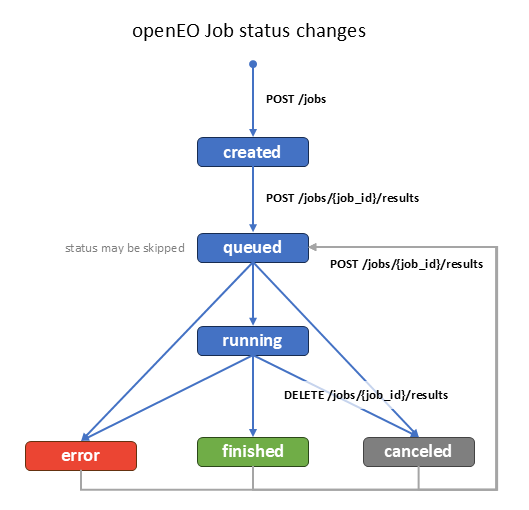
example: running
default: created
progress:
type: number
description: >-
Indicates the process of a running batch job, in percent.
Can also be set for a job which stopped due to an error or was
canceled by the user. In this case, the value indicates
the progress at which the job stopped. This property may not be
available for the status codes `created` and `queued`.
Submitted and queued jobs only allow the value `0`,
finished jobs only allow the value `100`.
minimum: 0
maximum: 100
example: 75.5
created:
$ref: '#/components/schemas/created'
updated:
$ref: '#/components/schemas/updated'
queued:
$ref: '#/components/schemas/queued'
started:
$ref: '#/components/schemas/started'
unpublished:
$ref: '#/components/schemas/unpublished'
plan:
$ref: '#/components/schemas/billing_plan'
costs:
$ref: '#/components/schemas/money'
budget:
$ref: '#/components/schemas/budget'
usage:
description: |-
Metrics about the resource usage of the batch job.
Back-ends are not expected to update the metrics while processing data,
so the metrics can only be available after the job has finished
or has stopped due to an error.
For usage metrics during processing, metrics can better be added to the
logs (e.g. `GET /jobs/{job_id}/logs`) with the same schema.
allOf:
- $ref: '#/components/schemas/usage'
log_level:
$ref: '#/components/schemas/min_log_level_default'
links:
type: array
description: |-
Links related to this batch job such as links to
invoices, log files or results.
Providing links with the following `rel` (relation) types is RECOMMENDED:
1. `monitor`: If logs are available, a link to the [logs endpoint](#tag/Batch-Jobs/operation/debug-job).
2. `result`: If batch job results are available, a link to the [results endpoint](#tag/Batch-Jobs/operation/list-results).
The relation types `monitor` and `result` may occur for various batch job states:
1. `created`: When the batch job was executed before and has been reset to `created` after an
[update](#tag/Batch-Jobs/operation/update-job) there could still be results and logs available
until they get discarded by [queueing the batch job again](#tag/Batch-Jobs/operation/start-job).
2. `finished`: The full log and results are expected to be available.
3. `error` / `canceled`: Partial results and logs may be available.
For more relation types see the lists of
[common relation types in openEO](#section/API-Principles/Web-Linking).
items:
$ref: '#/components/schemas/link'
example:
- rel: result
type: application/json
title: Batch Job Results
href: https://openeo.example/api/v1/jobs/123/logs
- rel: result
type: application/json
title: Batch Job Logs
href: https://openeo.example/api/v1/jobs/123/logs
job_id:
type: string
description: >-
Per-back-end unique identifier of the batch job, generated by the
back-end during creation. MUST match the specified pattern.
pattern: '^[\w\-\.~]+$'
example: a3cca2b2aa1e3b5b
created:
type: string
format: date-time
description: >-
Date and time of creation (for batch jobs: the status 'created' was set),
formatted as a [RFC 3339](https://www.rfc-editor.org/rfc/rfc3339.html) date-time.
example: '2017-01-01T09:32:12Z'
updated:
type: string
format: date-time
description: >-
Date and time of the last status change,
formatted as a [RFC 3339](https://www.rfc-editor.org/rfc/rfc3339.html) date-time.
If the status is `error`, `canceled` or `finished`,
this is the time when the job has ended.
example: '2017-01-01T09:54:18Z'
queued:
type: string
format: date-time
description: >-
Date and time of queueing the batch job (i.e., when the status 'queued' was set),
formatted as a [RFC 3339](https://www.rfc-editor.org/rfc/rfc3339.html) date-time.
example: '2017-01-01T09:34:00Z'
started:
type: string
format: date-time
description: >-
Date and time when the batch job started processing (i.e., when the status 'running' was set),
formatted as a [RFC 3339](https://www.rfc-editor.org/rfc/rfc3339.html) date-time.
example: '2017-01-01T09:36:18Z'
expires:
type: string
format: date-time
description: >-
Time in UTC until which the assets and this document are accessible via the signed URL
that is provided with the relation type `canonical` in the links.
Formatted as a [RFC 3339](https://www.rfc-editor.org/rfc/rfc3339.html) date-time.
After expiration, a document with new signed URLs can be retrieved through an authenticated
request to this endpoint.
example: '2017-02-01T09:54:18Z'
unpublished:
type: string
format: date-time
description: >-
Time until which the batch job results are stored on the back-end, in UTC.
Formatted as a [RFC 3339](https://www.rfc-editor.org/rfc/rfc3339.html) date-time.
example: '2018-01-01T09:54:18Z'
description:
type: string
format: commonmark
description: >-
Detailed description to explain the entity.
[CommonMark 0.29](http://commonmark.org/) syntax MAY be used for rich
text representation.
object_title:
type: string
description: >-
A human-readable short title to be displayed to users **in addition** to
the names specified in the keys. This property is only for better user
experience so that users can understand the names better.
Example titles could be `GeoTiff` for the key `GTiff` (for file formats)
or `OGC Web Map Service` for the key `WMS` (for service types).
The title MUST NOT be used in communication (e.g. in process graphs),
although clients MAY translate the titles into the corresponding names.
eo_title:
description: A short description to easily distinguish entities.
type: string
nullable: true
example: NDVI based on Sentinel-2
eo_description:
type: string
format: commonmark
description: >-
Detailed multi-line description to explain the entity.
[CommonMark 0.29](http://commonmark.org/) syntax MAY be used for rich
text representation.
nullable: true
example: Deriving minimum NDVI measurements over pixel time series of Sentinel-2
process_description:
type: string
format: commonmark
description: >-
Detailed description to explain the entity.
[CommonMark 0.29](http://commonmark.org/) syntax MAY be used for rich
text representation. In addition to the CommonMark syntax, clients can
convert process IDs that are formatted as in the following example into
links instead of code blocks: ``` ``process_id()`` ```
service:
title: Secondary Web Service
description: >-
The metadata of a secondary web service that has been submitted by the
authenticated user.
type: object
required:
- id
- enabled
- type
- url
properties:
id:
$ref: '#/components/schemas/service_id'
title:
$ref: '#/components/schemas/eo_title'
description:
$ref: '#/components/schemas/eo_description'
url:
type: string
format: uri
description: >-
URL at which the secondary web service is accessible. Does not
necessarily need to be located within the API.
example: 'https://openeo.example/wms/wms-a3cca9'
type:
$ref: '#/components/schemas/service_type'
enabled:
$ref: '#/components/schemas/service_enabled'
process:
$ref: '#/components/schemas/process_graph_with_metadata'
configuration:
$ref: '#/components/schemas/service_configuration'
attributes:
title: Secondary Web Service Attributes
type: object
description: >-
Additional attributes of the secondary web service, e.g.
available layers for a WMS instance based on the bands in the
underlying GeoTiff.
example:
layers:
- ndvi
- evi
created:
$ref: '#/components/schemas/created'
plan:
$ref: '#/components/schemas/billing_plan'
costs:
$ref: '#/components/schemas/money'
budget:
$ref: '#/components/schemas/budget'
usage:
description: |-
Metrics about the resource usage of the secondary web service.
Back-ends are not expected to update the metrics in real-time.
For detailed usage metrics for individual processing steps, metrics
can be added to the logs (e.g. `GET /jobs/{job_id}/logs`) with the
same schema.
allOf:
- $ref: '#/components/schemas/usage'
log_level:
$ref: '#/components/schemas/min_log_level_default'
service_type:
description: >-
Definition of the service type to access result data. All available
service types can be retrieved via `GET /service_types`. Service types
MUST be accepted in a *case insensitive* manner.
type: string
example: wms
service_configuration:
type: object
title: Service Configuration
description: >-
Map of configuration settings, i.e. the setting names supported by the secondary
web service combined with actual values. See `GET /service_types` for
supported configuration settings. For example, this could
specify the required version of the service, visualization details or
any other service dependent configuration.
example:
version: 1.3.0
service_enabled:
type: boolean
description: >-
Describes whether a secondary web service is responding to requests
(true) or not (false). Disabled services do not produce any costs.
service_id:
type: string
description: >-
A per-back-end unique identifier of the secondary web service, generated
by the back-end during creation. MUST match the specified pattern.
pattern: '^[\w\-\.~]+$'
example: wms-a3cca9
resource_parameter:
x-additionalPropertiesName: Parameter Name
type: object
title: Resource Parameter
description: |-
Describes a parameter for various resources (e.g. file formats, service types).
The parameters are specified according to the [JSON Schema draft-07](http://json-schema.org/) specification.
See the chapter ['Schemas' in 'Defining Processes'](#section/Processes/Defining-Processes) for more information.
The following more complex JSON Schema keywords SHOULD NOT be used:
`if`, `then`, `else`, `readOnly`, `writeOnly`, `dependencies`, `minProperties`, `maxProperties`, `patternProperties`.
JSON Schemas SHOULD always be dereferenced (i.e. all `$refs` should be resolved). This allows clients to consume the schemas much better.
Clients are not expected to support dereferencing `$refs`.
Note: The specified schema is only a common subset of JSON Schema. Additional keywords MAY be used.
required:
- description
properties:
description:
type: string
description: A brief description of the parameter according to [JSON Schema draft-07](https://json-schema.org/draft-07/json-schema-validation.html#rfc.section.10.1).
required:
type: boolean
description: Determines whether this parameter is mandatory.
default: false
experimental:
$ref: '#/components/schemas/experimental'
default:
description: >-
The default value represents what would be assumed by the consumer
of the input as the value of the parameter if none is provided. The
value MUST conform to the defined type for the parameter defined at
the same level. For example, if type is string, then default can be
"foo" but cannot be 1. See [JSON Schema draft-07](https://json-schema.org/draft-07/json-schema-validation.html#rfc.section.10.2).
allOf:
- $ref: '#/components/schemas/json_schema'
error:
title: General Error
description: >-
An error object declares additional information about a client-side or
server-side error.
See also:
* [Error Handling](#section/API-Principles/Error-Handling) in the API in general.
* [Common Error Codes](errors.json)
type: object
required:
- code
- message
properties:
id:
type: string
description: >-
A back-end MAY add a unique identifier to the error response to be able
to log and track errors with further non-disclosable details. A client
could communicate this id to a back-end provider to get further
information.
example: 550e8400-e29b-11d4-a716-446655440000
code:
$ref: '#/components/schemas/log_code'
message:
type: string
description: >-
A message explaining what the client may need to change or what
difficulties the server is facing.
example: Parameter 'sample' is missing.
links:
$ref: '#/components/schemas/log_links'
log_code:
type: string
description: >-
The code is either one of the standardized error codes or a custom code,
for example specified by a user in the `inspect` process.
example: SampleError
log_links:
description: |-
Links related to this log entry / error, e.g. to a resource that
provides further explanations.
For relation types see the lists of
[common relation types in openEO](#section/API-Principles/Web-Linking).
type: array
items:
$ref: '#/components/schemas/link'
example:
- href: 'https://openeo.example/docs/errors/SampleError'
rel: about
log_level:
description: |-
The severity level of the log entry.
The order of the levels is as follows (from low to high severity): `debug`, `info`, `warning`, `error`.
The level `error` usually corresponds with critical issues that usually terminate the data processing.
type: string
enum:
- error
- warning
- info
- debug
example: error
min_log_level_default:
description: |-
The minimum severity level for log entries that the back-end stores for the processing request.
The order of the levels is as follows (from low to high severity): `debug`, `info`, `warning`, `error`.
That means if `warning` is set, the back-end will only store log entries with the level `warning` and `error`.
The default minimum log level is `info`.
Users need to specifically set this property to `debug` to capture *all* log entries.
It is RECOMMENDED that users set the level at least to "warning" in production workflows.
type: string
enum:
- error
- warning
- info
- debug
default: info
example: warning
min_log_level_update:
description: |-
Updates the minimum severity level for log entries that the back-end stores for the processing requests.
The back-end does not need to update existing log entries.
type: string
enum:
- error
- warning
- info
- debug
example: warning
data_type_schema:
title: Data Types
description: Either a single data type or a list of data types.
oneOf:
- $ref: '#/components/schemas/process_json_schema'
- title: Multiple data types
description: A list of data types this parameter supports, specified as JSON Schemas.
type: array
minItems: 1
uniqueItems: true
items:
$ref: '#/components/schemas/process_json_schema'
process_schema:
title: Process Data types
description: Either a single data type or a list of data types for process parameter or process return values.
oneOf:
- $ref: '#/components/schemas/process_json_schema'
- title: Multiple data types
description: A list of data types supported, specified as JSON Schemas.
type: array
minItems: 1
uniqueItems: true
items:
$ref: '#/components/schemas/process_json_schema'
process_json_schema:
type: object
title: Single Data Type
description: |-
Specifies a data type supported by a parameter or return value.
The data types are specified according to the [JSON Schema draft-07](http://json-schema.org/) specification.
See the chapter ['Schemas' in 'Defining Processes'](#section/Processes/Defining-Processes) for more information.
JSON Schemas SHOULD NOT contain `default`, `anyOf`, `oneOf`, `allOf` or `not` at the top-level of the schema.
Instead specify each data type in a separate array element.
The following more complex JSON Schema keywords SHOULD NOT be used:
`if`, `then`, `else`, `readOnly`, `writeOnly`, `dependencies`, `minProperties`, `maxProperties`, `patternProperties`.
JSON Schemas SHOULD always be dereferenced (i.e. all `$refs` should be resolved). This allows clients to consume the schemas much better.
Clients are not expected to support dereferencing `$refs`.
Note: The specified schema is only a common subset of JSON Schema. Additional keywords MAY be used.
properties:
subtype:
type: string
description: The allowed sub data type for a value. See the chapter on [subtypes](#section/Processes/Defining-Processes) for more information.
deprecated:
$ref: '#/components/schemas/deprecated'
allOf:
- $ref: '#/components/schemas/json_schema'
oneOf:
- title: Generic
- $ref: '#/components/schemas/process_graph_json_schema'
- $ref: '#/components/schemas/datacube_json_schema'
process_graph_json_schema:
title: Process Graph
type: object
properties:
subtype:
type: string
enum:
- process-graph
parameters:
type: array
title: Process Graph Parameters
description: |-
A list of parameters passed to the child process graph.
The order in the array corresponds to the parameter order to
be used in clients that do not support named parameters.
items:
$ref: '#/components/schemas/parameter'
returns:
type: object
title: Process Graph Return Value
description: |-
Description of the data that is returned by the child process graph.
required:
- schema
properties:
description:
$ref: '#/components/schemas/process_description'
schema:
$ref: '#/components/schemas/data_type_schema'
allOf:
- $ref: '#/components/schemas/process_json_schema'
datacube_json_schema:
title: Datacube
properties:
subtype:
type: string
enum:
- datacube
dimensions:
title: Datacube constraints
description: |-
Allows to specify requirements the data cube has to fulfill.
Right now, it only allows to specify the dimension types and
adds for specific dimension types:
* axes for `spatial` dimensions in raster datacubes
* geometry types for `geometry` dimensions in vector datacubes
type: array
items:
type: object
required:
- type
properties:
type:
type: string
oneOf:
- title: Spatial (raster)
properties:
type:
type: string
enum:
- spatial
axis:
type: array
minItems: 1
items:
$ref: '#/components/schemas/dimension_axis_xyz'
- title: Spatial (vector)
properties:
type:
type: string
enum:
- geometry
geometry_type:
type: array
minItems: 1
items:
$ref: '#/components/schemas/geometry_type'
- title: Other
properties:
type:
type: string
enum:
- bands
- temporal
- other
json_schema:
type: object
title: JSON Schema
description: |-
A JSON Schema compliant to [JSON Schema draft-07](https://json-schema.org/draft-07/json-schema-validation.html) or later.
JSON Schemas SHOULD always be dereferenced (i.e. all `$refs` should be resolved).
This allows clients to consume the schemas much better.
Clients are not expected to support dereferencing `$refs`.
Note: The specified schema in the OpenAPI document is only a common subset of JSON Schema.
Additional keywords from the JSON Schema specification MAY be used.
properties:
$schema:
description: |-
The JSON Schema version. If not given in the context of openEO,
defaults to JSON Schema draft-07: `http://json-schema.org/draft-07/schema#`
The default value for `$schema` property may have to be added to the JSON Schema
object before passing it to a JSON Schema validator.
type: string
format: uri
default: http://json-schema.org/draft-07/schema#
$id:
description: ID of your JSON Schema.
type: string
format: uri
type:
description: |-
The allowed data type(s) for a value.
If this property is not present, all data types are allowed.
oneOf:
- $ref: '#/components/schemas/json_schema_type'
- type: array
minItems: 1
uniqueItems: true
items:
$ref: '#/components/schemas/json_schema_type'
pattern:
type: "string"
format: "regex"
description: The regular expression a string value must match against.
enum:
type: array
items: {}
description: An exclusive list of allowed values.
minimum:
type: number
description: The minimum value (inclusive) allowed for a numerical value.
maximum:
type: number
description: The maximum value (inclusive) allowed for a numerical value.
minItems:
type: number
minimum: 0
default: 0
description: The minimum number of items required in an array.
maxItems:
type: number
minimum: 0
description: The maximum number of items required in an array.
items:
description: Specifies schemas for the items in an array.
anyOf:
- type: array
minItems: 1
items:
$ref: '#/components/schemas/json_schema'
- $ref: '#/components/schemas/json_schema'
additionalProperties:
description: >-
Any other property supported by the JSON Schema version that is given through the property `$schema` are allowed. Defaults to JSON Schema [draft-07](https://json-schema.org/draft-07/json-schema-validation.html), but can also be any later version of JSON Schema.
example:
type: string
enum:
- a
- b
json_schema_type:
type: string
enum:
- array
- boolean
- integer
- 'null'
- number
- object
- string
file:
title: Workspace File
type: object
required:
- path
properties:
path:
type: string
description: |-
Path of the file, relative to the root directory of the user's server-side workspace.
MUST NOT start with a slash `/` and MUST NOT be url-encoded.
The Windows-style path name component separator `\` is not supported,
always use `/` instead.
Note: The pattern only specifies a minimal subset of invalid characters.
The back-ends MAY enforce additional restrictions depending on their OS/environment.
example: folder/file.txt
pattern: "^[^/\\r\\n\\t\\\\:'\"][^\\r\\n\\t\\\\:'\"]*$"
size:
type: integer
description: File size in bytes.
example: 1024
modified:
type: string
format: date-time
description: >-
Date and time the file has lastly been modified, formatted as a [RFC
3339](https://www.rfc-editor.org/rfc/rfc3339.html) date-time.
example: '2018-01-03T10:55:29Z'
geometry_type:
title: Geometry type
type: string
enum:
- Point
- MultiPoint
- LineString
- MultiLineString
- Polygon
- MultiPolygon
- GeometryCollection
GeoJsonPoint3D:
type: array
description: Point in 3D space
minItems: 2
maxItems: 3
items:
type: number
GeoJsonPoint:
type: object
title: GeoJSON Point
required:
- type
- coordinates
properties:
type:
type: string
enum:
- Point
coordinates:
$ref: '#/components/schemas/GeoJsonPoint3D'
GeoJsonGeometry:
title: GeoJSON Geometry
type: object
required:
- type
properties:
type:
$ref: '#/components/schemas/geometry_type'
discriminator:
propertyName: type
mapping:
Point: '#/components/schemas/GeoJsonPoint'
LineString: '#/components/schemas/GeoJsonLineString'
Polygon: '#/components/schemas/GeoJsonPolygon'
MultiPoint: '#/components/schemas/GeoJsonMultiPoint'
MultiLineString: '#/components/schemas/GeoJsonMultiLineString'
MultiPolygon: '#/components/schemas/GeoJsonMultiPolygon'
GeometryCollection: '#/components/schemas/GeoJsonGeometryCollection'
GeoJsonLineString:
allOf:
- $ref: '#/components/schemas/GeoJsonGeometry'
- type: object
title: GeoJSON LineString
required:
- coordinates
properties:
coordinates:
type: array
items:
$ref: '#/components/schemas/GeoJsonPoint3D'
GeoJsonPolygon:
allOf:
- $ref: '#/components/schemas/GeoJsonGeometry'
- type: object
title: GeoJSON Polygon
required:
- coordinates
properties:
coordinates:
type: array
items:
type: array
items:
$ref: '#/components/schemas/GeoJsonPoint3D'
GeoJsonMultiPoint:
allOf:
- $ref: '#/components/schemas/GeoJsonGeometry'
- type: object
title: GeoJSON MultiPoint
required:
- coordinates
properties:
coordinates:
type: array
items:
$ref: '#/components/schemas/GeoJsonPoint3D'
GeoJsonMultiLineString:
allOf:
- $ref: '#/components/schemas/GeoJsonGeometry'
- type: object
title: GeoJSON MultiLineString
required:
- coordinates
properties:
coordinates:
type: array
items:
type: array
items:
$ref: '#/components/schemas/GeoJsonPoint3D'
GeoJsonMultiPolygon:
allOf:
- $ref: '#/components/schemas/GeoJsonGeometry'
- type: object
title: GeoJSON MultiPolygon
required:
- coordinates
properties:
coordinates:
type: array
items:
type: array
items:
type: array
items:
$ref: '#/components/schemas/GeoJsonPoint3D'
GeoJsonGeometryCollection:
allOf:
- $ref: '#/components/schemas/GeoJsonGeometry'
- type: object
title: GeoJSON GeometryCollection
required:
- geometries
properties:
geometries:
type: array
items:
$ref: '#/components/schemas/GeoJsonGeometry'
log_entry:
title: Log Entry
description: >-
An log message that communicates information about the processed data.
type: object
required:
- id
- level
- message
properties:
id:
type: string
description: >-
An unique identifier for the log message, could simply be an incrementing number.
example: "1"
code:
$ref: '#/components/schemas/log_code'
level:
$ref: '#/components/schemas/log_level'
message:
type: string
description: >-
A concise message explaining the log entry.
Messages do *not* explicitly support [CommonMark 0.29](http://commonmark.org/)
syntax as other descriptive fields in the openEO API do,
but the messages MAY contain line breaks or indentation.
It is NOT RECOMMENDED to add stacktraces to the `message`.
example: >-
Can not load the UDF file from the URL `https://openeo.example/invalid/file.txt`.
Server responded with error 404.
time:
type: string
format: date-time
title: Date and Time
description: >-
The date and time the event happened, in UTC. Formatted as a
[RFC 3339](https://www.rfc-editor.org/rfc/rfc3339.html) date-time.
data:
description: |-
Data of any type. It is the back-ends task to decide how to best
present passed data to a user.
For example, a datacube passed to the `inspect` SHOULD return the
metadata similar to the collection metadata, including `cube:dimensions`.
There are implementation guidelines available for the `inspect` process.
path:
description: |-
Describes where the log entry originates from.
The first element of the array is the process that has triggered the log entry, the second element is the parent of the process that has triggered the log entry, etc. This pattern is followed until the root of the process graph.
type: array
items:
type: object
required:
- node_id
properties:
node_id:
type: string
description: The id of the node the log entry originates from.
example: runudf1
process_id:
$ref: '#/components/schemas/process_id'
namespace:
$ref: '#/components/schemas/process_namespace'
parameter:
type: string
description: >-
If applicable, the name of the parameter the log entry corresponds to.
pattern: '^\w+$'
nullable: true
example: udf
usage:
$ref: '#/components/schemas/usage'
stacktrace:
type: string
description: >-
A stacktrace or similar, may include whitespaces for formatting.
links:
$ref: '#/components/schemas/log_links'
usage:
title: Resource usage metrics
type: object
properties:
cpu:
description: |-
Specifies the CPU usage, usually in a unit such as `cpu-seconds`.
allOf:
- $ref: '#/components/schemas/usage_metric'
memory:
description: |-
Specifies the memory usage, usually in a unit such as `mb-seconds` or `gb-hours`.
allOf:
- $ref: '#/components/schemas/usage_metric'
duration:
description: |-
Specifies the wall time, usually in a unit such as `seconds`, `minutes` or `hours`.
allOf:
- $ref: '#/components/schemas/usage_metric'
network:
description: |-
Specifies the network transfer usage (incoming and outgoing), usually in a unit such as `b` (bytes), `kb` (kilobytes), `mb` (megabytes) or `gb` (gigabytes).
allOf:
- $ref: '#/components/schemas/usage_metric'
disk:
description: |-
Specifies the amount of input (read) and output (write) operations on the storage such as disks, usually in a unit such as `b` (bytes), `kb` (kilobytes), `mb` (megabytes) or `gb` (gigabytes).
allOf:
- $ref: '#/components/schemas/usage_metric'
storage:
description: |-
Specifies the usage of storage space, usually in a unit such as `b` (bytes), `kb` (kilobytes), `mb` (megabytes) or `gb` (gigabytes).
allOf:
- $ref: '#/components/schemas/usage_metric'
additionalProperties:
description: |-
Additional metrics.
allOf:
- $ref: '#/components/schemas/usage_metric'
example:
cpu:
value: 40668
unit: cpu-seconds
duration:
value: 2611
unit: seconds
memory:
value: 108138811
unit: mb-seconds
network:
value: 0
unit: kb
storage:
value: 55
unit: mb
usage_metric:
type: object
required:
- value
- unit
properties:
value:
type: number
minimum: 0
unit:
type: string
responses:
logs:
description: Lists the requested log entries.
content:
application/json:
schema:
title: Log Entries
type: object
required:
- logs
- links
properties:
level:
description: |-
The minimum severity level for log entries that the back-end returns.
This property MUST reflect the effective lowest `level` that may appear in the document,
which is (if implemented) the highest level of:
1. the `log_level` specified by the user for the processing request.
2. the `level` specified by the user for the log request.
The order of the levels is as follows (from low to high severity): `debug`, `info`, `warning`, `error`.
That means if `warning` is set, the logs will only contain entries with the level `warning` and `error`.
type: string
enum:
- error
- warning
- info
- debug
default: debug
logs:
description: A chronological list of logs.
type: array
items:
$ref: '#/components/schemas/log_entry'
links:
$ref: '#/components/schemas/links_pagination'
client_error:
description: |-
The request can not be fulfilled due to an error on client-side, i.e. the
request is invalid. The client SHOULD NOT repeat the request without
modifications.
The response body SHOULD contain a JSON error object.
MUST be any HTTP status code specified in [RFC
7231](https://www.rfc-editor.org/rfc/rfc7231.html#section-6.6). This request
usually does not respond with HTTP status codes 401 and 403 due to
missing authorization. HTTP status code 404 SHOULD be used if the value
of a path parameter is invalid.
See also:
* [Error Handling](#section/API-Principles/Error-Handling) in the API in general.
* [Common Error Codes](errors.json)
content:
application/json:
schema:
$ref: '#/components/schemas/error'
client_error_auth:
description: |-
The request can not be fulfilled due to an error on client-side, i.e. the
request is invalid. The client SHOULD NOT repeat the request without
modifications.
The response body SHOULD contain a JSON error object.
MUST be any HTTP status code specified in [RFC 7231](https://www.rfc-editor.org/rfc/rfc7231.html#section-6.6).
This request MUST respond with HTTP status codes 401 if authorization is required or
403 if the authorization failed or access is forbidden in general to the
authenticated user. HTTP status code 404 SHOULD be used if the value of
a path parameter is invalid.
See also:
* [Error Handling](#section/API-Principles/Error-Handling) in the API in general.
* [Common Error Codes](errors.json)
content:
application/json:
schema:
$ref: '#/components/schemas/error'
server_error:
description: |-
The request can not be fulfilled due to an error at the back-end. The
error is never the client’s fault and therefore it is reasonable for the
client to retry the exact same request that triggered this response.
The response body SHOULD contain a JSON error object. MUST be any HTTP
status code specified in [RFC 7231](https://www.rfc-editor.org/rfc/rfc7231.html#section-6.6).
See also:
* [Error Handling](#section/API-Principles/Error-Handling) in the API in general.
* [Common Error Codes](errors.json)
content:
application/json:
schema:
$ref: '#/components/schemas/error'
parameters:
pagination_limit:
name: limit
description: |-
This parameter enables pagination for the endpoint and specifies the maximum number of
elements that arrays in the top-level object (e.g. collections, processes, batch jobs,
secondary services, log entries, etc.) are allowed to contain.
The `links` array MUST NOT be paginated like the resources,
but instead contain links related to the paginated resources
or the pagination itself (e.g. a link to the next page).
If the parameter is not provided or empty, all elements are returned.
Pagination is OPTIONAL: back-ends or clients may not support it.
Therefore, it MUST be implemented in a way that clients not supporting
pagination get all resources regardless. Back-ends not supporting
pagination MUST return all resources.
If the response is paginated, the `links` array MUST be used to communicate the
links for browsing the pagination with predefined `rel` types. See the `links` array schema
for supported `rel` types.
Back-end implementations can, unless specified otherwise, use any kind of pagination technique,
depending on what is supported best by their infrastructure: page-based, offset-based, token-based
or something else. The clients SHOULD use whatever is specified
in the links with the corresponding `rel` types.
in: query
allowEmptyValue: true
example: 10
schema:
type: integer
minimum: 1
log_offset:
name: offset
description: The last identifier (property `id` of a log entry) the client has received. If provided, the back-end MUST only send the entries that occurred after the specified identifier. If not provided or empty, the back-end MUST start with the first entry.
in: query
allowEmptyValue: true
example: log1234
schema:
type: string
log_level:
name: level
description: |-
The minimum severity level for log entries that the back-end returns.
The order of the levels is as follows (from low to high severity): `debug`, `info`, `warning`, `error`.
That means if `warning` is set, the back-end will only return log entries with the level `warning` and `error`.
The default minimum log level is `debug`, which returns all log levels.
in: query
allowEmptyValue: true
example: error
schema:
type: string
enum:
- error
- warning
- info
- debug
default: debug
service_id:
name: service_id
in: path
description: Identifier of the secondary web service.
required: true
schema:
$ref: '#/components/schemas/service_id'
job_id:
name: job_id
in: path
description: Identifier of the batch job.
required: true
schema:
$ref: '#/components/schemas/job_id'
collection_id:
name: collection_id
in: path
description: Collection identifier
required: true
schema:
$ref: '#/components/schemas/collection_id'
examples:
evi_user_defined_process:
description: A user-defined process that computes the Enhanced Vegetation Index (EVI).
value:
id: evi
summary: Enhanced Vegetation Index
description: >-
Computes the Enhanced Vegetation Index (EVI).
It is computed with the following formula: `2.5 * (NIR - RED) / (1 + NIR + 6*RED + -7.5*BLUE)`.
parameters:
- name: red
description: Value from the red band.
schema:
type: number
- name: blue
description: Value from the blue band.
schema:
type: number
- name: nir
description: Value from the near infrared band.
schema:
type: number
returns:
description: Computed EVI.
schema:
type: number
process_graph:
sub:
process_id: subtract
arguments:
x:
from_parameter: nir
y:
from_parameter: red
p1:
process_id: multiply
arguments:
x: 6
y:
from_parameter: red
p2:
process_id: multiply
arguments:
x: -7.5
y:
from_parameter: blue
sum:
process_id: sum
arguments:
data:
- 1
- from_parameter: nir
- from_node: p1
- from_node: p2
div:
process_id: divide
arguments:
x:
from_node: sub
y:
from_node: sum
p3:
process_id: multiply
arguments:
x: 2.5
y:
from_node: div
result: true
securitySchemes:
Bearer:
type: http
scheme: bearer
bearerFormat: JWT or openEO
description: >-
A Bearer token can be provided in two different formats:
1. **JSON Web Token (JWT) - RECOMMENDED**
- Conformance class: `https://api.openeo.org/1.3.0/authentication/jwt`
The Bearer token is an access token in [JWT](https://datatracker.ietf.org/doc/html/rfc7519) format
as defined in RFC 7519. For openEO, it MUST include the issuer in the
`iss` claim although being optional in RFC 7519.
If the concept of an issuer does not exist in an authentication method (e.g. in HTTP Basic),
implementations could use the endpoint for Basic Authentication as the issuer, for example.
openEO backend implementations MUST signal their support for JWT by listing the given
conformance class. Likewise, openEO clients SHOULD only use JWT when the openEO backend
lists the conformance class.
2. **openEO Tokens - DEPRECATED**
- Conformance class: *None*
The Bearer Token is constructed from the authentication method, a
provider ID (if available) and the access token. All separated by a
forward slash `/`.
Examples (replace `TOKEN` with the actual access token):
- Basic authentication (no provider ID available): `basic//TOKEN`
- OpenID Connect (provider ID is `ms`): `oidc/ms/TOKEN`.
For OpenID Connect, the provider ID corresponds to the value
specified for `id` for each provider in `GET /credentials/oidc`.
All openEO backends MUST accept this method for backward compatibility
until version 2.0 of the specification.
The access tokens provided by the identity provider do not include
the prefix that includes the authentication method and provider ID.
The Bearer Token sent to the openEO backend MUST have the prefix, e.g. `basic//` for Basic authentication.
This means that the clients have to prepend the prefix.
JWT and openEO tokens can be distinguished by the presence of a slash
`/` in the token, which JWT can never contain due to the Base64 encoding.
Basic:
type: http
scheme: basic