# OpenMobile-2: Building Versatile Mobile Agents with Scalable Environments and App-Native Tools
📑 Paper | 🌐 Homepage | 🤗 Dataset | 🤖 Model |  MobileGym++
We introduce OpenMobile-2, a near-frontier mobile agent with fully open training environments and recipes. We make three key advances: (1) *Diverse environments with simulated commercial apps*: We build **MobileGym++**, featuring 35 realistic, functionally rich commercial-style apps with cross-app workflows, while preserving full controllability for reset and verification. Together with newly configured apps in Android emulators, this yields a diverse playground spanning over 110 apps. (2) *Open training data at scale*: Building on this foundation, we curate nearly 12K mobile interaction trajectories for supervised fine-tuning and the largest open collection of verifiable RL training data for mobile agents, comprising over 2K executable tasks with automatic rewards. (3) *Hybrid GUI and app-native tool use*: We explore an experimental mobile-use setting where apps expose selected functionalities as app-native tools alongside their GUIs, allowing agents to interleave GUI actions and tool calls within a task. We implement this setting in **MobileGym++** with over 300 carefully scoped tools across 50+ apps. Additionally, we introduce **MobileGym++ Bench** for complex, long-horizon commercial mobile scenarios, supporting both GUI-only and hybrid GUI–tool evaluation on a shared task suite.
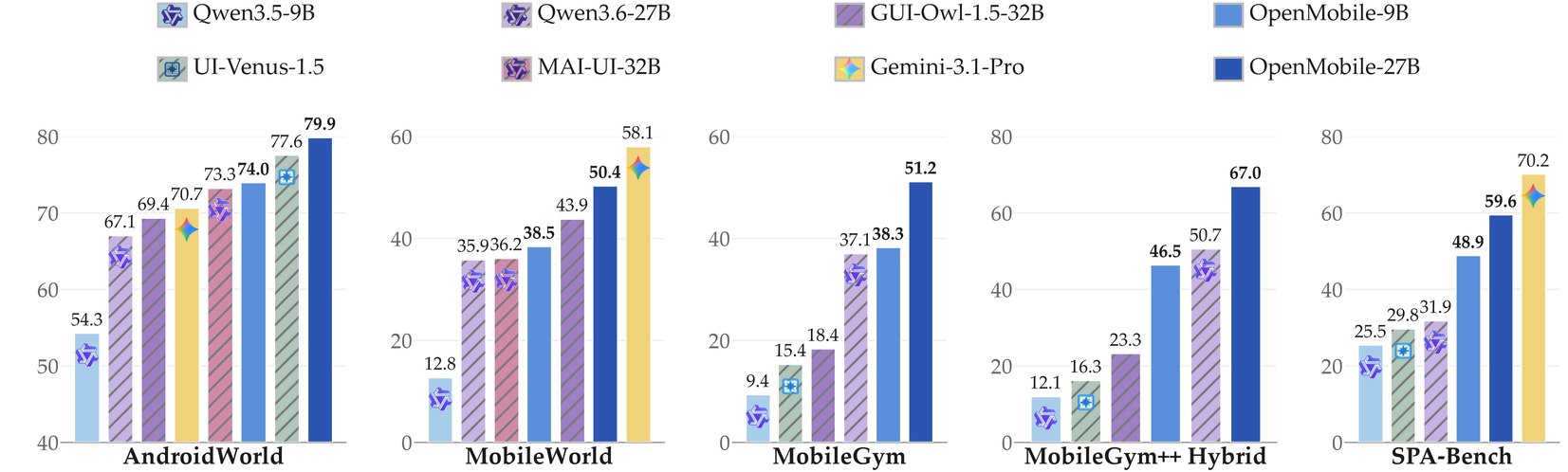
OpenMobile-2 performs competitively across established benchmarks, including AndroidWorld (79.9) and MobileWorld (50.4), while showing promising transfer to real-device mobile use, nearly doubling SPA-Bench performance from 31.9 to 59.6.
Release plans:
- [x] [OpenMobile-Data-v2](https://huggingface.co/datasets/OpenMobile-2/OpenMobile-Data-v2)
- [x] [Fine-tuned checkpoints](https://huggingface.co/OpenMobile-2/OpenMobile-2-27B) trained on [OpenMobile-Data-v2](https://huggingface.co/datasets/OpenMobile-2/OpenMobile-Data-v2)
- [x] [MobileGym++ environment and benchmark](https://github.com/OpenMobile2/MobileGym-plusplus)
- [x] Evaluation code
- [x] [Extended Android AVDs](https://huggingface.co/datasets/yanhhh/AndroidAvd)
- [ ] Data construction scripts
- [ ] Other code and resources
## 📋 Contents
- [Environment setup](#environment-setup)
- [Evaluation](#evaluation)
- [Runtimes](#runtimes)
- [AndroidWorld](#androidworld)
- [MobileGym](#mobilegym)
- [MobileWorld](#mobileworld)
- [MobileGym++ Bench](#mobilegym-bench)
- [Training](#training)
- [Acknowledgements](#acknowledgements)
- [License](#license)
## ⚙️ Environment setup
Install one Python environment, `android_world`, and use it for every eval in this repository. Details, including the protobuf pin, are in [`AndroidWorld/environment.md`](AndroidWorld/environment.md).
```bash
conda create -n android_world python=3.11.8
conda activate android_world
cd /AndroidWorld
python -m pip install -r requirements.txt
conda install -c conda-forge opencv
python setup.py install
python -m pip install -e android_env
python -m pip install openai pillow tqdm ImageHash sentence-transformers
python -m pip install -U "protobuf==7.35.1" "grpcio==1.84.0" "grpcio-status==1.84.0"
```
This repository evaluates the agent. Each device, frontend, or emulator is started from its own repository. The commands are in [Evaluation](#evaluation).
| Benchmark | Start the environment | Score it here |
|---|---|---|
| AndroidWorld | [AndroidWorld](https://github.com/google-research/android_world) | [`run.py`](#androidworld) |
| MobileGym | [mobilegym](https://github.com/Purewhiter/mobilegym) | [`run_eval_session.ps1`](#mobilegym) |
| MobileWorld | [MobileWorld](https://github.com/Tongyi-MAI/MobileWorld) | [`parallel_eval_mw.py`](#mobileworld) |
| MobileGym++ | [MobileGym-plusplus](https://github.com/OpenMobile2/MobileGym-plusplus) | [`eval_bench215.ps1`](#mobilegym-bench) |
## 📊 Evaluation
Download the target model and deploy it with [vLLM](https://github.com/vllm-project/vllm) (for example, OpenMobile-2-9B). The server address and the served model name are the `model_base_url` and `model_name` used in the commands below. Local servers can use `EMPTY` as the API key.
Start the environment from the repository named in the table above, then run the command in that benchmark's section.
### 🤗 Runtimes
OpenMobile-2 is evaluated with `qwen35_thought_session`. `qwen3vl` is the flat ReAct runtime for OpenMobile-8B. `venus` and `gui_owl` reproduce UI-Venus-1.5 and GUI-Owl.
| `--runtime` | What the model sees | Typical `last_n` |
|---|---|---|
| `qwen3vl` | One system prompt and one user prompt. Past `Action:` lines are concatenated into that user prompt, with the last N screenshots. Output is Thought, Action, and one JSON ``. | 1 |
| `qwen35_thought_session` | Multi-turn session used for the evaluations below. The task is sent once. Later turns are screenshots. The assistant writes `Thought:` and then one XML ``. Native thinking is off. | 3 |
| `venus` | Current screenshot only. Output is ``, ``, ``. | ignored |
| `gui_owl` | MobileGym / MobileGym++ official GUI-Owl adapter. The prompt stays in that benchmark. | benchmark default |
`gui_owl` is not implemented inside `runtimes/`. Pass it as the benchmark agent name.
### AndroidWorld
Python environment: [`AndroidWorld/environment.md`](AndroidWorld/environment.md). The AVD itself follows the [AndroidWorld](https://github.com/google-research/android_world) instructions. Leave the emulator running while the eval is in progress. Console port `5554` and gRPC port `8554` must match the eval flags below.
#### 1. Start the AndroidWorld emulator / ADB environment
On macOS the emulator binary is `~/Library/Android/sdk/emulator/emulator`.
```bash
EMULATOR_NAME=AndroidWorldAvd
~/Library/Android/sdk/emulator/emulator -avd $EMULATOR_NAME -port 5554 -no-snapshot -grpc 8554
```
#### 2. Run evaluation
`--perform_emulator_setup=true` is required once on a fresh AVD. After that, drop the flag.
```bash
cd AndroidWorld
python run.py \
--runtime qwen35_thought_session \
--last_n 3 \
--console_port 5554 \
--grpc_port 8554 \
--perform_emulator_setup=true \
--model_base_url http:///v1 \
--model_api_key EMPTY \
--model_name YOUR_MODEL \
--checkpoint_dir runs/androidworld-thought \
--task_random_seed 30
```
OpenMobile-8B uses the flat ReAct runtime:
```bash
python run.py \
--runtime qwen3vl \
--last_n 1 \
--console_port 5554 \
--grpc_port 8554 \
--model_base_url http:///v1 \
--model_api_key EMPTY \
--model_name OpenMobile-8B \
--checkpoint_dir runs/androidworld-qwen3vl
```
Results are written under `--checkpoint_dir`.
> **Scoring note.** One check differs from official AndroidWorld, in [`_SystemBrightnessToggle.is_successful`](AndroidWorld/android_world/task_evals/single/system.py).
>
> - **Change.** Maximum passes at `screen_brightness >= 229` instead of `== 255`. Minimum stays `== 1`.
> - **Tasks affected.** `SystemBrightnessMax` and `SystemBrightnessMaxVerify`.
> - **Basis.** An exact integer match is a strict standard. On a screenshot, a 2% difference on the brightness bar is hard to see. We treat a bar above 98% as maximum and a bar below 2% as minimum. Android 13 [convertGammaToLinear](https://android.googlesource.com/platform/frameworks/base/+/refs/tags/android-13.0.0_r83/packages/SettingsLib/src/com/android/settingslib/display/BrightnessUtils.java) maps 98% to `229` and 2% to `1`.
### MobileGym
Start the phone from [mobilegym](https://github.com/Purewhiter/mobilegym). The eval below talks to the URL you start.
#### 1. Start the MobileGym frontend
`` is the checkout that contains `package.json` and `bench_env`. In the official repo that is the inner `mobilegym/` directory.
```bash
cd
npm run preview -- --host 127.0.0.1 --port 4172
```
#### 2. Run evaluation
Pass that same directory as `-FrontendDir`. `-EnvUrl` and `-Port` must match the preview above.
```powershell
cd \MobileGym
.\run_eval_session.ps1 -Runtime qwen35_thought_session -ModelName YOUR_MODEL `
-FrontendDir `
-ModelBaseUrl http:///v1 -EnvUrl http://127.0.0.1:4172 -Port 4172
.\run_eval_session.ps1 -Runtime qwen3vl -ModelName OpenMobile-8B `
-FrontendDir `
-ModelBaseUrl http:///v1
.\run_eval_session.ps1 -Runtime venus -ModelName UI-Venus-1.5-8B `
-FrontendDir `
-ModelBaseUrl http:///v1
.\run_eval_session.ps1 -Runtime gui_owl -ModelName GUI-Owl-1.5-8B `
-FrontendDir `
-ModelBaseUrl http:///v1
```
`-Runtime` is `qwen35_thought_session` (default, last_n 3), `qwen3vl` (last_n 1), `venus` (last_n 1), or `gui_owl`. `qwen35_session` is still accepted. Output is `MobileGym/runs_main/` with dots removed.
### MobileWorld
Start the backends from [MobileWorld](https://github.com/Tongyi-MAI/MobileWorld). [`MobileWorld/README.md`](MobileWorld/README.md) repeats that start command. GUI tasks and MCP tasks are separate runs. Do not put both on the same hosts at the same time.
#### 1. Start the MobileWorld backends
`--count 2` serves `http://127.0.0.1:6800` and `http://127.0.0.1:6801`.
```bash
cd /MobileWorld
uv run mw env run --count 2
```
#### 2. Run evaluation
`--hosts` must be the backends started above.
GUI tasks:
```powershell
cd \MobileWorld
python parallel_eval_mw.py `
--hosts http://127.0.0.1:6800,http://127.0.0.1:6801 `
--runtime qwen35_thought_session `
--last_n 3 `
--tasks ALL `
--output_dir eval-gui/YOUR_MODEL/gui-only `
--model_base_url http:///v1 `
--model_name YOUR_MODEL `
--model_api_key EMPTY
```
MCP tasks use the same runtime and add `--mcp_only`. Run this only after the GUI run has released those hosts, or point it at a different pair:
```powershell
python parallel_eval_mw.py `
--hosts http://127.0.0.1:6800,http://127.0.0.1:6801 `
--runtime qwen35_thought_session `
--last_n 3 `
--mcp_only `
--enable_user_interaction `
--output_dir eval-mcp/YOUR_MODEL `
--model_base_url http:///v1 `
--model_name YOUR_MODEL `
--model_api_key EMPTY
```
Summaries are `eval_summary.json` inside each output directory. Flat OpenMobile-8B is `--runtime qwen3vl --last_n 1` on the GUI run (MCP expects a session runtime).
### MobileGym++ Bench
Start the phone from [MobileGym-plusplus](https://github.com/OpenMobile2/MobileGym-plusplus). Use a different port from official MobileGym (`4172`).
`` is that checkout. It contains `package.json` and `bench_env`.
#### 1. Start the MobileGym++ mock frontend
```powershell
cd
npm run preview -- --host 127.0.0.1 --port 3000
```
#### 2. Run evaluation
Pass that same directory as `-FrontendDir`. `-Port` must match the preview above.
```powershell
cd \MobileGymPP
.\eval_bench215.ps1 -Runtime qwen35_thought_session -Port 3000 -Mode both `
-FrontendDir `
-ModelBaseUrl http:///v1 -ModelName YOUR_MODEL
.\eval_bench215.ps1 -Runtime qwen3vl -Mode gui_only -Port 3000 `
-FrontendDir `
-ModelBaseUrl http:///v1 -ModelName OpenMobile-8B
.\eval_bench215.ps1 -Runtime venus -Port 3000 `
-FrontendDir `
-ModelBaseUrl http:///v1 -ModelName UI-Venus-1.5-8B
```
`-Runtime` is `qwen35_thought_session`, `qwen3vl`, `venus`, `gui_owl`, or `mai_ui`. `-Mode gui_only` or `-Mode hybrid` runs one side. Output is `MobileGymPP/eval_runs//bench215-mock/` with `gui_only` and `hybrid` subdirectories. Pass `-OutputDir` to write somewhere else.
## 🎯 Training
We fine-tune OpenMobile-2 models with [ms-swift](https://github.com/modelscope/ms-swift). The SFT data is released as [OpenMobile-2/OpenMobile-Data-v2](https://huggingface.co/datasets/OpenMobile-2/OpenMobile-Data-v2).
The public training files are `emulator/train.json`, `simulator/gui-only/train.json`, and `simulator/hybrid/train.json`. `dataset_info.json` registers them as `emulator_qwen35_last3_noloop_notitle_nocoord_think_thought`, `mobilegym_qwen35_last3_noloop_notitle_nocoord_think_thought`, and `gui_mcp_qwen35_last3_noloop_notitle_nocoord_think_thought`.
Image paths inside each JSON are relative to that file. Download the full repository so the screenshots resolve.
```bash
hf download OpenMobile-2/OpenMobile-Data-v2 --repo-type dataset --local-dir OpenMobile-Data-v2
swift sft \
--custom_dataset_info OpenMobile-Data/dataset_info.json \
--dataset emulator_qwen35_last3_noloop_notitle_nocoord_think_thought \
mobilegym_qwen35_last3_noloop_notitle_nocoord_think_thought \
gui_mcp_qwen35_last3_noloop_notitle_nocoord_think_thought
```
Please adjust `model`, batch size, and output paths according to your local ms-swift setup and hardware.
## 💐 Acknowledgements
[AndroidWorld](https://github.com/google-research/android_world)
[MobileWorld](https://github.com/Tongyi-MAI/MobileWorld)
[MobileGym](https://github.com/Purewhiter/mobilegym)
[Qwen-VL](https://github.com/QwenLM/Qwen3-VL)
[ms-swift](https://github.com/modelscope/ms-swift)
## ⚖️ License
Apache 2.0. See [LICENSE](LICENSE). Third-party models, datasets, and benchmark code keep their own licenses.
## 📜 Citation
If you find this project useful, please consider citing:
```bibtex
@article{openmobile2,
title={OpenMobile-2: Building Versatile Mobile Agents with Scalable Environments and App-Native Tools},
author={Chenyang Yan and Yingying Zhang and Kanzhi Cheng and Qiushi Sun and Zhengyuan Pan and Zheng Ma and Hang Yan and Yian Wang and Nuo Chen and Jialin Cao and Xingdong Gong and Wenpo Song and Han Chen and Zichen Ding and Fangzhi Xu and Shujian Huang and Xinyu Dai and Yichen Liu and Tiankuo Yao and Bo Wang and Ben Kao and Jianbing Zhang and Lewei Lu and Dahua Lin},
journal={arXiv preprint arXiv:2610.14157},
year={2026},
url={https://arxiv.org/abs/2610.14157}
}
```