---
[](https://pypi.org/project/openrl/)

[](https://anaconda.org/openrl/openrl)
[](https://anaconda.org/openrl/openrl)
[](https://anaconda.org/openrl/openrl)
[](https://github.com/psf/black)
[](https://hitsofcode.com/github/OpenRL-Lab/openrl/view?branch=main)
[](https://codecov.io/gh/OpenRL-Lab/openrl)
[](https://openrl-docs.readthedocs.io/zh/latest/?badge=latest)
[](https://openrl-docs.readthedocs.io/zh/latest/)

[](https://github.com/opendilab/OpenRL/stargazers)
[](https://github.com/OpenRL-Lab/openrl/network)

[](https://github.com/OpenRL-Lab/openrl/issues)
[](https://github.com/OpenRL-Lab/openrl/pulls)
[](https://github.com/OpenRL-Lab/openrl/graphs/contributors)
[](https://github.com/OpenRL-Lab/openrl/blob/master/LICENSE)
[](https://discord.gg/qMbVT2qBhr)
[](https://join.slack.com/t/openrlhq/shared_invite/zt-1tqwpvthd-Eeh0IxQ~DIaGqYXoW2IUQg)
OpenRL-v0.2.1 is updated on Dec 20, 2023
The main branch is the latest version of OpenRL, which is under active development. If you just want to have a try with
OpenRL, you can switch to the stable branch.
## 欢迎来到OpenRL
[中文文档](https://openrl-docs.readthedocs.io/zh/latest/) | [English](./README.md) | [Documentation](https://openrl-docs.readthedocs.io/en/latest/)
用心做好强化学习框架,欢迎提出宝贵意见
OpenRL是一个开源的通用强化学习研究框架,支持单智能体、多智能体、离线强化学习、自博弈训练、自然语言等多种任务的训练。
OpenRL基于PyTorch进行开发,目标是为强化学习研究社区提供一个简单易用、灵活高效、可持续扩展的平台。
目前,OpenRL支持的特性包括:
- 提供**简单易用**且**通用**的接口,支持各种任务和多样的环境训练
- 支持单智能体、多智能体训练
- 支持通过专家数据进行离线强化学习训练
- 支持自博弈训练
- 支持自然语言任务(如对话任务)的强化学习训练
- 支持[DeepSpeed](https://github.com/microsoft/DeepSpeed)
- 支持[竞技场](https://openrl-docs.readthedocs.io/zh/latest/arena/index.html)功能,可以在多智能体对抗性环境中方便地对各种智能体(甚至是[及第平台](https://openrl-docs.readthedocs.io/zh/latest/arena/index.html#openrl)上提交的智能体)进行评测。
- 支持从[Hugging Face](https://huggingface.co/)上导入模型和数据。支持加载Hugging Face上[Stable-baselines3的模型](https://openrl-docs.readthedocs.io/zh/latest/sb3/index.html)来进行测试和训练。
- 提供用户自有环境接入OpenRL的[详细教程](https://openrl-docs.readthedocs.io/zh/latest/custom_env/index.html).
- 支持LSTM,GRU,Transformer等模型
- 支持多种训练加速,例如:自动混合精度训练,半精度策略网络收集数据等
- 支持用户自定义训练模型、奖励模型、训练数据以及环境
- 支持[gymnasium](https://gymnasium.farama.org/)环境
- 支持[Callbacks](https://openrl-docs.readthedocs.io/zh/latest/callbacks/index.html),可以用于实现日志记录、保存、提前停止等各种功能
- 支持字典观测空间
- 支持[wandb](https://wandb.ai/),[tensorboardX](https://tensorboardx.readthedocs.io/en/latest/index.html)等主流训练可视化工具
- 支持环境的串行和并行训练,同时保证两种模式下的训练效果一致
- 中英文文档
- 提供单元测试和代码覆盖测试
- 符合Black Code Style和类型检查
OpenRL目前支持的算法(更多详情请参考 [Gallery](Gallery.md)):
- [Proximal Policy Optimization (PPO)](https://arxiv.org/abs/1707.06347)
- [Dual-clip PPO](https://arxiv.org/abs/1912.09729)
- [Multi-agent PPO (MAPPO)](https://arxiv.org/abs/2103.01955)
- [Joint-ratio Policy Optimization (JRPO)](https://arxiv.org/abs/2302.07515)
- [Generative Adversarial Imitation Learning (GAIL)](https://arxiv.org/abs/1606.03476)
- [Behavior Cloning (BC)](http://www.cse.unsw.edu.au/~claude/papers/MI15.pdf)
- [Advantage Actor-Critic (A2C)](https://arxiv.org/abs/1602.01783)
- Self-Play
- [Deep Q-Network (DQN)](https://arxiv.org/abs/1312.5602)
- [Multi-Agent Transformer (MAT)](https://arxiv.org/abs/2205.14953)
- [Value-Decomposition Network (VDN)](https://arxiv.org/abs/1706.05296)
- [Soft Actor Critic (SAC)](https://arxiv.org/abs/1812.05905)
- [Deep Deterministic Policy Gradient (DDPG)](https://arxiv.org/abs/1509.02971)
OpenRL目前支持的环境(更多详情请参考 [Gallery](Gallery.md)):
- [Gymnasium](https://gymnasium.farama.org/)
- [MuJoCo](https://github.com/deepmind/mujoco)
- [PettingZoo](https://pettingzoo.farama.org/)
- [MPE](https://github.com/openai/multiagent-particle-envs)
- [Chat Bot](https://openrl-docs.readthedocs.io/en/latest/quick_start/train_nlp.html)
- [Atari](https://gymnasium.farama.org/environments/atari/)
- [StarCraft II](https://github.com/oxwhirl/smac)
- [SMACv2](https://github.com/oxwhirl/smacv2)
- [Omniverse Isaac Gym](https://github.com/NVIDIA-Omniverse/OmniIsaacGymEnvs)
- [DeepMind Control](https://shimmy.farama.org/environments/dm_control/)
- [Snake](http://www.jidiai.cn/env_detail?envid=1)
- [gym-pybullet-drones](https://github.com/utiasDSL/gym-pybullet-drones)
- [EnvPool](https://github.com/sail-sg/envpool)
- [GridWorld](./examples/gridworld/)
- [Super Mario Bros](https://github.com/Kautenja/gym-super-mario-bros)
- [Gym Retro](https://github.com/openai/retro)
- [Crafter](https://github.com/danijar/crafter)
该框架经过了[OpenRL-Lab](https://github.com/OpenRL-Lab)的多次迭代并应用于学术研究,目前已经成为了一个成熟的强化学习框架。
OpenRL-Lab将持续维护和更新OpenRL,欢迎大家加入我们的[开源社区](./docs/CONTRIBUTING_zh.md),一起为强化学习的发展做出贡献。
关于OpenRL的更多信息,请参考[文档](https://openrl-docs.readthedocs.io/zh/latest/)。
## 目录
- [欢迎来到OpenRL](#欢迎来到openrl)
- [目录](#目录)
- [为什么选择使用OpenRL?](#为什么选择使用openrl)
- [安装](#安装)
- [使用Docker](#使用docker)
- [快速上手](#快速上手)
- [Gallery](#Gallery)
- [使用OpenRL的项目](#使用OpenRL的项目)
- [反馈和贡献](#反馈和贡献)
- [维护人员](#维护人员)
- [支持者](#支持者)
- [↳ Contributors](#-contributors)
- [↳ Stargazers](#-stargazers)
- [↳ Forkers](#-forkers)
- [Citing OpenRL](#citing-openrl)
- [License](#license)
- [Acknowledgments](#acknowledgments)
## 为什么选择使用OpenRL
这里我们提供了一个表格,比较了OpenRL和其他常用的强化学习库。 OpenRL采用模块化设计和高层次的抽象,使得用户可以通过统一的简单易用的接口完成各种任务的训练。
| 强化学习库 | 自然语言任务/RLHF | 多智能体训练 | 自博弈训练 | 离线强化学习 | [DeepSpeed](https://github.com/microsoft/DeepSpeed) |
|:------------------------------------------------------------------:|:------------------:|:--------------------:|:--------------------:|:------------------:|:------------------:|
| **[OpenRL](https://github.com/OpenRL-Lab/openrl)** | :heavy_check_mark: | :heavy_check_mark: | :heavy_check_mark: | :heavy_check_mark: | :heavy_check_mark: |
| [Stable Baselines3](https://github.com/DLR-RM/stable-baselines3) | :x: | :x: | :x: | :x: | :x: |
| [Ray/RLlib](https://github.com/ray-project/ray/tree/master/rllib/) | :x: | :heavy_check_mark: | :heavy_check_mark: | :heavy_check_mark: | :x: |
| [DI-engine](https://github.com/opendilab/DI-engine/) | :x: | :heavy_check_mark: | not fullly supported | :heavy_check_mark: | :x: |
| [Tianshou](https://github.com/thu-ml/tianshou) | :x: | not fullly supported | not fullly supported | :heavy_check_mark: | :x: |
| [MARLlib](https://github.com/Replicable-MARL/MARLlib) | :x: | :heavy_check_mark: | not fullly supported | :x: | :x: |
| [MAPPO Benchmark](https://github.com/marlbenchmark/on-policy) | :x: | :heavy_check_mark: | :x: | :x: | :x: |
| [RL4LMs](https://github.com/allenai/RL4LMs) | :heavy_check_mark: | :x: | :x: | :x: | :x: |
| [trlx](https://github.com/CarperAI/trlx) | :heavy_check_mark: | :x: | :x: | :x: | :heavy_check_mark: |
| [trl](https://github.com/huggingface/trl) | :heavy_check_mark: | :x: | :x: | :x: | :heavy_check_mark: |
| [TimeChamber](https://github.com/inspirai/TimeChamber) | :x: | :x: | :heavy_check_mark: | :x: | :x: |
## 安装
用户可以直接通过pip安装OpenRL:
```bash
pip install openrl
```
如果用户使用了Anaconda或者Miniconda,也可以通过conda安装OpenRL:
```bash
conda install -c openrl openrl
```
想要修改源码的用户也可以从源码安装OpenRL:
```bash
git clone https://github.com/OpenRL-Lab/openrl.git && cd openrl
pip install -e .
```
安装完成后,用户可以直接通过命令行查看OpenRL的版本:
```bash
openrl --version
```
**Tips**
:无需安装,通过Colab在线试用OpenRL: [](https://colab.research.google.com/drive/15VBA-B7AJF8dBazzRcWAxJxZI7Pl9m-g?usp=sharing)
## 使用Docker
OpenRL目前也提供了包含显卡支持和非显卡支持的Docker镜像。
如果用户的电脑上没有英伟达显卡,则可以通过以下命令获取不包含显卡插件的镜像:
```bash
sudo docker pull openrllab/openrl-cpu
```
如果用户想要通过显卡加速训练,则可以通过以下命令获取:
```bash
sudo docker pull openrllab/openrl
```
镜像拉取成功后,用户可以通过以下命令运行OpenRL的Docker镜像:
```bash
# 不带显卡加速
sudo docker run -it openrllab/openrl-cpu
# 带显卡加速
sudo docker run -it --gpus all --net host openrllab/openrl
```
进入Docker镜像后,用户可以通过以下命令查看OpenRL的版本然后运行测例:
```bash
# 查看Docker镜像中OpenRL的版本
openrl --version
# 运行测例
openrl --mode train --env CartPole-v1
```
## 快速上手
OpenRL为强化学习入门用户提供了简单易用的接口,
下面是一个使用PPO算法训练`CartPole`环境的例子:
```python
# train_ppo.py
from openrl.envs.common import make
from openrl.modules.common import PPONet as Net
from openrl.runners.common import PPOAgent as Agent
env = make("CartPole-v1", env_num=9) # 创建环境,并设置环境并行数为9
net = Net(env) # 创建神经网络
agent = Agent(net) # 初始化智能体
agent.train(total_time_steps=20000) # 开始训练,并设置环境运行总步数为20000
```
使用OpenRL训练智能体只需要简单的四步:**创建环境**=>**初始化模型**=>**初始化智能体**=>**开始训练**!
对于训练好的智能体,用户也可以方便地进行智能体的测试:
```python
# train_ppo.py
from openrl.envs.common import make
from openrl.modules.common import PPONet as Net
from openrl.runners.common import PPOAgent as Agent
agent = Agent(Net(make("CartPole-v1", env_num=9))) # 初始化训练器
agent.train(total_time_steps=20000)
# 创建用于测试的环境,并设置环境并行数为9,设置渲染模式为group_human
env = make("CartPole-v1", env_num=9, render_mode="group_human")
agent.set_env(env) # 训练好的智能体设置需要交互的环境
obs, info = env.reset() # 环境进行初始化,得到初始的观测值和环境信息
while True:
action, _ = agent.act(obs) # 智能体根据环境观测输入预测下一个动作
# 环境根据动作执行一步,得到下一个观测值、奖励、是否结束、环境信息
obs, r, done, info = env.step(action)
if any(done): break
env.close() # 关闭测试环境
```
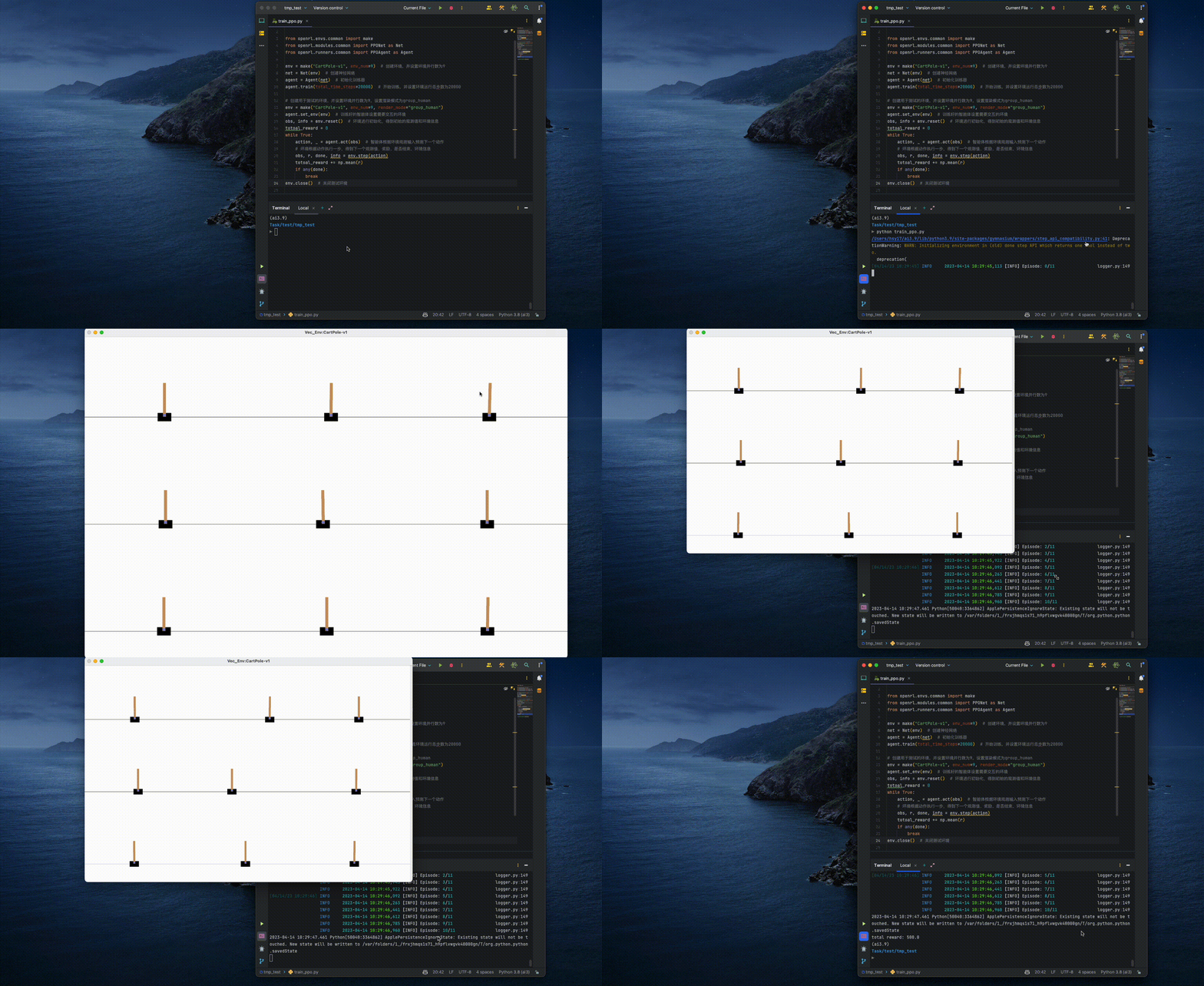
在普通笔记本电脑上执行以上代码,只需要几秒钟,便可以完成该智能体的训练和可视化测试:
**Tips:** 用户还可以在终端中通过执行一行命令快速训练`CartPole`环境:
```bash
openrl --mode train --env CartPole-v1
```
对于多智能体、自然语言等任务的训练,OpenRL也提供了同样简单易用的接口。
关于如何进行多智能体训练、训练超参数设置、训练配置文件加载、wandb使用、保存gif动画等信息,请参考:
- [多智能体训练例子](https://openrl-docs.readthedocs.io/zh/latest/quick_start/multi_agent_RL.html)
关于自然语言任务训练、Hugging Face上模型(数据)加载、自定义训练模型(奖励模型)等信息,请参考:
- [对话任务训练例子](https://openrl-docs.readthedocs.io/zh/latest/quick_start/train_nlp.html)
关于OpenRL的更多信息,请参考[文档](https://openrl-docs.readthedocs.io/zh/latest/)。
## Gallery
为了方便用户熟悉该框架,
我们在[Gallery](Gallery.md)中提供了更多使用OpenRL的示例和demo。
也欢迎用户将自己的训练示例和demo贡献到Gallery中。
## 使用OpenRL的研究项目
我们在 [OpenRL Project](Project.md) 中列举了使用OpenRL的研究项目。
如果你在研究项目中使用了OpenRL,也欢迎加入该列表。
## 反馈和贡献
- 有问题和发现bugs可以到 [Issues](https://github.com/OpenRL-Lab/openrl/issues) 处进行查询或提问
- 加入QQ群:[OpenRL官方交流群](docs/images/qq.png)
- 加入 [slack](https://join.slack.com/t/openrlhq/shared_invite/zt-1tqwpvthd-Eeh0IxQ~DIaGqYXoW2IUQg)
群组,与我们一起讨论OpenRL的使用和开发。
- 加入 [Discord](https://discord.gg/qMbVT2qBhr) 群组,与我们一起讨论OpenRL的使用和开发。
- 发送邮件到: [huangsy1314@163.com](huangsy1314@163.com)
- 加入 [GitHub Discussion](https://github.com/orgs/OpenRL-Lab/discussions)
OpenRL框架目前还在持续开发和文档建设,欢迎加入我们让该项目变得更好:
- 如何贡献代码:阅读 [贡献者手册](./docs/CONTRIBUTING_zh.md)
- [OpenRL开发计划](https://github.com/OpenRL-Lab/openrl/issues/2)
## 维护人员
目前,OpenRL由以下维护人员维护:
- [Shiyu Huang](https://huangshiyu13.github.io/)([@huangshiyu13](https://github.com/huangshiyu13))
- Wenze Chen([@Chen001117](https://github.com/Chen001117))
欢迎更多的贡献者加入我们的维护团队 (发送邮件到[huangsy1314@163.com](huangsy1314@163.com)申请加入OpenRL团队)。
## 支持者
### ↳ Contributors
 ### ↳ Stargazers
[](https://github.com/OpenRL-Lab/openrl/stargazers)
### ↳ Forkers
[](https://github.com/OpenRL-Lab/openrl/network/members)
## Citing OpenRL
如果我们的工作对你有帮助,欢迎引用我们:
```latex
@article{huang2023openrl,
title={OpenRL: A Unified Reinforcement Learning Framework},
author={Huang, Shiyu and Chen, Wentse and Sun, Yiwen and Bie, Fuqing and Tu, Wei-Wei},
journal={arXiv preprint arXiv:2312.16189},
year={2023}
}
```
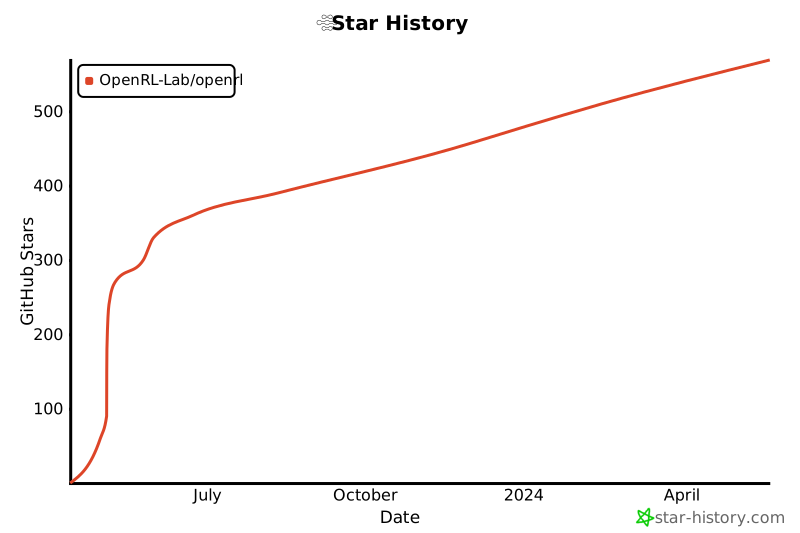
## Star History
[](https://star-history.com/#OpenRL-Lab/openrl&Date)
## License
OpenRL under the Apache 2.0 license.
## Acknowledgments
The development of the OpenRL framework has drawn on the strengths of other reinforcement learning frameworks:
- Stable-baselines3: https://github.com/DLR-RM/stable-baselines3
- pytorch-a2c-ppo-acktr-gail: https://github.com/ikostrikov/pytorch-a2c-ppo-acktr-gail
- MAPPO: https://github.com/marlbenchmark/on-policy
- Gymnasium: https://github.com/Farama-Foundation/Gymnasium
- DI-engine: https://github.com/opendilab/DI-engine/
- Tianshou: https://github.com/thu-ml/tianshou
- RL4LMs: https://github.com/allenai/RL4LMs
### ↳ Stargazers
[](https://github.com/OpenRL-Lab/openrl/stargazers)
### ↳ Forkers
[](https://github.com/OpenRL-Lab/openrl/network/members)
## Citing OpenRL
如果我们的工作对你有帮助,欢迎引用我们:
```latex
@article{huang2023openrl,
title={OpenRL: A Unified Reinforcement Learning Framework},
author={Huang, Shiyu and Chen, Wentse and Sun, Yiwen and Bie, Fuqing and Tu, Wei-Wei},
journal={arXiv preprint arXiv:2312.16189},
year={2023}
}
```
## Star History
[](https://star-history.com/#OpenRL-Lab/openrl&Date)
## License
OpenRL under the Apache 2.0 license.
## Acknowledgments
The development of the OpenRL framework has drawn on the strengths of other reinforcement learning frameworks:
- Stable-baselines3: https://github.com/DLR-RM/stable-baselines3
- pytorch-a2c-ppo-acktr-gail: https://github.com/ikostrikov/pytorch-a2c-ppo-acktr-gail
- MAPPO: https://github.com/marlbenchmark/on-policy
- Gymnasium: https://github.com/Farama-Foundation/Gymnasium
- DI-engine: https://github.com/opendilab/DI-engine/
- Tianshou: https://github.com/thu-ml/tianshou
- RL4LMs: https://github.com/allenai/RL4LMs