# PROJECT NOT UNDER ACTIVE MANAGEMENT #
This project will no longer be maintained by Intel.
Intel has ceased development and contributions including, but not limited to, maintenance, bug fixes, new releases, or updates, to this project.
Intel no longer accepts patches to this project.
If you have an ongoing need to use this project, are interested in independently developing it, or would like to maintain patches for the open source software community, please create your own fork of this project.
The E2E sample implements aspects of smart city sensing, analytics and management features as follows:
 - **Camera Provisioning**: Tag and calibrate cameras for installation locations, calibration parameters and other usage pattern information.
- **Camera Discovery**: Discover and register IP cameras on specified IP blocks. Registered cameras automatically participate into the analytics activities. See [Sensor Simulation and Discovery](sensor/README.md) for additional details.
- **Recording**: Record and manage segmented camera footage for preview or review (at a later time) purpose.
- **Analytics**: Perform analytics on the live/recorded camera streams. Latency-sensitive analytics are performed on Edge while others are on cloud.
- **Triggers and Alerts**: Manage triggers on analytics data. Respond with actions on triggered alerts.
- **Smart Upload and Archive**: Transcode and upload only critical data to cloud for archival or further offline analysis.
- **Stats**: Calculate statistics for planning/monitoring purpose on analytical data.
- **UI**: Present above data to users/administrators/city planners.
### Scenarios
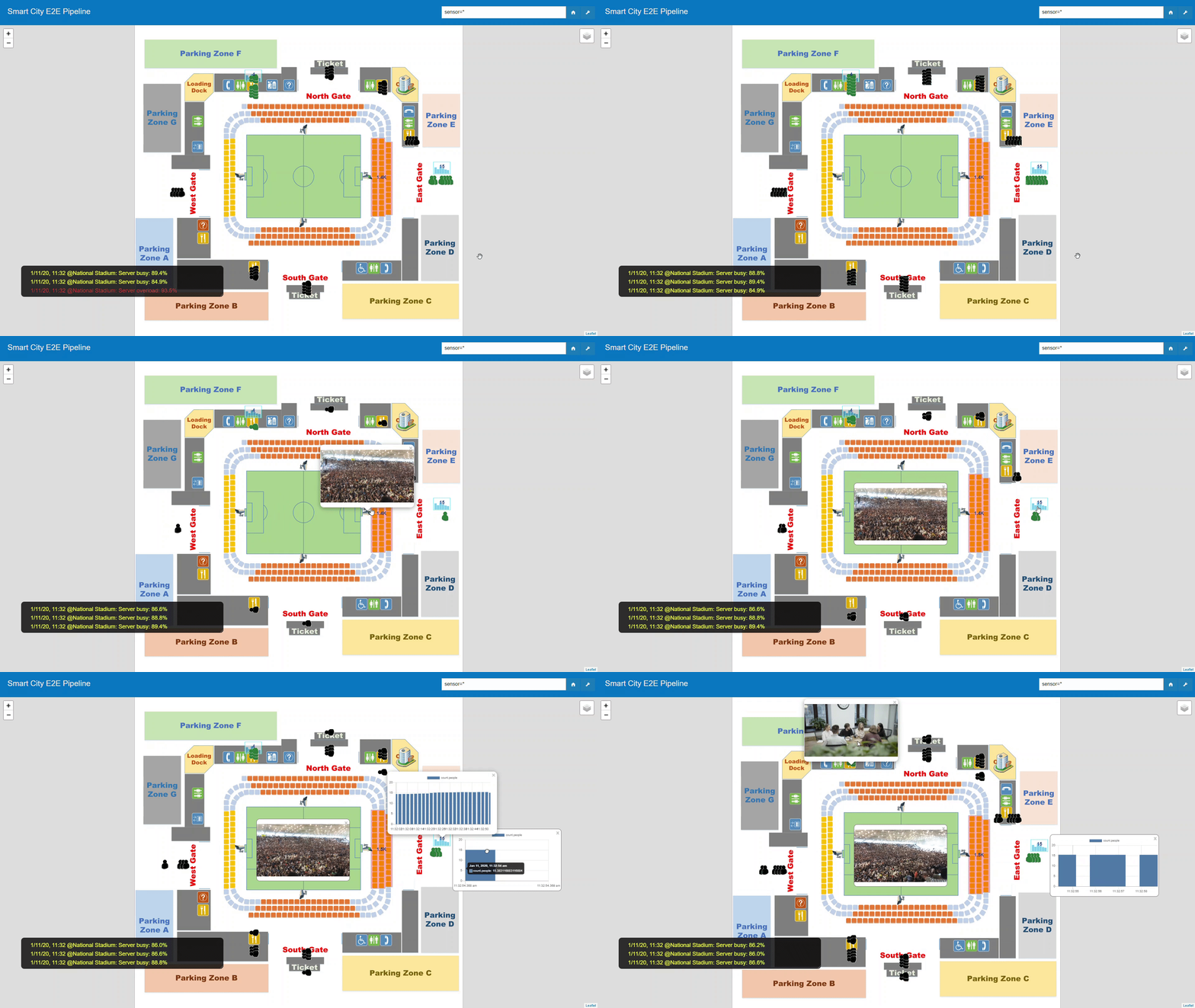
The sample implements the Smart-City [`traffic`](https://github.com/OpenVisualCloud/Smart-City-Sample/wiki/Smart-City:-Traffic-Scenario) and [`stadium`](https://github.com/OpenVisualCloud/Smart-City-Sample/wiki/Smart-City:-Stadium-Scenario) scenarios. The [`traffic`](https://github.com/OpenVisualCloud/Smart-City-Sample/wiki/Smart-City:-Traffic-Scenario) scenario measures vehicle/pedestrian flow for planning purpose. The [`stadium`](https://github.com/OpenVisualCloud/Smart-City-Sample/wiki/Smart-City:-Stadium-Scenario) scenario focuses on different access control techniques, including entrance people counting, service-point queue counting, and stadium seating zone crowd counting.
| [Traffic](https://www.youtube.com/watch?v=BWU0SEqEfbo") | Stadium |
|:-------:|:-------:|
|
- **Camera Provisioning**: Tag and calibrate cameras for installation locations, calibration parameters and other usage pattern information.
- **Camera Discovery**: Discover and register IP cameras on specified IP blocks. Registered cameras automatically participate into the analytics activities. See [Sensor Simulation and Discovery](sensor/README.md) for additional details.
- **Recording**: Record and manage segmented camera footage for preview or review (at a later time) purpose.
- **Analytics**: Perform analytics on the live/recorded camera streams. Latency-sensitive analytics are performed on Edge while others are on cloud.
- **Triggers and Alerts**: Manage triggers on analytics data. Respond with actions on triggered alerts.
- **Smart Upload and Archive**: Transcode and upload only critical data to cloud for archival or further offline analysis.
- **Stats**: Calculate statistics for planning/monitoring purpose on analytical data.
- **UI**: Present above data to users/administrators/city planners.
### Scenarios
The sample implements the Smart-City [`traffic`](https://github.com/OpenVisualCloud/Smart-City-Sample/wiki/Smart-City:-Traffic-Scenario) and [`stadium`](https://github.com/OpenVisualCloud/Smart-City-Sample/wiki/Smart-City:-Stadium-Scenario) scenarios. The [`traffic`](https://github.com/OpenVisualCloud/Smart-City-Sample/wiki/Smart-City:-Traffic-Scenario) scenario measures vehicle/pedestrian flow for planning purpose. The [`stadium`](https://github.com/OpenVisualCloud/Smart-City-Sample/wiki/Smart-City:-Stadium-Scenario) scenario focuses on different access control techniques, including entrance people counting, service-point queue counting, and stadium seating zone crowd counting.
| [Traffic](https://www.youtube.com/watch?v=BWU0SEqEfbo") | Stadium |
|:-------:|:-------:|
| |
| |
### Software Stacks
The sample is powered by the following OpenVisualCloud software stacks:
- **Edge Low-latency Analytics**:
- [The GStreamer-based media analytics stack](https://github.com/OpenVisualCloud/Dockerfiles/tree/master/Xeon/ubuntu-20.04/analytics/gst) is used for object detection, people-counting, queue-counting and crowd-counting on camera streams. The software stack is optimized for [Intel® Xeon® Scalable Processors](https://github.com/OpenVisualCloud/Dockerfiles/tree/master/Xeon/ubuntu-20.04/analytics/gst).
|
### Software Stacks
The sample is powered by the following OpenVisualCloud software stacks:
- **Edge Low-latency Analytics**:
- [The GStreamer-based media analytics stack](https://github.com/OpenVisualCloud/Dockerfiles/tree/master/Xeon/ubuntu-20.04/analytics/gst) is used for object detection, people-counting, queue-counting and crowd-counting on camera streams. The software stack is optimized for [Intel® Xeon® Scalable Processors](https://github.com/OpenVisualCloud/Dockerfiles/tree/master/Xeon/ubuntu-20.04/analytics/gst).
 - **Smart Upload with Transcoding**:
- [The FFmpeg-based media transcoding stack](https://github.com/OpenVisualCloud/Dockerfiles/tree/master/Xeon/ubuntu-20.04/media/ffmpeg) is used to transcode recorded content before uploading to cloud. The software stack is optimized for [Intel Xeon Scalable Processors](https://github.com/OpenVisualCloud/Dockerfiles/tree/master/Xeon/ubuntu-20.04/media/ffmpeg).
- **Smart Upload with Transcoding**:
- [The FFmpeg-based media transcoding stack](https://github.com/OpenVisualCloud/Dockerfiles/tree/master/Xeon/ubuntu-20.04/media/ffmpeg) is used to transcode recorded content before uploading to cloud. The software stack is optimized for [Intel Xeon Scalable Processors](https://github.com/OpenVisualCloud/Dockerfiles/tree/master/Xeon/ubuntu-20.04/media/ffmpeg).
 ### Install Prerequisites:
- **Time Zone**: Check that the timezone setting of your host machine is correctly configured. Timezone is used during build. If you plan to run the sample on a cluster of machines managed by Docker Swarm or Kubernetes, please make sure to synchronize time among the manager/master node and worker nodes.
- **Build Tools**: Install `cmake`, `make`, `m4`, `wget` and `gawk` if they are not available on your system.
- **Docker Engine**:
- Install [docker engine](https://docs.docker.com/install). Minimum version required: `17.05`. Make sure you [setup](https://docs.docker.com/install/linux/linux-postinstall) docker to run as a regular user.
- Setup [docker swarm](https://docs.docker.com/engine/swarm), if you plan to deploy through docker swarm. See [Docker Swarm Setup](deployment/docker-swarm/README.md) for additional setup details.
- Setup [Kubernetes](https://kubernetes.io/docs/setup), if you plan to deploy through Kubernetes. See [Kubernetes Setup](deployment/kubernetes/README.md) for additional setup details.
- Setup docker proxy as follows if you are behind a firewall:
```bash
sudo mkdir -p /etc/systemd/system/docker.service.d
printf "[Service]\nEnvironment=\"HTTPS_PROXY=$https_proxy\" \"NO_PROXY=$no_proxy\"\n" | sudo tee /etc/systemd/system/docker.service.d/proxy.conf
sudo systemctl daemon-reload
sudo systemctl restart docker
```
### Build Sample:
Use the following commands to build the sample. By default, the sample builds to the `traffic` scenario. To enable the `stadium` scenario, use `cmake -DSCENARIO=stadium ..`. See also: [Build Options](doc/cmake.md).
```bash
mkdir build
cd build
cmake ..
make
```
### Start/stop Sample:
Use the following commands to start/stop services via docker swarm:
```bash
make update # optional for private registry
make start_docker_swarm
make stop_docker_swarm
```
See also: [Docker Swarm Setup](deployment/docker-swarm/README.md).
Use the following commands to start/stop Kubernetes services:
```
make update # optional for private registry
make start_kubernetes
make stop_kubernetes
```
See also: [Kubernetes Setup](deployment/kubernetes/README.md).
### Launch Sample UI:
Launch your browser and browse to ```https://``` for the sample UI.
---
* For Kubernetes/Docker Swarm, `````` is the hostname of the manager/master node.
* If you see a browser warning of self-signed certificate, please accept it to proceed to the sample UI.
---
### See Also
- [Configuration Options](doc/cmake.md)
- [Docker Swarm Setup](deployment/docker-swarm/README.md)
- [Kubernetes Setup](deployment/kubernetes/README.md)
- [REST API List](doc/restapi.md)
- [Demo Video](https://www.youtube.com/watch?v=BWU0SEqEfbo)
### Install Prerequisites:
- **Time Zone**: Check that the timezone setting of your host machine is correctly configured. Timezone is used during build. If you plan to run the sample on a cluster of machines managed by Docker Swarm or Kubernetes, please make sure to synchronize time among the manager/master node and worker nodes.
- **Build Tools**: Install `cmake`, `make`, `m4`, `wget` and `gawk` if they are not available on your system.
- **Docker Engine**:
- Install [docker engine](https://docs.docker.com/install). Minimum version required: `17.05`. Make sure you [setup](https://docs.docker.com/install/linux/linux-postinstall) docker to run as a regular user.
- Setup [docker swarm](https://docs.docker.com/engine/swarm), if you plan to deploy through docker swarm. See [Docker Swarm Setup](deployment/docker-swarm/README.md) for additional setup details.
- Setup [Kubernetes](https://kubernetes.io/docs/setup), if you plan to deploy through Kubernetes. See [Kubernetes Setup](deployment/kubernetes/README.md) for additional setup details.
- Setup docker proxy as follows if you are behind a firewall:
```bash
sudo mkdir -p /etc/systemd/system/docker.service.d
printf "[Service]\nEnvironment=\"HTTPS_PROXY=$https_proxy\" \"NO_PROXY=$no_proxy\"\n" | sudo tee /etc/systemd/system/docker.service.d/proxy.conf
sudo systemctl daemon-reload
sudo systemctl restart docker
```
### Build Sample:
Use the following commands to build the sample. By default, the sample builds to the `traffic` scenario. To enable the `stadium` scenario, use `cmake -DSCENARIO=stadium ..`. See also: [Build Options](doc/cmake.md).
```bash
mkdir build
cd build
cmake ..
make
```
### Start/stop Sample:
Use the following commands to start/stop services via docker swarm:
```bash
make update # optional for private registry
make start_docker_swarm
make stop_docker_swarm
```
See also: [Docker Swarm Setup](deployment/docker-swarm/README.md).
Use the following commands to start/stop Kubernetes services:
```
make update # optional for private registry
make start_kubernetes
make stop_kubernetes
```
See also: [Kubernetes Setup](deployment/kubernetes/README.md).
### Launch Sample UI:
Launch your browser and browse to ```https://``` for the sample UI.
---
* For Kubernetes/Docker Swarm, `````` is the hostname of the manager/master node.
* If you see a browser warning of self-signed certificate, please accept it to proceed to the sample UI.
---
### See Also
- [Configuration Options](doc/cmake.md)
- [Docker Swarm Setup](deployment/docker-swarm/README.md)
- [Kubernetes Setup](deployment/kubernetes/README.md)
- [REST API List](doc/restapi.md)
- [Demo Video](https://www.youtube.com/watch?v=BWU0SEqEfbo)