DeepCanary
A task inbox and local notifications for DeepSeek Harness.




简体中文 · Documentation · Changelog · Releases
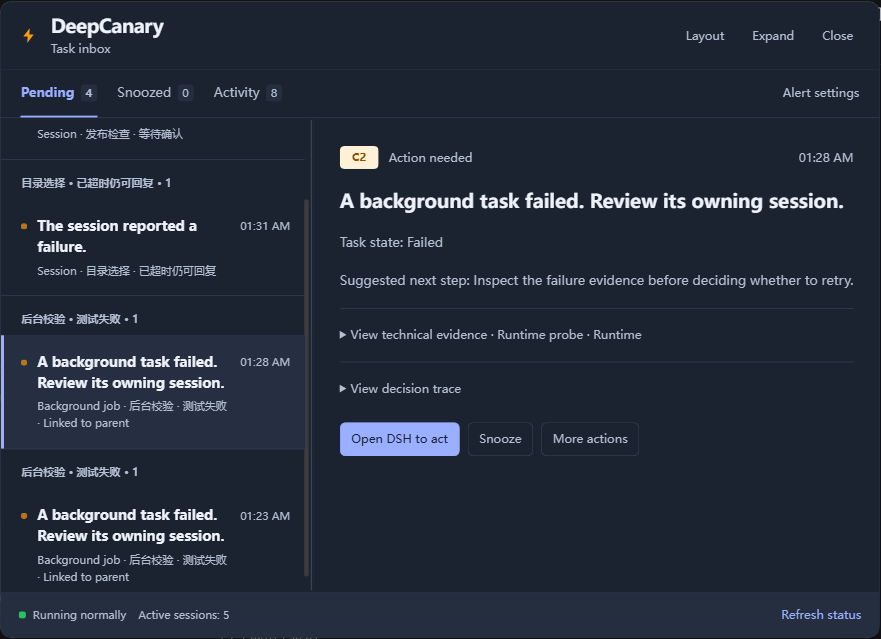
DeepCanary groups task updates in **Pending**, **Snoozed**, and **Activity**. It reminds you when DSH needs an answer or approval, keeps routine completions in Activity, and returns you to the corresponding session.
[Install](#install) · [Use](#use) · [Notifications](#notifications) · [Update or remove](#update-or-remove) · [Compatibility](#compatibility) · [Troubleshooting](#troubleshooting) · [Security](#security-and-privacy) · [Contributing](#contributing) · [Acknowledgments](#acknowledgments) · [License](#license)
## Install
DeepCanary **0.1.9-rc.1** requires DSH `0.2.1-rc.5` or `0.2.2-alpha.3` and later. Check the [Node.js requirements for WebUI](#compatibility) before installing. Windows Desktop includes its own runtime. [Install DeepSeek Harness](https://github.com/deepseek-ai/deepseek-harness#readme).
### Windows Desktop
1. Open **Plugins → Add plugin → Install a third-party plugin**.
2. Enter `dsh-deepcanary@0.1.9-rc.1` under **Package name or address** and choose **Install**.
3. Follow any restart prompt, then open **DeepCanary** from the left sidebar.
### WebUI
Stop the running DSH WebUI server. Run these commands in your terminal.
```sh
dsh plugin --profile web add dsh-deepcanary@0.1.9-rc.1 --registry=https://registry.npmjs.org/
dsh web
```
Open **DeepCanary** from the sidebar once WebUI starts.
Use a custom DSH data directory or profile
If you start DSH with another profile, replace `web` in both commands with that name. If your launch command sets `DSH_HOME`, set it to the same directory in your terminal before installing, updating, or removing the plugin.
PowerShell
```powershell
$env:DSH_HOME = ""
```
Bash or Zsh
```sh
export DSH_HOME=""
```
Install from a downloaded package
Download the tgz and `SHA256SUMS` from the [GitHub release](https://github.com/Oscar-Williams/dsh-deepcanary/releases/tag/v0.1.9-rc.1). Run one of these commands from the download directory and compare the result with the package entry in `SHA256SUMS`.
```powershell
Get-FileHash ./dsh-deepcanary-0.1.9-rc.1.tgz -Algorithm SHA256
```
```sh
shasum -a 256 ./dsh-deepcanary-0.1.9-rc.1.tgz
```
For WebUI, stop the server and run the commands below from the download directory. The package manager may still download dependencies from npm.
```sh
dsh plugin --profile web add ./dsh-deepcanary-0.1.9-rc.1.tgz --registry=https://registry.npmjs.org/
dsh web
```
For Windows Desktop, open DSH once to initialize its profile, then choose **Application → Quit**. Open PowerShell in `resources/runtime/cli/bin` under the application directory. If you use a custom `DSH_HOME`, set it as shown above. Replace the placeholder with the full path to the downloaded package, run the command, and reopen DSH.
```powershell
.\dsh.cmd plugin --profile desktop add "" --registry=https://registry.npmjs.org/
```
## Use
| View | What you'll find |
| --- | --- |
| **Pending** | Questions, approvals, and task updates that need attention |
| **Snoozed** | Reminders scheduled for later |
| **Activity** | Routine completions, context compaction, and tasks you stopped |
Select a reminder to see its details. Use the DSH button to open the session and reply or approve there. Choose **More actions → Acknowledge** to clear the reminder from Pending, or **Snooze** to schedule it for later.
Drag the title bar to move the panel and drag any edge or corner to resize it. Drag the divider to adjust the list width. The **Layout** menu lets you dock, expand, restore, or reset the panel. DeepCanary remembers the layout on this device. In narrow windows, the list keeps its scroll position when you return from a reminder.
For keyboard control, choose move or resize from **Layout**. Use the arrow keys to adjust the panel, hold Shift for larger steps, press Enter to confirm, or press Escape to cancel.
## Notifications
Open **Alert settings** from the inbox. Set the minimum alert level, quiet hours, and the hourly limit for C2 interruptions. C3 reminders can still appear during quiet hours and after the C2 limit is reached.
| Level | Meaning |
| --- | --- |
| **C3** | DSH is waiting for an answer or approval before it can continue |
| **C2** | An error or unusual task state needs checking |
| **C1** | A routine update is available in Activity |
In WebUI, allow notifications for your DSH site and leave a DSH tab open. In Windows, allow notifications from your browser or DeepSeek Harness. The desktop app can receive notifications while minimized or hidden if it is still running.
Click a notification to return to the reminder and session. Respond to questions and approvals in DSH to continue the task.
## Update or remove
To replace an earlier version on Windows Desktop, uninstall DeepCanary from **Plugins**, then add `dsh-deepcanary@0.1.9-rc.1` in the same DSH app. Follow any restart prompts. To remove the plugin, stop after uninstalling.
For WebUI, stop the server and repeat the [installation commands](#webui). Use the same DSH data directory and profile to keep your settings and reminders.
To remove DeepCanary from WebUI, stop the server, run the following command, then restart WebUI. Replace `web` if you use another profile.
```sh
dsh plugin --profile web remove dsh-deepcanary
```
## Compatibility
| Tested DSH version | Platforms | Node.js for WebUI |
| --- | --- | --- |
| `0.2.1-rc.5` | WebUI and Windows Desktop | `^22.19.0 \|\| >=24.0.0` |
| `0.2.2-alpha.3` | WebUI and Windows Desktop | `>=24.9.0` |
Later DSH versions can install this package. Check the Node.js requirement for your DSH version. [Compatibility details](docs/compatibility.md).
## Troubleshooting
| Problem | What to check |
| --- | --- |
| DeepCanary is missing | Check **Plugins** in the DSH app you use. For WebUI, confirm the data directory and profile match your launch command. Restart if prompted. |
| DSH installs an older version | Enter `dsh-deepcanary@0.1.9-rc.1` and use the official npm registry, `https://registry.npmjs.org/`. |
| Installation is rejected | Check the DSH and Node.js versions in [Compatibility](#compatibility). |
| No system banner appears | Check that DSH is running, then check browser permission, Windows Do Not Disturb, and [alert settings](#notifications). |
| A session cannot be opened | Check whether the session still appears in your current DSH app. You can still read the reminder in the inbox. |
| The panel is hard to reach | Select **Layout → Reset layout**. |
| Reminder state cannot be saved | Click **Refresh status** in the inbox to retry. If it fails again, check that the account running DSH can write to its profile directory. |
For ordinary bugs, include your DSH and DeepCanary versions, operating system, and steps to reproduce. Remove private content before posting. [Report an issue](https://github.com/Oscar-Williams/dsh-deepcanary/issues).
## Security and privacy
DeepCanary saves reminder metadata in your DSH data directory and uses local rules to decide when to notify you. Read about the files it saves and how notifications use them. [Data and privacy](docs/security.md).
Use the private reporting channel for vulnerabilities. [Security policy](SECURITY.md).
## Contributing
See how to set up the project, run tests, and submit a change. [Contributing](CONTRIBUTING.md) · [Documentation](docs/README.md).
## Acknowledgments
Thanks to the DeepSeek Harness team for the plugin APIs, and to the community directories that list DeepCanary. [DeepSeek Harness](https://github.com/deepseek-ai/deepseek-harness) · [dsh.works plugin directory](https://github.com/dshworks/awesome-dsh-plugins) · [Awesome DeepSeek Harness Plugins](https://github.com/jqueryscript/awesome-dsh-plugins).
## License
Licensed under the [MIT License](LICENSE). Copyright © 2026 Oscar Williams.