# 🐤 Updo - Website Monitoring Tool
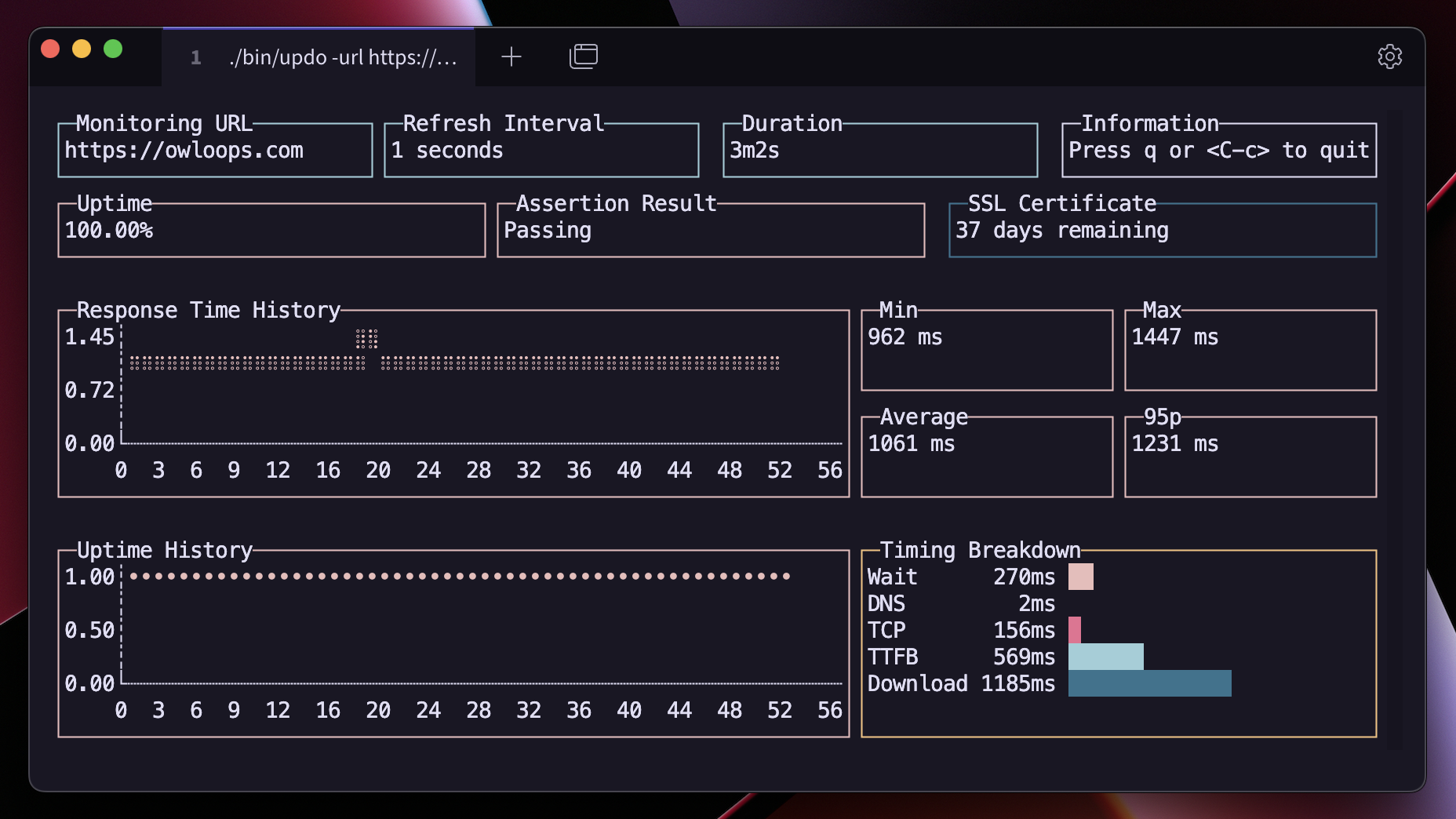
Updo demo

Updo is a command-line tool for monitoring website uptime and performance. It provides real-time metrics on website status, response time, SSL certificate expiry, and more, with alert notifications. ![Language:Go](https://img.shields.io/static/v1?label=Language&message=Go&color=blue&style=flat-square) ![License:MIT](https://img.shields.io/static/v1?label=License&message=MIT&color=blue&style=flat-square) [![Latest Release](https://img.shields.io/github/v/release/Owloops/updo?style=flat-square)](https://github.com/Owloops/updo/releases/latest)
## Features - Real-time monitoring of website uptime and performance - Displays various metrics like uptime percentage, average response time, and SSL certificate expiry - Desktop alert notifications for website status changes - Customizable refresh intervals and request timeouts - Supports HTTP and HTTPS, with options to skip SSL verification - Assertion on response body content - Command-line interface with subcommand support - Simple mode with fancy or plain text output - Automatic terminal capability detection ## Demo ## Installation
Quick install script (Linux, macOS, Windows/MSYS) #### One-line install command ```bash curl -sSL https://raw.githubusercontent.com/Owloops/updo/main/install.sh | bash ``` This script automatically: - Detects your OS and architecture - Downloads the latest release - Makes the binary executable - Installs to /usr/local/bin (or ~/.local/bin if permission denied) - Removes quarantine attribute on macOS
Download executable binaries #### You can download executable binaries from the latest release page > [![Latest Release](https://img.shields.io/github/v/release/Owloops/updo?style=flat-square)](https://github.com/Owloops/updo/releases/latest)
Build from source #### You can install Updo by cloning the repository and building the binary Make sure your system has Go [installed](https://go.dev/doc/install). > ```bash > git clone https://github.com/Owloops/updo.git > cd updo > go build > ``` > #### Build with version information To include version information in the binary, use ldflags: ```bash go build -ldflags="-X 'main.version=v1.0.0' -X 'main.commit=$(git rev-parse HEAD)' -X 'main.date=$(date)'" ``` Check the version with: ```bash ./updo --version ``` #### Another way to install it if you have go in your machine just ```sh GOBIN="absolute_path_where_you_want_binaries_to_be_installed" go install github.com/Owloops/updo@latest ```
> [!NOTE] > You may get a warning message on Windows and MacOS, which is discussed in this issue > > ### macOS Security > > macOS may prevent running downloaded binaries due to security measures. If you get a warning message like "cannot be opened because the developer cannot be verified", you can remove the quarantine attribute with this command: > > ```bash > xattr -d com.apple.quarantine /path/to/updo > ``` > > Replace `/path/to/updo` with the actual path to the downloaded binary (e.g. `~/Downloads/updo_Darwin_arm64/updo`) ## Usage Run Updo using the following command: ```bash # Basic usage ./updo [options] # Explicit monitor command ./updo monitor [options] # Generate shell completions ./updo completion bash > updo_completion.bash ``` ### Docker You can run Updo using Docker: ```console # Build Docker image from locally cloned repo docker build -t updo . # ... or build straight from repo URL (no cloning needed): docker build -t updo https://github.com/Owloops/updo.git # And now you can run Updo from the built image: docker run -it updo [options] --url ``` ### Options - `-u, --url`: URL of the website to monitor - `-r, --refresh`: Refresh interval in seconds (default: 5) - `-f, --should-fail`: Invert status code success (default: false) - `-t, --timeout`: HTTP request timeout in seconds (default: 10) - `-l, --follow-redirects`: Follow redirects (default: true) - `-s, --skip-ssl`: Skip SSL certificate verification (default: false) - `-a, --assert-text`: Text to assert in the response body - `-n, --receive-alert`: Enable alert notifications (default: true) - `--simple`: Use simple output instead of TUI - `--no-fancy`: Disable fancy terminal formatting in simple mode - `-c, --count`: Number of checks to perform (0 = infinite) - `-h, --help`: Display help message ### Examples ```bash # Basic monitoring with defaults ./updo https://example.com # Set custom refresh and timeout ./updo -r 10 -t 5 https://example.com # Use simple mode with a set number of checks ./updo --simple -c 10 https://example.com # Simple mode with plain text output ./updo --simple --no-fancy https://example.com # Assert text in the response ./updo -a "Welcome" https://example.com ``` ## Keyboard Shortcuts - `q` or `Ctrl+C`: Quit the application ## Mentions - [awesome-readme](https://github.com/matiassingers/awesome-readme) - [termui](https://github.com/gizak/termui) - [Terminal Trove](https://terminaltrove.com/updo) - [cobra](https://github.com/spf13/cobra) - [bubbletea](https://github.com/charmbracelet/bubbletea) ## Contributing Contributions to Updo are welcome! Feel free to create issues or submit pull requests. ## License This project is licensed under the [MIT License](LICENSE).