# 🐤 Updo - Website Monitoring Tool
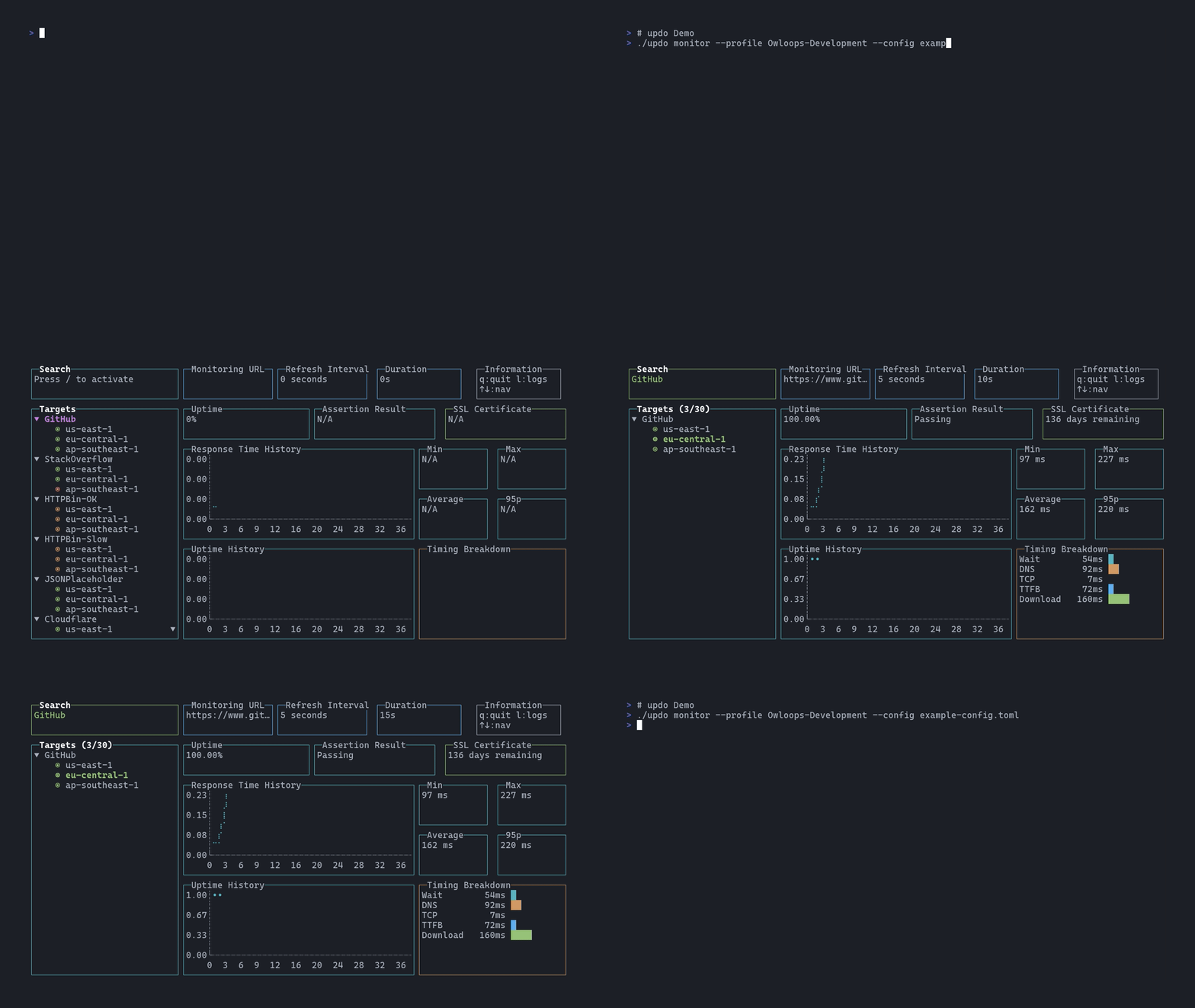
Updo demo

Updo is a command-line tool for monitoring website uptime and performance. It provides real-time metrics on website status, response time, SSL certificate expiry, and more, with alert notifications. ![License:MIT](https://img.shields.io/static/v1?label=license&message=MIT&color=blue) [![Latest Release](https://img.shields.io/github/v/release/Owloops/updo)](https://github.com/Owloops/updo/releases/latest) [![Go Report Card](https://goreportcard.com/badge/github.com/Owloops/updo)](https://goreportcard.com/report/github.com/Owloops/updo)
## Features - **Real-time monitoring** with uptime percentage, response times, and SSL certificate tracking - **Multi-target monitoring** - Monitor multiple URLs concurrently from the command line or config files - **Multi-region AWS Lambda** - Deploy across 13 global regions for worldwide monitoring coverage - **Prometheus & Grafana integration** - Export metrics for visualization and long-term storage - **Alert notifications** - Desktop notifications and webhook integration (Slack, Discord, custom endpoints) - **Flexible HTTP support** - Custom headers, POST/PUT requests, SSL verification options, response assertions - **Multiple output modes** - Interactive TUI, simple text output, or structured JSON logging ## Demo

Basic Monitoring

Multi-Region Monitoring

## Installation
macOS - Homebrew (Recommended) ```bash brew install owloops/tap/updo ```
Linux - Package Managers (Recommended) **Debian/Ubuntu:** ```bash # Replace VERSION with actual version (e.g., 0.3.7) curl -L -O https://github.com/Owloops/updo/releases/latest/download/updo_VERSION_linux_amd64.deb sudo dpkg -i updo_VERSION_linux_amd64.deb ``` **Red Hat/Fedora/CentOS:** ```bash # Replace VERSION with actual version (e.g., 0.3.7) curl -L -O https://github.com/Owloops/updo/releases/latest/download/updo_VERSION_linux_amd64.rpm sudo rpm -i updo_VERSION_linux_amd64.rpm ``` **Alpine Linux:** ```bash # Replace VERSION with actual version (e.g., 0.3.7) curl -L -O https://github.com/Owloops/updo/releases/latest/download/updo_VERSION_linux_amd64.apk sudo apk add --allow-untrusted updo_VERSION_linux_amd64.apk ``` **Arch Linux:** ```bash yay -S updo # or use the binary package yay -S updo-bin ``` **openSUSE:** ```bash # Replace VERSION with actual version (e.g., 0.3.7) curl -L -O https://github.com/Owloops/updo/releases/latest/download/updo_VERSION_linux_amd64.rpm sudo zypper install --allow-unsigned-rpm updo_VERSION_linux_amd64.rpm ```
Windows - Direct Download **PowerShell:** ```powershell # Download and install updo Invoke-WebRequest -Uri "https://github.com/Owloops/updo/releases/latest/download/updo_Windows_amd64.exe" -OutFile "updo.exe" # Move to a directory in your PATH (or create a custom directory) Move-Item updo.exe C:\Windows\System32\updo.exe ``` **Manual Download:** Download the Windows executable from the [latest release](https://github.com/Owloops/updo/releases/latest) and add it to your PATH.
Quick install script (Linux, macOS, Windows/MSYS) ```bash curl -sSL https://raw.githubusercontent.com/Owloops/updo/main/install.sh | bash ```
Build from source Requires Go [installed](https://go.dev/doc/install). ```bash git clone https://github.com/Owloops/updo.git cd updo go build ``` Or install directly: ```bash go install github.com/Owloops/updo@latest ```
Docker ```bash # Build and run docker build -t updo https://github.com/Owloops/updo.git docker run updo monitor [options] ```
## Usage ```bash # Monitor URLs updo monitor [options] updo monitor # Using configuration file updo monitor --config # Generate shell completions updo completion bash > updo_completion.bash ``` ### Options **Basic:** - `--url, --config`: Target URL or TOML config file - `--refresh`: Check interval in seconds (default: 5) - `--timeout`: Request timeout in seconds (default: 10) - `--count`: Number of checks (0 = infinite) - `--simple`: Text output instead of TUI **HTTP:** - `--header`: Custom HTTP headers (repeatable) - `--request`: HTTP method (default: GET) - `--data`: Request body data - `--skip-ssl, --follow-redirects, --accept-redirects`: SSL and redirect options - `--assert-text`: Expected response text **Multi-region:** - `--regions`: AWS regions (comma-separated or 'all') - `--profile`: AWS profile for remote executors **Output & Alerts:** - `--log`: JSON structured logging - `--webhook-url, --webhook-header`: Webhook notifications - `--only, --skip`: Target filtering > **Note:** When using CLI flags, all settings (headers, webhook URL, timeouts, etc.) apply globally to all monitored targets. For per-target configuration, use a TOML configuration file. ### Examples ```bash # Basic monitoring updo monitor https://example.com # Set custom refresh and timeout updo monitor --refresh 10 --timeout 5 https://example.com # Simple mode and logging updo monitor --simple --count 10 https://example.com updo monitor --log --count 10 https://example.com > output.json # Custom requests updo monitor --header "Authorization: Bearer token" --assert-text "Welcome" https://example.com updo monitor --request POST --header "Content-Type: application/json" --data '{"test":"data"}' https://api.example.com # Multi-target monitoring updo monitor https://google.com https://github.com https://cloudflare.com updo monitor --config example-config.toml --only Google,GitHub # Multi-region monitoring updo monitor --regions us-east-1,eu-west-1 https://example.com updo monitor --regions all --profile production https://example.com # Webhook notifications updo monitor --webhook-url "https://hooks.slack.com/services/YOUR/WEBHOOK" https://example.com ``` ## Configuration File Use TOML configuration for complex monitoring setups with multiple targets. ### Example Configuration ```toml [global] refresh_interval = 5 timeout = 10 webhook_url = "https://hooks.slack.com/services/YOUR/WEBHOOK" only = ["Google", "API"] # Monitor only these targets [[targets]] url = "https://www.google.com" name = "Google" refresh_interval = 3 assert_text = "Google" [[targets]] url = "https://api.example.com/health" name = "API" method = "POST" headers = ["Authorization: Bearer token"] ``` ### Configuration Options **Global settings** (apply to all targets unless overridden): - `refresh_interval`, `timeout`, `follow_redirects`, `accept_redirects`, `receive_alert`, `count` - `webhook_url`, `webhook_headers`: Default webhook settings - `only`, `skip`: Target filtering arrays - `regions`: AWS regions for remote executors **Target settings** (can override global): - `url` (required), `name`: Target identification - `method`, `headers`, `body`: HTTP request options - `assert_text`, `should_fail`: Response validation - `skip_ssl`, `follow_redirects`, `accept_redirects`: Connection options - `webhook_url`, `webhook_headers`: Per-target notifications - `regions`: Target-specific AWS regions ## Multi-Region Monitoring Deploy remote executors as AWS Lambda functions across 13 global regions for distributed monitoring from multiple geographic locations. ```bash # Deploy remote executors to AWS regions updo aws deploy --regions us-east-1,eu-west-1 # Monitor using remote executors updo monitor --regions us-east-1,eu-west-1 https://example.com # Cleanup when done updo aws destroy --regions all ``` ### Prerequisites **AWS CLI configured** with appropriate credentials and the following permissions: | Service | Required Permissions | |---------|---------------------| | Lambda | CreateFunction, UpdateFunctionCode, DeleteFunction, GetFunction, InvokeFunction | | IAM | CreateRole, AttachRolePolicy, DetachRolePolicy, DeleteRole, GetRole | | STS | GetCallerIdentity | **Supported regions:** us-east-1, us-west-1, us-west-2, eu-west-1, eu-central-1, eu-west-2, ap-southeast-1, ap-southeast-2, ap-northeast-1, ap-northeast-2, ap-south-1, sa-east-1, ca-central-1 **Troubleshooting:** If you get credential errors, run `aws sso login --profile your-profile` to refresh expired sessions. ## Webhook Notifications Updo can send webhook notifications when targets go up or down. Updo **automatically detects** Slack and Discord webhooks by URL pattern and formats messages accordingly with rich formatting. Custom webhooks receive a generic JSON payload. ### Supported Platforms - **Slack** - Auto-detected via `hooks.slack.com` URL, sends rich messages with attachments and color coding - **Discord** - Auto-detected via `discord.com/api/webhooks` URL, sends embeds with color and structured fields - **Custom** - Any other webhook URL receives generic JSON format ### Integration Examples **Slack Webhook (Auto-Detected):** ```toml [[targets]] url = "https://api.example.com" name = "Production API" webhook_url = "https://hooks.slack.com/services/YOUR/WEBHOOK/URL" ``` Updo automatically formats Slack messages with: - Color-coded attachments (red for down, green for up) - Unicode symbols (✘ for down, ✔ for up) - Structured fields for URL, error, status code, response time, and timestamp **Discord Webhook (Auto-Detected):** ```toml [[targets]] url = "https://api.example.com" name = "Production API" webhook_url = "https://discord.com/api/webhooks/123456789/YOUR_WEBHOOK_TOKEN" ``` Updo automatically formats Discord messages with: - Color-coded embeds (red for down, green for up) - Unicode symbols (✘ for down, ✔ for up) - Structured fields with inline formatting - Clickable URL links **Custom Webhook:** For custom webhooks, Updo sends a generic JSON payload: ```json { "event": "target_down", "target": "Production API", "url": "https://api.example.com", "timestamp": "2024-01-01T12:00:00Z", "response_time_ms": 1500, "status_code": 500, "error": "Internal Server Error" } ``` ```toml [[targets]] url = "https://critical-service.example.com" name = "Critical Service" webhook_url = "https://alerts.internal.com/webhook" webhook_headers = [ "Authorization: Bearer YOUR_TOKEN", "X-Service: updo-monitor" ] ``` ## Prometheus & Grafana Integration Export updo metrics to Prometheus for long-term storage, visualization, and alerting: ```bash # Basic Prometheus integration updo monitor --prometheus-url http://localhost:9090/api/v1/write https://example.com # Via environment variables (CLI flag optional if URL provided via env) export UPDO_PROMETHEUS_RW_SERVER_URL="https://prometheus.example.com/api/v1/write" export UPDO_PROMETHEUS_USERNAME="admin" export UPDO_PROMETHEUS_PASSWORD="secret" updo monitor https://example.com ``` **Available metrics:** - Target uptime and response times - HTTP status codes and timing breakdown (DNS, TCP, TTFB, download) - SSL certificate expiry and assertion results **Quick start with Docker:** ```bash # Clone and start the monitoring stack git clone https://github.com/Owloops/updo.git cd updo/examples/prometheus-grafana docker compose up -d ``` Access Grafana at [http://localhost:3000](http://localhost:3000) for pre-built dashboards. > **📖 Full Documentation:** See [examples/prometheus-grafana/README.md](examples/prometheus-grafana/README.md) for complete setup, authentication options, metrics reference, and PromQL examples. ## Structured Logging The `--log` flag outputs JSON-formatted logs for programmatic consumption: - **Check logs** (stdout): HTTP requests, responses, and timing information - **Metrics logs** (stdout): Uptime, response time stats, success rate - **Error logs** (stderr): Failures, warnings, and assertion results Usage examples: ```bash # All logs to one file updo monitor --log https://example.com > all.json 2>&1 # Metrics to one file, errors to another updo monitor --log https://example.com > metrics.json 2> errors.json # Processing with jq updo monitor --log https://example.com | jq 'select(.type=="check") | .response_time_ms' ``` ## Keyboard Shortcuts When monitoring multiple targets: - `↑/↓`: Navigate targets - `Tab`: Collapse/expand all target groups - `Enter`: Collapse/expand individual target group - `/`: Search mode, `ESC` to exit - `l`: Toggle logs per target - `q` or `Ctrl+C`: Quit ## Mentions - [awesome-cli-apps](https://github.com/agarrharr/awesome-cli-apps) - [awesome-readme](https://github.com/matiassingers/awesome-readme) - [termui](https://github.com/gizak/termui) - [Terminal Trove](https://terminaltrove.com/updo) ## Contributing Contributions to Updo are welcome! Feel free to create issues or submit pull requests. ## License This project is licensed under the [MIT License](LICENSE).