Unshacklarr

The episodes Sonarr is missing, downloaded by Unshackle and imported by Sonarr.
For those who already download with Unshackle and keep their series in Sonarr: pick a streaming service for a series once, and its new episodes land in your library on their own.

Version 1.5.0 License GPL-3.0 Python 3.10+ Sonarr v3 and v4 Unshackle 5.4 to 6 9 languages

Try the live demo Install with Docker Join the Discord What's new

How it works · Features · Tour · Quick start · Reverse proxy · Configuration · API · Community · Security
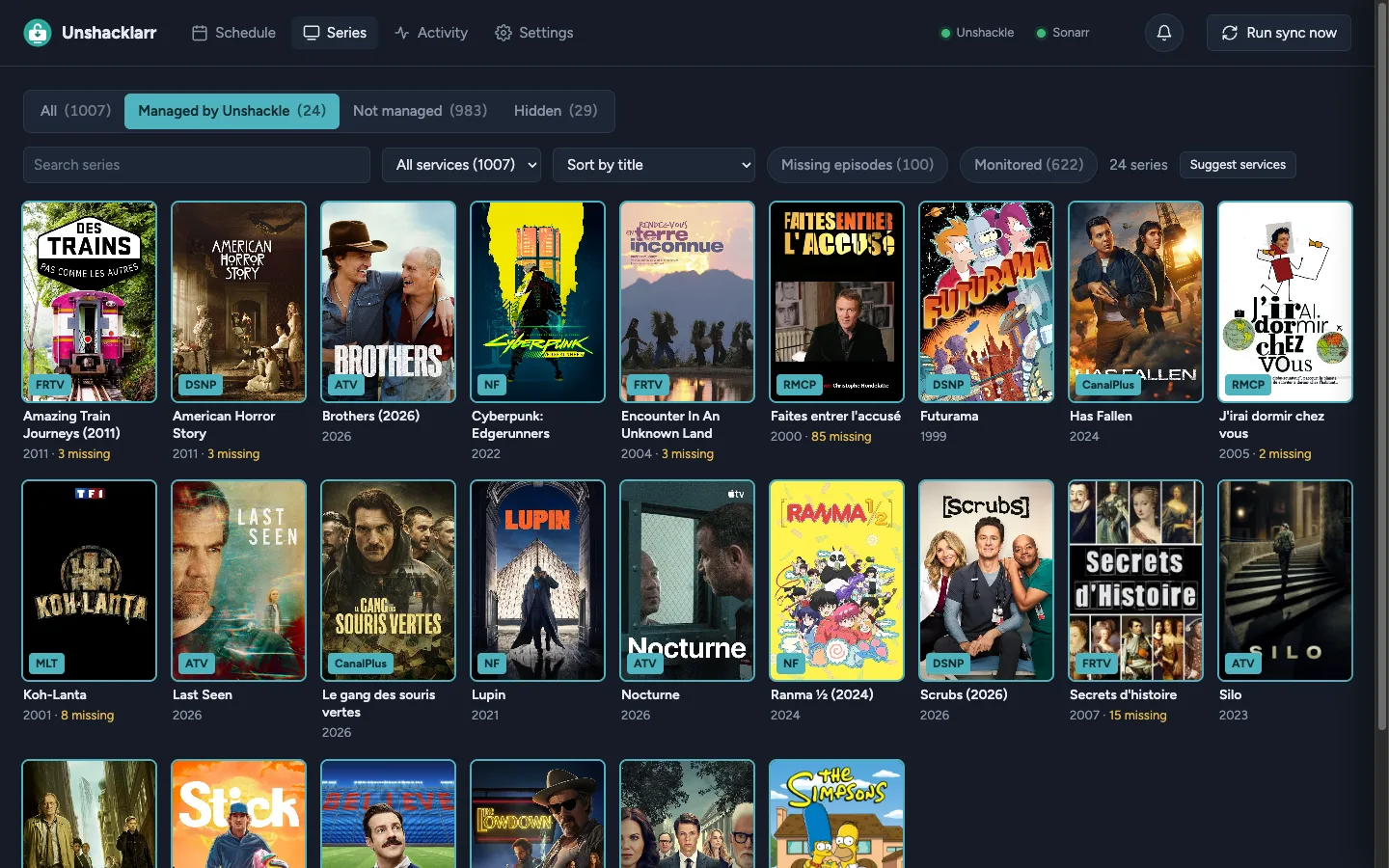
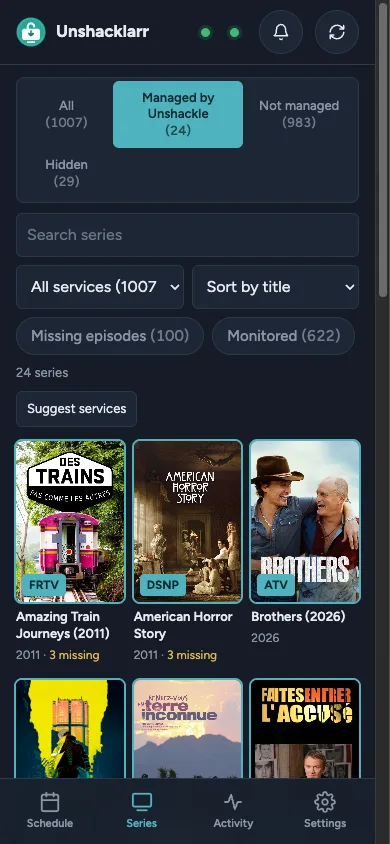
The Series page: the managed series as posters, each with its streaming service
📺 Series: your Sonarr library as posters, each with its streaming service, picked by hand or from a link found on TMDB.

## 🔄 How it works ```mermaid flowchart LR sonarr[("📡 Sonarr
missing episodes")] -- watched --> app["🔓 Unshacklarr"] app -- "at release time" --> serve["⬇️ unshackle serve"] serve -- "from the service" --> files["🧹 parts joined,
files named"] files -- "imported, then checked" --> sonarr ``` 1. 👀 **It watches Sonarr** for episodes that aired and are still missing. 2. ⬇️ **It asks Unshackle** to download each one, at the series' release time when it has one, else at the next sync after it airs. 3. 🧹 **It tidies the files**: split parts joined back, named after Sonarr's series and numbering. 4. 📥 **It hands them to Sonarr**, which imports them like any other download, and checks it did. ## ✨ Features
⏰ The right time
A series' release time, in your time zone: tried then every 30 s for 10 minutes, else at the regular sync, for 14 days after airing.
🔢 Numbering that differs
Season maps (Sonarr's season 34 is the service's 29), episode and season offsets, and per-episode exceptions, down to one part.
🔎 What a service has
A series' episodes on the service, without downloading anything, matched by title when the service numbers them its own way.
🛡️ No downgrades
A file Sonarr has is only replaced by a better one, as the series' quality profile ranks them, unless you ask.
🧩 Episodes in parts
Joined into one file, or kept apart when Sonarr counts each part, and never imported half when a series waits for all of them.
🍪 Cookies and CDMs
Unshackle's cookie files with their expiry, its Widevine and PlayReady devices with a test license, and the device of each service.
🔔 Notifications
Discord, Telegram, ntfy, Pushover, e-mail and 100 more, each address with the messages you tick for it, and quiet hours.
💚 Health
Lights for Unshackle and Sonarr, and a message when one goes down, comes back, or when cookies or a device are about to fail.
📚 More than one Sonarr
A 4K library beside the 1080p one: each Sonarr with its own quality ladder, its copy downloaded at the same release time and imported into it.
⬆️ Upgrades
The files your quality ladder says could be better, checked against the service by themselves every week, and replaced when you tick them.
📱 On a phone
An installable app with a tab bar, live progress and push notifications, once the page is served over HTTPS.
🌍 Your language
English, French, Spanish, German, Brazilian Portuguese, Italian, Russian, Simplified Chinese and Japanese, notifications included.
## 📸 Tour > [!TIP] > **Rather click than read?** The **[live demo](https://unshacklarr.ownzzzz.workers.dev)** is the real page, in your > browser, with a guided tour. Everything in it is made up: no Sonarr, no Unshackle, nothing downloaded.
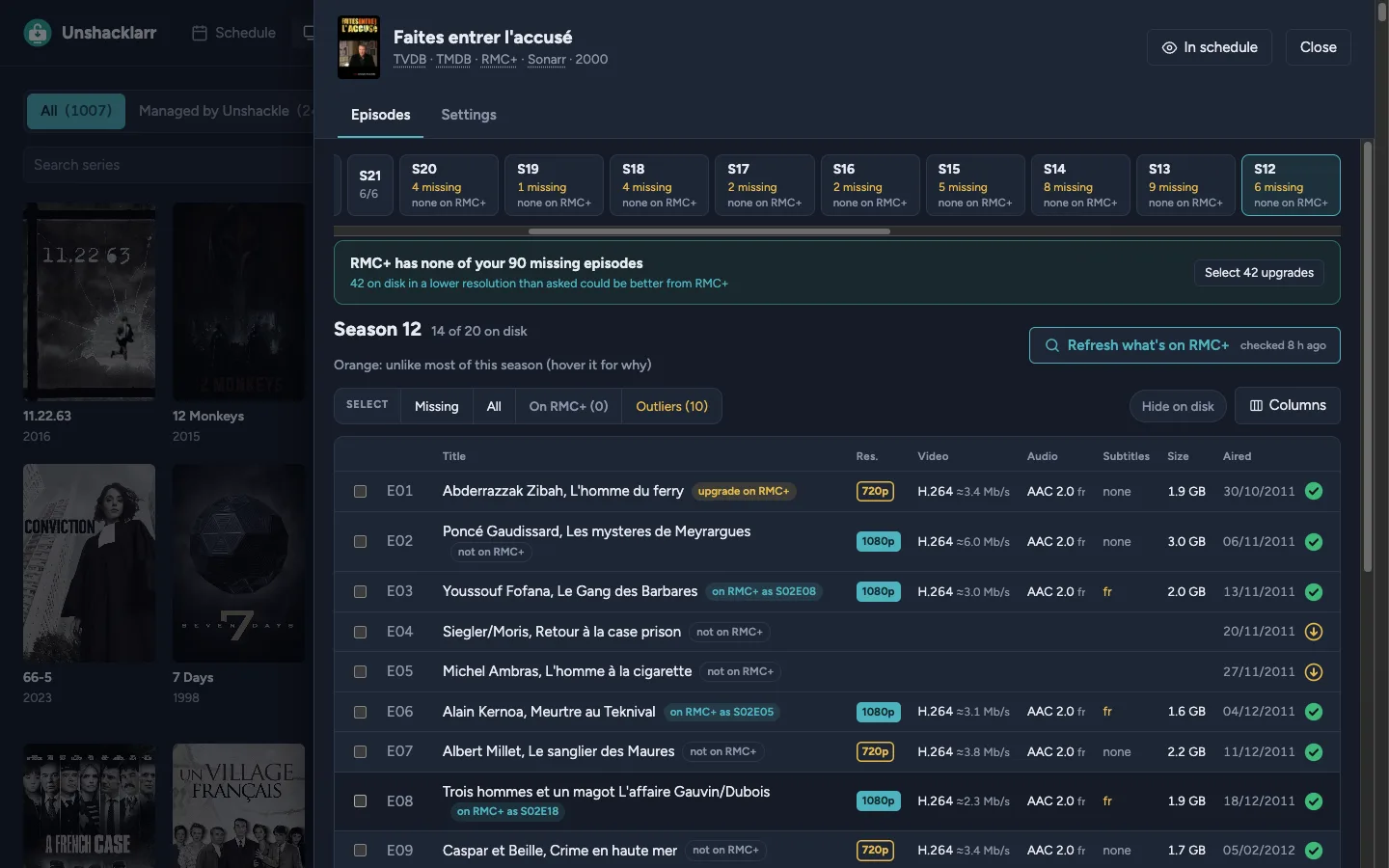
A series' episodes, season by season: what is on disk, what is missing, and what the service has
🎞️ A series: each episode's resolution, codecs, languages and size, and what the service has.
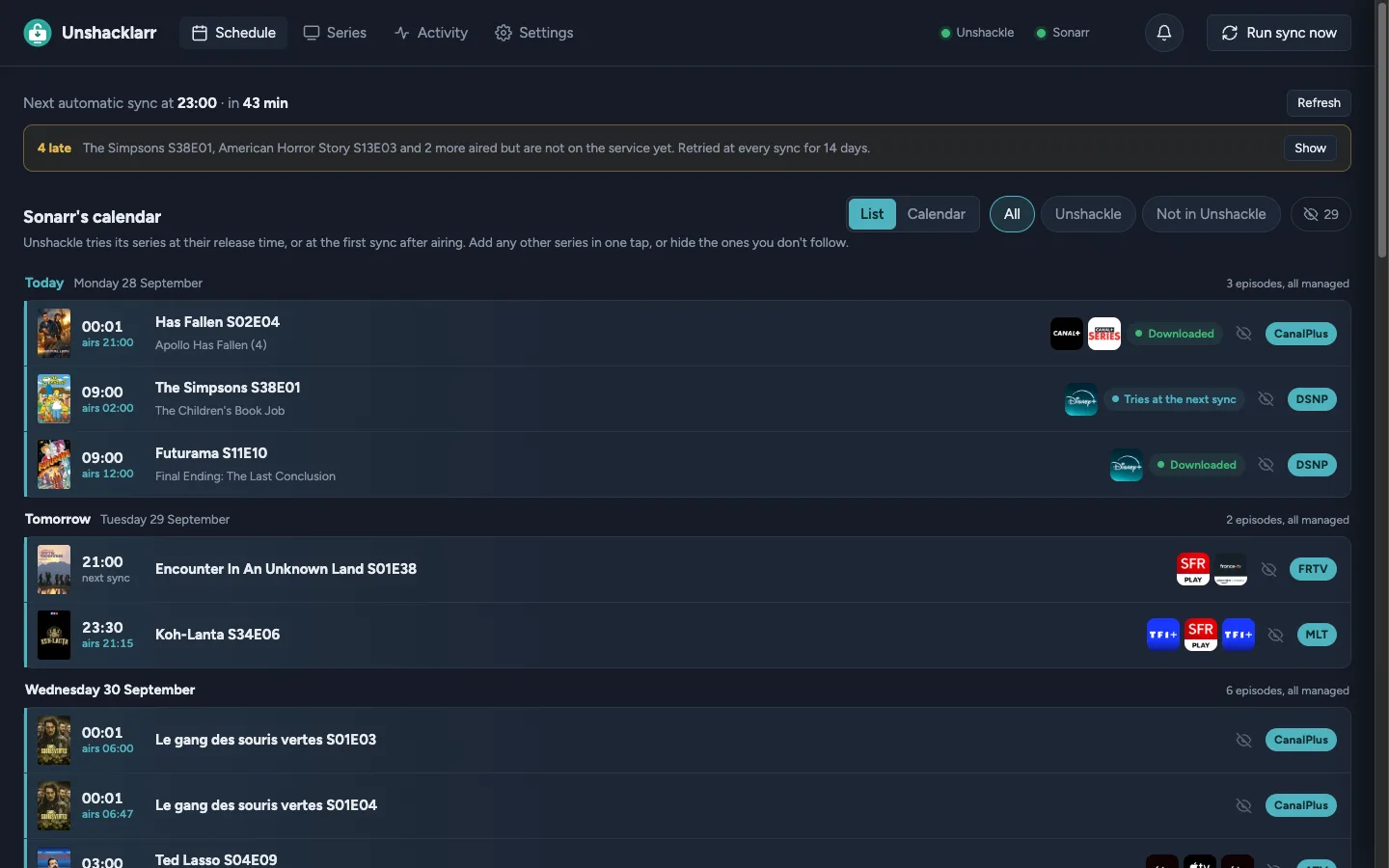
The Schedule: the coming episodes by day and the time each is tried
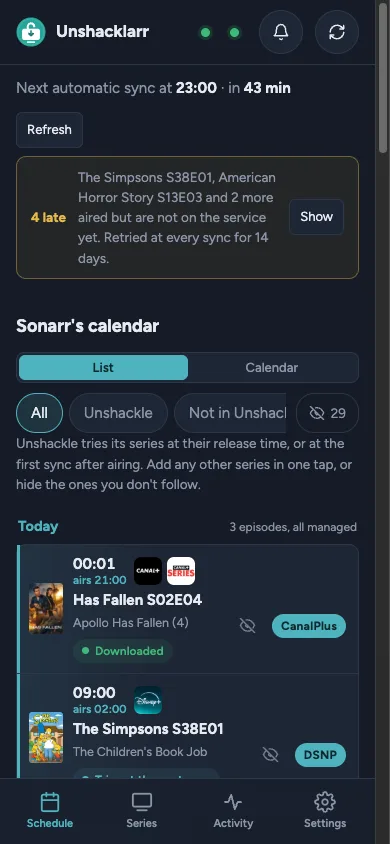
📅 Schedule: the coming episodes by day, when each is tried, the late ones in one banner.
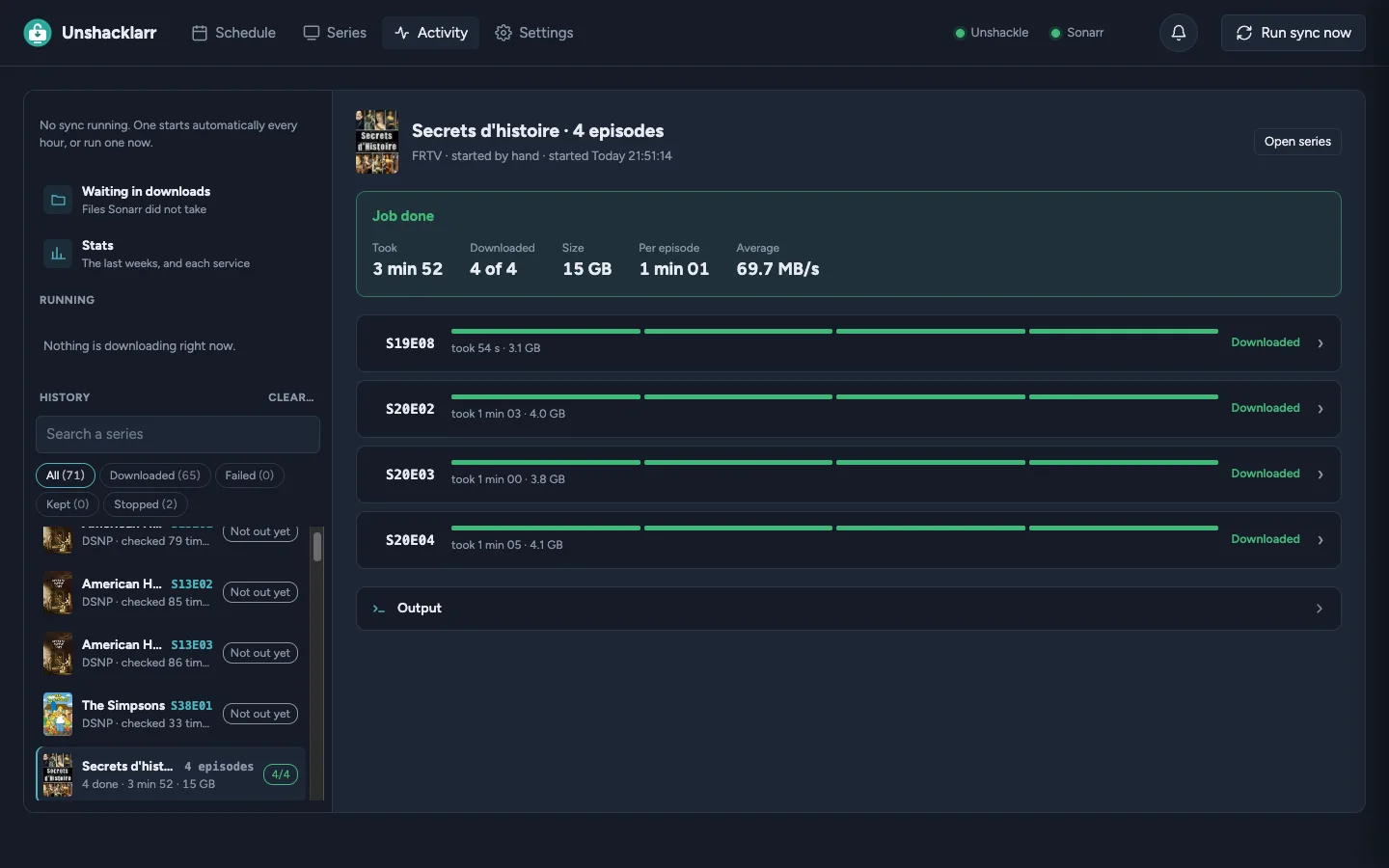
Activity: a finished job, its time, size and episodes
📈 Activity: downloads live, track by track and through the mux, then their history and stats per week and per service.
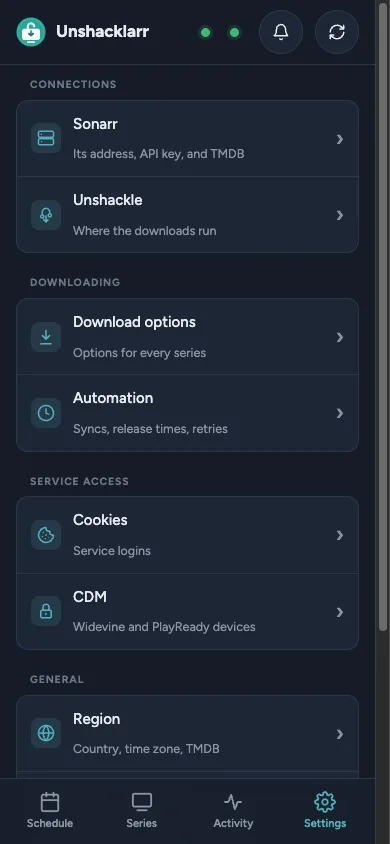
The Series page on a phone The Schedule on a phone Settings on a phone, as a list of sections
📱 On a phone: the same app, with a tab bar.
## 🚀 Quick start You need: - ⬇️ **Unshackle** 5.4.0 or later, 6.0 included, set up with its services, cookies and CDMs; - 📡 **Sonarr** v4, or v3; - 🎞️ **MKVToolNix** (`mkvmerge`, `mkvpropedit`), which Unshackle needs too; the Docker image has it. > [!NOTE] > A few extras need what Unshackle itself does not have yet: describing, testing and reprovisioning > CDM devices, downloading through a remote server (`--remote`), a TV login's link and code, and > Unshackle's own log, live in Activity. Without them, everything else works. Answering a service's > question during a download (a code sent by e-mail) needs Unshackle 6.0 or later. > > **Unshackle 6** lets an API key use the proxies of `unshackle.yaml` (a country code such as `au`, or a > provider) only once it is allowed. Run by Unshacklarr on the same computer, its key always is; with > Docker or another server, Settings › Unshackle offers to allow it the first time a download is refused. > By hand: a key listed under `serve: users:` loses the rights the unlisted admin key has, so list it > with all of them, then restart Unshackle (5.4 reads `server_cdm` and the devices, and ignores the rest): > > ```yaml > serve: > users: > : > devices: [] > playready_devices: [] > username: api_user > admin: true > server_cdm: true > server_vault: true > server_accounts: true > server_proxy: true > ``` **Docker** pulls Unshacklarr's image and runs Unshackle in a container of its own too, built once from its source (on an x86-64 host). **On the computer where Unshackle runs**, Unshacklarr uses the Unshackle you already have. ### 🐳 With Docker 1. **Get the two files** it takes, in a folder of their own: ```bash mkdir unshacklarr && cd unshacklarr curl -fsSLo docker-compose.yml https://raw.githubusercontent.com/OwnzZzZ/Unshacklarr/main/docker-compose.example.yml curl -fsSLo .env https://raw.githubusercontent.com/OwnzZzZ/Unshacklarr/main/.env.example ``` 2. **Fill in `.env`:** | In `.env` | What to put | |---|---| | `PUID`, `PGID` | The user and group Sonarr runs as, so that it can move the files. | | `TZ` | Your time zone, e.g. `Europe/Paris`: release times use it. | | `DOWNLOADS_DIR` | A folder of this host for the downloads, that Sonarr's container mounts too. | | `SONARR_DOWNLOADS` | That same folder, as Sonarr sees it in its container. | | `UNSHACKLE_API_KEY` | A long random string (`openssl rand -hex 32`), also given to `unshackle.yaml` below. | | `SONARR_URL` | Sonarr as this container reaches it (see step 5). | 3. **Give it your Unshackle config**: `unshackle.yaml`, `Cookies/`, `WVDs/` and `PRDs/` in `./unshackle`, your services in `./services` (Unshackle itself ships only an `EXAMPLE` one). In `unshackle.yaml`, add the API key, and the folders as the container sees them (by default, Unshackle looks for them in its own install, which it cannot write): ```yaml serve: api_secret: the-UNSHACKLE_API_KEY-of-.env directories: cookies: /config/unshackle/Cookies wvds: /config/unshackle/WVDs prds: /config/unshackle/PRDs cache: /data/cache temp: /data/temp logs: /data/logs ``` 4. **Create the folders it mounts**, so that Docker does not create them owned by root: ```bash mkdir -p data unshackle-data "$(grep ^DOWNLOADS_DIR= .env | cut -d= -f2)" ``` 5. **Reach Sonarr**: if it runs in another compose project, uncomment the `networks:` lines of `docker-compose.yml` with the name of its network (`docker network ls`). Otherwise set `SONARR_URL` to an address this container can reach, such as `http://:8989`; not `localhost`, which is the container itself. 6. **Start it** (the first time, it builds Unshackle's container: a few minutes), read the setup code in its log, and open **http://<server>:8788**: ```bash docker compose up -d docker logs unshacklarr ``` The setup asks for a password, Sonarr's URL and API key (in Sonarr › Settings › General) and [the downloads folder as Sonarr sees it](#downloads-folder). Then, in **Series**, pick a service for each series you want. **Updating:** `docker compose pull unshacklarr && docker compose up -d --no-deps unshacklarr` brings a new Unshacklarr and leaves Unshackle running: without `--no-deps`, Compose may recreate Unshackle too (Unshacklarr depends on it), which cuts the downloads going on and leaves Unshacklarr saying Unshackle is unreachable until it has started again. For a new Unshackle, when nothing is downloading, `docker compose build --pull unshackle && docker compose up -d`. **On a Synology NAS:** its shutdown marks the containers as stopped, so `restart: unless-stopped` leaves them off after a reboot. Use `restart: always` there. On a small NAS, Settings › Unshackle › Downloads at once set to 1 keeps the disks from being saturated.
🍴 A fork of Unshackle, or a serve that already runs elsewhere - **A fork**: build Unshackle's image from it, then start as above. ```bash docker compose build --build-arg UNSHACKLE_REPO= --build-arg UNSHACKLE_REF= unshackle docker compose up -d ``` - **`unshackle serve` already running somewhere**: leave the `unshackle` service and the `depends_on: [unshackle]` line out of `docker-compose.yml` (nothing is built then), and in the setup pick **Remote**, with its address and API key.
### 🖥️ On the computer where Unshackle runs ```bash uv tool install git+https://github.com/OwnzZzZ/Unshacklarr.git # or: pipx install git+https://github.com/OwnzZzZ/Unshacklarr.git unshacklarr ``` Open **http://localhost:8788**, enter the **setup code** printed at start, and pick **Local**: Unshacklarr starts `unshackle serve` itself, with your usual `unshackle.yaml`, and stops it when it quits. The setup then asks for the same as with Docker. > [!TIP] > If `unshackle` is not on your `PATH` (a git clone run with `uv run`), give the full path to it in > the **Unshackle command** field, e.g. `/home/you/unshackle/.venv/bin/unshackle` (no `~`). Stuck somewhere? Ask on the **[Discord](https://discord.gg/5HmNgaGASy)**. ## 🛡️ Reverse proxy > [!WARNING] > **Do not open port 8788 to the internet.** Unshacklarr holds the keys to your Sonarr, to your > Unshackle and its devices: keep it on your network, and reach it from outside only through a > reverse proxy, a VPN or a firewall that chooses who gets in. | Put in front of it | What it gives | |---|---| | 🔀 **A reverse proxy**: Nginx Proxy Manager, Caddy, Traefik | HTTPS, which the phone app and its notifications need, and a second lock before the page: an access list, basic auth, or a sign-in such as Authelia or Authentik. | | 🔐 **A VPN**: WireGuard, Tailscale | The page reachable from your own devices only, as if at home. | | 🧱 **A firewall** | Port 8788 open to your network only, never forwarded by the router. | Behind a reverse proxy: - **Publish the port to the proxy only**: `127.0.0.1:8788:8788` in `docker-compose.yml` when the proxy runs on the same host, or no `ports:` at all when it shares a Docker network with Unshacklarr. - **Pass on the client's address and the scheme**: `X-Real-IP`, as the login limit counts tries per address (and trusts that header from a private address only), and `X-Forwarded-Proto`, so that the session cookie is marked `Secure` over HTTPS. Nginx Proxy Manager sends both. - **Let WebSockets and streams through**: Activity's output is a WebSocket and its live view a stream (in Nginx Proxy Manager, turn on *Websockets Support*). - **Sign in once, at the proxy** (optional): when Authelia or Authentik already asks who you are, Settings, Account, *Sign in through a reverse proxy* takes the header that names you (`Remote-User`) and the proxy's addresses. The header is believed from those addresses only; the password is still asked again before the most sensitive changes. ## ⚙️ Configuration Everything is set in the page; these are the parts worth knowing before you start. ### 📂 The downloads folder An episode downloads into its own folder, `unshackle--S01E02`, inside a downloads folder that three programs reach: Unshacklarr (to join parts and rename), Unshackle (to write the files) and Sonarr (to import them). Each may see it at another path: | Setting | The downloads folder… | Empty means | |---|---|---| | **Downloads folder** (Settings › Unshackle) | as Unshacklarr sees it | a `downloads` folder in Unshacklarr's settings folder | | **Downloads folder, as Unshackle sees it** (Remote only) | as `unshackle serve` sees it | the same path | | **Downloads folder, as Sonarr sees it** (Settings › Sonarr) | as Sonarr sees it | the same path | With the example compose file, both containers mount `DOWNLOADS_DIR` at `/downloads`; a Sonarr that mounts its parent folder at `/downloads` sees it as `/downloads/unshacklarr`, the value of `SONARR_DOWNLOADS` in `.env.example`. > [!NOTE] > A folder that stays there is an episode waiting for Sonarr: it is not downloaded again. When > Sonarr keeps its own file (the download was not better), you get a warning, and the folder waits > in Activity › Waiting in downloads, to import anyway or delete. After 14 days it is deleted > (Settings › Automation › Delete them after; 0 keeps them). **Download only** (Settings › Automation › After the download, or a series' own page): the episode is downloaded, checked and named, then waits in Activity › Waiting in downloads for you to import it by hand. Those folders are never deleted on their own. **Other Unshackle servers** (Settings › Unshackle): more `unshackle serve`, one behind a VPN say, each with its address, API key and the downloads folder as it sees it. A service downloads with the one picked for it in Settings › Download options › Per service; a service only one of them has goes to it. Its downloads folder left empty is the main server's. Each one is watched: its state shows in Settings, and you are told when it goes down and when it is back. **Other Sonarr instances** (Settings › Sonarr): a second Sonarr with its own library, each with a name, its address, API key, the downloads folder as it sees it, and its own quality ladder and After the download. The series set up in Unshacklarr are downloaded for each instance that has them (by TVDB id), into folders named after it (`unshackle-sonarr-2--SxxEyy`), and imported into it. Episodes, Catch up and Upgrades work with each one; new episodes come at their release time and with the automatic sync, as for the main Sonarr. The main Sonarr can be named too (Settings › Sonarr › Name); a badge on each series names the libraries it is in. **Upgrades** (Activity): the episodes on disk in a lower quality than the series' quality ladder asks for, that the service now has better. They are checked automatically every 7 days, each episode's answer kept 30 days, and replaced only when you tick them (Settings › Upgrades). **Muxing progress** (Activity): once every track is in, Unshackle decrypts them and muxes the file. Activity shows how far the mux is when Unshacklarr can read Unshackle's work folder (its `directories: temp`): on the same computer it always can; with Docker, mount that folder read only and set `UNSHACKLE_TEMP_DIR`, as `docker-compose.example.yml` does. Without it, the step shows how long it has been going. **Catch up** (Activity): the automatic sync only takes new episodes. The aired episodes your series still miss (those from before a series got its service, or that the sync gave up on) are listed there, within 7, 30 or 90 days or all, and downloaded together. ### 🎛️ Download options Options are Unshackle's own, written as on its command line (`--quality 1080`, `--a-lang fr`). They stack in three levels, each overriding the one before: **defaults** for every series, **per service** (`--proxy ca` for one service), then **per series**. The Schedule shows each download as the `unshackle dl` command it amounts to. Every option `unshackle serve` takes is offered; those Unshackle 6 added (`--cdm`, `--proxy-download`, `--forced-subs-only`, `--require-audio`…) say so, as an older Unshackle ignores them without a word. **Quality ladders** (Settings › Quality) go further than a fixed `--quality`: an ordered list of steps (a codec, a range, a height from… to…), tried against the episode's real tracks just before the download. The first step it has a track for sets the quality, codec and range asked for; when none does, the episode fails with the tracks it has, and nothing outside the ladder is downloaded. Three come built in (1080p, 4K then 1080p, Archival). A ladder is picked for every series, per service, or per series, the same three levels as the options. A track is measured as Unshackle's `--quality` does, by its 16:9 height (a 1920x800 film is 1080p). A ladder can also hold an audio and a subtitle language order (en-AU, then en), used unless the series or its service sets `--a-lang` or `--s-lang`. ### 🔑 Cookies and CDMs Settings › Cookies and Settings › CDM manage Unshackle's own files: its cookie files, its Widevine (`.wvd`) and PlayReady (`.prd`) devices, and which device each service uses (the `cdm:` section of `unshackle.yaml`, where only that service's line changes). Unshackle reads them anew for every download. Unshacklarr must see those files: - **on the same computer**, it asks Unshackle where they are; - **with Docker**, mount Unshackle's config folder in both containers and set `UNSHACKLE_CONFIG_DIR`, as `docker-compose.example.yml` does; - a `serve` on **another machine** with no shared folder keeps them to itself. Describing, testing and reprovisioning devices goes through `unshackle serve`, which has the DRM libraries. **One device for a series or a service** (Unshackle 6): the `--cdm` option, its value picked among the devices above, overrides the `cdm:` section for those downloads. Unshackle takes it only once `unshackle.yaml` allows it: ```yaml serve: cdm_overrides: true # or a list of the devices allowed ``` ### 📁 Where things are kept | | Settings, history and caches | |---|---| | 🐧 Linux | `~/.config/unshacklarr` | | 🍎 macOS | `~/Library/Application Support/Unshacklarr` | | 🪟 Windows | `%APPDATA%\Unshacklarr` | | 🐳 Docker | `/data`, that is `./data` next to `docker-compose.yml` | `UNSHACKLARR_DATA` moves them. The page listens on port `8788` on every address; `PORT` and `HOST` change that. ## 🧰 Options worth knowing These are off until you turn them on: - **Add audio track** (Settings › Download options › Languages). When your preferred audio language becomes available, only that audio track is downloaded and added to the file in your library. Sonarr then imports the updated file. Unshacklarr needs access to your library: set its folder as Sonarr sees it and as Unshacklarr sees it. If the file can't be found, the whole episode is downloaded instead. - **Fallback service** (on a series page, in Source). A second service and the series URL on it, used when the main service doesn't have the episode yet, or not in an accepted language. If that service numbers episodes differently, set its `season_map` or `episode_offset` under `fallback:` in `config.yaml`. - **Auto release times** (Settings › Automation). When 3 episodes of a series come out at the same time, that time becomes its release time. Release times you set yourself are never changed. - **Download window** (Settings › Automation). Automatic downloads only run between two times, which can span midnight. Release-time downloads can follow it too. Episodes you start by hand are not affected. After an update, the **What's new** button in the header lists the new options, and each one shows a "New" badge until you have seen it. ## 💾 Backups Settings › Account › *Backups* downloads every setting but the password (the series, their options, the ladders, the notifications, the API keys: keep the file private), and *Restore from a file* puts one back. Set *Back up automatically every N days*, and a backup is also saved in the data folder's `backups` folder, the newest few kept. To rebuild an install, put a backup in that folder (or keep the file at hand), start Unshacklarr, and choose *Restore from a backup* in the setup: the setup code and a new password are enough. ## 🔌 API Other programs (a script, Home Assistant, iOS Shortcuts) can check on Unshacklarr, start a sync or a download, stop one, answer a service's question and read the notifications, with a key created in Settings › Account: ```bash curl -H "X-Api-Key: " http://localhost:8788/api/v1/status ``` Every route and its answer: **[docs/API.md](docs/API.md)**. ## 💬 Community | For | Where | |---|---| | 💬 Questions, help with Unshacklarr, ideas | **[Unshacklarr's Discord](https://discord.gg/5HmNgaGASy)** | | 🐛 A bug in Unshacklarr | an [issue](https://github.com/OwnzZzZ/Unshacklarr/issues), with what Activity shows | | 🧩 Unshackle itself: a service, a login, a CDM, a download it fails | **[Unshackle's GitHub](https://github.com/unshackle-dl/unshackle/issues)** or **[Unshackle's Discord](https://discord.gg/mHYyPaCbFK)** | | 🔒 A security flaw | a [private security advisory](https://github.com/OwnzZzZ/Unshacklarr/security/advisories/new), never a public issue | > [!IMPORTANT] > **Unshacklarr only drives `unshackle serve`, through its API.** It doesn't download, log in or decrypt anything > itself: when a service, its cookies or a CDM fail, Unshackle says so in Activity's output, and it is for > Unshackle's own GitHub or Discord, not Unshacklarr's. ## 🔒 Security > [!NOTE] > Unshacklarr was written with an AI coding assistant. That is a reason to check it, not to take > it on trust. Nobody can *prove* a program secure; what follows is what protects Unshacklarr, > how it was checked, and where its limits are, so that you can judge for yourself. Unshacklarr is a self-hosted app for **one person**. It holds the keys to your Sonarr and to Unshackle, it can read and change Unshackle's cookie files and CDM devices (private keys), and it decides which `unshackle` command runs: whoever has the password controls all of that, so the page itself is what is locked down. In local mode, `unshackle serve` listens on 127.0.0.1 only, with a key made up at each start. | Threat | What stops it | |---|---| | 🚪 **Someone reaches the page** | A password (hashed with scrypt, compared in constant time), five wrong ones per address and thirty in all every 5 minutes, each counted before it is checked. The first run asks for a setup code printed in the server's log: nobody who finds a fresh install can claim it, nor see its addresses and folders. | | 🍪 **A stolen or forged session** | The session cookie is signed (HMAC-SHA256), expires after 30 days, and is `HttpOnly`, `SameSite=Strict`, and `Secure` over HTTPS. Logging out ends it on the server too. Changing the password, or logging out other devices, ends every other session and turns off every device's push notifications. | | 🔌 **The API key** | It opens `/api/v1` only, never the password, cookies, devices or settings. It replaces a file of the library only when asked to (`"replace": true`), as the page's Replace anyway does. Only its hash is kept; it is shown once, when created, after the password is asked again. | | 🌐 **Another site acting as you (CSRF)** | Every request that changes something needs a custom header that another site's page cannot send without a CORS preflight, which the server never grants. | | 💉 **Injected script (XSS), framing** | The page builds everything as DOM nodes with `textContent`; `innerHTML` is used only for fixed icons written in the code, never for data. Every script it runs is served by Unshacklarr itself, no CDN, and it refuses to be framed by another site. | | 🔑 **Keys in the browser** | The keys of Sonarr, Unshackle and TMDB never reach it: the page only learns whether one is set, and a saved key is never sent to a new address unless you type it again, nor a remote CDM's secret to a new server. Notification addresses and a proxy's password reach it masked. `unshackle.yaml` shows as it is only in its editor, after the password is asked again. | | 💾 **Secrets on disk** | `config.yaml` and the Web Push key are readable by their owner only; cookie and device files too, or by their group as well when their folder is shared by group (setgid and group-writable), never by other users. A device's private key is never sent back. | | 📁 **Paths outside their folder** | Cookie and device names are checked against a strict pattern, anything that looks like a path is refused, and a symbolic link planted in a shared folder (`unshackle.yaml`, the downloads) is never followed. | | 🛰️ **The server fetching what you ask (SSRF)** | Testing a Sonarr or Unshackle address needs the setup code (before setup) or a session (after). | | 📦 **Dependencies** | Seven direct runtime dependencies (aiohttp, Apprise, PyYAML, requests, pywebpush, cryptography, py-vapid), 28 packages in all, each pinned by `uv.lock`, in the image too. DRM libraries are not among them: devices are described and tested by `unshackle serve`, which already has them. Unshackle's image checks the tools it downloads against pinned SHA-256 sums, and the CI pins what it runs. |
🔍 How it was checked - ✅ **Tests.** Automated tests run on every push, including security regressions: a saved key or secret never follows a new address, secret files are readable by their owner only, names and links cannot lead out of their folder, wrong passwords sent at once are all counted, tokens never reach the page, a hostile line cannot slow translations down, the API key opens `/api/v1` only. - 🕵️ **A full audit, with about 400 AI agents** (October 2026). Ten attack surfaces, from sessions to the supply chain and the public history; every finding challenged by three sceptics who tried to refute it, most reproduced with a script. Nothing critical nor high; the 10 medium findings were fixed (among them a login limit a burst could bypass, notification tokens sent to the page, a push device that outlived a password change, the terminal loaded from a CDN, a slow regular expression in translations, links planted in shared folders, unverified downloads in the CI and in Unshackle's image), and most low ones with them. - 🕵️ **An earlier multi-agent review** found three lower-severity issues, fixed since: `config.yaml` readable by other local users, a saved key that could follow a new URL, URL tests before setup. - 🔁 **Reviews along the way.** Changes also went through automated security reviews as they were made; their findings (an unsafe link scheme, a fragile admin-key check) were fixed straight away. - 🧾 **The history.** The whole history was scanned for secrets and personal data before publishing.
> [!WARNING] > **Limits.** No independent human audit has been done. It is built for **one trusted person**: no > user accounts or roles. Keep it [behind a reverse proxy, a VPN or a firewall](#reverse-proxy), never > straight on the internet. **Lost the password?** Set a new one where Unshacklarr runs; settings and series stay: ```bash unshacklarr reset-password docker exec -it unshacklarr unshacklarr reset-password # with Docker ``` ## 🗺️ What's new and next Every change, version by version: **[CHANGELOG.md](CHANGELOG.md)**. Settings shows the version running. > [!TIP] > **Coming next, for Sonarr 5:** Sonarr 5 is still in beta, so what Unshacklarr does with it waits in the > [`dev-sonarr-v5`](https://github.com/OwnzZzZ/Unshacklarr/tree/dev-sonarr-v5) branch until Sonarr 5 is released. > That branch has everything in this version, plus: > > - **Languages** (Activity): your files without your audio languages, read from Sonarr 5's own tracks. Watch them > for the preferred audio, or download them again. > - **Titles in your language:** a series whose titles Sonarr gives in English offers, on its page, to have them in > yours, so that its episodes match the service's better. > - **Episode order:** a series Sonarr numbers in another order (DVD, Netflix…) says so in its Numbering. When that > order changes after the numbering was set, new episodes wait until you confirm the numbering. > > It is made for Sonarr 5 and has no ready-made image. To try it, build one and use it in place of > `ghcr.io/ownzzzz/unshacklarr` in `docker-compose.yml`: > > ```bash > docker build -t unshacklarr:sonarr-v5 https://github.com/OwnzZzZ/Unshacklarr.git#dev-sonarr-v5 > ``` > > Without Docker: `uv tool install git+https://github.com/OwnzZzZ/Unshacklarr.git@dev-sonarr-v5`. Tell us on the > [Discord](https://discord.gg/5HmNgaGASy) or in an issue how it goes.
🛠️ Development, translations and releases #### Run it from the source ```bash uv sync --group test uv run --group test pytest UNSHACKLARR_DATA=/tmp/unshacklarr uv run unshacklarr ``` The page is one file, `unshacklarr/static/index.html`, with no framework and no build step. Three things next to it are made by tools: - its translations, `static/i18n/*.json`: `python tools/i18n/extract.py` lists the English texts in `en.json`, and each language's file translates them; - the `unshackle.yaml` editor, `static/codemirror.js`: `tools/codemirror/build.sh`; - the keys that editor offers, `static/unshackle-keys.json`: `python tools/unshackle-keys.py `. #### Make a release 1. Move the changelog's *Unreleased* entries under a new version and date, and update the compare links at its end. 2. Set that version in `pyproject.toml`, `unshacklarr/__init__.py` and the README's badge (its URL and its `alt`; a test checks they all agree with the changelog), then run `uv lock`: the CI and the image install with `uv sync --locked`, which stops on a lockfile that names the old version. 3. Commit, then push `main` and a tag: ```bash git tag -a v1.1.0 -m "Unshacklarr 1.1.0" && git push origin main v1.1.0 ``` #### Continuous integration The tests run on every push, on Forgejo (`.forgejo/workflows/ci.yml`) as on GitHub (`.github/workflows/ci.yml`). On `main`, each also builds the image and pushes it to its own registry as `:latest` and as the first 12 characters of the commit. A version tag `v1.1.0` adds `:1.1.0` to that same image, not built again (`tools/ci/retag.sh`; built only if `main` has none for the commit), and on GitHub makes the release, its notes taken from the changelog: - GitHub: `ghcr.io/ownzzzz/unshacklarr`, with no secret to add; - Forgejo: `//unshacklarr`, given a `REGISTRY_TOKEN` secret (a token allowed to write packages). The example compose file uses that image: a server only pulls it, `docker compose pull unshacklarr && docker compose up -d --no-deps unshacklarr`.
## 📜 License Unshacklarr is free software under the [GNU General Public License v3.0](LICENSE), like Unshackle and Sonarr: you may use, study, share and change it; whoever distributes it, changed or not, passes on the same freedoms with its source.