dsh-capability-menu
One unified capability management surface for DeepSeek Harness: control the exposure level (context footprint) and execution of Tools and Skills


简体中文 · English
## Table of Contents
- [Capability Overview](#capability-overview)
- [Quick Install](#quick-install)
- [Exposure Policy](#exposure-policy)
- [Configuration](#configuration)
---
## Capability Overview
dsh-capability-menu is a Cordis plugin for [DeepSeek Harness](https://github.com/deepseek-ai/deepseek-harness). It builds a unified capability catalog (`ctx.capability`) over a large number of tools / skills (MCP tools and harness-native built-in tools) and manages their **exposure level and execution** in three tiers — **Resident / On-demand / Disabled** — so you can adjust the agent's capability boundary at any time, keep a flood of tools/skills out of a single request, and save tokens and context. Changes apply immediately without restarting, and the plugin composes into the Harness runtime purely through the Cordis plugin mechanism — no upstream source is modified. **Without this plugin (policy) mounted, everything stays visible as before; mounted with no rules at all, every capability defaults to Resident.**
### Capability Model
*Capability* is the umbrella concept introduced by this plugin: a Tool and a Skill are different *kinds* of capability.
| kind | provides to the agent | action | notes |
| --- | --- | --- | --- |
| `tool` | executes an action (an MCP tool or a harness-native built-in tool) | `execute` | indexed by `ctx.tools` |
| `skill` | the method / flow / knowledge for a class of tasks | `load` | indexed by `ctx.skills` |
The model gets two meta tools:
| tool | role | corresponding entry |
| --- | --- | --- |
| `meta_search` | search the capability catalog (Tool / Skill), list/detail dual mode | `@daweifu/capability-menu/search` |
| `meta_invoke` | unified execution surface: really executes Tools (full `ctx.tools` pipeline) + loads Skills | `@daweifu/capability-menu/invoke` |
### Capability Management
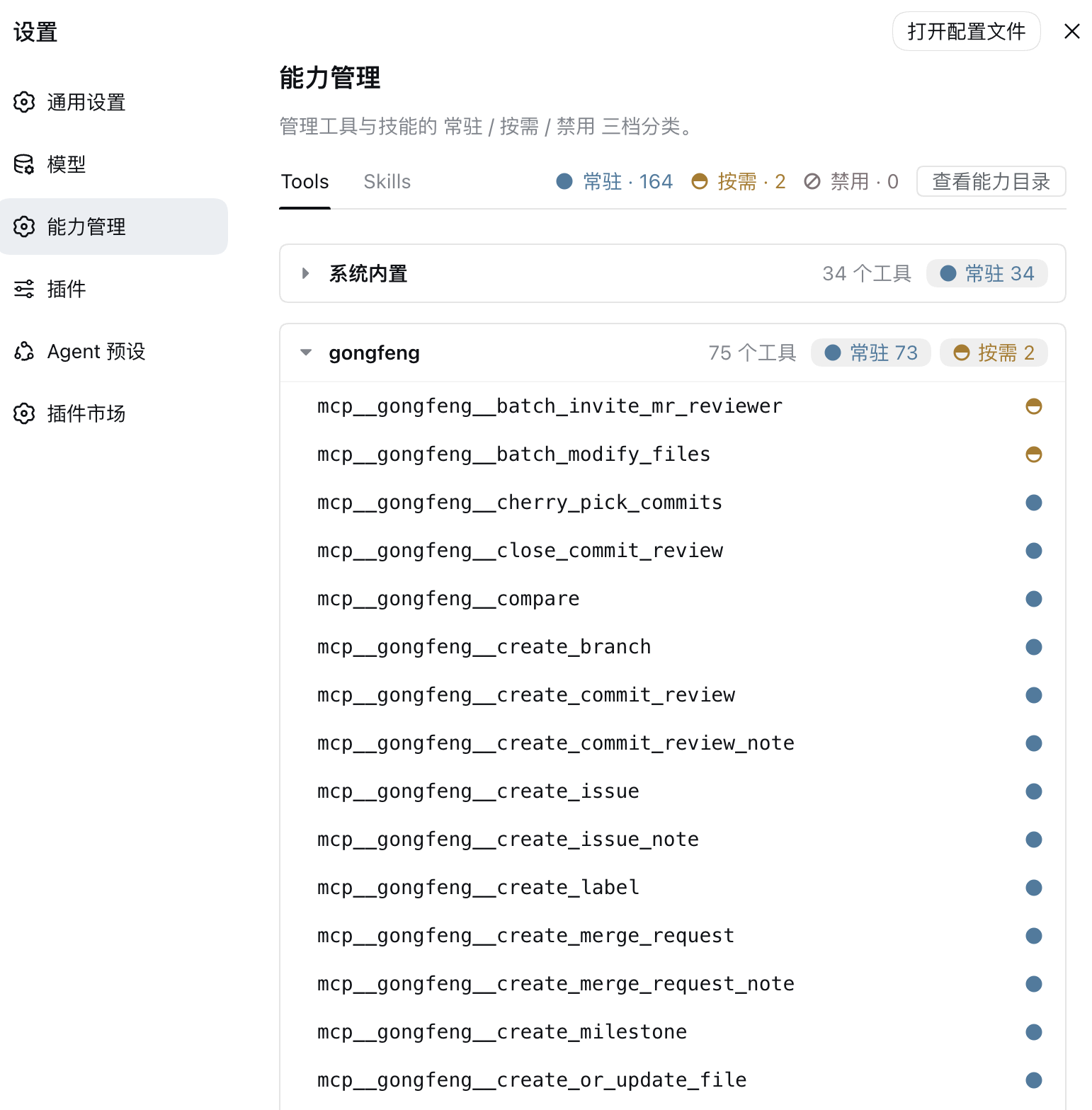
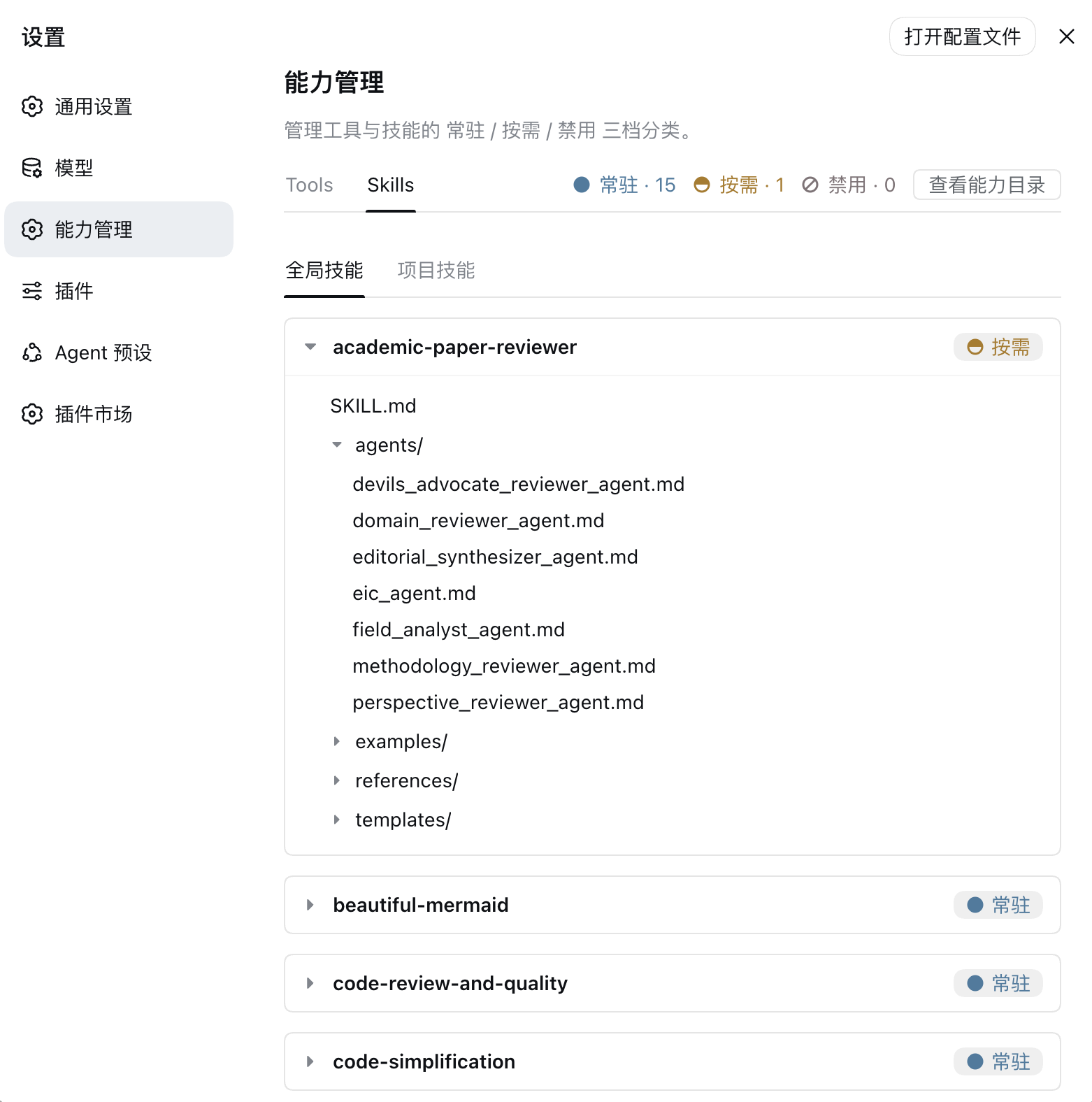
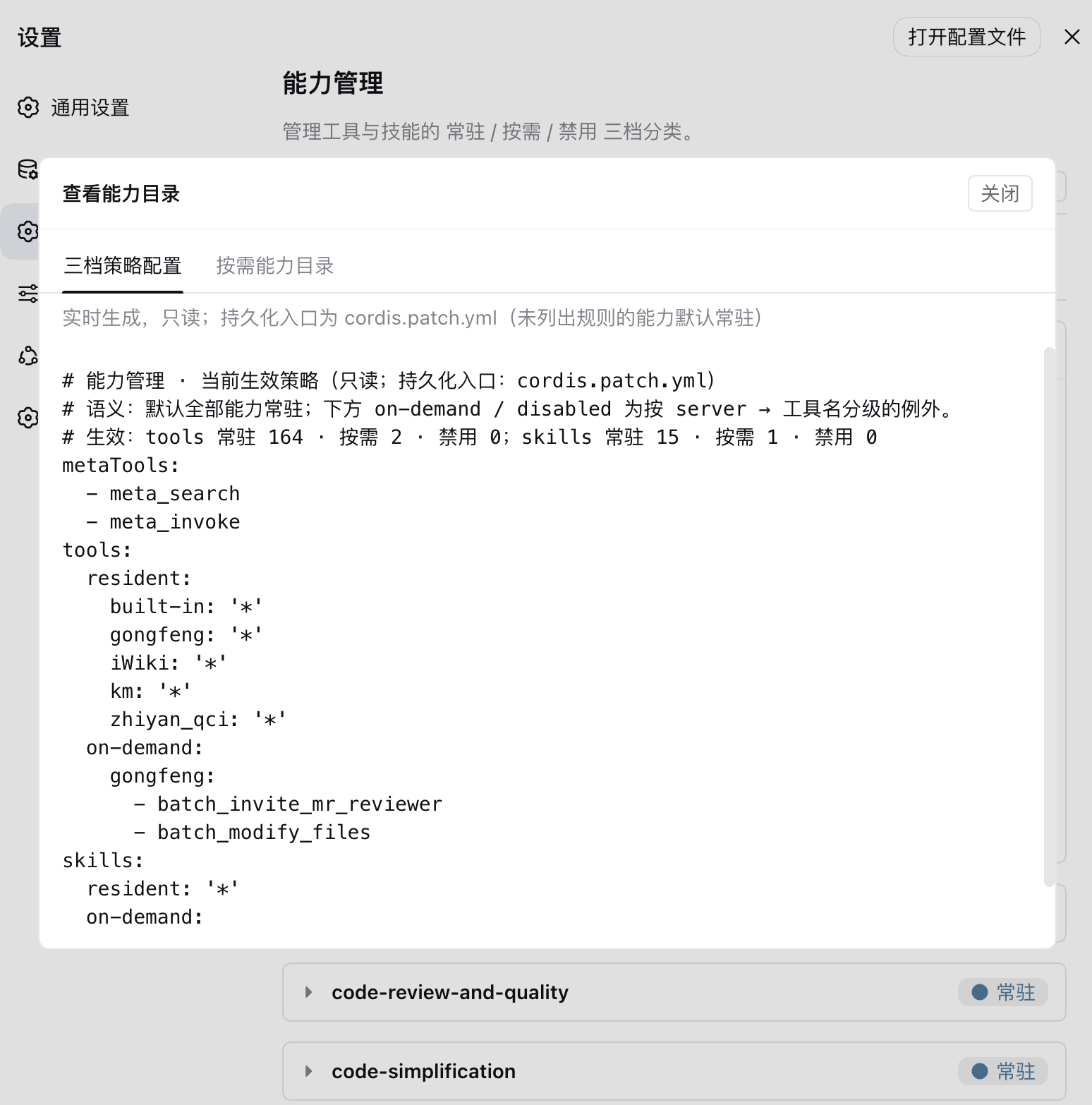
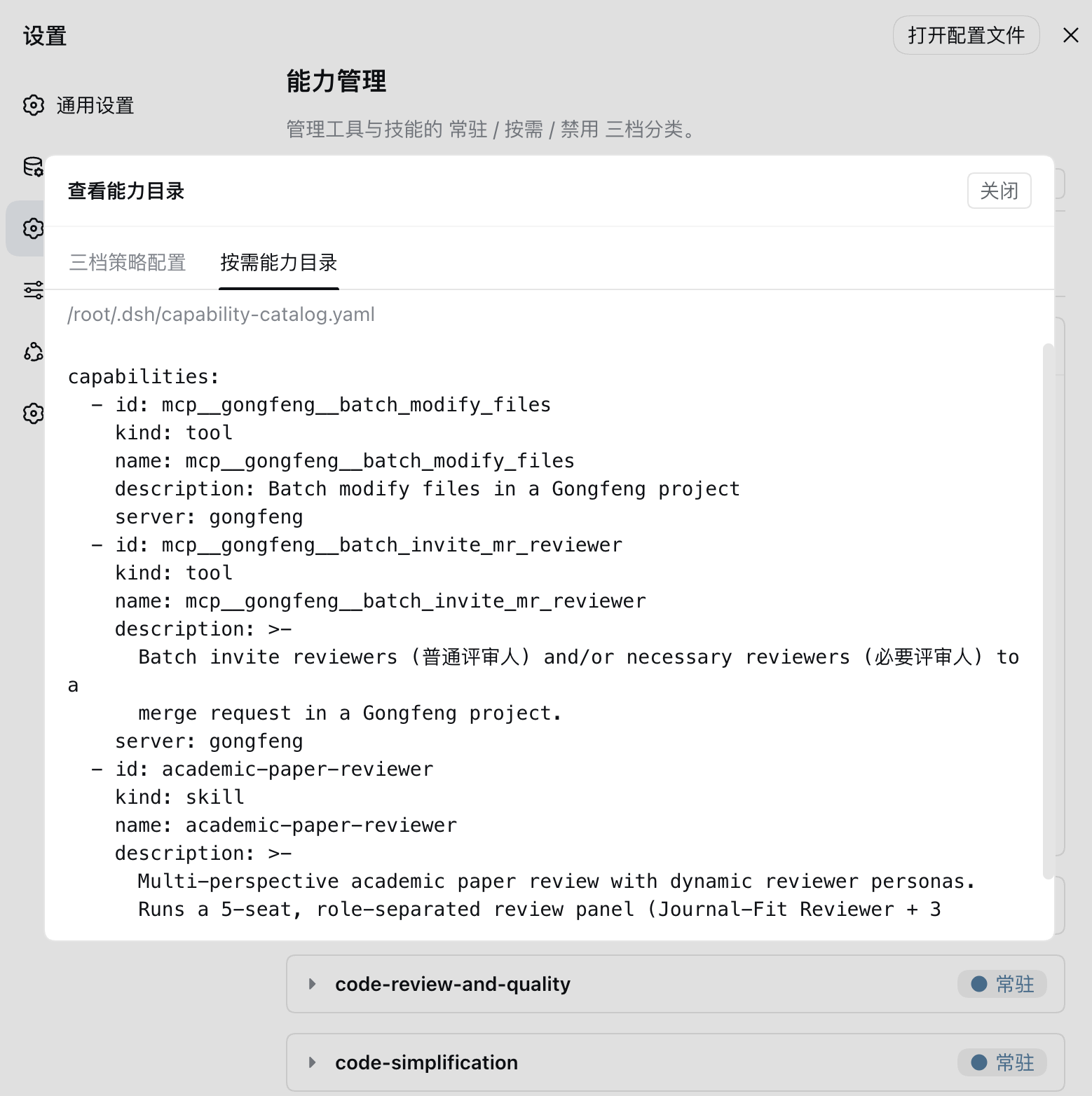
Once installed, a Capability Management tab appears under Settings → General Settings (between "Model" and "Plugins"). It lets you visualize and adjust the exposure policy; changes apply immediately, no restart needed:
- **Tools / Skills tabs**: the top tab bar shows `Tools` and `Skills`; its right side holds the per-class counts, Refresh, and Register capability. The read-only "Policy & catalog" entry sits on the description row in the page header. The Tools tab groups every tool by server (collapsible). MCP tools hang under their own server (`gongfeng`/`km`…); harness-native tools from the agent presets (`bash`/`read`/`write`/`glob`/`grep`…) hang under the reserved "System built-in" group (server key `built-in`). Click a row to view the model-facing tool definition — name / description / parameters.
- **Skills tab**: split into "Global skills" / "Project skills" sub-tabs (both always visible; the empty side shows an empty-state hint), and the per-class counts at the top follow the active sub-tab. Click a skill row to expand its directory tree; click a file to preview its content (e.g. the SKILL.md).
- **Three-state dot & click-to-cycle**: every capability carries a classification dot — solid = Resident, top-half-filled ring = On-demand, ring with a slash (no-entry sign) = Disabled — with per-class counts at the top of the pane; click a capability's dot or a class count to cycle its classification (built-in tools are manageable exactly like MCP tools), and if a higher-priority rule (e.g. a wildcard) overrides it, the UI reports that the classification did not apply.
- **Policy & catalog**: the button on the page header's description row opens a read-only modal with the effective policy in a semantic view — every capability defaults to Resident, so `tools.resident` lists each server as `'*'`, exceptions appear only under `on-demand`/`disabled` grouped by server → tool name (skills have no server dimension, so `skills.resident` is just `'*'`) — plus the materialized On-demand catalog file (`catalogFile`) path and content. The policy shown there is a read-only view; rules are changed by clicking on the page, and the change is written back to the profile's `cordis.patch.yml` once you stop.
- **Register capability**: the top-right button opens a registration form with two sub-tabs — MCP servers and skill directories — and opens on the sub-tab matching the main tab you are on (Tools → MCP, Skills → Skill). The modal holds only the form: what is already registered is visible in the list itself, each entry carrying its own Edit button.
- **MCP servers**: registering one writes an `@deepseek-ai/dsh-mcp-client` row into the patch file and lets **dsh mount it natively** (the plugin does not manage connections itself). Hand-written declarative rows live in the same file and the same table; no dsh restart needed (a live profile hot-reloads the change). Fields: `serverName`, transport (required by `dsh-mcp-client` with no default, so the form picks `streamable-http`: the server runs as an independent process and the client connects over an HTTP endpoint, needing only a URL; `stdio`: the client launches the server as a local subprocess, so its launch information is required), stdio command / args / working directory / environment, http URL / **headers**, timeout (seconds).
> **Headers** carry the credentials: one `Key: Value` per line, e.g. `Authorization: Bearer …`. They are stored in plain text in `~/.dsh/cordis.patch.yml`, exactly as hand-written rows are.
- **Skill directories**: two locations are offered — **Global** (`~/.dsh/skills/`, visible to every session) or **Project** (`/.dsh/skills/`, visible only to sessions whose cwd sits inside that project). For a project you only supply **any existing path inside it**: the project root is derived the way dsh derives it (nearest `.git` above that path, or the path itself when there is none), and the panel reports the path actually written — so a skill can no longer register into a directory dsh never scans. Either way it is a symlink, exactly matching dsh's own skill discovery. Registration validates the `SKILL.md` the way dsh's loader does: the frontmatter must parse as a YAML mapping carrying a string `name` (lowercase letters, digits and hyphens only, e.g. `my-skill`) and a `description`, and any `disable-model-invocation` / `user-invocable` present must read as a boolean (`true`/`false`/`1`/`0`/`on`/`off`…). Failures are reported — including legacy key names such as `disableModelInvocation`, which are rejected with the canonical spelling — so a directory can no longer register here and then be silently skipped by dsh. The skill name comes from the directory name; renaming requires removing and registering again.
- **Edit**: every MCP server group header in the Tools tab and every registered skill row in the Skills tab carries an Edit button that opens the current configuration prefilled, to change, save or remove. **Removal asks for confirmation first**, and states what this particular removal costs: an MCP server loses its patch row (configuration and headers deleted, its `mcp____*` tools with it), while a skill goes one of two ways — a symlink is unlinked and the source directory is left untouched, whereas an entry that is a **real directory** under the skill root is deleted recursively and cannot be recovered. The **built-in group has no Edit button** — it is not a real MCP server, so there is no entry to edit; likewise a skill that is not registered under `~/.dsh/skills/` (a project or bundled skill). A skill row **without** an Edit button shows one of two things, never both (that would say the same thing twice): the action it can take, or where it came from. For skills in **user-level** roots such as `~/.agents/skills` / `customSkillDirs`, an **Adopt** action asks for confirmation and then links the skill into dsh's skill root (**content untouched**, one extra symlink — the same shape the existing entries already have), after which it is editable. The rest state their source — labels naming one directory show that path (e.g. `~/.agents/skills`), category labels read as "custom skill dirs" / "bundled with dsh". Project entries carry an Edit button too (the entry itself supplies which root it belongs to, so you never retype the path); their **location cannot be changed** — moving a skill between roots is remove + register. An MCP server's `serverName` is **read-only** when editing: it forms the tool name prefix `mcp____` and is referenced by existing session history and permission rules, which stop matching once it changes.
- **Refresh**: the Refresh button rebuilds the capability catalog and re-pulls the list. Registering a source triggers this automatically, so you rarely need it by hand; use it after changing a source outside dsh (editing the patch file by hand, symlinking a skill directory yourself).
## Quick Install
Prerequisites: Node.js and the dsh CLI installed (`dsh plugin` forwards to pnpm internally).
### Install from npm (recommended)
A single package ships both the server-side plugin and the front-end Capability Management tab; once installed it shows up under Settings → General Settings:
```sh
dsh plugin --profile web add @daweifu/capability-menu
```
### Install from source
```sh
git clone https://github.com/PKUfudawei/dsh-capability-menu.git
cd dsh-capability-menu
pnpm install # the prepare script builds lib/ (server) and lib/client.js (front-end)
dsh plugin --profile web add ./dsh-capability-menu
```
### Verify the install
```sh
dsh --profile web --dump-config | grep -E 'capability-menu'
```
```
# == @daweifu/capability-menu
- id: capability-menu-registry
name: '@daweifu/capability-menu/registry'
- id: capability-menu-search
name: '@daweifu/capability-menu/search'
- id: capability-menu-invoke
name: '@daweifu/capability-menu/invoke'
- id: capability-menu-policy
name: '@daweifu/capability-menu/policy'
- id: capability-menu
name: '@daweifu/capability-menu'
```
### Uninstall
```sh
dsh plugin --profile web remove @daweifu/capability-menu
```
## Exposure Policy
All capabilities (Tool and Skill) fall into three tiers by their **exposure level** (what the model sees in the context) and their **execution mode**:
### Tools / Skills three-tier exposure and execution
| tier | capability | exposure (model view) | discovery | execution |
| --- | --- | --- | --- | --- |
| **Resident** | tool | full schema in `assembly.tools` → the model's `tools` request payload, visible at every step | none (already resident) | model calls it directly; at runtime it goes through the full `ctx.tools` pipeline |
| | skill | name + description in the `` catalog (body not in the catalog) | none (already resident) | the `skill` tool loads the body on demand (on-demand loading) |
| **On-demand** | tool | not in the payload (zero context cost) | `meta_search` list / `grep` the materialized catalog YAML (`catalogFile`) | executed by `meta_invoke` (via `ctx.tools.execute`, full pipeline); or fetch the schema through detail and call it directly |
| | skill | not in the `` catalog | `meta_search`, or `grep` the materialized catalog YAML (`catalogFile`) | `meta_invoke` loads the SKILL.md body (via `ctx.skills`) |
| **Disabled** | tool | not in the payload | not returned by `meta_search`, not written to the catalog YAML | refused by `meta_invoke`; hallucinated direct calls are also hard-rejected in `tools/pre-execute` |
| | skill | not in the `` catalog | not returned by `meta_search`, not written to the catalog YAML | refused by `meta_invoke`; the `skill` tool is hard-rejected in `tools/pre-execute` |
> **Scope & reserved tools**:
> - The tool tiers cover both `mcp__` cataloged tools and harness-native built-in tools (native tools are grouped under the reserved `built-in` server and are managed in all three tiers exactly like MCP tools). **Do not name a real MCP server `built-in`.**
> - `meta_search`/`meta_invoke` are this plugin's control plane: always Resident, cannot be disabled (a rule that disables one fails at startup). `run_code` is the reserved Code Mode transport: it never enters the catalog, does not appear in Capability Management, and should not get tier rules.
> - **Keep high-frequency core tools Resident**: an On-demand built-in tool leaves the model's resident view and needs a `meta_search` → `meta_invoke` two-hop call.
## Configuration
Rules are declared under the `config` of the `capability-menu-policy` plugin entry in the profile's `cordis.patch.yml` (the outer `- insert:` / `id` / `name` is Cordis patch boilerplate and has nothing to do with the rules):
```yaml
config:
tools:
resident:
- execute_cmd
- get_session_context
- search_kb
- 'mcp__gongfeng__*' # wildcard: everything under this server is resident
on-demand:
- 'mcp__*' # wildcard fallback
- 'server:km:*' # bulk on-demand by server prefix
disabled:
- 'mcp__secret__*' # disabled outranks everything, even resident
skills:
resident:
- debugging
- coding
on-demand:
- legacy_skill # explicit on-demand (unlisted skills default to resident)
disabled:
- forbidden_skill
metaTools:
- meta_search # always resident; cannot be disabled
- meta_invoke
```
> Config keys are the tier words themselves: `resident` (常驻) / `on-demand` (按需) / `disabled` (禁用).
### All configuration options
| Option | Entry | Default | Description |
| --- | --- | --- | --- |
| `tools` / `skills` / `metaTools` | `capability-menu-policy` | see above | Tier rules; runtime memory only, never written to disk |
| `catalogFile` | `capability-menu-registry` | `~/.dsh/capability-catalog.yaml` | Materialized on-demand catalog path; empty disables it |
| `refreshDebounceMs` | `capability-menu-registry` | `200` | Debounce window (ms) for change-event rebuilds; `0` disables debouncing |
| `patchFile` | `capability-menu-policy` | `~/.dsh/cordis.patch.yml` (`$DSH_HOME` wins) | Patch file that MCP server registration writes to |
| `skillsDir` | `capability-menu-policy` | `~/.dsh/skills` | Skill root used by skill directory registration |
| `persistDebounceMs` | `capability-menu-policy` | `1500` | Debounce window (ms) before a clicked tier change is written back to the patch file |
**Rule priority** (first match wins; within one tier, an exact rule beats a wildcard):
| priority | rule | example | effect |
| --- | --- | --- | --- |
| 1 | `disabled` exact | `disabled: [forbidden_skill]` | hardest deny, overrides everything |
| 2 | `disabled` wildcard | `disabled: ['mcp__secret__*']` | block a whole group |
| 3 | `resident` exact | `resident: [bash]` | keep one capability resident |
| 4 | `on-demand` exact | `on-demand: [legacy_skill]` | one capability on-demand (what a Capability Management click writes) |
| 5 | `resident` wildcard | `resident: ['mcp__gongfeng__*']` | keep a whole group resident |
| 6 | `on-demand` wildcard | `on-demand: ['mcp__*']` | bulk on-demand fallback |
| default | no rule matched | — | resident |
Key points:
- **Exact rules win over wildcards (even across tiers)**: e.g. with `resident: ['mcp__gongfeng__*']` in place, clicking a tool to On-demand in the Capability Management writes an exact `on-demand` rule that takes effect instead of being pushed back by the wildcard (if a higher-priority rule still overrides it, the UI reports that the classification did not apply).
> **Two kinds of change, two persistence models**:
>
> - **Tier classification** only writes to in-memory runtime state and is not persisted. To persist it (apply with the profile, version-controllable / batch-declarable), edit the profile's `cordis.patch.yml` — that is the persistence entry point; no extra import/export buttons are needed.
> - **Registered sources** (MCP servers, skill directories) are written to disk by the plugin itself: MCP rows go into the patch file, skill directories are linked into `~/.dsh/skills/`. They survive a restart.
### On-demand capability catalog (`catalogFile`, the single materialized catalog, searchable with `grep`)
On-demand capabilities are materialized into **one auto-generated YAML file** the model can browse:
- The file location is the `config.catalogFile` of the **registry entry** (`capability-menu-registry`): it defaults to `~/.dsh/capability-catalog.yaml` and an empty string disables emission. The registry rewrites it automatically on any tool/skill or classification change. When nothing is On-demand, the catalog pointer is not injected (saving context).
- A skill must first be **registered in `ctx.skills`** (a skill provider — e.g. its SKILL.md under a user/project skills root or `customSkillDirs`) to show up automatically; there is **no separate user-maintained input file**.
- The model browses the file with `grep`/`read` (or calls `meta_search`) to get an entry's id and `kind`, then calls `meta_invoke(id, kind)` to run/load it. Skill ids are the bare name (e.g. `frontend-design`); `kind` distinguishes tools from skills.
```yaml
# ~/.dsh/capability-catalog.yaml (auto-generated; contains only On-demand
# capabilities — Resident ones are already resident and Disabled ones must not
# be discoverable, so neither is written. Lists are emitted as `-` block
# sequences, one item per line.)
capabilities:
- id: mcp__km__search
kind: tool
name: mcp__km__search
description: Search the knowledge base
server: km
- id: legacy_skill
kind: skill
name: legacy_skill
description: A low-frequency skill for working on legacy code
whenToUse: Use when working on legacy projects
```
> The catalog file is written under the host's `~/.dsh` by default, so the sandbox of the model-side `bash`/`read` tools must be able to reach that path. If the sandbox isolates the host directory, explicitly configure `catalogFile` to a path the sandbox can see. The default path is shared across multiple dsh instances (last-write-wins); in multi-instance deployments, give each instance its own `catalogFile`.
## License
This project is licensed under the [Apache License 2.0](LICENSE).