dsh-capability-menu
One unified capability management surface for DeepSeek Harness: control the exposure level (context footprint) and execution of Tools and Skills


简体中文 · English
## Table of Contents
- [Capability Overview](#capability-overview)
- [Quick Install](#quick-install)
- [Exposure Policy](#exposure-policy)
- [Configuration](#configuration)
---
## Capability Overview
dsh-capability-menu is a Cordis plugin for [DeepSeek Harness](https://github.com/deepseek-ai/deepseek-harness). It builds a unified capability catalog (`ctx.capability`) over a large number of tools / skills (MCP tools and harness-native built-in tools) and manages their **exposure level and execution** in three tiers — **Resident / On-demand / Disabled** — so you can adjust the agent's capability boundary at any time, keep a flood of tools/skills out of a single request, and save tokens and context. Changes apply immediately without restarting, and the plugin composes into the Harness runtime purely through the Cordis plugin mechanism — no upstream source is modified. **Without this plugin (policy) mounted, everything stays visible as before; mounted with no rules at all, every capability defaults to Resident.**
### Capability Model
*Capability* is the umbrella concept introduced by this plugin: a Tool and a Skill are different *kinds* of capability.
| kind | provides to the agent | action | notes |
| --- | --- | --- | --- |
| `tool` | executes an action (an MCP tool or a harness-native built-in tool) | `execute` | indexed by `ctx.tools` |
| `skill` | the method / flow / knowledge for a class of tasks | `load` | indexed by `ctx.skills` |
The model gets two meta tools:
| tool | role | corresponding entry |
| --- | --- | --- |
| `meta_search` | search the capability catalog (Tool / Skill), list/detail dual mode | `@daweifu/capability-menu/search` |
| `meta_invoke` | unified execution surface: really executes Tools (full `ctx.tools` pipeline) + loads Skills | `@daweifu/capability-menu/invoke` |
### Capability Management
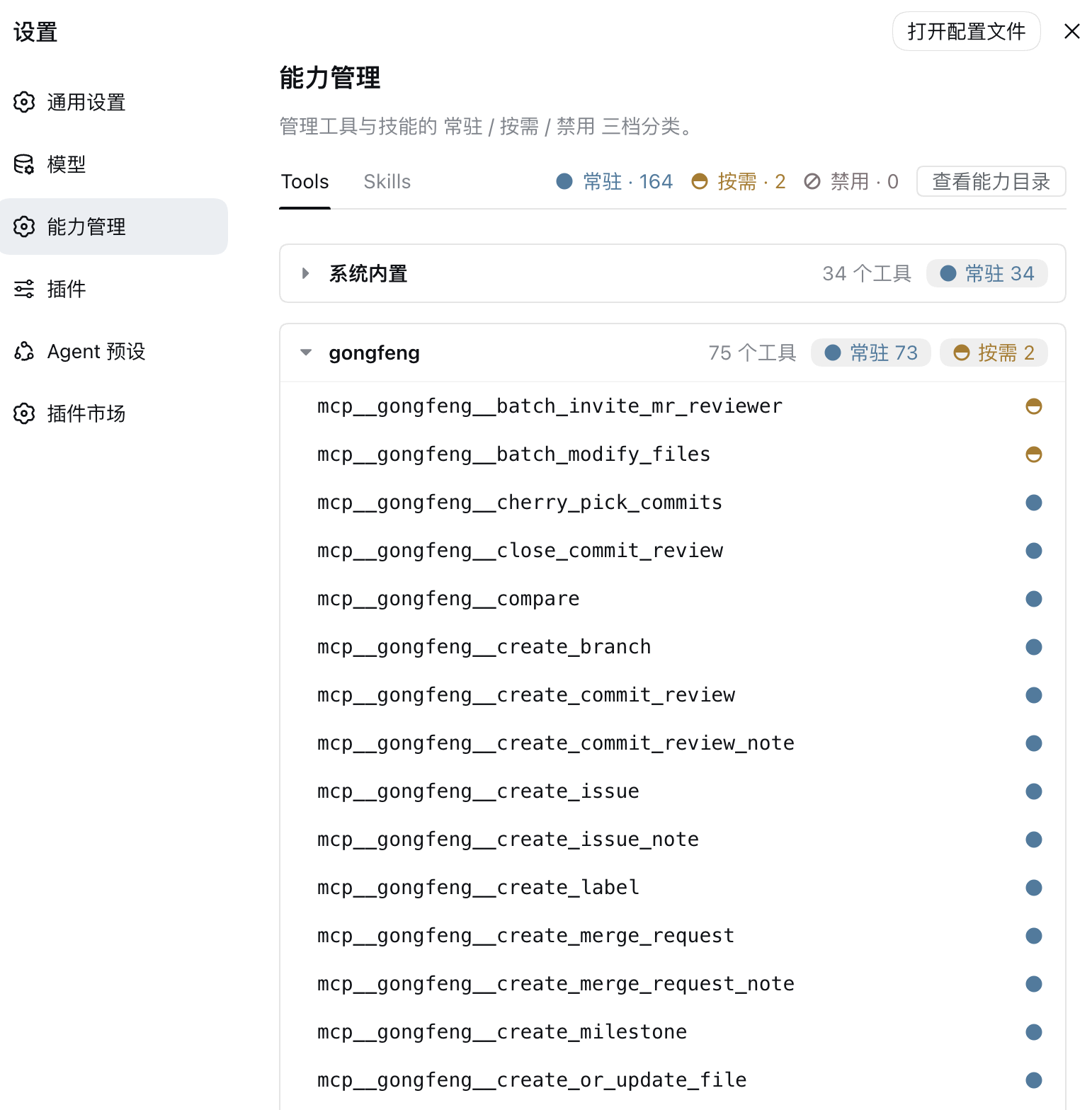
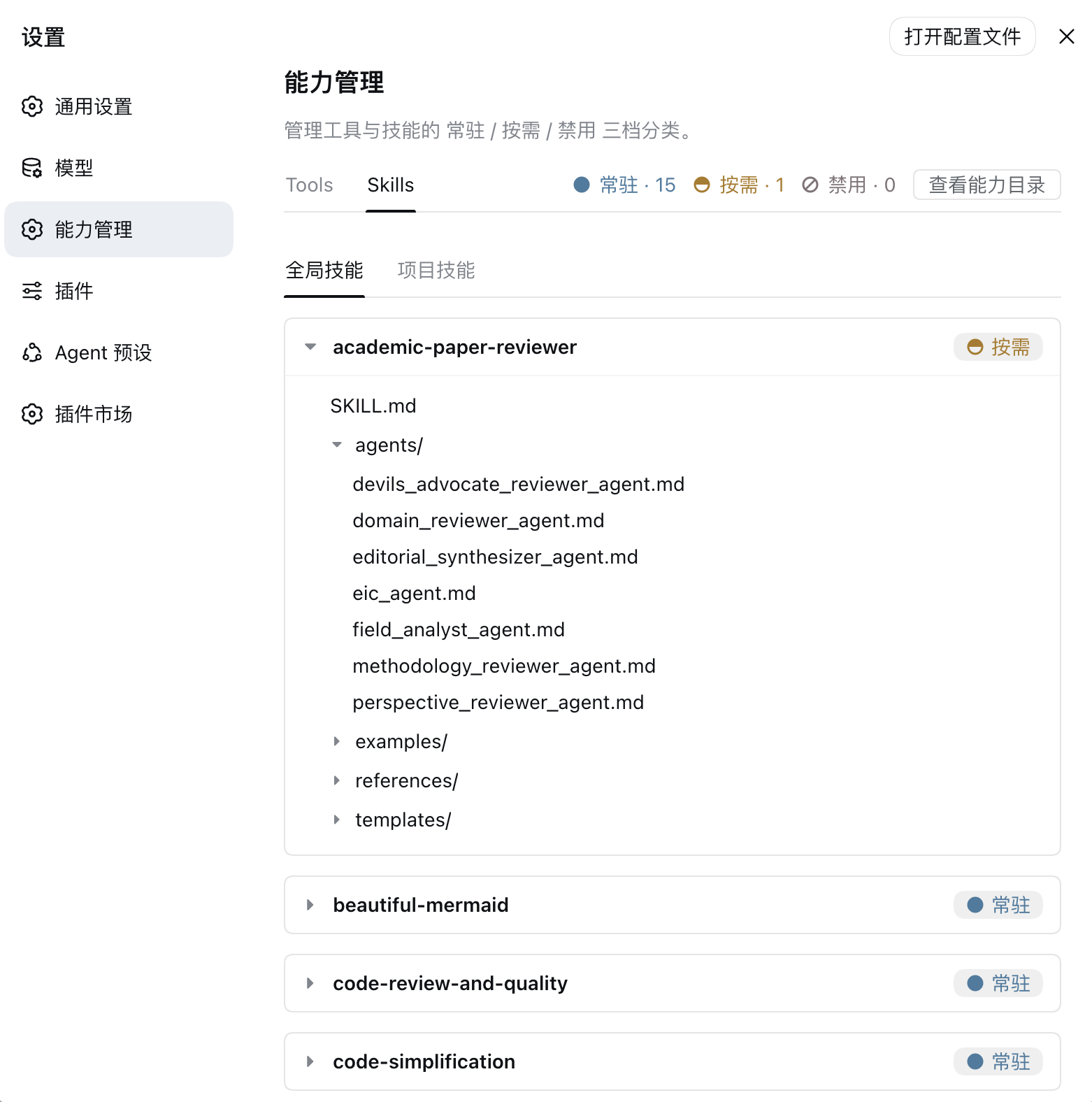
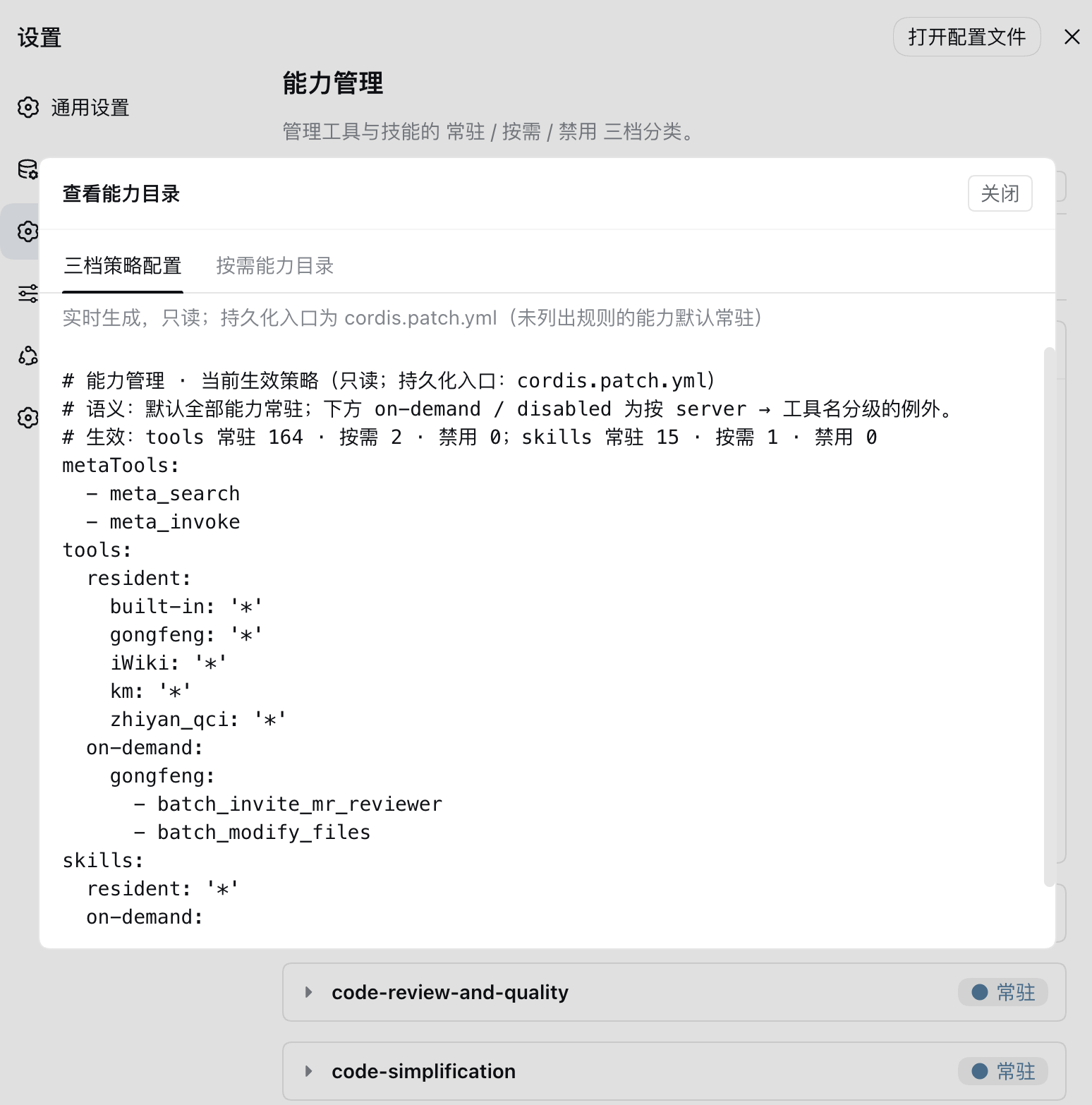
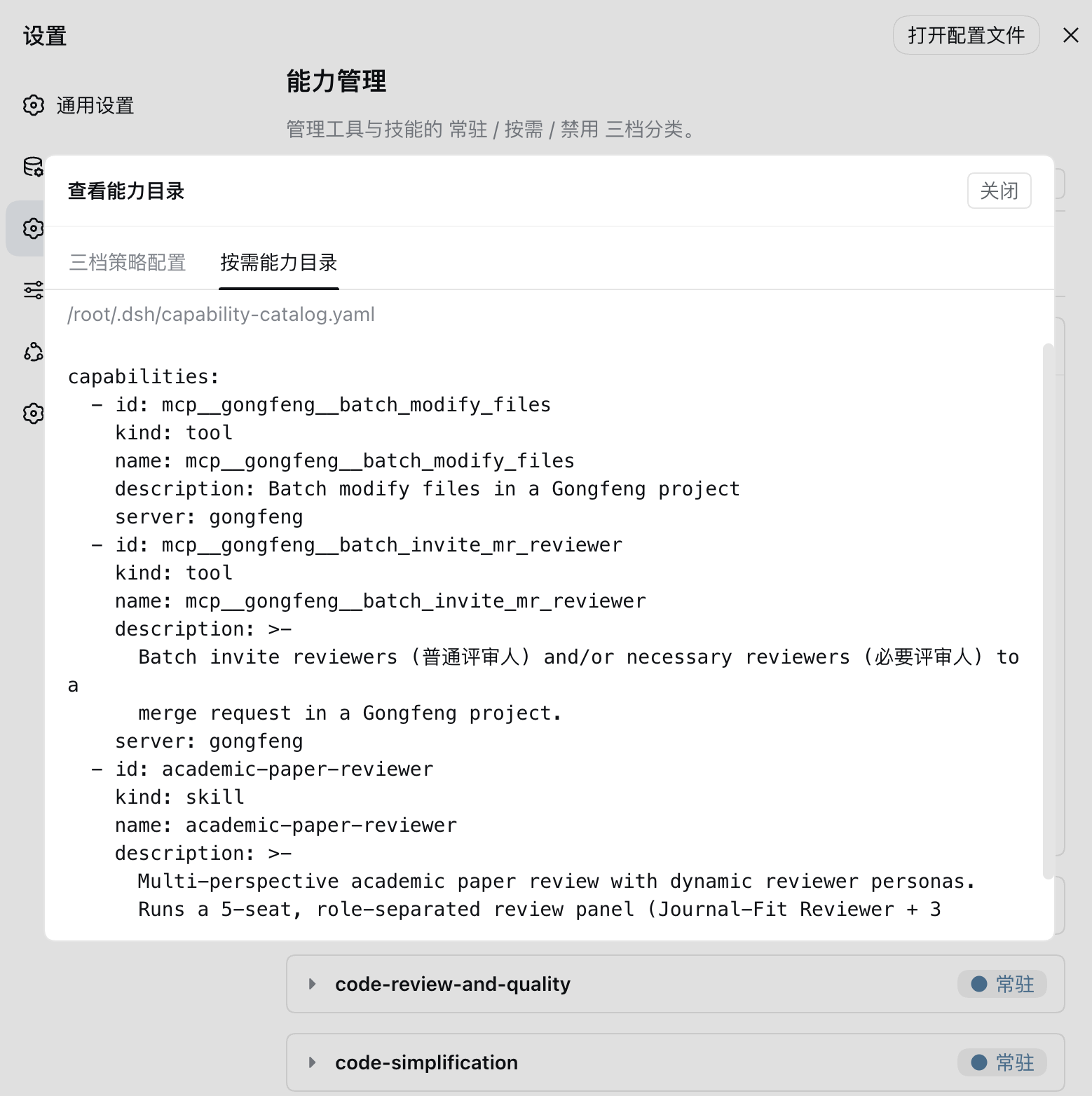
Once installed, a Capability Management tab appears under Settings → General Settings (between "Model" and "Plugins"). It is where you view and adjust a capability's exposure tier; changes apply immediately, no restart needed.
| What you want to do | Where |
| --- | --- |
| Change a tier | Click the dot on a capability row, or a tier count at the top to switch the whole group |
| Register an MCP server / skill directory | Register capability, top right |
| Edit or remove a registered entry | Edit on an MCP server's group header (Tools) or a skill row (Skills) |
| See the effective policy and the On-demand catalog | Policy & catalog, on the header's description row |
| The list is stale (you changed a source outside dsh) | Refresh, at the top |
**The tier is that dot**: filled = Resident (the model calls it directly), half-filled ring = On-demand (reached through `meta_search` → `meta_invoke`), ring with a slash (a no-entry sign) = Disabled. If a higher-priority rule (a wildcard, say) overrides it, the UI reports that the classification did not apply.
**How the page is laid out**: the Tools tab groups by server and folds — MCP tools under their own server, harness-native tools together under the built-in group; the Skills tab splits into "Global skills" / "Project skills". Click a capability row for its model-facing definition, a skill row to expand its directory tree, and a file to preview it.
**Three behaviours worth knowing**:
- **A tier click does not hit disk immediately**: it changes memory first (so it feels instant) and is written back to `patchFile` (the home layer's `~/.dsh/cordis.patch.yml` by default) once you stop for ~1.5s — writing that file makes dsh hot-reload this plugin, so it cannot happen on every click.
- **Registering writes files**: an MCP server goes into the same patch file (an `@deepseek-ai/dsh-mcp-client` row, mounted natively by dsh — this plugin never manages the connection), and a skill directory becomes a symlink under the skill root. Credentials such as headers are stored there in **plain text**.
- **Some skill rows offer Adopt rather than Edit**: those are skills in user-level roots such as `~/.agents/skills` / `customSkillDirs`. The confirmation names the directory it currently lives in, and confirming links it into `~/.dsh/skills/` with the **content untouched**; rows that cannot be adopted show their source instead.
What each form field means, how visible a global versus a project skill is, what a removal actually costs, and how `SKILL.md` is validated are all stated where you act on them — no need to repeat them here.
## Quick Install
Prerequisites: Node.js and the dsh CLI installed (`dsh plugin` forwards to pnpm internally).
### Install from npm (recommended)
A single package ships both the server-side plugin and the front-end Capability Management tab; once installed it shows up under Settings → General Settings:
```sh
dsh plugin --profile web add @daweifu/capability-menu
```
### Install from source
```sh
git clone https://github.com/PKUfudawei/dsh-capability-menu.git
cd dsh-capability-menu
pnpm install # the prepare script builds lib/ (server) and lib/client.js (front-end)
dsh plugin --profile web add ./dsh-capability-menu
```
### Verify the install
```sh
dsh --profile web --dump-config | grep -E 'capability-menu'
```
```
# == @daweifu/capability-menu
- id: capability-menu-registry
name: '@daweifu/capability-menu/registry'
- id: capability-menu-search
name: '@daweifu/capability-menu/search'
- id: capability-menu-invoke
name: '@daweifu/capability-menu/invoke'
- id: capability-menu-policy
name: '@daweifu/capability-menu/policy'
- id: capability-menu
name: '@daweifu/capability-menu'
```
### Uninstall
```sh
dsh plugin --profile web remove @daweifu/capability-menu
```
## Exposure Policy
All capabilities (Tool and Skill) fall into three tiers by their **exposure level** (what the model sees in the context) and their **execution mode**:
### Tools / Skills three-tier exposure and execution
| tier | capability | exposure (model view) | discovery | execution |
| --- | --- | --- | --- | --- |
| **Resident** | tool | full schema in `assembly.tools` → the model's `tools` request payload, visible at every step | none (already resident) | model calls it directly; at runtime it goes through the full `ctx.tools` pipeline |
| | skill | name + description in the `` catalog (body not in the catalog) | none (already resident) | the `skill` tool loads the body on demand (on-demand loading) |
| **On-demand** | tool | not in the payload (zero context cost) | `meta_search` list / `grep` the materialized catalog YAML (`catalogFile`) | executed by `meta_invoke` (via `ctx.tools.execute`, full pipeline); or fetch the schema through detail and call it directly |
| | skill | not in the `` catalog | `meta_search`, or `grep` the materialized catalog YAML (`catalogFile`) | `meta_invoke` loads the SKILL.md body (via `ctx.skills`) |
| **Disabled** | tool | not in the payload | not returned by `meta_search`, not written to the catalog YAML | refused by `meta_invoke`; hallucinated direct calls are also hard-rejected in `tools/pre-execute` |
| | skill | not in the `` catalog | not returned by `meta_search`, not written to the catalog YAML | refused by `meta_invoke`; the `skill` tool is hard-rejected in `tools/pre-execute` |
> **Scope & reserved tools**:
> - The tool tiers cover both `mcp__` cataloged tools and harness-native built-in tools (native tools are grouped under the reserved `built-in` server and are managed in all three tiers exactly like MCP tools). **Do not name a real MCP server `built-in`.**
> - `meta_search`/`meta_invoke` are this plugin's control plane: always Resident, cannot be disabled (a rule that disables one fails at startup). `run_code` is the reserved Code Mode transport: it never enters the catalog, does not appear in Capability Management, and should not get tier rules.
> - **Keep high-frequency core tools Resident**: an On-demand built-in tool leaves the model's resident view and needs a `meta_search` → `meta_invoke` two-hop call.
## Configuration
Rules are declared under the `config` of this plugin's `capability-menu-policy` entry — by default in the home layer's `~/.dsh/cordis.patch.yml` (`$DSH_HOME` wins), and a profile's `cordis.patch.yml` can also amend it with an id-targeted override patch (the outer `- insert:` / `id` / `name` is Cordis patch boilerplate and has nothing to do with the rules):
```yaml
config:
tools:
resident:
- execute_cmd
- get_session_context
- search_kb
- 'mcp__gongfeng__*' # wildcard: everything under this server is resident
on-demand:
- 'mcp__*' # wildcard fallback
- 'server:km:*' # bulk on-demand by server prefix
disabled:
- 'mcp__secret__*' # disabled outranks everything, even resident
skills:
resident:
- debugging
- coding
on-demand:
- legacy_skill # explicit on-demand (unlisted skills default to resident)
disabled:
- forbidden_skill
metaTools:
- meta_search # always resident; cannot be disabled
- meta_invoke
```
> Config keys are the tier words themselves: `resident` (常驻) / `on-demand` (按需) / `disabled` (禁用).
### All configuration options
| Option | Entry | Default | Description |
| --- | --- | --- | --- |
| `tools` / `skills` / `metaTools` | `capability-menu-policy` | see above | Tier rules; UI changes are written back to this entry's `config` after the debounce |
| `catalogFile` | `capability-menu-registry` | `~/.dsh/capability-catalog.yaml` | Materialized on-demand catalog path; empty disables it |
| `refreshDebounceMs` | `capability-menu-registry` | `200` | Debounce window (ms) for change-event rebuilds; `0` disables debouncing |
| `patchFile` | `capability-menu-policy` | `~/.dsh/cordis.patch.yml` (`$DSH_HOME` wins) | Patch file that MCP server registration writes to |
| `skillsDir` | `capability-menu-policy` | `~/.dsh/skills` | Skill root used by skill directory registration |
| `persistDebounceMs` | `capability-menu-policy` | `1500` | Debounce window (ms) before a clicked tier change is written back to the patch file |
**Rule priority** (first match wins; within one tier, an exact rule beats a wildcard):
| priority | rule | example | effect |
| --- | --- | --- | --- |
| 1 | `disabled` exact | `disabled: [forbidden_skill]` | hardest deny, overrides everything |
| 2 | `disabled` wildcard | `disabled: ['mcp__secret__*']` | block a whole group |
| 3 | `resident` exact | `resident: [bash]` | keep one capability resident |
| 4 | `on-demand` exact | `on-demand: [legacy_skill]` | one capability on-demand (what a Capability Management click writes) |
| 5 | `resident` wildcard | `resident: ['mcp__gongfeng__*']` | keep a whole group resident |
| 6 | `on-demand` wildcard | `on-demand: ['mcp__*']` | bulk on-demand fallback |
| default | no rule matched | — | resident |
Key points:
- **Exact rules win over wildcards (even across tiers)**: e.g. with `resident: ['mcp__gongfeng__*']` in place, clicking a tool to On-demand in the Capability Management writes an exact `on-demand` rule that takes effect instead of being pushed back by the wildcard (if a higher-priority rule still overrides it, the UI reports that the classification did not apply).
> **Two kinds of change, both persisted**:
>
> - **Tier classification** changes memory first (so a click takes effect immediately) and is written back to this plugin's entry `config` (`patchFile`, the home layer's `~/.dsh/cordis.patch.yml` by default) once you stop for ~1.5s — writing that file makes dsh hot-reload this plugin and re-run the capability enumeration, so it cannot happen on every click. To batch-declare rules under version control, edit that same entry; no import/export buttons are needed.
> - **Registered sources** (MCP servers, skill directories) hit disk as you click: MCP rows go into the same patch file (as `@deepseek-ai/dsh-mcp-client` entries), skill directories are linked into the skill root.
### On-demand capability catalog (`catalogFile`, the single materialized catalog, searchable with `grep`)
On-demand capabilities are materialized into **one auto-generated YAML file** the model can browse:
- The file location is the `config.catalogFile` of the **registry entry** (`capability-menu-registry`): it defaults to `~/.dsh/capability-catalog.yaml` and an empty string disables emission. The registry rewrites it automatically on any tool/skill or classification change. When nothing is On-demand, the catalog pointer is not injected (saving context).
- A skill must first be **registered in `ctx.skills`** (a skill provider — e.g. its SKILL.md under a user/project skills root or `customSkillDirs`) to show up automatically; there is **no separate user-maintained input file**.
- The model browses the file with `grep`/`read` (or calls `meta_search`) to get an entry's id and `kind`, then calls `meta_invoke(id, kind)` to run/load it. Skill ids are the bare name (e.g. `frontend-design`); `kind` distinguishes tools from skills.
```yaml
# ~/.dsh/capability-catalog.yaml (auto-generated; contains only On-demand
# capabilities — Resident ones are already resident and Disabled ones must not
# be discoverable, so neither is written. Lists are emitted as `-` block
# sequences, one item per line.)
capabilities:
- id: mcp__km__search
kind: tool
name: mcp__km__search
description: Search the knowledge base
server: km
- id: legacy_skill
kind: skill
name: legacy_skill
description: A low-frequency skill for working on legacy code
whenToUse: Use when working on legacy projects
```
> The catalog file is written under the host's `~/.dsh` by default, so the sandbox of the model-side `bash`/`read` tools must be able to reach that path. If the sandbox isolates the host directory, explicitly configure `catalogFile` to a path the sandbox can see. The default path is shared across multiple dsh instances (last-write-wins); in multi-instance deployments, give each instance its own `catalogFile`.
## License
This project is licensed under the [Apache License 2.0](LICENSE).