
Paca
AI-native. Free. Lightweight. Open-source.
The fully customizable alternative to Jira, Trello, ClickUp, and Monday.
🌱 A non-profit, community-owned project — built by contributors, for everyone. Free forever, no paid tiers.







✨ Sponsored by





Getting Started
·
MCP Server
·
Paca Skills
·
Architecture
·
Contributing
·
Roadmap
---
## What is Paca?
Paca is a **non-profit, community-driven** project: a **self-hosted project management platform** where AI agents and humans collaborate as equal teammates inside a Scrum team — not as chatbots bolted on the side.
Jira gives you a backlog. ClickUp gives you automations. Monday gives you dashboards. **Paca gives your AI agents a seat at the table.** They join sprint planning, pick up tasks from the board, write BDD specs, and adapt alongside humans in real time.
Everything about Paca — its workflow, its data model, its UI — is **configurable and extendable via plugins**.
---
## Why Paca?
| | Jira / Trello / ClickUp / Monday | **Paca** |
|:--|:--|:--|
| **AI integration** | Chatbot add-ons, peripheral automation | AI agents as first-class Scrum teammates |
| **Collaboration model** | Human-only by default | Human + AI, side by side on the same board |
| **Hosting** | Vendor cloud (your data, their servers) | Self-hosted, you own everything |
| **Cost** | $8–$20+ per seat/month | **Free forever. Every feature, no paid tiers** |
| **Customization** | Limited; locked behind enterprise tiers | **Fully open: configuration + plugins** |
| **Weight** | Bloated feature sprawl | Lightweight core; extend only what you need |
| **Source** | Closed / proprietary | **100% open-source (Apache 2.0)** |
---
## Our Promise: Free Forever, Owned by the Community
Paca is, and will always be, **free and non-profit**.
- **No paid tiers.** There will never be a "Pro", "Team", or "Enterprise" edition.
- **No paywalled features.** Every feature — today and in the future — is available to everyone, at no cost.
- **No open-core bait-and-switch.** We will not move existing features behind a paywall or a license change.
- **Belongs to the community.** Paca is built by its contributors and for its users. It is not a vendor's product, and its direction is shaped in the open through issues, discussions, and pull requests.
- **Not a business.** No company sells Paca and there is no paid edition. Sponsors help cover infrastructure costs; the project's direction stays with the community.
- **Everyone is welcome to help.** Code, docs, translations, plugins, bug reports, and ideas all count. Start with [CONTRIBUTING.md](CONTRIBUTING.md).
---
## Core Idea: Humans and AI Agents, One Scrum Team
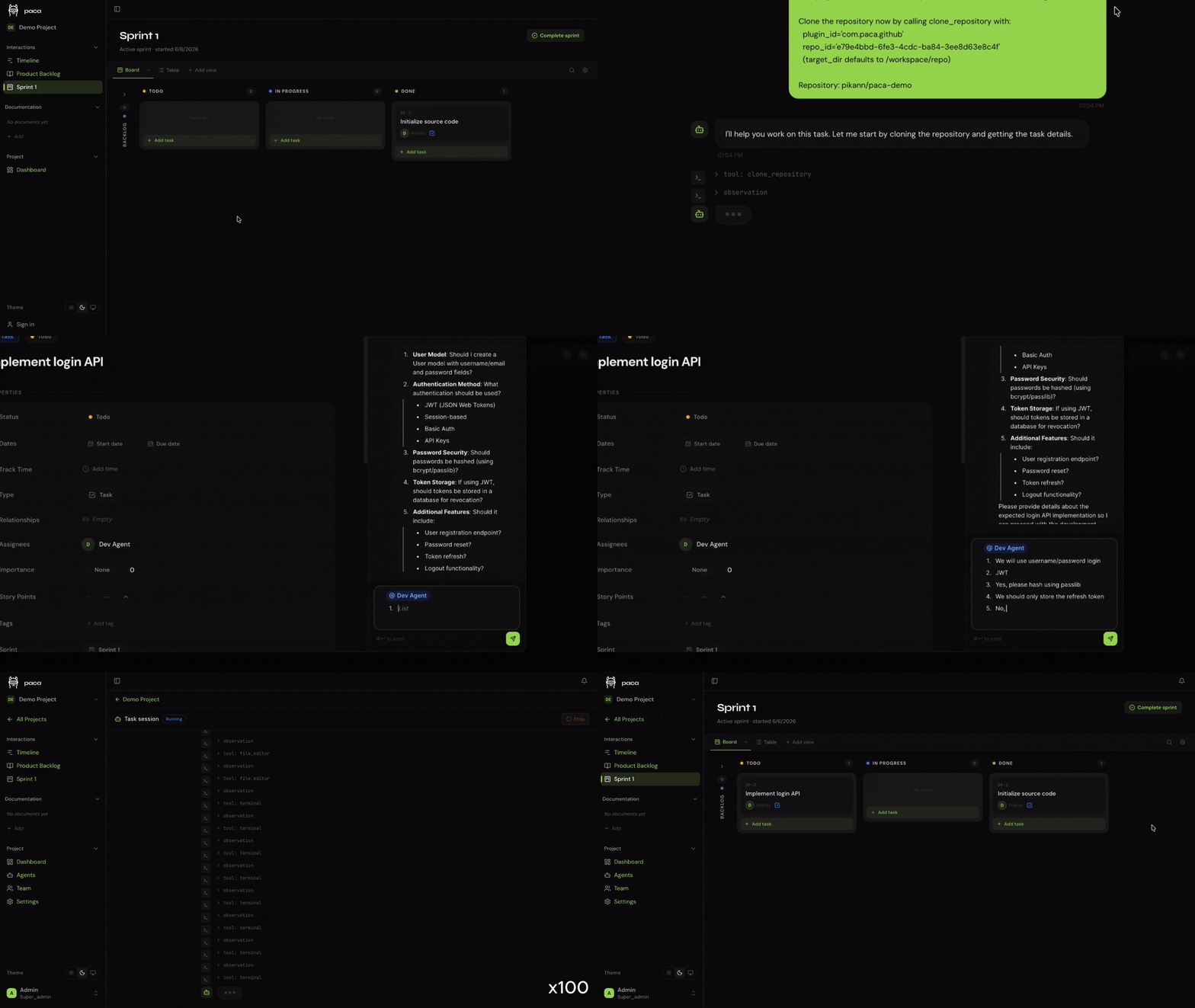
The central insight behind Paca is that **AI agents should participate in the Scrum process**, not just generate output in isolation.
In Paca, AI agents:
- Are **assigned to sprints** and appear on the Scrumban board alongside human teammates
- **Pick up tasks** from the backlog and update their status in real time
- **Collaborate on BDD specs** — helping Product Owners and BAs write Gherkin scenarios
- **Contribute to System Design Documents** — keeping the architecture visible to the whole team
- **Probe, sense, and respond** to emerging complexity, just like a human would
This is not automation. It is **genuine collaboration** — rooted in the Cynefin / Stacey framework's recognition that complex domains require teams, not pipelines.
---
## Fully Customizable — Configuration and Plugins
Paca ships as a small, focused core. Everything else is optional.
**Configuration-driven:** workflows, statuses, field definitions, board layouts, sprint rules, and agent behavior are all driven by project-level configuration files. No code needed to adapt Paca to your team's process.
**Plugin system:** extend or replace any part of Paca via plugins. Plugins are compiled to **WebAssembly (WASM)** for the backend (write in Go, Rust, AssemblyScript — anything with a WASM target) and standard module bundles for the frontend. Plugins run in a sandboxed environment with a capability-based permission model; they declare exactly what host functions they need, and nothing more.
```
plugins/
├── backend/ # WASM modules — add custom routes, logic, data models
└── frontend/ # UI modules — add custom pages, board views, widgets
```
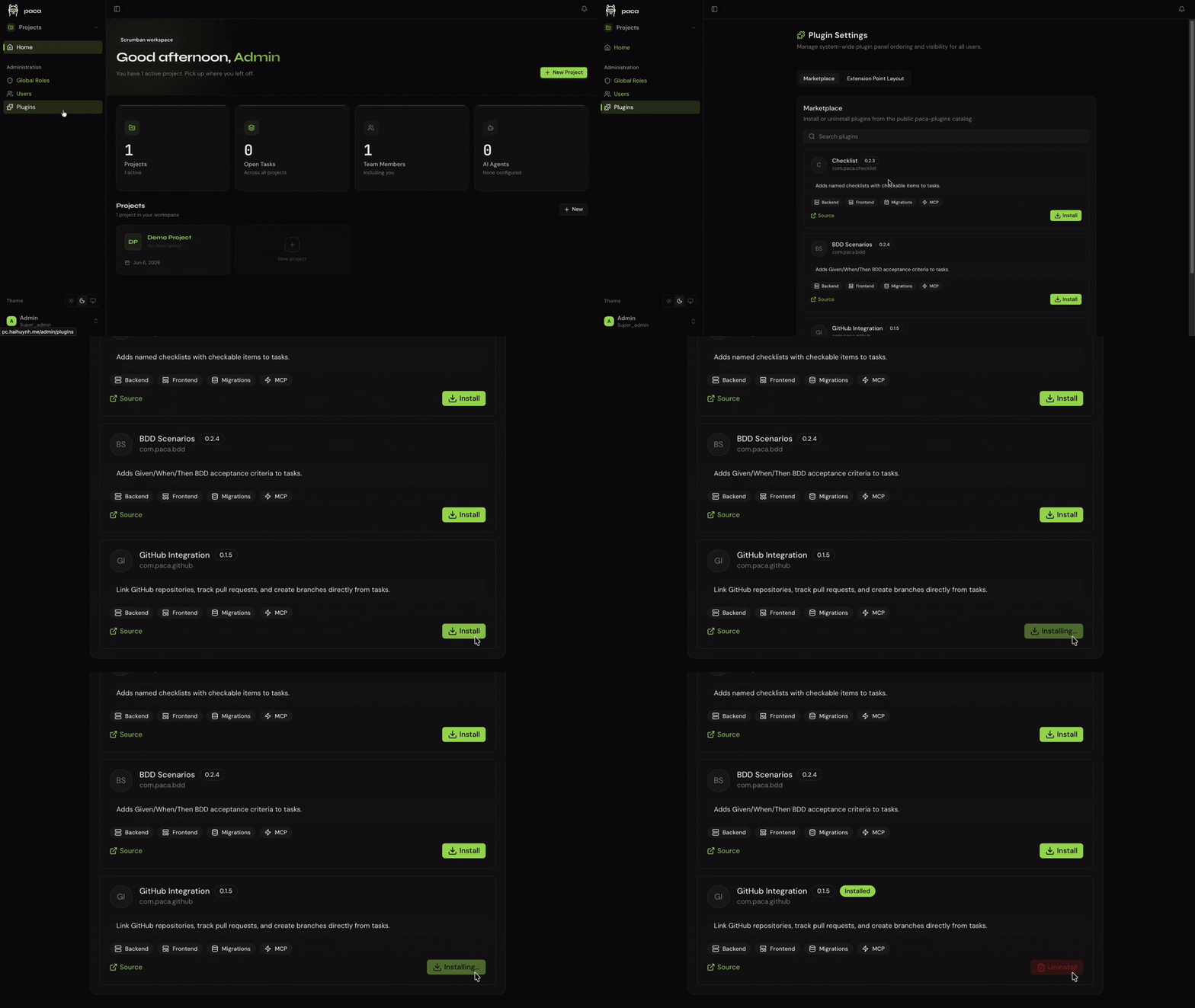
Browse and install community plugins directly from the **Plugin Marketplace** inside the Paca UI — no command line required. Go to **Settings → Plugins → Marketplace**, find a plugin, and click **Install**.
For local development or custom plugins, you can also install from the filesystem:
```bash
./scripts/install-local-plugin.sh ./my-plugin --api-key
```
---
## The P-A-C-A Cycle
Paca structures team collaboration around four phases that mirror both Scrum and the scientific method:
```
Plan → Act → Check → Adapt
↑ |
└─────────────────────────────┘
```
| Phase | What happens |
|:--|:--|
| **Plan** | POs, BAs, and AI agents collaboratively refine the backlog. BDD scenarios and SDD designs are written together. |
| **Act** | Sprint is live. Humans and AI agents pull tasks from the board, execute, and post updates. |
| **Check** | QA agents run automated verification. Humans review AI output. The board reflects reality. |
| **Adapt** | Data from the sprint informs the next cycle. The team — human and AI — retrospects together. |
---
## What's New in v0.21.0
- **Real-time collaborative document editing** — several people (and agents) can edit the same document at once and see each other's changes live.
- **Gantt view** — the Roadmap view is now a full Gantt chart with task links and zoom.
- **Edit documents as files over MCP** — let Claude Code or any editor work on your project docs as local Markdown files, then push the edits back to Paca with conflict detection. See [`pull` and `push`](apps/mcp/README.md#command-line-pull-and-push).
- **Analyst role and `/paca-analyst`** — talk a request or bug through with an agent and get draft tasks in a new **Refinement** status for a human to approve.
- **Drag-and-drop docs** — move documents and folders around in the sidebar.
- **SSO-only mode** — block password sign-in and restrict SSO access by IdP group or role.
---
## What's New in v0.20.0
- **Git integration — agents that work on your pull requests** — connect a Git host and let AI agents work where your code lives. Mention an agent on a pull/merge request or issue, or hand it work, and it replies, pushes commits, reviews, and fixes CI, with every action attributed to a bot identity and bounded by least-privilege credentials. GitHub ships first, and the provider SPI lets a plugin add GitLab, Bitbucket, Gitea or Azure DevOps without touching the core.
- **Connections and linked repositories** — add any number of connections per host (a GitHub App, a bot user, or an access token), owned by the workspace or by a single project, then link repositories through them. Paca receives change-request, branch, comment, review and check events for linked repositories and routes them to the project.
- **Task references** — change requests and branches are tied to the tasks they mention, so a task shows its code changes alongside its activity.
- **Agent identities** — give an agent its own bot name, avatar and handle, or let it act through the connection its repository was linked with.
- **Permissions** — Git actions are governed by the same [roles and policies](docs/guides/roles-and-policies.md) as everything else.
- **Learn more** — see [Git agent workflow](docs/ai-agent/git-agent-workflow.md) for the full design.
- **Multi-factor authentication** — require two-step verification for the whole workspace, with account lockout and a login throttle after repeated failed attempts. Admins can also restrict sign-in to IP allow-lists and reset an account's MFA from **Settings → Security**.
---
## What's New in v0.19.0
- **Role-based authorization (IAM-style)** — access in Paca is now controlled by **roles**: named JSON policies that allow or deny *actions* on *resources*, the same model as AWS IAM. A role is the only thing that grants access, nothing is allowed by default, and an explicit **Deny** always wins. Edits take effect on the person's next request.
- **Configure roles per resource** — a policy names the exact resource it covers, from a whole project (`project//*`) down to a single task, sprint, doc, view, workflow, environment, agent or conversation. Give someone read-only access to one sprint, let an agent write docs in a single folder, or keep a team away from production environments.
- **Conditions** — narrow a statement further by sprint, task status or type, assignee, doc folder, environment type, and more.
- **Simple and Advanced editors** — build a role from a permission list in the **Simple** editor, or write the policy directly in the **Advanced** JSON editor with autocomplete and validation.
- **Learn more** — see [Roles and policies](docs/guides/roles-and-policies.md) for worked examples, and [IAM authorization](docs/guides/iam-authorization.md) for the full model.
---
## What's New in v0.17.0
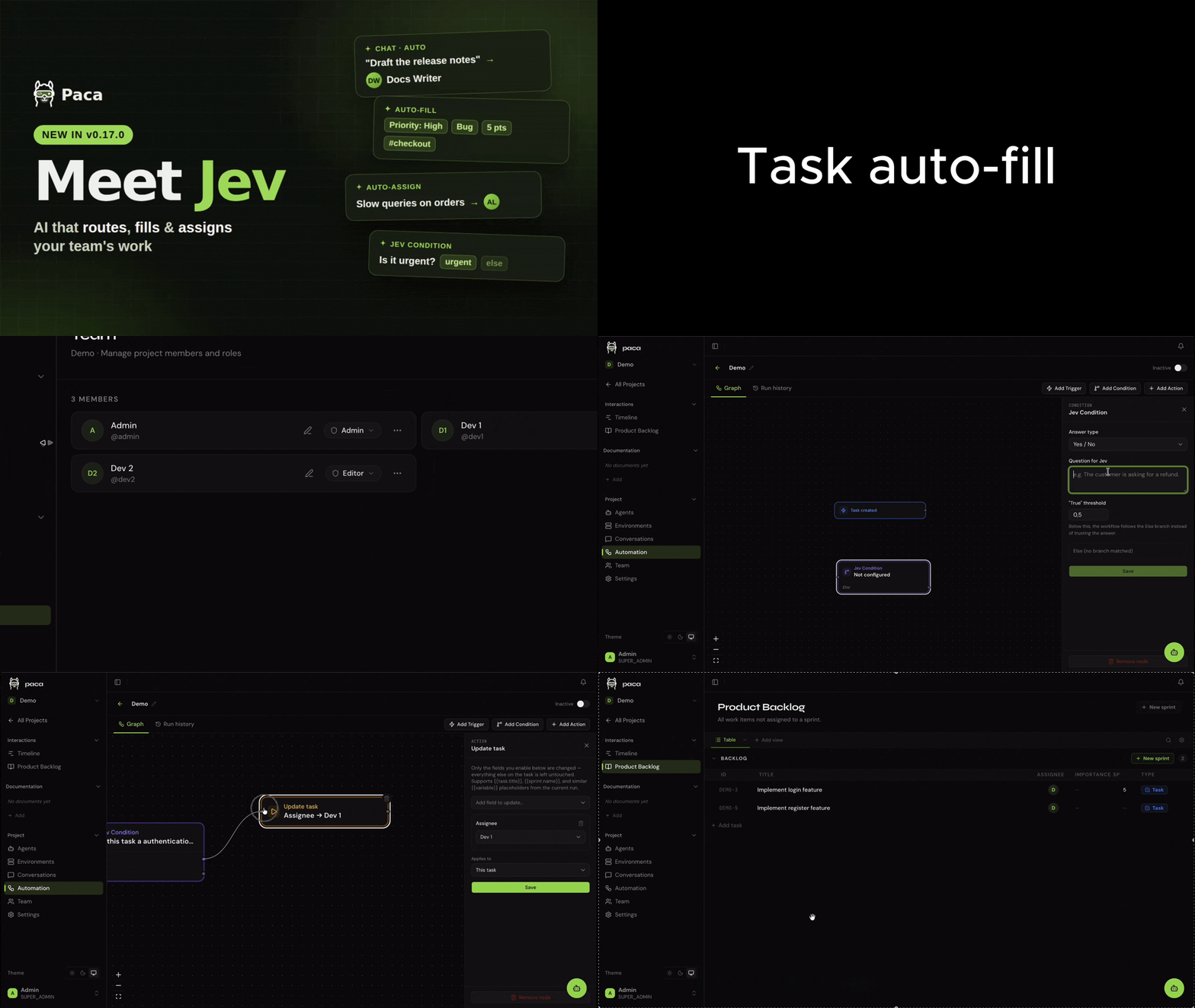
- **Jev AI integration** — plug [Jev](https://docs.typesafe.ai), an AI decision engine, into any project to let it make the small routing calls a team makes all day. It's opt-in and per-project: bring your own key for TypeSafe (the default) or any Jev-compatible provider such as [OpenJev](https://openjev.sh/docs) from **Settings → Jev AI**. The key is encrypted at rest and never shown again, and a project without a key behaves exactly as before.
- **Agent Auto-routing** — pick **Auto** in the chat's agent picker and Jev hands your message to the best-fit agent, based on each agent's description.
- **Task Auto-fill** — when a task is created, Jev fills in the fields left blank (priority, type, story points, tags, epic, and select/boolean custom fields). It only applies confident answers and never overwrites a field a person set.
- **Task Auto-assign** — set a task's assignee to **Auto** and Jev picks the best-matching member from their descriptions. If it isn't confident, it leaves the task unassigned and says why in the activity feed.
- **Jev Condition in automations** — a new condition node that routes a workflow on Jev's answer (a choice, a score, or yes/no), falling back to the **Else** branch whenever Jev is unsure or unavailable.
---
## What's New in v0.15.0
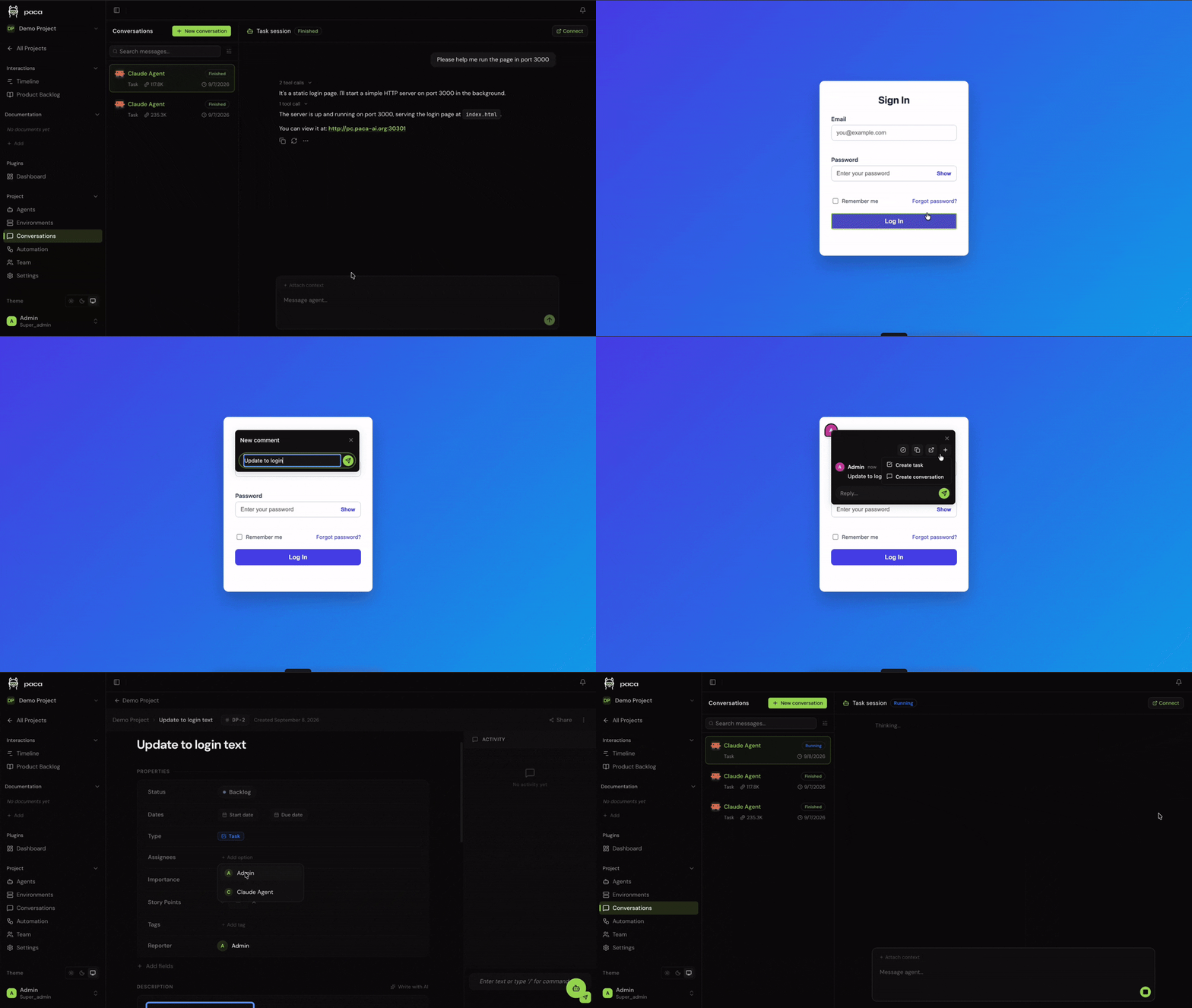
- **Browser extension for page annotations** — comment directly on an element of a running [environment](docs/ai-agent/environment-management.md)'s preview page, right on the page itself, and turn any comment into a real Paca task in one click. It authenticates through your existing Paca session — no separate login — via the same-hostname cookie trick documented in [apps/extension/README.md](apps/extension/README.md). Install the pre-built zip from each [release](https://github.com/Paca-AI/paca/releases), or build it from source.
- **`provider_cli` agent type** — run an agent on a CLI you're already logged into — Claude Code, Codex, Gemini CLI, or Cursor CLI — inside one of its own static environments. Log into the CLI once from the environment's terminal (a static environment, because the CLI's own login has to persist across conversations), and Paca drives that CLI directly for every conversation afterward, syncing your configured MCP servers into its config along the way.
---
## What's New in v0.14.0
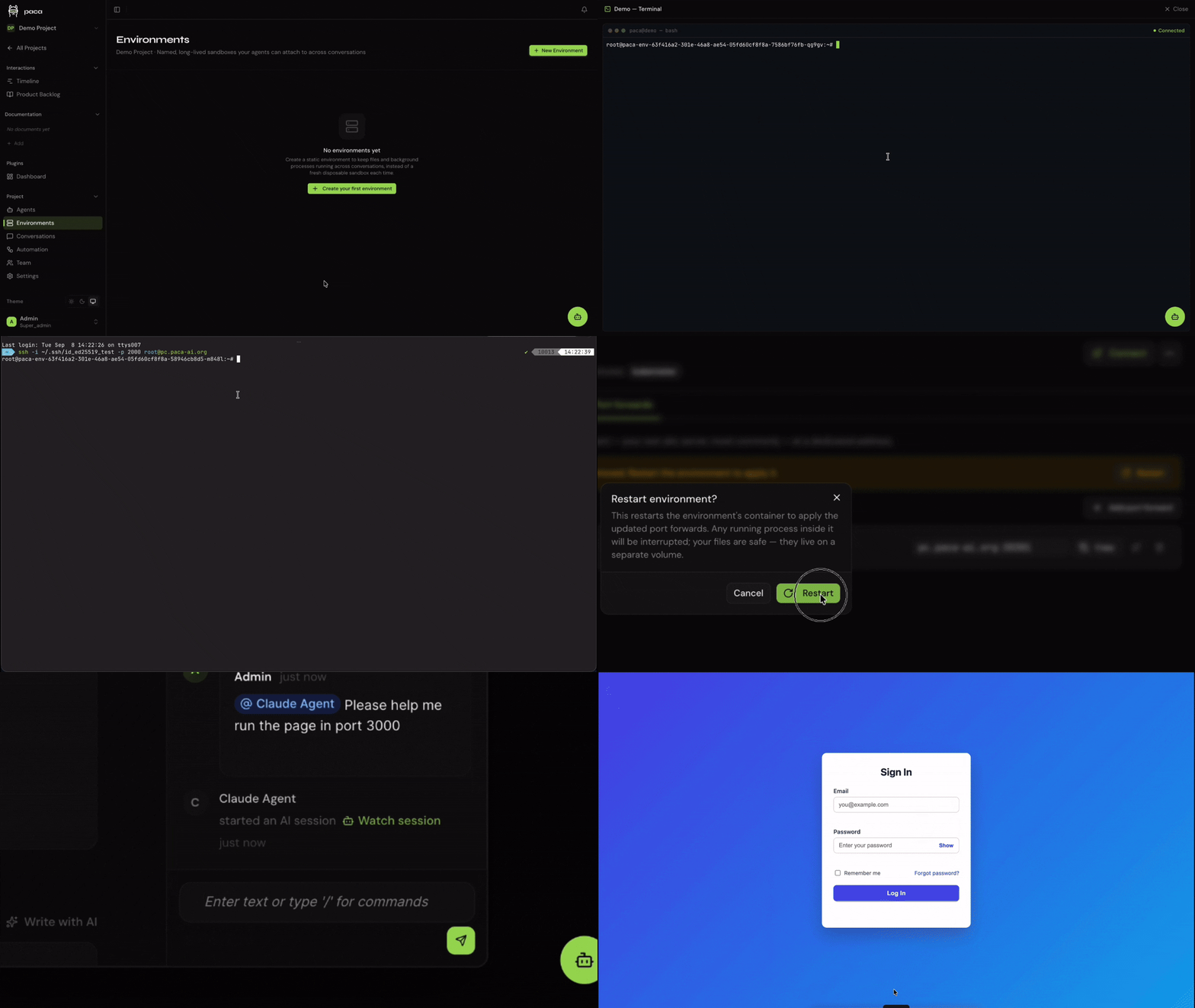
- **Static environments** — create a named, long-lived container that persists independently of any single conversation: agents attach to it instead of spinning up a fresh disposable sandbox, so files on disk and background processes survive across chats. Reach a running environment through an in-browser terminal, real SSH with per-environment authorized keys, or user-managed port forwards to preview a live dev server — on both self-hosted Docker Compose and Kubernetes/Helm. See [docs/ai-agent/environment-management.md](docs/ai-agent/environment-management.md) for the full design.
---
## What's New in v0.12.0
- **Workspace branding** — customize your workspace's logo, favicon, and primary accent color from **Settings → Workspace Branding**. Upload a logo and favicon (PNG, JPEG, WEBP, or GIF, up to 5 MB) and pick from a curated set of accent colors, each with matching light- and dark-mode variants applied automatically across buttons, highlights, the sidebar, and the login screen.
---
## What's New in v0.11.0
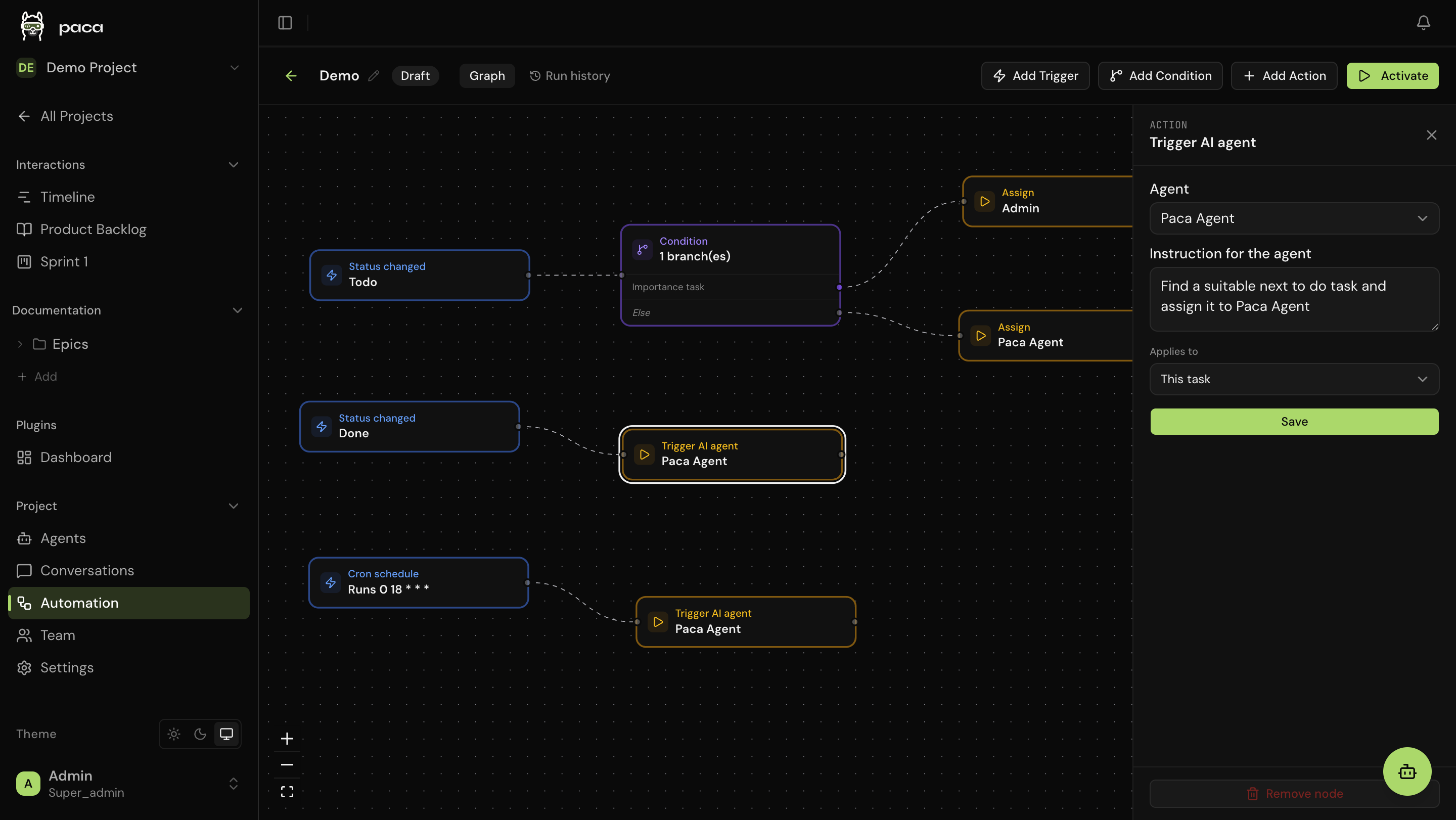
- **Event-driven automation engine** — a complete redesign of the automation system into a visual, n8n-style graph builder. Compose **Trigger → Condition → Action** flows on an interactive canvas with multi-branch switch logic, an `Else` fallback path, and nine built-in trigger types — including UTC cron schedules, due-date offsets, task-dependency gates, and inbound webhooks with secret-token auth. Actions can **retarget linked tasks** (parent, children, blockers, or explicit picks) with automatic fan-out, **dispatch AI agents** with custom prompts, or **call external APIs**. Every run is traced step-by-step in a new **Run History** panel, and a project-wide **Dependency Map** visualizes cross-task automation relationships. Plugins can contribute custom trigger, condition, and action node types via WASM.
---
## What's New in v0.10.0
- **ACP agent support** — connect any [Agent Client Protocol](https://agentclientprotocol.com) coding CLI as a Paca AI agent: Claude Code, Codex, Gemini CLI, or a custom ACP server. A lightweight local bridge (`paca-acp-bridge`) runs from your project's source directory and streams the conversation back to Paca over an authenticated WebSocket — no code is cloned into a cloud sandbox, and the agent uses your own local auth, git/`gh` credentials, and whatever MCP servers or skills you've already set up for that CLI. See [apps/acp-bridge/README.md](apps/acp-bridge/README.md) for setup.
---
---
## What's New in v0.4.0
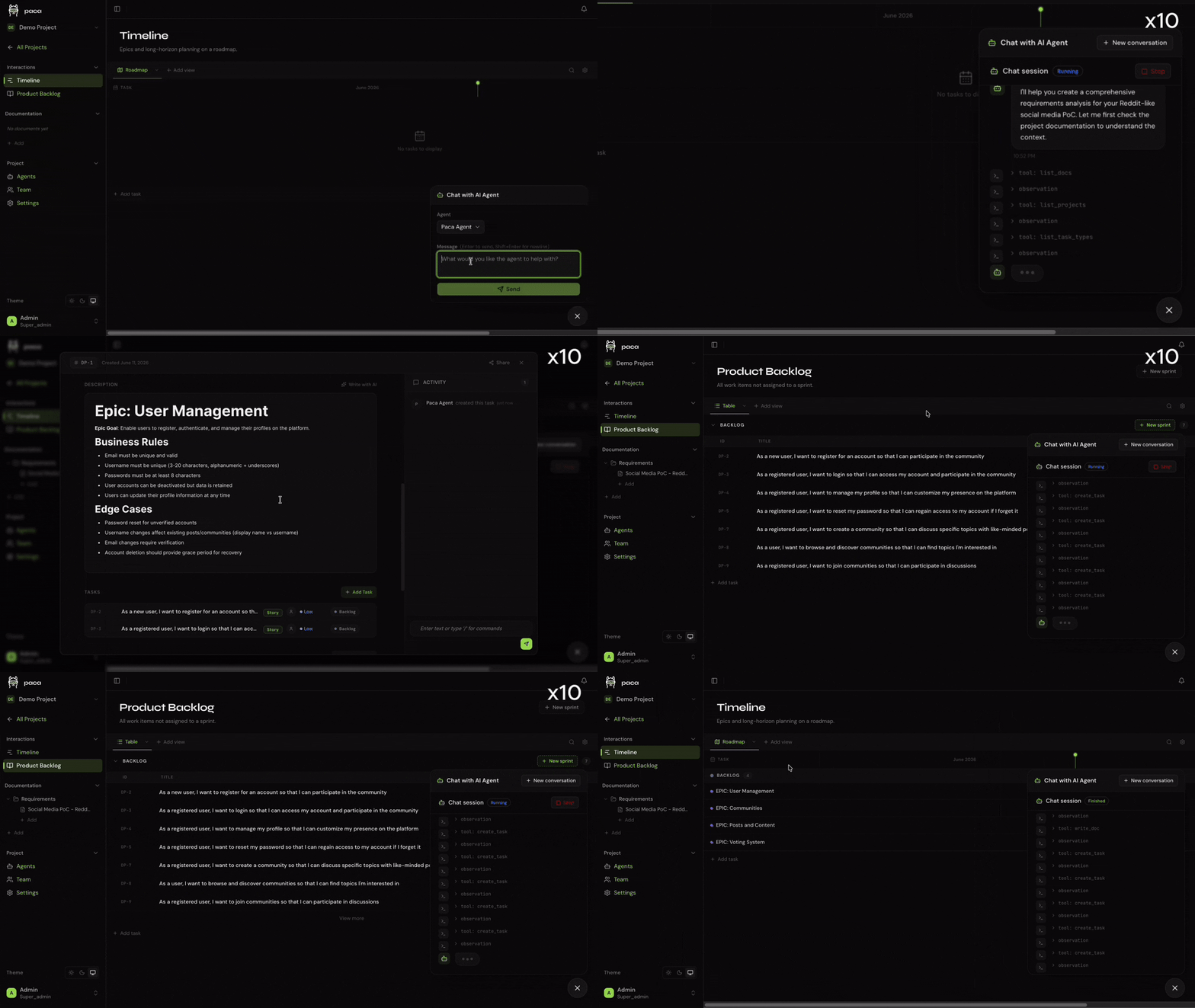
- **In-app AI chat** — chat with AI agents at the project level to plan work, create or update epics, stories, tasks, and documentation — all in plain English without leaving Paca
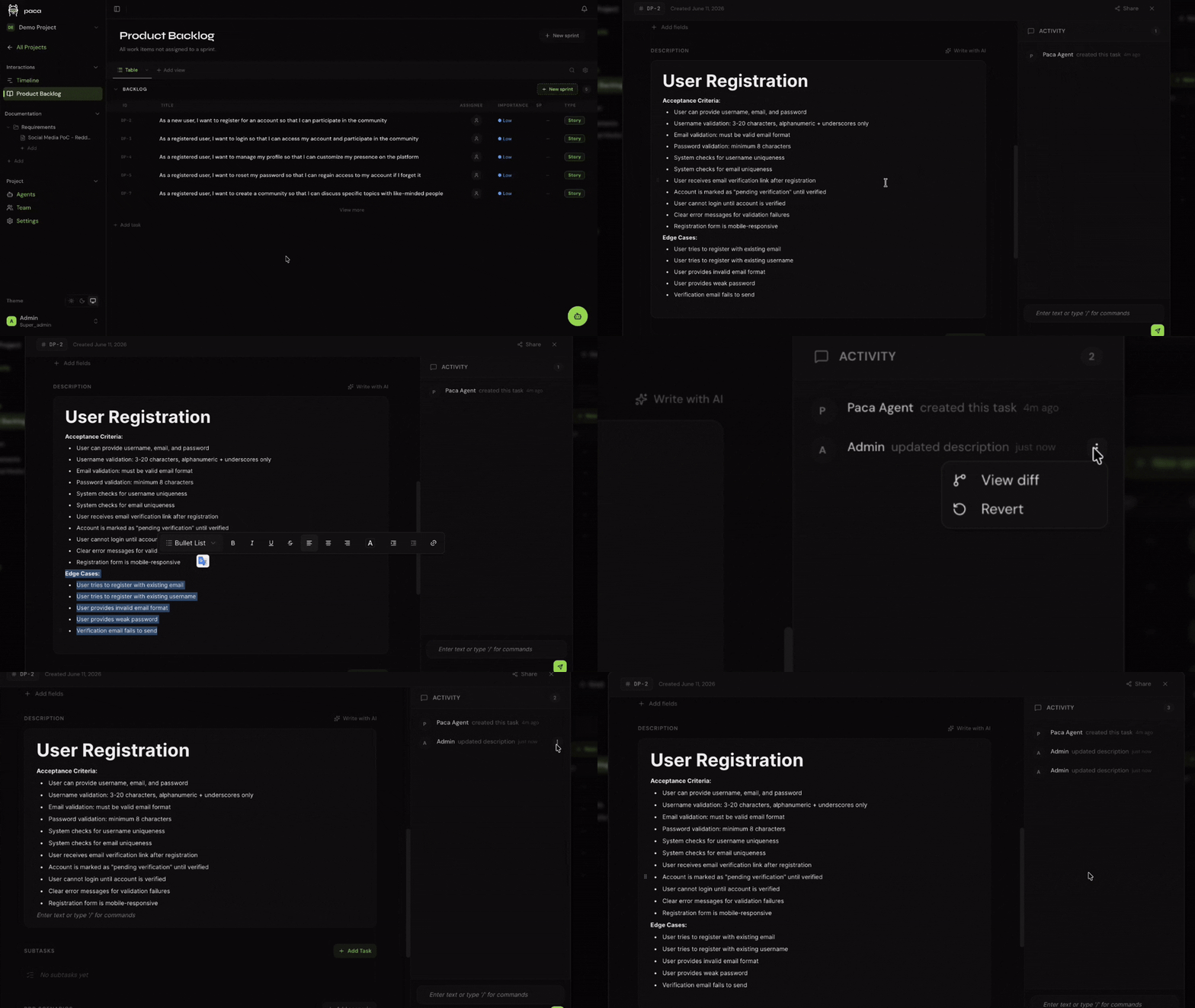
- **Activity diff & revert** — every field change in the activity pane now shows a before/after diff; one click reverts a change to its previous value
---
## Key Features
- **Unified Scrumban Board** — humans and AI agents share a single real-time board; no separate "AI workspace"
- **In-app AI chat** — chat with AI agents at the project level to plan work, create or update epics, stories, tasks, and documentation in plain English
- **Activity diff & revert** — see a visual diff for every field change in the activity pane and revert any change with one click
- **BDD Collaboration** — Gherkin scenario editor co-authored by POs, BAs, and AI agents
- **System Design Documents (SDD)** — living architecture docs that keep AI agents contextually grounded
- **MCP Server** — connect Claude, custom agents, or any MCP-compatible tool directly into Paca's data layer
- **Claude Code skill** — `/paca` slash command for Claude Code; manage tasks, docs, and sprints in plain English without leaving your editor
- **Real-time updates** — Socket.IO delivery; everyone sees changes the moment they happen
- **OpenHands-powered agents** — AI agents run on the [OpenHands](https://github.com/All-Hands-AI/OpenHands) SDK; each agent executes inside its own isolated sandbox container so your host environment is never touched
- **WASM plugin sandbox** — extend Paca safely; plugins cannot escape their declared permissions
- **Self-hosted** — runs on a single Docker Compose command; your data never leaves your infrastructure
- **Lightweight by default** — minimal core, no feature bloat; add only what your team actually needs
---
## Getting Started
### Option 1 — Interactive install script (recommended for production)
Runs on any Linux server with Docker. No repository clone required.
```bash
curl -fsSL https://github.com/Paca-AI/paca/releases/latest/download/install.sh | bash
```
The script walks you through configuration interactively and starts the full stack. Open `http://your-server-ip` when it finishes.
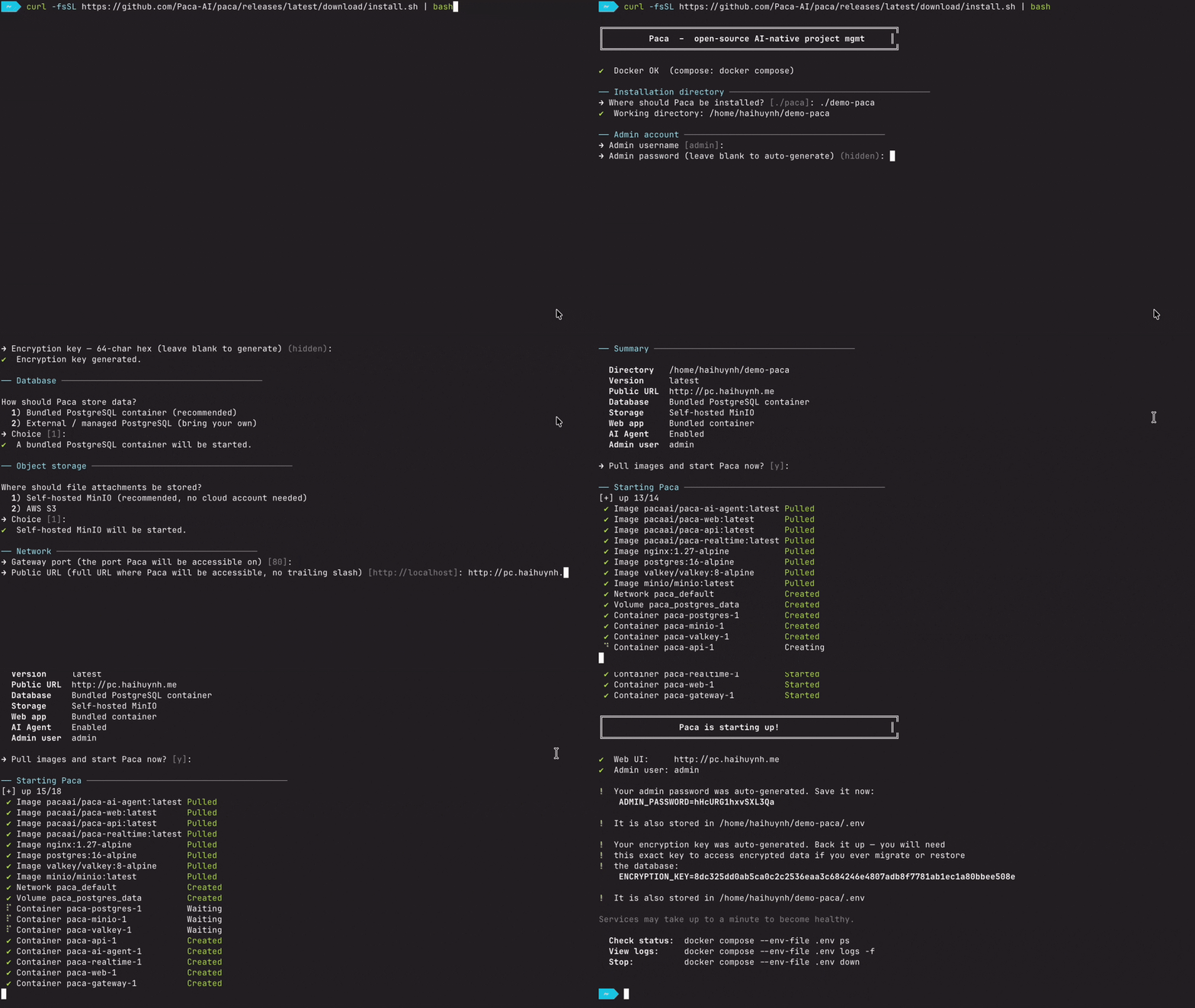
**Non-interactive (CI, scripts, AI coding agents):** set `PACA_YES=1` — required for
unattended use, since without it the script can block on a prompt with nobody there
to answer it. Every other setting (database, storage, domain/HTTPS, AI agent, secrets)
can be steered with an environment variable instead of accepting its default:
```bash
PACA_YES=1 bash <(curl -fsSL https://github.com/Paca-AI/paca/releases/latest/download/install.sh)
```
> **If you are an AI agent installing Paca on someone's behalf:** use this script
> rather than hand-writing `docker-compose.yml` / `.env` yourself — it pins
> compatible image tags and generates every secret in the format the services
> expect, so it's far less likely to drift from what a given release needs. See
> [deploy/README.md](deploy/README.md#non-interactive-install-ci-scripts-ai-coding-agents)
> for the full environment variable reference, or the comment header at the top of
> [`scripts/install.sh`](scripts/install.sh) for the same reference inline with the script.
>
> Prefer a manual Docker Compose setup, or a local dev environment instead? See
> [deploy/README.md](deploy/README.md#manual-setup) and
> [docs/guides/local-development.md](docs/guides/local-development.md).
---
### Upgrading to a new version
From the directory where your `docker-compose.yml` and `.env` live, run the upgrade
script published with each release — it refreshes `docker-compose.yml` and the
Caddyfile (with backups) and restarts the stack:
```bash
curl -fsSL https://github.com/Paca-AI/paca/releases/latest/download/upgrade.sh -o upgrade.sh
bash upgrade.sh
```
Database migrations run automatically on API startup. Non-interactive (CI, AI agents): set `PACA_YES=1`, same as `install.sh` — see [deploy/README.md](deploy/README.md#upgrading-to-a-new-version) for the full env var reference, pinning a specific version, or passing through `--scale` flags.
---
### Option 2 — Kubernetes (Helm chart)
For running Paca on an existing Kubernetes cluster instead of a single Docker host. No repository clone required — the chart is published as an OCI artifact alongside every other release image.
```bash
kubectl create namespace paca
helm install paca oci://ghcr.io/paca-ai/charts/paca --version -n paca -f my-values.yaml
```
`` is a [release](https://github.com/Paca-AI/paca/releases) tag without its leading `v` (e.g. `0.13.1` for `v0.13.1`); omit `--version` to install the newest chart published. At minimum, `my-values.yaml` needs `publicUrl` and the required secrets (`jwtSecret`, `adminPassword`, `encryptionKey`, and others) — there are no guessable defaults, so the chart refuses to render without them.
See [Artifact Hub](https://artifacthub.io/packages/helm/paca/paca) for the full values reference, exposing the app via Ingress/TLS or a LoadBalancer, what's bundled vs. pointing at managed Postgres/Redis/S3, the AI agent sandbox's Kubernetes-specific RBAC, and troubleshooting.
---
## MCP Server — Connect Any AI Agent to Paca
Paca ships an [MCP (Model Context Protocol)](https://modelcontextprotocol.io) server that gives any compatible AI agent direct, structured access to your workspace — projects, tasks, sprints, documents, members, and more. No scraping, no custom APIs to wire up.
The server is published as **`@paca-ai/paca-mcp`** on npm. You run it with `npx`; your MCP client handles the rest.
### Claude Desktop
1. Open (or create) the Claude Desktop config file:
- **macOS**: `~/Library/Application Support/Claude/claude_desktop_config.json`
- **Windows**: `%APPDATA%\Claude\claude_desktop_config.json`
2. Add the `paca` entry:
```json
{
"mcpServers": {
"paca": {
"command": "npx",
"args": ["-y", "@paca-ai/paca-mcp"],
"env": {
"PACA_API_KEY": "your-api-key-here",
"PACA_API_URL": "http://localhost:8080"
}
}
}
}
```
3. Restart Claude Desktop. Claude now has access to all Paca tools and can answer requests like:
- *"List all active sprints in project X"*
- *"Create a task for implementing OAuth and assign it to sprint 3"*
- *"Add a comment to task #42 with my progress update"*
### Other MCP-Compatible Clients
Any client that speaks MCP works. Typical configuration:
```json
{
"name": "paca",
"command": "npx",
"args": ["-y", "@paca-ai/paca-mcp"],
"env": {
"PACA_API_KEY": "your-api-key-here",
"PACA_API_URL": "http://your-paca-instance:8080"
}
}
```
### Environment Variables
| Variable | Required | Default | Description |
|:--|:--|:--|:--|
| `PACA_API_KEY` | Yes | — | API key from your Paca instance (Settings → API Keys) |
| `PACA_API_URL` | No | `http://localhost:8080` | URL of your Paca API |
### Available Tools
The server exposes tools across these categories:
| Category | Tools |
|:--|:--|
| Projects | `list_projects`, `get_project`, `create_project`, `update_project`, `delete_project` |
| Tasks | `list_tasks`, `get_task`, `create_task`, `update_task`, `delete_task`, + more |
| Sprints | `list_sprints`, `create_sprint`, `update_sprint`, `complete_sprint`, + more |
| Documents | `list_documents`, `get_document`, `create_document`, `update_document`, `delete_document` |
| Members & Roles | `list_project_members`, `add_project_member`, `list_project_roles`, + more |
| Task Types & Statuses | `list_task_types`, `create_task_type`, `list_task_statuses`, + more |
| Views & Custom Fields | `list_views`, `create_view`, `list_custom_fields`, `create_custom_field`, + more |
| Attachments | `list_task_attachments`, `get_attachment_download_url`, `delete_task_attachment` |
| Activity & Comments | `list_task_activities`, `add_task_comment`, `update_task_comment`, `delete_task_comment` |
| Plugin tools | Installed plugins can register additional tools at runtime |
For a complete reference and advanced configuration (agent-mode, plugin tools, programmatic usage), see [docs/guides/mcp-server-setup.md](docs/guides/mcp-server-setup.md).
---
## `/paca` skills — Claude Code, Gemini CLI, Cursor, and more
Install the Paca skill set and manage your entire Paca workspace through natural-language slash commands — without leaving your editor and without creating local files. Every command reads your Paca documentation first to understand the project before acting.
Skills use the [Agent Skills](https://agentskills.io/specification) format (YAML frontmatter + instructions) and are served by a running Paca instance's own API (`GET /api/v1/skills`), not read from a checked-out directory — so installed content always matches the exact version that instance runs. The install script fetches and installs them to [Claude Code](https://claude.ai/code) (`~/.claude/commands/`), Gemini CLI (`~/.gemini/commands/`), Cursor (`.cursor/commands/`, project-scoped), and any AGENTS.md-reading tool (project-scoped) in one pass, and also pulls in skills contributed by your installed plugins. See [docs/guides/install-skills.md](docs/guides/install-skills.md) for details.
### Install
Point the installer at a running Paca instance and run this once in your terminal to install all skills to every supported platform found on this machine:
```bash
PACA_API_URL=http://localhost:8080 \
curl -fsSL https://raw.githubusercontent.com/Paca-AI/paca/master/scripts/install-paca-skills.sh | bash
```
Then connect the Paca MCP server to Claude Code:
```bash
claude mcp add paca \
--env PACA_API_KEY= \
--env PACA_API_URL= \
-- npx -y @paca-ai/paca-mcp
```
Run `/paca-setup` inside a Claude Code session for a guided interactive walkthrough instead.
### Available commands
| Command | What it does |
|:--|:--|
| `/paca ` | General task, doc, and sprint operations in plain English |
| `/paca-analyst ` | Talk a request or bug through and draft tasks in Refinement for a human to approve |
| `/paca-epic ` | Turn requirements into an epic with child stories and a spec doc |
| `/paca-clarify ` | Identify ambiguities, ask questions, and update the spec in Paca |
| `/paca-breakdown ` | Decompose a task into independent, estimable sub-tasks |
| `/paca-sprint` | Plan a sprint from the backlog against capacity and goals |
| `/paca-estimate ` | Estimate story points and write them back to tasks |
| `/paca-prioritize` | Score and set priorities across the backlog |
| `/paca-do ` | Execute a task, update its status, and keep docs current |
| `/paca-test ` | Derive test cases, run them, and record results as a comment |
| `/paca-doc ` | Write or update documentation in Paca Docs |
| `/paca-review ` | Review a task's pull request on spec and standards axes, read CI, submit a verdict |
| `/paca-triage` | Triage unsorted tasks: type, duplicates, ready / needs info / decline |
| `/paca-retro` | Sprint retrospective from the record, with improvements turned into tasks |
| `/paca-feedback` | Turn page comments from the browser extension into tasks |
| `/paca-board` | Audit and set up task types, statuses, custom fields and views |
| `/paca-team` | See who can do what; add, re-role or remove project members |
| `/paca-automation ` | Design and build event-driven automations (trigger → condition → action) |
| `/paca-setup` | Interactive MCP connection wizard |
For full setup options and command reference, see [docs/guides/install-skills.md](docs/guides/install-skills.md).
---
## Architecture
```
apps/web React + TanStack Start + shadcn/ui — user interface
apps/mcp @paca-ai/paca-mcp — MCP server for AI agent integration
services/api Go + Gin — core business logic and REST API
services/realtime Node.js + Socket.IO — real-time event fan-out
services/agent-runner Go — AI agent execution (Goose over ACP)
services/agent-server Docker image for the Goose sandbox agent-runner spawns per conversation
apps/e2e Playwright — end-to-end test suite
PostgreSQL Persistent store
Valkey Cache + async event streams between services
```
See [docs/architecture/overview.md](docs/architecture/overview.md) for detail.
---
## The "Paca" Story
The name is a small pun on the Japanese word **"Baka" (ばか)** — "silly."
In the early days, we jokingly called our AI assistants "silly" when they hallucinated. And building a serious project management platform as a free, open-source alternative to multi-billion-dollar tools might also seem a bit silly.
But Paca is built from conviction: human-AI collaboration in a real Scrum team should be accessible to every team, everywhere — not locked behind a vendor's pricing model. We think that's worth being a little foolish about. 🦙✨
---
## Documentation
| Document | Description |
|:--|:--|
| [docs/architecture/overview.md](docs/architecture/overview.md) | High-level system architecture |
| [docs/guides/getting-started.md](docs/guides/getting-started.md) | Getting started (install, Docker, local dev) |
| [docs/guides/local-development.md](docs/guides/local-development.md) | Contributor dev environment setup |
| [docs/guides/mcp-server-setup.md](docs/guides/mcp-server-setup.md) | Connect AI agents via MCP |
| [docs/guides/install-skills.md](docs/guides/install-skills.md) | `/paca` skill for Claude Code — manage Paca from your editor |
| [apps/extension/README.md](apps/extension/README.md) | Browser extension — comment on environment preview pages, turn comments into tasks |
| [docs/plugins/](docs/plugins/) | Plugin system: backend (WASM) and frontend |
| [deploy/README.md](deploy/README.md) | Full deployment reference |
| [CONTRIBUTING.md](CONTRIBUTING.md) | How to contribute |
| [SECURITY.md](SECURITY.md) | Security policy |
---
## Contributors
Thanks to everyone who has helped build Paca. 💛
 Want to see your face here? Read [CONTRIBUTING.md](CONTRIBUTING.md) and open a pull request.
---
## License
Distributed under the **Apache License 2.0**. See [LICENSE](LICENSE) for details.
---
## A Small Thank-You for the Community
Some partners offer a little extra to folks who find them through Paca — just perks for this project, not promotions:
- **Fluxion AI** — signup bonus bumped to **$3** for anyone who joins through Paca's community link: [https://fluxionai.world/register?source=github&campaign=github-paca&promo=PACA](https://fluxionai.world/register?source=github&campaign=github-paca&promo=PACA)