




📑 SHEET helps you easily create a wide variety of action sheets with navigation features used in the Flipboard App
## Installation
### CocoaPods
```bash
pod 'Sheet', '~> 0.7.0'
```
### Carthage
```bash
github "ParkGwangBeom/Sheet" ~> 0.7.0
```
### Manually
If you prefer not to use either of the aforementioned dependency managers, you can integrate Sheet into your project manually.
## Usage
Implementing the contents of a Sheet is similar to implementing an existing UICollectionViewController.
Simply make your view controller subclass of SheetContentsViewController.
```
import Sheet
class ViewController: SheetContentsViewController {
/// Sheet visible contents height. If contentSize height is less than visibleContentsHeight, contentSize height is applied.
override var visibleContentsHeight: CGFloat {
return 600
}
/// Give CollectionView a chance to regulate Supplementray Element
override func registCollectionElement() {
let nib = UINib(nibName: "TitleHeaderView", bundle: nil)
collectionView?.register(nib, forSupplementaryViewOfKind: SheetLayoutElement.header.kind, withReuseIdentifier: SheetLayoutElement.header.id)
}
/// Provide an opportunity to set default settings for collectionview custom layout
override func setupSheetLayout(_ layout: SheetContentsLayout) {
layout.settings.itemSize = { indexPath in
let height: CGFloat = indexPath.section == 0 ? 30 : 60
return CGSize(width: UIScreen.main.bounds.width, height: height)
}
layout.sectionInset = UIEdgeInsets(top: 0, left: 0, bottom: 15, right: 0)
layout.settings.headerSize = CGSize(width: UIScreen.main.bounds.width, height: 60)
layout.settings.isHeaderStretchy = true
}
override func collectionView(_ collectionView: UICollectionView, numberOfItemsInSection section: Int) -> Int {
return 10
}
override func collectionView(_ collectionView: UICollectionView, cellForItemAt indexPath: IndexPath) -> UICollectionViewCell {
let cell = collectionView.dequeueReusableCell(withReuseIdentifier: "cell", for: indexPath)
...
return cell
}
override func collectionView(_ collectionView: UICollectionView, didSelectItemAt indexPath: IndexPath) {
...
}
...
}
```
You can use the custom action sheet transition using the default api provided by UIKit such as present, push, pop.
> 🔥 **However, do not use the dismiss of the NavigationController, but use the close (duration: completion :) function.**
```
// present
let contentsViewController = ViewController()
let sheetNavigation = SheetNavigationController(rootViewController: contentsViewController)
present(sheetNavigation, animated: true, completion: nil)
// push
let nextContentsViewController = NextContentsViewController()
navigationController?.pushViewController(nextContentsViewController, animated: true)
// pop
navigationController?.popViewController(animated: true)
```
**See the Example project for more details.**
## Layout
**Sheet** basically has Navigation structure. All children should inherit from **SheetContentsViewController**. SheetContentsViewController inherits **UICollectionViewController** by default, and its layout is like the following image.
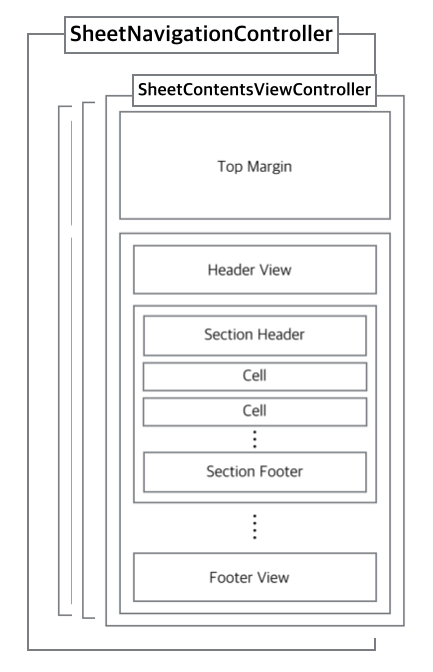
**Please refer to Example Code for detailed setting of image layout.**
## Advanced
Easily customizable by SheetContents.
### Options
| Property | Type | Default Value |
| -------- | --- | --- |
| `defaultToolBarBackgroundColor` | `UIColor` | `.black` |
| `sheetToolBarHeight` | `CGFloat`| `50`|
| `isSheetToolBarHidden` | `Bool` | `false`|
| `cornerRadius` | `CGFloat` | `0`|
| `defaultVisibleContentHeight` | `CGFloat` | `240`|
| `dimmingViewBackgroundColor` | `UIColor` | `.black.withAlphaComponent(0.3)`|
| `sheetBackgroundColor` | `UIColor` | `.white`|
| `presentTransitionType` | `SheetPresentTransitionType` | `.scale`|
### Layout Settings
| Property | Type |
| -------- | --- |
| `headerSize` | `CGSize?` |
| `footerSize` | `CGSize?`|
| `itemSize` | `((IndexPath) -> CGSize)?` |
| `sectionHeaderSize` | `((IndexPath) -> CGSize)?` |
| `sectionFooterSize` | `((IndexPath) -> CGSize)?` |
### SheetContentsViewController
| Property | Type |
| -------- | --- |
| `sheetToolBar` | `UIView` |
| Method | Explanation |
| -------- | --- |
| `func registCollectionElement()` | `Give CollectionView a chance to regulate Supplementray Element` |
| `func setupSheetLayout()` | `Provide an opportunity to set default settings for collectionview custom layout`|
| `func reload()` | `Help reload CollectionView and adjust the height of the content.`|
| `func close(completion: (() -> Void)? = nil)` | `Sheet Dismiss`|
### Custom ToolBar
The built-in toolbar consists of a single button.
| Default ToolBar |
|------- |
| |
Setting up a Custom ToolBar is very simple.
```
sheetToolBar = CustomToolBar()
```
## Author
- GwangBeom Park ([@gwangbeom](https://github.com/ParkGwangBeom))
## License
Sheet is released under the MIT license. See LICENSE for details.
|
Setting up a Custom ToolBar is very simple.
```
sheetToolBar = CustomToolBar()
```
## Author
- GwangBeom Park ([@gwangbeom](https://github.com/ParkGwangBeom))
## License
Sheet is released under the MIT license. See LICENSE for details.