# Digital Music Stand
[](https://ci.patwie.com/PatWie/digitalmusicstand)
A simple cross-platform browser-based pdfjs-based viewer to display and search music sheets.
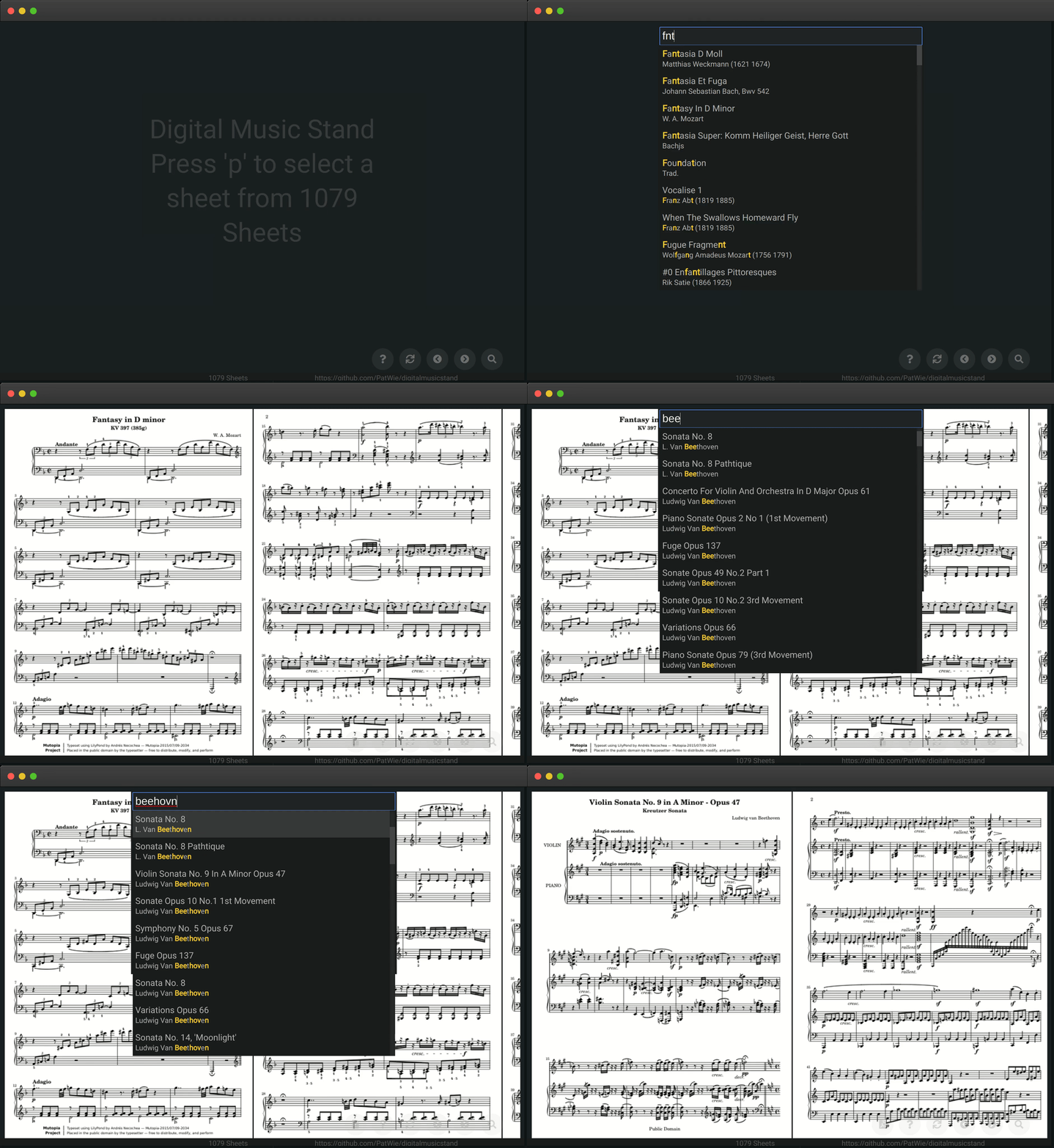 * A single binary including all assets.
* Usage is similar to SublimeText. Press `P` and perform a fuzzy search.
* Not database required
* Shortcuts `1,2` to scroll to previous/next page using a programmable foot pedal.
* Unobtrusive design
* Upload PDF when enabled
* Add sheets via simple file naming
* Use a YAML format to add whole songbooks and complex sheets
## DEMO
See [http://demo-digitalmusicstand.patwie.com/](http://demo-digitalmusicstand.patwie.com/) for a subset of the [Mutopia Project](https://www.mutopiaproject.org/) which are released under Creative Commons Attribution-ShareAlike.
#### Handling
Press `p` and then type `monlgiht3` (with typos).
You can use the arrow keys (up/down) to navigate. But for now select `Sonata No. 14 Moonlight (3rd Movement: Presto Agitato)` and press the `enter` key. To scroll to the next page use the right arrow key (or the key `2`).
#### Shortcuts
- h
- opens help dialog
- p
- opens prompt for a query
- u
- opens dialog to upload pdf (when enabled)
- enter
- loads select sheet
- esc
- closes all modal dialogs
- arrow key down
- selects next entry in result list
- arrow key up
- selects previous entry in result list
- arrow key right or key '2'
- scrolls to next page
- arrow key left or key '1'
- scrolls to previous page
The short cuts `1` and `2` are for a programmable foot pedal
## Get it
Download from the [release page](https://github.com/PatWie/digitalmusicstand/releases). The single binary contains all files.
## Or build it yourself
Or build it yourself:
```bash
git clone https://github.com/PatWie/digitalmusicstand.git
cd digitalmusicstand
# only run once: minify static assets
wget https://github.com/tdewolff/minify/releases/download/v2.6.1/minify_2.6.1_linux_amd64.tar.gz
tar -xvf minify_2.6.1_linux_amd64.tar.gz && rm -r cmd && rm LICENSE.md
make
# run multiple times
go build
```
Instructions to install the required dependencies and their known-to-be-working versions are available at https://github.com/PatWie/digitalmusicstand/blob/master/.docker/dms-release.dockerfile
## Usage
```bash
./digitalmusicstand --sheets /path/to/pdfs --listen :3000
```
The files in the sheet directoy need to follow the convention `interpret_title.pdf`.
Whitespaces should be replaced by '-'.
Point your browser to `http://localhost:3000`
#### Add Songbooks
Alternatively, the YAML format can be used to add songbooks or complex sheets.
Example 1 (Songbook):
```yaml
# content of The_Big_Book_of_Jazz.yml
path: The_Big_Book_of_Jazz.pdf
artist: Various Artists
title: The Big Book of Jazz
songs:
- artist: Artist 1
title: Song 1
pages: [2, 3]
- artist: Artist 2
title: Song 2
pages: [4, 5, 6, 5, 6]
- title: The Big Book of Jazz (Full book)
```
Example 2 (single sheet):
```yaml
# content of Let_it_be.yml
path: Let_it_be.pdf
artist: The Beatles
title: Let It Be
```
* Each song is added to the sheet list with its artist name and title. (see Example 1)
* The page numbers define the used pages of the PDF and their ordering. (see Song 1 and Song 2)
* If no page information for a song is provided, the complete pdf is used. (see Example 1)
* If no artist name for a song is provided, the artist name of the head is used. (useful for single artist songbooks)
* If no songs are provided, the head (artist anme and title) is used for a single sheet. (see Example 2)
* Subfolders are allowed in `path`.
To activate this functionality use the `--parse-yaml` flag:
```bash
./digitalmusicstand --parse-yaml --sheets /path/to/pdfs --listen :3000
```