# Piia Engram
### Local-first AI work identity you can see, edit, and override — portable across your MCP coding tools.
Tell AI once who you are, how you work, and what "good" means.
Claude Code, Codex, Cursor, Windsurf, and other MCP-compatible tools can start from the same AI work identity layer — local files you own, no cloud account, no hidden memory you cannot inspect.
[Install](#install) · [See It in Action](#see-it-in-action) · [Supported Tools](#supported-tools) · [MCP Tools](#mcp-tools) · [FAQ](#faq)
[ENGLISH](README.md) | [中文](README.zh-CN.md)
[](https://pypi.org/project/piia-engram/)
[](https://pypi.org/project/piia-engram/)
[](https://python.org)
[](https://modelcontextprotocol.io)
[](LICENSE)
[](https://github.com/Patdolitse/piia-engram/actions/workflows/ci.yml)
[](https://github.com/Patdolitse/piia-engram/actions/workflows/guard-strategic-files.yml)
**Listed in:**
[](https://registry.modelcontextprotocol.io)
[](https://github.com/punkpeye/awesome-mcp-servers)
[](https://glama.ai/mcp/servers/@Patdolitse/piia-engram)
Also listed in: [awesome-agents](https://github.com/kyrolabs/awesome-agents) · [Awesome-MCP-ZH](https://github.com/yzfly/Awesome-MCP-ZH) · [mcpservers.org](https://mcpservers.org/servers/patdolitse/piia-engram) · [Cursor Directory](https://cursor.directory/plugins/piia-engram) · [ModelScope](https://www.modelscope.cn/mcp/servers/Patdolitse/piia-engram) · [PulseMCP](https://www.pulsemcp.com/servers/patdolitse-engram)
---
> **TL;DR:** piia-engram is a local-first personal AI identity layer. It helps multiple coding agents start from the same understanding of you: your preferences, quality bar, lessons learned, decisions, and project context. It is not an agent memory database; it is the user-owned layer above your tools.
**Why not just use native memory?** Claude Code, Codex, Cursor, and Windsurf are adding their own memories and rules. Those are useful, but they are scoped to one tool or workspace. piia-engram gives you one portable identity layer above them: local files you own, AI-proposed knowledge you review, and context that can follow you across tools.
**Trust model in four lines:**
- **No cloud account:** install with `pip`, keep the core store on your machine.
- **Local files:** identity and knowledge live under `~/.engram/` as JSON/Markdown.
- **User approval:** AI writes locally; high-risk items (credentials, shell commands, MCP config, permission rules) wait for your review, while low/medium writes are auto-absorbed but fully auditable and reversible. Set `ENGRAM_APPROVAL=strict` to gate every write.
- **Documented boundaries:** see [Trust model](docs/trust.md), [Privacy](PRIVACY.md), and [Security](SECURITY.md).
Want proof? See the [live cross-tool continuity proof](docs/cross-tool-continuity-proof.md) — a memory written by Claude Code, read back by Codex through one local store — or the one-command [reproducible code demo](docs/cross-tool-continuity-demo.md).
## See It in Action
```
You → "Help me refactor this auth module"
# WITHOUT piia-engram: AI starts from scratch
AI → "What language? What framework? What's your testing preference?"
# WITH piia-engram: AI can load your approved context
AI → "Based on your preference for pytest + 90% coverage, and your
lesson about always separating auth middleware from business
logic (from the March incident), here's my approach..."
```
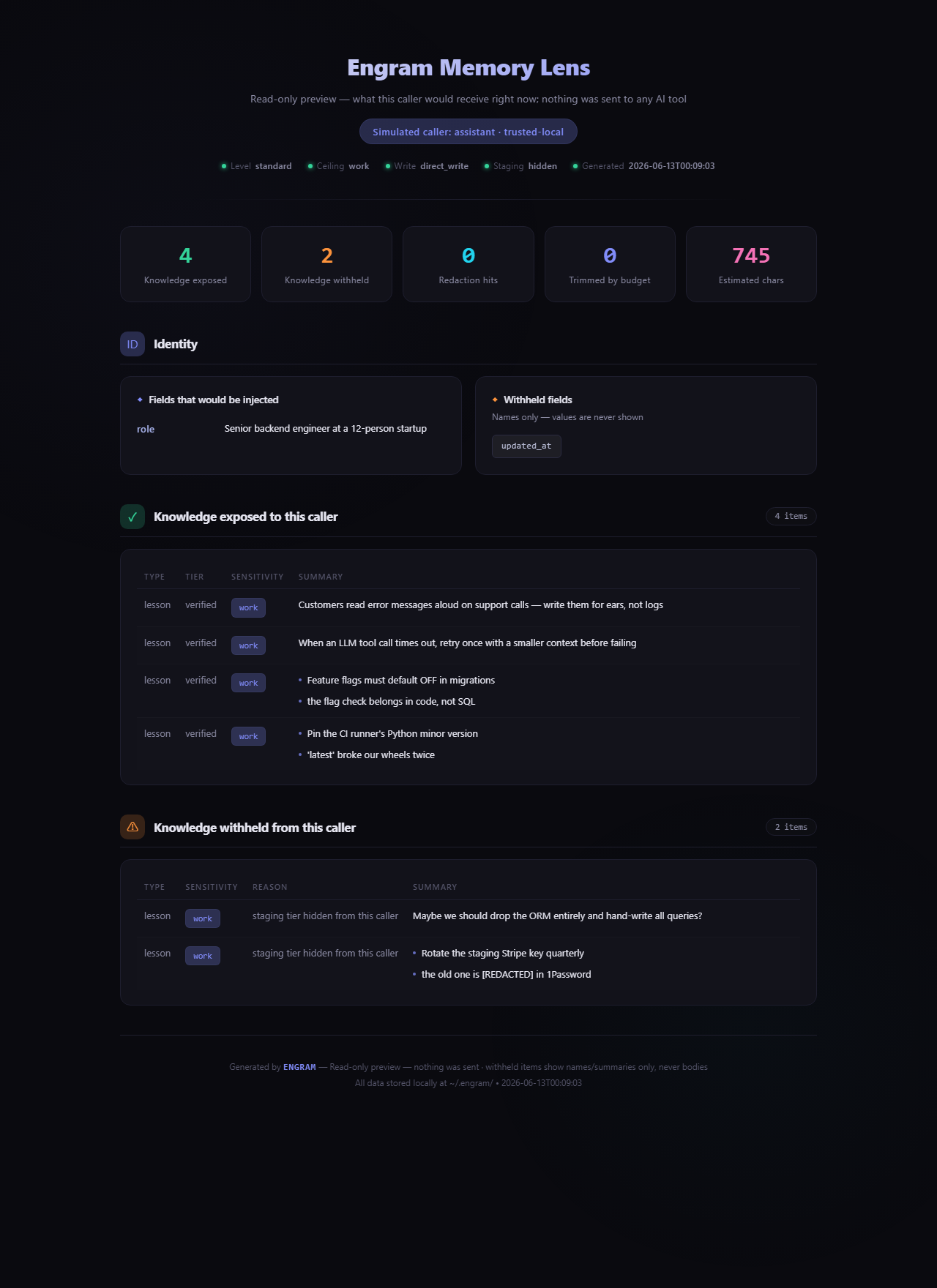
And you never have to take that on faith — **Memory Lens** (`engram preview --html`) shows exactly what any AI caller would receive, and what governance withheld, before anything is sent: