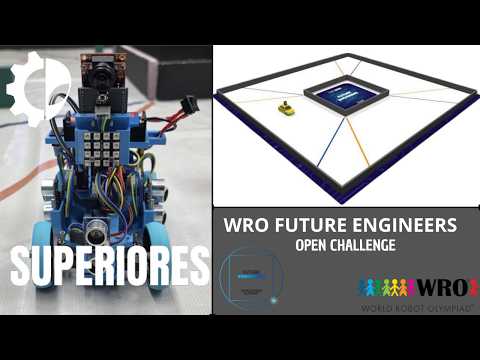
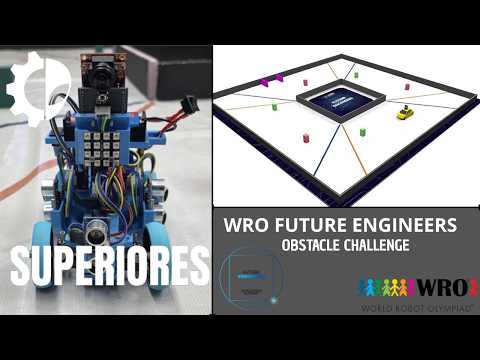
# WRO 2026 Future Engineers Superiores

> [!NOTE]
> **Documentation Migration Notice**
> Due to an issue locating the main repository during the initial development phase, previous documentation and progress updates were temporarily tracked in a secondary repository. You can review the prior commits and documentation at the following link:
> https://github.com/daiilvvyeyo/WRO-2026-Future-Engineers-Superiores



## Team Members
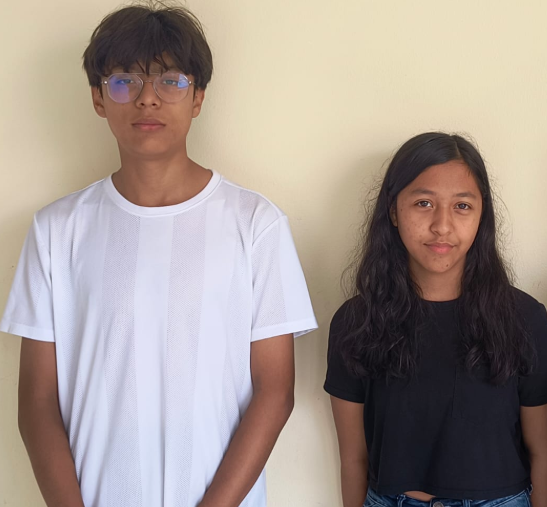
#### Team photo
|
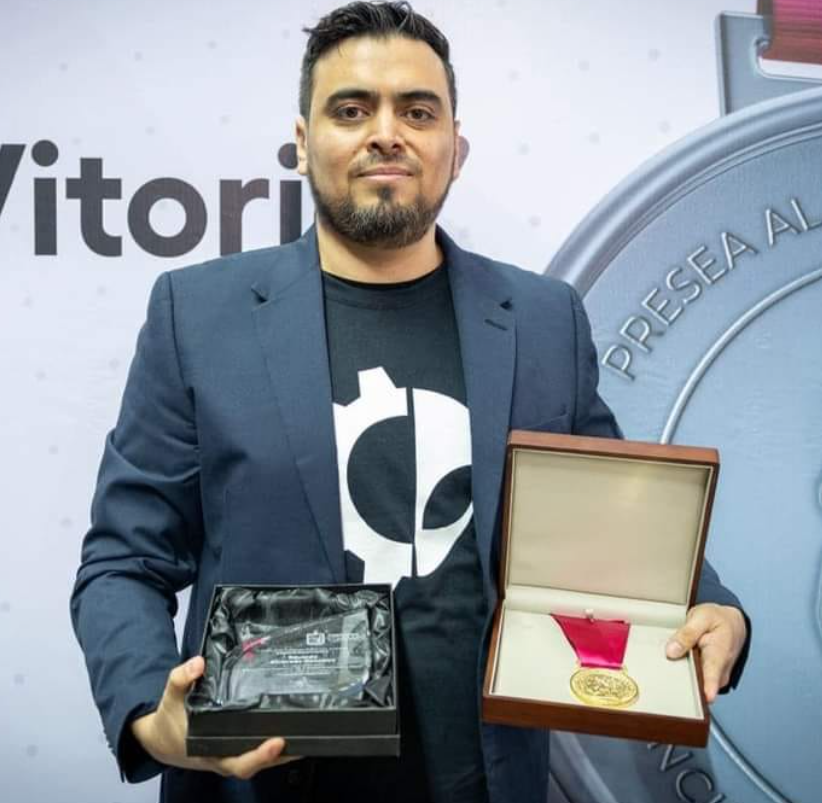
Eduardo Alvarado González — Coach & Founder
|
|
Age: 40
I founded Los Grises Superiores in 2014 with the goal of creating a team where students could learn engineering through real competition experience. Over the years we have participated in multiple WRO and TMR events, reaching both national and international stages. This season I mainly support the team in project organization, technical guidance, and helping the students improve their engineering process during development.
|
---
|
Christopher Pérez Cortés — Programming & Electronics
|

|
Age: 14
I joined the robotics club this year after taking an intensive robotics course, and since then I have been learning a lot about electronics, Arduino programming, and 3D design in Onshape. In the team I mainly work on the robot code, sensor integration, and electronics. WRO 2026 is my first international robotics competition, so this season has been a big learning experience for me.
|
---
|
Bárbara Daiana García Balboa — Design & Assembly
|

|
Age: 13
I joined the robotics club a few months ago after completing two robotics courses. My main role in the team is helping with the mechanical design, chassis assembly, and testing different structural ideas for the robot. This is my first robotics competition, so I have been learning how the engineering and competition process works while building the project together as a team.
|
## Track Challenges
* **Open Challenge:** Complete 3 full laps of the track in the shortest time possible while maintaining lane alignment using sensors (distance and vision).
* **Obstacle Challenge:** Navigate the track and dodge colored pillars in real time using computer vision (camera):
* **Red Pillars:** Dodge by passing on the right.
* **Green Pillars:** Dodge by passing on the left.
* **Autonomous Parking:** Detect the designated parking space and perform an automatic parallel parking maneuver upon completion.
## Project Videos
The following videos show the vehicle driving autonomously during both WRO Future Engineers 2026 challenges. Additional video documentation is available in the [video/](video/) folder.
## Project Overview & Abstract
This project was developed as the evolution of our 2025 WRO Future Engineers robot, which successfully reached the international final. Based on the experience gained during that season, the entire vehicle was redesigned for 2026 using a fully 3D-printed chassis, an OpenMV H7 camera, and an Arduino Nano-based control system to improve stability, adaptability, and overall performance.
The robot was built to autonomously complete the two Future Engineers challenges established by the WRO 2026 rules. During the Open Challenge, the vehicle must complete three laps while adapting to randomized track conditions such as driving direction, starting position, and corridor width. In the Obstacle Challenge, the robot must detect colored traffic pillars, avoid them from the correct side, and finally perform a parallel parking maneuver inside the designated parking zone.
Throughout the development process, the team continuously tested and improved both the mechanical and software systems in order to adapt the robot to the new 2026 rule changes and achieve more reliable autonomous behavior.
### Chassis Design & Iteration
Our first robot designs were based on a LEGO Mindstorms EV3 chassis. While it was easy to build and modify, we noticed several limitations during testing, especially related to weight, space distribution, and steering precision. The EV3 structure was also too restrictive for the type of custom design we wanted to achieve for the 2026 season.
Because of this, we decided to redesign the entire chassis using fully 3D-printed parts designed in Onshape. Our main goal was to create a lighter and more compact structure while still following the WRO size and weight regulations. We also wanted to improve stability, steering performance, and sensor placement.
Throughout the season, we tested different chassis versions. The first prototype used a flat structure, but during steering tests we discovered that the chassis flexed when the servo applied force, causing inaccurate steering movements. To improve rigidity, we redesigned the structure by adding reinforced supports and increasing the wall thickness in critical areas.
Later, we developed a third version focused on improving cornering performance in the new 600 mm corridor introduced in the 2026 rules. We reduced the overall length of the robot and relocated some electronic components to lower the center of gravity and improve balance while turning.
During the final reprint of the chassis using grey PLA filament, we encountered an unexpected problem: the drivetrain became stuck even though the motor was working correctly. After inspecting the structure, we realized that the new filament produced slightly tighter tolerances, causing friction around the rear axle housing. To solve this, we manually sanded the affected area until the shaft rotated smoothly again. After this issue, we started checking all moving parts after every print before assembling the robot.
### Steering System
The robot uses an **Ackermann steering geometry** controlled by a rack-and-pinion mechanism. The steering system was developed through several iterations during the prototyping process.
In the previous prototype, we used a **Steren MOT-110 micro servo** to control the steering mechanism. This version allowed us to test the basic steering geometry and evaluate the mechanical response of the system.
For the final vehicle, we decided to use an **SG90 micro servo**. The SG90 was selected for the final version because it provided the required steering movement while being compact and easy to integrate into the redesigned chassis.
The servo is connected to a **LEGO Technic rack-and-pinion mechanism (part 64781)**, which converts the servo's rotational movement into the linear movement required to turn the front wheels.
The steering system follows **Ackermann geometry**, allowing the inner and outer front wheels to turn at different angles during a corner. This helps the vehicle maintain a more appropriate trajectory while navigating the track.
The final steering configuration consists of:
* **Servo motor:** SG90 micro servo
* **Steering mechanism:** Rack-and-pinion
* **Rack:** LEGO Technic part 64781
* **Steering geometry:** Ackermann
* **Control:** Arduino Nano
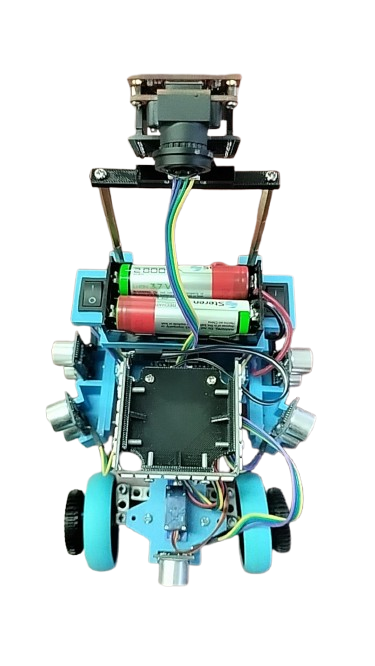
## Robot Photos
| Front | Back | Left |
|:---:|:---:|:---:|
| 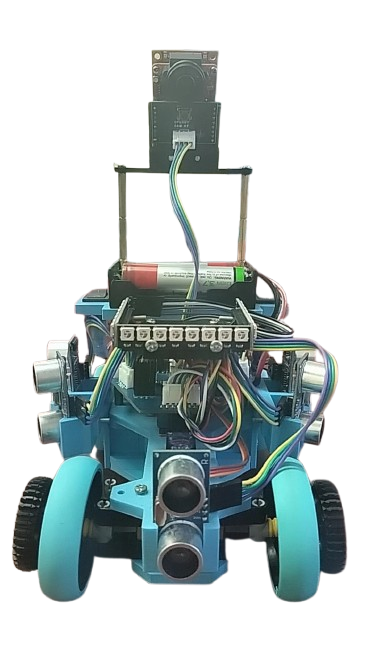 |
| 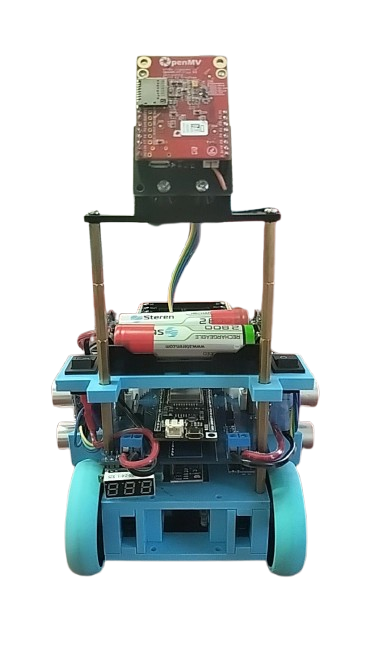 |
| 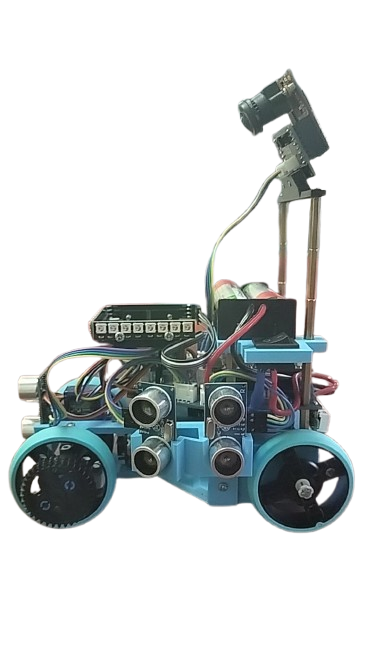 |
| Right | Top | Bottom |
|:---:|:---:|:---:|
|
|
| Right | Top | Bottom |
|:---:|:---:|:---:|
| 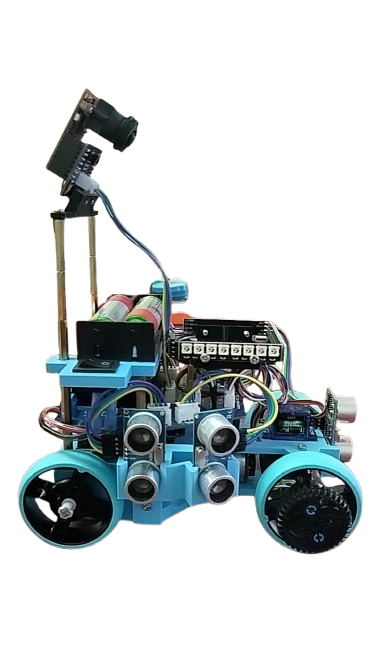 |
|  |
| 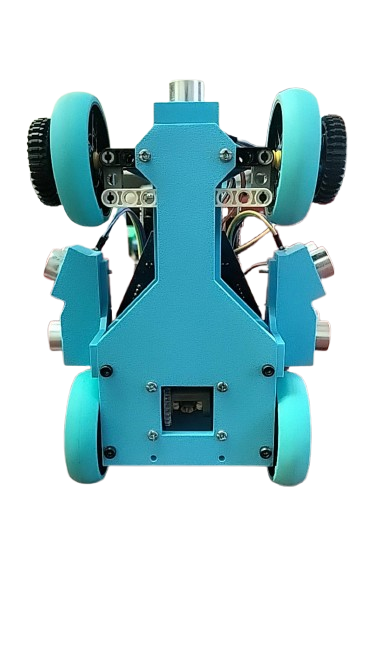 |
- Robot Weight: 0.710 kg
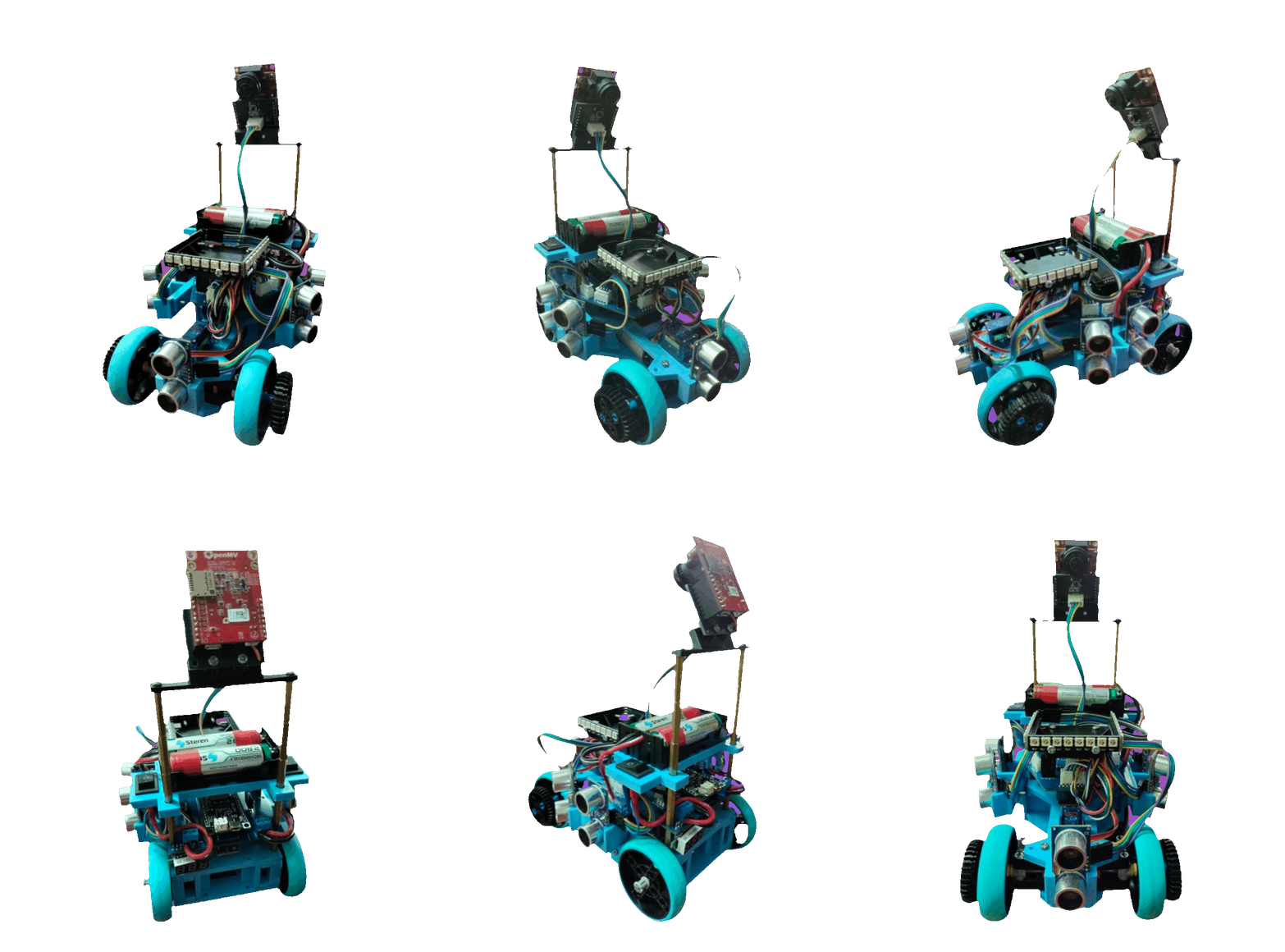
## Robot 360º
|
- Robot Weight: 0.710 kg
## Robot 360º
## Robot Components
| Component | Quantity | Main Function |
|---|:---:|---|
| ESP32 Microcontroller | 1 | Main processing / communication with OpenMV and sensors |
| Arduino Nano Microcontroller | 1 | Additional control (motor, encoders, ultrasonic sensors) |
| OpenMV Camera | 1 | Color vision, RX/TX communication (UART) |
| BNO085 IMU | 1 | Orientation / yaw (I2C: SCL, SDA) |
| HC-SR04 Ultrasonic Sensor | 5 | Distance measurement (front, 2 left, 2 right) |
| TB6612FNG Motor Driver | 1 | H-bridge for controlling the DC motor (PWMA, AIN1, AIN2, STBY) |
| DC Motor with Encoder | 1 | Traction (uses ENC_A and ENC_B for speed feedback) |
| 4-Channel Logic Level Converter | 1 | Adapts 3.3V ↔ 5V signals between modules (HV/LV x4) |
| Steering Servo | 1 | Steering control (S1 signal, SER_5+ power supply) |
| NeoPixel LEDs (WS2812) | 1 strip | Indicator lighting / vision assistance |
| 18650 Battery | Several | Main power supply (power bank) |
| Mini-560 Buck Converter | 2 | Voltage regulation (one line to 5V, another to 3.3V) |
| 7805 Voltage Regulator | 2 | One for the servo (SER_5+), another for the LEDs (LEDS_5+) |
| Digital Voltmeter | 1 | Battery voltage monitoring |
## Code
Our robot uses two main programs that work together. The Arduino Nano handles the distance sensors and LED strips, while the ESP32 acts as the main controller of the robot.
### Sensor Codes
- [ESP32 Open Optimized](./ESP32_Open_Optimizado.ino) — Main control code that processes the sensor data and manages the robot's movement.
- [Nano Sensors I2C 3x8](./Nano_Sensors_I2C_3x8.ino) — Reads the ultrasonic sensors through I2C and sends distance measurements to the ESP32.
- [Obstacle & Parking Exit](./OBSTACULOS_Salida_del_parking.ino) — Controls obstacle detection and the sequence used to exit the initial parking area.
### Arduino Nano — Sensors & LEDs
The Arduino Nano works as an assistant to the ESP32. It measures the five ultrasonic sensors, controls three strips of eight LEDs, and communicates the sensor measurements to the ESP32 through I2C.
### OpenMV – Detección y visión
[Detección de pilares, parking y obstáculos](./codes/color_corner_v6.py)
Sistema de visión de la OpenMV encargado de detectar pilares rojos y verdes, identificar las paredes y el hueco del estacionamiento, detectar posibles colisiones y enviar los datos al ESP32 mediante UART. :contentReference[oaicite:0]{index=0}
[Explicación del código](./codes/Pegado%20text(1).txt)
Explicación detallada del funcionamiento del sistema de visión, sus ROI, filtros de color y forma, detección del parking y comunicación con el ESP32. :contentReference[oaicite:1]{index=1}
**Main functions:**
* Reads five ultrasonic distance sensors.
* Controls 24 LEDs arranged in three strips of eight.
* Sends distance measurements to the ESP32.
* Receives the LED intensity level from the ESP32.
* Uses I2C communication at address `0x08`.
[View Arduino Nano Code](./codes/Nano_Sensores_I2C_3x8.ino)
### ESP32 — Main Robot Control
The ESP32 is the main controller of the robot. It receives the distance measurements from the Arduino Nano and uses them to control the motor, steering, speed, safety systems, lap counting, and final parking sequence.
**Main functions:**
* Receives data from the five distance sensors.
* Controls the DC motor through the TB6612FNG.
* Controls the SG90 steering servo.
* Uses the BNO085 to track orientation and count three laps.
* Uses the encoder to detect actual wheel movement.
* Maintains the robot centered using PID control.
* Detects walls and corners.
* Adjusts speed according to track conditions.
* Performs emergency reverse maneuvers.
* Executes the final movement after completing three laps.
* Provides an optional Wi-Fi dashboard for monitoring the robot.
[View ESP32 Code](./codes/ESP32_Open_Optimizado.ino)
# LEGO Set Use
| BLItemNo | ElementId | LdrawId | Part Name | BLColorId | LDrawColorId | Color Name | Qty | Weight (g) | Price per piece (USD) | Total (USD) |
|----------|------------|----------|------------|------------|----------------|-------------|-----|--------------|-------------------------|---------------|
| 6589 | 4565452 | 6589.dat | Technic Gear 12 Tooth Bevel | 19 | 19 | Tan | 3 | 0.40 | 0.15 | 0.45 |
| 3713 | 6275844 | 3713.dat | Technic Bush | 86 | 7 | Light Bluish Gray | 6 | 0.20 | 0.05 | 0.30 |
| 32523 | 4142822 | 32523.dat | Technic Liftarm 1 x 3 | 11 | 0 | Black | 2 | 0.80 | 0.20 | 0.40 |
| 39367pb01 | 6460453 | 39367.dat | Wheel 56 x 14 Technic | 102 | 9 | Blue | 4 | 5.50 | 1.50 | 6.00 |
| 62821b | — | 62821.dat | Technic Differential Gear (Closed) | 85 | 8 | Dark Bluish Gray | 1 | 3.50 | 3.50 | 3.50 |
| 87083 | 6083620 | 87083.dat | Technic Axle 4L with Stop | 85 | 8 | Dark Bluish Gray | 4 | 0.60 | 0.10 | 0.40 |
| 94925 | 4640536 | 94925.dat | Technic Gear 16 Tooth | 86 | 7 | Light Bluish Gray | 4 | 0.50 | 0.20 | 0.80 |
| 43093 | — | 43093.dat | Technic Axle 1L with Pin | 102 | 9 | Blue | 2 | 0.30 | 0.15 | 0.30 |
| 43093 | — | 43093.dat | Technic Axle 1L with Pin | 19 | 19 | Tan | 2 | 0.30 | 0.15 | 0.30 |
| 48989 | 6282158 | 48989.dat | Technic Pin Connector Perpendicular 3L | 86 | 7 | Light Bluish Gray | 2 | 1.00 | 0.30 | 0.60 |
| 40490 | 4645732 | 40490.dat | Technic Liftarm 1 x 9 | 15 | 15 | White | 1 | 1.20 | 0.50 | 0.50 |
| 32523 | 4142822 | 32523.dat | Technic Liftarm 1 x 3 | 11 | 0 | Black | 2 | 0.80 | 0.20 | 0.40 |
| 4265c | 6271167 | 4265c.dat | Technic Bush 1/2 Smooth | 3 | 14 | Yellow | 2 | 0.10 | 0.10 | 0.20 |
| TOTAL PARTS | TOTAL WEIGHT |
|--------------|----------------|
| 35 | 39.2 g |
### Traction System
For the traction system, we decided to use a rear-wheel drive configuration powered by a DC motor with an integrated gearbox connected to a TB6612FNG motor driver. Both rear wheels are connected through the same drivetrain, which helped us keep the system simpler, lighter, and fully compliant with the WRO rules.
During testing, we experimented with different gear ratios to find the best balance between speed and control. Some configurations made the robot extremely fast, but that also reduced the reaction time when detecting obstacles or correcting direction. Other configurations improved stability but made the robot too slow during acceleration.
After multiple test sessions, we found that an approximate 1:30 gear ratio gave us the best overall performance for both challenges.
| Parameter | Value |
|---|---|
| Drive motor | DC motor with gearbox |
| Motor driver | TB6612FNG dual H-bridge |
| Drive system | Rear-wheel drive |
| Wheel configuration | Both rear wheels connected together |
| Selected gear ratio | Approx. 1:30 |
### Speed Testing
| PWM Value | Approx. Speed | Main Use |
|---|---|---|
| 110 | ~0.28 m/s | Narrow corridor and obstacle sections |
| 130 | ~0.36 m/s | Normal track navigation |
| 150 | ~0.44 m/s | Open straight sections |
### Gear Ratio Comparison
| Gear Ratio | What Happened |
|---|---|
| 1:20 | The robot became too fast and reacted late to obstacles |
| 1:50 | Acceleration became too slow for completing laps efficiently |
| 1:30 | Best balance between speed, control, and stability |
#### Mechanical Trade-offs & Decisions
During the development process, we tested different ideas and components before deciding on the final configuration of the robot. In several cases, we had to choose between simplicity, performance, reliability, and compliance with the WRO rules.
| System | Option We Chose | Option We Rejected | Why We Chose It |
|---|---|---|---|
| Chassis material | 3D-printed PLA | LEGO Technic | Allowed us to create custom shapes while reducing overall weight |
| Steering system | Servo + rack mechanism | Differential steering | More stable and compliant with WRO steering rules |
| Drive system | Single DC motor | Two coupled motors | Simpler wiring, lighter structure, and easier control |
| Vision system | OpenMV H7 (UART) | HuskyLens (I2C) | OpenMV provided faster and more stable data during movement |
One of the most important decisions was replacing the HuskyLens camera with the OpenMV H7. During testing, we noticed that the HuskyLens sometimes sent data too slowly, which caused unstable steering corrections and servo oscillation. After switching back to the OpenMV system, the robot behaved much more smoothly and consistently during autonomous navigation.**
## Final Robot Design

Final 3D chassis design — WRO 2026 Future Engineers
Click the image to open the complete STL model.
### Why We Chose This Design
The final chassis was selected after several mechanical iterations and testing sessions throughout the development of our WRO 2026 robot.
Our first prototypes were based on LEGO Technic and EV3 components. Although this approach made early modifications easier, it introduced several limitations, including higher weight, less freedom in component placement, chassis flex, and a larger overall structure.
For the final version, we designed a custom 3D-printed chassis in Onshape. This allowed us to control the geometry of the robot and place each mechanical and electronic component according to its function.
The final design was chosen mainly for the following reasons:
- **Compact dimensions:** A shorter chassis improves maneuverability and reduces the turning radius, which is especially important in the narrower sections of the WRO 2026 track.
- **Improved steering rigidity:** Earlier versions flexed when the steering servo applied force. The final chassis includes reinforced structural areas to reduce deformation and make the Ackermann steering system more precise.
- **Better component distribution:** The ESP32, Arduino Nano, motor driver, batteries, OpenMV camera, ultrasonic sensors, BNO085 and other electronics can be positioned in specific locations instead of being limited by a LEGO structure.
- **Lower center of gravity:** Heavy components were positioned as low as possible to improve stability while turning and during obstacle avoidance maneuvers.
- **Sensor positioning:** The custom structure provides dedicated mounting positions for the front and lateral ultrasonic sensors, allowing the robot to measure the walls and obstacles from consistent angles.
- **Camera visibility:** The front section was designed so the OpenMV camera has a clear field of view for detecting red and green pillars as well as the parking area.
- **Ackermann steering integration:** The chassis was designed around the steering mechanism instead of adapting the steering mechanism to an existing chassis. This provides better alignment between the servo, rack-and-pinion system and front wheels.
- **Rear-wheel-drive integration:** The rear section provides the necessary space and alignment for the DC motor, drivetrain and rear axle while keeping the propulsion system compact.
- **Easy maintenance:** The open and modular structure allows us to access the electronics, sensors and mechanical components quickly during testing and competition.
- **Iterative manufacturing:** Because the chassis is 3D printed, individual parts can be redesigned and reprinted when a problem is discovered without rebuilding the entire robot.
The objective of the final design was not simply to make the robot smaller or lighter. We wanted the mechanical structure, electronics, sensors and software to work together as a single system.
This design represents the lessons learned from our previous prototypes and provides a better balance between **stability, maneuverability, sensor coverage, steering precision, accessibility and reliability** for the WRO 2026 Future Engineers challenges.
### 3D Model
The complete printable model is available here:
**[Open `final_design.stl`](./models/final_design.stl)**
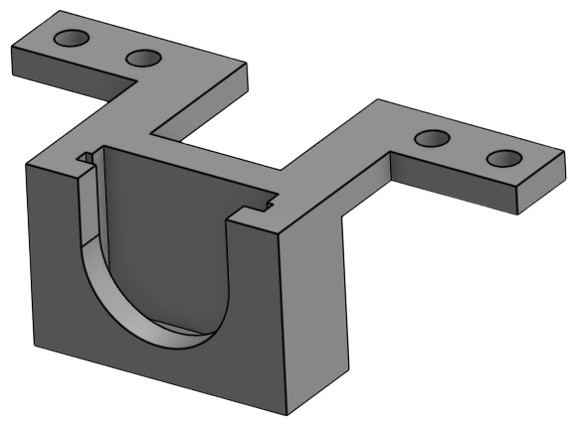
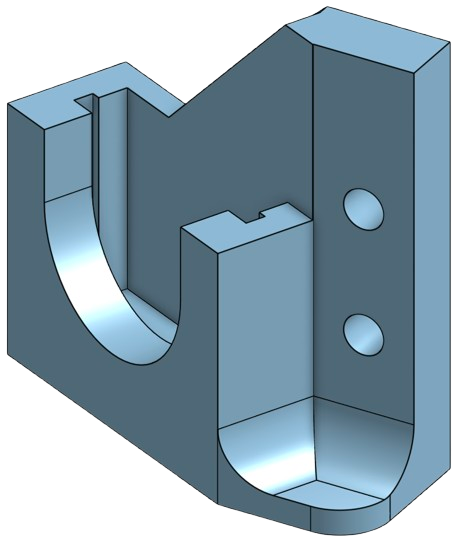
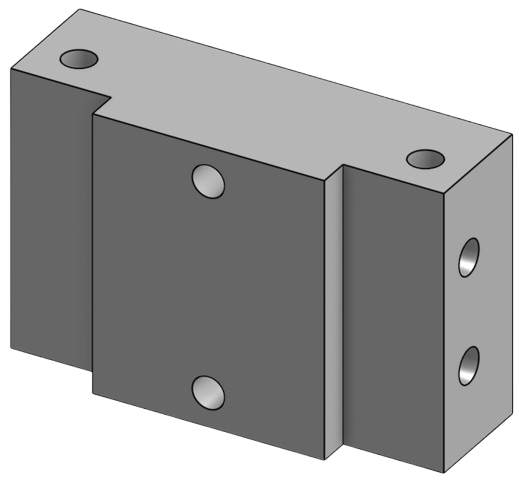
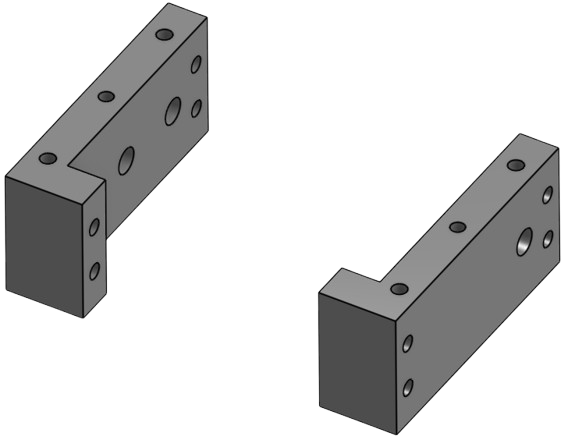
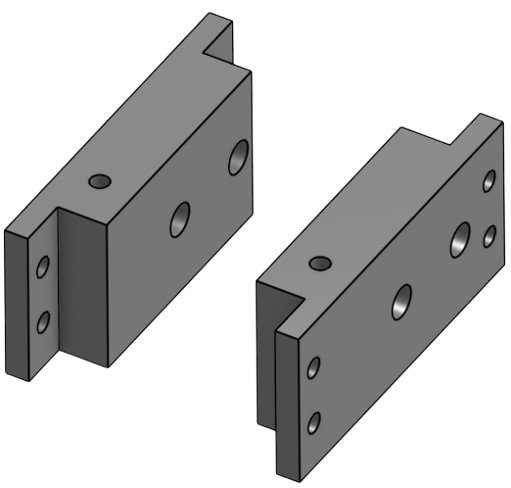
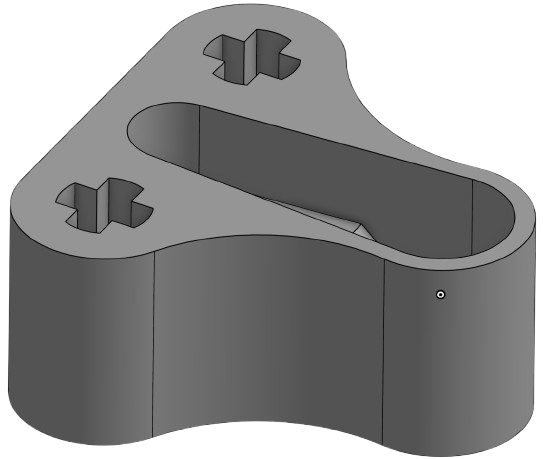
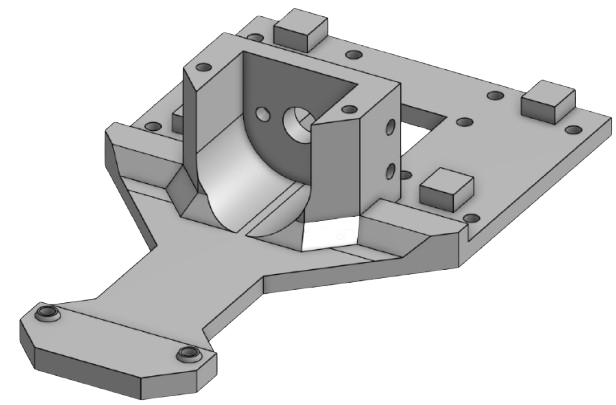
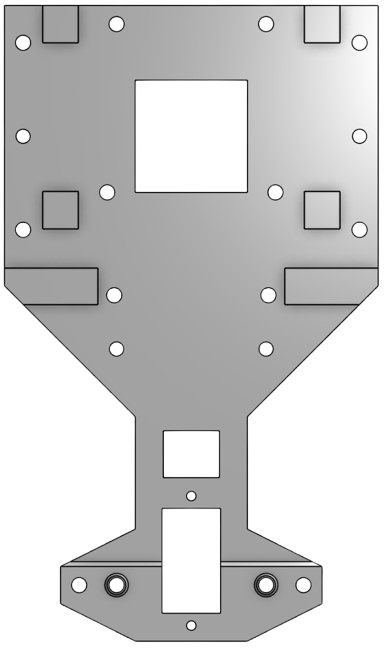
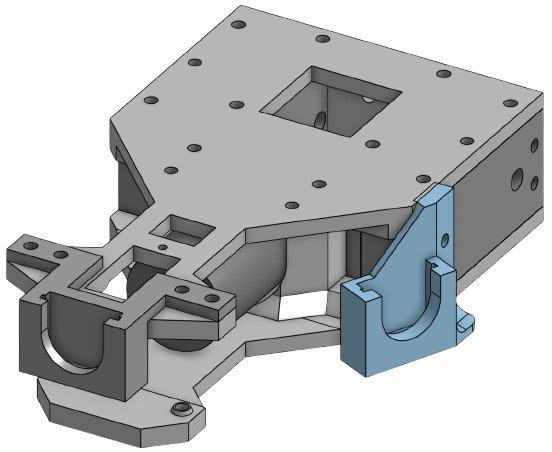
#### Structural Components (3D Design)
| Central Sensor Mount | Side Sensor Mounts | Rear Support |
|:--:|:--:|:--:|
|
|
|
|
| External Supports | Internal Supports | Directional Module |
|:--:|:--:|:--:|
|
|
|
|
| Lower Body | Upper Body | Full Base Structure |
|:--:|:--:|:--:|
|
|
|
|
| Lower Body | Upper Body |
|:--:|:--:|
|
|
|
| Full Base Structure |
|:--:|
|
|
| Directional Module |
|:--:|
|
|
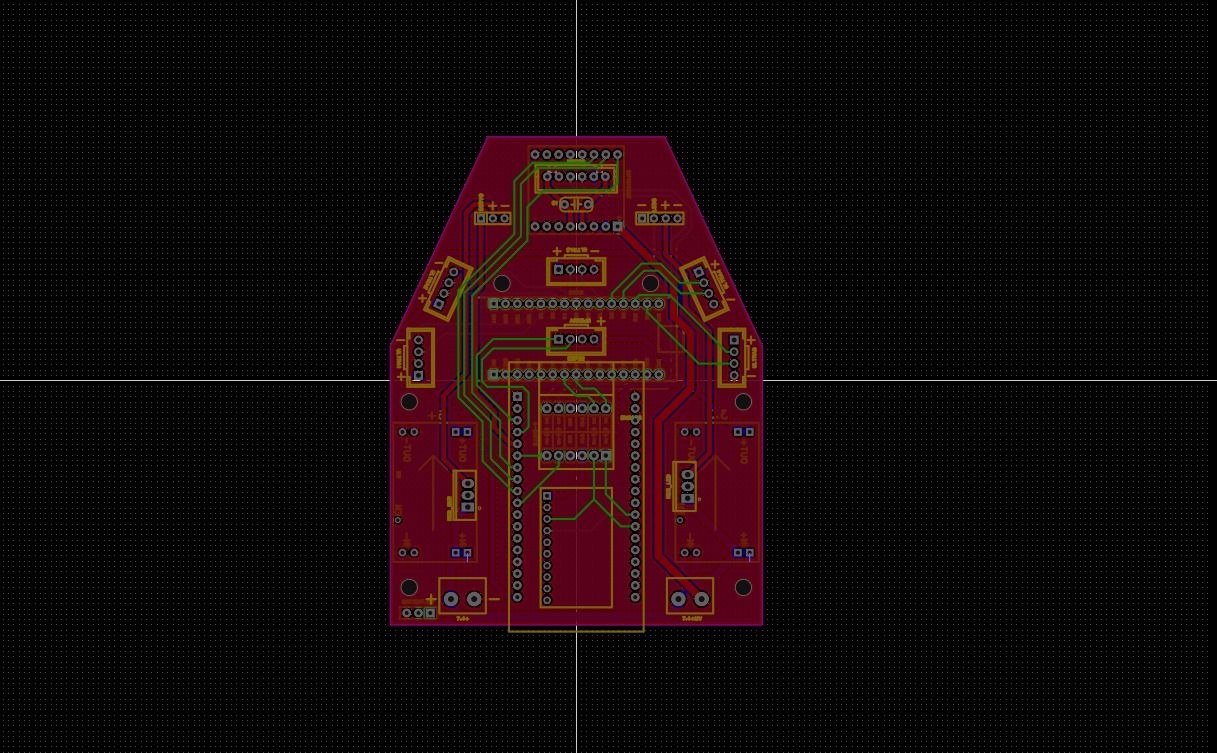
PCB Design
|
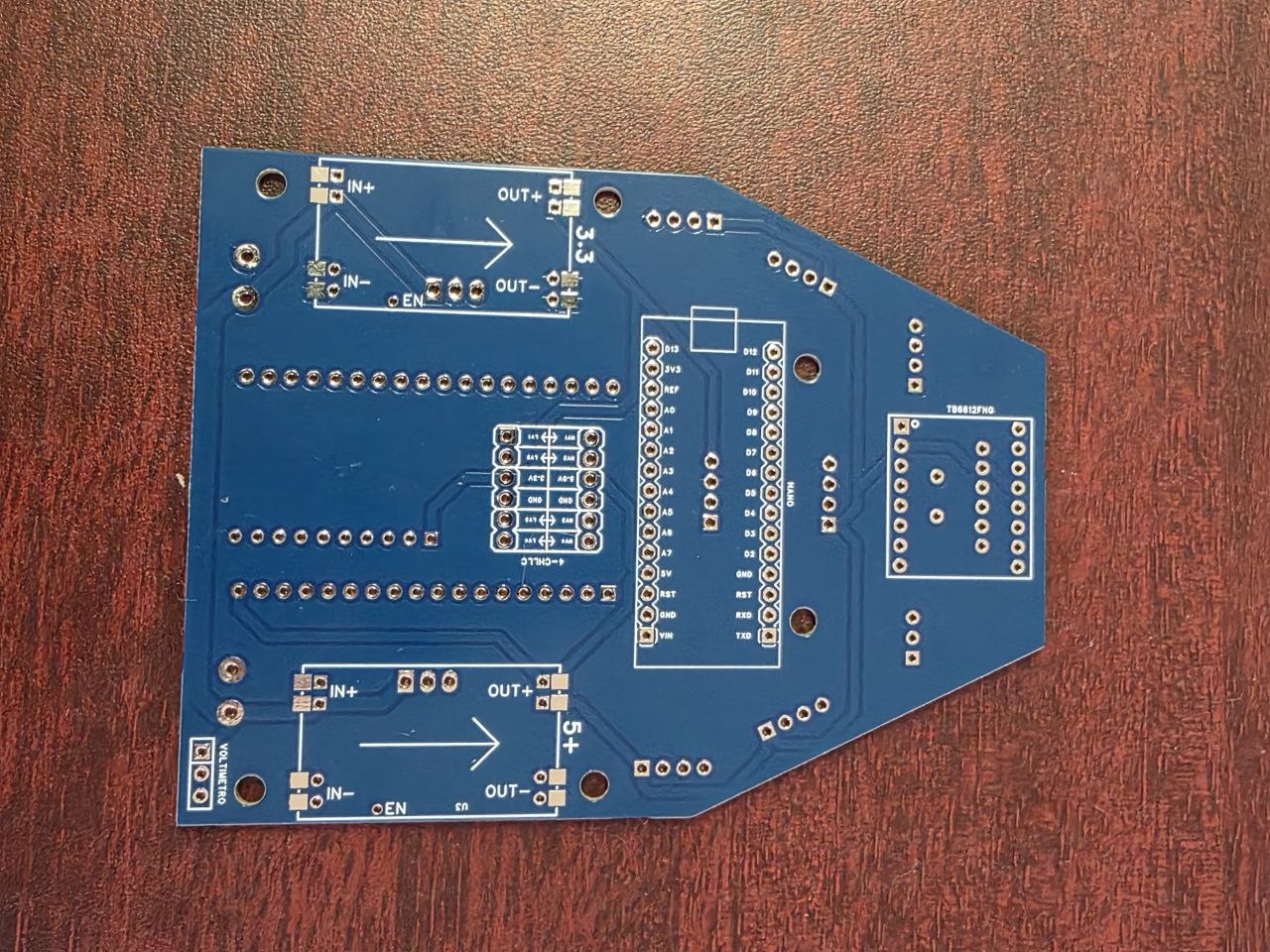
Real PCB
|
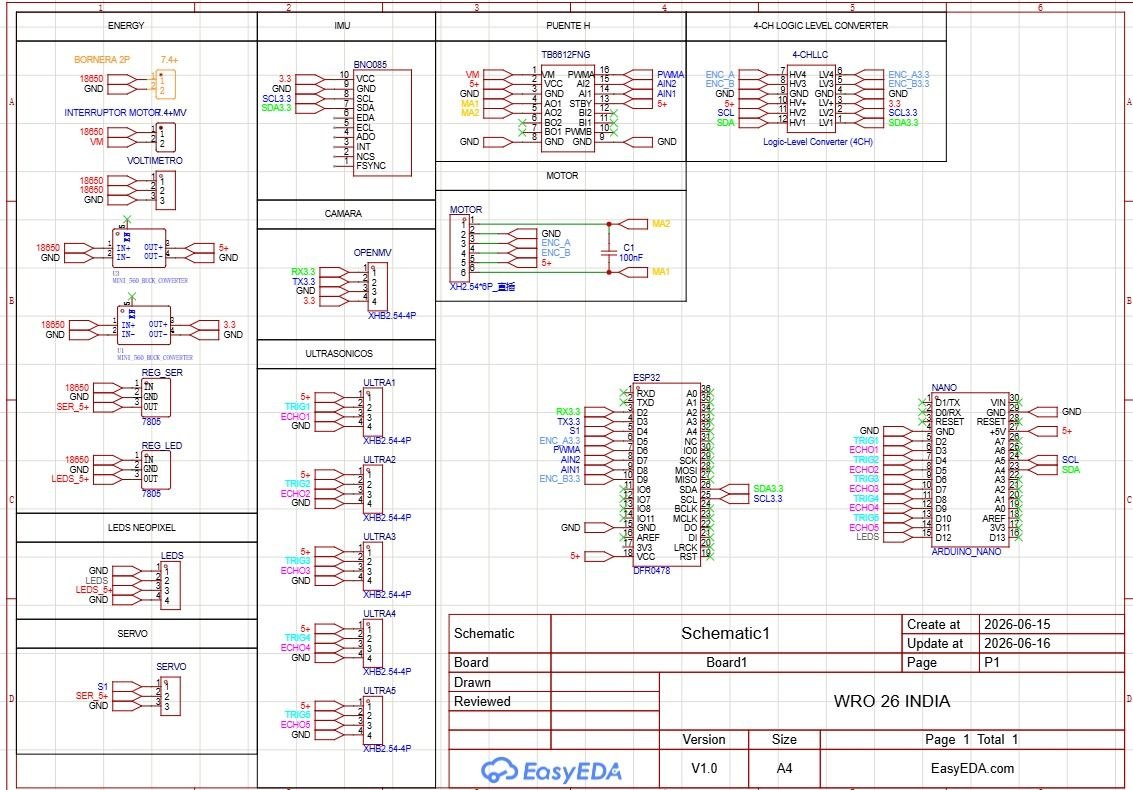
PCB Schematic
|
## Source Code
Full source code available in `src/`
Our robot is controlled using an Arduino Nano, where we manage sensor reading, steering control, obstacle reactions, and movement decisions. Throughout the season, we continuously tested and adjusted the code to improve stability and response time during both challenges.
Some of the main functions implemented in our code include:
- Ultrasonic-based wall navigation
- IMU yaw tracking and lap counting
- OpenMV color detection for red and green pillars
- Obstacle avoidance logic
- Parking sequence development
# Criterion 2 — Power & Sensor Architecture
## Power System & Budget
To power the robot, we use two Steren Li-ion 3.7V batteries connected in series, providing a total of 7.4V. We separated the power system into two rails: one dedicated to the electronic components and another one for the motor system. This helped us reduce electrical noise and achieve more stable sensor readings during movement.
| Rail | Components Powered | Estimated Consumption |
|---|---|---|
| 5V Logic Rail | Arduino Nano, MPU6050, OpenMV H7, HC-SR04 sensors | ~600 mA |
| Motor Rail | TB6612FNG + DC motor | ~1.5 A |
We used a Mini 560 step-down regulator to provide a stable 5V supply for the electronic components. During testing, this configuration proved reliable even when the motor rapidly changed speed.
One issue we considered was battery voltage drop during long testing sessions. When the voltage became too low, the robot started losing motor performance and sensor stability. Because of this, we added a small digital voltmeter directly on the chassis to monitor battery voltage before every run.
## Ultrasonic Sensor Expansion
During early testing with 3 sensors, we noticed that the robot couldn't measure distances accurately enough to maintain precise wall centering. To solve this and improve spatial awareness, we upgraded our setup to 5 HC-SR04 ultrasonic sensors: 2 on the right side, 2 on the left side, and 1 in the front center.
| Sensor | Position | Purpose |
| --- | --- | --- |
| Front | Front center | Detect walls and corners ahead |
| Left (×2) | Left side | Measure distance and alignment to left wall |
| Right (×2) | Right side | Measure distance and alignment to right wall |
### Power Consumption
| Component | Approx. Current |
|---|---|
| Arduino Nano | 20 mA |
| MPU6050 | 3.9 mA |
| OpenMV H7 | ~280 mA |
| HC-SR04 ×5 | ~75 mA |
| Steering Servo | ~200 mA |
| DC Motor | 800–1500 mA |
## Wiring Diagram
Full wiring diagrams available in `schemes/`
The electrical system was designed to keep the wiring as organized and compact as possible inside the chassis. Most components are connected directly to the Arduino Nano and distributed through the PCB designed by the team.
### Main Connections
| Component | Connection |
|---|---|
| MPU6050 | SDA → A4 / SCL → A5 |
| OpenMV H7 | UART TX/RX |
| Front Ultrasonic | TRIG → D7 / ECHO → D6 |
| Left Ultrasonic | TRIG → D3 / ECHO → D2 |
| Right Ultrasonic | TRIG → D5 / ECHO → D4 |
| DC Motor Driver | AIN1 → D10 / AIN2 → D11 / PWMA → D9 |
| Steering Servo | Signal → D8 |
The MPU6050 communicates through I2C, while the OpenMV camera uses UART communication. This allowed us to keep the I2C bus dedicated only to the IMU and helped improve communication stability between modules.
## PCB & Iteration Problems
To keep the internal wiring cleaner and more organized, we designed a custom PCB to centralize all the electrical connections inside the robot. Compared to direct wiring, this helped us reduce cable clutter, simplify debugging, and improve overall reliability during movement.
During one of our testing sessions, we accidentally inserted the batteries backward into the power rail. This reverse polarity connection caused the Li-ion battery to short-circuit and emit smoke due to thermal overload.
Fortunately, none of our main sensors or microcontrollers suffered permanent damage. However, to prevent potential trace degradation or instability in the power lines, we solved this issue by replacing the damaged board with a spare custom PCB we already had available.
Additionally, during our first PCB assembly, excess solder created small bridges between nearby PCB traces, causing interference between the TRIG and ECHO signals of the sensors. We solved this by removing the excess solder with desoldering braid and re-soldering the affected areas. Once cleaned, the readings stabilized completely.
## Sensor Selection & Placement
### HC-SR04 Ultrasonic Sensors
During early testing with 3 sensors, we noticed that the robot couldn't measure distances accurately enough to maintain precise wall centering. To solve this and improve spatial awareness, we upgraded our setup to 5 HC-SR04 ultrasonic sensors: 2 on the right side, 2 on the left side, and 1 in the front center.
| Sensor | Position | Purpose |
| --- | --- | --- |
| Front | Front center | Detect walls and corners ahead |
| Left (×2) | Left side | Measure distance and alignment to left wall |
| Right (×2) | Right side | Measure distance and alignment to right wall |
### MPU6050 IMU
The MPU6050 is used mainly for yaw tracking and orientation correction. We use the gyroscope data to count turns, detect drift, and calculate completed laps during autonomous navigation.
Some of the main functions of the IMU in our robot are:
- Counting 90° turns
- Correcting drift on straight sections
- Determining lap completion through accumulated yaw
Before every run, the robot performs a short calibration process while remaining completely still. This allows the IMU to calculate sensor offsets and improve accuracy during movement.
### Camera — OpenMV H7
For vision processing, we currently use an OpenMV H7 camera connected through UART communication.
| Parameter | Value |
|---|---|
| Resolution | 320 × 240 px |
| Communication | UART (115200 baud) |
| Detection Mode | Color blob tracking |
| Objects Detected | Red and green pillars |
| Frame Rate | ~30 FPS |
| Camera Position | Front-center, tilted downward |
At the beginning of the season, we originally planned to use a HuskyLens camera because it was easier to integrate and already included built-in object detection features. However, during testing we discovered that the HuskyLens was sending data too slowly for our steering system.
Because the Arduino was not receiving continuous detection updates, the steering servo started oscillating and the robot moved inconsistently during straight sections.
To solve this problem, we switched back to the OpenMV H7 platform that we had already used during the 2025 season. Using a custom MicroPython script, the OpenMV continuously sends detection data to the Arduino through UART communication, resulting in much smoother and more stable steering behavior.
Although the OpenMV required more programming and communication handling, the improvement in reliability and response time made the change completely worth it.
After several tests, we also found that mounting the camera with a slight downward angle produced the best detection results without capturing too much of the floor or reducing detection range.
## Calibration Methods
Before testing or competing, we calibrate different parts of the robot to make sure everything works consistently on the track.
| Component | How We Calibrate It | When |
|---|---|---|
| MPU6050 | Using `calcOffsets()` while the robot stays still | Before every run |
| OpenMV H7 | Adjusting LAB color thresholds in OpenMV IDE | Before testing and competitions |
| HC-SR04 Sensors | Comparing readings with real measured distances | During testing |
| Steering Servo | Adjusting the steering center value manually | After rebuilding or modifying the chassis |
These calibration steps helped us improve steering accuracy, sensor stability, and overall consistency during autonomous runs.
# Criterion 3 — Software Architecture & Obstacle Strategy
## System Overview
Our entire control system runs on a single Arduino Nano. All the sensor reading, steering corrections, obstacle detection, and movement decisions happen inside the same main loop.
Instead of using multiple processors, we decided to keep everything on one controller because it made the robot easier to debug, modify, and test throughout the season. After several iterations, this setup gave us stable performance and fast enough response times for both challenges.
To keep the code organized, we divided the program into different modules.
| Module | Main Functions | What It Does |
|---|---|---|
| IMU | `actualizarIMU()` | Tracks robot rotation and yaw |
| Ultrasonics | `medirDistancia()` | Measures wall distances |
| Lateral Control | Steering correction logic | Keeps the robot centered |
| OpenMV | `parseOpenMV()` | Receives obstacle detection data |
| Drive | `avanzar()`, `girarSuave()` | Controls movement and steering |
| Start Sequence | `faseInicio` | Handles startup alignment |
## State Machine
To organize the robot behavior, we created different operating states depending on what the robot detects during the run.
| State | Purpose |
|---|---|
| START | Initial alignment before moving |
| LANE_FOLLOW | Normal navigation and wall following |
| AVOID_COLOR | Obstacle avoidance using camera detection |
| EMERGENCY | Collision prevention and recovery |
| STOP | End of the run after completing laps |
The robot constantly switches between these states depending on sensor readings and track conditions. Emergency actions always have the highest priority to avoid crashes.
## Open Challenge Algorithm
At the start of every run, we initialize all the sensors, calibrate the IMU, and wait for the start button. Once the run begins, the robot continuously reads wall distances, updates orientation data, and adjusts steering depending on the track conditions.
We also implemented adaptive speed control. In narrow sections, the robot slows down to improve stability and avoid collisions. In wider sections, it increases speed to complete laps more efficiently.
For lap counting, we use the MPU6050 gyroscope. Every detected 90° turn increases the accumulated yaw value until reaching the equivalent of three complete laps. Once that value is reached, the robot stops automatically.
This method allowed us to make the lap counting system work correctly in both clockwise and counterclockwise runs without needing separate logic for each direction.
## Vision Processing Strategy (ROIs)
We noticed that using the full camera image caused a lot of unstable detections. Reflections from the floor, random objects, and unnecessary data sometimes made the robot react too late or steer incorrectly.
To solve this, we divided the image into different Regions of Interest (ROIs), so the OpenMV only focuses on the most important parts of the frame.
### WS2812B RGB LED Matrix Module (4x4 / 16-bit)
To ensure reliable vision processing under varying ambient lighting conditions on the track, we integrated a 4x4 WS2812B RGB LED matrix module. Shadowing and uneven venue illumination previously affected color thresholding on the OpenMV H7 camera. By mounting this addressable LED matrix directly near the camera's field of view, we provide consistent, controlled lighting. This significantly improves the camera's ability to accurately detect and distinguish between red and green traffic pillars during the Obstacle Challenge.
## ROI Purpose
Upper ROI Detect pillars early and prepare the turn
Middle ROI Main decision area for obstacle avoidance
Lower ROI Ignore floor reflections and false detections
When multiple objects appear, we select the largest blob because it is usually the closest obstacle. We also added a small delay (~300 ms) to avoid repeated detections during turns.
This strategy made the robot much more stable and predictable during testing. Instead of improving the camera itself, we improved how the information was processed, which reduced false positives and gave us faster and smoother reactions.
## Parking Strategy
After finishing the 3 laps in the Obstacle Challenge, our robot performs a parallel parking maneuver inside the magenta parking zone. The system is still being refined, but our current strategy focuses more on reliability and consistency than speed.
To detect the parking area, we mainly use the HC-SR04 ultrasonic sensors. We look for a larger side gap and less obstruction in front of the robot. The OpenMV H7 can also help identify the parking area if visual references are available.
The maneuver is divided into three phases:
| Phase | Description |
|---|---|
| Alignment | Position the robot parallel to the parking zone |
| Entry | Turn smoothly into the parking space |
| Correction | Make small adjustments until centered |
During testing, we found several challenges:
- Limited parking space
- Ultrasonic noise at short distances
- Need for precise steering timing
To improve consistency, we reduced the parking speed and combined fixed steering sequences with sensor feedback. Right now, our goal is making the maneuver stable and repeatable instead of extremely fast.
Future updates will include better parking detection and more dynamic corrections before the final competition.
## Lateral Control Strategy
Instead of using a full PID controller, we decided to use a simpler threshold-based control system combined with IMU correction. This made the robot easier to tune and more stable on the Arduino Nano.
The robot constantly compares the left and right ultrasonic distances:
```cpp
error = distL - distR;
If the robot gets too close to one wall, we automatically correct the steering toward the opposite side to keep the robot centered.
To reduce sensor noise from the HC-SR04 sensors, we added exponential smoothing:
```cpp
suavizado = (suavizado * 0.7f) + (error * 0.3f);
```
For straight sections, the MPU6050 helps us correct small drifting errors using gyro feedback. This became especially important in the 1000 mm corridor, where long straight sections make drift more noticeable.
After many tests, we tuned the control constants to reduce oscillation while still keeping fast reactions near corners.
| Constant | Value |
|-----------|--------|
| Kp | 2.5 |
| Ki | 0.01 |
| Kd | 1.2 |
We started with a low proportional gain and gradually increased it until the robot began oscillating. Then we reduced it slightly and added derivative damping to make the steering smoother and more stable.
# Power, Sensors and Software Architecture
## Power Architecture
The robot is powered by two 18650 batteries rated at 3.7 V each.
The batteries provide power to both the motors and the electronic systems of
the robot. The power system supplies the robot's control boards, sensors and
actuators.
### Battery Voltage Monitoring
A small digital voltmeter is connected to the robot to monitor the battery
voltage during testing.
During our tests, we observed that when the battery voltage reaches
approximately 7 V or below, the robot's movement becomes slower and its
performance changes.
Because of this, we monitor the battery voltage before and during testing to
help maintain consistent robot performance.
### Power System Failure and Iteration
On July 18, 2026, we experienced a power-related failure caused by connecting
the batteries in the wrong orientation. This caused one of the boards to burn.
After this incident, we became more careful when connecting the batteries and
checking their polarity before powering the robot.
This experience showed us the importance of verifying the power connections
before every test.
## Sensor Architecture
The robot uses ultrasonic sensors, an orientation sensor and a camera to
understand its environment and navigate the course.
### Ultrasonic Sensors
The ultrasonic sensors are distributed around the robot:
| Sensor | Position | Purpose |
|---|---|---|
| Sensor 1 | Front | Detect obstacles in front of the robot |
| Sensors 2–3 | Right side | Detect obstacles and distances on the right |
| Sensors 4–5 | Left side | Detect obstacles and distances on the left |
We selected these positions so that the robot could detect obstacles not only
on its sides but also in front of it.
The front sensor helps the robot detect obstacles before reaching them,
reducing the possibility of collisions.
The side sensors provide additional distance information during navigation and
help the robot understand the space around it.
### Sensor Testing and Reliability
Before testing the complete robot, we check that the ultrasonic sensors are
working correctly and providing valid readings.
The sensor programming has already been tested and adjusted, and all of the
ultrasonic sensors currently operate correctly.
During our testing, we have not experienced failures with the ultrasonic
sensors.
## BNO085
The BNO085 orientation sensor is used as a lap/turn counter.
The sensor provides orientation information that allows the robot to keep
track of its turns while navigating the course.
## OpenMV
The OpenMV camera is responsible for detecting the colors of the blocks.
The robot uses the detected block color to determine which direction it should
take:
| Detected Color | Direction |
|---|---|
| Green | Left |
| Red | Right |
This allows the robot to determine the appropriate direction when approaching
an obstacle.
# Software Architecture
The robot combines information from several electronic systems to control its
movement and navigate the course.
### Main Systems
- **OpenMV:** Detects the color of the blocks.
- **HC-SR04:** Measures distances around the robot.
- **BNO085:** Provides orientation information used to count turns/laps.
- **PID control:** Controls and corrects the robot's movement.
## PID Control
The robot uses PID control as part of its movement control system.
PID continuously adjusts the robot's movement according to the difference
between the desired movement and the current behavior of the robot.
This allows the robot to make corrections while moving instead of relying only
on fixed movement commands.
# Obstacle Strategy
Obstacle detection combines the information obtained from the OpenMV camera
and the ultrasonic sensors.
The OpenMV identifies the color of the obstacle, while the ultrasonic sensors
provide distance information around the robot.
When a colored block is detected:
1. The OpenMV identifies the block color.
2. The robot determines the required direction.
3. A green block results in a left direction.
4. A red block results in a right direction.
5. The ultrasonic sensors provide distance information to help prevent
collisions.
This combination allows the robot to use both visual and distance information
during obstacle navigation.
# Testing and Iteration
Testing has been an important part of the development process.
During testing, we identified several aspects that could affect the robot's
performance:
- Battery voltage affects the robot's movement speed.
- Incorrect battery orientation can damage the electronics.
- Sensor placement is important for detecting obstacles around the robot.
- Sensor operation is checked before testing.
- The OpenMV color detection determines the direction used for obstacle
navigation.
- PID control is used to continuously correct the robot's movement.
The current sensor configuration was maintained because the ultrasonic sensors
have operated correctly during our tests and provide coverage of the front,
left and right sides of the robot.
# Engineering Decisions
Our design decisions were based on the behavior observed during testing.
### Sensor Placement
We distributed the ultrasonic sensors across the front and both sides of the
robot instead of concentrating them in a single area.
The reason was to give the robot information about obstacles in multiple
directions and reduce the possibility of reaching the blocks without detecting
them.
### Battery Monitoring
We added a digital voltmeter to monitor the battery voltage because testing
showed that lower battery voltage affects the robot's movement.
This gives us a direct way to check the battery condition during testing.
### Color-Based Direction
We use the OpenMV camera to distinguish between red and green blocks.
The color determines the direction:
- Green → Left
- Red → Right
This provides the robot with a visual decision-making system for obstacle
navigation.
### Power Connection Safety
After the board failure on July 18, 2026 caused by reversing the battery
orientation, checking battery polarity became an important part of our testing
procedure.
# System Interaction
The robot's subsystems work together during navigation.
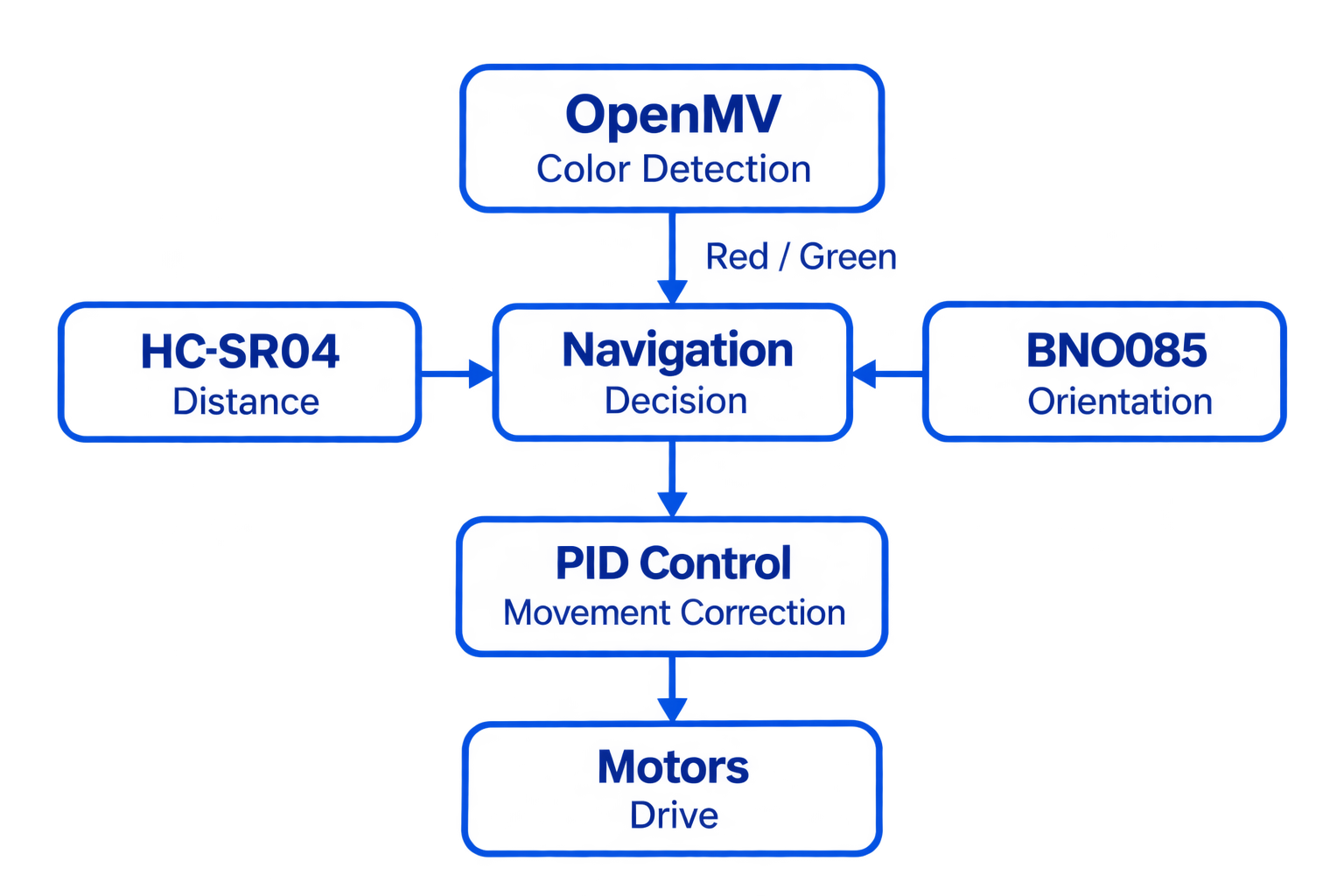
The OpenMV camera detects the color of the obstacle and provides red or green
information to the navigation system.
The HC-SR04 ultrasonic sensors provide distance information, while the BNO085
provides orientation information used to count turns/laps.
The navigation system uses this information to determine the appropriate
movement. PID control is then used to correct the robot's movement before the
commands are sent to the motors.
# Testing Workflow
Before each complete robot test, we check the operation of the sensors and
verify the battery connection.
The general testing process is:
1. Check the battery polarity.
2. Check the battery voltage.
3. Verify that the ultrasonic sensors are operating correctly.
4. Verify the OpenMV color detection.
5. Check the BNO085 orientation information.
6. Run the robot.
7. Observe its movement and navigation.
8. Identify problems or changes in performance.
9. Adjust the system when necessary.
10. Repeat the test.
This iterative process has helped us identify problems related to power,
sensor operation and robot movement.
# Testing & Tuning
| Test | Result | Adjustment |
|------|---------|-------------|
| Open Challenge (wide corridor) | 18/20 successful runs | — |
| Open Challenge (narrow corridor) | 14/20 successful runs | Reduced speed to PWM 110 |
| Obstacle avoidance | 17/20 correct detections | Increased detection timeout |
| IMU lap counting | 20/20 correct | — |
| Startup alignment | 19/20 centered correctly | Improved alignment gain |
Most of our tuning focused on making the robot more stable under different corridor sizes and lighting conditions.
## Problems & Iterations
During the development of our robot, we faced several problems related to mechanics, electronics, and software.
Instead of ignoring them, we used each issue as an opportunity to improve the robot and better understand how every part of the system behaves in real conditions.
| Problem | Impact | Solution |
|----------|--------|----------|
| Excessive dimensions in the original LEGO chassis | The robot struggled in tight curves and narrow sections | We redesigned the structure and moved to a more compact and lightweight 3D-printed chassis |
| Signal instability in sensors | We noticed inconsistent wall detection and unstable trajectory corrections | We created a custom PCB and improved the soldering quality to reduce electrical noise and improve reliability |
| Limitations in simultaneous color detection | Sometimes the robot reacted incorrectly to obstacles | We optimized the OpenMV firmware and improved the AI processing logic for more stable detections |
| Insufficient internal space for components | Organizing the electronics and wiring became difficult inside the chassis | We slightly increased the chassis length to create more internal space and improve cable management |
# Evolution From 2025 to 2026
Our 2026 robot is not just a small upgrade from the 2025 version. We rebuilt almost the entire system based on everything we learned during the international competition.
| System | 2025 | 2026 Final |
|--------|------|-------------|
| Chassis | LEGO Technic | Custom 3D-printed PLA |
| Vision | OpenMV H7 | OpenMV H7 |
| Controller | EV3 Brick | Arduino Nano |
| Steering | EV3 motor | Steren MOT-110 servo |
| Weight | ~1.2 kg | ~0.7 kg |
One of the biggest changes happened mid-season when we replaced the HuskyLens with the OpenMV H7 again. During testing, the HuskyLens was not sending enough continuous data, causing the steering servo to oscillate. Switching back to OpenMV solved the issue and gave us much smoother and more stable control.
## Vehicle Evolution — Before & After
| View | Before | After |
|:---:|:---:|:---:|
| **Front** | 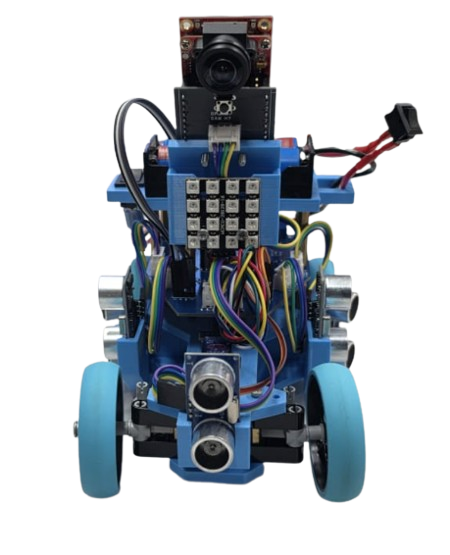 | |
| **Back** |
| |
| **Back** | 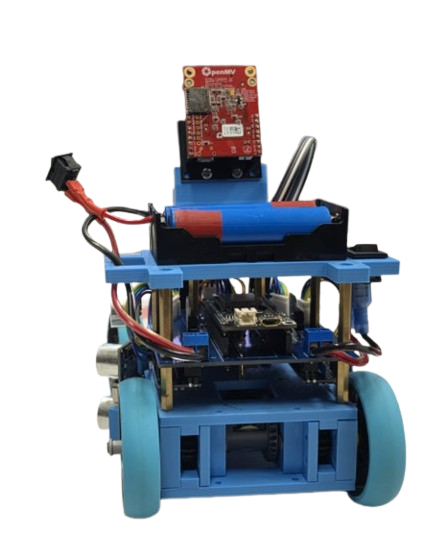 | |
| **Left** |
| |
| **Left** | 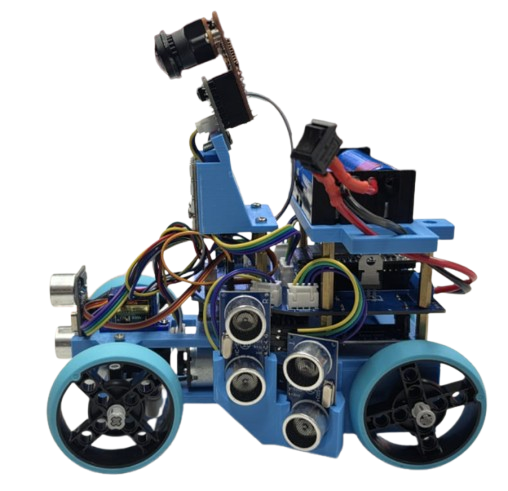 | |
| **Right** |
| |
| **Right** | 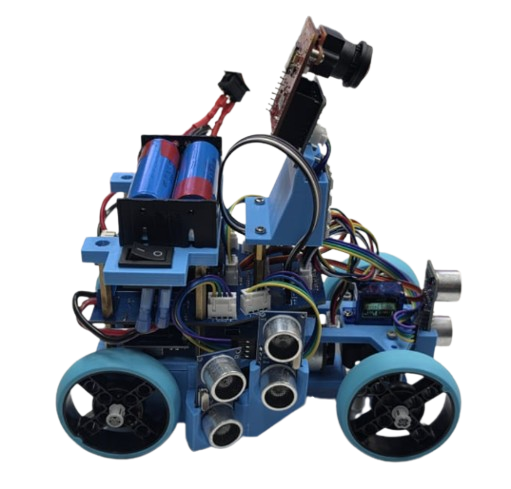 | |
| **Top** |
| |
| **Top** | 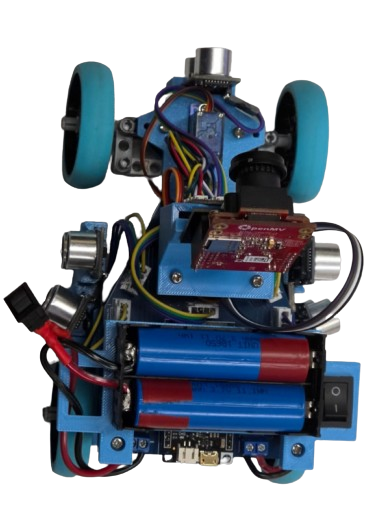 | |
| **Bottom** |
| |
| **Bottom** | 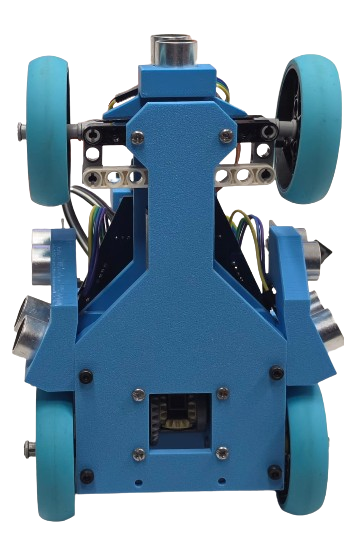 | |
# Engineering Decisions & Trade-offs
Throughout development, we constantly balanced simplicity, reliability, and performance.
| Decision | Why we chose it |
|----------|-----------------|
| Arduino Nano instead of Raspberry Pi | Easier to debug and understand as a team |
| OpenMV instead of HuskyLens | More stable continuous data stream |
| Short wheelbase | Better turning radius in tight corridors |
| Threshold-based control | More predictable than a complex PID setup |
We focused on building a system that every team member could fully understand and maintain instead of relying on overly complex solutions.
# Risk Analysis
| Risk | Mitigation |
|------|-------------|
| IMU drift | Accumulated yaw tracking |
| Wrong color detection | Largest blob selection + timeout |
| Battery voltage drop | Voltmeter checks before runs |
| Wall collisions | Adaptive speed reduction |
| Servo drift | IMU correction on straight sections |
We also documented and solved several hardware problems during development, including PCB solder bridges and drivetrain binding after reprinting the chassis.
## Wiring Diagram
| |
# Engineering Decisions & Trade-offs
Throughout development, we constantly balanced simplicity, reliability, and performance.
| Decision | Why we chose it |
|----------|-----------------|
| Arduino Nano instead of Raspberry Pi | Easier to debug and understand as a team |
| OpenMV instead of HuskyLens | More stable continuous data stream |
| Short wheelbase | Better turning radius in tight corridors |
| Threshold-based control | More predictable than a complex PID setup |
We focused on building a system that every team member could fully understand and maintain instead of relying on overly complex solutions.
# Risk Analysis
| Risk | Mitigation |
|------|-------------|
| IMU drift | Accumulated yaw tracking |
| Wrong color detection | Largest blob selection + timeout |
| Battery voltage drop | Voltmeter checks before runs |
| Wall collisions | Adaptive speed reduction |
| Servo drift | IMU correction on straight sections |
We also documented and solved several hardware problems during development, including PCB solder bridges and drivetrain binding after reprinting the chassis.
## Wiring Diagram
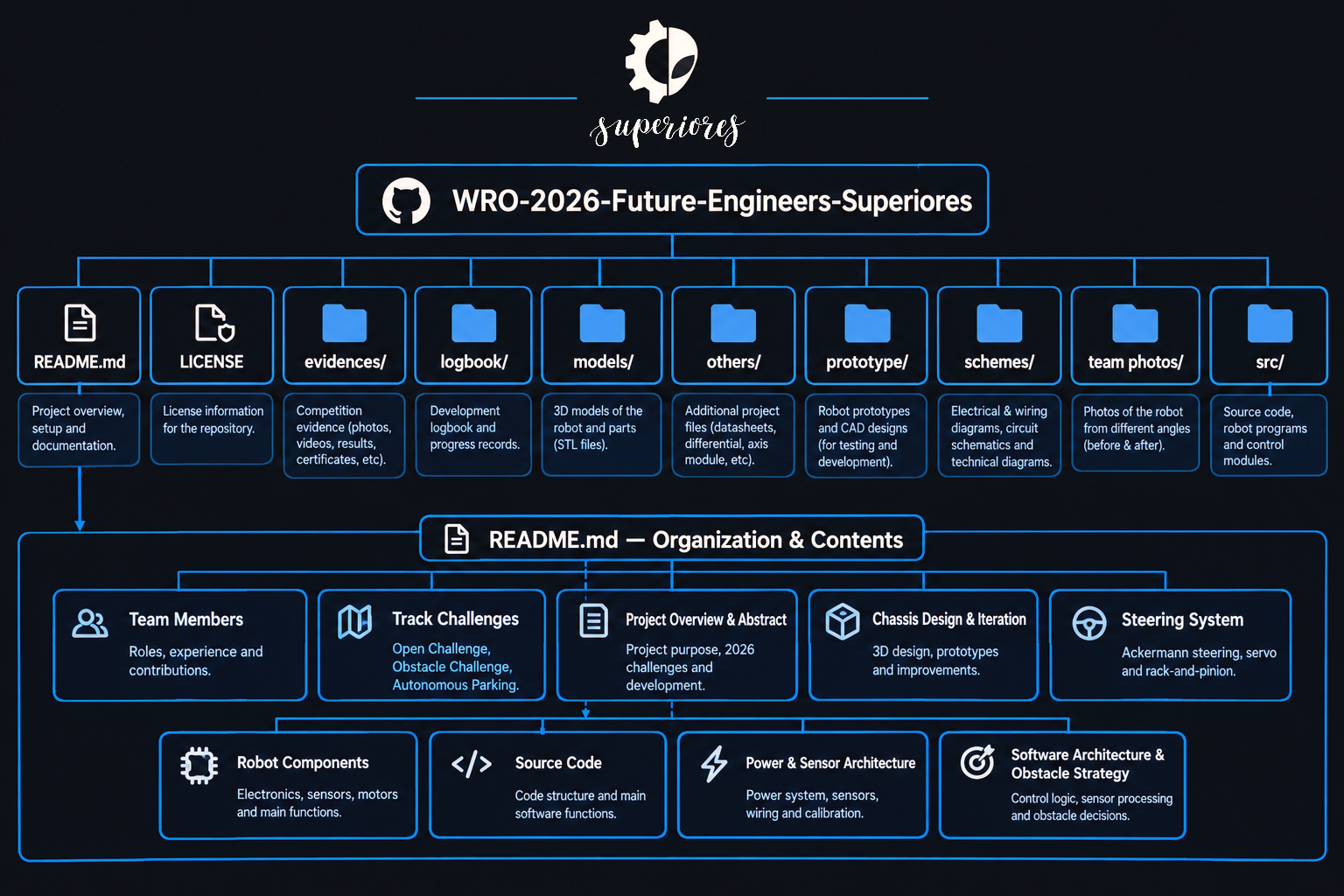
The repository includes the full Arduino code, wiring diagrams, PCB schematics, STL files, and robot photos so the entire project can be reproduced and improved in the future.
# Components & Cost
| Component | Qty |
|-----------|-----|
| OpenMV H7 | 1 |
| Arduino Nano | 1 |
| HC-SR04 | 3 |
| MPU6050 | 1 |
| TB6612FNG | 1 |
| Steren MOT-110 Servo | 1 |
| Li-ion Batteries | 2 |
**Estimated total cost: approximately 154 USD**
# In conclusion (●'◡'●)
This repository documents the complete development process of our WRO 2026 Future Engineers robot, from the first design concepts to the latest competition-ready version.
Throughout the season, we redesigned almost every part of the system based on testing, failures, and continuous improvements. The project includes a fully custom 3D-printed chassis, Arduino Nano control system, OpenMV H7 vision processing, ultrasonic navigation, IMU-based lap tracking, and obstacle avoidance strategies developed specifically for the 2026 rules.
Instead of focusing only on final results, this repository also documents the engineering decisions behind the robot, including hardware changes, software iterations, PCB problems, steering improvements, sensor calibration, and real testing data collected during development.
Our goal was to build a robot that is not only competitive, but also understandable, reliable, and fully developed by our team through experimentation and iteration.
This repository contains:
- Full Arduino source code
- Wiring diagrams and PCB schematics
- 3D models and printable STL files
- Robot photos and assembly references
- Engineering documentation and testing results
- Development history and design decisions
We hope this project can also help future teams learn more about robotics, engineering design, and autonomous vehicle development.
# THANK YOU FOR READING (´▽`)
### Thank you for taking the time to explore our project and follow our development process throughout the WRO 2026 season.
### We truly appreciate your time, interest, and support.
**Team Superiores**
*WRO Future Engineers 2026*