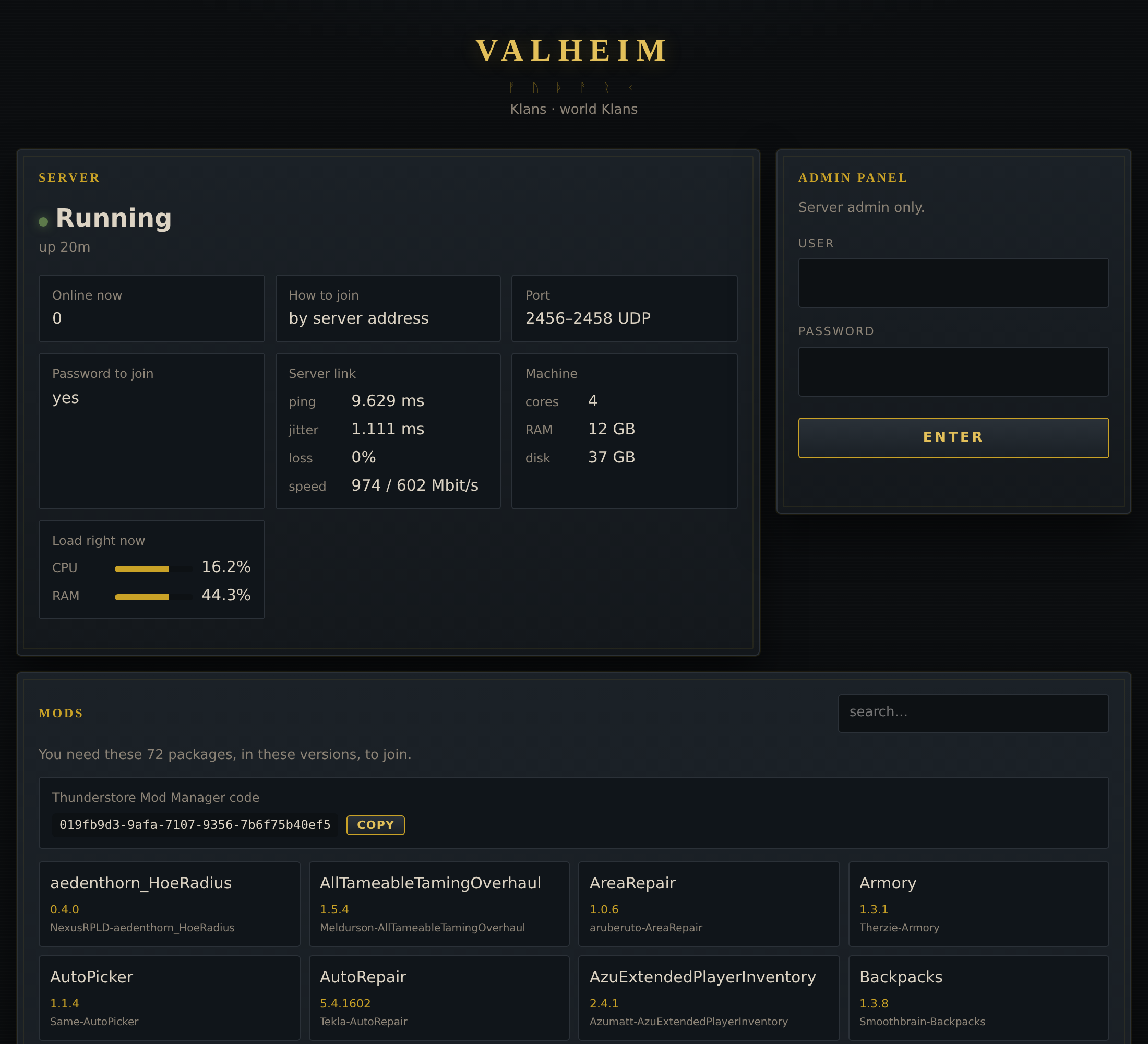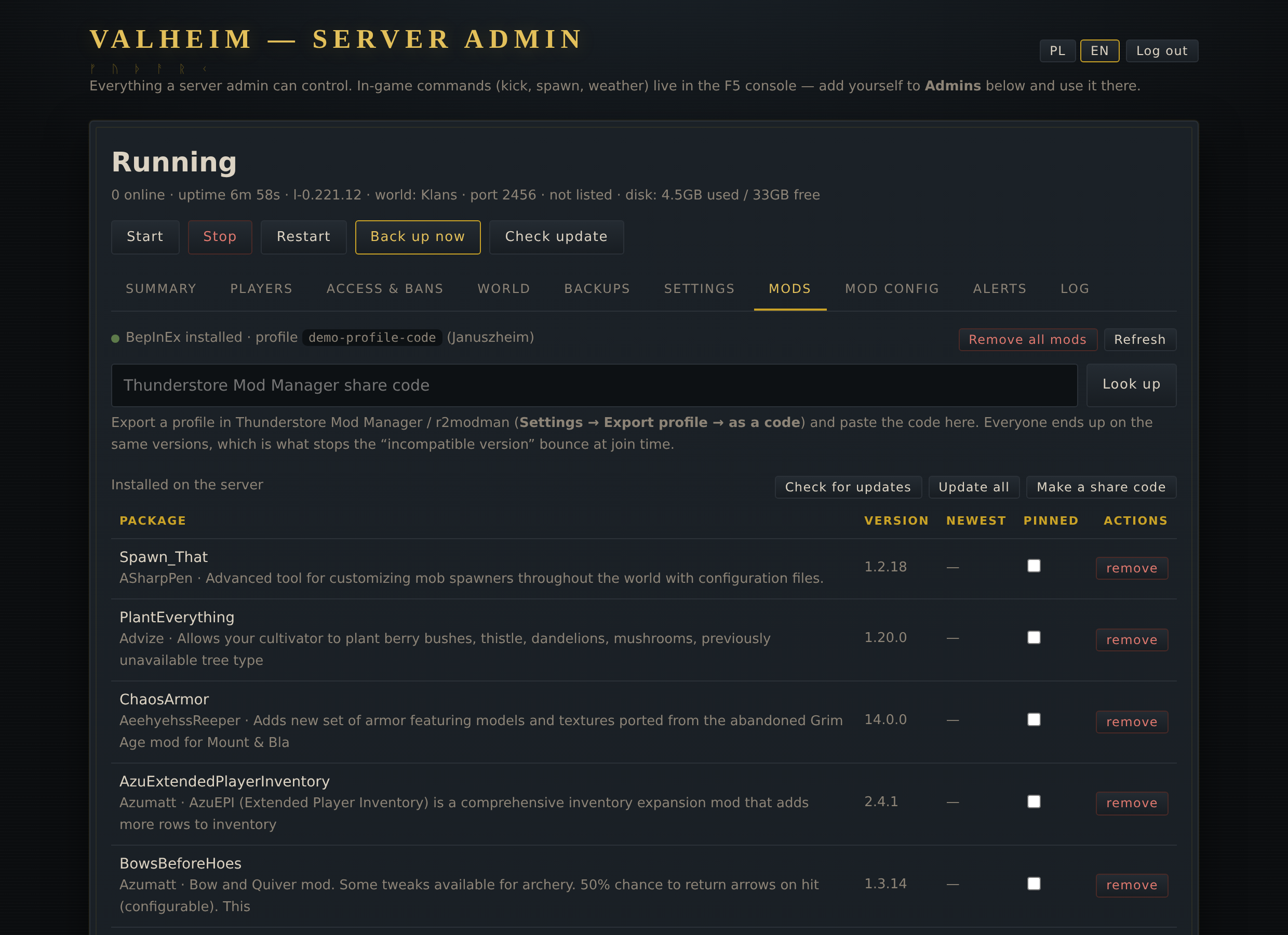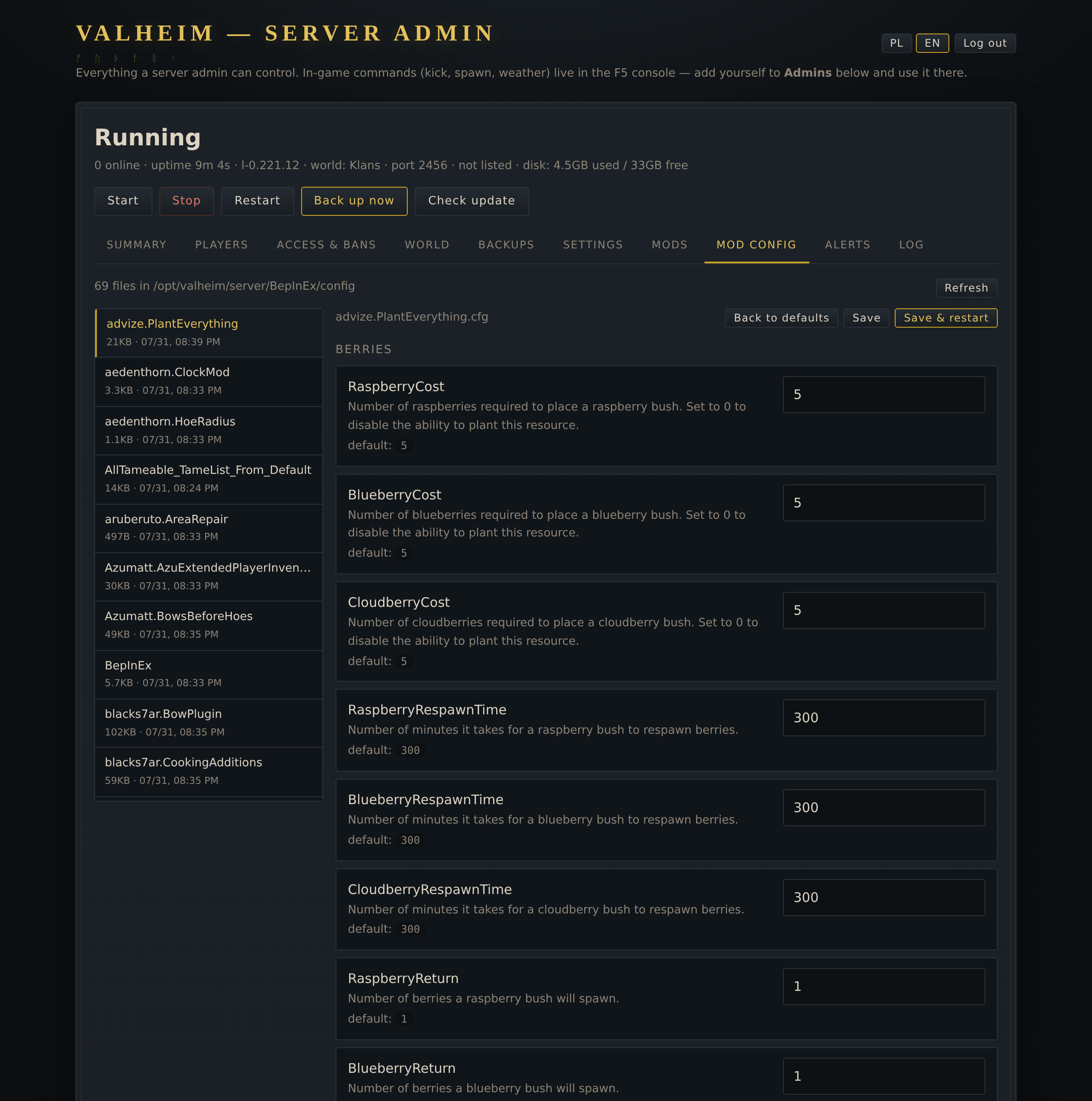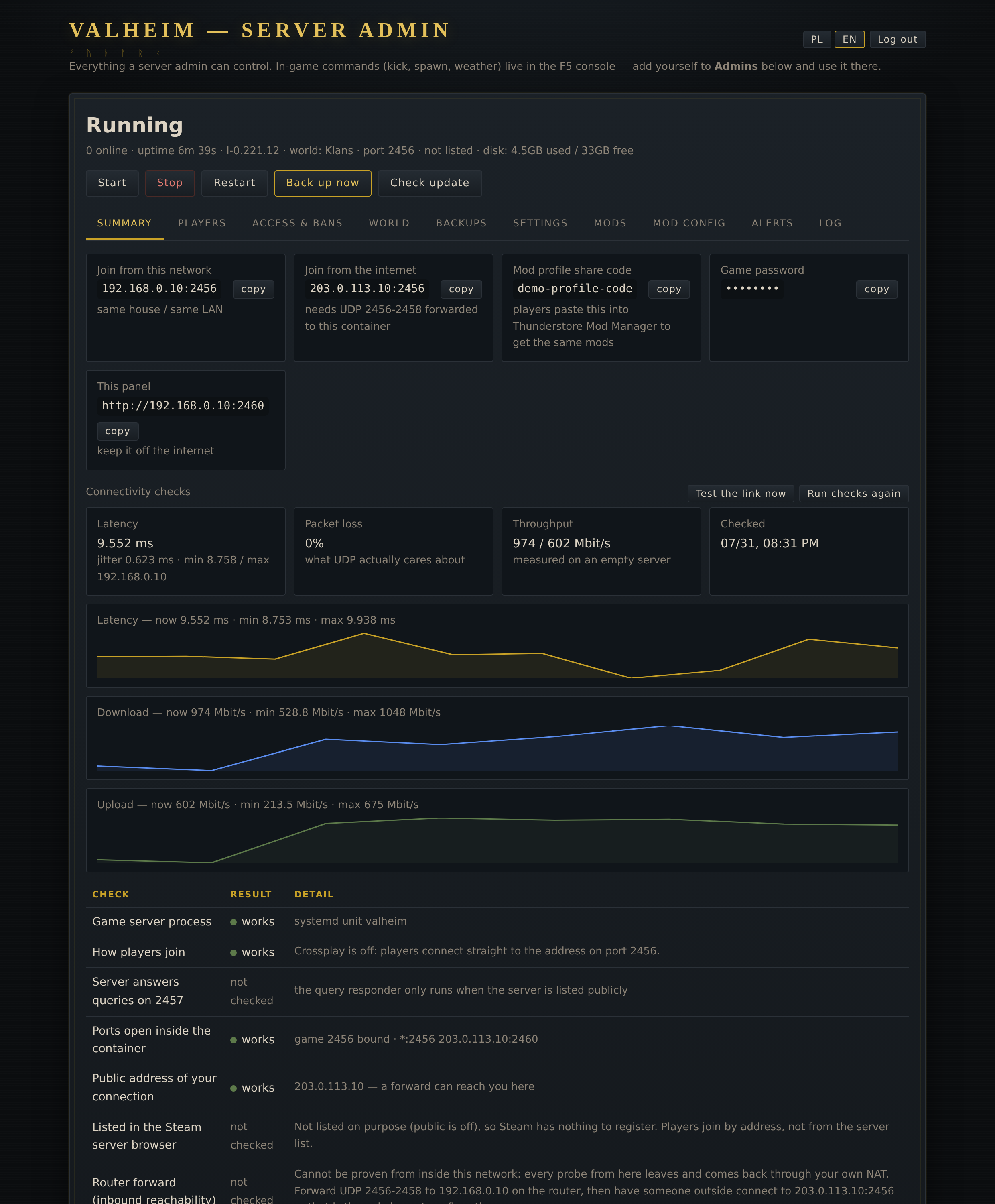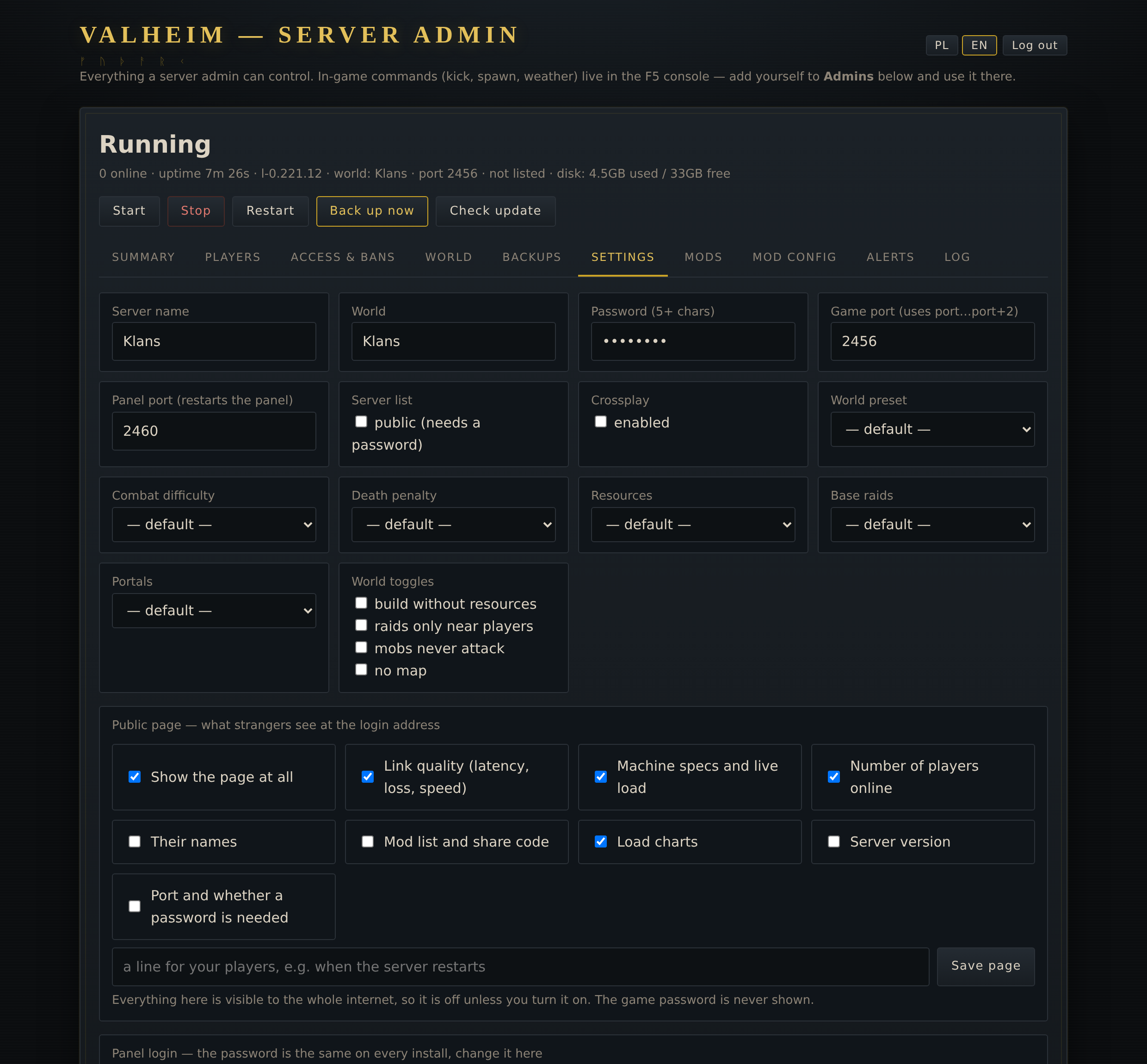
# valheim-proxmox **Valheim dedicated server in its own LXC, with a web panel to run it.** **Players get a launcher for Windows, macOS and Linux — with the server's mods working on all three.** [Polski →](README.pl.md) · **[Update from an older version](#already-running-it-update-once--then-it-updates-itself)** · [Screenshots](#what-it-looks-like) · [Panel](#the-panel) · [Mods](#mods-from-a-share-code) [![Buy Me a Coffee](https://img.shields.io/badge/Buy%20Me%20a%20Coffee-cygan-FFDD00?logo=buymeacoffee&logoColor=black)](https://buymeacoffee.com/cygan)

--- ## Already running it? Update once — then it updates itself > [!IMPORTANT] > **Since v1.20.0 the panel updates itself.** A banner shows when a new version is out, and it > installs on its own while nobody is playing — world backed up first, rolled back if the new > version does not start. You can switch it off in Settings. > > **Installed before v1.20.0?** Update once, and from then on it is automatic. The world, > settings, logins and mods stay; the game keeps running. **Installed on 7 September 2026 or later** — the panel has an **Update panel** button in Settings. Click it once. **Older install, or no button** — run this once **on the Proxmox host** (put your container's id in place of `CTID`, `pct list` shows it): ```bash pct exec CTID -- bash -c "curl -fsSL https://raw.githubusercontent.com/PawelSzymanski89/valheim-proxmox/main/panel/panel-update.sh | bash" ``` Installed with `setup.sh` straight on a Debian machine — run it there, as root: ```bash curl -fsSL https://raw.githubusercontent.com/PawelSzymanski89/valheim-proxmox/main/panel/panel-update.sh | bash ``` **Docker** — the image is the update there. In the `docker/` folder of your clone: `git fetch --tags && git checkout vX.Y.Z && docker compose up -d --build` — the panel's banner shows the exact command for the newest release. A release tag, not `main`: tags cannot be moved or deleted on GitHub, so the build is the reviewed, signed release and not whatever `main` is that day. It ends with `updated to v… - world and settings untouched`. Details: [Updating](#updating). ## Install Three ways in, depending on what you are installing onto. All end with the same thing: the game server, the panel, backup and update timers. ### On a Proxmox VE host — creates the container for you Run as root **on the Proxmox host**. It builds an unprivileged Debian LXC, installs everything into it and prints the address, the login and the game password. ```bash bash -c "$(curl -fsSL https://raw.githubusercontent.com/PawelSzymanski89/valheim-proxmox/main/install.sh)" ``` Defaults: 4 cores, 6 GB RAM, 30 GB disk, DHCP. Change any of them with flags — `--ram 12288 --disk 40 --ip 192.168.1.50/24 --gw 192.168.1.1`, and `--help` lists the rest. The container gets its own Proxmox firewall rules: the game ports (UDP) open to everyone, the panel only to private networks (LAN, and CGNAT ranges like Tailscale), everything else dropped — including the RCON port of the admin tools, which listens on every interface and has no setting to stop it. The rules only act when the Proxmox firewall is on for the datacenter; the installer says so if it is not. `--no-firewall` skips them. ```bash # on the Proxmox host, for an existing container (CTID = its id; ports as installed) cat > /etc/pve/firewall/CTID.fw <<'FW' [OPTIONS] enable: 1 policy_in: DROP dhcp: 1 ndp: 1 [RULES] IN ACCEPT -p udp -dport 2456:2458 -log nolog IN ACCEPT -p tcp -dport 2460 -source 10.0.0.0/8,172.16.0.0/12,192.168.0.0/16,100.64.0.0/10 -log nolog IN Ping(ACCEPT) -log nolog FW pct set CTID --net0 "$(pct config CTID | sed -n 's/^net0: //p'),firewall=1" ``` ### On any Debian 12/13 machine — installs into the system you are on No Proxmox, no container: a VPS, a spare box, an LXC you already made. Run as root **inside that system**. ```bash curl -fsSL https://raw.githubusercontent.com/PawelSzymanski89/valheim-proxmox/main/setup.sh -o setup.sh && bash setup.sh ``` Same environment variables as the flags above (`RAM=` and `DISK=` do not apply here — the machine is whatever you are running on). ### Docker — on any Linux box that already runs Docker One container with systemd inside, so the panel works exactly as on the other two paths. The game downloads from Steam on the first start; ports, names and passwords come from `.env` and are read once — after that the panel owns them. ```bash git clone https://github.com/PawelSzymanski89/valheim-proxmox && cd valheim-proxmox/docker cp .env.example .env # optional docker compose up -d --build ``` Host networking: `GAME_PORT` (udp, plus the next one) and `PANEL_PORT` (tcp) are the ports inside and outside, nothing to map. Details, the plain `docker run` form and what it needs (`privileged`) are in [docker/README.md](docker/README.md). Not for Docker Desktop on macOS/Windows. Either way it takes a few minutes, most of it Steam pulling ~1.5 GB. Afterwards the panel is on **http://ADDRESS:2460**, login `admin` and the password the installer printed at the end — generated for this install. --- ## The public page The login address is the only page strangers ever see, so it doubles as a **status page**: server up or down, uptime, how many are playing, and how to join — with the login form beside it. It is **minimal on purpose**. Every field is off until you turn it on in **Settings → Public page**, because this is visible to the whole internet: a version number narrows down what to try against the server, a mod list and a load chart tell a stranger what runs there and when nobody is watching. What you can switch on: player count, their names, machine specs with a live CPU and memory reading, the mod list with the share code (handy — players get everything they need before asking), load charts, server version, port and whether a password is required. Plus a free line of your own, e.g. when the server restarts. **The game password is never exposed, at any setting.** Nor is anything else the panel knows: disk, logs, checks and settings all sit behind the login, and `/api/public` is the only route that answers without one. With a big pack the page rearranges itself: status and login share the top row, the mod list takes the full width as a grid of tiles with a search box, and the charts sit below. Seventy-two mods in a narrow column next to empty space was the first version, and it looked it. ![Public page](docs/public.png) ## What it looks like The panel keeps its own dark norse skin — stone, soot and dimmed gold — on the login screen and inside. Interface in English or Polish, switch in the top right. | | | |---|---| | ![Mods](docs/mods.png) | ![Mod config](docs/modconfig.png) | | **Mods** — paste a share code, pick what to install | **Mod config** — a form built from the file's own metadata | ![Summary](docs/summary.png) **Summary** — join addresses with copy buttons, live load of the container, and checks that say what they prove. Addresses and secrets in these shots are masked by the panel itself: open it with `?demo=1` and every IP, password, join code and profile code is replaced with a documentation value, so a screenshot never leaks the network it was taken on. ![Settings](docs/settings.png) **Settings** — server name, world, ports, listing, crossplay, world preset and modifiers, plus the panel login. ## What you get | | | |---|---| | **Game server** | Valheim dedicated, systemd unit with a clean stop (`SIGINT`, so the world is saved) | | **Panel** | web UI on port **2460**, HTTP Basic auth, password generated at install | | **Backups** | world snapshot every 2 h, 30 kept (both set in the panel), restore with one click | | **Updates** | checks Steam every 2 h and restarts **only** when there is a new build | | **Defaults** | 4 cores, 6 GB RAM, 30 GB disk, container starts on boot | ## The panel | Tab | What it does | |---|---| | **Summary** | join addresses for LAN and for the internet (with copy buttons), live load / RAM / disk of the container, and connectivity checks that say what they can and cannot prove | | **Players** | who is online right now — name, id, **live session timer** — and a persistent login history (first seen / last seen / number of joins) | | **Access & bans** | admin list, ban list, allowlist; ban straight from the online list or the history. **An allowlist that is not empty locks everyone else out** — that is Valheim's own rule, not the panel's | | **World** | list worlds, switch the active one, download, delete, upload a world — a Valheim 1.0 world folder, or an old `.db` + `.fwl` pair the server converts | | **Backups** | restore, download, delete; copies to another machine over SSH; toggles for the auto-backup and auto-update timers | | **Settings** | server name, world, password, **game port**, **panel port**, public listing, crossplay, world preset and modifiers (combat, death penalty, resources, raids, portals) and the world toggles (`nobuildcost`, `playerevents`, `passivemobs`, `nomap`) | | **Mods** | paste a Thunderstore Mod Manager / r2modman **share code**: the panel expands it, shows what is inside, and installs the picked packages (BepInEx included, world backed up first). Also installs single packages by name | | **Log** | server events, with the PlayFab keepalive noise filtered out | Plus Start / Stop / Restart / Back up now / Check update. ### Panel login and getting back in Login happens on the panel's own screen, not the browser's grey box: session cookie, signed with a secret **and** the current password hash, so changing the password ends every session. HTTP Basic still works for `curl` and scripts. The first password is generated for each install and printed at the end of it (with Docker: `docker compose logs | grep "panel login"`). Until v1.20.1 it was `valheim123` everywhere; an install that still has it shows a red banner until it is changed in **Settings → Panel login**, which asks for the current password first. Tried `valheim123` and got told it was retired? Every install up to v1.21.0 started with that password, and an update never touched it — so from v1.22.0 the panel replaces it with a random one the first time it starts. Set your own the same way as after a lockout: Locked out? There is no reset dance — set a new password from the Proxmox host: ```bash pct exec -- /opt/valheim/panel-passwd.sh 'new-password-8-chars' pct exec -- /opt/valheim/panel-passwd.sh newuser 'new-password' # user too ``` It writes `/opt/valheim/panel.env` (mode 600, root) and takes effect on the next request — no restart. Pick the login at install time with `--panel-user` / `--panel-pass`. ### Ports | Port | What | |---|---| | `2456-2458/udp` | the game (Valheim always uses three consecutive ports starting at the one you set) | | `2460/tcp` | the panel — picked to sit right next to the game ports so it is easy to remember, and clear of the usual suspects (8080, 8000, 9000, 8006…) | Both are changeable in **Settings**. Changing the panel port restarts the panel through `systemd-run`, so the request that changed it still gets an answer. The panel refuses a port that would land inside the game's three-port range. ## Playing from the internet Forward **UDP 2456-2458** to the container on your router. That is all the game needs — Valheim is raw UDP, it does not go through a reverse proxy and does not need a certificate. ### Crossplay changes what "port" means **Measured, not assumed:** with crossplay on the server talks through the PlayFab relay and **never binds the game port** — `ss -uln` shows only the query port. Players join from the crossplay server list with a join code, and a router forward does exactly nothing. With crossplay off the server binds `2456` and people connect by address, which is what the port forwarding above is for. The installer therefore leaves crossplay **off**; flip it in Settings if you would rather have Xbox/Game Pass players and no direct address joins. **Crossplay needs `libpulse-mainloop-glib0`.** Without it PlayFab Party never initialises, the log repeats `begin PlayFab create and join network` every 30 s and the join code comes out empty — a server that nobody can reach by any route. The installer pulls it in; the diagnosis was `ldd libparty.so`. With crossplay working the panel reads the **join code** out of the log and shows it on Summary (it changes on every restart). **Keep the panel off the internet.** It can delete worlds and hand out world downloads. LAN or VPN only. If you must expose it, put it behind a reverse proxy with its own auth. ## Mods, from a share code Export a profile in Thunderstore Mod Manager or r2modman (**Settings → Export profile → as a code**) and paste that code into the **Mods** tab. The panel pulls the profile from Thunderstore, lists the packages with their exact versions, and installs the ones you keep ticked — together with BepInEx if it is not there yet. The point of going through the code rather than picking mods by hand: the versions in it are the versions your players already run, and a version mismatch is what bounces people at the door. The code is shown on the **Summary** tab afterwards, so you can hand it back to anyone who needs to catch up. Profiles carry client-side mods too (UI, maps, sounds). They are usually harmless on a server but a few throw on load, so untick what the server has no use for. The world is backed up before the first mod is ever installed — mods can wreck a save for good. Installing stops the server first and starts it again when it is done — writing into `BepInEx/plugins` under a running server leaves the old assemblies loaded, which looks exactly like "the mod did not install". **Remove all mods** puts the world in a backup, stops the server, deletes BepInEx and every plugin, and then asks whether to start clean or stay down while you install a different set. The world file is untouched, but anything a mod added inside it stops existing. Installed mods live in `server/BepInEx/plugins/-/`, and `start.sh` turns on the doorstop loader by itself once `BepInEx/` exists. ### Keeping versions in step **Check for updates** asks Thunderstore what the newest version of each installed package is and marks what is behind. **Update all** takes only those, stops the server, updates and starts it again. **Pin** a package and it is never offered again — because the versions that matter are the ones your players run, and a server that quietly moves ahead bounces everyone at the door. Pinned packages are refused by the update call itself, not just hidden in the UI. **Make a share code** turns whatever is installed into a Thunderstore profile and gives you back one code. Players paste it into their mod manager and land on exactly these versions — the same mechanism as importing, in the other direction. ### Tested on a real 72-mod pack The whole flow was run against a real Thunderstore share code carrying 72 packages ("Januszheim"): preview, install, restart, config edit, save, restart, restore. - **72 installed, 0 failed**, 1455 MB pulled from Thunderstore; the game came back with **71 plugins loaded** and reached `Game server connected`. - The server process settled at **6.7 GB RSS** with that pack — worth knowing before picking `--ram`. The 6 GB default is a vanilla figure. - **69 config files** appeared once the mods had run once; `PlantEverything` alone parses into **147 form entries** with their descriptions, types and defaults. - A save changed **exactly one line in a 760-line file**, the server restarted with all plugins, and the previous version came back with one click. Two bugs in the unpacker came out of this run, both from packages zipped on Windows: paths carried backslashes, so `plugins\Mod.dll` landed as a single file with a backslash in its name, and `plugins\Translations\` was not recognised as a directory entry and became an empty *file*, which made every real file under it fail. Both are normalised now. ## The launcher players get — Windows, macOS and Linux The mods a server runs are useless if the players cannot install them, so the panel hands out a launcher that does it for them. Give players one address — the **Download** button on the public page, or `/api/launcher/download` — and they get a build named after your server, for **their own system**: `.exe` on Windows, `.app` on macOS, a plain binary on Linux. **Mods work on all three.** The launcher finds the game itself (it reads Steam's own `libraryfolders.vdf`, so a second disk is no obstacle), downloads exactly the files this server ships — each one checked against its `sha256` — removes what the server has dropped, installs the mod loader for that platform and starts the game. On Windows that loader is `winhttp.dll`, on macOS and Linux it is `run_bepinex.sh` with `libdoorstop`. **On Apple Silicon the launcher starts the game through Rosetta on purpose**: the native arm64 process loads the loader but never hooks Mono, so mods silently do nothing — one line of difference between "72 mods running" and "no mods and no error message". Verified with a 72-mod pack: 1.5 GB in 466 files, 71 plugins loaded, game up. ![The launcher after a mod sync](docs/launcher.png) Server-only mods stay on the server. Anything matching RCON or admin tooling is unticked by default in the **Launcher** tab, and a config file carrying a password never reaches the manifest — that mattered here, because a mod config once carried the RCON password. The launcher updates itself from GitHub releases and keeps its server assignment through the update. Engine: [valheim_launcher_proxmox](https://github.com/PawelSzymanski89/valheim_launcher_proxmox). ## Mod config, without SSH and without breaking it BepInEx writes one `.cfg` per plugin. The **Mod config** tab reads them and builds a **form**: every entry keeps its own description, type and default from the file's own comments, so a boolean is a checkbox, a bounded number is a number field with the bounds, and a setting with listed acceptable values is a dropdown. Keys, sections and comments are never retyped — only values are rewritten, on their own line. A config cannot be broken from here. **Every save is kept.** Under the form there is a list of earlier versions; one click puts any of them back, and the state being replaced is itself added to the list, so restoring is reversible too. Twenty versions per file. Mods read their config at startup, so **Save** and **Save & restart** are separate buttons. ## Admin only tools, and messages in game Vanilla Valheim gives an admin no way into a running server — no RCON, no console socket, no chat. Three **server-side** mods provide one, and the **Mods** tab installs and configures all three from a single button: | Package | What it is for | |---|---| | `AviiNL-rcon` | carries the RCON protocol | | `JereKuusela-Rcon_Commands` | puts the server console behind it | | `JereKuusela-Server_devcommands` | the commands worth sending | **Players install nothing.** These run on the server only and vanilla clients join as before. Everything that depends on them stays hidden in the panel until they answer. **Polish letters (and any other non-ASCII) reach the game from v1.33.0.** The RCON mod reads commands as ASCII, which turned every ą or ł into `?`. The panel adds a small plugin of its own next to it (`panel/rcon-utf8`, source included) that switches that read to UTF-8. It stays on the server and is never sent to players. On an upgraded install it takes effect after the next server restart; until then the panel keeps writing without diacritics. Messages in the middle of the screen are shown by the game for 4 seconds and cannot be made longer from the server, so the panel sends each one again every 2.5 s. It stays up about three times as long. RCON is enabled with a generated password on port **2465** — deliberately not the mod's default 2458, which sits inside the 2456-2458 range a router forward points at. It listens for the panel on the same machine; there is no reason to expose it, and every reason not to. With them installed, the **Messages** tab can: - send a line to everyone playing, in the middle of the screen or in the corner, - keep a **schedule** of messages — *N in-game hours before nightfall*, *at an in-game hour*, or *every N real minutes*. A rule fires once per in-game day and never into an empty server. - show what was sent, when, and by which rule. Backups also get better: with the tools installed, `backup.sh` asks the server to write the world before it copies it. Without that, a backup is only as fresh as the last autosave — up to twenty minutes behind. ### The in-game clock, with no mod at all Game time runs at wall-clock rate while somebody is connected and stands still when nobody is, so the panel extrapolates it from the world file: the day, the time of day, and how long until it turns. The public page shows it too. One in-game hour is 75 real seconds, and of the 30-minute cycle roughly 21 minutes are daylight. The phase comes from the game's own code: the counter's zero is the middle of the night, daylight runs from 03:36 to 20:24, and a new world starts at 03:12. `VH_CLOCK_OFFSET` shifts it if you ever need to. (Before v1.33.0 the panel assumed 06:00, and "before dark" messages came 7.5 minutes early.) ## Alerts on your phone, and a restart window The panel watches the server once a minute on its own — it no longer only looks when someone opens the page — and pushes what changed to **[ntfy](https://ntfy.sh)**: an app that needs no account, no login and no server of your own. **Setup is two steps.** The installer generates an unguessable topic name (`valheim-a1b2c3d4e5`) and prints it. Install the ntfy app ([Android](https://play.google.com/store/apps/details?id=io.heckel.ntfy) · [F-Droid](https://f-droid.org/packages/io.heckel.ntfy/) · [iOS](https://apps.apple.com/app/ntfy/id1625396347) · [browser](https://ntfy.sh/app)), subscribe to that name, press **Send a test** in the panel. Everyone who should get alerts subscribes to the same topic; the name is the only secret, which is why it is random and can be regenerated with one click if it leaks. Each alert is a separate switch: **server stopped / came back**, **player joined / left**, **backup failed**, **disk almost full**, **game update on Steam**, **someone signed in to the panel**, **mod install failed**, **scheduled restart**. A private ntfy server works too — set the URL and a token. The test message and the memory-restart notice follow the panel's PL / EN switch; every other alert is sent in English. **CPU or memory pegged**, **connection degraded** and **disk almost full** can be limited to **only while someone is playing**. The topic and server live in `panel.env` (600) next to the login, the same split the rest of this homelab uses: secrets in the env file, "what to send" in `alerts.json`. **Scheduled restart.** Valheim grows in memory over days, so a nightly restart is ordinary hygiene — but not on top of a running raid. Set a time, keep **only when nobody is playing** on, and if someone is on at that hour the restart is put off and retried later, with a notification either way. Game updates go through the same gate: the panel checks Steam every two hours and installs a new build only when the launch mode allows it and nobody is on. The **Update** button does the same on demand; `valheim-update.timer` is the on/off switch for the automatic part. ### Playtime and when the server is busy The **Players** tab keeps a leaderboard — total time played, longest single session, number of sessions, last seen — and a bar per hour of the day showing when people actually play. All of it comes out of the session log the panel already keeps, so nothing extra runs on the game server and nothing is asked of the players. ## Backups on another machine A backup on the same disk as the world dies with that disk. From v1.32.0 the **Backups** tab has an **Offsite copy** box: give it `user@host` of any machine you can SSH into (a NAS, a second server, a Raspberry Pi) and every new backup is also sent there, with its own number kept. 1. On the target, save `scripts/offsite-sink.sh` as `~/bin/valheim-sink` and `chmod +x` it. 2. Type `user@host` in the panel, tick **on** and save. The panel makes its own SSH key and shows one line (under **How to set up the target**); add it to `~/.ssh/authorized_keys` on the target. 3. **Test**, then **Send the newest now**. That key can do nothing but store world backups: the line pins it to `valheim-sink`, which accepts only files named like `world-YYYYMMDD-HHMMSS.tar.gz` into one folder, lists them and prunes the oldest — no shell, no other paths, no tunnels. If the target is down, the panel retries every ten minutes and sends one **backup failed** alert. ## Link quality For a game server the line matters more than the CPU — Valheim is UDP, so latency and packet loss decide how it feels. Two costs, two rules. **The ping keeps running while people play** — five packets over four seconds, and that is exactly when the evidence is worth having, because *"it was lagging last night"* is unanswerable if the graph has a hole in it. **Throughput waits for an empty server**, because it pushes 200 MB through the line those same people are using. Every ten minutes and every six hours by default; both intervals and both rules are settings. The numbers are honest because the method is: **four parallel streams, summed**. Measured on a 1000/600 line, a single 25 MB download reported 551 Mbit/s and a single 100 MB upload 492 — on a 10 ms path most of a short transfer is TLS and TCP ramp-up, not the line. Four streams of the same size reported **890–923 down and 618–637 up**, which is the line. 25 MB per stream is also the practical ceiling: Cloudflare answers 403 above 100 MB. Latency, download and upload each get their own chart, next to the players, CPU and memory ones — same shape, same page. The throughput lines are sparse by design: they only gain a point when the server was empty at the six-hour mark. A test moves about 200 MB. **Test the link now** in the panel runs it on demand — and refuses while people are playing unless you insist; a bad result (over 10 % loss or above 150 ms) raises an alert, because that is the point at which players start blaming the server. ### What the panel keeps, and for how long Nothing grows without a ceiling. Each file trims itself on write, so there is no cron job to forget about and nothing to clean up by hand: | File | Kept | Roughly | |---|---|---| | `metrics.json` | 1440 points | 24 h of players, CPU and memory, one a minute (~90 KB) | | `link.json` | 1008 entries | a week of latency and loss at ten-minute steps (~150 KB) | | `players.json` | 60 sessions per player | totals stay forever, the session list does not | | `panel.log` | 4000 lines / 2 MB | trimmed when it crosses the size | | `BepInEx/config/.history` | 20 versions per file | older ones are dropped on the next save | The throughput test writes nothing but a temporary file it deletes itself, and the 200 MB it moves goes to `/dev/null`. ## Updating Every install updates itself. When a new release is out, a banner at the top of the panel says so, with a link to what changed. With **Install new versions automatically** on (Settings, on by default) the panel installs it on its own the next time nobody is playing; the **Update now** button does it right away. An update is `/opt/valheim/panel-update.sh`: it downloads the release, backs the world up, then runs `setup.sh` in upgrade mode — the panel, `start.sh`, `backup.sh`, the systemd units and the dependencies all move to the new version. The world, the backups, `server.env`, the panel login and the mods are not touched, the game is not downloaded again, and a server that was stopped stays stopped; only the panel restarts. If the new panel does not answer within half a minute, the previous one comes back on its own. One automatic try per release. An install too old to have the button updates once from the terminal, and from then on by itself: ```bash # on the Proxmox host (CTID = the container's id) pct exec CTID -- bash -c "curl -fsSL https://raw.githubusercontent.com/PawelSzymanski89/valheim-proxmox/main/panel/panel-update.sh | bash" # inside the container / on a plain Debian install curl -fsSL https://raw.githubusercontent.com/PawelSzymanski89/valheim-proxmox/main/panel/panel-update.sh | bash ``` On a Docker install the banner says to rebuild the image instead. A release is a bump of `panel/VERSION`, a tag and a GitHub release — the tag is what installs move to, never an untagged commit on `main`. **Releases arrive in waves** (from v1.25.0). On the default `stable` channel a release installs itself 48 hours after it is published; `early` (Settings) takes it at once — meant for the maintainer's and testers' servers, which catch a bad release before everyone else does. The **Update now** button always installs right away. A release whose notes have a line reading just `[hold]` does not install itself on any channel while that line is there — one edit on GitHub stops a release that turned out wrong. **Only signed releases are installed** (from v1.23.0). Each release carries `valheim-proxmox-.tar.gz` and a `.sig` made with an ed25519 key that lives on the maintainer's machine, not on GitHub; `panel-update.sh` checks it with `openssl` against the public key it carries and refuses anything else. A stolen GitHub account can publish a release but cannot get it installed anywhere. The launcher builds the panel hands to players are held to the same key, and so are the launcher's own self-updates. The panel's Python packages are pinned with hashes (`panel/requirements.txt`), so an install never takes whatever PyPI has that day. Maintainers publish with `scripts/release.sh "" notes.md`. Two keys are trusted (from v1.29.0): the working one and a backup kept offline. Either can sign a release. A release may also carry `release-keys.txt` signed by a key trusted now; every install that takes it trusts exactly that list from then on — so a lost or leaked key is replaced by publishing one release (`RELEASE_KEYS_FILE=list.txt scripts/release.sh …`), with nobody having to update by hand. The list in force is `/opt/valheim/release-keys` (the built-in pair when absent). The repository runs a fresh install on every push: in a container, Steam download included, then the panel and the game have to come up (`.github/workflows/install.yml`). A second job installs the latest release the way a server has it, updates it to the pushed commit with the script that release ships, and checks that the world, the settings and the admin's choices are unchanged and the game never restarted; then it feeds in a deliberately broken release, which has to be rolled back (`.github/ci/upgrade-test.sh`). ## Panel log The panel writes its own log of every action to `/opt/valheim/panel.log` — mod installs with what failed and why, config saves with the keys that changed, service actions, world and backup operations, login changes (never the password). It sits in the **Log** tab next to the game server log, filterable to mods or errors only. ## Options Every value can be overridden with an environment variable: ```bash CTID=250 RAM=8192 CORES=6 DISK=40 GAME_PORT=2456 PANEL_PORT=2460 \ SERVER_NAME="Klans" WORLD_NAME="Midgard" SERVER_PASS="letmein42" \ bash -c "$(curl -fsSL .../install.sh)" ``` | Variable | Default | | |---|---|---| | `CTID` | next free id | container id | | `HOSTNAME_` | `valheim` | container hostname | | `CORES` / `RAM` / `DISK` | `4` / `6144` / `30` | cores / MB / GB | | `STORAGE` | first storage that takes a rootfs | where the container disk goes | | `IP` / `GW` | `dhcp` | fixed address instead: `IP=192.168.89.21/24 GW=192.168.89.1` — worth it when DNS or a port forward already points at that address | | `BRIDGE` | `vmbr0` | network bridge | | `GAME_PORT` / `PANEL_PORT` | `2456` / `2460` | | | `SERVER_NAME` / `WORLD_NAME` | `Valheim` / `Dedicated` | | | `SERVER_PASS` | random 10 chars | game password (5+ chars, must not contain the server or world name — the game rejects that) | ### Flags Everything above also works as a flag, which reads better in a one-liner you keep around: ```bash bash -c "$(curl -fsSL .../install.sh)" -- --ram 12288 --disk 40 --ip 192.168.89.21/24 --gw 192.168.89.1 ``` `--help` prints the list with the current defaults. ## Layout ``` /opt/valheim/ ├── server/ game files (SteamCMD) ├── data/ savedir: worlds_local/, adminlist.txt, bannedlist.txt, permittedlist.txt ├── backups/ world-YYYYMMDD-HHMMSS.tar.gz, 30 kept by default ├── server.env launch settings — this is what the panel edits ├── panel.env panel user, password, port (600) ├── players.json login history (the journal rotates, this does not) ├── start.sh assembles the launch arguments from server.env ├── backup.sh world snapshot + retention ├── update.sh stub — game updates are done by the panel (valheim-update.timer = the switch) ├── panel-update.sh update to the newest release, with rollback (automatic, or the button) ├── panel.version the installed release, and when └── panel/ app.py, index.html, .venv ``` systemd: `valheim`, `valheim-panel`, `valheim-backup.timer`, `valheim-update.timer`. ## Honest limitations - **Valheim has no RCON.** In-game commands (kick, spawn, weather, god mode) are typed in the F5 console by a player whose id is in `adminlist.txt`. The panel manages that list — it cannot type into the game for you. A "kick" here is a ban followed by an unban. - **The online player list is a heuristic.** The log line that carries the player name (`Got character ZDOID from …`) does not carry the player id, so names are matched to connections in order of arrival. The authoritative counter (`Connections N`) is printed only every ~10 minutes; when the two disagree the panel says so rather than hiding it. - **The panel runs as root** in its own container. It calls `systemctl` and writes into `/opt/valheim`. That is why it is a dedicated container and why it should not face the internet. Everything root does inside the game user's folders (worlds, mods, configs, backups) it does *as* the game user, so a malicious mod cannot trick it into writing or reading elsewhere. - **The game password is visible to `ps` inside the container.** The Valheim server takes it only as a command-line argument; the journal masks it, the process list cannot. - **SteamCMD's own bootstrap download is not checksummed** — Valve changes it without notice. It runs as the game user, never as root, and the game it installs comes through Steam's own verification. ## Verified on Proxmox VE 8.4, `debian-12-standard` template, Valheim dedicated `l-0.221.12`. Every panel action was exercised against a real container: settings propagation down to the running process arguments, world switch/upload/delete, backup restore (checksum matched before and after), timers, panel port change, login change. The player list and the login history are covered by `panel/test_parse.py`, since they need real players joining. ## When memory runs away Valheim's server grows by a couple of hundred megabytes an hour with nobody playing — Unity does not hand memory back — so a long-lived server drifts towards the OOM killer. The nightly maintenance window normally deals with it, but a server busy every evening would keep deferring, which is what the memory guard is for. The threshold is **computed, not fixed**, because what a server uses at rest depends almost entirely on its mod list: this one rests near 12% bare and at 41% with seventy-two mods, reached within four minutes of starting. A single number would either loop on the modded install or never fire on the bare one. So it is a **base plus an allowance per installed mod** — 45% + 0.5% each by default, both editable in Settings, which puts a 72-mod server at 81%. Three brakes, all of them learned from getting it wrong: only ever an **empty** server, only one that has been **up over two hours**, and **at most once every three** — with that cooldown kept on disk, so restarting the panel does not quietly reset it. Every firing sends a notification with the reading, the threshold and how long the server had been up. ## License **MIT** — see [LICENSE](LICENSE). Use it, change it, run it for friends or for money; keep the copyright notice. Signed builds of the launcher (Authenticode, notarised `.app`) and support are available on request: **pawel@howtodev.it**.