
Read papers in DSH: read, ask and take notes in one place
Quick start · Highlights · TODO · Developer handbook · 简体中文
[](./LICENSE) [](https://github.com/topics/dsh-plugin) [](https://github.com/deepseek-ai/deepseek-harness) [](https://github.com/PhysicalAI-0/dsh-paperforge) News
- **2026-09-29**
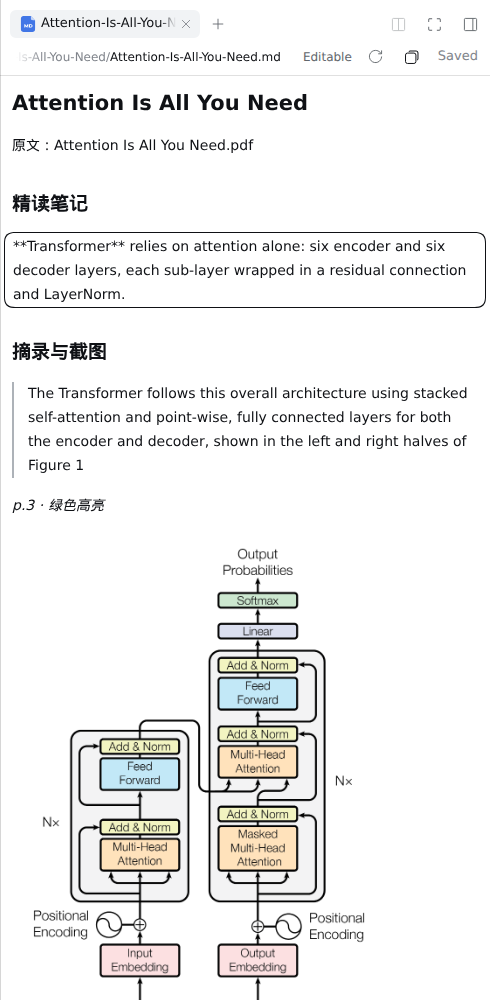
- Native multi-column reading layout: session list on the left, the paper's AI session in the middle, PDF|notes on the right.
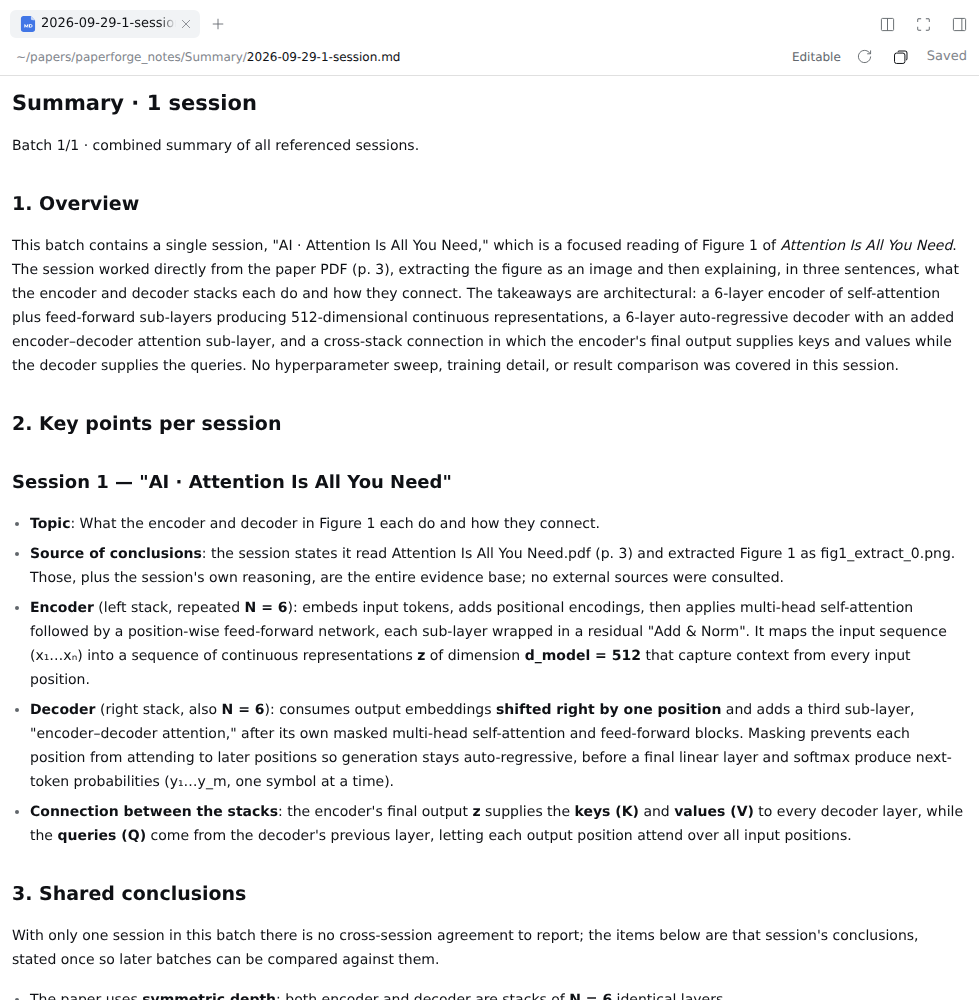
- Added session Summary and Copy path; notes now live in `paperforge_notes`, and images no longer referenced by any note are cleaned up.
- Block-level Markdown editing: every `.md` is editable in place, with autosave.
- Reading flow rebuilt: paper library, live notes preview, one dedicated AI session per paper.
- **2026-09-28** — First release; installs through DSH's native `dsh plugin` command.
News
- **2026-09-29**
- Native multi-column reading layout: session list on the left, the paper's AI session in the middle, PDF|notes on the right.
- Added session Summary and Copy path; notes now live in `paperforge_notes`, and images no longer referenced by any note are cleaned up.
- Block-level Markdown editing: every `.md` is editable in place, with autosave.
- Reading flow rebuilt: paper library, live notes preview, one dedicated AI session per paper.
- **2026-09-28** — First release; installs through DSH's native `dsh plugin` command.
 Highlights

Highlights

 Quick start
Requirements: DSH `0.1.7+` and `pnpm` on your PATH.
```bash
dsh plugin --profile web add github:PhysicalAI-0/dsh-paperforge
# or install from a local clone (code changes take effect after restarting dsh web):
git clone https://github.com/PhysicalAI-0/dsh-paperforge.git && cd dsh-paperforge
dsh plugin --profile web add .
```
Start `dsh web` in the folder that holds your papers (that folder must also be a DSH workspace). A **Papers** entry in the left sidebar means it's installed. Uninstall: `dsh plugin --profile web remove dsh-paperforge`.
Quick start
Requirements: DSH `0.1.7+` and `pnpm` on your PATH.
```bash
dsh plugin --profile web add github:PhysicalAI-0/dsh-paperforge
# or install from a local clone (code changes take effect after restarting dsh web):
git clone https://github.com/PhysicalAI-0/dsh-paperforge.git && cd dsh-paperforge
dsh plugin --profile web add .
```
Start `dsh web` in the folder that holds your papers (that folder must also be a DSH workspace). A **Papers** entry in the left sidebar means it's installed. Uninstall: `dsh plugin --profile web remove dsh-paperforge`.
 Where notes go
```text
Where notes go
```text
 Configuration (optional)
Override by id in `~/.dsh/profiles/web/cordis.patch.yml`:
```yaml
- id: paperforge
config:
workspaceRoot:
Configuration (optional)
Override by id in `~/.dsh/profiles/web/cordis.patch.yml`:
```yaml
- id: paperforge
config:
workspaceRoot:  TODO
- [ ] Instant-rendering Markdown (Vditor-style): click an image to zoom, drag blocks to reorder
- [ ] Rich rendering: mermaid flowcharts / sequence diagrams / Gantt charts, echarts, mind maps
- [ ] Several sessions for the same paper (the **AI** header button)
- [ ] Tools and a skill for reading papers by page and by figure, cutting the token cost of reading figures
- [ ] Write key Q&A points back into the notes automatically
- [ ] Pure JavaScript: replace the Python sidecar with `mupdf`; make the library scan asynchronous
TODO
- [ ] Instant-rendering Markdown (Vditor-style): click an image to zoom, drag blocks to reorder
- [ ] Rich rendering: mermaid flowcharts / sequence diagrams / Gantt charts, echarts, mind maps
- [ ] Several sessions for the same paper (the **AI** header button)
- [ ] Tools and a skill for reading papers by page and by figure, cutting the token cost of reading figures
- [ ] Write key Q&A points back into the notes automatically
- [ ] Pure JavaScript: replace the Python sidecar with `mupdf`; make the library scan asynchronous
 Known limitations
- The right sidebar has at most two panes (a DSH limit); float extra windows out.
- Before its first question, a paper session shows as "New session" in the left list, and DSH's "New session" may reuse it.
- Markdown is edited block by block: undo covers only the current block; reference-style links and footnotes defined in another block may not resolve; a `.md` outside the workspaces or over 2 MB is preview-only.
- Summary: DSH references at most three sessions per message, so the plugin sends batches; the AI writes the result with its file-writing tool.
- PDFs with the same file name in different folders share one notes folder; section headings in the notes are always Chinese.
Known limitations
- The right sidebar has at most two panes (a DSH limit); float extra windows out.
- Before its first question, a paper session shows as "New session" in the left list, and DSH's "New session" may reuse it.
- Markdown is edited block by block: undo covers only the current block; reference-style links and footnotes defined in another block may not resolve; a `.md` outside the workspaces or over 2 MB is preview-only.
- Summary: DSH references at most three sessions per message, so the plugin sends batches; the AI writes the result with its file-writing tool.
- PDFs with the same file name in different folders share one notes folder; section headings in the notes are always Chinese.
 Development
```bash
pixi run test # unit tests
pixi run verify # contract and smoke tests
```
The plugin has two halves: the browser half `lib/client.js` and the host half `lib/index.js` and friends (registering the `/api/paper.*` routes), plus an optional Python sidecar `py/` used only to write highlights into the PDF file itself. Read [`AGENTS.md`](./AGENTS.md) (in Chinese) before developing: it covers the hard constraints on DSH plugins, the key APIs, the pitfalls hit so far and the roadmap.
Development
```bash
pixi run test # unit tests
pixi run verify # contract and smoke tests
```
The plugin has two halves: the browser half `lib/client.js` and the host half `lib/index.js` and friends (registering the `/api/paper.*` routes), plus an optional Python sidecar `py/` used only to write highlights into the PDF file itself. Read [`AGENTS.md`](./AGENTS.md) (in Chinese) before developing: it covers the hard constraints on DSH plugins, the key APIs, the pitfalls hit so far and the roadmap.
 Background and acknowledgement
The author is a heavy user of [alphaXiv](https://www.alphaxiv.org/), which inspired this plugin's "ask about a selection, take notes in place" interaction. Its Q&A allowance is limited and its model can't be swapped, so this brings the "select → ask → note" loop into DSH, an environment you fully control: no new reader, just DSH's native preview, sessions and model configuration.
PaperForge is not affiliated with, sponsored by or endorsed by alphaXiv or its team, and contains none of its code or assets.
Background and acknowledgement
The author is a heavy user of [alphaXiv](https://www.alphaxiv.org/), which inspired this plugin's "ask about a selection, take notes in place" interaction. Its Q&A allowance is limited and its model can't be swapped, so this brings the "select → ask → note" loop into DSH, an environment you fully control: no new reader, just DSH's native preview, sessions and model configuration.
PaperForge is not affiliated with, sponsored by or endorsed by alphaXiv or its team, and contains none of its code or assets.
 License
[MIT](./LICENSE) © dsh-paperforge contributors
License
[MIT](./LICENSE) © dsh-paperforge contributors