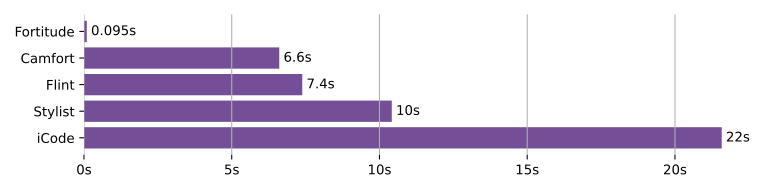
Linting 43 files from the GS2 repo.
- :zap: Blazingly fast, up to hundreds of times faster than other open-source Fortran linters. - :wrench: Automatically fixes linter warnings. - :chart_with_upwards_trend: Over 100 rules, with many more planned. - :page_with_curl: Multiple output formats, including SARIF and GitHub/GitLab CI. - :handshake: Follows [community best practices](https://fortran-lang.org/learn/best_practices/). - :muscle: Built on a robust [tree-sitter](https://tree-sitter.github.io/tree-sitter/) parser. Fortitude is developed by [PlasmaFAIR](https://plasmafair.readthedocs.io), improving the sustainability of plasma science research software.  ## Table of Contents For more detail, please see our [documentation](https://fortitude.readthedocs.io). - [Installation](#installation) - [Usage](#usage) - [Contributing](#contributing) - [License](#license) ## Installation Fortitude is available as [`fortitude-lint`](https://pypi.org/project/fortitude-lint) on PyPI: ```bash # With uv: uv tool install fortitude-lint@latest # With pip: pip install fortitude-lint ``` Starting with version `0.7.0`, Fortitude can be installed with our standalone installers: ```bash # On macOS and Linux: curl -LsSf https://github.com/PlasmaFAIR/fortitude/releases/latest/download/fortitude-installer.sh | sh # On Windows: powershell -c "irm https://github.com/PlasmaFAIR/fortitude/releases/latest/download/fortitude-installer.psi | iex" ``` It can also be installed as a pure Rust project: ```bash git clone https://github.com/PlasmaFAIR/fortitude cd fortitude cargo install --path crates/fortitude ``` Fortitude can also be installed via [other package managers](https://fortitude.readthedocs.io/en/stable/installation/) ## Usage Fortitude can lint your whole project under the working directory using the `check` command: ```bash fortitude check ``` You can also call `check` on individual files, globs, and directories. You can configure what extensions Fortitude searches for in directories with `--file-extensions`: ```bash fortitude check --file-extensions=f90,fpp ``` Be default, Fortitude will ignore files and directories in your `.gitignore`. This can be disabled by setting `--no-respect-gitignore`. Additional excludes can be set using `--extend-exclude`: ```bash # Don't check in the `benchmarks/` and `tests/` directories. fortitude check --extend-exclude=benchmarks,tests ``` You can select or ignore individual rules or whole groups with `--select` and `--ignore`: ```bash # Just check for missing `implicit none` fortitude check --select=C001 # Also check for missing `implicit none` in interfaces fortitude check --select=C001,C002 # Ignore all styling rules fortitude check --ignore=S # Only check for style rules, but ignore superfluous implicit none fortitude check --select=S --ignore=S201 # Rules and categories can also be referred to by name fortitude check --select=style --ignore=superfluous-implicit-none ``` Use `--output-format=concise` to get shorter output: ```bash $ fortitude check --output-format=concise test.f90:2:1: C111 function not contained within (sub)module or program test.f90:5:1: S061 end statement should read 'end function double' test.f90:7:1: C111 subroutine not contained within (sub)module or program test.f90:8:3: C022 real has implicit kind ``` The `explain` command can be used to get extra information about any rules: ```bash # Print extra information for all rules fortitude explain # Only get information for selected rules fortitude explain C001 C011 # Print information on all style rules fortitude explain S # Rules and categories can also be referred to by name fortitude explain obsolescent superfluous-implicit-none ``` Use `--summary` to get a brief overview: ```bash # Overview of all rules fortitude explain --summary # Overview of all style rules fortitude explain style --summary ``` To see further commands and optional arguments, try using `--help`: ```bash fortitude --help fortitude check --help ``` ### Fixes Fortitude can automatically fix some lint warnings, such as unnecessary `implicit none` statements, missing double-colons in variable declarations, and more. Just pass the `--fix` flag to `check`: ```console $ fortitude check --fix fortitude: 1 files scanned. Number of errors: 2 (2 fixed, 0 remaining) ``` Run `fortitude explain` to see which rules have fixes available. ### Preview Some fortitude rules are only available through an opt-in preview mode to give the community some time to evaluate them and provide feedback. To enable preview rules, pass the `--preview` flag to `check`, ```console $ fortitude check --preview ``` or to enable more permanently, set it in your `fpm.toml`: ```toml [extra.fortitude.check] preview = true ``` or `fortitude.toml`: ```toml [check] preview = true ``` Run `fortitude explain` to see which rules are in preview mode. ## Configuration Fortitude will look for either a `fortitude.toml`, `.fortitude.toml`, `fpm.toml`, or `pyproject.toml` file in the current directory, or one of its parents. If using `fortitude.toml` or `.fortitude.toml`, settings should be under the command name: ```toml [check] select = ["C", "E", "S"] ignore = ["S001", "S082"] line-length = 132 ``` For `fpm.toml` files, this has to be additionally nested under the `extra.fortitude` table: ```toml [extra.fortitude.check] select = ["C", "E", "S"] ignore = ["S001", "S082"] line-length = 132 ``` while `pyproject.toml` uses `tool.fortitude`. You can use `--extend-select` from the command line to select additional rules on top of those in the configuration file. ```bash # Select correctness, error, style and obsolescent categories fortitude check --extend-select=OB ``` A description of configuration options can be viewed using the `config` command: ```bash # View all options under the 'check' heading fortitude config check # Get description of the 'extend-select' option fortitude config check.extend-select ``` ## Editor Integration Fortitude can be integrated into text editors and IDEs that support the Language Server Protocol (LSP), providing real-time diagnostics and code actions for applying fixes as you work. Please see the [documentation](https://fortitude.readthedocs.io/en/stable/editors/) for details on setting this up for your editor. We also have a [VSCode plugin](https://marketplace.visualstudio.com/items?itemName=PlasmaFAIR.fortitude)!. ## pre-commit [Pre-commit](https://pre-commit.com/) hooks for Fortitude are available at [fortitude-pre-commit](https://github.com/PlasmaFAIR/fortitude-pre-commit). ## Documentation See [table of rules](https://fortitude.readthedocs.io/en/stable/rules/) for a list of all rules. ## Contributing Please feel free to add or suggest new rules and features! See [`CONTRIBUTING.md`](CONTRIBUTING.md) for a guide on contributing to the project. This also includes instructions for building the project from source, running tests, and linting/formatting the code. Please consult our [code of conduct](CODE_OF_CONDUCT.md) before contributing. ## Projects Using Fortitude More and more open-source Fortran projects are using Fortitude to help maintain their code, including: - [ADCIRC](https://github.com/adcirc/adcirc) - [cp2k](https://github.com/cp2k/cp2k) - [flexi](https://github.com/flexi-framework/flexi) - [FTorch](https://github.com/Cambridge-ICCS/FTorch) - [MESA](https://github.com/MESAHub/mesa) - [OpenFMS](https://github.com/ispg-group/openfms) - [The Met Office](https://github.com/MetOffice/growss/tree/main/fortran-lint) ### Show Your Support If you've found Fortitude useful in your project, please consider adding the Fortitude badge to your `README.md`: ```md [](https://github.com/PlasmaFAIR/fortitude) ``` or `README.rst`: ```rst .. image:: https://img.shields.io/endpoint?url=https://raw.githubusercontent.com/PlasmaFAIR/fortitude/main/docs/assets/badge/v0.json :target: https://github.com/PlasmaFAIR/fortitude :alt: Fortitude ``` or, as HTML: ```html ```
## License
This work is distributed under the MIT License. See [`LICENSE`](LICENSE) for more
information.
Fortitude is inspired by, and uses parts from
[ruff](https://github.com/astral-sh/ruff), used under the MIT licence. See
[`LICENSE`](LICENSE) for more information.
```
## License
This work is distributed under the MIT License. See [`LICENSE`](LICENSE) for more
information.
Fortitude is inspired by, and uses parts from
[ruff](https://github.com/astral-sh/ruff), used under the MIT licence. See
[`LICENSE`](LICENSE) for more information.