# Maestro
### Run a fleet of coding agents. Steer it from your phone.
A free desktop app that runs Claude Code, Codex, Cursor, and other CLI coding agents in parallel,
each in its own git worktree, on macOS, Windows, and Linux, with **[Maestro Web](https://app.maestro-build.com)** in your pocket.
**[Download](https://maestro-build.com)** · [Windows](https://maestro-build.com/windows) · [Linux](https://maestro-build.com/linux) · [Open Maestro Web](https://app.maestro-build.com) · [Maestro vs Conductor](https://maestro-build.com/maestro-vs-conductor)
## One window for the whole fleet
Every agent gets its own branch, chat, terminal, and diff, so a dozen can run at once without touching
each other's files. See who is working, who needs you, and what is done, at a glance.
## Hand out work. Glance. Ship.
Hand out. Describe the task. Maestro cuts a fresh worktree from the latest remote and starts the agent.
Glance.⌘K to any workspace or command, ⌘1 to ⌘9 to switch. A notification lands when an agent finishes or needs you.
Ship. Read the diff, comment on any line and send it back to the agent, then push and open the PR without leaving the app.
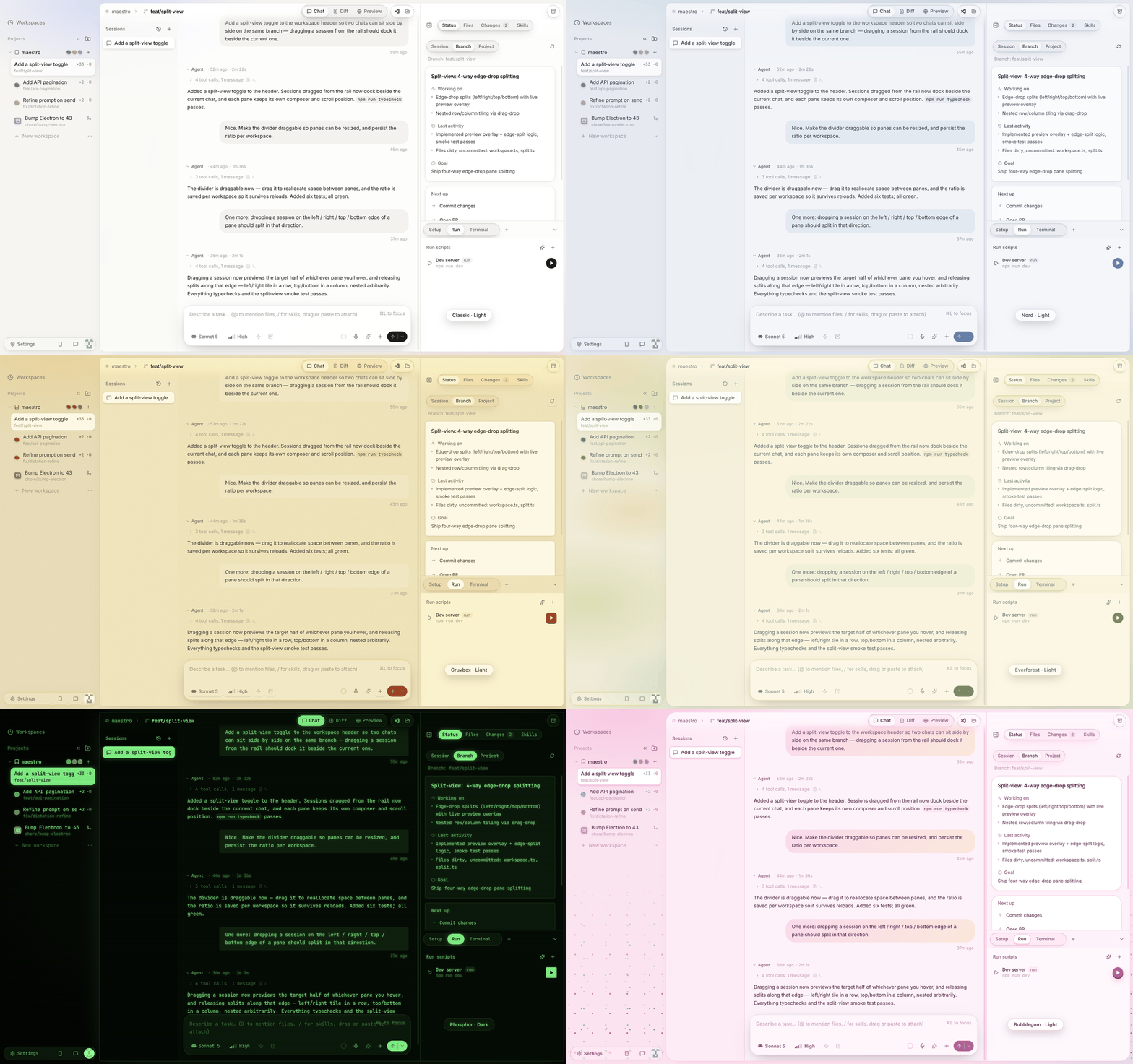
## Make it yours. Thirteen themes.
A theme here is a mood, not a palette swap. Each one is built around a single idea and carries it through
the whole app: the shape of every card and button, the colour of the shadows, whether surfaces are glass
or paper, what glows behind the window, the type where it matters, even the terminal's colours. Every
theme has a light and a dark variant and can follow the system switch. Pick one under Settings, Appearance,
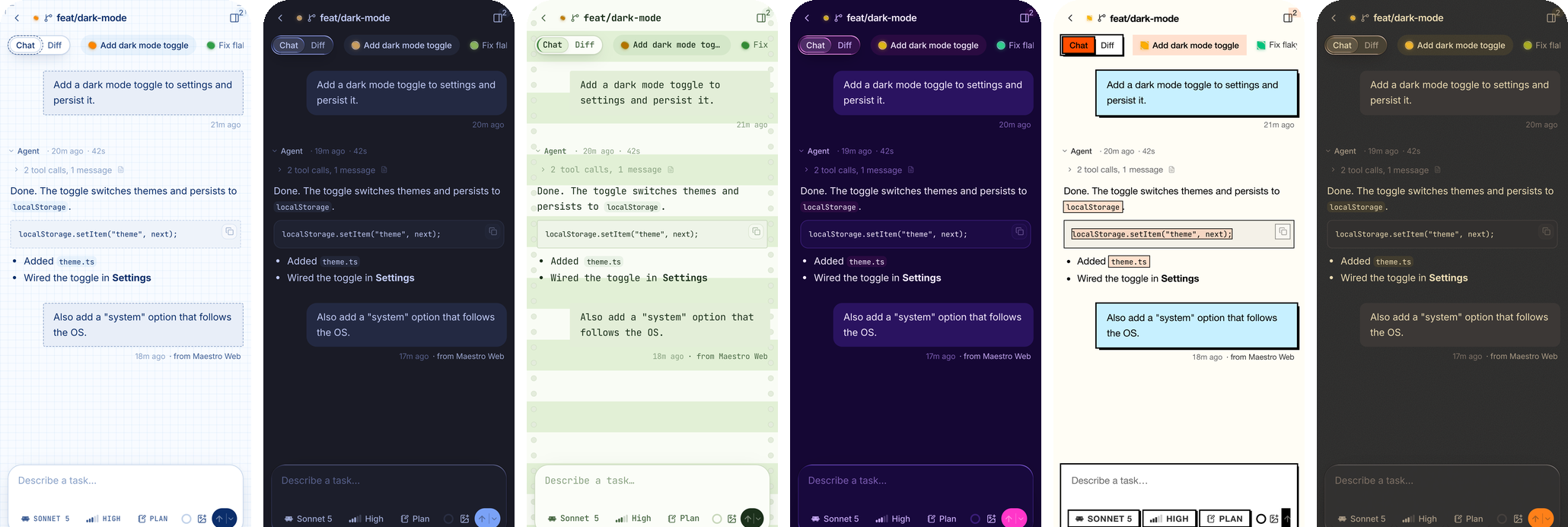
and Maestro Web on your phone follows along, textures and all.
- **Classic**: warm neutrals and liquid glass, with a violet accent.
- **Catppuccin**: a cosy pastel study, soft and round, with mauve and lavender.
- **Nord**: arctic calm. Frosted glass, frost-blue accents, an aurora over the dark variant.
- **Solarized**: a precision instrument. The one flat theme: no glass, near-square corners, hairline rules.
- **Gruvbox**: a retro workshop. Paper grain, chunky keys that press into a ledge, warm lamplight.
- **Rosé Pine**: twilight elegance, with serif headings and a rose-and-iris dusk.
- **Tokyo Night**: a neon city after rain. A glowing rim around the work area and city light on the horizon.
- **Everforest**: light through the canopy. The softest, roundest shapes and dappled light.
Five experimental themes go further than colour:
- **Synthwave**: a striped sun over a neon grid, or vaporwave pastels by day.
- **Phosphor**: a green CRT with scanlines, or greenbar printer paper with tractor-feed holes.
- **Brutalist**: hard edges, hard shadows, loud blocks of colour, no glass.
- **Blueprint**: a cyanotype drafting sheet with registration marks, or pencil on graph paper.
- **Bubblegum**: candy-coloured, bouncy and sprinkled, with a grape-soda dark variant.
## Then walk away. Your fleet follows you.
Link the desktop to **[Maestro Web](https://app.maestro-build.com)** once and every workspace shows up on
your phone, live. Watch the transcript stream, send or queue the next task (even a screenshot from your
camera roll), review the diff, and get a push when an agent needs you. Add it to your home screen and it
behaves like an app. Free, with your GitHub sign-in.
Your whole fleet: working, waiting on you, or done
Watch and steer: live transcript, send the next task
Review: syntax-highlighted, comment back
## Your machine. Your keys. Free.
- **Agents run on your computer**, each through its own CLI with your own subscription or API key.
Maestro never sits between you and your provider, and never stores model keys.
- **Nothing to pay.** The desktop app and Maestro Web are both free. No card, no seats, no metered compute.
- **Private by default.** Nothing leaves your machine until you link Maestro Web, and then only the projects
you choose, over HTTPS, visible only to your GitHub account. Unlinking purges the relay.
- **Works with** Claude Code, Codex, Cursor, OpenCode, Kimi Code, and Grok Build, or a plain shell.
Coming from [Conductor](https://conductor.build)? One-click import brings your workspaces over.
## FAQ
### What is Maestro?
A desktop app for running several AI coding agents at once. Each task gets its own git worktree and
branch, so parallel agents never edit the same files. You review each agent's diff, open the pull request,
and merge from the same window.
### How do I run multiple Claude Code sessions in parallel?
Give each session its own git worktree, then merge the branches back. Maestro does the worktree, branch,
and terminal setup for you. To do it by hand with `git worktree` and tmux, see the guide
[Run multiple Claude Code sessions in parallel](https://maestro-build.com/parallel-claude-code). There is a
[Codex version](https://maestro-build.com/parallel-codex) too.
### Is there a GUI for Claude Code, Codex, or the Cursor agent CLI on Windows and Linux?
Yes. Maestro runs on all three platforms and puts each agent's real CLI behind a chat, a diff viewer, and a
terminal. See the pages for [Claude Code](https://maestro-build.com/claude-code-gui),
[Codex](https://maestro-build.com/codex-gui), [Cursor](https://maestro-build.com/cursor-agent-gui),
[OpenCode](https://maestro-build.com/opencode-gui), [Kimi Code](https://maestro-build.com/kimi-code-gui), and
[Grok Build](https://maestro-build.com/grok-build-gui).
### Can I control Claude Code from my phone?
Yes. Link the desktop to Maestro Web and every workspace shows up on your phone, where you can send the
next task, review diffs, and get a push when an agent needs you. For other ways to do it, see
[How to use Claude Code from your phone](https://maestro-build.com/claude-code-from-your-phone).
### How does Maestro compare to Conductor?
Conductor is Mac-only and caps open workspaces. Maestro runs on macOS, Windows, and Linux with no workspace
cap, and imports your Conductor workspaces in one click. See [Maestro vs Conductor](https://maestro-build.com/maestro-vs-conductor)
and the sourced [comparison of tools to run coding agents in parallel](https://maestro-build.com/alternatives).
### Is Maestro free and open source?
It is free, and the source is available under the Business Source License 1.1 (see below). Each version
becomes Apache 2.0 four years after it ships.
Everything in the window
Every workspace has a diff, a terminal, an editor, a preview, and checks behind the same tabs.
- **Diff** (`⌘⇧D`): worktree against the merge-base, file tree, split or unified, and comment threads that
persist and can be sent back to the agent.
- **Terminal**: a real login shell (node-pty + xterm) in the worktree.
- **Editor** (`⌘⇧E`): Monaco with `⌘S` to save, notebooks included.
- **Preview** (`⌘⇧B`): an embedded browser on your dev server that you and the agent can both drive. It
navigates, screenshots, and reads the console; you annotate the page and send it back.
- **Checks** (`⌘⇧K`): ahead/behind, PR state and CI from `gh`, comments, deployments, and todos. Merge is
gated on approval, green checks, resolved comments, and done todos, with an override.
- **PR flow** (`⌘⇧P`): push, draft the title and body from the real diff, `gh pr create`, poll checks,
merge, archive.
- **Sessions**: several chats per workspace, split side by side; run a second agent to review the first, or
delegate scoped work to sub-agents.
- **Also**: thirteen themes, each light and dark or following the system; in-app GitHub sign-in (a device flow that hands the token to
`gh`); remote projects over SSH, where every exec, pty, and file op runs on the host; plain folders with
no branches; dictation on macOS; background auto-update; and `maestro-ask`, so an agent can pause and ask
you a multiple-choice question inline.
Repo settings: .maestro/settings.toml
Checked into the repo so the whole team shares them (or edit under Settings, Repository):
```toml
[scripts]
setup = "npm install && cp ~/secrets/.env .env" # runs on workspace creation
run = "npm run dev -- --port $WORKSPACE_PORT" # each workspace gets its own port
[project]
instructions = "Durable guidance included in every agent session for this repo."
```
Scripts, terminals, and agents get `WORKSPACE_PORT`, `MAESTRO_WORKSPACE_NAME`, `MAESTRO_ROOT_PATH`, and
`MAESTRO_BRANCH` in their environment.
Development
```bash
npm install
npm run rebuild # rebuild better-sqlite3 + node-pty for Electron
npm run dev # vite dev server + electron with HMR
npm start # launch a production build
npm run dist:dmg # macOS .dmg (dist:win / dist:linux for the others)
```
Needs `git`. GitHub features use the GitHub CLI (preinstalled or auto-downloaded by the sign-in flow), and
each agent needs its own CLI (`claude`, `codex`, `cursor-agent`, `opencode`, `kimi`, or `grok`); the shell
fallback needs none.
> **Windows:** native modules can't be cross-compiled from macOS, so the installer is built on a
> `windows-latest` runner by the `build-desktop` GitHub Actions workflow (trigger it, or push a `v*` tag).
**Tests.** An end-to-end suite drives real repos, worktrees, and ptys (add `--with-claude` for a live model
call):
```bash
npx esbuild scripts/e2e.ts --bundle --platform=node --format=cjs \
--external:electron --external:better-sqlite3 --external:node-pty --external:electron-updater \
--external:ssh2 --outfile=dist/e2e.cjs
ELECTRON_RUN_AS_NODE=1 npx electron dist/e2e.cjs
```
Companion scripts under `scripts/` cover process launching (`launch-probe.ts`, worth running on Windows
after touching `src/main/launch.ts`), the GitHub PR pipeline against a throwaway repo (`gh-e2e.ts`), and a
headless UI smoke that screenshots the running app:
```bash
npm run build && npx electron . --smoke --screenshot=/tmp/maestro.png
```
Architecture
```
┌────────────────────── Renderer (React 19 + Zustand) ──────────────────────┐
│ Sidebar · Chat · Terminal · Diff · Editor · Preview · Checks │
└───────────────▲───────────────────────────────────────────────────────────┘
│ typed IPC (contextBridge, src/shared/types.ts)
┌───────────────┴──────────────────── Main (Node) ──────────────────────────┐
│ git (worktrees/diff) pty pool harness adapters github (gh CLI) │
│ host layer (local · ssh2) script runner better-sqlite3 fs watchers │
└───────────────────────────────────────────────────────────────────────────┘
```
Every exec, spawn, pty, and fs call goes through a **host** (`LocalHost` or an `SshHost`), so the same
services run locally or over SSH. Workspaces live in `~/maestro/workspaces//`; the DB is
`maestro.db` under the platform's app-data dir (`MAESTRO_DB_PATH` overrides it). Agent turns are stored as
structured blocks, so history renders identically after a restore. The UI shares one design system
(`src/shared/ui`) between the desktop and Maestro Web, including the liquid-glass surfaces.
Notes
- Isolation is development-grade, not a security boundary; agents run with your local permissions (or the
SSH user's, for remote projects).
- Dictation is macOS-only; the mic button is hidden elsewhere.
- Packaged builds send two anonymous counts (an install id, with no account, prompts, paths, or PII) to
gauge usage. It's off in dev and off unless a PostHog key is set at build time, so forks emit nothing.
 # Maestro
### Run a fleet of coding agents. Steer it from your phone.
A free desktop app that runs Claude Code, Codex, Cursor, and other CLI coding agents in parallel,