AIDE = AI + IDE: a VS Code-style local development environment for DeepSeek Harness.











中文 · English
## Highlights - **One integrated AIDE**: explorer, Monaco editor, search, Git, terminal, and DSH conversation in one VS Code-style interface. - **Complete file experience**: open text, Markdown, images, PDF, and Word files directly; the tree supports drag-and-drop uploads and common file operations. - **Reliable and live**: atomic saves and revision checks prevent silent overwrites, while WebSocket updates flag external workspace changes. - **Visual Git workflow**: status, staging, commits, branches, diffs, commit files, and a swimlane commit graph. - **Persistent workspace context**: restore the tree, views, panels, and widths per workspace; terminals support multiple sessions, splits, and rename. - **Language services**: a built-in TypeScript/JavaScript language service plus any external LSP server, with diagnostics, hover, go-to-definition, references, rename, symbols, and completion. - **Built for DSH**: reuse the DSH conversation surface on the right and follow the DSH theme instead of shipping a second color scheme. ## Features - **Files and editor**: lazy explorer with create, upload, drag-and-drop, rename, delete, and Git markers; Monaco tabs provide dirty state, atomic saves, and conflict notices. - **Easter egg**: clicking the teaser line in the empty editor state opens Chrome's own offline dino **as an editor tab called "小恐龙"** (not a popup — switching away or closing the tab exits), filling the editor panel and **following the DSH theme** (dark mode inverts the transparent canvas so the dark sprites render light); it comes from the MIT npm package `react-chrome-dino` (sprites and sounds included — no custom game logic and no vendored assets). - **Preview**: Markdown source, outline, relative links, and images; built-in PDF paging and zoom plus DOCX rendering, with DOC/ODT download support. - **Search and replace**: `@vscode/ripgrep` supports case, whole-word, regex, and path filters. Results are grouped by file with every hit highlighted; replace one match, replace all, preserve case, step through hits with `F4` / `Shift+F4`, and the last search (including replacement text and options) survives reloads. - **Source control**: stage, unstage, discard, commit, branches, diffs, and commit files. The panel title `...` menu is nested like VS Codes (view & sort / commit / changes / pull-push / branch / remote / stash / tags) and every submenu entry works: pull, push, sync, fetch, clone, bulk stage or discard, checkout / create / rename / delete / merge / rebase branches, add or remove remotes, stash push-apply-pop-drop, create/delete/push tags, and undo the last commit. Branches, stashes and tags are picked through searchable quick picks. **The commit graph is its own editor tab** (opened from the commit-graph icon in the Source Control title bar — it uses Git Graph's own SVG icon), coloured like the VS Code Git Graph extension. The graph shows uncommitted changes and stashes; clicking a commit opens a detail panel on the right (author, full message, per-file +/− counts, click a file for its diff), Ctrl(⌘)-clicking a second commit compares the two, and the toolbar offers find (Ctrl+F over message/author/hash/refs) and multi-select branch filtering. It also supports check out, create a branch or tag, reset or drop a commit, cherry-pick, and revert; author/date/hash columns can be shown, hidden and resized; commit messages support emoji shortcodes and issue links (GitHub/GitLab/Bitbucket inferred from the remote URL); repository settings let you edit, fetch and prune remotes, configure issue links and the pull-request target branch, and export the view configuration; the `...` menu opens the provider-specific pull-request creation page (GitHub compare / GitLab merge_requests / Bitbucket pull-requests); the view menu clears code-review marks; files in the commit details can be marked reviewed (opening a diff marks it automatically, persisted for 90 days); show all branches and load more commits are still there. In-tab shortcuts: `Ctrl+F` find, `Ctrl+H` jump to HEAD, `Ctrl+R` refresh, `↑`/`↓` move between commits, `Esc` close the details. "Show Git Output" opens a log of the git operations the workbench ran. - **Terminal**: `node-pty` and xterm with up to eight sessions, rename, a right-side switcher, splits, ANSI output, and Ctrl+C. The host pre-warms the default shell when the panel opens, so a new terminal usually already has its prompt in the replay buffer; collapsing the panel or switching tabs keeps the xterm instances instead of rebuilding and replaying them. Terminal session tabs sit at the top of the terminal view; the left side of the bottom panel title bar holds three separate rounded buttons (Problems / Output / Terminal, not a tab strip), and its `⋯` menu currently offers a Debug Console panel (an empty state until a debugger is wired in). - **Output**: mirrors VS Code's Output view with channels — the language-services channel collects LSP server output plus connection/scan events, and the Git channel records every Git command issued by the workbench. It is read-only, can switch channels, and can clear the current channel. - **Layout and DSH**: the primary view, terminal panel, and DSH conversation sidebar can be shown and resized independently; widths are dragged and double-clicked back to default in place, so they are not duplicated as settings. - **Settings page**: the "AIDE" page under DSH settings is one scrolling page grouped into Editor / AI completion / Language services / Terminal / Shortcuts / About and diagnostics, using the same type scale as DSH settings (row title 14/20, hint 12/18, controls 14/32px). Editor: font size, line height, tab size and insert-spaces, word wrap (off/on/bounded), minimap, overview ruler, occurrence highlight, whitespace rendering, cursor style, smooth scrolling, sticky scroll, auto save and delay. AI completion: master switch, trigger delay, model route (**listed from the models DSH already has configured**, free-form allowed), failure fallback, plus the model actually in use and the last failure. Language services: master switch, built-in TypeScript switch, hover/completion toggles, discovered-server states, and the settings-file path. Also terminal font size, a **shortcut panel** (one "view" row on the page that opens a searchable, rebindable panel: click a keycap to record in place, conflict warnings, per-row and reset-all defaults; Monaco's built-in editor keys stay read-only), and reset-to-defaults. - **Occurrence highlight and overview ruler**: selecting or double-clicking a word highlights every occurrence in the document the way VS Code does, and a three-lane overview ruler appears on the right (selection, occurrences, and find matches are drawn in the scrollbar strip). Ruler markers use the foreground color (white on dark themes, no longer the blue accent), and the scrollbar slider is translucent so it never hides them. - **Close confirmation and auto save**: closing a tab, bulk-closing (others/right/saved/all), or returning to DSH with unsaved edits opens a VS Code-style dialog (single: Save / Don't Save / Cancel; multiple: Save All / Don't Save All / Cancel with the file list). Files that fail to save stay open and report the error, and returning to DSH is blocked while any save failed. An optional delayed auto save is available too. - **Localized context menus**: the explorer, tabs, code editor, terminal, and source control all have VS Code-style menus in Chinese — new/upload/cut/copy/paste/rename/delete, copy relative or absolute path, open in terminal, tab close-others/right/saved, editor undo-redo and find-replace, terminal copy/paste and clear, Git stage/unstage/discard/copy commit hash. Monaco's built-in English menu is disabled (`contextmenu:false`); menu contents are pure data (unit-tested) over one shared shell. - **Richer editor menu**: the standard edit items are grouped into **submenus** (Select / Find / Go To / Lines / Convert / Format), so the top level stays at 12 rows — undo/redo, cut/copy/paste, the six groups, and save — instead of 30 flat items. Inside are the VS Code staples: select all occurrences, go to definition / find references / rename symbol, move-copy-delete lines, indent, transform case, add cursor above/below, line and block comments, format document or selection, fold and unfold. **With a text selection, a "DeepSeek Harness" submenu appears at the very top**: Add to Conversation, Ask DSH…, Explain / Fix / Refactor this code, Generate Unit Tests, Add Comments, Review this code, Copy as Quote. Everything except "Copy as Quote" only **inserts the quote or instruction into the DSH composer — it never sends for you**, so you can finish the message and send it yourself. The menu supports two levels (hover or arrow keys to expand, Escape closes one level at a time) and exposes `registerEditorMenuContribution` so other plugins can append their own items. The menus are **text only** (no icons); only expandable submenus carry a small chevron at the end of the row. - **Inline completion**: ghost-text suggestions at the cursor, served by a real model or a local fallback; cycle through candidates and accept by block, by line, or by word. Context comes from the current file and a local retrieval index that never leaves the workspace directory. See [docs/inline-completion.md](docs/inline-completion.md) for implementation and verification status. Note: host-side code loads at process start, so **restart the app** after changes (a page reload is enough for the client side). - **Language services (LSP / diagnostics / navigation)**: a built-in TypeScript/JavaScript service reads `tsconfig.json` and resolves workspace `node_modules` types, while external LSP servers are discovered on `PATH` (pyright/pylsp, rust-analyzer, gopls, clangd, yaml-language-server, bash-language-server, lua-language-server, intelephense, solargraph, …) or configured in the settings file. `F12` / `Ctrl+Click` go to definition, `Shift+F12` finds references, `F2` renames across files, `Ctrl+Shift+O` lists document symbols, `Ctrl+T` searches workspace symbols, and `Ctrl+.` offers quick fixes (including organize imports); hover shows cross-file types and completion/signature help come from the language service. Diagnostics are live (260 ms debounce) and surface in the editor, the activity bar "Problems" badge, the status bar counts, and a grouped, filterable Problems panel where clicking jumps to the location and `F8` / `Shift+F8` step through them. "Scan workspace" in the panel checks every built-in TS project file. Jumping into `node_modules` or TypeScript's `lib.*.d.ts` opens a read-only tab that still supports hover and further jumps. Settings expose the master switch, the built-in TS switch, and hover/completion toggles; external servers and custom configuration are documented in [docs/language-services.md](docs/language-services.md). - **Sync and restore**: workspace file changes stream to the UI, while reload restores views, expanded directories, panels, layout, and **the file tabs from your previous session** (stored locally per workspace root: leaving to the DSH main page, reloading the page, or restarting the app all bring the tab bar back; contents are re-read from disk when you switch to a tab, and unsaved drafts are not restored across sessions. Files that changed on disk while AIDE was hidden are reloaded when you return). AIDE mounts through DSH's `shell.overlay`, `main`, `sidebar.panellist`, and `settings.section` extension points (`main` and `sidebar.panellist` are registered as a pair and swap places when the side panel is collapsed). It does not replace or disable `ui-layout`. ## Performance - **Terminal startup**: opening the terminal panel pre-warms the default shell on the host (`TerminalManager.prewarm`, reclaimed after 90 seconds if nobody claims it). Creating a terminal then adopts that shell, whose replay buffer already holds the prompt. On this machine `pwsh` needs about 530 ms from spawn to accepting commands; a pre-warmed create costs about 2 ms on the host. Create/close/rename each issue a single request, and the panel plus every opened xterm instance stay mounted. Deployments that do not want the extra idle shell can disable prewarming with `DWV_TERMINAL_PREWARM=0` (creation still works). - **Rendering and IO**: file-change pushes only update tab state when something actually changed; resizer drags move CSS variables and persist the layout once on pointer-up; the Markdown outline and the Git commit graph are memoized; Monaco models are evicted LRU (open/dirty files kept, limit 12); TextMate grammars are installed once per language and files over 3000 lines or 200 KB fall back to the built-in tokenizer. - **Cold-start code splitting**: the PDF and Word render stacks are only needed when such a file is opened, so they now live in DSH client chunks (`lib/client.pdf.js` 487 KB, `lib/client.docx.js` 243 KB) loaded same-origin on first preview. The main bundle drops from 2.65 MB to **1.75 MB** (gzip 584 KB → 375 KB) and V8 compile from 28 ms to 18 ms; neither chunk is downloaded unless you open a PDF or Word document. - **Language services**: fully lazy — TypeScript is not loaded and no external server is started until a file of that language is opened; diagnostics run 260 ms after typing stops and the client coalesces refreshes for 80 ms, so hundreds of diagnostics do not re-render the Problems panel per message. - **Completion**: request bodies carry only the cursor window (about 20 KB for a 1 MB document, with the prompt byte-identical to sending the whole document); response headers no longer wait for the retrieval index; snippets are read by line range and multiple hits in one file share a single scan. - **Git**: `gitRoot` and rev-parse results are cached, bringing a Git panel refresh from five `git.exe` invocations to two on the warm path; committing reuses the status the host returns and only refetches the log. - **Reproducible baseline**: `pnpm perf` measures terminal startup (spawn / first byte / interactive readiness for three shells, plus "warm ready / adopting the warm shell / waiting without prewarm"), client bundle size and compile cost (including the on-demand chunks), and host entry load cost, writing `perf-results/baseline.json` (gitignored). Measured here: adopting the warm shell takes about 2 ms, while clicking "new terminal" without prewarm needs about 100–160 ms to a prompt (the shell's own startup is absorbed by the time the panel is open or the button is hovered). Current bundle numbers: main `lib/client.js` 1.75 MB (about 375 KB gzip, about 18 ms V8 compile), host entry import about 37 ms. - **No native/Rust addon**: the host's hot spots are Windows process creation (about a 44 ms floor per `git.exe` or shell) and protocol overhead, not JavaScript computation. Pure JS optimizations capture most of the win, while a native addon would need to cover both the Electron and Node ABIs with per-platform prebuilds, which is not worth the install size and distribution cost. ## Demo
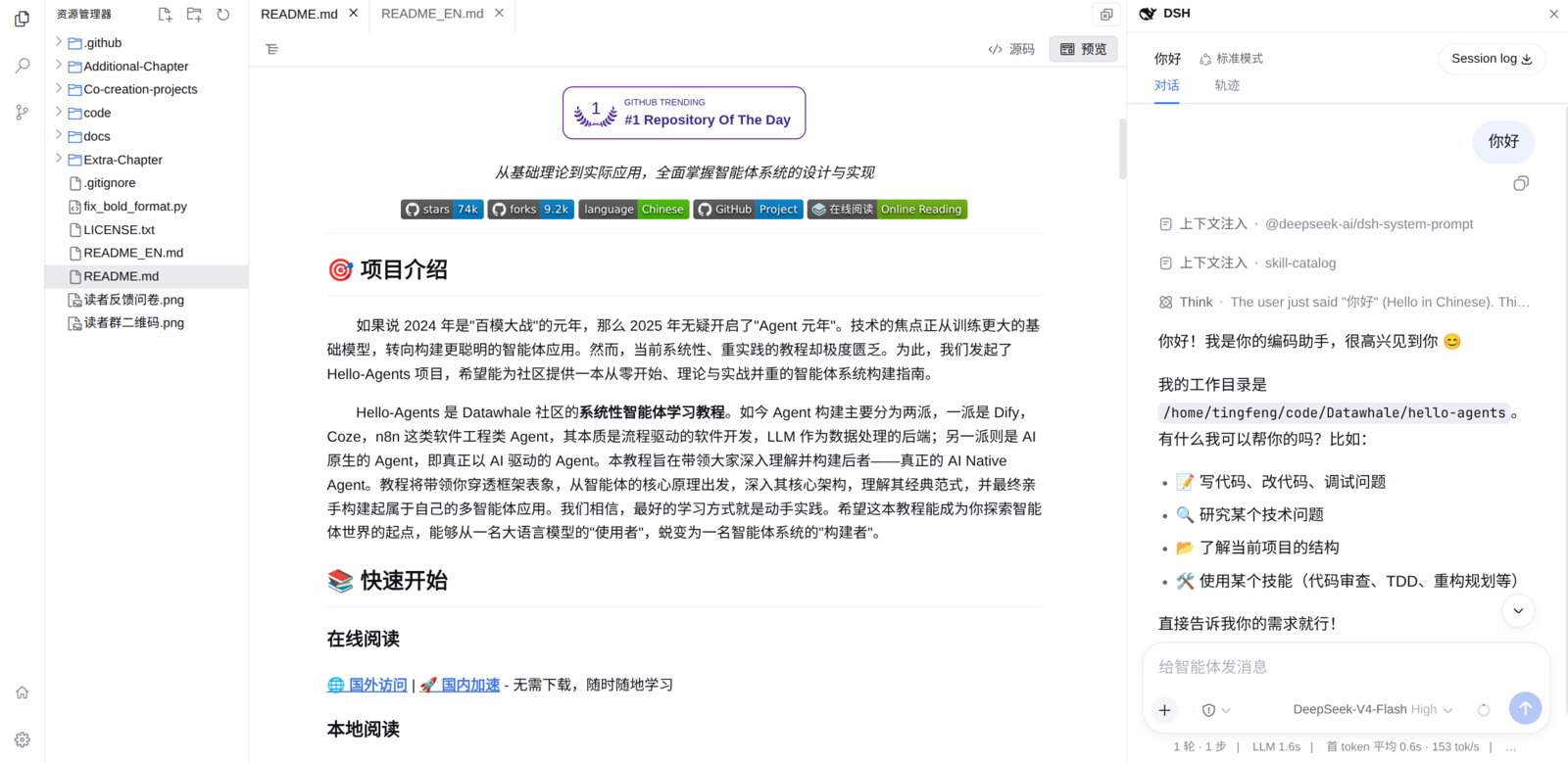
Explorer and Monaco editor
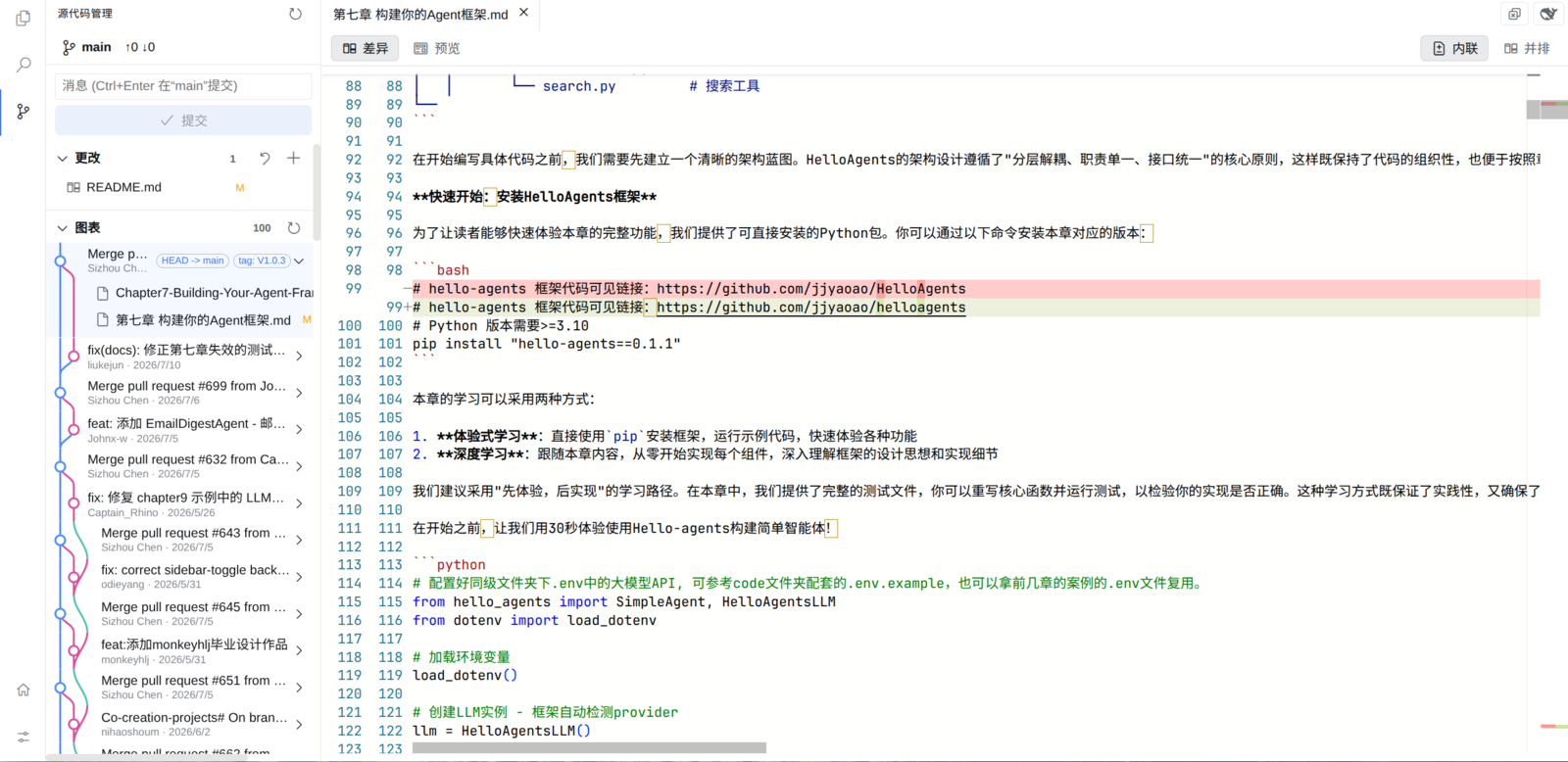
Source control and commit graph

terminal