A free, open-source anti-detect browser launcher for web scraping and multi-accounting.
Patched Chromium 156 with engine-level fingerprint spoofing, a local API, an MCP server and SDKs.
ShardX is built by the **[ProxyShard](https://proxyshard.com?utm_source=shardx&utm_medium=referral&utm_campaign=shardx-launcher)** team.
ProxyShard provides full **SOCKS5 UDP relay** support (RFC 1928 §7) and
active **p0f TCP fingerprint spoofing** at the proxy exit. This keeps the
operating system presented by the proxy consistent with the SYN/ACK shape
seen by websites. ShardX is the anti-detect browser stack built to use
those capabilities. The launcher manages profiles, binds proxies and
ships a patched **Chromium 156** build that applies fingerprint changes
inside the browser engine.
Native fingerprinting Blink, V8 and the network stack
Proxy-native networking QUIC, HTTP/3 and WebRTC over SOCKS5 UDP
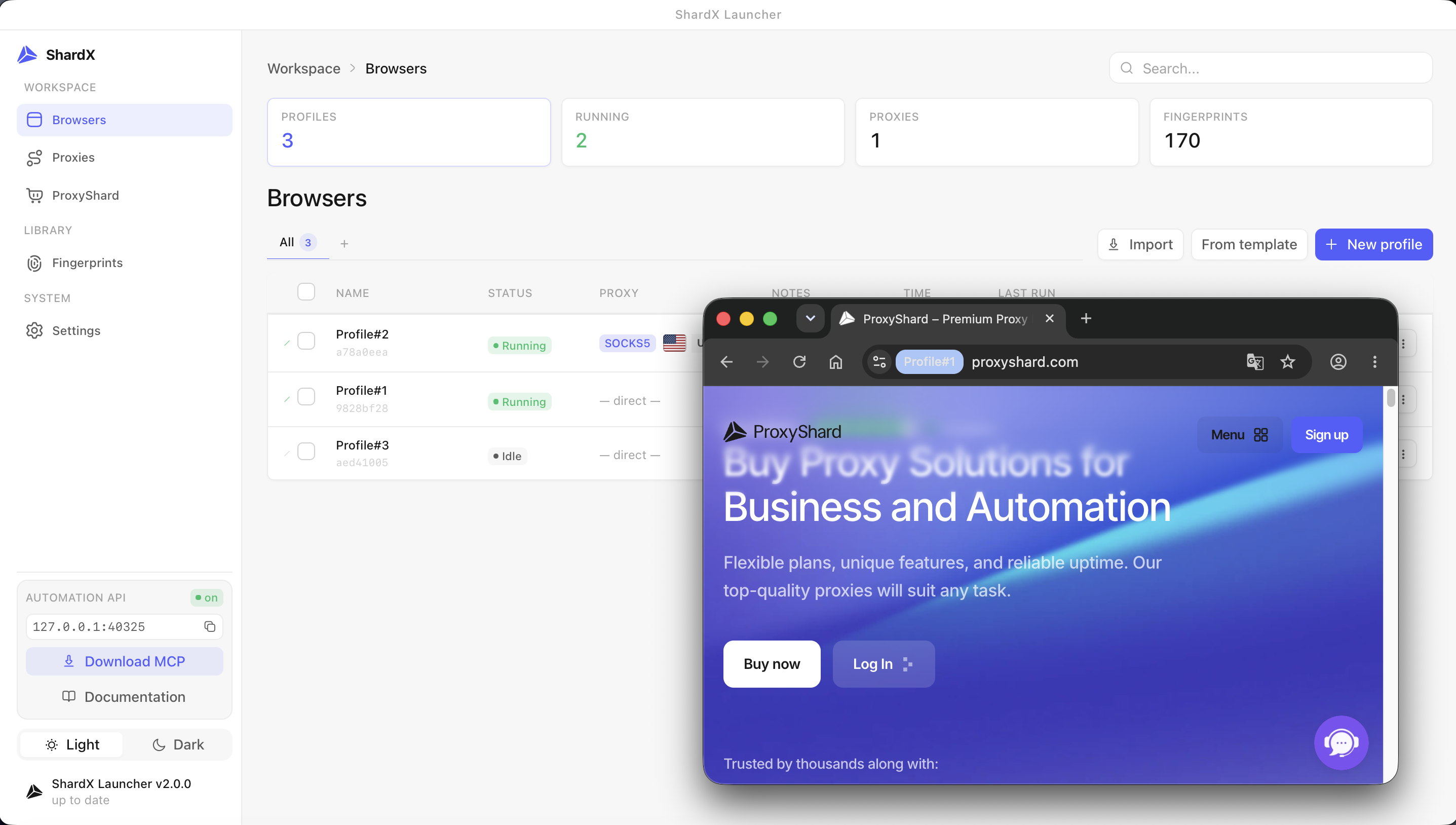
Four control surfaces Desktop UI, HTTP API, MCP and SDKs
ShardX provides four ways to control the same profiles. They all use the
same local state, so no additional synchronization is required:
* **Desktop UI:** workspace for daily work with profiles, proxies,
cookies and the fingerprint editor.
* **Local HTTP API:** Bearer JWT authentication on `127.0.0.1:40325`.
Create, start and stop profiles from any language, then obtain a CDP endpoint.
* **MCP server:** connects ShardX to Claude Desktop, Cursor and other
MCP clients for natural-language profile orchestration through the
HTTP API and CDP.
* **Standalone SDKs:** Python, Node and Rust libraries that ship the
browser engine and run without the desktop UI. They are intended for
scrapers, CI jobs and servers.
Configuration details are available in [Usage](#usage).
---
## What it is
ShardX can run hundreds of isolated browser identities side by side.
Each profile defines a complete device identity, including GPU, screen
and its refresh rate, fonts, audio settings, timezone, locale, WebGL and
WebGPU capabilities, TLS ClientHello, UA-CH, WebRTC policy, geolocation
and cookies. The signals within a profile are kept consistent with one
another.
Fingerprint changes are applied inside Chromium's C++ engine, including
Blink, V8 and the network stack. ShardX does not rely on JavaScript
injection, so the same values are visible in frames, workers, developer
tools and headless sessions.
The launcher includes 220 ready-made device profiles for Mac M1 to M5,
Windows desktops and laptops with NVIDIA RTX or GTX, Intel, and AMD
GPUs, Linux workstations and Android phones. You can bind a SOCKS5 or HTTP
proxy to each profile.
The launcher resolves timezone, locale and geolocation from the proxy
exit country. It also manages an isolated `user-data-dir` for each
profile, persistent cookies, Widevine pre-warming and QUIC over the
proxy UDP relay. WebRTC traffic follows the configured proxy policy and
does not expose the host IP.
ShardX is free to use. ProxyShard proxies support end-to-end QUIC and
WebRTC over SOCKS5 UDP relay. Other proxy providers can also be used,
but full QUIC and WebRTC operation requires SOCKS5 UDP relay support.
Verification results and test pages:
| Test | Result |
|-----------------------------------------------------------------|--------------------------------------------------------------------------|
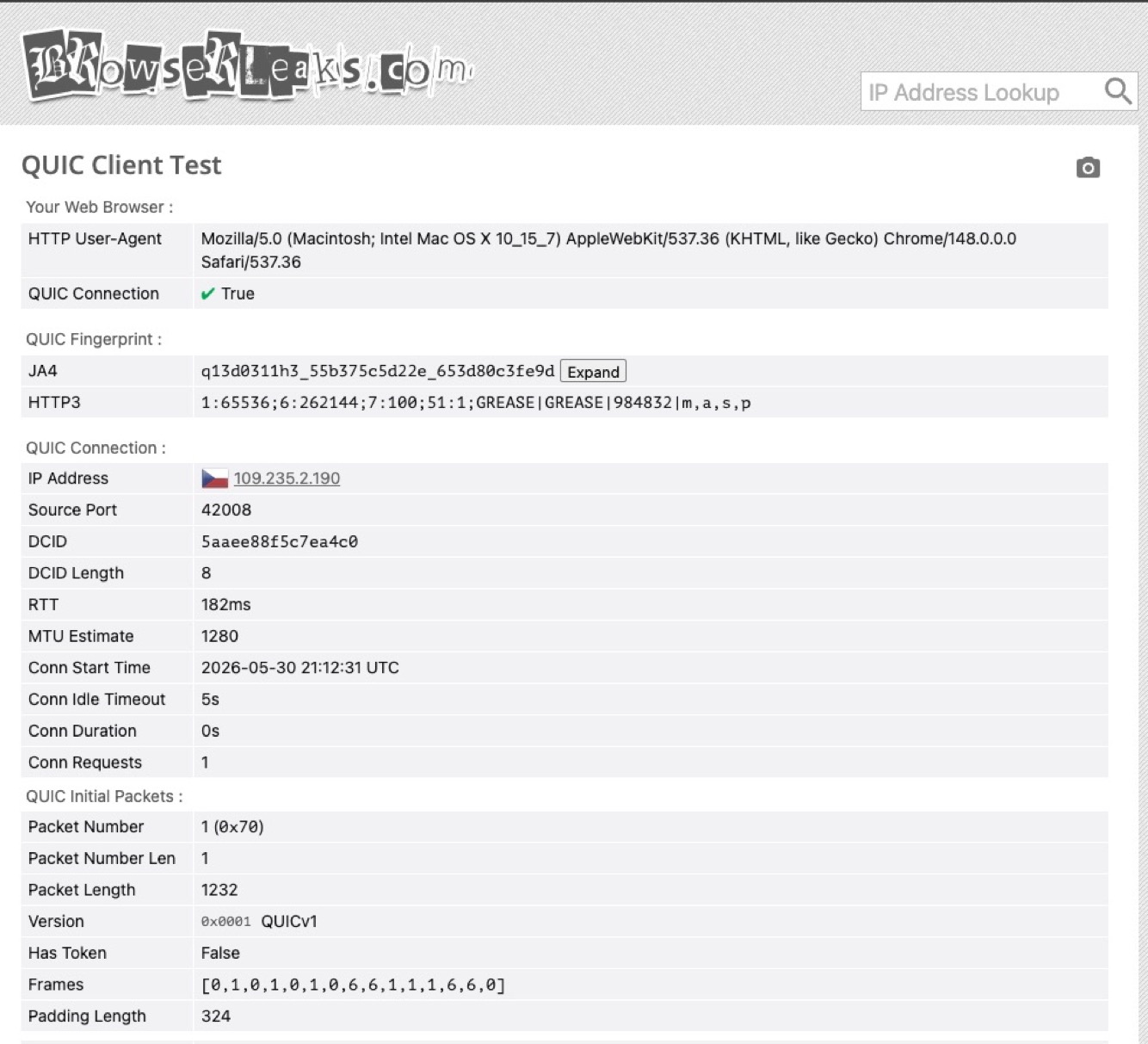
| [browserleaks.com/quic](https://browserleaks.com/quic) | QUIC `True`, JA4 matches real Chrome, MTU 1232 over SOCKS5 UDP relay |
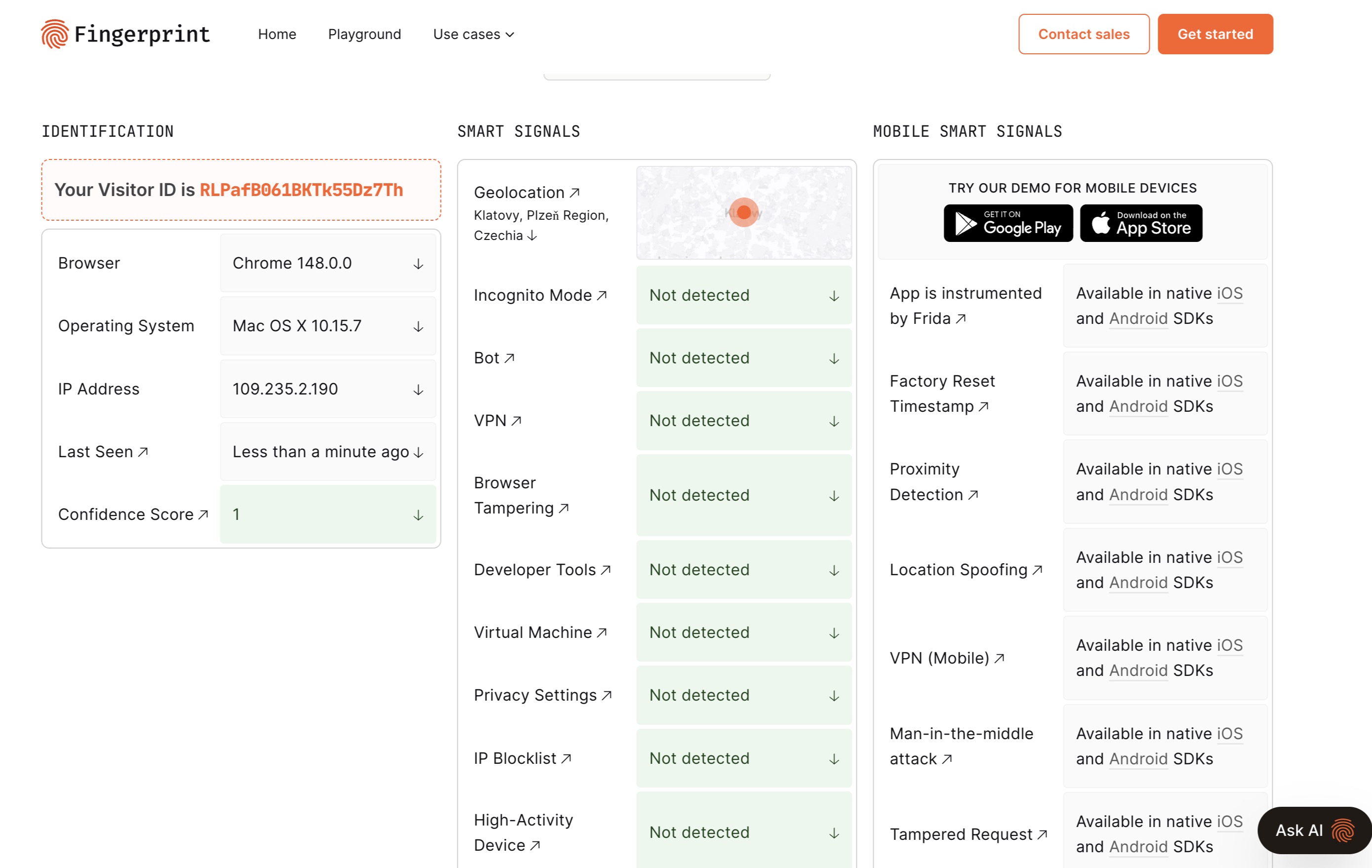
| [fingerprint.com](https://fingerprint.com/demo) | Bot / VPN / DevTools / browser-tampering all `Not detected` |
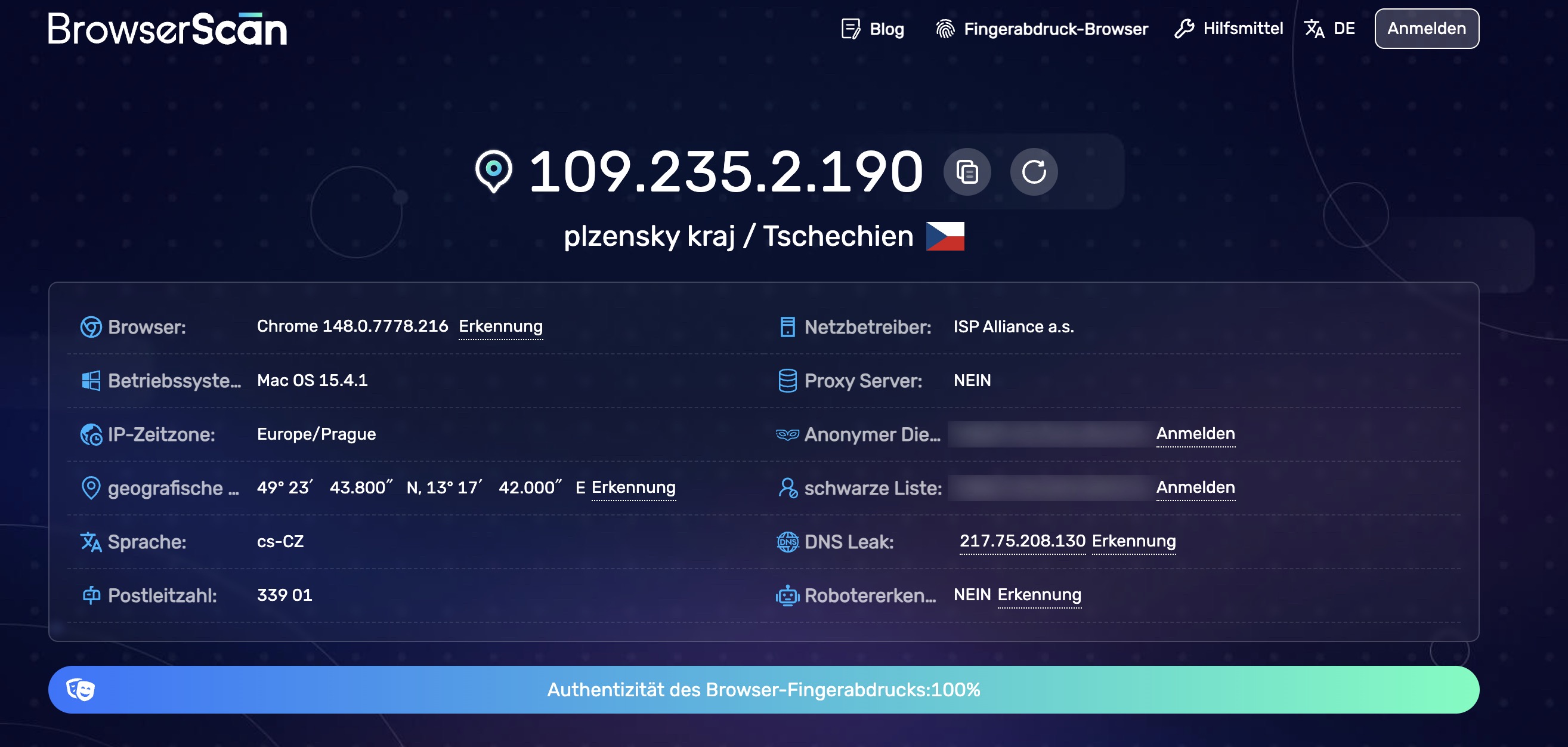
| [browserscan.net](https://www.browserscan.net) | Authenticity **100%** |
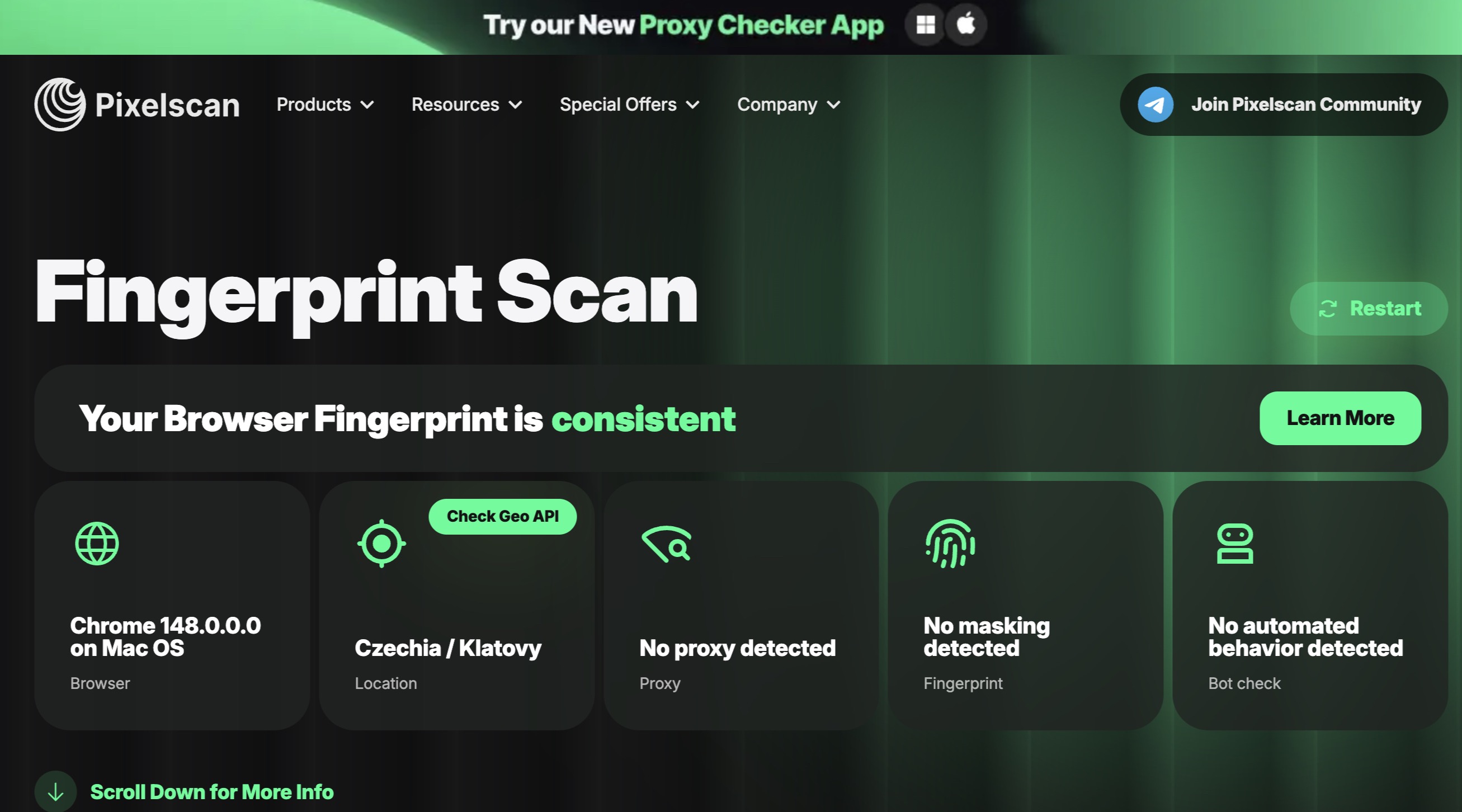
| [pixelscan.net](https://pixelscan.net) | Fingerprint **consistent**, no proxy / automation detected |
| [deviceandbrowserinfo.com/are_you_a_bot](https://deviceandbrowserinfo.com/are_you_a_bot) | Browser fingerprinting and CDP bot-detection test |
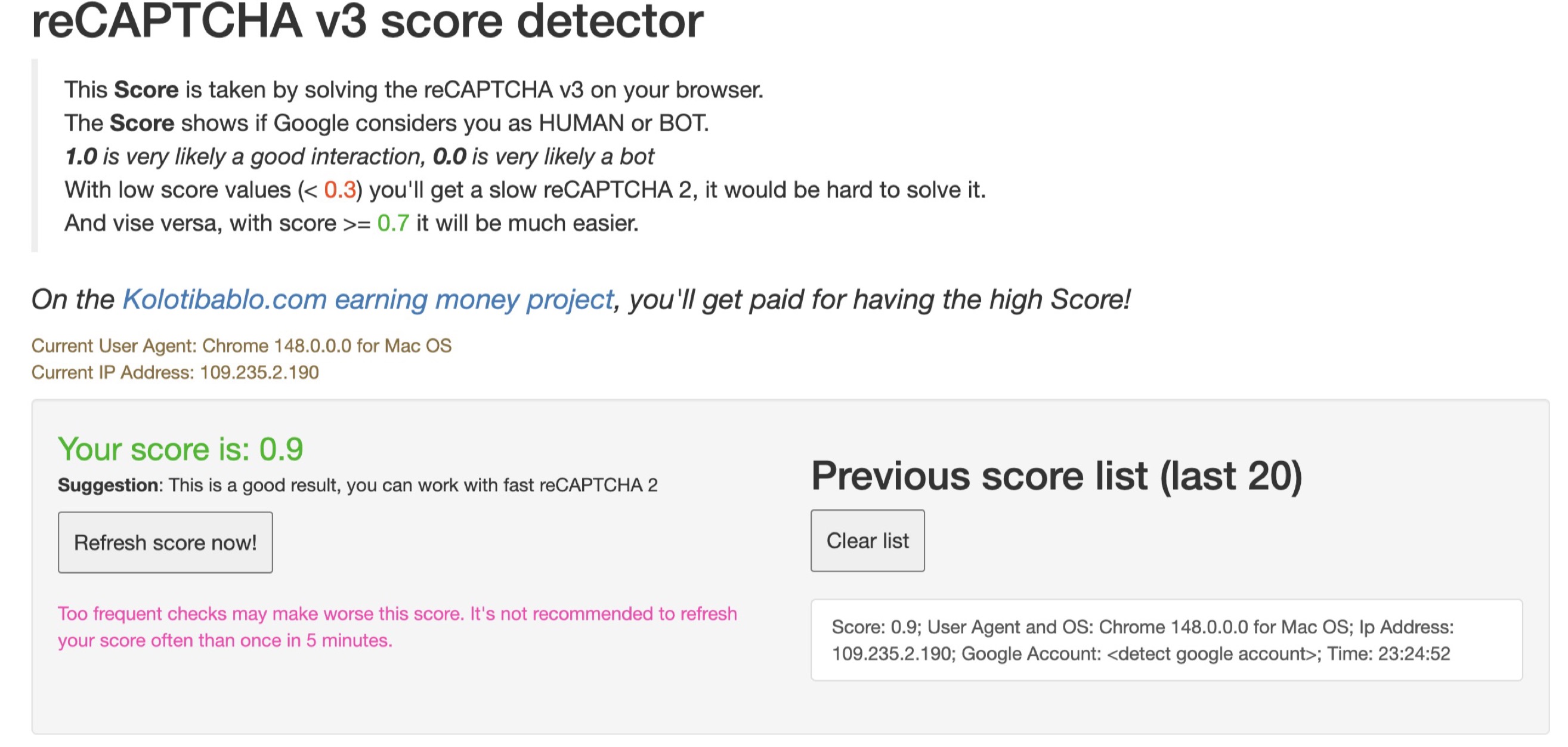
| [antcpt.com/score_detector](https://antcpt.com/score_detector/) | reCAPTCHA v3 score **0.9** |
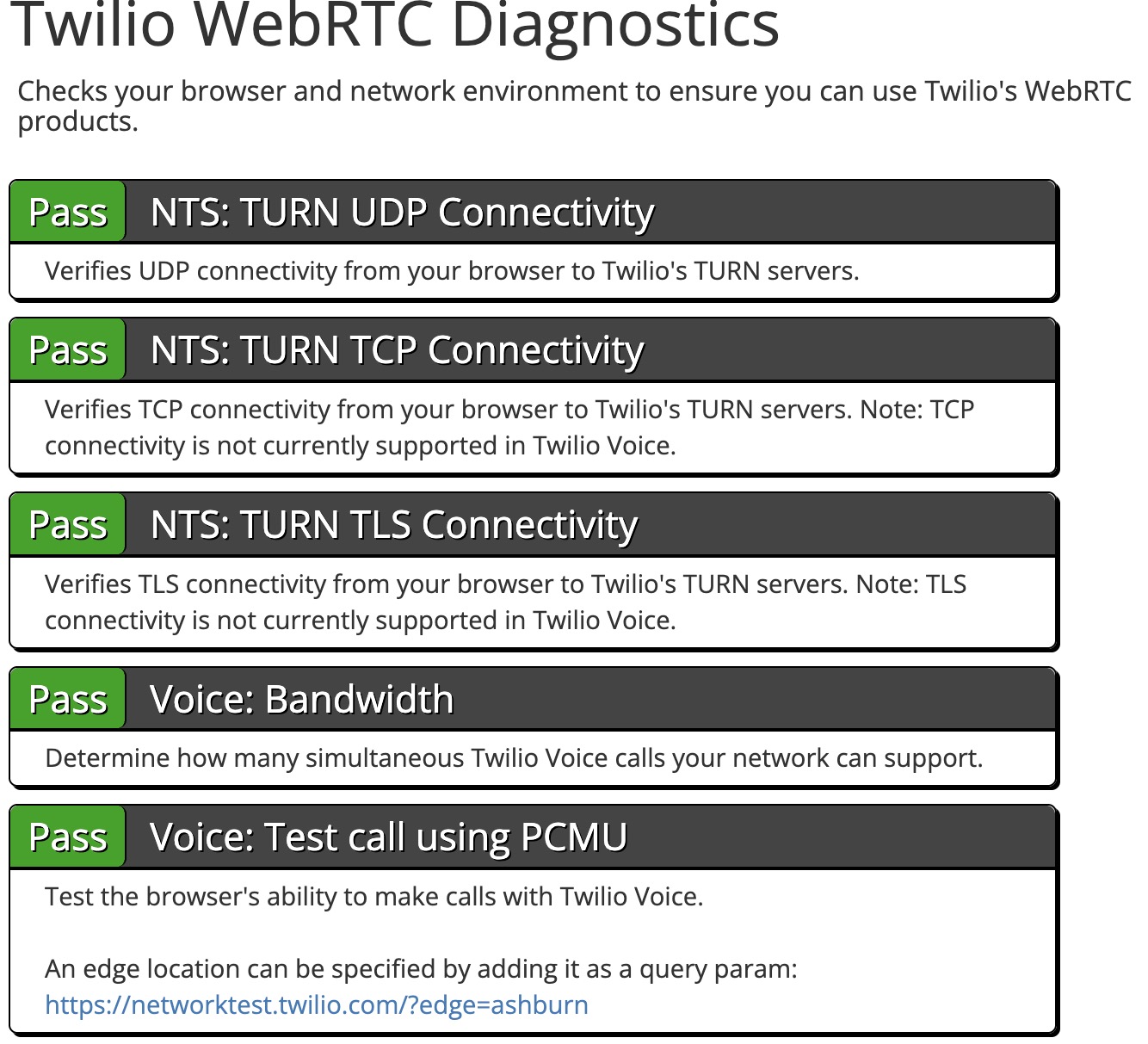
| [networktest.twilio.com](https://networktest.twilio.com) | TURN UDP / TCP / TLS + Voice. All checks **Pass** with no real-IP leak |
---
## Fingerprint surfaces patched
All overrides are applied inside the browser engine. There is no
JavaScript shim layer, so the configured values remain consistent in
iframes, web workers, developer tools and headless mode.
* **Device identity:** user agent, platform, vendor, CPU cores, RAM,
touch points, full Sec-CH-UA stack (brand, version, architecture,
bitness, mobile, model) with stable GREASE.
* **Graphics:** WebGL renderer / vendor / extensions / limits, WebGPU
adapter + limits, deterministic per-profile noise for Canvas, DOMRect
and ClientRects, color gamut and HDR claims.
* **Audio:** sample rate, channel count, optional per-profile noise on
raw audio samples.
* **Screen & window:** full resolution + available area + DPR + color
depth, max-size cap so the OS won't resize past the claimed
dimensions.
* **Locale:** timezone, ICU locale, primary language and the
Accept-Language header auto-derived from the bound proxy's country.
* **Geolocation:** coordinates set manually or derived from the proxy's
exit IP. Host GPS and Wi-Fi data are never used.
* **Network capability:** connection type, downlink, RTT, save-data,
storage quota, JS heap limit, battery state, media-device counts.
* **TLS ClientHello:** Chrome 156 cipher suites and signature algorithms
with extension shuffling. JA4, Akamai and Peetprint
fingerprints match the browser version.
* **HTTP-3 over the proxy's UDP relay:** QUIC works end to end through
SOCKS5. Origin hostnames are resolved by the proxy.
* **WebRTC policy:** `block` / `tcp_only` / `auto`. In `auto`, traffic
uses the proxy's UDP relay. In the other modes, WebRTC candidates report the
proxy exit IP, never the host. STUN / TURN targets on private
networks are dropped.
* **Mobile profiles:** a profile claiming a phone behaves like one.
Mouse and wheel reach the page as finger touches, the viewport lays
out at mobile widths, screen orientation follows the claimed screen
and can be turned over the debugging port, motion sensors report a
device being held, and the font set is the handset's. Protected video
at the level a phone claims is an opt-in switch per profile.
* **Speech voices:** full per-OS `speechSynthesis.getVoices()`
enumeration (200+ macOS voices, SAPI + Google for Windows, Google-only
for Linux).
* **Fonts:** a profile can declare the font set of the device it
claims, and that set is all a page can find — the machine's own fonts
stop being visible. Declared families the machine does not have are
still measured as present, drawn with a face it does have, so a phone
profile reports a phone's fonts rather than nothing. Names are
declared in groups, because a device's font config mostly is: on
Android, Arial, Helvetica, Tahoma and Verdana are one file and measure
alike. Without a declared set the host's fonts flow through with a
small per-profile subset hidden.
* **WebGPU on Linux:** a profile claiming a Linux desktop keeps
`navigator.gpu` and answers the adapter request with nothing, which is
what Chrome on Linux does — it ships with the service switched off.
Without this the profile handed back the host machine's own adapter.
* **Google validation headers:** headers added by Google Chrome to
requests for Google properties are reproduced, including `x-client-data`.
Its absence is a strong reCAPTCHA bot signal.
* **WebAuthn:** platform-authenticator availability matches the
claimed device.
* **Hardening:** Widevine pre-warmed per profile, headless markers
stripped, devtools-protocol side-channels closed, sync hard-disabled,
no keychain prompts, no Google account telemetry, no Privacy Sandbox
enrollment data leaked.
---
## Launcher features
* **Profile workspace:** per-profile `user-data-dir`, persistent
Chrome sessions ("Continue where you left off" without the
crash-restore bubble), bulk import, folder / tag organization, pin
to top, clone.
* **Fingerprint library:** 220 starter profiles shipped via CDN
(31 mac-arm64 / 120 windows-x64 / 19 linux-x64 / 50 android). Profile
editor randomizes CPU / RAM / platform-version when you change the
GPU, and the OS selector includes Android.
* **Proxy manager:** SOCKS5 / HTTP / HTTPS, bulk paste-import,
per-proxy live test (TCP + UDP_ASSOCIATE probe + geo lookup), bind a
proxy to a profile by id or inline-on-launch. Auto-resolves timezone
/ locale / geolocation from the proxy's exit country.
* **Auto-runtime:** first launch downloads the patched ShardX Chromium
build and the fingerprint library from CDN; an ETag is stored so later
launches do not repeat them. The Widevine CDM is not shipped: the
engine's own component updater fetches it for the first profile that
opens a DRM page, and the launcher keeps that copy and hands it to
every profile after — so the CDM is always the version Google is
currently serving.
* **Team spaces and sync:** share profiles with a team, or carry your own
profiles between computers, through a server you run yourself. See
[Team spaces and sync](#5-team-spaces-and-sync-self-hosted).
* **Synchronised windows:** you work in one window and every other window
in the group repeats what you did, in its own profile. Pointer,
keystrokes, scrolling, tabs opened and closed, extension popups. It is
not a recording played back: each window performs the action with its
own motor profile, so no two move identically. There is no leader to
appoint — whichever window is receiving your input is the one driving,
and switching windows switches that too. The fill helper is left out on
purpose: every window fills the same form with its own generated person,
so mirroring those keystrokes would put one window's answers in
everyone else's fields.
* **Automation:** build a project out of steps — navigation, pointer,
keyboard, waiting, reading, flow control, requests, databases — and run
it against as many profiles as you like, several at a time, for a number
of passes or for a number of hours. Every step says where the run goes
next both when it works and when it does not, and failure stops by
default, because carrying on after a click that found nothing is how a
run ends up typing into the wrong page. Open a profile inside the
section and its window appears beside the list: click, type and scroll
straight on it, right-click to pick what to do with whatever is under
the cursor, and turn recording on to have everything you do written down
as steps. The Fleet window shows every browser in the run and the step it
is on, and each run keeps its own log.
* **Human input engine:** every click and keystroke the launcher performs —
yours and the project's — goes through the browser's own input engine
rather than synthesised DOM events. Movement has acceleration and
overshoot, typing has rhythm and corrections, and a site sees a person
using a mouse.
* **Form filling helper:** generates a coherent person — name, address,
card, dates — and types it into the page through that same engine, from
the right-click menu. Each profile gets its own person, so a group of
profiles filling the same form does not fill it identically.
* **Your own blocks:** a step can be a small module you write in Rust and
compile to WebAssembly. It never touches the page — it is handed the
step's settings and answers with ordinary actions the launcher performs
itself. Modules install and uninstall in the Automation section, their
steps appear in the library in a group of their own, and a project
exported to a file carries the modules it needs with it.
* **Camera:** a profile can present a video file, a still image or a region
of the screen as its webcam, with the device named the way the claimed
machine would name it.
* **Local automation API:** axum HTTP server on `127.0.0.1`,
Bearer JWT authentication. Full reference at
[docs.proxyshard.com/eng/shardx-launcher-api](https://docs.proxyshard.com/eng/shardx-launcher-api/binding-and-lifecycle?fallback=true&utm_source=shardx&utm_medium=referral&utm_campaign=shardx-launcher),
raw schema in [openapi.yaml](openapi.yaml). Create / start / stop
profiles and get a CDP WebSocket URL programmatically.
* **MCP server bundled:** connect ShardX to Claude Desktop, Cursor and
other MCP clients for natural-language profile orchestration. Automation
projects are reachable the same way — list them, read one, replace it,
run it, watch a run, stop it, export and import — over the local API and
as MCP tools, so a project no longer has to be started by hand.
* **Cookie I/O:** import / export the profile's Chromium Cookies
SQLite with v10 (mac / linux) and AES-GCM + DPAPI (win) decryption.
* **Extension library:** paste a Web Store link or extension ID and the
launcher downloads the `.crx`. Local `.crx` and `.zip` files and unpacked
folders also work. Extensions can be selected per profile. The grid reads
the name, version, description and icon from `manifest.json`, including
localized `__MSG_*__` values from the default locale.
* **Folder bookmarks:** a site linked to a folder appears in the bookmarks
bar of every profile in it. ShardX rewrites its own `ShardX` folder on each
launch without changing the user's bookmarks.
* **Per-profile window icon:** each profile gets a platform-specific badge
with its name. macOS uses a squircle and shadow, Windows uses a full-bleed
design and Linux uses an Adwaita-style icon with an outline. The badge uses
the profile color, which is also passed to the browser as
`--shardx-profile-color`.
* **Trash:** deleting a profile archives its cookies, logins, web data,
preferences, Local Storage and IndexedDB for 7 days. Caches are excluded,
so a gigabyte-sized profile can shrink to a few megabytes.
* **Movable data root:** profiles, user data, extensions and trash can be
stored in any folder or on any disk. The move copies and verifies the data
before deleting the original, shows progress and prevents profiles from
launching while it runs.
* **Extra launch arguments:** switches are appended to every profile launch
and applied last, so they can override the launcher's defaults.
* **Android DRM answers (phone profiles):** a switch on the profile itself,
under Media in the editor, shown only for a profile that claims a phone.
Almost every Android device is Widevine L1, so a real handset accepts
hardware-secured playback and this browser refuses it — one
`requestMediaKeySystemAccess` call with a robustness string reads the
difference. Turned on, the profile answers like the device it claims to be.
The trade is real and is why it is off by default: ShardX reaches Widevine
through a software module, so a site that believes the answer and asks for a
hardware-secured licence gets one it cannot play. Leave it off where paid
video has to work, turn it on where matching the device matters more.
* **Cross-platform:** macOS arm64, Windows x64 and Linux x64. The app uses
native traffic lights on macOS and a custom title bar elsewhere.
---
## Screenshots
### Network: QUIC + WebRTC over SOCKS5
The QUIC handshake completes end to end through the SOCKS5 UDP relay.
Twilio's UDP, TCP and TLS WebRTC tests pass without exposing the host IP.
| [browserleaks.com/quic](https://browserleaks.com/quic): QUIC `True`, JA4 matches Chrome 156 | [networktest.twilio.com](https://networktest.twilio.com): every probe `Pass` |
|-------------------------------------------------------------|------------------------------------------------------------|
| | |
### Bot / automation detection
fingerprint.com Bot, VPN, DevTools and browser tampering are not detected
### Fingerprint consistency
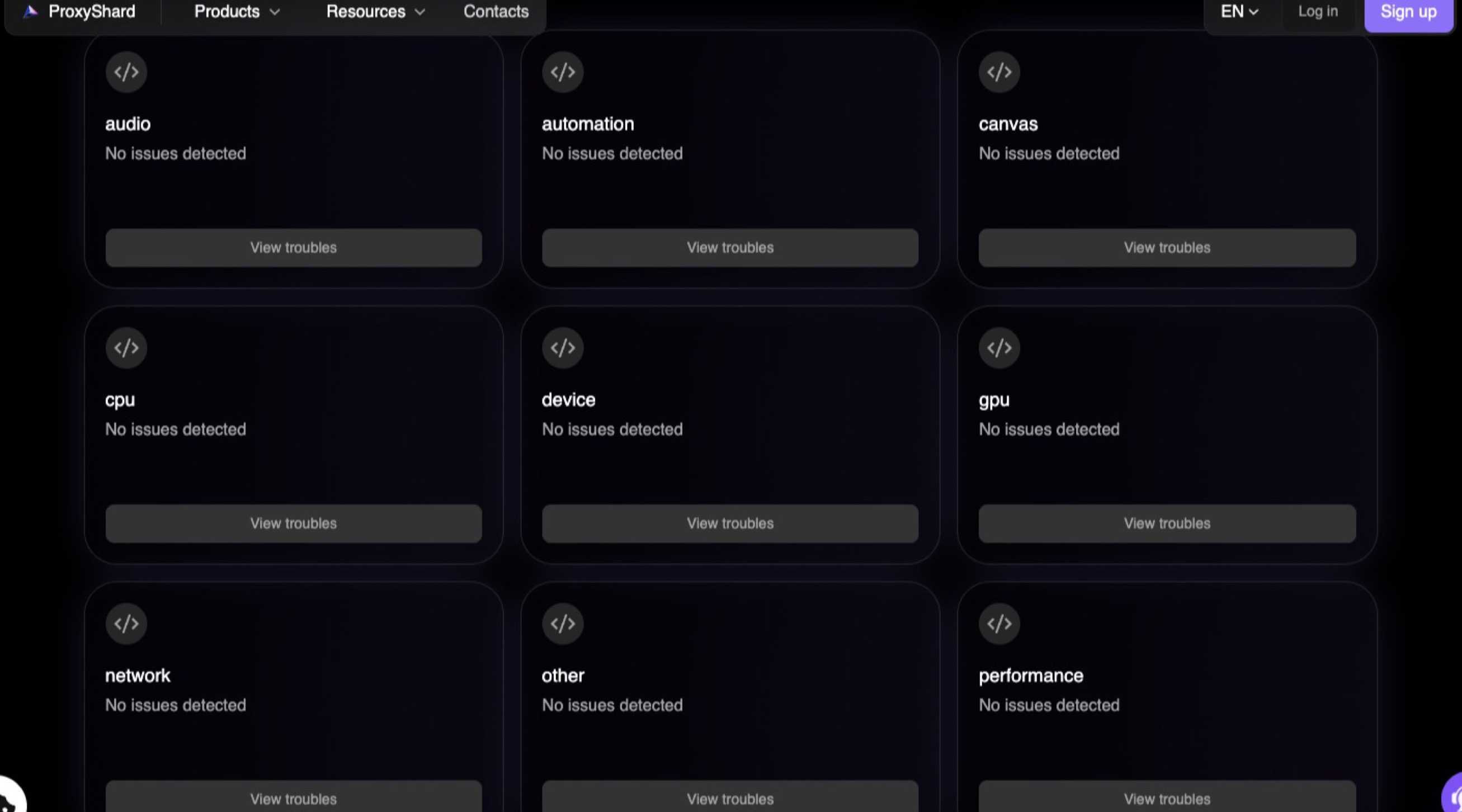
| **ProxyShard browser checker:** no issues across 9 categories | [pixelscan.net](https://pixelscan.net): Fingerprint **consistent** |
|-------------------------------------------------------------------|---------------------------------------------------------|
| | |
### Authenticity score
| [browserscan.net](https://www.browserscan.net): Authenticity 100%, locale honored | [antcpt.com](https://antcpt.com/score_detector/): reCAPTCHA v3 score **0.9** |
|-----------------------------------------------------------|------------------------------------------------------------|
| | |
---
## Comparison with other anti-detect browsers
All three products use patched Chromium builds. The table compares
fingerprint coverage, network behavior and the tools provided around
the browser engine.
| Feature | ShardX (this project) | CloakBrowser | Multilogin / AdsPower / Dolphin |
|---------------------------------------------------------------|------------------------------|------------------------------|------------------------------------------------|
| WebGPU spoofing (`navigator.gpu` adapter + every limit) | ✅ full | ❌ untouched, host GPU leaks | ✅ full |
| Client Hints (Sec-CH-UA-* full stack with GREASE) | ✅ full | ❌ partial / inconsistent | ✅ full on Multilogin / AdsPower, ❌ Dolphin |
| Font enumeration pinned per profile | ✅ system-level | ❌ JS-only, host fonts still leak via CSS / canvas font-render | ⚠️ partial |
| V8 / CDP side-channel hardening (preview-getters, inspector) | ✅ closed | ❌ open, CDP automation detectable | ⚠️ partial |
| TLS ClientHello fingerprint (JA4) | ✅ matches real Chrome 156 | ⚠️ static, may drift after browser updates | ✅ matches the forked Chrome version |
| QUIC / HTTP-3 over SOCKS5 | ✅ stable end to end via UDP relay | ⚠️ unstable, falls back to TCP or drops mid-session | ❌ disabled when proxy is set |
| WebRTC over SOCKS5 (no real-IP leak via STUN) | ✅ proxy UDP relay or synth candidates | ⚠️ same UDP relay path, same instability | ⚠️ disable-only |
| Consistency of generated profiles | ✅ coherent device (GPU, CPU, RAM, UA and fonts) | ❌ frequent contradictions (Win UA + Mac GPU, mobile UA + desktop screen, etc.) | ⚠️ varies |
| Bundled fingerprint library | 220 profiles from real-device samples, phones included | ❌ random generator, may combine a Windows UA with a Mac GPU or a mobile UA with a desktop screen | catalog (subscription) |
| Mobile profiles (touch input, sensors, phone fonts) | ✅ the browser behaves like a phone, not only answers like one | ❌ none | ⚠️ UA and screen only |
| Synchronised windows | ✅ one window drives, the rest repeat in their own profiles | ❌ none | ⚠️ paid add-on where offered |
| Built-in automation | ✅ visual projects, recording, fleet runs, WASM modules, local API + MCP | ❌ external scripts only | ⚠️ varies, usually paid |
| Human input engine | ✅ in the browser itself, used by hand and by scripts | ❌ none | ⚠️ synthetic events |
| Pricing | **Free**, proxy costs only | **Free**, engine only | Paid / freemium |
| Management UI | ✅ desktop app (this launcher) | ⚠️ CLI only, manual profile management | ✅ desktop app |
| Launcher source | **Open** (MIT, this repo) | **Open** (CLI) | Closed |
### Why this matters in practice
Public browser checkers such as fingerprint.com, pixelscan.net,
browserscan.net, [deviceandbrowserinfo.com](https://deviceandbrowserinfo.com/are_you_a_bot)
and antcpt test only part of the browser fingerprint. An anti-detect
browser can pass these checks while still
exposing inconsistent values on surfaces that are not tested there.
Production anti-fraud systems inspect these additional surfaces.
Inconsistencies can cause an account to be flagged after several
sessions even when the initial public checks passed:
* `navigator.gpu.requestAdapter()` returns the **host** GPU on
CloakBrowser, so a profile claiming an RTX 4060 on Windows leaks the
Mac M-series adapter underneath. ShardX (and the paid anti-detects)
return the claimed GPU with full WebGPU limits.
* CDP wrappers, V8 inspector preview-getters and `Object.toString`
side-channels remain exposed on CloakBrowser and are only partially
handled by some paid anti-detects. ShardX patches the documented side
channels so they do not expose automation.
* Font lists scraped via canvas font rendering or
`document.fonts.check()` return the **host** font list on
CloakBrowser no matter what the profile claims. ShardX pins the font
enumeration at the system level so the result matches the device.
* CloakBrowser's profile generator routinely emits incoherent
fingerprints (Win32 platform with macOS user-agent, mobile UA with
1920×1080 screen, RTX GPU with `hardwareConcurrency=2`). ShardX's
library is derived from real-device samples so every signal agrees
with the others.
* QUIC and HTTP/3 over SOCKS5 are increasingly important because major
Google properties do not always fall back to HTTP/2 cleanly. The paid
products listed in the table disable QUIC when a proxy is configured.
CloakBrowser provides UDP relay support, but the connection can drop
during a session. ShardX routes QUIC through the proxy UDP relay so
HTTP/3 remains available for the full session.
---
## Quick start
### Option A: download a release
Download the build for your OS from [GitHub Releases](../../releases),
then run it. Use `.dmg` for macOS, `.msi` or the portable `.exe` for
Windows, and `.AppImage` or `.deb` for Linux.
The release is not code-signed with Apple Developer ID or Authenticode,
so the operating system may show a warning on first launch:
* **macOS:** Gatekeeper may report that Apple cannot verify the app.
On macOS 14 and later, it may instead report that the app is damaged
and should be moved to the Trash. Both messages can be resolved by
removing the quarantine attribute once in Terminal:
```bash
xattr -dr com.apple.quarantine "/Applications/ShardBrowser Launcher.app"
```
The app should then open normally. For the developer verification
warning, right-click the app, select *Open* and confirm once.
* **Windows:** SmartScreen may show *"Windows protected your PC"*.
Select **More info**, then **Run anyway**. Later launches do not show
the same prompt.
* **Linux:** for `.AppImage`, run `chmod +x ShardX-Launcher.AppImage && ./ShardX-Launcher.AppImage`.
For `.deb`, run `sudo apt install ./ShardX-Launcher.deb`.
### Linux system dependencies
The bundled Chromium engine needs `unzip` and the standard shared
libraries any Chromium fork links against. On a fresh Debian / Ubuntu:
```bash
sudo apt install -y \
unzip ca-certificates fonts-liberation \
libnss3 libnspr4 libatk1.0-0 libatk-bridge2.0-0 libcups2 \
libxkbcommon0 libxcomposite1 libxdamage1 libxfixes3 libxrandr2 \
libgbm1 libpango-1.0-0 libcairo2 libasound2 libxshmfence1
```
### Option B: build from source
Run these commands from the repository root:
```bash
npm install
npm run tauri dev # dev (hot reload)
# or
npm run tauri build # release .app / .msi / .AppImage in src-tauri/target/release/bundle/
```
### First launch
The app downloads the patched browser (~150 MB) and the fingerprint
library (~780 KB) from our CDN, places everything under
* `~/Library/Application Support/shardx-launcher/` (mac)
* `%APPDATA%\shardx-launcher\` (win)
* `~/.config/shardx-launcher/` (linux)
and you're ready to bind a proxy and launch your first profile.
---
## Usage
ShardX provides four interfaces for different workflows. They all read
the same local state. A profile created in the UI is immediately
available through the API, MCP server and SDKs.
### 1. Desktop UI
Use the desktop app for daily profile management. Open *Proxies > Add
proxy* and enter `socks5://user:pass@host:port`, or paste a list for
bulk import. Select *Test* to run a TCP check, UDP_ASSOCIATE probe and
IP geolocation lookup. Open *Profiles*, select a profile, choose *Bind
proxy* and then select *Start*. The launcher handles the following tasks:
* downloading the engine + 220 starter profiles on first
launch, with subsequent requests cached by ETag.
* per-profile `user-data-dir` so cookies / cache / extensions stay
isolated.
* resolving timezone / locale / geolocation from the proxy's exit
country before each launch.
* deciding QUIC + WebRTC policy from a live UDP probe. QUIC remains on
when the proxy supports UDP and turns off when it does not. No manual
toggle is required.
* re-binding to the same `user-data-dir` next time so you get
*"Continue where you left off"* without the crash-restore bubble.
The workspace also includes bulk import and export, folders, tags,
pinning, cloning, and cookie import and export for Chromium SQLite v10
and DPAPI. The fingerprint editor randomizes CPU, RAM and platform
version together to keep hardware combinations consistent.
### 2. Local automation API
An axum HTTP server bound to `127.0.0.1:40325` (port configurable in
*Settings > Automation API*). Use it to control the launcher from
Python, Go, curl or any other HTTP client. Every endpoint except
`GET /health` requires the Bearer JWT shown in *Settings > Automation API*.
Regenerating the token rotates the signing secret immediately.
* **Reference docs:** [https://docs.proxyshard.com/eng/shardx-launcher-api/binding-and-lifecycle](https://docs.proxyshard.com/eng/shardx-launcher-api/binding-and-lifecycle?utm_source=shardx&utm_medium=referral&utm_campaign=shardx-launcher)
* **OpenAPI schema:** [openapi.yaml](openapi.yaml)
Launching a profile and getting a CDP endpoint:
```bash
TOKEN=""
BASE="http://127.0.0.1:40325"
# Start the profile in CDP mode and return its websocket endpoint.
# Reuse the endpoint with Puppeteer, patchright, a raw WebSocket client
# or another CDP client.
curl -s -X POST "$BASE/profiles/win-rtx4060/start?cdp=true&headless=false" \
-H "Authorization: Bearer $TOKEN" | jq .
# Response: {"id":"win-rtx4060","cdp_url":"ws://127.0.0.1:53217/devtools/browser/...","pid":48211}
# Stop it.
curl -s -X POST "$BASE/profiles/win-rtx4060/stop" \
-H "Authorization: Bearer $TOKEN"
```
Endpoints cover profiles (create, edit, delete, start, stop, and list running
profiles), proxies (add, delete, and list), extensions (add from a Web Store
link or local file, list, and remove), bookmarks (add, list, and delete),
trash (list, restore, and purge), fingerprint generation and library listing,
folders, and cookie import or export. See the OpenAPI file for the complete
list.
The `color` and `extensions` fields can be set when a profile is created
or edited. This lets a script create a recognizable profile with the
extensions it needs from the first launch:
```bash
EXTENSION_ID="$(
curl -s -X POST "$BASE/extensions" \
-H "Authorization: Bearer $TOKEN" \
-H 'Content-Type: application/json' \
-d '{"url":"https://chromewebstore.google.com/detail/rabby-wallet/acmacodkjbdgmoleebolmdjonilkdbch"}' |
jq -r '.id'
)"
FINGERPRINT="$(
curl -s "$BASE/fingerprint/new" \
-H "Authorization: Bearer $TOKEN" |
jq -c '.fingerprint'
)"
jq -n \
--arg extension "$EXTENSION_ID" \
--argjson fingerprint "$FINGERPRINT" \
'{
name: "kz-01",
color: "#2FCB80",
extensions: [$extension],
fingerprint: $fingerprint
}' |
curl -s -X POST "$BASE/profiles" \
-H "Authorization: Bearer $TOKEN" \
-H 'Content-Type: application/json' \
--data-binary @- | jq .
```
#### Throwaway profiles with noise
`POST /profiles/temporary` makes a profile that is hidden from the
list and deleted when its browser closes. It takes a `noise` block, so
a scripted run can decide per vector instead of taking the default
(everything off):
```bash
curl -s -X POST "$BASE/profiles/temporary" \
-H "Authorization: Bearer $TOKEN" -H 'Content-Type: application/json' \
-d '{
"platform": "Windows",
"proxy": "socks5://user:pass@host:1080",
"noise": {
"canvas": true,
"webgl": { "enabled": true, "intensity": 0.0005 },
"fonts": true
}
}'
```
Shorthand (`true`) and full blocks can be mixed. A block is merged into
the vector instead of replacing it, so `{"webgl": {"intensity": 0.001}}`
leaves `enabled` unchanged. Enabling `webgl` or `client_rects` with
shorthand also sets the strength used by the UI because an enabled vector
with zero strength has no effect. A `seed` of `0`, or an omitted seed,
still derives a stable value from the profile ID. This prevents temporary
profiles created a second apart from sharing a fingerprint.
#### Human input over CDP
Once you have a CDP endpoint, the patched core provides a **`Motion`**
domain for pointer movement and keystrokes. It uses the same engine as
the browser's own *Human Type* menu item. Text is typed one key at a time
through the browser's input path. It is not pasted or set directly on the
element, and no script is injected.
The domain is merged into the browser-level protocol, so it is available
from the **browser** target but does not appear in `/json/protocol` or
`Schema.getDomains`. This is intentional. A client that knows the commands
can use them, while a page that enumerates the protocol cannot discover
them. The command names also differ from those used by other products
because matching a known tool's vocabulary would create its own
fingerprint.
| Command | Parameters | Returns |
| --- | --- | --- |
| `Motion.createPointer` | `x`, `y`, `paceScale?`, `seed?` | No fields |
| `Motion.glideTo` | `x`, `y`, `targetWidth?` | `durationMs` |
| `Motion.tap` | `button?`, `clickCount?` | `durationMs` |
| `Motion.dragTo` | `x`, `y`, `targetWidth?`, `button?` | `durationMs` |
| `Motion.wheel` | `deltaY`, `deltaX?` | `durationMs` |
| `Motion.enterText` | `text`, `allowTypos?` | `durationMs` |
| `Motion.pressKey` | `key`, `modifiers?` | `durationMs` |
| `Motion.destroyPointer` | No parameters | No fields |
* Coordinates are **viewport CSS pixels**.
* `targetWidth` is the element's real width. It feeds Fitts's law, so
passing it is what makes a small target take longer to reach than a
large one. Defaults to 32.
* `paceScale` multiplies the profile's own speed. A value of `1.0` keeps
its default pace.
* `seed` overrides the profile's motor seed. Leave it unset in production
so profiles do not end up moving identically.
* `allowTypos` lets the profile's typo rate introduce a mistake and
correct it with a real backspace. Off by default, because it changes
the value that ends up in the field.
* Call `createPointer` first. A session without a pointer answers every
other command with an error instead of inventing an origin. A guessed
starting point would produce the wrong duration and curve.
```python
# pip install websockets
import asyncio, json, websockets
CDP = "ws://127.0.0.1:53217/devtools/browser/..." # from /profiles/{id}/start
async def main():
async with websockets.connect(CDP, max_size=None) as ws:
n = 0
async def call(method, params=None):
nonlocal n
n += 1
await ws.send(json.dumps({"id": n, "method": method,
"params": params or {}}))
while True:
msg = json.loads(await ws.recv())
if msg.get("id") == n:
if "error" in msg:
raise RuntimeError(msg["error"])
return msg.get("result", {})
# Where the cursor starts. Not a movement.
await call("Motion.createPointer", {"x": 20, "y": 20})
# Aim at the field. Pass its real width.
r = await call("Motion.glideTo", {"x": 640, "y": 360,
"targetWidth": 220})
print("moved in", r["durationMs"], "ms")
await call("Motion.tap") # focus it
await call("Motion.enterText", {"text": "hello there"})
await call("Motion.destroyPointer")
asyncio.run(main())
```
The same sequence in Node over an existing Puppeteer connection:
```js
const s = await browser.target().createCDPSession();
await s.send("Motion.createPointer", { x: 20, y: 20 });
await s.send("Motion.glideTo", { x: 640, y: 360, targetWidth: 220 });
await s.send("Motion.tap");
await s.send("Motion.enterText", { text: "hello there" });
await s.send("Motion.destroyPointer");
```
Typing happens in real time. `enterText` returns only when the last key is
released, and `durationMs` reports how long it took. Allow as much time as
you would for a person typing the same text.
`wheel` scrolls with the device the profile's platform implies — a
trackpad on macOS, a notched wheel on Windows and Linux, where the
distance delivered is rounded to whole detents. It deliberately does not
move the pointer: a scroll happens under whatever the cursor is already
over. `pressKey` takes a UI Events name (`Enter`, `Tab`, `ArrowDown`,
`F5`) and resolves a printable character through the **profile's** keyboard
layout, so on a `ru-RU` profile the key a US layout calls `a` reports code
`KeyA`.
#### Finger gestures and the handset
A profile that claims a touchscreen has no cursor, and the core enforces
it in both directions: the pointer commands above are refused on such a
profile, and the ones below are refused on every other. A phone that
moves a cursor and hovers has contradicted itself before any statistical
check on the motion begins.
| Command | Parameters | Returns |
| --- | --- | --- |
| `Motion.touchTap` | `x`, `y`, `targetWidth?`, `tapCount?` | `durationMs` |
| `Motion.touchLongPress` | `x`, `y`, `holdMs?` | `durationMs` |
| `Motion.touchSwipe` | `fromX`, `fromY`, `toX`, `toY`, `flick?` | `durationMs` |
| `Motion.touchDrag` | `fromX`, `fromY`, `toX`, `toY`, `holdMs?` | `durationMs` |
| `Motion.pinch` | `x`, `y`, `scale`, `rotation?` | `durationMs` |
| `Motion.setOrientation` | `angle`, `turnMs?` | `angle`, `type`, `screenWidth`, `screenHeight`, `durationMs` |
* Unlike the pointer, a finger is **not on the glass between commands**.
Each command places its own contacts, plays the whole gesture and lifts
them, so there is no `createPointer` equivalent and no way to leave a
contact down across two calls.
* The contact reported is offset from the point you ask for by the
profile's own fat-finger bias plus per-tap scatter — the sensed centroid
of a fingertip is not where its owner thinks it is. `targetWidth`
defaults to 44, the smallest target the platform guidelines call
tappable.
* There is **no touchScroll and no fling command**, and that is not an
omission. Gestures are built in the browser out of the touch stream, so
a real swipe produces `GestureScrollBegin/Update/End` and
`GestureFlingStart` with the velocity the browser's own tracker fitted
from the last 100 ms of the stroke. `flick` decides whether the finger
lifts while still moving.
* `touchDrag` differs from `touchSwipe` in the one way that decides
everything: the contact stays still, inside the tap slop, until the
long-press timers have fired. That is when a page's drag-and-drop
starts. A stroke that begins earlier is a scroll.
* `pinch` fails rather than producing a gesture the browser will not
recognise — the initial separation must clear the minimum scaling span
and the span must then change by more than the slop. A pinch below those
thresholds delivers DOM touch events and no zoom at all, which looks
like success and is not.
* `setOrientation` is **physical and takes time**. The pose the sensors
report starts moving first and the screen angle commits at the end of
the ramp, 150–500 ms later, which is the order a handset produces. It
answers once the new angle has reached every renderer, so `screen.width`
read straight afterwards is already the turned one. `angle` is 0, 90,
180 or 270; anything else is refused rather than rounded. It is refused
too on a profile with no motion sensors: a device with no accelerometer
cannot notice that it has been turned.
```js
const s = await browser.target().createCDPSession();
await s.send("Motion.touchSwipe", { fromX: 200, fromY: 600,
toX: 200, toY: 200, flick: true });
await s.send("Motion.touchLongPress", { x: 200, y: 300 });
await s.send("Motion.pinch", { x: 200, y: 400, scale: 2 });
const r = await s.send("Motion.setOrientation", { angle: 90 });
// r → { angle: 90, type: "landscape-primary", screenWidth: 844, ... }
```
In the desktop **Automation** section the same gestures are the *Touch*
palette — `touch.tap`, `touch.longPress`, `touch.swipe`, `touch.drag`,
`touch.pinch` and `screen.rotate` — and the ordinary steps become touches
by themselves on a phone profile: `click` taps, `rightClick` long-presses,
`scroll` and `swipe` use a finger. `hover` is the one that refuses, since
there is nothing to hover with.
### 3. MCP server
A [Model Context Protocol](https://modelcontextprotocol.io) server for
Claude Desktop, Cursor and any other MCP client. It wraps the launcher's
HTTP API and browser control over CDP through patchright, allowing a
language model to:
* manage profiles / proxies / fingerprints / folders / cookies through
the launcher.
* navigate / click / type / wait / screenshot in a live ShardX
profile, with the profile auto-starting when needed.
The app does not run the server itself. Open *Settings > MCP server >
Download MCP server*, choose a folder, run `npm install` and register
the server with your MCP client. Setup instructions, environment
variables and tools are listed in
**[mcp/README.md](mcp/README.md)**.
Minimal stdio registration:
```json
{
"mcpServers": {
"shardx": {
"command": "node",
"args": ["/ABSOLUTE/PATH/mcp/index.js"],
"env": {
"SHARDX_API": "http://127.0.0.1:40325",
"SHARDX_TOKEN": ""
}
}
}
}
```
### 4. Standalone SDKs (Python / Node / Rust)
These client libraries do not require the desktop app. On first use,
they download the same engine and fingerprint library, then launch
profiles directly as subprocesses. Python and Node use
[patchright](https://github.com/Kaliiiiiiiiii-Vinyzu/patchright) as a
stealth Playwright client. Rust uses
[chromiumoxide](https://docs.rs/chromiumoxide) over CDP. The SDKs use the
same pre-launch pipeline as the desktop app, including a UDP probe,
conditional QUIC, automatic resolution of timezone, locale and geolocation,
the same screen strategy and host-aware hardware randomization.
Use an SDK when you want ShardX as a library inside a scraper, CI job or
server-side worker without installing the GUI.
* **Python:** [sdks/python/README.md](sdks/python/README.md), `pip install shardx`
* **Node:** [sdks/node/README.md](sdks/node/README.md), `npm install @proxyshard/shardx`
* **Rust:** [sdks/rust/README.md](sdks/rust/README.md), `cargo add shardx`
### 5. Team spaces and sync (self-hosted)
**Team spaces** let several people work with the same profiles through a
server you run yourself. **Personal sync** carries your own profiles to
your other computers through the same kind of server. Nothing goes through
our infrastructure: the server, its database and the profiles' sessions
stay on a machine you control.
#### Run the server
It is one program with its database built in. Run it on any machine all
your computers can reach: a VPS, a home server, a computer that stays on.
With Docker:
```bash
docker run -d --name shardbrowser-team --restart unless-stopped \
-p 8787:8787 -v shardbrowser-team:/data \
-e SHARDBROWSER_TEAM_NAME='My team' \
-e SHARDBROWSER_TEAM_BIND=0.0.0.0:8787 -e SHARDBROWSER_TEAM_DATA_DIR=/data \
ghcr.io/proxyshard/shardbrowser-team-server:latest
docker logs shardbrowser-team
```
Or download `shardbrowser-team-server` for Linux x64 / arm64, macOS arm64
or Windows x64 from the [latest release](https://github.com/ProxyShard/ShardBrowser/releases/latest)
and start it:
```bash
chmod +x ./shardbrowser-team-server
SHARDBROWSER_TEAM_NAME='My team' SHARDBROWSER_TEAM_BIND=0.0.0.0:8787 \
SHARDBROWSER_TEAM_DATA_DIR=./team-data ./shardbrowser-team-server
```
On its first start the server prints an admin invite such as
`http://203.0.113.10:8787#…`. In the launcher open the space switcher at
the bottom of the sidebar, choose **Join a team…** and paste it. The
**Create a team…** guide in the same menu shows these commands with your
team's name filled in.
| Variable | Default | Meaning |
|---|---|---|
| `SHARDBROWSER_TEAM_BIND` | `127.0.0.1:8787` | Address and port to listen on. Use `0.0.0.0:8787` to accept other computers. |
| `SHARDBROWSER_TEAM_DATA_DIR` | `./data` | Folder with `team.sqlite` and `server.key`. |
| `SHARDBROWSER_TEAM_NAME` | `Team` | The team's name, read on the first start only. |
| `SHARDBROWSER_TEAM_TRASH_DAYS` | `30` | Days a deleted team item stays in the team's Trash. |
| `SHARDBROWSER_TEAM_PUBLIC_URL` | `http://` + bind address | The address invites start with, when the server is reached under another address (NAT, a domain, a port forward). |
`shardbrowser-team-server --print-invite` prints a fresh admin invite at
any time, also while the server is running.
**Plain http on an IP address is fine, also over the internet.** The
launcher and the server encrypt the connection themselves, and the invite
pins the server's key, so no domain, certificate or reverse proxy is
needed. The server needs ShardBrowser Launcher 2.1.1 or newer.
**Back up the data folder**: `team.sqlite` and `server.key` together. The
database is encrypted with that key and cannot be read without it.
#### Team spaces
* The admin invites members from the **Team** page and gives rights per
team, folder or profile: see, start, edit, create, delete, cookies and
take out. The narrowest rule wins; at equal width a refusal wins.
* A profile is open on one computer at a time. When it closes, its
session (cookies, logins, site storage) goes back to the server, and the
next person opens it where it was left.
* Bookmarks, extensions, tags, folders and automation projects can belong
to the team as well.
* Removing a member ends their access at once. Deleted items wait in the
team's Trash, 30 days by default.
* The server does not need the admin online.
#### Personal sync
Open **Settings › Sync** and connect to your own server (with its admin
invite) or to the server of a team you are in. Then choose what travels:
profiles with their sessions, proxies, folders, tags, bookmarks,
extensions and automation projects. To add another computer, copy the
invite from the same page and paste it there.
* A profile open on one computer cannot start on another until it is
closed there.
* Changes made without a connection are sent when the server is back. If
the same profile changed on two computers, both versions are kept.
* Launcher settings and the fingerprint library stay on each computer.
Secret values in automation steps never leave the computer they were
typed on.
---
## Licensing
The desktop launcher source in this repository, including the Tauri shell,
React UI and Rust source, is available under the **MIT License**. See
[LICENSE](LICENSE). You may use, fork, modify and distribute the launcher,
including for commercial projects.
The **browser engine** (the patched Chromium 156 binary that the
launcher downloads from our CDN on first run) is distributed as a
**closed-source binary**. Its source is not published in this
repository or elsewhere, and the following are explicitly **not
permitted**:
* reverse engineering, disassembly, decompilation, or any attempt to
extract or reconstruct the engine source.
* redistributing a modified version of the engine.
* using the engine or any binary derived from it, with or without
modification, as part of a commercial anti-detect, browser or
fingerprint-spoofing product or service.
Permitted uses include personal projects, web scraping,
multi-accounting and integration with the launcher's automation API.
Contact us before building a commercial product on top of the engine.


 |
|  |
### Bot / automation detection
|
### Bot / automation detection
 |
|  |
### Authenticity score
| [browserscan.net](https://www.browserscan.net): Authenticity 100%, locale honored | [antcpt.com](https://antcpt.com/score_detector/): reCAPTCHA v3 score **0.9** |
|-----------------------------------------------------------|------------------------------------------------------------|
|
|
### Authenticity score
| [browserscan.net](https://www.browserscan.net): Authenticity 100%, locale honored | [antcpt.com](https://antcpt.com/score_detector/): reCAPTCHA v3 score **0.9** |
|-----------------------------------------------------------|------------------------------------------------------------|
|  |
|  |
---
## Comparison with other anti-detect browsers
All three products use patched Chromium builds. The table compares
fingerprint coverage, network behavior and the tools provided around
the browser engine.
| Feature | ShardX (this project) | CloakBrowser | Multilogin / AdsPower / Dolphin |
|---------------------------------------------------------------|------------------------------|------------------------------|------------------------------------------------|
| WebGPU spoofing (`navigator.gpu` adapter + every limit) | ✅ full | ❌ untouched, host GPU leaks | ✅ full |
| Client Hints (Sec-CH-UA-* full stack with GREASE) | ✅ full | ❌ partial / inconsistent | ✅ full on Multilogin / AdsPower, ❌ Dolphin |
| Font enumeration pinned per profile | ✅ system-level | ❌ JS-only, host fonts still leak via CSS / canvas font-render | ⚠️ partial |
| V8 / CDP side-channel hardening (preview-getters, inspector) | ✅ closed | ❌ open, CDP automation detectable | ⚠️ partial |
| TLS ClientHello fingerprint (JA4) | ✅ matches real Chrome 156 | ⚠️ static, may drift after browser updates | ✅ matches the forked Chrome version |
| QUIC / HTTP-3 over SOCKS5 | ✅ stable end to end via UDP relay | ⚠️ unstable, falls back to TCP or drops mid-session | ❌ disabled when proxy is set |
| WebRTC over SOCKS5 (no real-IP leak via STUN) | ✅ proxy UDP relay or synth candidates | ⚠️ same UDP relay path, same instability | ⚠️ disable-only |
| Consistency of generated profiles | ✅ coherent device (GPU, CPU, RAM, UA and fonts) | ❌ frequent contradictions (Win UA + Mac GPU, mobile UA + desktop screen, etc.) | ⚠️ varies |
| Bundled fingerprint library | 220 profiles from real-device samples, phones included | ❌ random generator, may combine a Windows UA with a Mac GPU or a mobile UA with a desktop screen | catalog (subscription) |
| Mobile profiles (touch input, sensors, phone fonts) | ✅ the browser behaves like a phone, not only answers like one | ❌ none | ⚠️ UA and screen only |
| Synchronised windows | ✅ one window drives, the rest repeat in their own profiles | ❌ none | ⚠️ paid add-on where offered |
| Built-in automation | ✅ visual projects, recording, fleet runs, WASM modules, local API + MCP | ❌ external scripts only | ⚠️ varies, usually paid |
| Human input engine | ✅ in the browser itself, used by hand and by scripts | ❌ none | ⚠️ synthetic events |
| Pricing | **Free**, proxy costs only | **Free**, engine only | Paid / freemium |
| Management UI | ✅ desktop app (this launcher) | ⚠️ CLI only, manual profile management | ✅ desktop app |
| Launcher source | **Open** (MIT, this repo) | **Open** (CLI) | Closed |
### Why this matters in practice
Public browser checkers such as fingerprint.com, pixelscan.net,
browserscan.net, [deviceandbrowserinfo.com](https://deviceandbrowserinfo.com/are_you_a_bot)
and antcpt test only part of the browser fingerprint. An anti-detect
browser can pass these checks while still
exposing inconsistent values on surfaces that are not tested there.
Production anti-fraud systems inspect these additional surfaces.
Inconsistencies can cause an account to be flagged after several
sessions even when the initial public checks passed:
* `navigator.gpu.requestAdapter()` returns the **host** GPU on
CloakBrowser, so a profile claiming an RTX 4060 on Windows leaks the
Mac M-series adapter underneath. ShardX (and the paid anti-detects)
return the claimed GPU with full WebGPU limits.
* CDP wrappers, V8 inspector preview-getters and `Object.toString`
side-channels remain exposed on CloakBrowser and are only partially
handled by some paid anti-detects. ShardX patches the documented side
channels so they do not expose automation.
* Font lists scraped via canvas font rendering or
`document.fonts.check()` return the **host** font list on
CloakBrowser no matter what the profile claims. ShardX pins the font
enumeration at the system level so the result matches the device.
* CloakBrowser's profile generator routinely emits incoherent
fingerprints (Win32 platform with macOS user-agent, mobile UA with
1920×1080 screen, RTX GPU with `hardwareConcurrency=2`). ShardX's
library is derived from real-device samples so every signal agrees
with the others.
* QUIC and HTTP/3 over SOCKS5 are increasingly important because major
Google properties do not always fall back to HTTP/2 cleanly. The paid
products listed in the table disable QUIC when a proxy is configured.
CloakBrowser provides UDP relay support, but the connection can drop
during a session. ShardX routes QUIC through the proxy UDP relay so
HTTP/3 remains available for the full session.
---
## Quick start
### Option A: download a release
Download the build for your OS from [GitHub Releases](../../releases),
then run it. Use `.dmg` for macOS, `.msi` or the portable `.exe` for
Windows, and `.AppImage` or `.deb` for Linux.
The release is not code-signed with Apple Developer ID or Authenticode,
so the operating system may show a warning on first launch:
* **macOS:** Gatekeeper may report that Apple cannot verify the app.
On macOS 14 and later, it may instead report that the app is damaged
and should be moved to the Trash. Both messages can be resolved by
removing the quarantine attribute once in Terminal:
```bash
xattr -dr com.apple.quarantine "/Applications/ShardBrowser Launcher.app"
```
The app should then open normally. For the developer verification
warning, right-click the app, select *Open* and confirm once.
* **Windows:** SmartScreen may show *"Windows protected your PC"*.
Select **More info**, then **Run anyway**. Later launches do not show
the same prompt.
* **Linux:** for `.AppImage`, run `chmod +x ShardX-Launcher.AppImage && ./ShardX-Launcher.AppImage`.
For `.deb`, run `sudo apt install ./ShardX-Launcher.deb`.
### Linux system dependencies
The bundled Chromium engine needs `unzip` and the standard shared
libraries any Chromium fork links against. On a fresh Debian / Ubuntu:
```bash
sudo apt install -y \
unzip ca-certificates fonts-liberation \
libnss3 libnspr4 libatk1.0-0 libatk-bridge2.0-0 libcups2 \
libxkbcommon0 libxcomposite1 libxdamage1 libxfixes3 libxrandr2 \
libgbm1 libpango-1.0-0 libcairo2 libasound2 libxshmfence1
```
### Option B: build from source
Run these commands from the repository root:
```bash
npm install
npm run tauri dev # dev (hot reload)
# or
npm run tauri build # release .app / .msi / .AppImage in src-tauri/target/release/bundle/
```
### First launch
The app downloads the patched browser (~150 MB) and the fingerprint
library (~780 KB) from our CDN, places everything under
* `~/Library/Application Support/shardx-launcher/` (mac)
* `%APPDATA%\shardx-launcher\` (win)
* `~/.config/shardx-launcher/` (linux)
and you're ready to bind a proxy and launch your first profile.
---
## Usage
ShardX provides four interfaces for different workflows. They all read
the same local state. A profile created in the UI is immediately
available through the API, MCP server and SDKs.
### 1. Desktop UI
Use the desktop app for daily profile management. Open *Proxies > Add
proxy* and enter `socks5://user:pass@host:port`, or paste a list for
bulk import. Select *Test* to run a TCP check, UDP_ASSOCIATE probe and
IP geolocation lookup. Open *Profiles*, select a profile, choose *Bind
proxy* and then select *Start*. The launcher handles the following tasks:
* downloading the engine + 220 starter profiles on first
launch, with subsequent requests cached by ETag.
* per-profile `user-data-dir` so cookies / cache / extensions stay
isolated.
* resolving timezone / locale / geolocation from the proxy's exit
country before each launch.
* deciding QUIC + WebRTC policy from a live UDP probe. QUIC remains on
when the proxy supports UDP and turns off when it does not. No manual
toggle is required.
* re-binding to the same `user-data-dir` next time so you get
*"Continue where you left off"* without the crash-restore bubble.
The workspace also includes bulk import and export, folders, tags,
pinning, cloning, and cookie import and export for Chromium SQLite v10
and DPAPI. The fingerprint editor randomizes CPU, RAM and platform
version together to keep hardware combinations consistent.
### 2. Local automation API
An axum HTTP server bound to `127.0.0.1:40325` (port configurable in
*Settings > Automation API*). Use it to control the launcher from
Python, Go, curl or any other HTTP client. Every endpoint except
`GET /health` requires the Bearer JWT shown in *Settings > Automation API*.
Regenerating the token rotates the signing secret immediately.
* **Reference docs:** [https://docs.proxyshard.com/eng/shardx-launcher-api/binding-and-lifecycle](https://docs.proxyshard.com/eng/shardx-launcher-api/binding-and-lifecycle?utm_source=shardx&utm_medium=referral&utm_campaign=shardx-launcher)
* **OpenAPI schema:** [openapi.yaml](openapi.yaml)
Launching a profile and getting a CDP endpoint:
```bash
TOKEN="
|
---
## Comparison with other anti-detect browsers
All three products use patched Chromium builds. The table compares
fingerprint coverage, network behavior and the tools provided around
the browser engine.
| Feature | ShardX (this project) | CloakBrowser | Multilogin / AdsPower / Dolphin |
|---------------------------------------------------------------|------------------------------|------------------------------|------------------------------------------------|
| WebGPU spoofing (`navigator.gpu` adapter + every limit) | ✅ full | ❌ untouched, host GPU leaks | ✅ full |
| Client Hints (Sec-CH-UA-* full stack with GREASE) | ✅ full | ❌ partial / inconsistent | ✅ full on Multilogin / AdsPower, ❌ Dolphin |
| Font enumeration pinned per profile | ✅ system-level | ❌ JS-only, host fonts still leak via CSS / canvas font-render | ⚠️ partial |
| V8 / CDP side-channel hardening (preview-getters, inspector) | ✅ closed | ❌ open, CDP automation detectable | ⚠️ partial |
| TLS ClientHello fingerprint (JA4) | ✅ matches real Chrome 156 | ⚠️ static, may drift after browser updates | ✅ matches the forked Chrome version |
| QUIC / HTTP-3 over SOCKS5 | ✅ stable end to end via UDP relay | ⚠️ unstable, falls back to TCP or drops mid-session | ❌ disabled when proxy is set |
| WebRTC over SOCKS5 (no real-IP leak via STUN) | ✅ proxy UDP relay or synth candidates | ⚠️ same UDP relay path, same instability | ⚠️ disable-only |
| Consistency of generated profiles | ✅ coherent device (GPU, CPU, RAM, UA and fonts) | ❌ frequent contradictions (Win UA + Mac GPU, mobile UA + desktop screen, etc.) | ⚠️ varies |
| Bundled fingerprint library | 220 profiles from real-device samples, phones included | ❌ random generator, may combine a Windows UA with a Mac GPU or a mobile UA with a desktop screen | catalog (subscription) |
| Mobile profiles (touch input, sensors, phone fonts) | ✅ the browser behaves like a phone, not only answers like one | ❌ none | ⚠️ UA and screen only |
| Synchronised windows | ✅ one window drives, the rest repeat in their own profiles | ❌ none | ⚠️ paid add-on where offered |
| Built-in automation | ✅ visual projects, recording, fleet runs, WASM modules, local API + MCP | ❌ external scripts only | ⚠️ varies, usually paid |
| Human input engine | ✅ in the browser itself, used by hand and by scripts | ❌ none | ⚠️ synthetic events |
| Pricing | **Free**, proxy costs only | **Free**, engine only | Paid / freemium |
| Management UI | ✅ desktop app (this launcher) | ⚠️ CLI only, manual profile management | ✅ desktop app |
| Launcher source | **Open** (MIT, this repo) | **Open** (CLI) | Closed |
### Why this matters in practice
Public browser checkers such as fingerprint.com, pixelscan.net,
browserscan.net, [deviceandbrowserinfo.com](https://deviceandbrowserinfo.com/are_you_a_bot)
and antcpt test only part of the browser fingerprint. An anti-detect
browser can pass these checks while still
exposing inconsistent values on surfaces that are not tested there.
Production anti-fraud systems inspect these additional surfaces.
Inconsistencies can cause an account to be flagged after several
sessions even when the initial public checks passed:
* `navigator.gpu.requestAdapter()` returns the **host** GPU on
CloakBrowser, so a profile claiming an RTX 4060 on Windows leaks the
Mac M-series adapter underneath. ShardX (and the paid anti-detects)
return the claimed GPU with full WebGPU limits.
* CDP wrappers, V8 inspector preview-getters and `Object.toString`
side-channels remain exposed on CloakBrowser and are only partially
handled by some paid anti-detects. ShardX patches the documented side
channels so they do not expose automation.
* Font lists scraped via canvas font rendering or
`document.fonts.check()` return the **host** font list on
CloakBrowser no matter what the profile claims. ShardX pins the font
enumeration at the system level so the result matches the device.
* CloakBrowser's profile generator routinely emits incoherent
fingerprints (Win32 platform with macOS user-agent, mobile UA with
1920×1080 screen, RTX GPU with `hardwareConcurrency=2`). ShardX's
library is derived from real-device samples so every signal agrees
with the others.
* QUIC and HTTP/3 over SOCKS5 are increasingly important because major
Google properties do not always fall back to HTTP/2 cleanly. The paid
products listed in the table disable QUIC when a proxy is configured.
CloakBrowser provides UDP relay support, but the connection can drop
during a session. ShardX routes QUIC through the proxy UDP relay so
HTTP/3 remains available for the full session.
---
## Quick start
### Option A: download a release
Download the build for your OS from [GitHub Releases](../../releases),
then run it. Use `.dmg` for macOS, `.msi` or the portable `.exe` for
Windows, and `.AppImage` or `.deb` for Linux.
The release is not code-signed with Apple Developer ID or Authenticode,
so the operating system may show a warning on first launch:
* **macOS:** Gatekeeper may report that Apple cannot verify the app.
On macOS 14 and later, it may instead report that the app is damaged
and should be moved to the Trash. Both messages can be resolved by
removing the quarantine attribute once in Terminal:
```bash
xattr -dr com.apple.quarantine "/Applications/ShardBrowser Launcher.app"
```
The app should then open normally. For the developer verification
warning, right-click the app, select *Open* and confirm once.
* **Windows:** SmartScreen may show *"Windows protected your PC"*.
Select **More info**, then **Run anyway**. Later launches do not show
the same prompt.
* **Linux:** for `.AppImage`, run `chmod +x ShardX-Launcher.AppImage && ./ShardX-Launcher.AppImage`.
For `.deb`, run `sudo apt install ./ShardX-Launcher.deb`.
### Linux system dependencies
The bundled Chromium engine needs `unzip` and the standard shared
libraries any Chromium fork links against. On a fresh Debian / Ubuntu:
```bash
sudo apt install -y \
unzip ca-certificates fonts-liberation \
libnss3 libnspr4 libatk1.0-0 libatk-bridge2.0-0 libcups2 \
libxkbcommon0 libxcomposite1 libxdamage1 libxfixes3 libxrandr2 \
libgbm1 libpango-1.0-0 libcairo2 libasound2 libxshmfence1
```
### Option B: build from source
Run these commands from the repository root:
```bash
npm install
npm run tauri dev # dev (hot reload)
# or
npm run tauri build # release .app / .msi / .AppImage in src-tauri/target/release/bundle/
```
### First launch
The app downloads the patched browser (~150 MB) and the fingerprint
library (~780 KB) from our CDN, places everything under
* `~/Library/Application Support/shardx-launcher/` (mac)
* `%APPDATA%\shardx-launcher\` (win)
* `~/.config/shardx-launcher/` (linux)
and you're ready to bind a proxy and launch your first profile.
---
## Usage
ShardX provides four interfaces for different workflows. They all read
the same local state. A profile created in the UI is immediately
available through the API, MCP server and SDKs.
### 1. Desktop UI
Use the desktop app for daily profile management. Open *Proxies > Add
proxy* and enter `socks5://user:pass@host:port`, or paste a list for
bulk import. Select *Test* to run a TCP check, UDP_ASSOCIATE probe and
IP geolocation lookup. Open *Profiles*, select a profile, choose *Bind
proxy* and then select *Start*. The launcher handles the following tasks:
* downloading the engine + 220 starter profiles on first
launch, with subsequent requests cached by ETag.
* per-profile `user-data-dir` so cookies / cache / extensions stay
isolated.
* resolving timezone / locale / geolocation from the proxy's exit
country before each launch.
* deciding QUIC + WebRTC policy from a live UDP probe. QUIC remains on
when the proxy supports UDP and turns off when it does not. No manual
toggle is required.
* re-binding to the same `user-data-dir` next time so you get
*"Continue where you left off"* without the crash-restore bubble.
The workspace also includes bulk import and export, folders, tags,
pinning, cloning, and cookie import and export for Chromium SQLite v10
and DPAPI. The fingerprint editor randomizes CPU, RAM and platform
version together to keep hardware combinations consistent.
### 2. Local automation API
An axum HTTP server bound to `127.0.0.1:40325` (port configurable in
*Settings > Automation API*). Use it to control the launcher from
Python, Go, curl or any other HTTP client. Every endpoint except
`GET /health` requires the Bearer JWT shown in *Settings > Automation API*.
Regenerating the token rotates the signing secret immediately.
* **Reference docs:** [https://docs.proxyshard.com/eng/shardx-launcher-api/binding-and-lifecycle](https://docs.proxyshard.com/eng/shardx-launcher-api/binding-and-lifecycle?utm_source=shardx&utm_medium=referral&utm_campaign=shardx-launcher)
* **OpenAPI schema:** [openapi.yaml](openapi.yaml)
Launching a profile and getting a CDP endpoint:
```bash
TOKEN="