---
title: "Agentic Design System - From Chatbot to Orchestration"
sha256: 69947a3edb3807bb8a89a981bd1d66be5e197a7000ec9cb4fd23d46598f2e9d5
source: newsletter
source_url: "https://learn.thedesignsystem.guide/p/agentic-design-system-from-chatbot"
url: "https://learn.thedesignsystem.guide/p/agentic-design-system-from-chatbot"
fetcher: jina
review_value: 7
review_confidence: 8
review_recommendation: worth-reading
review_stars: 3
ingested: 2026-05-14
created: 2026-05-14
updated: 2026-05-14
---
Published Time: 2026-05-10T07:43:20+00:00
Markdown Content:
👋 Get weekly insights, tools, and templates to help you build and scale design systems. More: [Design Tokens Mastery Course](https://thedesignsystem.guide/design-tokens-course) / [YouTube](https://www.youtube.com/@designsystemguide) / [My Linkedin](https://www.linkedin.com/in/rominakavcic/)
[](https://substackcdn.com/image/fetch/$s_!MCS3!,f_auto,q_auto:good,fl_progressive:steep/https%3A%2F%2Fsubstack-post-media.s3.amazonaws.com%2Fpublic%2Fimages%2Fd3cca961-0bd9-4aa9-95ab-c4a92ef5b549_2184x1455.png)
Quick note before we dive in. My **Agentic Design Course**is almoooost ready. The “it has to be amazing” brain took over, and I kept adding before launch. A few testers are inside it now. It’s coming in the end of May. 😍
Most design system teams are preparing for the wrong AI future.
They are asking:
> “How do we use AI to generate components faster?”
But the better question is:
> **“Can AI understand why this component exists, when to use it, and when not to?”**
That is the real shift.
The next generation of design systems will not be judged by how many components they have. They will be judged by how well agents can read them, reason with them, and safely act on them.
In other words, your design system is no longer just for humans. **It is becoming infrastructure for agents.**
[Gartner predicts](https://www.gartner.com/en/newsroom/press-releases/2025-08-26-gartner-predicts-40-percent-of-enterprise-apps-will-feature-task-specific-ai-agents-by-2026-up-from-less-than-5-percent-in-2025) that 40% of enterprise apps will embed task-specific AI agents by the end of 2026, up from less than 5% in 2025. Gartner also warns about “agentwashing,” where ordinary assistants are marketed as agents even when they cannot operate independently.
That distinction matters.
Microsoft is already [redesigning Fluent](https://microsoft.design/articles/designs-for-the-frontier-future/) around adaptive interfaces that respond to user intent and move from passive UI toward more dynamic systems.
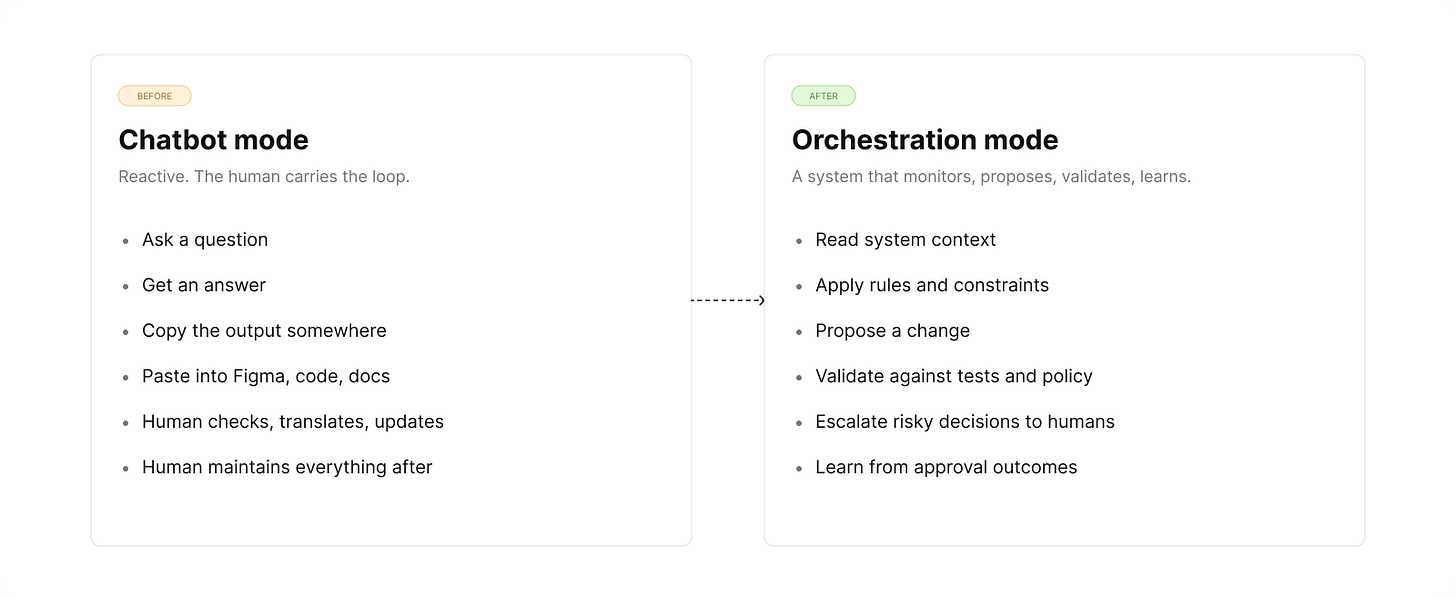
Meanwhile, many design system teams are still treating AI like a chatbot. Ask a question → get an answer → move on. That is not the future.
The future is orchestration.
A chatbot answers. An agent acts. A system of agents coordinates work across tools, files, workflows, and approval gates. That is the shift design system teams need to understand.
[](https://substackcdn.com/image/fetch/$s_!QXMW!,f_auto,q_auto:good,fl_progressive:steep/https%3A%2F%2Fsubstack-post-media.s3.amazonaws.com%2Fpublic%2Fimages%2F0258038b-c738-4f92-a415-d484aba1a59b_1600x658.png)
[](https://substackcdn.com/image/fetch/$s_!FtYW!,f_auto,q_auto:good,fl_progressive:steep/https%3A%2F%2Fsubstack-post-media.s3.amazonaws.com%2Fpublic%2Fimages%2F28795734-4523-41f3-8f04-2f2fd7c4bd15_2400x941.png)
**AI in design systems is not just:**
* “Write documentation for this component.”
* “Generate a React card.”
* “Summarize our token structure.”
* “Create a Figma variant.”
The bigger change happens when**agents can read your design system**, **understand**its rules, **propose**changes,**validate**those changes, and **escalate** risky decisions to humans. That is where the design system stops being a passive library and starts becoming operational infrastructure: not a chatbot, an orchestration layer.
**So, what is an agentic design system?**
An **agentic design system** is a system where AI agents can read, interpret, and apply design decisions with human oversight. Not just generate code from prompts. Not just summarize documentation. Not just create random UI.
A real agentic design system gives agents enough structure to understand:
* what exists,
* why it exists,
* when to use it,
* when not to use it,
* what rules must be followed,
* what changes are safe,
* what changes require approval.
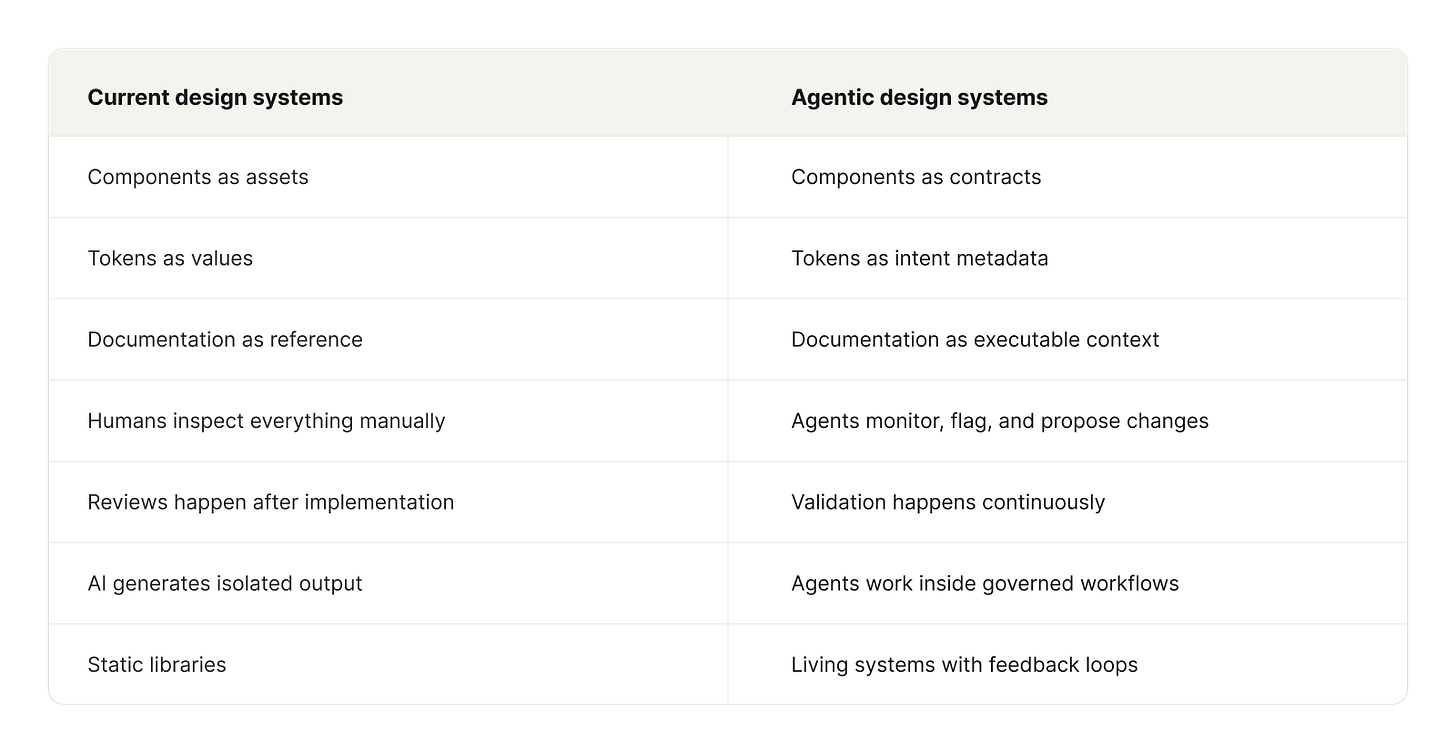
The difference looks like this:
[](https://substackcdn.com/image/fetch/$s_!g1aw!,f_auto,q_auto:good,fl_progressive:steep/https%3A%2F%2Fsubstack-post-media.s3.amazonaws.com%2Fpublic%2Fimages%2F76285f6b-d9aa-4e2d-8218-591f1b19a3e7_1600x827.png)
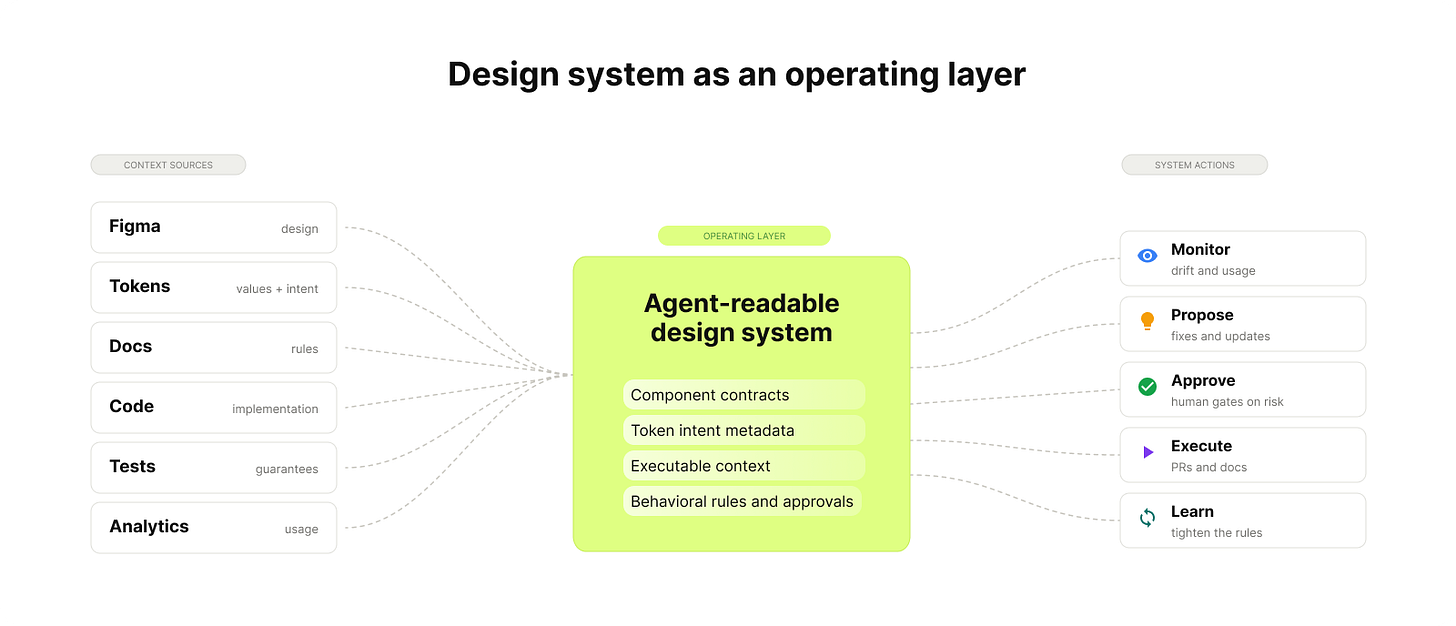
The shift is not from “human design” to “AI design.” That framing is too shallow. The real shift is from “Here is a button” to “Here are the rules, intent, constraints, accessibility requirements, and usage conditions for this action pattern.” The button does not magically know what to do. The system does.
[](https://substackcdn.com/image/fetch/$s_!2A-r!,f_auto,q_auto:good,fl_progressive:steep/https%3A%2F%2Fsubstack-post-media.s3.amazonaws.com%2Fpublic%2Fimages%2F802ccec8-c19d-4bb2-85da-5dd7f0317784_1600x688.png)
This is the most important mental model.
In traditional design systems, a component is something you import.
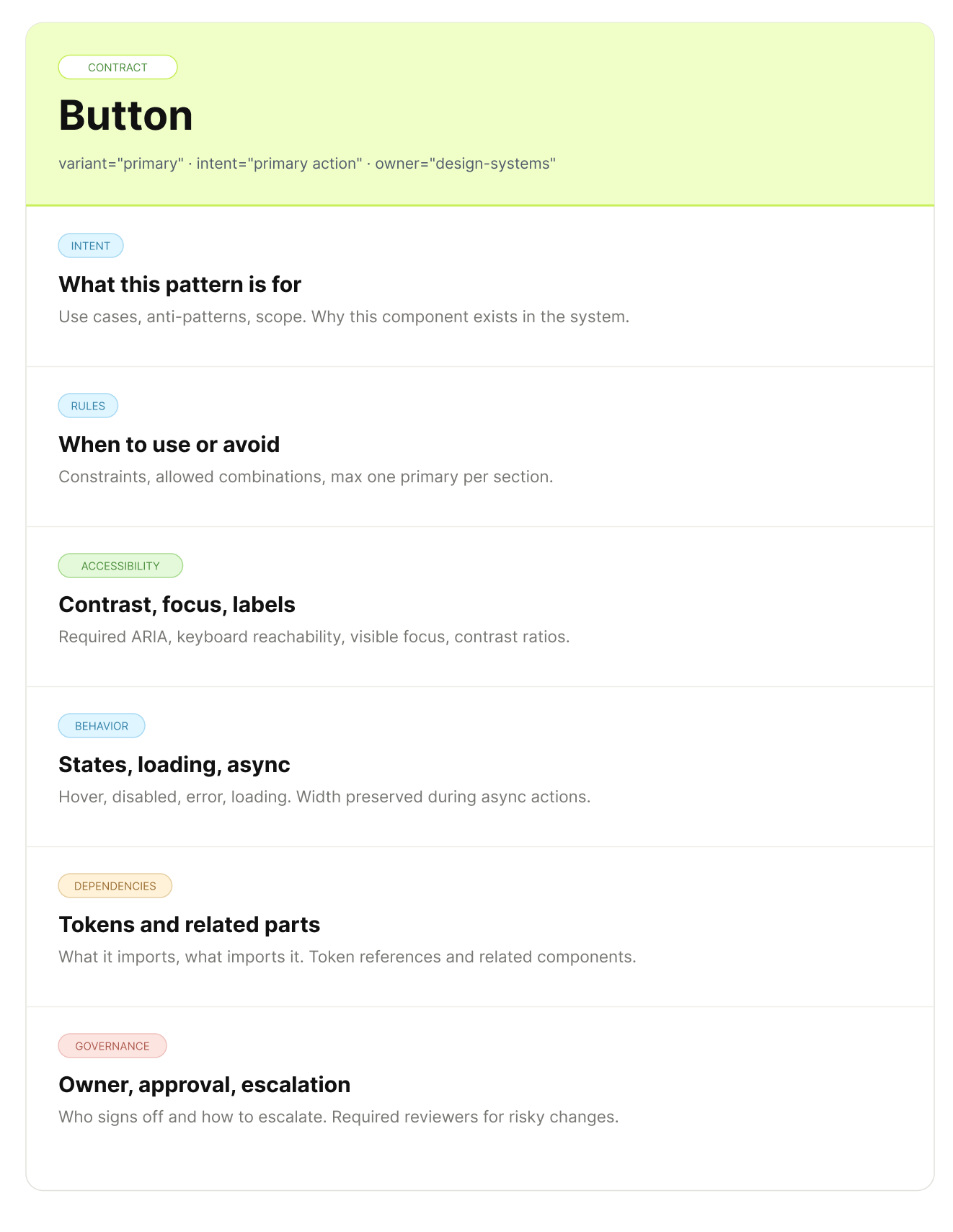
In an agentic design system, a component becomes a contract between design, code, product intent, accessibility, and behavior.
A button is no longer just:
``
It also carries rules:
[](https://substackcdn.com/image/fetch/$s_!Wc2R!,f_auto,q_auto:good,fl_progressive:steep/https%3A%2F%2Fsubstack-post-media.s3.amazonaws.com%2Fpublic%2Fimages%2Facf29b50-9e59-4f9a-bffb-295cc3f63f11_1322x1709.png)
* Use primary buttons for the main action in a flow.
* Do not use destructive styling without a confirmation pattern.
* Maintain a minimum contrast ratio.
* Preserve keyboard navigation.
* Use loading states for asynchronous actions.
* Use platform-appropriate interaction patterns.
* Escalate if the requested variant does not exist.
* Do not create one-off styling without checking token availability.
This is what agents need. The better the contract, the safer the agent.
You do not have to imagine the entire future. The building blocks are already here.
They are not perfect. They are not fully autonomous. But they are enough to start preparing your design system for agents.
Figma introduced its [Model Context Protocol server](https://www.figma.com/blog/introducing-figma-mcp-server/) in 2025. This is a major shift because it allows AI tools to access structured design context directly from Figma.
The [Figma MCP Server Guide](https://help.figma.com/hc/en-us/articles/32132100833559-Guide-to-the-Figma-MCP-server) explains how teams can connect supported AI clients to Figma so that models can read design context, including components, variables, styles, layouts, and implementation details.
This matters because design systems have always struggled with translation. Design lives in Figma. Code lives in GitHub or GitLab. Documentation lives somewhere else. Usage data lives in analytics. Decisions live in people’s heads. MCP is one way to reduce the copy-paste layer between these worlds. It gives AI tools a bridge into the design source of truth.
That does not mean agents can safely redesign your system on their own. It means they can finally see more of the system.
This also explains why the dedicated design-to-code category, like [Anima](https://www.animaapp.com/), [Locofy](https://www.locofy.ai/), [Builder.io](https://www.builder.io/), and [v0](https://v0.dev/), is being absorbed. Each of those tools tried to translate Figma frames into React using its own heuristics. With **MCP,** a general-purpose agent like Claude Code, Cursor, or Codex **can do the same job** and also read your codebase, your tokens, and your existing components in one pass. The bridge is no longer a separate tool. It is whatever agent is already in your workflow.
The interesting question is no longer “which design-to-code tool wins.” It is whether your design system gives any agent enough context to generate code that survives review. That depends on you, not the tool.
Many teams already have pieces of agentic infrastructure without calling it that.
For example:
* automated accessibility checks with [axe-core](https://github.com/dequelabs/axe-core) and [Playwright](https://playwright.dev/),
* visual regression testing with [Chromatic](https://www.chromatic.com/) or [Percy](https://percy.io/),
* token validation with stylelint rules,
* component usage checks in code,
* Storybook-based documentation and testing,
* CI pipelines that block broken changes.
These tools are not agents on their own, but they are the guardrails agents need. Without validation, AI just makes output faster. With validation, AI can start working inside a system. That is the difference.
Spotify is a useful example, even if it is not a design system case study. In [Spotify’s background coding agent writeup](https://engineering.atspotify.com/2025/11/spotifys-background-coding-agent-part-1), the team describes how internal agents help with engineering workflows, migrations, and large-scale maintenance work.
The lesson for design system teams is not “copy Spotify.”
The lesson is this:
> **Background agents make the most sense when the work is repetitive, rule-based, measurable, and reviewable.**
That describes a lot of design system work: token migrations, component cleanup, documentation updates, accessibility checks, usage audits, deprecated prop detection, design-code drift. These are not glamorous tasks, but they are exactly the kind of tasks agents are good at.
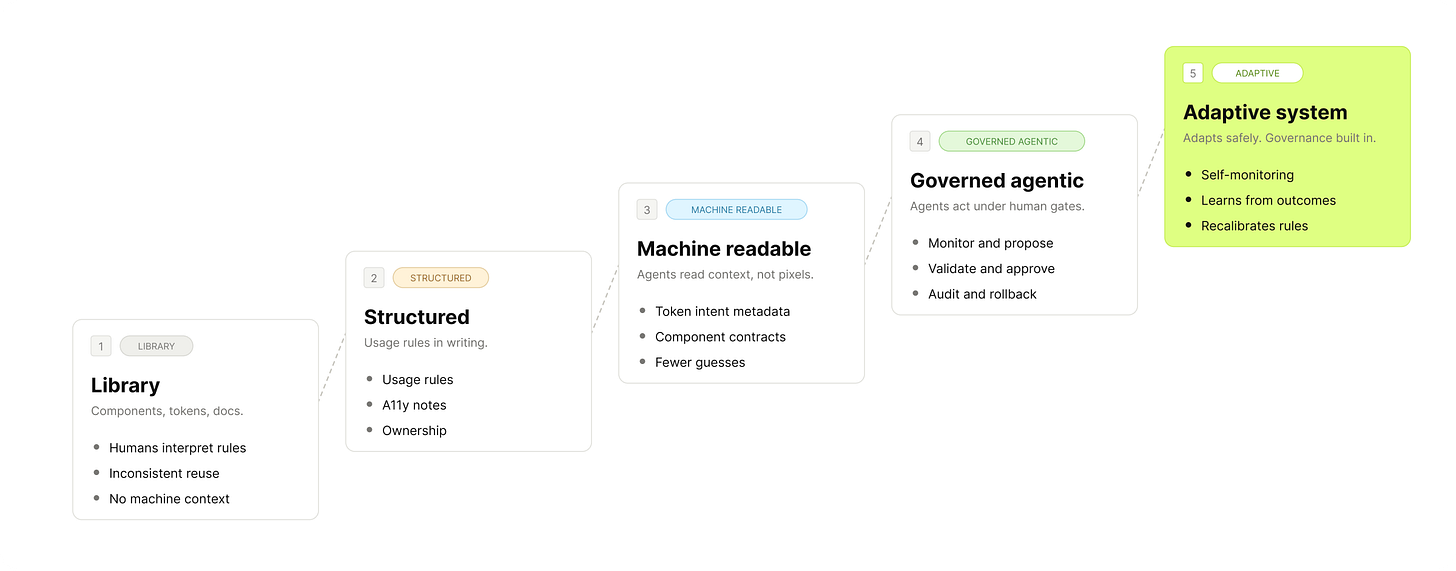
The next phase is not full autonomy, it is governed autonomy. Agents propose, humans approve, systems validate, changes are traceable. This is where design systems become much more interesting.
The point is **not full delegation.** It is delegating just enough that the system moves faster without losing oversight.
* components missing descriptions,
* variants that do not follow naming conventions,
* detached instances,
* local styles that should use variables,
* inconsistent spacing,
* missing accessibility annotations,
* components that have grown too many variants.
The agent should not automatically redesign everything. It should produce a report, suggest fixes, and escalate risky changes.
* hard-coded colors,
* incorrect token usage,
* custom components duplicating system components,
* deprecated props,
* inconsistent imports,
* missing tests,
* components that do not match Figma specifications.
Again, the value is not blind automation. The value is reducing the invisible drift between design and implementation.
* component usage guidelines,
* variant tables,
* accessibility notes,
* examples,
* changelogs,
* migration guides,
* design token references.
This is one of the easiest places to start because the risk is relatively low.
* accessibility tests,
* visual regression tests,
* keyboard interaction tests,
* responsive behavior checks,
* token compliance,
* browser compatibility,
* Storybook build validation.
This is where agentic systems become practical, because it can run boring checks consistently and tell the team where attention is needed.
[](https://substackcdn.com/image/fetch/$s_!N5qS!,f_auto,q_auto:good,fl_progressive:steep/https%3A%2F%2Fsubstack-post-media.s3.amazonaws.com%2Fpublic%2Fimages%2Fdb96876f-1abc-44df-9235-2ae77b57ac74_2400x635.png)
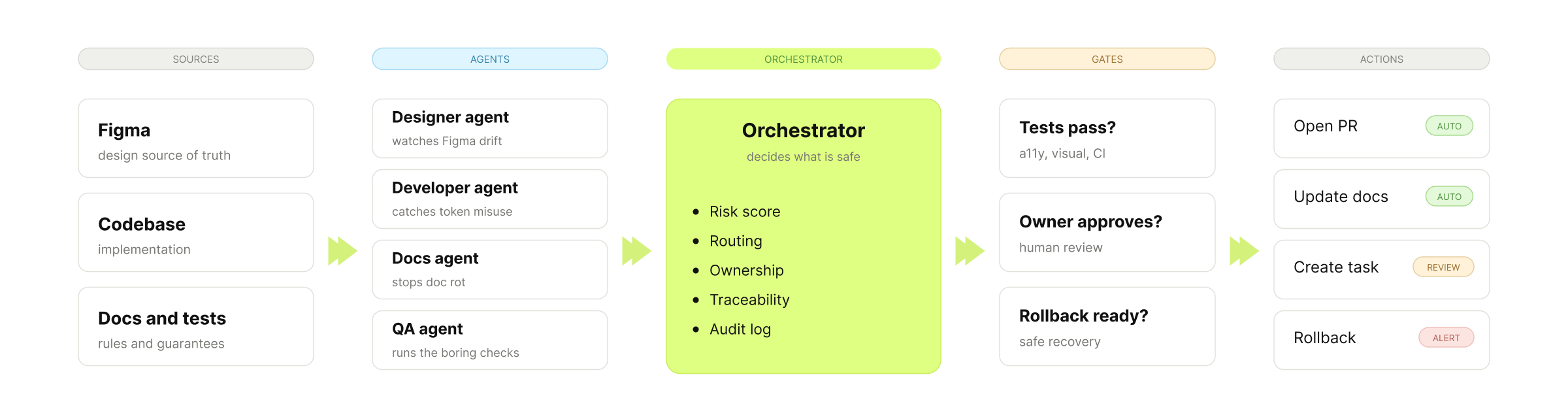
The orchestrator is the most important part.
**It coordinates the agents and decides:**
* which changes are safe to automate,
* which changes need review,
* who should approve what,
* which tests must pass,
* when to create a pull request,
* when to roll back,
* when to escalate.
You give structured autonomy inside clear boundaries.
By 2027 and 2028, design systems may operate very differently.
But this future will not arrive evenly.
Some teams will still be manually updating component docs.
Others will have agents monitoring usage, generating PRs, and surfacing design system drift before it becomes expensive.
The difference will not be prompts. It will be**structure.**
Most tokens today are still treated as values.
```
{
"color.primary": "#3B82F6",
"spacing.md": "16px"
}
```
That is useful for consistency. But it is not enough for agents. Agents need to understand intent.
**[Shopify Polaris](https://polaris-react.shopify.com/design/colors/color-tokens)**already shows the direction with semantic tokens that communicate purpose through naming and usage. The next step is richer metadata that agents can read directly.
For example:
```
{
"color.action.primary": {
"value": "#3B82F6",
"intent": "primary action",
"useFor": [
"main action in a flow",
"confirmation action",
"high-priority CTA"
],
"avoidFor": [
"decorative backgrounds",
"low-priority actions",
"destructive actions without confirmation"
],
"accessibility": {
"minimumContrast": "4.5:1",
"requiresTextContrastCheck": true
}
},
"spacing.component.md": {
"value": "16px",
"intent": "standard internal component spacing",
"useFor": [
"default card padding",
"form field grouping",
"standard layout rhythm"
],
"responsiveRules": {
"compact": "spacing.component.sm",
"comfortable": "spacing.component.lg"
}
}
}
```
This does not require science fiction. It requires better structure. Your tokens become more than reusable values; they become decision support.
Most documentation is written for humans. That will still matter. But agentic design systems also need documentation that machines can interpret.
That means documenting:
* intent,
* constraints,
* examples,
* anti-patterns,
* dependencies,
* accessibility requirements,
* edge cases,
* migration paths,
* ownership,
* approval rules.
This is where many design systems are weak. They explain how something looks, but they do not explain how decisions should be made. Agents need decision logic, and that logic has to live somewhere.
[](https://substackcdn.com/image/fetch/$s_!8nqX!,f_auto,q_auto:good,fl_progressive:steep/https%3A%2F%2Fsubstack-post-media.s3.amazonaws.com%2Fpublic%2Fimages%2F85cfcff7-b270-4356-b94a-de843e9dc9c2_2400x1058.png)
The most exciting future is also the easiest one to overhype. Components may adapt at runtime based on context.
For example:
```
```
This kind of adaptation is reasonable.
A component can respond to:
* viewport,
* platform,
* input method,
* language,
* motion preference,
* contrast preference,
* density preference,
* accessibility settings.
That is helpful, but some forms of adaptation are much more sensitive. For example:
* adapting based on user hesitation, emotional state, conversion probability, inferred confidence, behavioral vulnerability.
That is where teams need governance.
The question is not only:
> “Can the system adapt?”
The better question is:
> **“Should it adapt, who benefits, and how do we prevent harm?”**
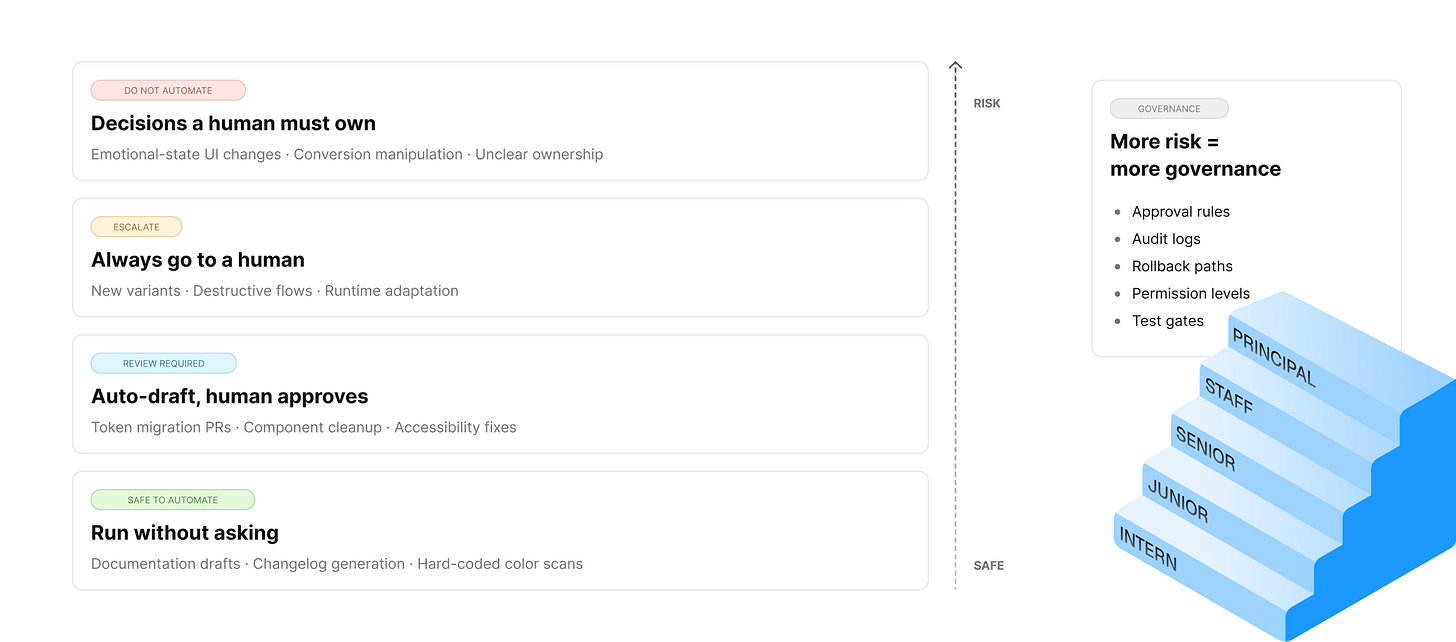
Agentic design systems will need more than tokens and components. They will need ethics, permissions, audit trails, and product principles. Otherwise, adaptive UI becomes manipulation with better tooling.
* Agents can optimize locally while breaking the broader product experience.
* A developer agent might clean up code but break design intent.
* A documentation agent might confidently describe a component incorrectly.
* A designer agent might suggest consistency where the product actually needs difference.
* Without governance, agents can create drift faster than humans can notice it.
**Design debt at machine speed**
AI does not magically fix weak systems; it amplifies them. If your components are poorly named, your tokens are inconsistent, and your docs are outdated, agents will inherit that mess. Bad metadata creates bad output faster.
**False confidence**
AI-generated documentation often sounds correct even when it is wrong, and that is dangerous. Design system documentation is not just content, it is instruction. If agents and teams rely on incorrect guidance, the damage spreads quickly.
**UX manipulation**
Runtime adaptation can improve usability. It can also cross a line. If the system changes UI based on inferred hesitation, conversion likelihood, or emotional state, teams need clear product and ethics review. Not every adaptive pattern is user-centered. Some are just business pressure wearing a nice interface.
**Governance gaps**
Agentic systems need:
* approval rules,
* audit logs,
* rollback mechanisms,
* permission levels,
* test gates,
* ownership models,
* escalation paths.
Without these, “agentic” becomes another word for “uncontrolled.”
**The goal is not to make agents autonomous everywhere.** The goal is to decide where autonomy is safe, useful, and measurable.
Figma is moving from a visual design tool toward a design system control surface.
That could include:
* managing component libraries,
* defining variables and modes,
* adding semantic metadata,
* previewing generated UI,
* reviewing agent-proposed changes,
* connecting design context to code tools,
* helping humans understand what agents are doing.
Figma is not the entire agentic system, but it can become one of the most important human interfaces into that system.
AI can generate layouts. That does not mean it understands taste, brand, timing, emotion, or product strategy. Designers still make the decisions that require judgment:
* what should feel premium,
* what should feel calm,
* what should feel urgent,
* where consistency helps,
* where consistency hurts,
* when to follow the system,
* when to evolve the system.
The more AI generates, the more valuable human judgment becomes, not less.
Designers will spend less time manually producing every variation. They will spend more time defining:
* intent,
* behavior,
* constraints,
* examples,
* quality bars,
* governance rules,
* evaluation criteria,
* approval models.
The designer becomes less of a component factory and more of a system architect.
The companies that win will be the ones that prepare their design systems for machine interpretation. That means they will:
They will document not only what a component is, but how it should be used.
They will define: intent, variants, anatomy, accessibility, dependencies, anti-patterns, product examples, implementation rules.
They will move beyond raw values and primitive naming.
```
{
"color.action.primary": {
"value": "#3B82F6",
"intent": "primary action",
"useFor": ["main CTA", "confirmation"],
"avoidFor": ["decoration", "destructive actions"]
}
}
```
Agents need meaning. Semantic structure gives them that meaning.
They will connect design system decisions to real product usage.
For example:
* Which components are used most?
* Which components are duplicated?
* Which tokens are overridden?
* Which variants are missing?
* Which patterns create accessibility issues?
* Which docs are most visited?
* Which components create the most support questions?
This is where design systems become measurable, not just maintained. Improved.
The first useful agents will not be magical design partners. They will be boring, and that is good. They will: detect drift, update docs, open migration PRs, flag accessibility issues, find token misuse, summarize component usage, generate changelogs, and suggest cleanup tasks.
Boring is where trust starts.
**1. Turn one component into a contract**
Pick your most-used component. Write a one-page contract with five sections: intent, variants, rules, accessibility, anti-patterns. A markdown file is enough. Start with one component. Not fifty.
**2. Add intent metadata to five tokens**
Pick your five most-used semantic tokens. For each, add what it is for, what it is not for, and the accessibility requirement. JSON, README, or doc page. Whatever you already have.
Tools change. Structure compounds.
Agents are leverage. Leverage applied to a weak system breaks it faster. Leverage applied to a readable system builds compounding advantage.
The prompt is not the moat. **The structure is.**
Enjoy experimenting. 🙌
Romina
**Mentioned links**
[Gartner: 40% of Enterprise Apps Will Feature AI Agents by 2026](https://www.gartner.com/en/newsroom/press-releases/2025-08-26-gartner-predicts-40-percent-of-enterprise-apps-will-feature-task-specific-ai-agents-by-2026-up-from-less-than-5-percent-in-2025)
[Microsoft Design: Designs for the Frontier Future](https://microsoft.design/articles/designs-for-the-frontier-future/)
[Figma: Introducing Figma MCP Server](https://www.figma.com/blog/introducing-figma-mcp-server/)
[Figma Help: Guide to the Figma MCP Server](https://help.figma.com/hc/en-us/articles/32132100833559-Guide-to-the-Figma-MCP-server)
[Figma: What is Model Context Protocol?](https://www.figma.com/resource-library/what-is-mcp/)
[Shopify Polaris: Color Tokens](https://polaris-react.shopify.com/design/colors/color-tokens)
[Spotify Engineering: Spotify’s Background Coding Agent](https://engineering.atspotify.com/2025/11/spotifys-background-coding-agent-part-1)
[IBM Carbon: Color Tokens](https://carbondesignsystem.com/elements/color/tokens/)
[IBM Carbon: stylelint-plugin-carbon-tokens](https://github.com/carbon-design-system/stylelint-plugin-carbon-tokens)
[Anima](https://www.animaapp.com/)
[Locofy](https://www.locofy.ai/)
[Builder.io](https://www.builder.io/)
[v0 by Vercel](https://v0.dev/)
[Chromatic Visual Testing](https://www.chromatic.com/)
_— If you enjoyed this post, please tap the Like button below 💛 This helps me see what you want to read. Thank you._
[](https://substackcdn.com/image/fetch/$s_!P-6W!,f_auto,q_auto:good,fl_progressive:steep/https%3A%2F%2Fsubstack-post-media.s3.amazonaws.com%2Fpublic%2Fimages%2F9789fd59-7fc8-4541-a2fa-168c990b3596_3024x1644.png)
**Design System Report 2026 🔗 [Download the report](https://report.zeroheight.com/)**
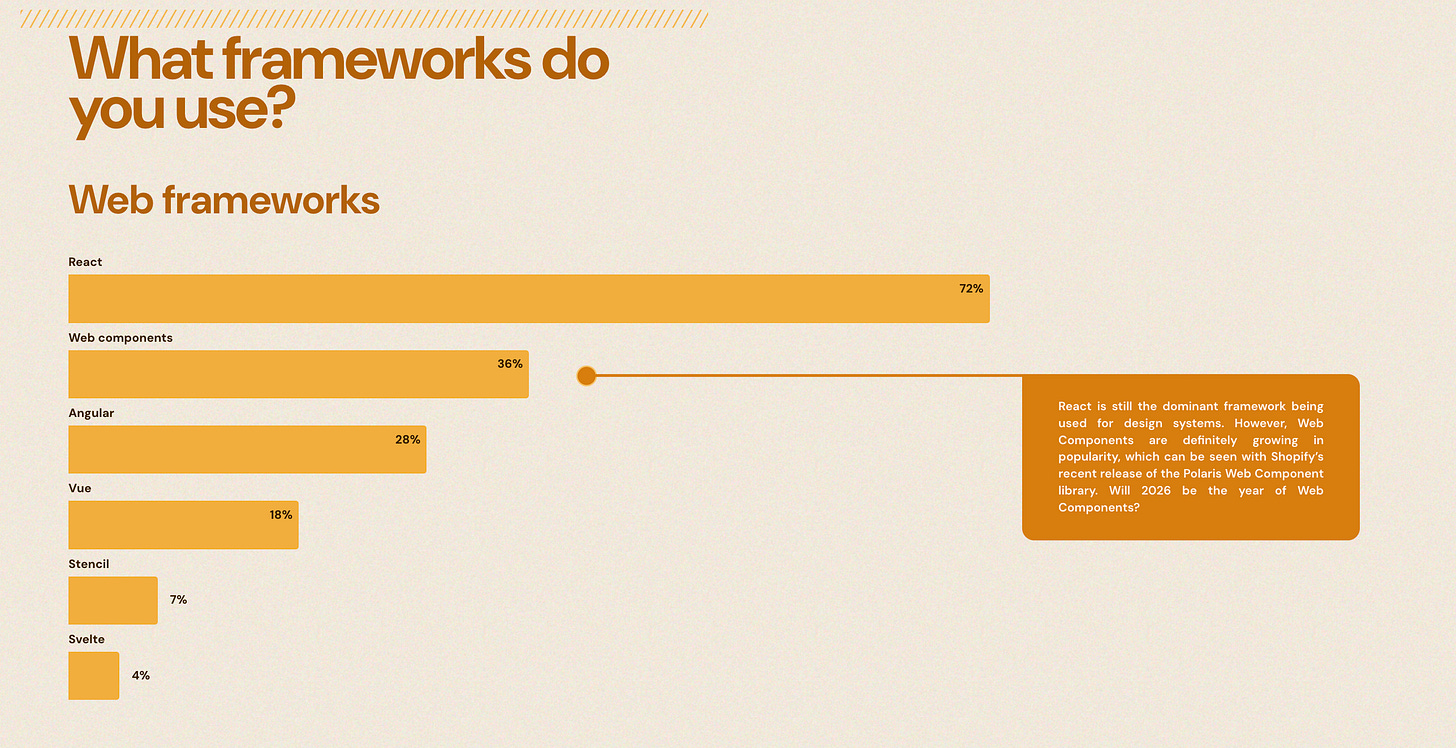
If you want a baseline for what "normal" looks like, read **[Zeroheight's State of Design Systems report](https://zeroheight.com/).** 147 companies surveyed. It is the only annual data I trust on how teams actually work, not how they say they work.
[](https://substackcdn.com/image/fetch/$s_!Re9W!,f_auto,q_auto:good,fl_progressive:steep/https%3A%2F%2Fsubstack-post-media.s3.amazonaws.com%2Fpublic%2Fimages%2F8c560eee-76ba-453a-864d-6c6c1087811e_2574x1322.png)