
中文 | English
欢迎访问360智脑官网 https://ai.360.com 体验更多更强大的功能。
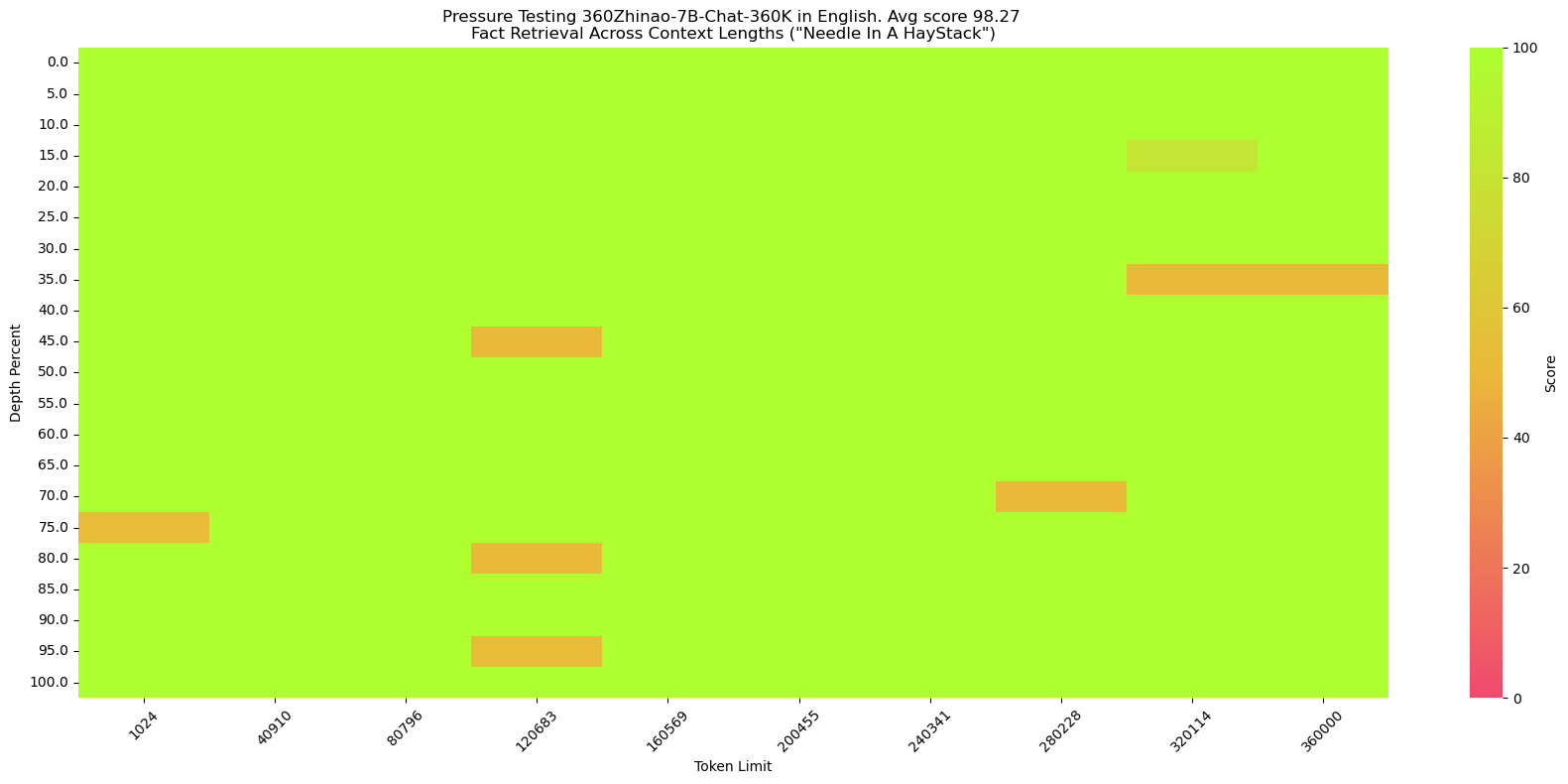
**针**:The best thing to do in San Francisco is eat a sandwich and sit in Dolores Park on a sunny day. **提问**:What is the best thing to do in San Francisco? - 中文“大海捞针”
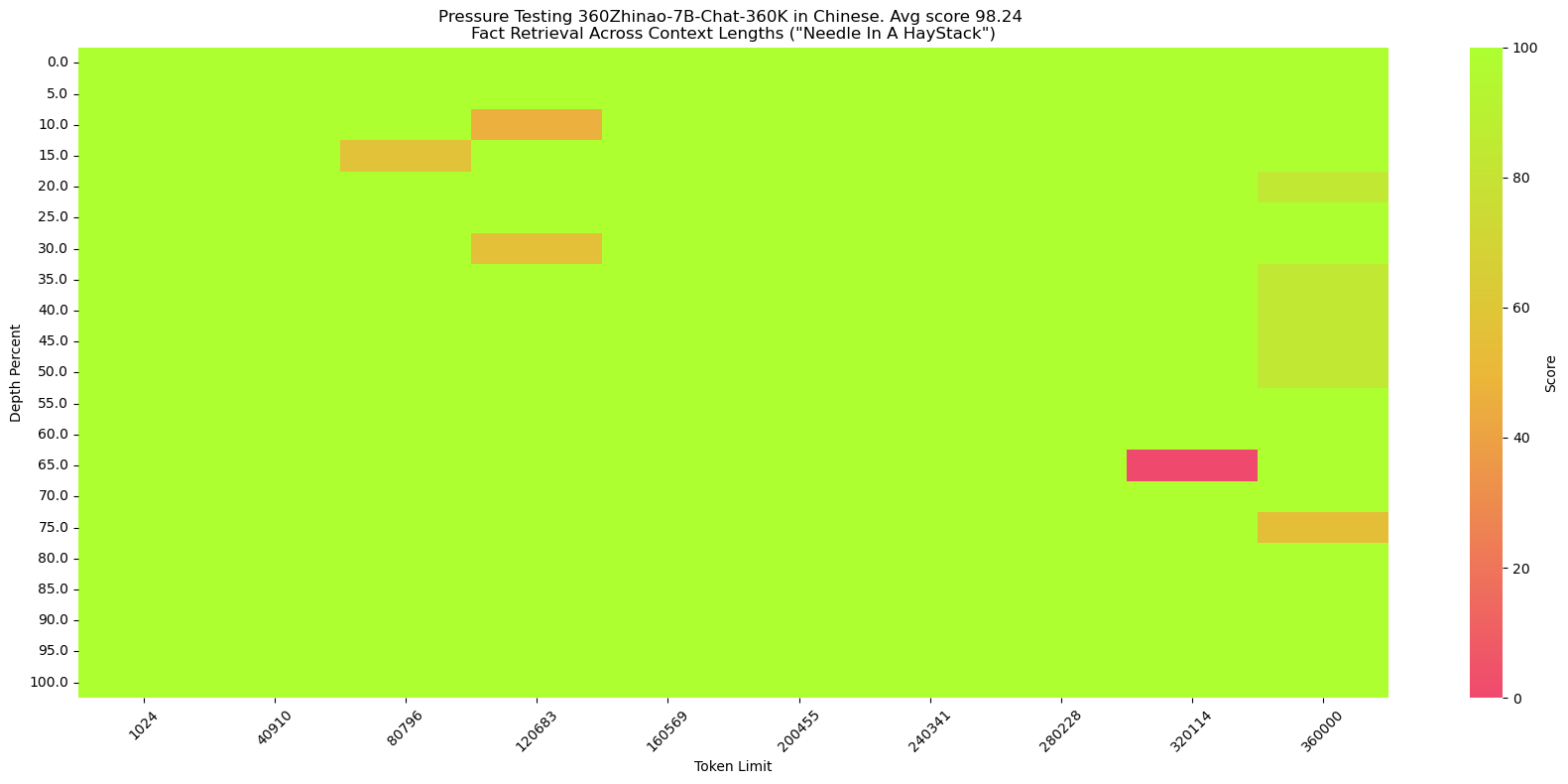
我们仿照[SuperCLUE-200K测评基准](https://mp.weixin.qq.com/s/QgoRf2LB-7vc3vTFOHJkpw)构造了中文大海捞针:
**海**:长篇小说。
**针**:王莽是一名勤奋的店员,他每天凌晨就起床,赶在第一缕阳光照亮大地之前到达店铺,为即将开始的一天做准备。他清扫店铺,整理货架,为顾客提供方便。他对五金的种类和用途了如指掌,无论顾客需要什么,他总能准确地找到。\n然而,他的老板刘秀却总是对他吹毛求疵。刘秀是个挑剔的人,他总能在王莽的工作中找出一些小错误,然后以此为由扣他的工资。他对王莽的工作要求非常严格,甚至有些过分。即使王莽做得再好,刘秀也总能找出一些小问题,让王莽感到非常沮丧。\n王莽虽然对此感到不满,但他并没有放弃。他知道,只有通过自己的努力,才能获得更好的生活。他坚持每天早起,尽管他知道那天可能会再次被刘秀扣工资。他始终保持微笑,尽管他知道刘秀可能会再次对他挑剔。
**提问**:王莽在谁的手下工作?
# 快速开始
简单的示例来说明如何利用🤖 ModelScope和🤗 Transformers快速使用360Zhinao-7B-Base和360Zhinao-7B-Chat
## 依赖安装
- python 3.8 and above
- pytorch 2.0 and above
- transformers 4.37.2 and above
- CUDA 11.4 and above are recommended.
```shell
pip install -r requirements.txt
```
我们推荐安装flash-attention(当前已支持flash attention 2)来提高你的运行效率以及降低显存占用。(flash-attention只是可选项,不安装也可正常运行该项目)
>flash-attn >= 2.3.6
```shell
FLASH_ATTENTION_FORCE_BUILD=TRUE pip install flash-attn==2.3.6
```
## 🤗 Transformers
### Base模型推理
此代码演示使用transformers快速使用360Zhinao-7B-Base模型进行推理
```python
from transformers import AutoTokenizer, AutoModelForCausalLM
from transformers.generation import GenerationConfig
MODEL_NAME_OR_PATH = "qihoo360/360Zhinao-7B-Base"
tokenizer = AutoTokenizer.from_pretrained(
MODEL_NAME_OR_PATH,
trust_remote_code=True)
model = AutoModelForCausalLM.from_pretrained(
MODEL_NAME_OR_PATH,
device_map="auto",
trust_remote_code=True)
generation_config = GenerationConfig.from_pretrained(
MODEL_NAME_OR_PATH,
trust_remote_code=True)
inputs = tokenizer('中国二十四节气\n1. 立春\n2. 雨水\n3. 惊蛰\n4. 春分\n5. 清明\n', return_tensors='pt')
inputs = inputs.to(model.device)
pred = model.generate(input_ids=inputs["input_ids"], generation_config=generation_config)
print("outputs:\n", tokenizer.decode(pred.cpu()[0], skip_special_tokens=True))
```
### Chat模型推理
此代码演示使用transformers快速使用360Zhinao-7B-Chat-4K模型进行推理
```python
from transformers import AutoTokenizer, AutoModelForCausalLM
from transformers.generation import GenerationConfig
MODEL_NAME_OR_PATH = "qihoo360/360Zhinao-7B-Chat-4K"
tokenizer = AutoTokenizer.from_pretrained(
MODEL_NAME_OR_PATH,
trust_remote_code=True)
model = AutoModelForCausalLM.from_pretrained(
MODEL_NAME_OR_PATH,
device_map="auto",
trust_remote_code=True)
generation_config = GenerationConfig.from_pretrained(
MODEL_NAME_OR_PATH,
trust_remote_code=True)
messages = []
#round-1
messages.append({"role": "user", "content": "介绍一下刘德华"})
response = model.chat(tokenizer=tokenizer, messages=messages, generation_config=generation_config)
messages.append({"role": "assistant", "content": response})
print(messages)
#round-2
messages.append({"role": "user", "content": "他有什么代表作?"})
response = model.chat(tokenizer=tokenizer, messages=messages, generation_config=generation_config)
messages.append({"role": "assistant", "content": response})
print(messages)
```
## 🤖 ModelScope
### Base模型推理
此代码演示使用ModelScope快速使用360Zhinao-7B-Base模型进行推理
```python
from modelscope import AutoModelForCausalLM, AutoTokenizer
from modelscope import GenerationConfig
MODEL_NAME_OR_PATH = "qihoo360/360Zhinao-7B-Base"
tokenizer = AutoTokenizer.from_pretrained(
MODEL_NAME_OR_PATH,
trust_remote_code=True)
model = AutoModelForCausalLM.from_pretrained(
MODEL_NAME_OR_PATH,
device_map="auto",
trust_remote_code=True)
generation_config = GenerationConfig.from_pretrained(
MODEL_NAME_OR_PATH,
trust_remote_code=True)
inputs = tokenizer('中国二十四节气\n1. 立春\n2. 雨水\n3. 惊蛰\n4. 春分\n5. 清明\n', return_tensors='pt')
inputs = inputs.to(model.device)
pred = model.generate(input_ids=inputs["input_ids"], generation_config=generation_config)
print("outputs:\n", tokenizer.decode(pred.cpu()[0], skip_special_tokens=True))
```
### Chat模型推理
此代码演示使用ModelScope快速使用360Zhinao-7B-Chat-4K模型进行推理
```python
from modelscope import AutoModelForCausalLM, AutoTokenizer
from modelscope import GenerationConfig
MODEL_NAME_OR_PATH = "qihoo360/360Zhinao-7B-Chat-4K"
tokenizer = AutoTokenizer.from_pretrained(
MODEL_NAME_OR_PATH,
trust_remote_code=True)
model = AutoModelForCausalLM.from_pretrained(
MODEL_NAME_OR_PATH,
device_map="auto",
trust_remote_code=True)
generation_config = GenerationConfig.from_pretrained(
MODEL_NAME_OR_PATH,
trust_remote_code=True)
messages = []
#round-1
messages.append({"role": "user", "content": "介绍一下刘德华"})
response = model.chat(tokenizer=tokenizer, messages=messages, generation_config=generation_config)
messages.append({"role": "assistant", "content": response})
print(messages)
#round-2
messages.append({"role": "user", "content": "他有什么代表作?"})
response = model.chat(tokenizer=tokenizer, messages=messages, generation_config=generation_config)
messages.append({"role": "assistant", "content": response})
print(messages)
```
## 终端 Demo
可使用终端交互实现快速体验
```shell
python cli_demo.py
```
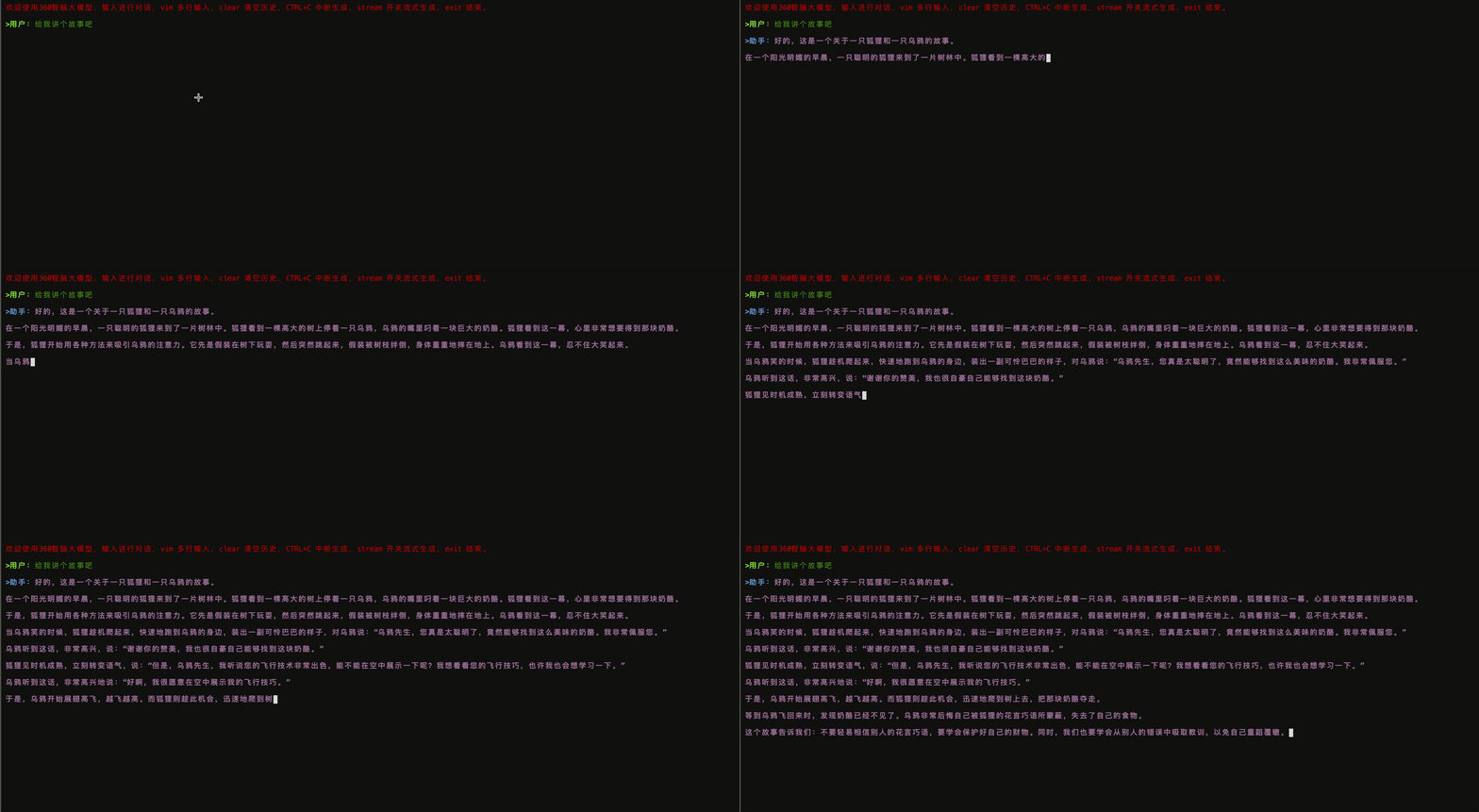
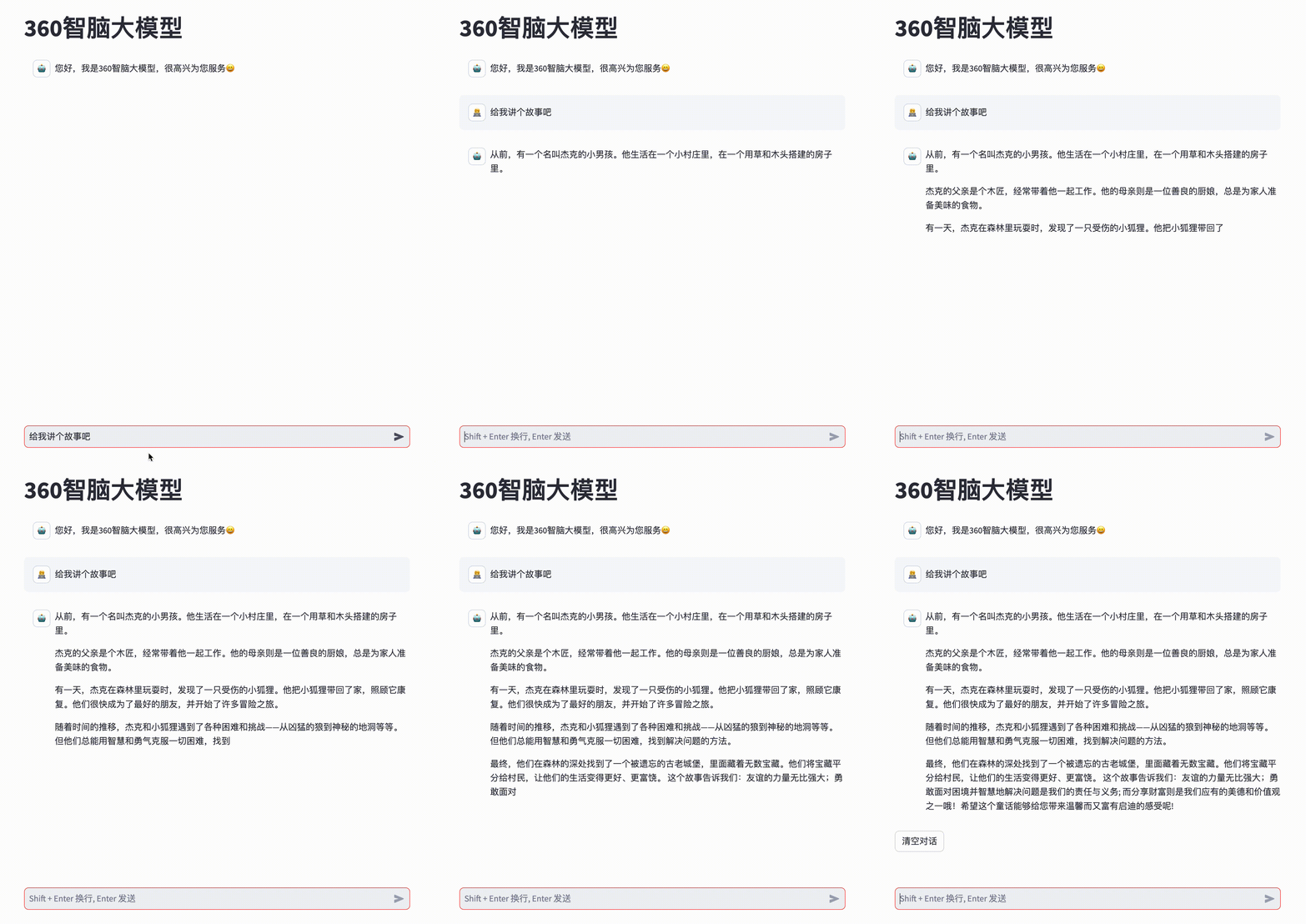
注:我们尚未支持Mac上`device = 'mps'`。 ## 网页 Demo 也可使用网页交互实现快速体验 ```shell streamlit run web_demo.py ```
## API Demo
启动命令
```shell
python openai_api.py
```
请求参数
```shell
curl 'http://localhost:8360/v1/chat/completions' \
-H 'Content-Type: application/json' \
-d '{
"max_new_tokens": 200,
"do_sample": true,
"top_k": 0,
"top_p": 0.8,
"temperature": 1.0,
"repetition_penalty": 1.0,
"messages": [
{"role": "system", "content": "You are a helpful assistant."},
{"role": "user", "content": "你好"}
]
}'
```
# 模型推理
## 模型量化
我们提供了基于AutoGPTQ的量化方案,并开源了Int4量化模型。
## 模型部署
### vLLM安装环境
如希望部署及加速推理,我们建议你使用 `vLLM==0.3.3`。
如果你使用**CUDA 12.1和PyTorch 2.1**,可以直接使用以下命令安装vLLM。
```shell
pip install vllm==0.3.3
```
否则请参考vLLM官方的[安装说明](https://docs.vllm.ai/en/latest/getting_started/installation.html)。
>安装完成后,还需要以下操作~
1. 把vllm/zhinao.py文件复制到env环境对应的vllm/model_executor/models目录下。
2. 把vllm/serving_chat.py文件复制到env环境对应的vllm/entrypoints/openai目录下。
3. 然后在vllm/model_executor/models/\_\_init\_\_.py文件增加一行代码
```shell
"ZhinaoForCausalLM": ("zhinao", "ZhinaoForCausalLM"),
```
### vLLM服务启动
启动服务
```shell
python -m vllm.entrypoints.openai.api_server \
--served-model-name 360Zhinao-7B-Chat-4K \
--model qihoo360/360Zhinao-7B-Chat-4K \
--trust-remote-code \
--tensor-parallel-size 1 \
--max-model-len 4096 \
--host 0.0.0.0 \
--port 8360
```
使用curl请求服务
```shell
curl http://localhost:8360/v1/chat/completions \
-H "Content-Type: application/json" \
-d '{
"model": "360Zhinao-7B-Chat-4K",
"max_tokens": 200,
"top_k": -1,
"top_p": 0.8,
"temperature": 1.0,
"presence_penalty": 0.0,
"frequency_penalty": 0.0,
"messages": [
{"role": "system", "content": "You are a helpful assistant."},
{"role": "user", "content": "你好"}
],
"stop": [
"
# 模型微调
## 训练数据
我们提供了微调训练样例数据 data/test.json,该样例数据是从 [multiturn_chat_0.8M](https://huggingface.co/datasets/BelleGroup/multiturn_chat_0.8M) 采样出 1 万条,并且做了格式转换。
数据格式:
```json
[
{
"id": 1,
"conversations": [
{
"from": "system",
"value": "You are a helpful assistant."
},
{
"from": "user",
"value": "您好啊"
},
{
"from": "assistant",
"value": "你好!我今天能为您做些什么?有什么问题或需要帮助吗? 我在这里为您提供服务。"
}
]
}
]
```
## 微调训练
训练脚本如下:
```shell
set -x
HOSTFILE=hostfile
DS_CONFIG=./finetune/ds_config_zero2.json
# PARAMS
LR=5e-6
EPOCHS=3
MAX_LEN=4096
BATCH_SIZE=4
NUM_NODES=1
NUM_GPUS=8
MASTER_PORT=29500
IS_CONCAT=False # 是否数据拼接到最大长度(MAX_LEN)
DATA_PATH="./data/training_data_sample.json"
MODEL_PATH="qihoo360/360Zhinao-7B-Base"
OUTPUT_DIR="./outputs/"
deepspeed --hostfile ${HOSTFILE} \
--master_port ${MASTER_PORT} \
--num_nodes ${NUM_NODES} \
--num_gpus ${NUM_GPUS} \
finetune.py \
--report_to "tensorboard" \
--data_path ${DATA_PATH} \
--model_name_or_path ${MODEL_PATH} \
--output_dir ${OUTPUT_DIR} \
--model_max_length ${MAX_LEN} \
--num_train_epochs ${EPOCHS} \
--per_device_train_batch_size ${BATCH_SIZE} \
--gradient_accumulation_steps 1 \
--save_strategy steps \
--save_steps 200 \
--learning_rate ${LR} \
--lr_scheduler_type cosine \
--adam_beta1 0.9 \
--adam_beta2 0.95 \
--adam_epsilon 1e-8 \
--max_grad_norm 1.0 \
--weight_decay 0.1 \
--warmup_ratio 0.01 \
--gradient_checkpointing True \
--bf16 True \
--tf32 True \
--deepspeed ${DS_CONFIG} \
--is_concat ${IS_CONCAT} \
--logging_steps 1 \
--log_on_each_node False
```
```shell
bash finetune/ds_finetune.sh
```
- 可通过配置hostfile,实现单机、多机训练。
- 可通过配置ds_config,实现zero2、zero3。
- 可通过配置fp16、bf16实现混合精度训练,建议使用bf16,与预训练模型保持一致。
- 可通过配置is_concat参数,控制训练数据是否拼接,当训练数据量级较大时,可通过拼接提升训练效率。
# 360Zhinao-search 模型介绍
360Zhinao-search采用自研BERT类模型作为基座,进行多任务微调。在C-MTEB榜单的Retrieval任务上平均得分75.05,目前排名第一。
[C-MTEB-Retrieval榜单](https://huggingface.co/spaces/mteb/leaderboard)共包含8个不同领域下的[query, passage]相似度检索子任务, 使用NDCG@10(Norma lized Discounted Cumulative Gain @ 10)作为评判指标。
| Model | T2Retrieval | MMarcoRetrieval | DuRetrieval | CovidRetrieval | CmedqaRetrieval | EcomRetrieval | MedicalRetrieval | VideoRetrieval | Avg |
|:-------------------------------|:--------:|:--------:|:--------:|:--------:|:--------:|:--------:|:--------:|:--------:|:--------:|
|**360Zhinao-search** | 87.12 | 83.32 | 87.57 | 85.02 | 46.73 | 68.9 | 63.69 | 78.09 | **75.05** |
|AGE_Hybrid | 86.88 | 80.65 | 89.28 | 83.66 | 47.26 | 69.28 | 65.94 | 76.79 | 74.97 |
|OpenSearch-text-hybrid | 86.76 | 79.93 | 87.85 | 84.03 | 46.56 | 68.79 | 65.92 | 75.43 | 74.41 |
|piccolo-large-zh-v2 | 86.14 | 79.54 | 89.14 | 86.78 | 47.58 | 67.75 | 64.88 | 73.1 | 74.36 |
|stella-large-zh-v3-1792d | 85.56 | 79.14 | 87.13 | 82.44 | 46.87 | 68.62 | 65.18 | 73.89 | 73.6 |
## 优化点
1. 数据过滤:严防CMTEB-Retrieval任务榜单测试数据泄露,清洗测试集所有的query和passage;
2. 数据源强化:利用开源数据,LLM合成数据提升数据多样性;
3. 负例挖掘:采用多种方式深度挖掘难分负例,提升信息增益;
4. 训练效率:多机多卡+Deepspeed的方式,优化GPU显存利用率。
## 环境要求
```bash
cd Retrieval
pip install -r requirements.txt
```
## 训练脚本
```bash
cd Retrieval/finetune
sh train.sh
```
## 推理脚本
```bash
cd Retrieval/eval
python test_model.py
```
## C-MTEB榜单测试脚本
```bash
cd Retrieval/eval
sh eval.sh
```
## 参考
[bge微调代码](https://github.com/FlagOpen/FlagEmbedding/tree/master/examples/finetune)
[C-MTEB官方测试脚本](https://github.com/FlagOpen/FlagEmbedding/tree/master/C_MTEB)
# 360Zhinao-1.8B-Reranking 模型介绍
360Zhinao-1.8B-Reranking模型采用自研的360Zhinao_1.8B_Base模型为基座模型,在C-MTEB榜单的Reranking任务上平均得分70.13分,目前全模型排名第一,开> 源模型排名第一,为生成式模型做判别任务打开了新的可能性。
[C-MTEB-Reranking榜单](https://huggingface.co/spaces/mteb/leaderboard)是一个通用Reranking榜单,榜单包含四个子任务,是不同领域下的用户问题和答> 案的相似度判断任务,榜单使用MAP(Mean-average-precision)作为评判指标。目前该榜单上的开源模型基本都是双向的判别式模型(BERT类模型),唯一的单向生> 成式模型(GPT类模型)是gte-Qwen1.5-7B-instruct,平均得分66.38分。
| Model | T2Reranking | MMarcoReranking | CMedQAv1 | CMedQAv2 | Avg |
|:-------------------------------|:--------:|:--------:|:--------:|:--------:|:--------:|
| **360Zhinao-1.8B-Reranking** | **68.55** | **37.29** | **86.75** | **87.92** | **70.13** |
| piccolo-large-zh-v2 | 67.15 | 33.39 | 90.14 | 89.31 | 70 |
| Baichuan-text-embedding | 67.85 | 34.3 | 88.46 | 88.06 | 69.67 |
| stella-mrl-large-zh-v3.5-1792d | 66.43 | 28.85 | 89.18 | 89.33 | 68.45 |
| PEG | 69.43 | 33.55 | 86.56 | 84.09 | 68.41 |
| bge-reranker-base | 67.28 | 35.46 | 81.27 | 84.1 | 67.03 |
| bge-reranker-large | 67.6 | 37.17 | 82.14 | 84.19 | 67.78 |
## 优化点
通过迭代式发现和解决以下的技术问题,不断激发大模型在预训练阶段蕴含的世界知识,更好的打通生成式模型-判别式任务的鸿沟。
1. 数据清洗:模型训练没有采用世界知识,即既没有采用领域数据继续预训练,也没有微调榜单四个数据集之外的数据集。只使用榜单内的四个数据集,细心的> 迭代式的进行数据感知,有针对性的对不同数据集进行数据清洗和挖掘,保证单任务排名能够达到前三水平。
2. 解决任务冲突问题:四个任务合并时,由于知识领域分布不同、回答模式不同、训练数据量不同、收敛步数不同甚至序列长度不同等原因,不同任务间存在冲> 突问题,深入解决冲突问题,得到综合指标最好的通用模型。
3. 解决训练不稳定问题:与生成任务会生成多个字符不同,使用生成式模型进行判别式任务,需要模型给出一个连续的数值,因此在训练过程中存在震荡问题,> 深入解决训练不稳定问题,得出一个泛化性和鲁棒性更好的模型。
## 环境要求
```bash
cd Reranking/
pip install -r requirements.txt
```
如果你的显卡支持fp16或bf16精度,我们还推荐安装[flash-attention](https://github.com/Dao-AILab/flash-attention)(**当前已支持flash attention 2** )来提高你的运行效率以及降低显存占用。(**flash-attention只是可选项,不安装也可正常运行该项目**)
```bash
git clone https://github.com/Dao-AILab/flash-attention
cd flash-attention && pip install .
# 下方安装可选,安装可能比较缓慢。
# pip install csrc/layer_norm
# 如果flash-attn版本高于2.1.1,下方无需安装。
# pip install csrc/rotary
```
## 数据输入格式
```json
[
{
"id": "identity_0",
"conversations": [
{
"from": "user",
"value": "天空是什么颜色的\n\n天空是蓝色的"
},
{
"from": "assistant",
"value": "3"
}
]
}
]
```
## 训练脚本
```bash
cd Reranking
sh finetune/finetune_ds.sh
```
## 推理脚本
```bash
cd Reranking
python test_model.py
```
# 引用
如果您觉得我们的工作有所帮助,欢迎引用:
```
@article{qwen,
title={360Zhinao Technical Report},
author={360Zhinao-Team},
journal={arXiv preprint arXiv:2405.13386},
year={2024}
}
```
# 许可证
本仓库源码遵循开源许可证Apache 2.0。
360智脑开源模型支持商用,若需将本模型及衍生模型用于商业用途,请通过邮箱(g-zhinao-opensource@360.cn)联系进行申请, 具体许可协议请见[《360智脑开源模型许可证》](https://github.com/Qihoo360/360zhinao/blob/main/360%E6%99%BA%E8%84%91%E5%BC%80%E6%BA%90%E6%A8%A1%E5%9E%8B%E8%AE%B8%E5%8F%AF%E8%AF%81.txt)。