The reverse proxy manager you would actually enjoy running.
Point-and-click hosts, automatic HTTPS, HTTP/3, single sign-on and live traffic charts. One Go binary. One 34 MB container. No nginx, no Traefik, no sidecars.
> **Live, and under active development.** quicgate runs a real homelab's whole ingress every
> day, and it gets new releases most weeks. We would love to hear how it works for you, good or
> bad: what you like, what broke, what is confusing, what is missing.
> [Open an issue](https://github.com/Quicgate/quicgate/issues), it does not have to be a bug. See the [roadmap](ROADMAP.md) for
> what is done and what comes next.
## Why quicgate
Most homelabs end up with the same pile: a proxy, something to manage it, something for
certificates, something for login, fail2ban, an exporter and a log viewer. quicgate is that pile as
one small program with a UI you can hand to someone else.
- **Add a host in seconds.** Domain, upstream, save. The certificate issues itself and the route
is live instantly: no reloads, no restarts, no config files.
- **Single sign-on without a second service.** quicgate runs the OpenID Connect login itself
against Keycloak, Entra ID, Authentik or any compliant provider, per host or even per URL.
- **HTTP/3 on every host by default.** A native Go data plane on `net/http` and quic-go, not a
wrapper around someone else's proxy.
- **See what is happening.** A week of traffic charts, open ports with their throughput, busiest
hosts, visitor countries, and who got refused and why.
- **Nothing to break with a typo.** Every option is a typed, validated field. There is no free-text
config box, so there is no way to take the proxy down with a missing semicolon.
- **Small enough to trust.** One static binary in a `FROM scratch` image, signed build provenance,
a vulnerability gate in CI, and guides that work offline inside the binary.
> I loved Nginx Proxy Manager's workflow but not its internals, and Pangolin's engine but not its
> moving parts. quicgate is the NPM experience rebuilt on a modern engine. It has been the only
> ingress of my own homelab (about 45 hosts, mail and media streams) since July 2026.
## Quick start
```yaml
# docker-compose.yml
services:
quicgate:
image: ghcr.io/quicgate/quicgate:latest
restart: unless-stopped
network_mode: host # engine owns 80/443 (tcp+udp), admin UI on 81
environment:
- QG_ACME_EMAIL=you@example.com
volumes:
- ./data:/data
```
```bash
docker compose up -d
```
Open `http://:81`, sign in with `admin@example.com` / `changeme` (you are made to change the
password right away, and can give the account your own address under Account & security), add your first proxy host, and watch the certificate arrive.
> [!WARNING]
> Never expose port 81 to the internet. Put the admin UI behind quicgate itself with an access
> list, a VPN or a firewall rule, like any other private service.
Prefer bridge networking, or want router port forwards managed for you over UPnP? See the comments
in [`docker-compose.yml`](docker-compose.yml) and the [getting started guide](web/docs/getting-started.md).
## A look around
| | |
|---|---|
| [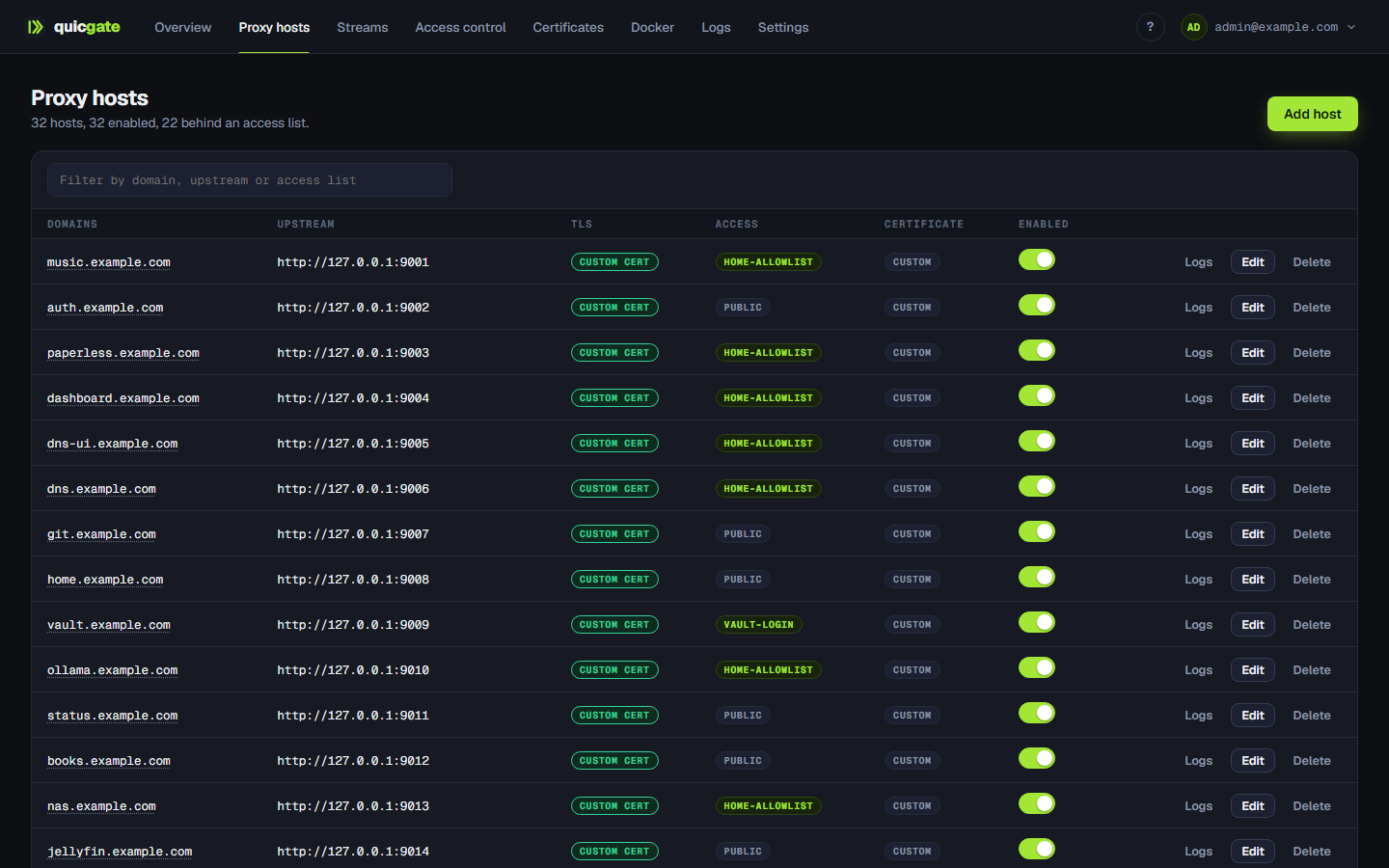](brand/screenshots/hosts.png) | [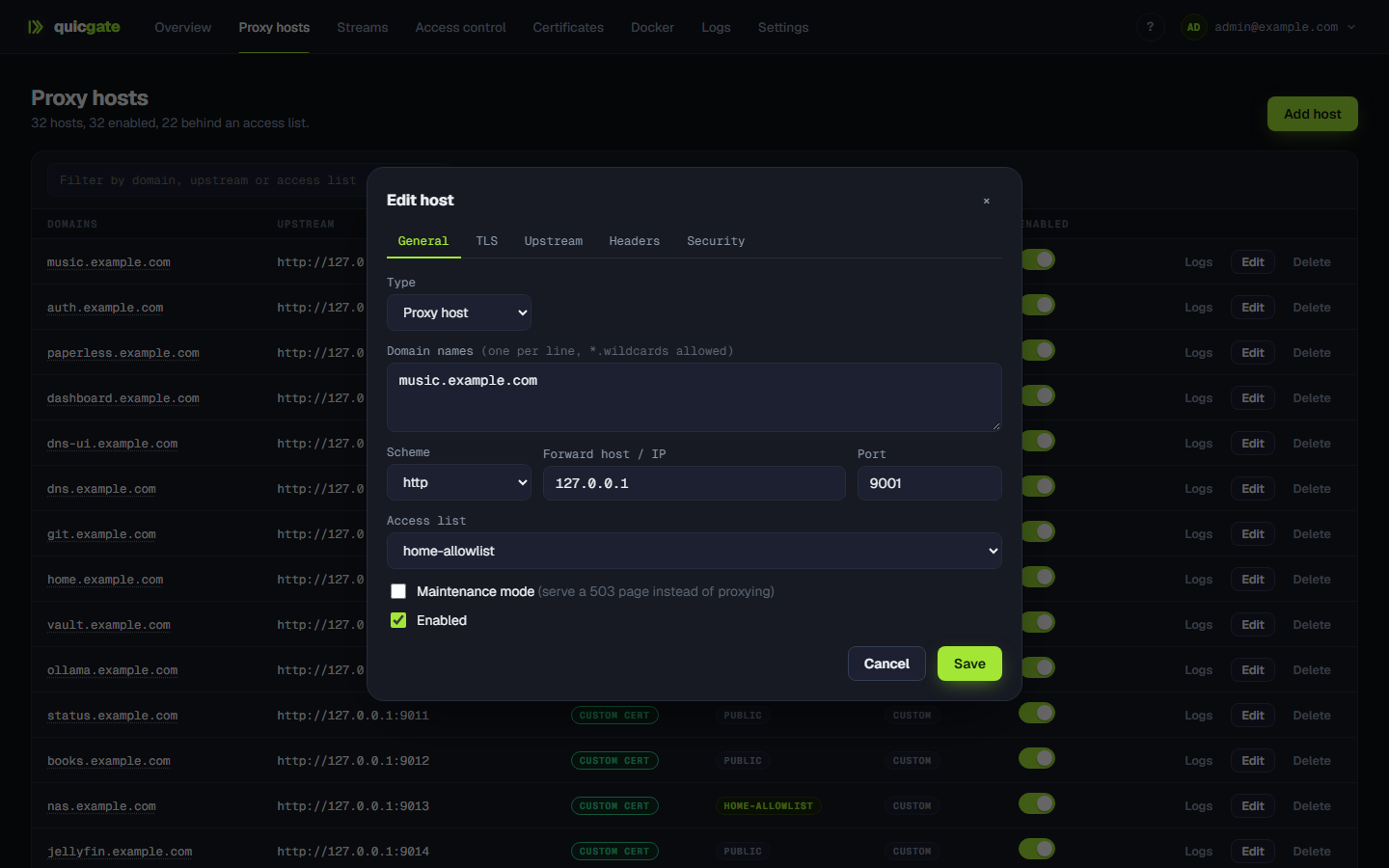](brand/screenshots/host-edit.png) |
| **Proxy hosts.** Everything on one screen: upstream, TLS, which access list guards it, and a per-host log. | **Typed options, not config snippets.** TLS, upstream pools, header rules and security each get their own tab. |
| [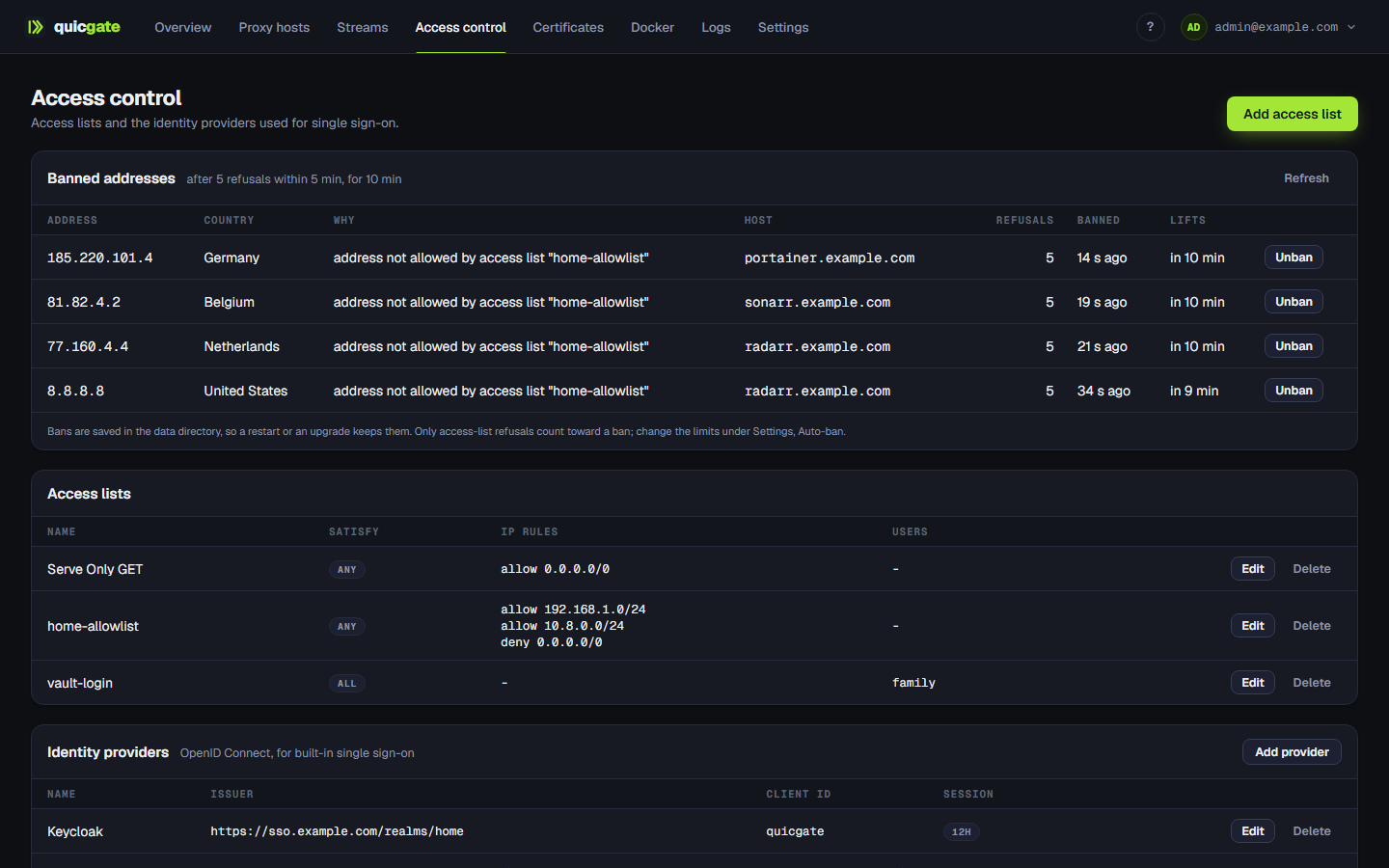](brand/screenshots/access.png) | [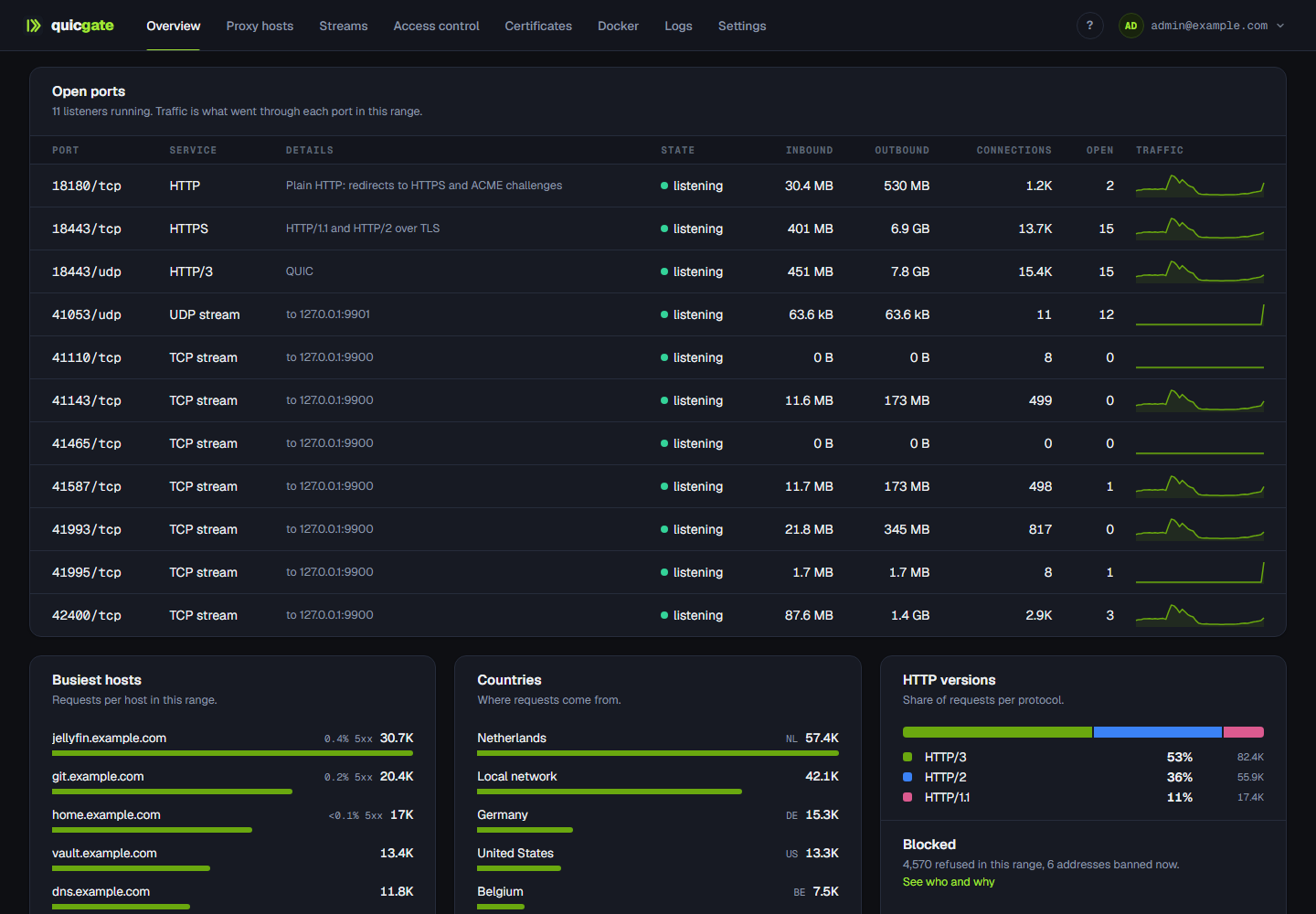](brand/screenshots/ports.png) |
| **Access control.** Access lists, identity providers, and the addresses auto-ban is refusing, with the reason. | **Open ports.** Every listener and stream with its traffic, plus busiest hosts, countries and HTTP versions. |
## It replaces the whole stack
| Instead of | quicgate gives you |
|---|---|
| Nginx Proxy Manager, nginx | proxy hosts, certificates, redirects, static sites, a UI |
| Traefik, Caddy | routing, ACME, Docker label discovery, HTTP/3 |
| Authelia, oauth2-proxy, Pomerium | OIDC login, group policy, `Remote-User` passed upstream |
| fail2ban, an exporter, a log viewer | auto-ban, Prometheus `/metrics`, JSON access logs with a viewer |
## Single sign-on, without a sidecar
Most proxies hand SSO to a second service. quicgate runs the OpenID Connect login itself: PKCE and a
nonce, ID-token signature verification, and a signed session cookie bound to the host **and** to the
provider that issued it.
Define an identity provider once, then choose per host who gets in: by email, by email domain or by
group. Optionally pass the identity upstream as `Remote-User` / `Remote-Email` / `Remote-Groups`, so
apps with proxy-auth support log the user straight in. Inbound copies of those headers are always
stripped, so a client can never forge them.
Authentication can differ **per URL** on the same host, which is what real apps need:
| Path | Gate |
|---|---|
| `/ValidationService.asmx` | public: a licensing callback that cannot log in |
| `/webhooks/` | public, `POST` only |
| `/admin/` | OIDC, group `platform-admins` |
| everything else | OIDC, any employee |
Different paths can even use **different identity providers**: staff on the company IdP, a partner
endpoint on theirs. Already running Authelia or Authentik? Point a host at its verify endpoint with
forward-auth instead. Details in the [Access control & SSO guide](web/docs/sso.md).
## What you get
Proxying
Proxy, redirect (301/302/307/308), 404 and static hosts · wildcard domains ·
load-balanced pools with health checks and sticky sessions · custom locations · path
rewrites (strip or add a prefix, RE2) · maintenance mode · response caching · gzip
TLS and HTTP/3
Automatic Let's Encrypt (HTTP-01), DNS-01 wildcards, custom ACME CAs (ZeroSSL, step-ca) ·
upload your own certificates or generate self-signed ones · mTLS client certificates ·
HSTS · HTTP/1.1, HTTP/2 and **HTTP/3 (QUIC)** on every host, with a per-host toggle
Access control
Ordered access lists by IP/CIDR, dynamic-DNS hostname or GeoIP country · basic auth ·
rules scoped to HTTP methods · built-in OIDC SSO and forward-auth · per-path rules
· rate limiting · exploit and bad-bot filters · fail2ban-style auto-ban with a
never-ban list · real client IP behind Cloudflare or another load balancer
Streams (TCP/UDP)
L4 forwards with source allowlists · PROXY protocol v1/v2 · TLS termination ·
SNI passthrough routing · port ranges · router port forwards managed over **UPnP**,
self-healing after a router reboot · targets on a remote network through a WireGuard site
WireGuard sites
Reach upstreams on networks quicgate is not on, through an ordinary WireGuard peer at the other
end: a router, a small Linux box, a VPS. Also the other way round, with quicgate on a VPS and the
home network calling in. Runs inside quicgate, unprivileged · keys made in your browser,
never stored · an upstream behind a site is never tried on the local network ·
handshake, traffic and connections per site
VPN for people (new in 1.17)
Hosts that exist inside the WireGuard tunnel only, invisible from outside · devices with
keys made in the browser · access-list rules about who is on the VPN · a portal where
people log in with single sign-on and add their own devices, re-checked with the identity provider
every few minutes · experimental LAN access with per-group policies, a flow log, and no way
to reach quicgate's own admin port through it
Docker
Opt a container in with `quicgate.enable=true` and its host (and streams) are derived from labels:
Traefik's provider idea without the router/service/middleware soup. Multi-host, and every derived
route shows why it is or is not routing.
Dual-stack
IPv6 clients, IPv6-literal and AAAA upstreams, IPv6 CIDRs in access lists and trusted-proxy lists,
GeoIP and rate limits on v6 alike.
Operations
Overview with a week of traffic charts · JSON access logs with a built-in viewer ·
Prometheus `/metrics` · one-click backup and restore · declarative JSON import ·
certificate-renewal alerts (ntfy, Gotify) · TOTP 2FA · API tokens · OIDC or
LDAP admin login · offline guides in the UI · light and dark, and a choice of themes
What is built, tested and qualified against real infrastructure, and what is deliberately deferred,
is tracked row by row in [FEATURES.md](FEATURES.md).
## How it compares
| | **quicgate** | **Nginx Proxy Manager** | **Pangolin** |
|---|---|---|---|
| Data plane | native Go (net/http, quic-go) | nginx | Traefik |
| Deployment | **1 container, ~34 MB, scratch** | 1 container (+ optional db) | 3+ containers |
| HTTP/3 (QUIC) | **default, per-host toggle** | no | via Traefik config |
| Config model | **typed, validated options** | UI + free-text nginx snippets | UI + Traefik config |
| Applying a change | instant atomic swap | nginx reload | Traefik provider push |
| SSO on your services | **built-in OIDC + forward-auth** | no | **built-in IdP/SSO** |
| Per-URL auth policy | **yes** | no | per resource |
| Access lists | IP/CIDR + **GeoIP + dynamic DNS** | IP/CIDR | yes |
| TCP/UDP streams | yes, + PROXY protocol, SNI, TLS termination | basic | via tunnels |
| Reaching services on remote networks | **WireGuard sites**, any WireGuard peer, no agent (new in 1.16) | no | **yes, mature, with its own agent and user access** |
| VPN for people's devices | WireGuard devices, SSO portal with re-checked logins, experimental LAN access (new in 1.17) | no | **yes, mature** |
| Config from container labels | **yes, flat labels + streams** | no | via Traefik labels |
| Metrics and API | Prometheus + full REST + OpenAPI | none / undocumented REST | via Traefik / REST |
| Maturity | **young, read the caveats** | battle-tested, huge community | growing fast |
**Choose NPM** for the most battle-tested option and years of community answers.
**Choose Pangolin** if tunnels are the heart of your setup: it is built around them, with its own
agent and identity-aware access for users.
**Choose quicgate** if you want one small container to replace the whole stack (proxy,
certificates, access control and SSO) on a modern engine.
### Honest caveats
- Young project, live in production in one homelab and under active development, so expect rough
edges. Feedback is wanted, good or bad: tell us in an [issue](https://github.com/Quicgate/quicgate/issues) what worked, what did not and
what you miss. A report that says "this confused me" is as useful as a bug.
- Not everything has met the real world yet. The built-in OIDC SSO, for one, is tested against a
synthetic identity provider: try it against yours before you rely on it.
[FEATURES.md](FEATURES.md) says per feature what is proven live and what is only tested.
- WireGuard sites are new in 1.16, and devices, the VPN portal and LAN access are new in 1.17:
tested, including adversarial tests, but not yet proven in production. LAN access is marked
experimental until the code has had an outside review. It is not a full-tunnel VPN and not a
mesh.
- A single admin account (with 2FA, OIDC or LDAP login), no multi-tenant roles.
## Performance
On a Ryzen 7 9800X3D: **~45,000 proxied requests/sec** to a local backend, **~180,000/sec** for cache
hits, ~9 ns routing lookups, and ~8,900 TLS-proxied req/s on a single core. Access lists add no
measurable overhead. Those are microbenchmarks on one machine, not a sustained-load qualification,
and authentication, TLS and your backends change the picture, so measure your own workload.
Reproduce with `go test -bench=. ./internal/engine`; methodology in [BENCHMARKS.md](BENCHMARKS.md).
## Supply chain
Release images are multi-arch (amd64, arm64), built in CI from a digest-pinned base, gated by
`govulncheck`, and carry signed SLSA build provenance you can verify yourself:
```bash
gh attestation verify oci://ghcr.io/quicgate/quicgate:latest --owner Quicgate
```
Pin `ghcr.io/quicgate/quicgate:1` to follow the 1.x line: patches arrive, a major version never
does on its own.
## Documentation
The guides live in [`web/docs/`](web/docs/) and are **built into the binary**: open Help (`?` in
the top bar) and pick one. They work offline, air-gapped installs included.
- [Getting started](web/docs/getting-started.md): run it, first host, TLS modes, host types, themes
- [Configuration reference](web/docs/configuration.md): env vars and settings, real client IP, GeoIP, HTTP/3, IPv6
- [Access control & SSO](web/docs/sso.md): access lists, OIDC login, forward auth, per-path rules, security model
- [Docker labels](web/docs/docker.md): hosts and streams from container labels, multi-host
- [Streams & port forwards](web/docs/streams.md): TCP/UDP forwarding, PROXY protocol, SNI routing, UPnP
## API
Everything the UI does is a REST call: interactive Swagger at `/docs.html`, the spec at
`/openapi.yaml`, prose in [API.md](API.md). Create a bearer token under the account menu, API tokens:
```bash
curl -H "Authorization: Bearer $TOKEN" http://:81/api/hosts
```
`POST /api/import` does idempotent, declarative bulk import, which is how my own NPM and Pangolin
migrations were scripted.
## Building from source
```bash
go build . # single static binary
docker build -t quicgate . # multi-stage, FROM scratch
```
Dev mode without TLS: `QG_TLS=off QG_HTTP=:8090 QG_ADMIN=:8091 QG_DATA=./devdata go run .`
## Project
- [SPEC.md](SPEC.md): the NPM feature-parity matrix and architecture decisions
- [ROADMAP.md](ROADMAP.md): features mined from NPM's issue tracker (all five phases implemented)
- [CHANGELOG.md](CHANGELOG.md): what changed, release by release
- [CONTRIBUTING.md](CONTRIBUTING.md): quicgate is deliberately opinionated (one binary, typed options, no free-text config)
- [SECURITY.md](SECURITY.md): found a vulnerability? Report it privately, never as a public issue
If quicgate saves you a container or three, a star helps other self-hosters find it.
## License
[MIT](LICENSE)




