# WaveFake: A Data Set to Facilitate Audio DeepFake Detection
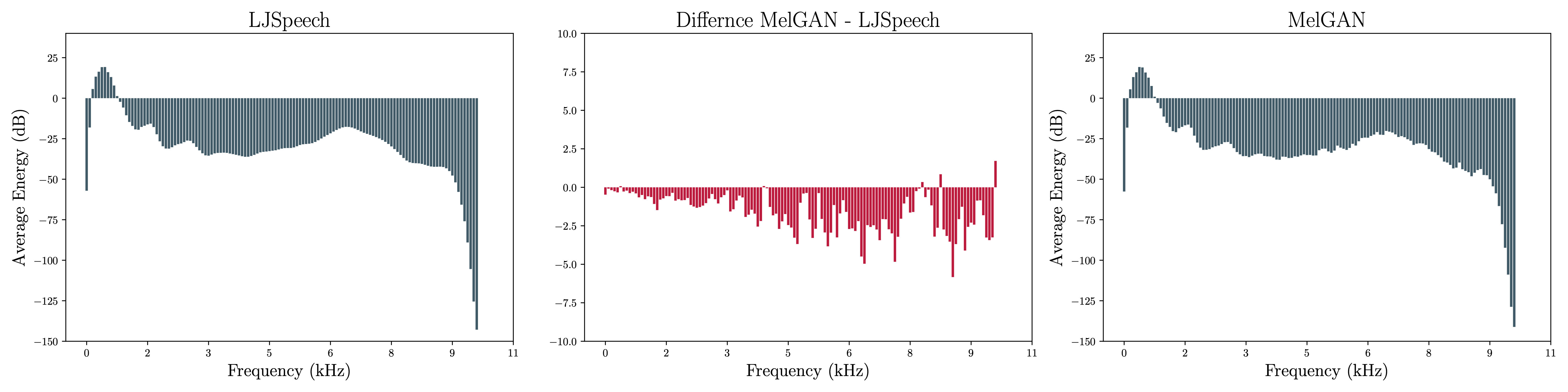
This is the code repository for our NeurIPS 2021 (Track on Datasets and Benchmarks) [paper](https://arxiv.org/abs/2111.02813) WaveFake.
>Deep generative modeling has the potential to cause significant harm to society.
>Recognizing this threat, a magnitude of research into detecting so-called "Deepfakes" has emerged.
>This research most often focuses on the image domain, while studies exploring generated audio signals have - so far - been neglected.
>In this paper, we aim to narrow this gap.
>We present a novel data set, for which we collected ten sample sets from six different network architectures, spanning two languages.
>We analyze the frequency statistics comprehensively, discovering subtle differences between the architectures, specifically among the higher frequencies.
>Additionally, to facilitate further development of detection methods, we implemented three different classifiers adopted from the signal processing community to give practitioners a baseline to compare against.
>In a first evaluation, we already discovered significant trade-offs between the different approaches.
>Neural network-based approaches performed better on average, but more traditional models proved to be more robust.
# Dataset & Pre-trained Models
You can find our dataset on [zenodo](https://zenodo.org/record/5642694) and we also provide [pre-trained models](https://ruhr-uni-bochum.sciebo.de/s/Aqw3PKXMZMbWBPE).
## Setup
You can install all needed dependencies by running:
```
pip install -r requirements.txt
```
#### RawNet2 Model
For consistency, we use the RawNet2 model provided by the ASVSpoof 2021 challenge.
Please download the model specifications [here](https://github.com/asvspoof-challenge/2021/tree/main/LA/Baseline-RawNet2) and place it under `dfadetect/models` as `raw_net2.py`.
## Statistics & Plots
To recreate the plots/statistics of the paper, use:
```
python statistics.py -h
usage: statistics.py [-h] [--amount AMOUNT] [--no-stats] [DATASETS ...]
positional arguments:
DATASETS Path to datasets. The first entry is assumed to be the referrence one. Specified as follows
optional arguments:
-h, --help show this help message and exit
--amount AMOUNT, -a AMOUNT
Amount of files to concider.
--no-stats, -s Do not compute stats, only plots.
```
**Example**
`python statistics.py /path/to/reference/data,ReferenceDataName /path/to/generated/data,GeneratedDataName -a 10000`
## Training models
You can use the training script as follows:
```
python train_models.py -h
usage: train_models.py [-h] [--amount AMOUNT] [--clusters CLUSTERS] [--batch_size BATCH_SIZE] [--epochs EPOCHS] [--retraining RETRAINING] [--ckpt CKPT] [--use_em] [--raw_net] [--cuda] [--lfcc] [--debug] [--verbose] REAL FAKE
positional arguments:
REAL Directory containing real data.
FAKE Directory containing fake data.
optional arguments:
-h, --help show this help message and exit
--amount AMOUNT, -a AMOUNT
Amount of files to load from each directory (default: None - all).
--clusters CLUSTERS, -k CLUSTERS
The amount of clusters to learn (default: 128).
--batch_size BATCH_SIZE, -b BATCH_SIZE
Batch size (default: 8).
--epochs EPOCHS, -e EPOCHS
Epochs (default: 5).
--retraining RETRAINING, -r RETRAINING
Retraining tries (default: 10).
--ckpt CKPT Checkpoint directory (default: trained_models).
--use_em Use EM version?
--raw_net Train raw net version?
--cuda, -c Use cuda?
--lfcc, -l Use LFCC instead of MFCC?
--debug, -d Only use minimal amount of files?
--verbose, -v Display debug information?
```
**Example**
To train all EM-GMMs use:
`python train_models.py /data/LJSpeech-1.1/wavs /data/generated_audio -k 128 -v --use_em --epochs 100`
## Evaluation
For evaluation you can use the evaluate_models script:
```
python evaluate_models.p -h
usage: evaluate_models.py [-h] [--output OUTPUT] [--clusters CLUSTERS] [--amount AMOUNT] [--raw_net] [--debug] [--cuda] REAL FAKE MODELS
positional arguments:
REAL Directory containing real data.
FAKE Directory containing fake data.
MODELS Directory containing model checkpoints.
optional arguments:
-h, --help show this help message and exit
--output OUTPUT, -o OUTPUT
Output file name.
--clusters CLUSTERS, -k CLUSTERS
The amount of clusters to learn (default: 128).
--amount AMOUNT, -a AMOUNT
Amount of files to load from each directory (default: None - all).
--raw_net, -r RawNet models?
--debug, -d Only use minimal amount of files?
--cuda, -c Use cuda?
```
**Example**
` python evaluate_models.py /data/LJSpeech-1.1/wavs /data/generated_audio trained_models/lfcc/em`
Make sure to move the out-of-distribution models to a seperate directory first!
## Attribution
We provide a script to attribute the GMM models:
```
python attribute.py -h
usage: attribute.py [-h] [--clusters CLUSTERS] [--steps STEPS] [--blur] FILE REAL_MODEL FAKE_MODEL
positional arguments:
FILE Audio sample to attribute.
REAL_MODEL Real model to attribute.
FAKE_MODEL Fake Model to attribute.
optional arguments:
-h, --help show this help message and exit
--clusters CLUSTERS, -k CLUSTERS
The amount of clusters to learn (default: 128).
--steps STEPS, -m STEPS
Amount of steps for integrated gradients.
--blur, -b Compute BlurIG instead.
```
**Example**
`python attribute.py /data/LJSpeech-1.1/wavs/LJ008-0217.wav path/to/real/model.pth path/to/fake/model.pth`
# BibTeX
When you cite our work feel free to use the following bibtex entry:
```
@inproceedings{
frank2021wavefake,
title={{WaveFake: A Data Set to Facilitate Audio Deepfake Detection}},
author={Joel Frank and Lea Sch{\"o}nherr},
booktitle={Thirty-fifth Conference on Neural Information Processing Systems Datasets and Benchmarks Track},
year={2021},
}
```