

EXPANDING COLLECTION
An animated material design UI card peek/pop controller
___
We specialize in the designing and coding of custom UI for Mobile Apps and Websites.

Stay tuned for the latest updates:
 [](http://twitter.com/Ramotion)
[](https://cocoapods.org/pods/expanding-collection)
[](http://cocoapods.org/pods/expanding-collection)
[](https://github.com/Ramotion/expanding-collection)
[](https://travis-ci.org/Ramotion/expanding-collection)
[](https://codebeat.co/projects/github-com-ramotion-expanding-collection)
[](https://paypal.me/Ramotion)
## Requirements
- iOS 9.0+
- Xcode 9.0+
## Installation
Just add the Source folder to your project.
or use [CocoaPods](https://cocoapods.org) with Podfile:
``` ruby
pod 'expanding-collection'
```
or [Carthage](https://github.com/Carthage/Carthage) users can simply add to their `Cartfile`:
```
github "Ramotion/expanding-collection"
```
## Usage
```swift
import expanding_collection
```
#### Create CollectionViewCell
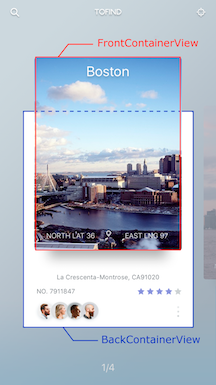
1) Create UICollectionViewCell inherit from `BasePageCollectionCell` (recommend create cell with xib file)
2) Adding FrontView
- add a view to YOURCELL.xib and connect it to `@IBOutlet weak var frontContainerView: UIView!`
- add width, height, centerX and centerY constraints (width and height constranints must equal cellSize)
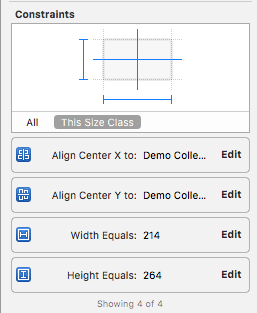
- connect centerY constraint to `@IBOutlet weak var frontConstraintY: NSLayoutConstraint!`
- add any desired uiviews to frontView
3) Adding BackView
- repeat step 2 (connect outlets to `@IBOutlet weak var backContainerView: UIView!`, `@IBOutlet weak var backConstraintY: NSLayoutConstraint!`)
4) Cell example [DemoCell](https://github.com/Ramotion/expanding-collection/tree/master/DemoExpandingCollection/DemoExpandingCollection/ViewControllers/DemoViewController/Cells)
###### If set `tag = 101` for any `FrontView.subviews` this view will be hidden during the transition animation
#### Create CollectionViewController
1) Create a UIViewController inheriting from `ExpandingViewController`
2) Register Cell and set Cell size:
``` swift
override func viewDidLoad() {
itemSize = CGSize(width: 214, height: 460) //IMPORTANT!!! Height of open state cell
super.viewDidLoad()
// register cell
let nib = UINib(nibName: "NibName", bundle: nil)
collectionView?.registerNib(nib, forCellWithReuseIdentifier: "CellIdentifier")
}
```
3) Add UICollectionViewDataSource methods
``` swift
extension YourViewController {
override func collectionView(collectionView: UICollectionView, numberOfItemsInSection section: Int) -> Int {
return items.count
}
override func collectionView(collectionView: UICollectionView, cellForItemAtIndexPath indexPath: NSIndexPath) -> UICollectionViewCell {
let cell = collectionView.dequeueReusableCellWithReuseIdentifier("CellIdentifier"), forIndexPath: indexPath)
// configure cell
return cell
}
}
```
4) Open Cell animation
```swift
override func viewDidLoad() {
itemSize = CGSize(width: 214, height: 264)
super.viewDidLoad()
// register cell
let nib = UINib(nibName: "CellIdentifier", bundle: nil)
collectionView?.registerNib(nib, forCellWithReuseIdentifier: String(DemoCollectionViewCell))
}
```
``` swift
func collectionView(collectionView: UICollectionView, didSelectItemAtIndexPath indexPath: NSIndexPath) {
cell.cellIsOpen(!cell.isOpened)
}
```
###### if you use this delegates method:
```Swift
func collectionView(collectionView: UICollectionView, willDisplayCell cell: UICollectionViewCell, forItemAtIndexPath indexPath: NSIndexPath)
func scrollViewDidEndDecelerating(scrollView: UIScrollView)
```
###### must call super method:
```Swift
func collectionView(collectionView: UICollectionView, willDisplayCell cell: UICollectionViewCell, forItemAtIndexPath indexPath: NSIndexPath) {
super.collectionView(collectionView: collectionView, willDisplayCell cell: cell, forItemAtIndexPath indexPath: indexPath)
// code
}
func scrollViewDidEndDecelerating(scrollView: UIScrollView) {
super.scrollViewDidEndDecelerating(scrollView: scrollView)
// code
}
```
#### Transition animation
1) Create a UITableViewController inheriting from `ExpandingTableViewController`
2) Set header height default 236
``` swift
override init(nibName nibNameOrNil: String?, bundle nibBundleOrNil: Bundle?) {
super.init(nibName: nibNameOrNil, bundle: nibBundleOrNil)
headerHeight = ***
}
```
OR
``` swift
required init?(coder aDecoder: NSCoder) {
super.init(coder: aDecoder)
headerHeight = ***
}
```
3) Call the push method in YourViewController to YourTableViewController
``` swift
if cell.isOpened == true {
let vc: YourTableViewController = // ... create view controller
pushToViewController(vc)
}
```
4) For back transition use `popTransitionAnimation()`
## 🗂 Check this library on other language:
[](http://twitter.com/Ramotion)
[](https://cocoapods.org/pods/expanding-collection)
[](http://cocoapods.org/pods/expanding-collection)
[](https://github.com/Ramotion/expanding-collection)
[](https://travis-ci.org/Ramotion/expanding-collection)
[](https://codebeat.co/projects/github-com-ramotion-expanding-collection)
[](https://paypal.me/Ramotion)
## Requirements
- iOS 9.0+
- Xcode 9.0+
## Installation
Just add the Source folder to your project.
or use [CocoaPods](https://cocoapods.org) with Podfile:
``` ruby
pod 'expanding-collection'
```
or [Carthage](https://github.com/Carthage/Carthage) users can simply add to their `Cartfile`:
```
github "Ramotion/expanding-collection"
```
## Usage
```swift
import expanding_collection
```
#### Create CollectionViewCell

1) Create UICollectionViewCell inherit from `BasePageCollectionCell` (recommend create cell with xib file)
2) Adding FrontView
- add a view to YOURCELL.xib and connect it to `@IBOutlet weak var frontContainerView: UIView!`
- add width, height, centerX and centerY constraints (width and height constranints must equal cellSize)

- connect centerY constraint to `@IBOutlet weak var frontConstraintY: NSLayoutConstraint!`
- add any desired uiviews to frontView
3) Adding BackView
- repeat step 2 (connect outlets to `@IBOutlet weak var backContainerView: UIView!`, `@IBOutlet weak var backConstraintY: NSLayoutConstraint!`)
4) Cell example [DemoCell](https://github.com/Ramotion/expanding-collection/tree/master/DemoExpandingCollection/DemoExpandingCollection/ViewControllers/DemoViewController/Cells)
###### If set `tag = 101` for any `FrontView.subviews` this view will be hidden during the transition animation
#### Create CollectionViewController
1) Create a UIViewController inheriting from `ExpandingViewController`
2) Register Cell and set Cell size:
``` swift
override func viewDidLoad() {
itemSize = CGSize(width: 214, height: 460) //IMPORTANT!!! Height of open state cell
super.viewDidLoad()
// register cell
let nib = UINib(nibName: "NibName", bundle: nil)
collectionView?.registerNib(nib, forCellWithReuseIdentifier: "CellIdentifier")
}
```
3) Add UICollectionViewDataSource methods
``` swift
extension YourViewController {
override func collectionView(collectionView: UICollectionView, numberOfItemsInSection section: Int) -> Int {
return items.count
}
override func collectionView(collectionView: UICollectionView, cellForItemAtIndexPath indexPath: NSIndexPath) -> UICollectionViewCell {
let cell = collectionView.dequeueReusableCellWithReuseIdentifier("CellIdentifier"), forIndexPath: indexPath)
// configure cell
return cell
}
}
```
4) Open Cell animation
```swift
override func viewDidLoad() {
itemSize = CGSize(width: 214, height: 264)
super.viewDidLoad()
// register cell
let nib = UINib(nibName: "CellIdentifier", bundle: nil)
collectionView?.registerNib(nib, forCellWithReuseIdentifier: String(DemoCollectionViewCell))
}
```
``` swift
func collectionView(collectionView: UICollectionView, didSelectItemAtIndexPath indexPath: NSIndexPath) {
cell.cellIsOpen(!cell.isOpened)
}
```
###### if you use this delegates method:
```Swift
func collectionView(collectionView: UICollectionView, willDisplayCell cell: UICollectionViewCell, forItemAtIndexPath indexPath: NSIndexPath)
func scrollViewDidEndDecelerating(scrollView: UIScrollView)
```
###### must call super method:
```Swift
func collectionView(collectionView: UICollectionView, willDisplayCell cell: UICollectionViewCell, forItemAtIndexPath indexPath: NSIndexPath) {
super.collectionView(collectionView: collectionView, willDisplayCell cell: cell, forItemAtIndexPath indexPath: indexPath)
// code
}
func scrollViewDidEndDecelerating(scrollView: UIScrollView) {
super.scrollViewDidEndDecelerating(scrollView: scrollView)
// code
}
```
#### Transition animation
1) Create a UITableViewController inheriting from `ExpandingTableViewController`
2) Set header height default 236
``` swift
override init(nibName nibNameOrNil: String?, bundle nibBundleOrNil: Bundle?) {
super.init(nibName: nibNameOrNil, bundle: nibBundleOrNil)
headerHeight = ***
}
```
OR
``` swift
required init?(coder aDecoder: NSCoder) {
super.init(coder: aDecoder)
headerHeight = ***
}
```
3) Call the push method in YourViewController to YourTableViewController
``` swift
if cell.isOpened == true {
let vc: YourTableViewController = // ... create view controller
pushToViewController(vc)
}
```
4) For back transition use `popTransitionAnimation()`
## 🗂 Check this library on other language:
 ## 📄 License
Expanding Collection is released under the MIT license.
See [LICENSE](./LICENSE) for details.
This library is a part of a selection of our best UI open-source projects.
If you use the open-source library in your project, please make sure to credit and backlink to www.ramotion.com
## 📱 Get the Showroom App for iOS to give it a try
Try this UI component and more like this in our iOS app. Contact us if interested.
## 📄 License
Expanding Collection is released under the MIT license.
See [LICENSE](./LICENSE) for details.
This library is a part of a selection of our best UI open-source projects.
If you use the open-source library in your project, please make sure to credit and backlink to www.ramotion.com
## 📱 Get the Showroom App for iOS to give it a try
Try this UI component and more like this in our iOS app. Contact us if interested.
