

GLIDING COLLECTION
A smooth, flowing, customizable decision for a UICollectionView Swift Controller
___
We specialize in the designing and coding of custom UI for Mobile Apps and Websites.

Stay tuned for the latest updates:
 [](http://twitter.com/Ramotion)
[](https://cocoapods.org/pods/GlidingCollection)
[](http://cocoapods.org/pods/GlidingCollection)
[](https://cdn.rawgit.com/Ramotion/gliding-collection/master/docs/index.html)
[](https://github.com/Ramotion/gliding-collection)
[](https://codebeat.co/projects/github-com-ramotion-gliding-collection)

[](https://paypal.me/Ramotion)
## Requirements
- iOS 8.0+
- Xcode 8
- Swift 3 (<= 1.0.3)
- Swift 4 (>= 1.1.0)
- Swift 4.2 (~> 2.0)
[](http://twitter.com/Ramotion)
[](https://cocoapods.org/pods/GlidingCollection)
[](http://cocoapods.org/pods/GlidingCollection)
[](https://cdn.rawgit.com/Ramotion/gliding-collection/master/docs/index.html)
[](https://github.com/Ramotion/gliding-collection)
[](https://codebeat.co/projects/github-com-ramotion-gliding-collection)

[](https://paypal.me/Ramotion)
## Requirements
- iOS 8.0+
- Xcode 8
- Swift 3 (<= 1.0.3)
- Swift 4 (>= 1.1.0)
- Swift 4.2 (~> 2.0)
## Installation
You can install `GlidingCollection` in several ways:
- Add source files to your project.
- Use [CocoaPods](https://cocoapods.org):
``` ruby
pod 'GlidingCollection'
```
- Use [Carthage](https://github.com/Carthage/Carthage):
```
github "Ramotion/gliding-collection"
```
## How to use
• Create a view controller class:
```swift
import GlidingCollection
class ViewController: UIViewController {
let items = ["gloves", "boots", "bindings", "hoodie"]
}
```
• Drag a `UIView` onto the canvas. Change it's class to `GlidingCollection` and use autolayout constraints.
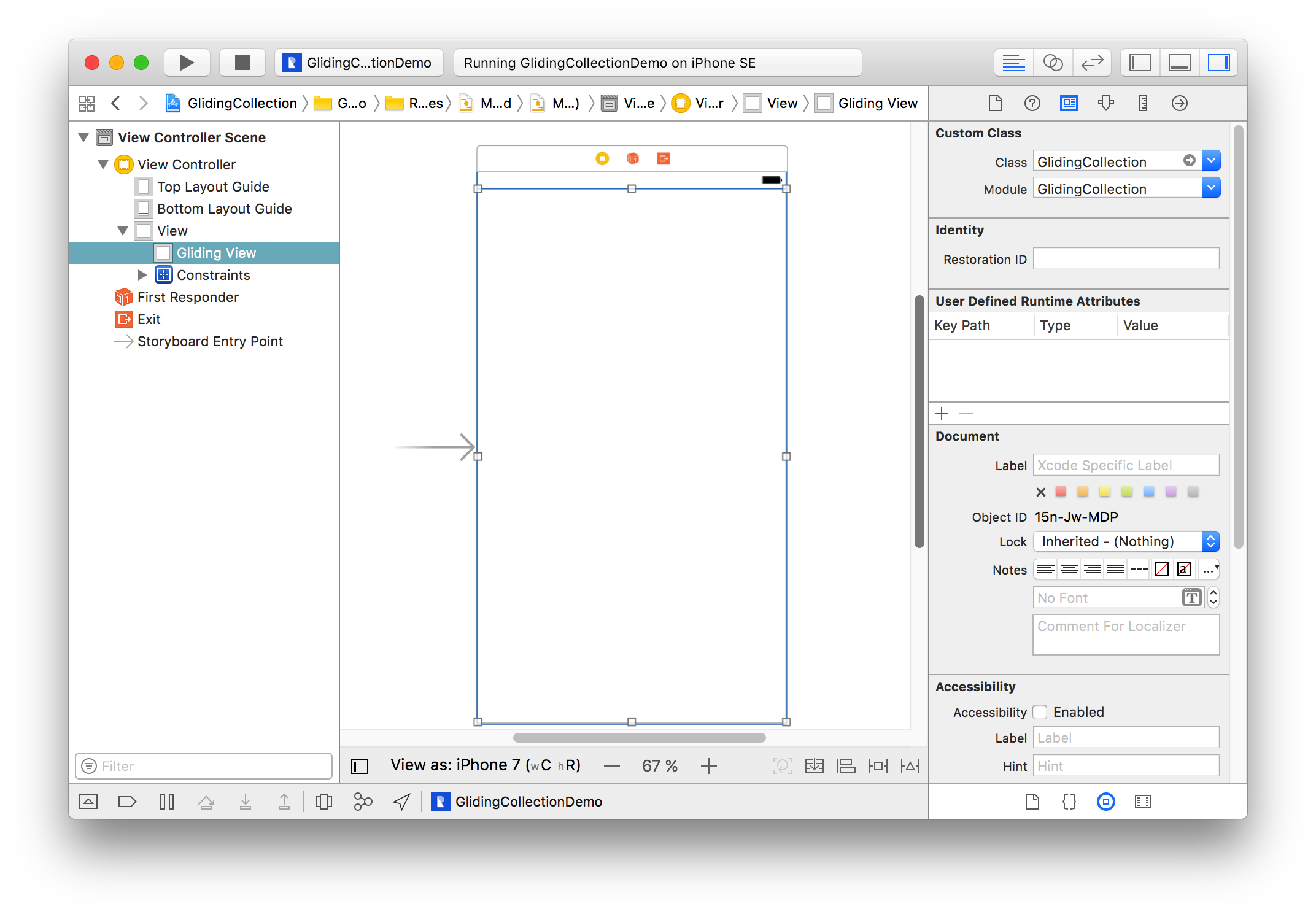
• Connect this view to your view controller class as an `@IBOutlet`.
```swift
@IBOutlet var glidingCollection: GlidingCollection!
```
• Make your view controller conform to `GlidingCollectionDatasource`. It's very similar to the `UITableView` or `UICollectionView` *datasource* protocols that you know:
```swift
extension ViewController: GlidingCollectionDatasource {
func numberOfItems(in collection: GlidingCollection) -> Int {
return items.count
}
func glidingCollection(_ collection: GlidingCollection, itemAtIndex index: Int) -> String {
return "– " + items[index]
}
}
```
• Make your view controller conform to `UICollectionViewDatasource`:
```swift
extension ViewController: UICollectionViewDatasource {
func collectionView(_ collectionView: UICollectionView, numberOfItemsInSection section: Int) -> Int {
let section = glidingView.expandedItemIndex // Value of expanded section.
return images[section].count
}
func collectionView(_ collectionView: UICollectionView, cellForItemAt indexPath: IndexPath) -> UICollectionViewCell {
guard let cell = collectionView.dequeueReusableCell(withReuseIdentifier: "Cell", for: indexPath) as? CollectionCell else { return UICollectionViewCell() }
// Configure and return your cell.
return cell
}
}
```
## Customize
You can customize the appearance of `GlidingCollection` by overriding `GlidingConfig`'s `shared` instance with your own.
```swift
var config = GlidingConfig.shared
config.buttonsFont = UIFont.boldSystemFont(ofSize: 22)
config.activeButtonColor = .black
config.inactiveButtonsColor = .lightGray
GlidingConfig.shared = config
```
>🗒 All parameters with their descriptions are listed in [`GlidingConfig`](/GlidingCollection/GlidingConfig.swift).
## Notes
There is a [`GlidingCollectionDelegate`](/GlidingCollection/Protocols/GlidingCollectionDelegate.swift) protocol which can notify you when *item* in `GlidingCollection` `didSelect`, `willExpand` and `didExpand`.
If you want to achieve a parallax effect on a horizontal cards stack, you need to place your `parallax view` in a cell's `contentView` and set its `tag` to `99`.
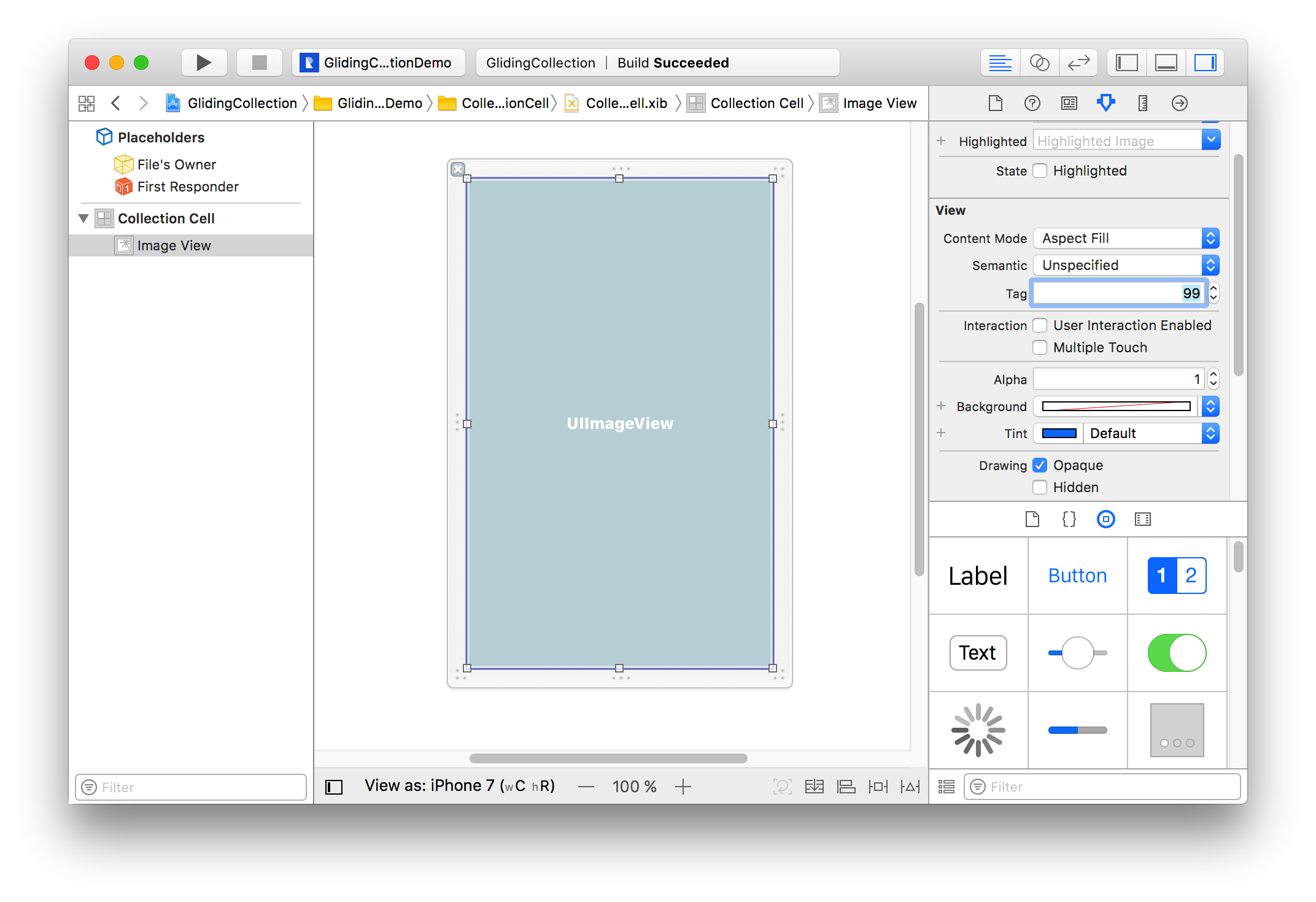
There is a `kGlidingCollectionParallaxViewTag` constant if you want to layout a cell in code.
```swift
imageView.tag = kGlidingCollectionParallaxViewTag
```
## 📄 License
Gliding Collection is released under the MIT license.
See [LICENSE](./LICENSE) for details.
This library is a part of a selection of our best UI open-source projects.
If you use the open-source library in your project, please make sure to credit and backlink to https://www.ramotion.com/
## 📱 Get the Showroom App for iOS to give it a try
Try this UI component and more like this in our iOS app. Contact us if interested.
