OpenQuok is a Swiss-army **Content OS** platform. Individuals and teams use one workspace for **social scheduling** and **directory launch**.
Draft and schedule social posts. Review each post before publish. Build product profiles, autofill directory forms with the [OpenQuok Chrome extension](https://chromewebstore.google.com/detail/openquok/diloknijkhhggpfhenpoccnjbcjdoedn), and submit each listing on the directory site. Use the dashboard, the CLI, MCP, and the public API. Self-host when you need an open alternative to closed SaaS tools.
## What you can do
### Social Scheduling
- **[Browser extension](https://www.openquok.com/browser-extension).** [Install from the Chrome Web Store](https://chromewebstore.google.com/detail/openquok/diloknijkhhggpfhenpoccnjbcjdoedn), then schedule from any tab with the side panel, connect Skool while signed in on skool.com, start drafts from right-click, and use Reddit handoff helpers — see the [install guide](https://www.openquok.com/docs/installation/chrome-extension).
- **[Connect social channels](https://www.openquok.com/docs/channels/connect).** Add Facebook Page, Threads, Instagram, LinkedIn, X, YouTube, TikTok, Dev.to, Bluesky, and Skool to a workspace. Each network keeps its own posting rules and limits — see the [social channel catalog](https://www.openquok.com/channels).
- **[Compose for each platform](https://www.openquok.com/docs/creating-posts).** Write once in Global mode or unlock a channel for its own caption, media, and settings. Preview each version before you schedule — see [Global vs per-channel](https://www.openquok.com/docs/creating-posts/global-vs-per-channel).
- **[Photo editor](https://www.openquok.com/tools/photo-editor).** Design and resize visuals for social channels in your browser. Pick platform aspect ratios, export PNG free, or save to your workspace when signed in.
- **[Humanizer](https://www.openquok.com/tools/humanizer).** Rewrite drafts so they read less machine-written. Human and Roughen modes run on-device in Chrome — no account required to copy results.
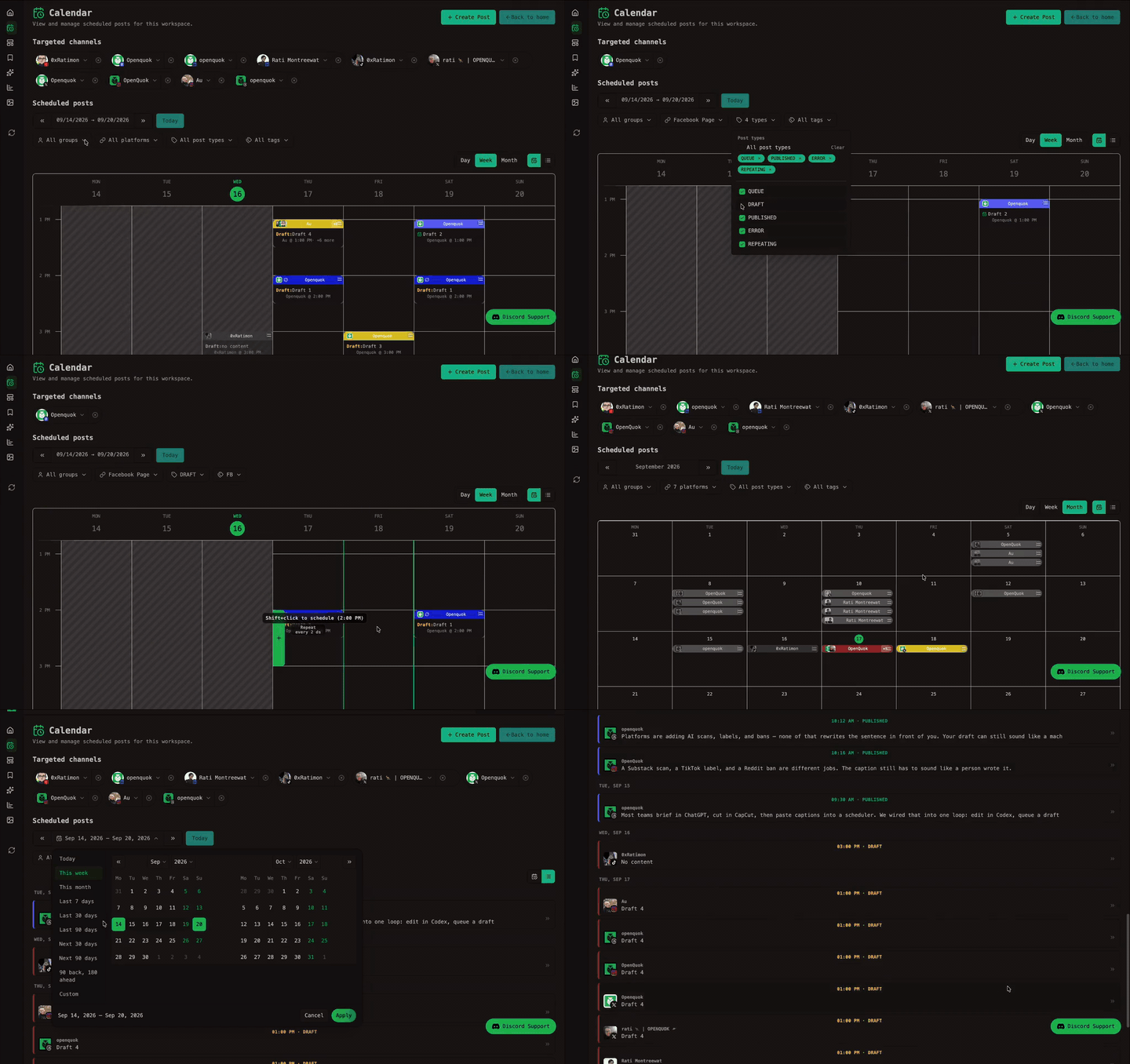
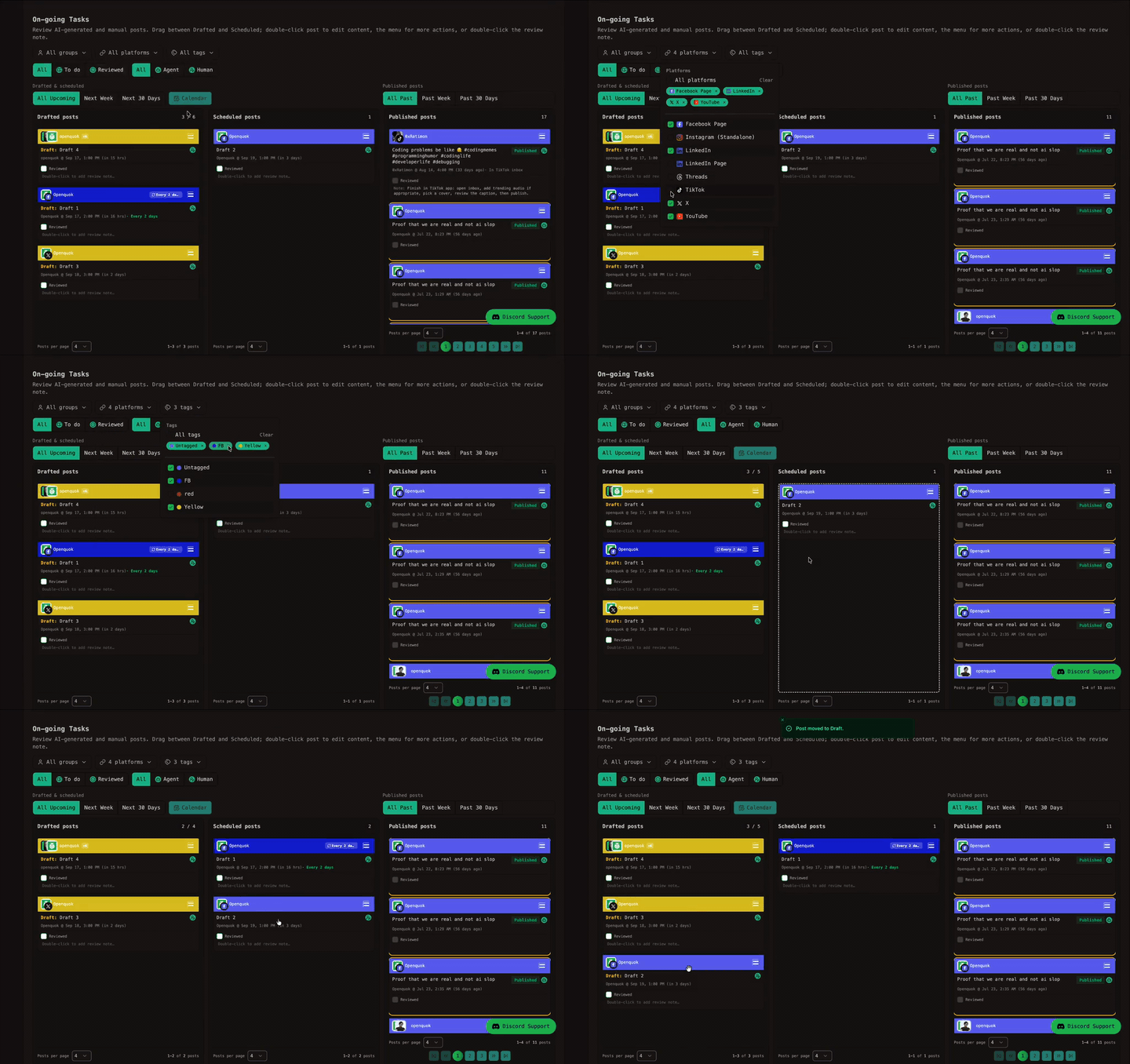
- **[Posts management](https://www.openquok.com/docs/posts-management).** Plan posts on the calendar, drag to reschedule, and review drafts on Home kanban — see [Kanban board](https://www.openquok.com/docs/posts-management/kanban) and [Moving posts](https://www.openquok.com/docs/posts-management/moving-posts).
- **[Review and approvals](https://www.openquok.com/docs/posts-management/approvals).** Share preview links and collect client comments before you schedule. Humans give final sign-off before anything goes live.
- **[Scheduling and time slots](https://www.openquok.com/docs/creating-posts/scheduling).** Save drafts, pick a publish time, or use [posting time slots](https://www.openquok.com/docs/channels/time-slots) per channel. Bundle channels into [business profiles](https://www.openquok.com/docs/channels/channel-groups) for clients or brands.
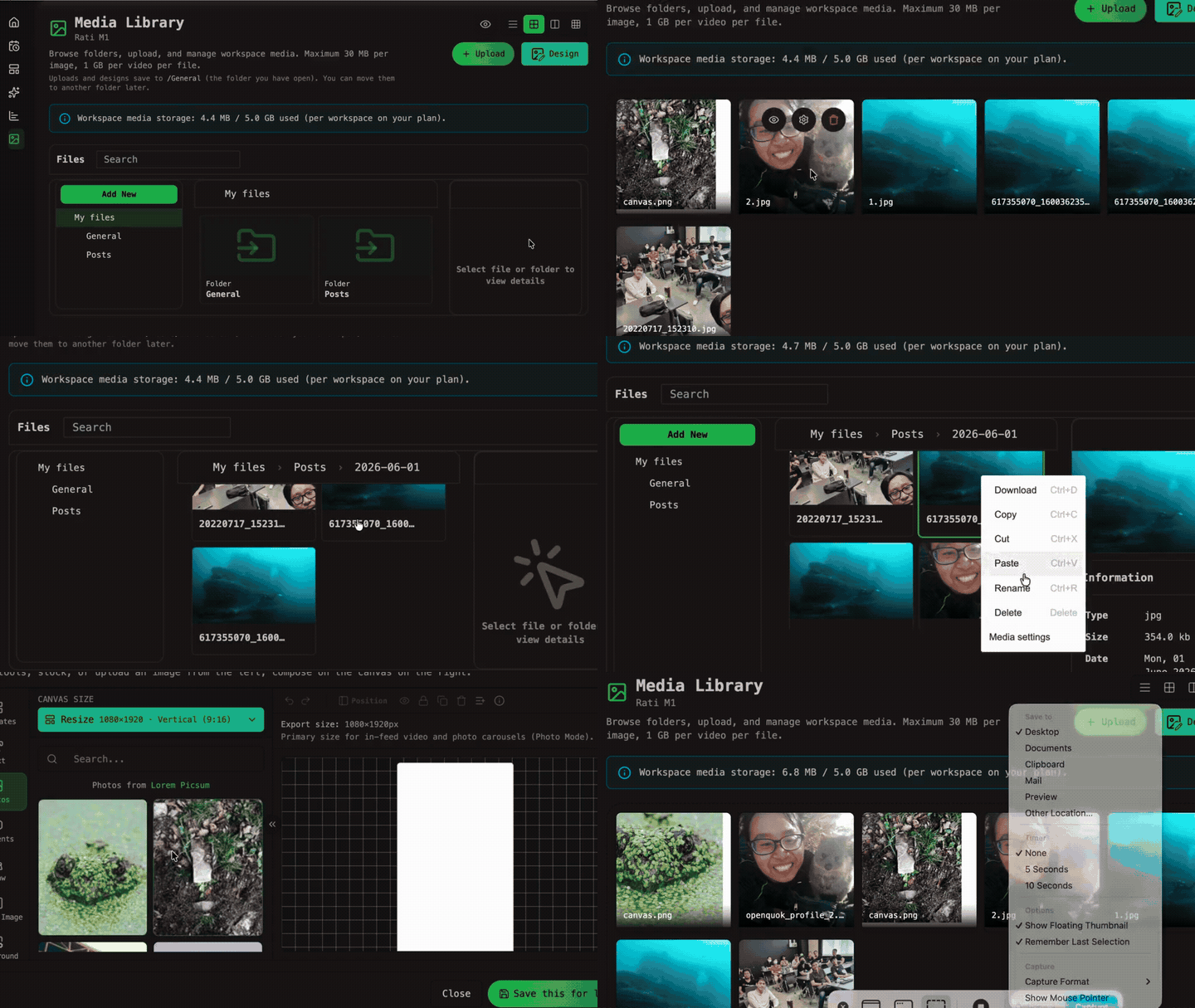
- **[Media library](https://www.openquok.com/docs/media).** Upload from your device, organize folders, and reuse files in the composer — see [Media in posts](https://www.openquok.com/docs/creating-posts/media) for per-channel attachments.
- **[Threads and follow-up comments](https://www.openquok.com/docs/creating-posts/threads-and-comments).** Schedule multi-part posts and timed replies on supported networks. Delays, thread finisher, and cross-account plugs are covered in [Automations](https://www.openquok.com/docs/automations).
- **[Templates and tags](https://www.openquok.com/docs/getting-started/glossary#template).** Save composer presets with [Templates](https://www.openquok.com/docs/posts-management/templates) for repeat workflows and label campaigns with [tags](https://www.openquok.com/docs/getting-started/glossary#tag) in the composer footer.
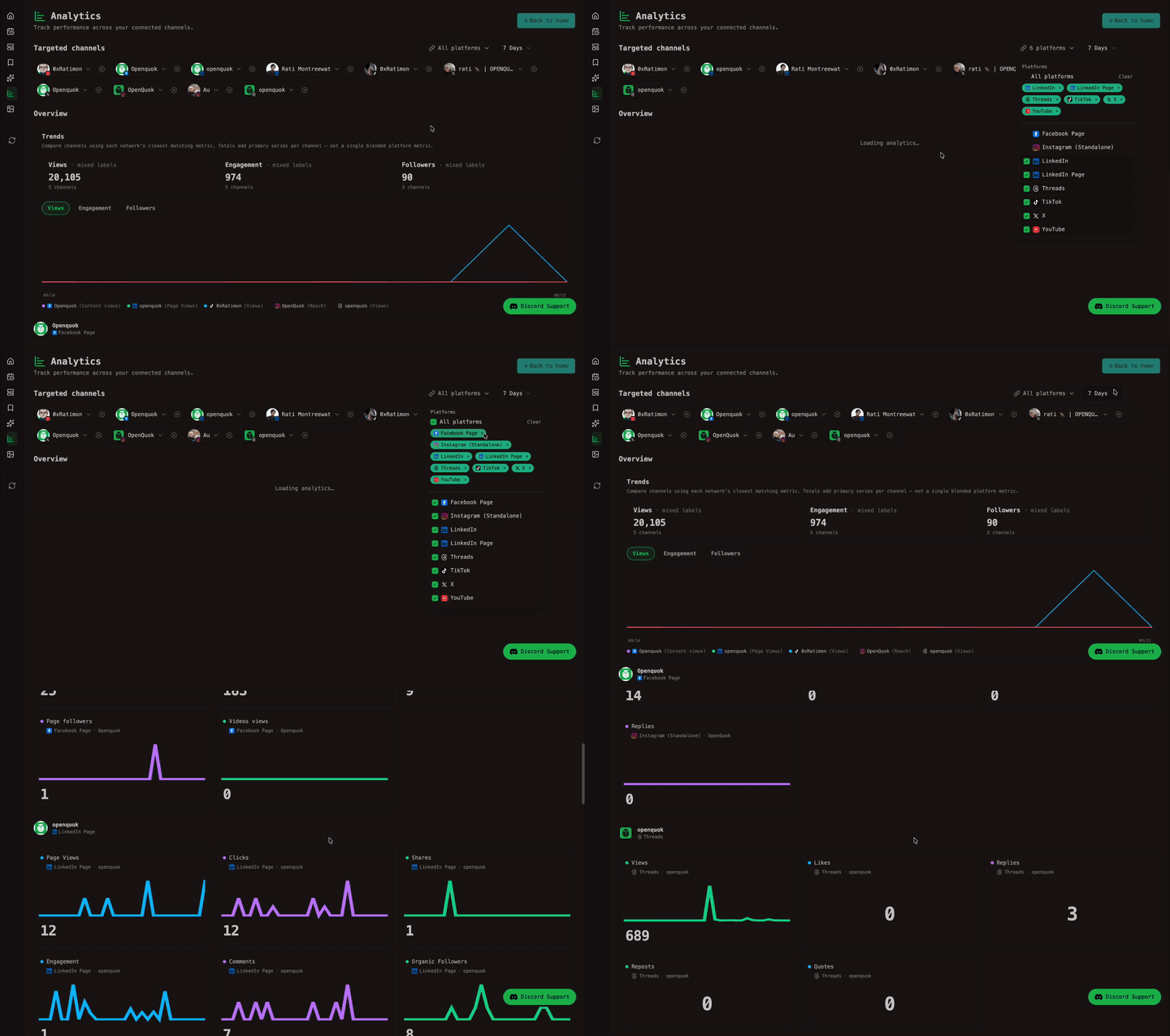
- **[Social analytics](https://www.openquok.com/docs/posts-management/actions-and-stats).** Compare post results and track audience changes across connected accounts. Per-network availability is listed under [Platforms → Analytics](https://www.openquok.com/docs/platforms/analytics) (Social tab).
### Directory launch
- **[Directory submission](https://www.openquok.com/docs/directory-submission).** Build a product profile on [My Products](https://www.openquok.com/account/products), pick destinations such as PeerPush and Uneed, and launch with the [browser extension](https://www.openquok.com/browser-extension) ([Chrome Web Store](https://chromewebstore.google.com/detail/openquok/diloknijkhhggpfhenpoccnjbcjdoedn) · [install guide](https://www.openquok.com/docs/installation/chrome-extension)). You review each form and submit on the directory site.
- **[Listing readiness and tracking](https://www.openquok.com/docs/directory-submission/track-submissions).** See required fields, save live listing URLs, and use per-site variants — see [Profile variants](https://www.openquok.com/docs/directory-submission/profile-variants).
- **[Directory analytics](https://www.openquok.com/docs/insights/directory-analytics).** Track domain rating for your product site and compare competitors on the **Directory** tab in [Analytics](https://www.openquok.com/account/analytics) (paid plans).
- **[Directory launch API, CLI, and MCP](https://www.openquok.com/docs/apis-directory-launch).** List profiles, ensure variants, and check listing readiness programmatically — [CLI](https://www.openquok.com/docs/cli-usages/directory-launch), [MCP tools](https://www.openquok.com/docs/mcp-references/tools#directory-launch), and the [openquok-directory-launch](https://www.openquok.com/docs/other-skills/openquok-directory-launch) skill.
### Agents, tools, and workspace
- **[AI drafting](https://www.openquok.com/docs/creating-posts/ai-generation).** Queue social posts from agents, the CLI, or the public API. Everything lands in the same review queue — you approve what publishes.
- **[API, CLI, and MCP](https://www.openquok.com/docs/automations).** Schedule posts, manage plugs, and automate social workflows from scripts or agent clients. Start with [OpenQuok Core](https://www.openquok.com/creators/openquok/building-blocks/openquok-core), the [CLI](https://www.openquok.com/docs/getting-started-for-cli), [MCP](https://www.openquok.com/docs/getting-started-for-mcp), or the [Public API reference](https://www.openquok.com/docs/getting-started-for-public-api).
- **[Building blocks](https://www.openquok.com/building-blocks).** Install skills and MCP servers for Cursor, Claude, OpenClaw, and the CLI — [OpenQuok Core](https://www.openquok.com/creators/openquok/building-blocks/openquok-core) schedules posts; combine blocks in [Skill Builder](https://www.openquok.com/tools/skill-builder) for custom agent setups.
- **[Playbooks](https://www.openquok.com/playbooks).** Run step-by-step marketing workflows that chain building blocks — viral carousels, video publish flows, and content-calendar batches — then approve every draft before anything goes live.
- **[Saved playbooks & backlinks](https://www.openquok.com/docs/saved).** **Libs** browses [Playbooks](https://www.openquok.com/playbooks) and [Building blocks](https://www.openquok.com/building-blocks) with hub-style filters, bookmarks listings (free; sync when you sign in), and **Your library** holds drafts and published stacks. Bookmark sites on [Build Backlinks](https://www.openquok.com/build-backlinks), then reorder and track outreach under **Saved → Backlinks**.
- **[Build Backlinks](https://www.openquok.com/build-backlinks).** Filter backlink opportunities, bookmark sites for outreach, and manage your shortlist under **Saved → Backlinks**.
- **[Free creator tools](https://www.openquok.com/tools).** [Skill Builder](https://www.openquok.com/tools/skill-builder) exports agent skills, [Best time to post](https://www.openquok.com/tools/best-time-to-post) builds timing test plans, and channel-specific pages exist for each shipped network.
- **[Teams and workspaces](https://www.openquok.com/docs/settings/team).** Keep brands and clients in separate workspaces, invite teammates, and manage timezone, profile, and [developer tokens](https://www.openquok.com/docs/settings/developers).
## Supported platforms
OpenQuok documents **social posting channels** and **directory launch destinations** separately. They share marketing language on the [Channels hub](https://www.openquok.com/channels), but connect and automate differently — see [Platforms overview](https://www.openquok.com/docs/platforms).
### Social posting channels
OpenQuok ships OAuth or API integrations for **Facebook Page**, **Threads**, **Instagram** (Business and Standalone), **LinkedIn** profile and Page, **X**, **YouTube**, **TikTok**, **Reddit**, **Dev.to**, **Bluesky**, and **Skool**.
Dev.to and Bluesky connect with credentials you paste in Add Channel — no OAuth redirect. Skool connects with the [OpenQuok browser extension](https://www.openquok.com/browser-extension) ([Chrome Web Store](https://chromewebstore.google.com/detail/openquok/diloknijkhhggpfhenpoccnjbcjdoedn)) while you are signed in on skool.com.
Posting formats, follow-up comments, and social analytics vary by network. Some integrations require provider app approval or publicly reachable media URLs on self-hosted deployments.
[Connect social channels](https://www.openquok.com/docs/channels/connect) · [Posting rules](https://www.openquok.com/docs/platforms) · [Social integrations (self-host)](https://www.openquok.com/docs/social-integration)
### Directory launch destinations
**PeerPush** and **Uneed** use a product profile on [My Products](https://www.openquok.com/account/products) and the same [browser extension](https://www.openquok.com/browser-extension) ([Chrome Web Store](https://chromewebstore.google.com/detail/openquok/diloknijkhhggpfhenpoccnjbcjdoedn)) as Skool — for directory autofill, not OAuth to the directory site. You submit on peerpush.com and uneed.best yourself.
Directory site keys, variants, and extension handoff are in [Directory integration](https://www.openquok.com/docs/directory-integration) and [Connect rules → Directory launch](https://www.openquok.com/docs/platforms/connect-rules#directory-launch-platforms).
[Directory submission](https://www.openquok.com/docs/directory-submission) · [Directory submission tool](https://www.openquok.com/directory-submission-tool) · [Browser extension](https://www.openquok.com/browser-extension) · [Directory channel catalog](https://www.openquok.com/channels#public-directory-channels-hub-heading)
## Supported Agents & MCP
- **Autonomous agent hosts.** **OpenClaw**, **Hermes Agent**, **Grok Bot**, **Rakazo**, **Dots**, **Meta Muse**, **ThinkRail**, **Manus**, **Gemini Task**, and **Claude Duet** install [OpenQuok Core](https://www.openquok.com/creators/openquok/building-blocks/openquok-core) (`@openquok/auto-cli` skill) or **Connected Apps (MCP)** and schedule from chat or a terminal — see [Agent setup guides](https://www.openquok.com/docs/agent-setup-guides) and the [agents catalog](https://www.openquok.com/agents).
- **MCP clients.** **Antigravity CLI**, **Android Studio**, **ChatGPT**, **Codex**, **Cursor**, **Claude Code**, **Claude Cowork**, **VS Code / Copilot**, **Devin Desktop**, **Amp**, **Warp**, **Muse Code**, and **Grok Build** connect OpenQuok over HTTP with a workspace programmatic token — see [MCP setup guides](https://www.openquok.com/docs/mcp-setup-guides) and [MCP getting started](https://www.openquok.com/docs/getting-started-for-mcp).
Drafts from every path land in the same review queue on Home and the calendar.
Create a programmatic token under **Account → Settings → Developers → Access**, or [start on Cloud](https://www.openquok.com/pricing) when you want hosted plans and billing handled for you.
[OpenQuok Core](https://www.openquok.com/creators/openquok/building-blocks/openquok-core) · [Building blocks](https://www.openquok.com/building-blocks) · [Playbooks](https://www.openquok.com/playbooks) · [Build Backlinks](https://www.openquok.com/build-backlinks) · [Agent setup guides](https://www.openquok.com/docs/agent-setup-guides) · [MCP setup guides](https://www.openquok.com/docs/mcp-setup-guides) · [CLI getting started](https://www.openquok.com/docs/getting-started-for-cli) · [MCP getting started](https://www.openquok.com/docs/getting-started-for-mcp) · [Agents catalog](https://www.openquok.com/agents)
---
## Packages
| Package | Description |
|---|---|
| [`@openquok/auto-cli`](https://www.npmjs.com/package/@openquok/auto-cli) · [source](./agent) | CLI-first scheduling interface for AI agents and automation scripts |
| [`@openquok/node-sdk`](https://www.npmjs.com/package/@openquok/node-sdk) · [source](./sdk) | Typed Node.js client for the OpenQuok public API |
| [OpenQuok browser extension](./extension) · [Chrome Web Store](https://chromewebstore.google.com/detail/openquok/diloknijkhhggpfhenpoccnjbcjdoedn) | Chrome MV3 extension — side panel scheduling, Skool connect, directory autofill, Reddit handoff |
---
## How it works
Let AI agents handle volume — drafting and scheduling at scale. You handle quality: review and approve what goes live across your channels.
Terminal (openquok CLI · schedule posts · upload media · flip draft ↔ scheduled) · Chat (Grok Bot · Hermes · Claude · Cursor) · Web UI (calendar · kanban review · analytics · approve before publish) · Browser extension (Chrome side panel · schedule from any tab · Skool · Reddit · directory autofill)
---
### Prerequisites
- Node.js 24.22.1+ (or run `nvm use` — see root `.nvmrc`)
- Corepack (for pnpm)
```bash
corepack enable
```
---
### Quick start
For a first-time local run — install dependencies, configure env for `backend/` and `web/`, and wire optional workers / CLI auth — follow the [Quick Start Guide](https://www.openquok.com/docs/getting-started-for-dev/quick-start).
Day-to-day commands (dev servers, tests, DB, deploy) live under [Development environment](https://www.openquok.com/docs/installation/development-environment). Production deploy notes are in [Production deployment](https://www.openquok.com/docs/installation/production-deployment).
### Self-host (Docker Compose)
Quick starter — copy env, add your Supabase keys, start the stack:
```bash
cp infra/self-host/.env.example infra/self-host/.env
# Edit infra/self-host/.env — set PUBLIC_SUPABASE_* / SUPABASE_SECRET_KEY and matching VITE_*
docker compose -f infra/self-host/docker-compose.yml up --build
```
Open **http://localhost:4007** (API **http://localhost:3000**). More env options, pre-built images, and the browser extension: [Docker Compose (self-host)](https://www.openquok.com/docs/installation/docker-compose) · [Self-host OpenQuok](https://www.openquok.com/self-hosting).
---
### Tech stack
- PNPM workspace
- Supabase DB & Auth
- Cloudflare R2
- Express.js
- Svelte 5
- Tailwind CSS
- DaisyUI
- Redis
- Stripe
- Resend
- Sentry
- Posthog
- Vercel
- Railway
Learn more at [Architecture](https://www.openquok.com/docs/getting-started-for-dev/architecture)
---
### Links
- [Official Website](https://www.openquok.com)
**Product docs (General tab)**
- [Getting started](https://www.openquok.com/docs/getting-started) — product overview; [Quickstart](https://www.openquok.com/docs/getting-started/quickstart) for a first post; [Glossary](https://www.openquok.com/docs/getting-started/glossary) and [Tour the app](https://www.openquok.com/docs/getting-started/tour-the-app)
- [Channels](https://www.openquok.com/docs/channels) — [connect](https://www.openquok.com/docs/channels/connect), [manage](https://www.openquok.com/docs/channels/manage), [time slots](https://www.openquok.com/docs/channels/time-slots), and [business profiles](https://www.openquok.com/docs/channels/channel-groups)
- [Creating posts](https://www.openquok.com/docs/creating-posts) — composer, [media](https://www.openquok.com/docs/creating-posts/media), [scheduling](https://www.openquok.com/docs/creating-posts/scheduling), [kanban](https://www.openquok.com/docs/posts-management/kanban), and [AI generation](https://www.openquok.com/docs/creating-posts/ai-generation)
- [Posts management](https://www.openquok.com/docs/posts-management) — [moving posts](https://www.openquok.com/docs/posts-management/moving-posts), [actions and stats](https://www.openquok.com/docs/posts-management/actions-and-stats), and [approvals](https://www.openquok.com/docs/posts-management/approvals)
- [Insights](https://www.openquok.com/docs/insights) — [workspace analytics](https://www.openquok.com/docs/insights/workspace-analytics), [per-post metrics](https://www.openquok.com/docs/insights/per-post-metrics), and which networks report stats ([Platforms → Analytics](https://www.openquok.com/docs/platforms/analytics))
- [Platforms](https://www.openquok.com/docs/platforms) — character limits, media rules, and per-network settings
- [Automations](https://www.openquok.com/docs/automations) — [plugs](https://www.openquok.com/docs/automations/plugs), internal, cross-account, and global rules
- [Settings](https://www.openquok.com/docs/settings) — timezone, team, profile, developers, signatures, and approved apps
- [Troubleshooting](https://www.openquok.com/docs/troubleshooting) — connect errors, uploads, login, failed posts, and [known issues](https://www.openquok.com/docs/troubleshooting/known-issues)
- [Help](https://www.openquok.com/docs/help) — support channels and how to describe a problem
- [Free tools](https://www.openquok.com/tools) — [Humanizer](https://www.openquok.com/tools/humanizer), [Photo editor](https://www.openquok.com/tools/photo-editor), [Skill Builder](https://www.openquok.com/tools/skill-builder), and [Best time to post](https://www.openquok.com/tools/best-time-to-post)
- [OpenQuok Cloud](https://www.openquok.com/docs/cloud) — hosted vs self-host, [plans](https://www.openquok.com/docs/cloud/plans), and [trial](https://www.openquok.com/docs/cloud/trial); paid plans include the [Google Chrome extension](https://www.openquok.com/pricing) (side panel, Skool, directory autofill)
- [Billing](https://www.openquok.com/docs/billing) — [subscription](https://www.openquok.com/docs/billing/subscription), [limits](https://www.openquok.com/docs/billing/limits), [downgrades](https://www.openquok.com/docs/billing/downgrades), and [refunds and support](https://www.openquok.com/docs/billing/refunds-and-support)
**CLI, MCP, and Public API**
- [CLI & agent users](https://www.openquok.com/docs/getting-started-for-cli) — `@openquok/auto-cli`, auth, [core usages](https://www.openquok.com/docs/cli-usages), and [examples](https://www.openquok.com/docs/cli-examples)
- [MCP](https://www.openquok.com/docs/getting-started-for-mcp) — Model Context Protocol setup, [tools reference](https://www.openquok.com/docs/mcp-references/tools), and [examples](https://www.openquok.com/docs/mcp-examples)
- [Public API](https://www.openquok.com/docs/getting-started-for-public-api) — programmatic access with workspace tokens; [provider settings](https://www.openquok.com/docs/public-api-providers)
- [OAuth2 for apps](https://www.openquok.com/docs/oauth2-for-apps) — Authorization Code flow for third-party applications
**Self-host & setup**
- [Developer quick start](https://www.openquok.com/docs/getting-started-for-dev/quick-start)
- [Installation](https://www.openquok.com/docs/installation) — [Docker Compose](https://www.openquok.com/docs/installation/docker-compose), [pre-built Docker images](https://www.openquok.com/docs/installation/docker), [Chrome extension](https://www.openquok.com/docs/installation/chrome-extension) ([Chrome Web Store](https://chromewebstore.google.com/detail/openquok/diloknijkhhggpfhenpoccnjbcjdoedn)), [system requirements](https://www.openquok.com/docs/installation/system-requirements), [development environment](https://www.openquok.com/docs/installation/development-environment), and [production deployment](https://www.openquok.com/docs/installation/production-deployment)
- [Social integrations](https://www.openquok.com/docs/social-integration) — operator OAuth apps, env keys, and provider dashboards
- [Admin setup](https://www.openquok.com/docs/admin) — platform admin, OAuth apps, and post-deploy setup
- [Configuration – Backend](https://www.openquok.com/docs/configuration-backend), [Web](https://www.openquok.com/docs/configuration-web), [Workers](https://www.openquok.com/docs/configuration-worker), and [CLI auth server](https://www.openquok.com/docs/configuration-agent)
**Compare & alternatives**
- [Compare](https://www.openquok.com/compare) — head-to-head feature and pricing comparisons with other schedulers
- [Alternatives](https://www.openquok.com/alternatives) — best-alternatives guides when you evaluate Buffer, Hootsuite, and similar tools
**Extensions Hub directories**
- [All Playbooks](https://www.openquok.com/playbooks)
- [All Building Blocks](https://www.openquok.com/building-blocks)
- [Build Backlinks](https://www.openquok.com/build-backlinks)
- [Saved playbooks & backlinks](https://www.openquok.com/docs/saved)
- [All Creators](https://www.openquok.com/creators)
- [Playbook Categories](https://www.openquok.com/playbooks/categories)
- [Playbook Tags](https://www.openquok.com/playbooks/tags)
- [Building Block Categories](https://www.openquok.com/building-blocks/categories)
- [Building Block Tags](https://www.openquok.com/building-blocks/tags)
**Social**
- [X (Twitter)](https://x.com/openquok)
- [Facebook](https://www.facebook.com/profile.php?id=61591368794883)
- [Instagram](https://www.instagram.com/openquok)
- [LinkedIn](https://www.linkedin.com/company/openquok)
- [Discord](https://discord.com/invite/xBfTzZr63W)
**Featured Blogs**
- [AI agents for Reddit: promote without getting banned](https://www.openquok.com/blog/ai-agents-for-reddit-promote-without-getting-banned) — draft with AI agents in OpenQuok, Global mode with other channels, human submit on reddit.com, and lower ban and shadowban risk
- [Team collaboration in OpenQuok](https://www.openquok.com/blog/team-collaboration-in-openquok-workspaces-clients-and-preview-links) — workspaces, business profiles per client, invite links, templates, and preview links for sign-off
- [Warm up a TikTok account](https://www.openquok.com/blog/how-to-warm-up-a-tiktok-account-to-reach-a-us-audience) — device setup and posting cadence before you scale carousels or agent-scheduled posts
- [Meta Business verification for Facebook apps](https://www.openquok.com/blog/how-to-pass-meta-business-verification-for-a-facebook-app-or-skip-it-with-openquok) — pass Meta’s checks or connect Facebook through OpenQuok without a standalone app review path
- [How to build free backlinks for SEO with OpenQuok](https://www.openquok.com/blog/how-to-build-free-backlinks-for-seo-with-openquok) — use the [Build Backlinks](https://www.openquok.com/build-backlinks) hub, site playbooks, and the Humanizer for SEO and AEO
**Contributing**
- [Developer guidelines](https://www.openquok.com/docs/developer-guidelines) and [Security guidelines](https://www.openquok.com/docs/developer-guidelines/security)
- [Contribution opportunities](https://www.openquok.com/docs/contribution-opportunities) — add a provider, translate docs, and more
- [Publish listings](https://www.openquok.com/docs/publish-listings) — Extensions Hub playbooks and building blocks
- [Saved playbooks & backlinks](https://www.openquok.com/docs/saved) — Libs browse and bookmarks, your library, compose playbooks, and backlink shortlists
- [Documentation contribution](https://www.openquok.com/docs/documentation-contribution)
---
### License
| Path | License |
|------|---------|
| Repository default (`backend/`, `web/`, `orchestrator/`, `sdk/`, `agent/src/`, …) | [AGPL-3.0-or-later](LICENSE) |
| `agent/skills/` | [MIT](agent/skills/LICENSE) |
Compiled CLI code published as [`@openquok/auto-cli`](https://www.npmjs.com/package/@openquok/auto-cli) is AGPL-3.0-or-later. Agent skills under `agent/skills/` are MIT so they can be copied into other agent setups without AGPL obligations on the skill text alone.




 **[Browser extension](https://www.openquok.com/browser-extension).** [Install from the Chrome Web Store](https://chromewebstore.google.com/detail/openquok/diloknijkhhggpfhenpoccnjbcjdoedn), then schedule from any tab with the side panel, connect Skool while signed in on skool.com, start drafts from right-click, and use Reddit handoff helpers — see the [install guide](https://www.openquok.com/docs/installation/chrome-extension).
-
 **[Connect social channels](https://www.openquok.com/docs/channels/connect).** Add Facebook Page, Threads, Instagram, LinkedIn, X, YouTube, TikTok, Dev.to, Bluesky, and Skool to a workspace. Each network keeps its own posting rules and limits — see the [social channel catalog](https://www.openquok.com/channels).
-
 **[Compose for each platform](https://www.openquok.com/docs/creating-posts).** Write once in Global mode or unlock a channel for its own caption, media, and settings. Preview each version before you schedule — see [Global vs per-channel](https://www.openquok.com/docs/creating-posts/global-vs-per-channel).
-
 **[Photo editor](https://www.openquok.com/tools/photo-editor).** Design and resize visuals for social channels in your browser. Pick platform aspect ratios, export PNG free, or save to your workspace when signed in.
-
 **[Humanizer](https://www.openquok.com/tools/humanizer).** Rewrite drafts so they read less machine-written. Human and Roughen modes run on-device in Chrome — no account required to copy results.
-
 **[Review and approvals](https://www.openquok.com/docs/posts-management/approvals).** Share preview links and collect client comments before you schedule. Humans give final sign-off before anything goes live.
-
 **[Media library](https://www.openquok.com/docs/media).** Upload from your device, organize folders, and reuse files in the composer — see [Media in posts](https://www.openquok.com/docs/creating-posts/media) for per-channel attachments.
-
 **[Threads and follow-up comments](https://www.openquok.com/docs/creating-posts/threads-and-comments).** Schedule multi-part posts and timed replies on supported networks. Delays, thread finisher, and cross-account plugs are covered in [Automations](https://www.openquok.com/docs/automations).
-
 **[Social analytics](https://www.openquok.com/docs/posts-management/actions-and-stats).** Compare post results and track audience changes across connected accounts. Per-network availability is listed under [Platforms → Analytics](https://www.openquok.com/docs/platforms/analytics) (Social tab).
### Directory launch
-
 **[Directory launch API, CLI, and MCP](https://www.openquok.com/docs/apis-directory-launch).** List profiles, ensure variants, and check listing readiness programmatically — [CLI](https://www.openquok.com/docs/cli-usages/directory-launch), [MCP tools](https://www.openquok.com/docs/mcp-references/tools#directory-launch), and the [openquok-directory-launch](https://www.openquok.com/docs/other-skills/openquok-directory-launch) skill.
### Agents, tools, and workspace
-
 **[AI drafting](https://www.openquok.com/docs/creating-posts/ai-generation).** Queue social posts from agents, the CLI, or the public API. Everything lands in the same review queue — you approve what publishes.
-
 **[Saved playbooks & backlinks](https://www.openquok.com/docs/saved).** **Libs** browses [Playbooks](https://www.openquok.com/playbooks) and [Building blocks](https://www.openquok.com/building-blocks) with hub-style filters, bookmarks listings (free; sync when you sign in), and **Your library** holds drafts and published stacks. Bookmark sites on [Build Backlinks](https://www.openquok.com/build-backlinks), then reorder and track outreach under **Saved → Backlinks**.
-
 **[Build Backlinks](https://www.openquok.com/build-backlinks).** Filter backlink opportunities, bookmark sites for outreach, and manage your shortlist under **Saved → Backlinks**.
-